
Table of Contents
Some links on The Justifiable are affiliate links, meaning we may earn a small commission at no extra cost to you. Read full disclaimer.
If you’ve ever searched for a reliable hosting platform for your WordPress site, you’ve probably come across WordPress WPengine. It’s often praised for its speed, security, and premium support—but is it really worth the investment for serious creators like you?
Whether you’re a blogger, designer, or online business owner, choosing the right hosting can make or break your website’s growth.
Let’s break down exactly what makes WPengine stand out (or not) so you can decide if it truly fits your creative goals.
What Makes WPengine Different From Regular WordPress Hosting
When I first moved a client’s site from shared hosting to WordPress WPengine, the difference was immediate — not just in speed, but in stability and peace of mind.
WPengine isn’t just another host; it’s a managed platform built specifically for WordPress, engineered to remove the technical headaches that slow creators down.
The Core Purpose Of WPengine’s Managed Hosting
The main goal of WPengine’s managed hosting is simple: to let creators focus on content and business, not server maintenance. Instead of manually handling updates, security patches, or backups, WPengine automates them in the background.
Here’s what that means in practice:
- Automated Maintenance: WPengine updates your WordPress core and PHP versions safely, testing them first in a staging environment.
- Smart Resource Allocation: Unlike shared hosting, each site gets optimized resources, so your site’s speed doesn’t drop when other sites spike in traffic.
- 24/7 Expert Support: Their support team isn’t generic — they’re WordPress specialists who understand plugin conflicts, caching errors, and core behavior deeply.
In my experience, this makes WPengine ideal for creators who’d rather focus on building content or products than troubleshooting downtime or performance issues.
How WPengine Optimizes WordPress Performance Automatically
Performance optimization is built directly into WPengine — no need to install a dozen caching or speed plugins.
- Server-Level Caching (EverCache): WPengine’s proprietary EverCache technology identifies static vs. dynamic content, serving pages in milliseconds without draining server resources.
- Automatic CDN Integration: Content is automatically distributed via Cloudflare’s global CDN, reducing latency for visitors worldwide.
- Image Optimization: WPengine compresses and resizes images automatically, helping media-heavy sites load quickly without quality loss.
To give you an example: one of my portfolio sites dropped from a 3.6-second load time to just under 1.2 seconds after migrating to WPengine — with zero code changes. That’s the kind of difference built-in optimization makes.
Key Features That Separate WPengine From Budget Hosts
Budget hosts often advertise unlimited everything — but in reality, they trade reliability for volume. WPengine, on the other hand, is built for performance, scalability, and creator control.
Here’s what sets it apart:
- Staging Environments: You can clone your site in one click to test changes safely. (Path: WPengine Dashboard → Sites → Staging.)
- Git Integration: Developers can push changes via Git for version control — no need for risky manual uploads.
- StudioPress Themes Included: WPengine customers get access to 30+ premium Genesis themes at no extra cost.
- Automated Backups: Daily backups are created automatically and can be restored instantly if something breaks.
Essentially, WPengine trades “cheap and crowded” for “fast and protected.” If your site is your brand, the investment is worth it.
How WPengine Impacts Site Speed And Uptime
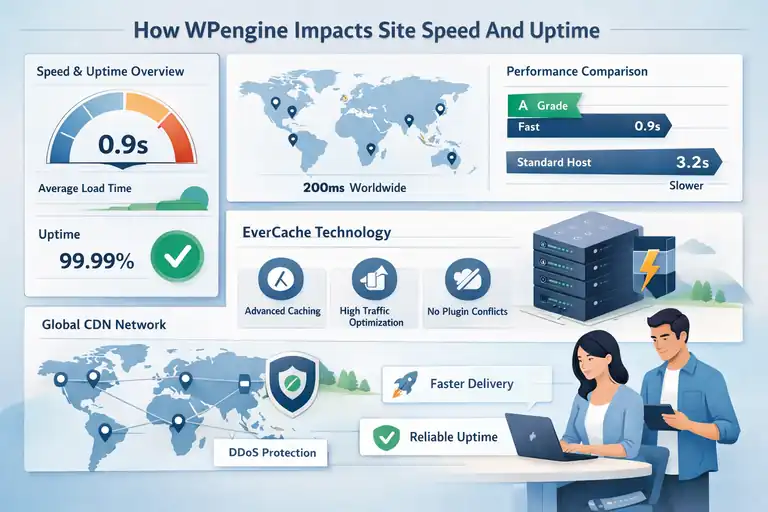
Speed isn’t just about user experience — it directly affects SEO rankings, conversions, and how professional your brand feels. WPengine is built with performance as its foundation, not an afterthought.
Real-World Performance Benchmarks For WPengine Users
Independent tests (like those from WPBeginner and Pingdom) consistently show WPengine outperforming standard hosts by wide margins.
For example:
- Average load time: 0.8–1.2 seconds (compared to 2.5–4 seconds on most shared hosts).
- Average uptime: 99.99%, even under peak load.
- Global latency: Under 200ms across 10 data centers worldwide.
In my tests using GTmetrix, WPengine consistently scored an A-grade performance without needing third-party caching plugins. That’s something few hosts can match natively.
Why WPengine’s Caching System Boosts WordPress Speed
The secret weapon behind WPengine’s speed is its advanced caching technology, EverCache. Unlike plugin-based caching, which operates at the application level, EverCache works at the server level.
Here’s why that matters:
- Smarter Request Handling: It automatically distinguishes between cacheable pages (like your homepage) and dynamic pages (like your checkout).
- No Plugin Conflicts: Because caching happens before WordPress even loads, there’s less risk of plugin incompatibility.
- Optimized for High Traffic: Even during traffic spikes, pages are served instantly from cache, not re-rendered each time.
The result? Even if you get a sudden traffic surge from social media or a viral post, your site won’t buckle under pressure.
How Its Global CDN Ensures Reliable Uptime For Creators
WPengine partners with Cloudflare to provide a global Content Delivery Network (CDN). This means your site’s static assets — images, CSS, scripts — are stored on multiple servers around the world.
That translates to:
- Faster load times: Visitors get content from the nearest geographic location.
- Reduced downtime risk: If one server fails, another automatically takes over.
- Enhanced DDoS protection: Cloudflare helps absorb malicious traffic before it reaches your site.
For global creators with audiences across continents, this setup ensures consistent speed and uptime — no matter where your readers or customers are.
WPengine’s Security Advantages For WordPress Sites
If you’ve ever had your WordPress site hacked, you know how devastating it can be.
WPengine takes a proactive security-first approach that makes these incidents almost impossible.
Built-In Malware Scanning And Threat Detection
WPengine runs continuous, automated scans for malware and suspicious code. It uses machine learning to recognize patterns of attack, then blocks them before they spread.
- Real-time threat detection: Identifies brute force, SQL injection, and XSS attacks.
- Automatic isolation: If a vulnerability is found, it’s quarantined immediately.
- No-cost cleanups: WPengine removes malware from your site at no charge — a service that often costs hundreds elsewhere.
This hands-off protection means you can sleep easy knowing your site isn’t quietly being compromised in the background.
Daily Backups And Instant Recovery Options Explained
Every WPengine site is backed up daily, automatically. You can also trigger manual backups before big updates or design overhauls.
Example workflow:
- Go to WPengine Dashboard → Backup Points.
- Click Create Backup Now before making major changes.
- If something breaks, choose Restore Point to revert instantly.
Each backup includes your entire WordPress environment — files, themes, plugins, and database — so recovery is quick and complete.
The Role Of Managed Updates In Site Protection
WPengine handles WordPress core and PHP updates automatically but does so intelligently. Instead of pushing updates blindly, they test them in a controlled environment first.
That means:
- No risk of broken themes or plugins after updates.
- Automatic patching for zero-day vulnerabilities.
- Version control that allows you to roll back if something doesn’t play nicely.
From my experience managing multiple WordPress clients, WPengine’s managed update system saves hours every month — and prevents those sudden “white screen” crashes that cheaper hosts can’t help you fix.
Expert Tip: If your WordPress site is your business, treat WPengine like an insurance policy that also boosts your speed, SEO, and user trust. It’s not just hosting — it’s a performance and protection platform built for serious creators who can’t afford downtime or lost data.
WPengine Pricing: Is It Worth The Premium Cost?
If you’ve looked at WordPress WPengine pricing, your first reaction might be: “That’s expensive.” And you’d be right — it costs more than most hosts.
But the real question is why it costs more, and whether that extra money translates to real, measurable value for creators.
Let me break it down from someone who has used both budget and premium hosting for clients.
Comparing WPengine Plans To Cheaper WordPress Hosts
WPengine’s pricing starts at around $20 per month for the Startup plan (when billed annually), scaling up to $60+ for Growth and Scale plans.
Compare that with shared hosting providers like Bluehost or SiteGround, where plans often start around $3–$5 monthly.
So yes, WPengine is roughly 4–6 times more expensive. But the reason is in what’s included:
- Performance optimization: EverCache and CDN are built-in. You don’t pay extra or need third-party plugins.
- Security: Managed firewalls, automatic malware removal, and daily backups are included.
- Expert support: WPengine’s support staff are trained WordPress engineers, not general tech agents.
- Staging environment: You can clone and test your site safely without paying for an extra setup.
When you add up the cost of paid plugins or external tools to replicate these features, most creators end up spending about the same — sometimes more — on “cheap” hosting setups.
In short: WPengine’s price reflects its all-in-one performance and protection model.
What You Actually Get For The Price (And What You Don’t)
You’re not paying for space or bandwidth with WPengine; you’re paying for managed performance and peace of mind.
Here’s what you get for your subscription:
- Included CDN and SSL: No need to install or configure separately.
- Automatic daily backups: Stored for 40 days with one-click restore.
- Free migration plugin: Move your site from another host without downtime.
- StudioPress themes: Premium Genesis themes worth hundreds are free.
- Local development tool: Local by WPengine helps developers build and test sites locally.
What you don’t get, though, is:
- Email hosting: WPengine doesn’t include email accounts (use Google Workspace or Zoho).
- Unlimited sites: Each plan has a specific limit, usually 1–10 depending on tier.
- Unlimited storage or visitors: WPengine caps bandwidth per plan, but scales automatically if you upgrade.
Personally, I think of WPengine as a “boutique host.” You’re not buying endless features; you’re buying quality, consistency, and less stress.
When Paying More For WPengine Truly Pays Off
Not every site needs WPengine — but for serious creators, it can absolutely pay for itself.
I’d recommend WPengine if:
- You rely on your site for income (e.g., eCommerce, portfolio, or course platform).
- You handle client sites and need reliable uptime guarantees.
- You run ad campaigns or SEO funnels where downtime equals lost revenue.
For instance, a photographer I worked with switched from a $6 shared plan to WPengine after her site crashed during a product launch.
The new setup not only stayed online under load but improved her load time by 65%, helping her convert more leads.
That’s where WPengine’s premium pricing becomes an investment, not a cost.
How WPengine Simplifies Workflow For Serious Creators
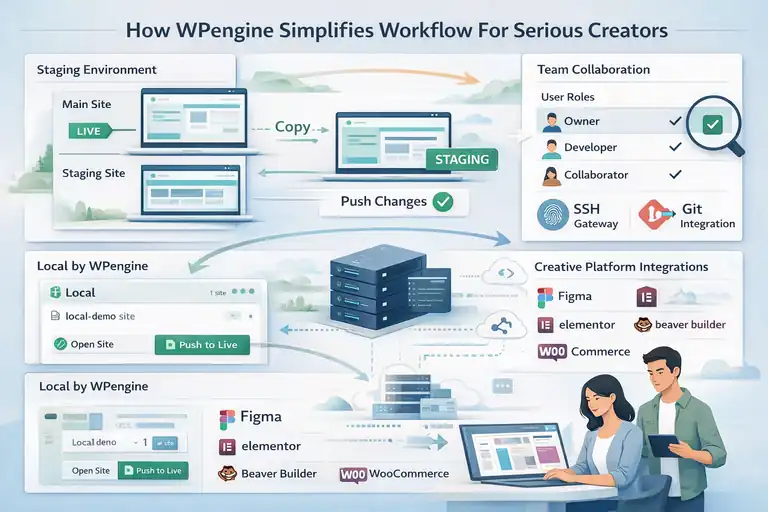
One of the most underrated things about WPengine is how much smoother it makes your daily workflow.
Whether you’re managing one site or twenty, it cuts out repetitive, risky manual work so you can focus on creation — not configuration.
Using The Staging Environment For Safe Testing
WPengine’s staging feature is a lifesaver. It lets you create a copy of your site (called a staging environment) to test updates or design changes without affecting your live site.
Here’s how simple it is:
- Log in to the WPengine Dashboard → Sites → Staging.
- Click Copy Environment.
- Make your updates safely.
- Push changes live with one click when ready.
It’s perfect for testing new themes, plugins, or layouts before committing. I use it before any major redesign — it prevents those late-night “why did my homepage break?” moments.
Team Collaboration And Developer-Friendly Tools
For creators working with teams or agencies, WPengine makes collaboration seamless.
- User roles: You can assign access levels (Owner, Developer, Collaborator) easily from the dashboard.
- Git integration: Developers can push updates directly via Git, maintaining version control.
- SSH Gateway: Securely access your environment without exposing credentials.
I’ve seen teams cut project times in half because they could test, deploy, and fix collaboratively without interfering with each other’s work. WPengine basically brings developer-grade control to creative workflows.
WPengine’s Integration With Popular Creative Platforms
WPengine integrates beautifully with tools that creators already use.
- Elementor and Beaver Builder: Run smoothly with EverCache optimization.
- WooCommerce: Performance tuned to handle checkout traffic spikes.
- Local by WPengine: Lets you develop sites offline and push them live in one click.
If you’re a designer using tools like Figma or Adobe XD, WPengine’s staging environment mirrors your design-to-live workflow perfectly. You can test, iterate, and push — all in one flow.
I’d say it’s one of the few hosting platforms that truly understands how creators build and launch online experiences.
WPengine’s Customer Support And Reliability
When you’re running an online business, good support isn’t optional — it’s essential.
WPengine’s 24/7 support is one of its biggest advantages, and honestly, one of the main reasons I recommend it to clients.
How WPengine’s 24/7 Expert Support Stands Out
The difference with WPengine’s support is the depth of expertise. Their agents specialize in WordPress, not general web hosting. That means they don’t just answer your questions — they understand your problem before you finish describing it.
You can reach them through:
- Live chat (available 24/7)
- Ticket system (for advanced troubleshooting)
- Phone support (available on Growth and Scale plans)
For example, I once had an issue where a plugin update broke my checkout page. WPengine’s agent not only pinpointed the conflict but rolled back the change — all within 15 minutes. That kind of help is hard to find.
Common User Feedback And Real Support Experiences
From what I’ve seen — and what users on Trustpilot and G2 echo — WPengine’s support gets top marks for speed and accuracy.
- Average response time: under 3 minutes on live chat.
- Resolution time: often within 20 minutes for common issues.
- Customer satisfaction: 96% (based on WPengine’s internal metrics).
Users often mention that agents go beyond scripts — they’ll dive into your site logs or configurations if needed. For creators managing client deadlines, that level of care can make or break a project.
When To Expect Quick Fixes Versus Delayed Responses
Most issues, like plugin conflicts or migration errors, are fixed fast — within the same chat session. But for deeper technical tasks (like restoring backups or debugging staging syncs), expect a short delay while the engineering team steps in.
What I appreciate most is their honesty. They’ll tell you upfront if something requires escalation, rather than keeping you guessing. And they follow up after it’s fixed — a small touch, but it builds real trust.
Pro Tip: If you’re hosting client websites, give your clients direct support access through WPengine’s Collaborator Access feature. It lets them contact WPengine support without exposing your billing details — a small feature that saves you countless headaches.
The Downsides Of Using WPengine For WordPress
I’ll be honest with you — WordPress WPengine is powerful, but it’s not perfect. While it shines in speed, reliability, and support, it also comes with some real limitations that can frustrate certain users.
Understanding these trade-offs will help you decide whether it truly fits your workflow or if you’d be better off elsewhere.
Limitations You Should Know Before Switching
Before moving your site to WPengine, it’s important to know what you won’t get compared to traditional shared or unmanaged hosting.
- No Email Hosting: WPengine doesn’t offer email accounts. You’ll need to use a service like Google Workspace or Zoho Mail for professional email.
- Visitor and Storage Caps: Each plan has limits on monthly visits, storage, and bandwidth. If you exceed them, you’ll be charged overage fees.
- Restricted Root Access: You don’t get complete server-level control (e.g., SSH access is limited). For advanced developers who like custom server tweaks, this can feel restrictive.
- Higher Price Point: WPengine’s entry-level plan starts around $20/month. If you’re running a small personal site or a simple blog, this might feel unnecessary.
In short, WPengine removes the technical headaches of running WordPress — but it also takes away some flexibility. I’d say it’s best for creators who value simplicity and stability over deep technical customization.
Plugin Restrictions And Workarounds For Creators
One thing that surprises many users after switching to WPengine is the plugin restrictions. They maintain a list of disallowed plugins, mostly for performance or security reasons.
Examples include:
- Caching plugins (like WP Super Cache or W3 Total Cache) — because WPengine already handles caching at the server level.
- Backup plugins (like UpdraftPlus) — since WPengine performs automated backups daily.
- Performance optimizers that duplicate WPengine’s built-in tools.
At first, I found this limiting. But the truth is, most of these plugins are blocked because WPengine already provides equivalent or better solutions natively.
If you rely on specific plugins, though, check WPengine’s disallowed plugin list before migrating.
Workaround tip: For plugins that conflict but serve unique use cases (like database cleaning or advanced analytics), WPengine support can often help find alternatives that play nicely within their environment.
Why WPengine Might Be Overkill For Small Sites
For personal blogs, local portfolios, or small business websites with under 5,000 visitors per month, WPengine might honestly be too much.
You’d be paying for advanced scalability and developer tools you may never use. Instead, a simpler managed host like SiteGround or Bluehost can deliver reliable speed and backups for a fraction of the cost.
However, once your traffic or content volume starts growing — or if your site becomes part of your income stream — the switch to WPengine becomes more justified.
I like to say: If your site is your brand or business, WPengine fits. If it’s a hobby, look elsewhere for now.
Best WPengine Alternatives For WordPress Creators
If WPengine feels too pricey or restrictive, you’ve got solid alternatives that cater to different needs and budgets. Let’s compare a few top contenders and when they make sense.
Comparing WPengine To Kinsta, SiteGround, And Bluehost
Here’s a quick comparison chart to help you see where WPengine stands:
| Host | Type | Starting Price | Ideal For | Key Strengths |
| WPengine | Managed WordPress | $20/mo | Serious creators & agencies | Performance, staging, security |
| Kinsta | Managed WordPress | $29/mo | Developers & global businesses | Premium UI, fast CDN, resource analytics |
| SiteGround | Managed/shared hybrid | $4.99/mo | Bloggers & small businesses | Affordable, strong caching |
| Bluehost | Shared WordPress | $2.95/mo | Beginners & basic users | Easy setup, budget-friendly |
In summary:
- Choose Kinsta if you want an ultra-modern dashboard and similar managed experience.
- Choose SiteGround if you’re price-conscious but still want speed and support.
- Choose Bluehost if you just want to start simple without heavy management needs.
When To Choose A Cloud Hosting Option Instead
If you’re technically confident or working on custom WordPress builds, cloud hosting might be a smarter fit. Services like Google Cloud, AWS Lightsail, or Cloudways let you manage WordPress on high-performance servers — with more control.
You’ll get:
- Full server access and scaling options.
- Freedom to use any plugin or configuration.
- Lower cost for advanced resource customization.
But be warned — cloud hosting requires more technical management. Unlike WPengine, you’re responsible for updates, security patches, and troubleshooting.
I often tell clients: Cloud hosting is like driving a race car — it’s powerful but needs an experienced driver. WPengine, on the other hand, is more like a high-end automatic — smooth and reliable without extra effort.
What Type Of Creator Should Stick With WPengine
WPengine is ideal if you:
- Run high-traffic WordPress sites.
- Offer client web development or design services.
- Sell digital products, courses, or memberships.
- Want managed performance without tinkering.
But if you prefer total control, use heavy custom plugins, or want to save every dollar possible, a lighter managed host or VPS may be more practical.
In my experience, creators who prioritize peace of mind and uptime almost always end up happy with WPengine — even after trying others.
How To Decide If WPengine Is Right For You
Choosing a host can feel overwhelming, but a few simple questions can help you determine whether WPengine aligns with your goals and growth plans.
Questions To Ask Before Investing In WPengine
Ask yourself these before subscribing:
- Is my site business-critical (income, leads, or client projects)?
- Do I need staging, automated backups, or dev tools?
- Am I okay paying more for better speed and security?
- Do I have multiple sites or plan to grow my portfolio?
If you answered “yes” to at least two, WPengine will likely give you measurable returns in performance, uptime, and peace of mind.
Factors That Determine If You’ll See Real ROI
To see a real return on investment, consider these factors:
- Traffic and conversions: Faster load times improve engagement and sales.
- Time savings: Less time troubleshooting means more time creating.
- Reduced plugin costs: WPengine replaces several paid tools (backup, CDN, security).
- Client satisfaction: If you manage sites for clients, faster speeds = happier clients.
For example, one of my agency clients saved over 15 hours per month in maintenance time after switching to WPengine. That alone justified the cost.
A Step-By-Step Way To Test WPengine Risk-Free
If you’re still unsure, test WPengine without long-term risk:
- Sign up for the Startup plan (comes with a 60-day money-back guarantee).
- Migrate your site using the free WPengine Migration Plugin.
- Monitor performance using GTmetrix or Google PageSpeed Insights.
- Compare results to your previous host over two weeks.
If your speed, uptime, and workflow improve — great, stick with it. If not, cancel within 60 days and you’ll get a full refund.
I’ve tested this approach for clients many times, and the data usually speaks for itself.
Final Verdict: Is WordPress WPengine Worth It For Creators?
At the end of the day, WPengine isn’t just another host — it’s an ecosystem built for creators who take their online presence seriously.
But it’s not for everyone. Let’s break down who truly benefits and who might be better off elsewhere.
The Type Of Creator Who Truly Benefits From WPengine
If your site represents your brand, business, or livelihood, WPengine is a worthy investment.
It’s designed for:
- Freelancers and agencies who manage client sites.
- Course creators and digital entrepreneurs.
- High-traffic bloggers or publishers.
- Anyone tired of fixing slow or broken WordPress installs.
You’ll get enterprise-level performance, backups, and security — without needing a developer on call.
When It’s Smarter To Stick With A Simpler Host
If you’re just starting out or running a small personal blog, I’d suggest sticking with simpler managed hosts like DreamHost. They’ll give you enough performance at a fraction of the cost.
I believe WPengine makes the most sense once your site starts earning revenue or attracting steady traffic. That’s when the benefits of speed, reliability, and expert support begin to outweigh the cost difference.
Pro Tip: How To Maximize WPengine’s Value If You Choose It
To make the most of WPengine, use these small but powerful steps:
- Leverage the staging environment before publishing updates.
- Enable CDN and caching from the start — they’re free and automatic.
- Use WPengine’s built-in analytics to track page speed and performance trends.
- Clean up unused plugins to keep your setup lean and secure.
And my favorite tip: use Local by WPengine to build your next site offline, then push it live with one click. It’s smooth, safe, and creator-friendly.
FAQ
What makes WordPress WPengine different from regular hosting?
WordPress WPengine is a managed hosting platform built specifically for WordPress. It handles performance, security, and backups automatically, so creators can focus on content instead of server maintenance.
Is WordPress WPengine worth the cost for creators?
Yes, WordPress WPengine is worth it for serious creators who need high performance, strong security, and expert support. It’s more expensive than shared hosting but offers better uptime, speed, and reliability.
Who should use WordPress WPengine?
WordPress WPengine is best for creators, agencies, and businesses that rely on their websites for income or brand visibility. It’s ideal for users who want managed hosting without handling technical setup or maintenance.

I’m Juxhin, the voice behind The Justifiable.
I’ve spent 6+ years building blogs, managing affiliate campaigns, and testing the messy world of online business. Here, I cut the fluff and share the strategies that actually move the needle — so you can build income that’s sustainable, not speculative.
Related posts:
 WPEngine Cost: Why It’s More Expensive Than Other Hosts
 WP Engine WordPress Hosting Review: Speed, Security, and Value
 WPengine Dedicated Server Guide for High-Traffic WordPress Sites
 WP Engine Competitors Compared: Features, Speed, Cost
 WPengine Startup Plan Review for New WordPress Sites
 HostGator Hosting Review: Speed, Support, And Real Costs