
Table of Contents
Some links on The Justifiable are affiliate links, meaning we may earn a small commission at no extra cost to you. Read full disclaimer.
If you’re dealing with the GetResponse duplicate contacts problem solution, the good news is that this issue is usually fixable without tearing apart your whole account.
In most cases, duplicates happen because GetResponse treats the same email address across multiple lists as separate contact entries for list-based activity, especially in automation and imports. Once you understand that behavior, cleaning things up gets much easier.
I’ve seen this create messy reporting, repeated automation steps, and a lot of avoidable stress, so let me walk you through the fastest way to clean it up and keep it from coming back.
Why duplicate contacts happen in GetResponse
Before you start deleting anything, it helps to understand what GetResponse is actually doing. The platform is not always “wrong” when it shows duplicates.
A lot of the time, it is following its list-based structure exactly as designed.
GetResponse can treat one person as multiple list entries
This is the part that confuses most people. In GetResponse, the same email address can exist across multiple lists, and that can behave like multiple contact entries in certain workflows and list actions.
The Help Center specifically notes that marketing automation can treat the same person in different lists as individual contacts, which is why one subscriber may enter the same workflow multiple times.
That matters because the “duplicate contacts problem” is often not a broken database. It is a list architecture problem.
Here’s what that looks like in real life:
- Example: Sarah joins your newsletter list from a popup.
- Example: Two weeks later, she downloads a lead magnet tied to another list.
- Example: A month later, your Shopify or CRM sync pushes her into a third list.
Now you have one real person, one email address, and several list memberships. On paper, it feels like a duplicate. Inside GetResponse, it may be functioning exactly the way the account is set up.
I believe this is where most cleanup projects go wrong. People start deleting contacts before they separate “same person in multiple lists” from “bad import hygiene.” Those are related problems, but they are not identical.
Imports and syncs often create the mess faster than forms do
If your duplicates grew quickly, imports are a likely cause. GetResponse’s import process gives you options such as add and update, only add new, or only update existing data.
If you choose the wrong import mode, or if your source data is inconsistent, you can accidentally keep old structures alive instead of consolidating them.
This gets worse when you combine multiple sources:
- a website form
- a store integration
- a CRM sync
- manual CSV uploads
- webinar registrations
- lead magnet landing pages
Imagine you run a small e-commerce brand. Your store app syncs buyers to one list, your lead magnet sends prospects to another, and your old VA uploads event signups into a third. Nobody intended to create duplicates, but the system slowly turns into a maze.
From what I’ve seen, duplicates rarely come from one dramatic mistake. They usually come from several “small reasonable decisions” stacked over time.
Duplicate contacts create real performance and reporting issues
The problem is not just visual clutter. Duplicate contacts can affect how often someone enters automations, how list counts look, and how confidently you can segment your audience.
GetResponse even documents that if the same contact is on more than one list, automation can send them through the same flow more than once unless you apply the Unique contacts filter.
That creates three practical risks:
- Over-emailing: One person may trigger repeated workflow actions.
- Messy analytics: List totals look larger than your true unique audience.
- Bad targeting: Segments become less reliable when the same subscriber appears in several places.
This is why cleaning duplicates is not just an admin task. It directly affects deliverability, user experience, and campaign accuracy.
How to diagnose the duplicate contact issue correctly

Before you remove anything, you need to know which kind of duplicate problem you have.
I recommend treating this like an audit, not a cleanup sprint.
Start by checking whether duplicates are cross-list or true import duplicates
Your first job is to determine whether the same contact is repeated because they live on multiple lists, or because your source file or sync keeps re-adding them poorly.
GetResponse’s contact view notes that if a contact is in multiple lists, some status details such as consent can carry across duplicate entries, which is another sign that list duplication is a built-in behavior rather than random corruption.
A simple way to audit this is:
- Search for a known duplicated email.
- Check every list that contact belongs to.
- Look at subscription source, tags, custom fields, and activity history.
- Identify whether those entries serve different business purposes or are just redundant.
Here is the key distinction:
- Useful multi-list presence: A buyer is on a customer list and a webinar attendee list for a real reason.
- Wasteful duplication: The same lead sits on three prospect lists that trigger overlapping promos.
I suggest opening ten to twenty repeated contacts manually before doing any bulk action. That sample usually reveals the pattern fast.
Review your import settings and subscription paths
If duplicates keep returning after cleanup, the cause is upstream. GetResponse’s import workflow lets you choose whether to add new contacts, update existing data, or do both. That sounds minor, but it changes whether your imports reinforce order or chaos.
Look at these sources one by one:
- CSV imports: Did you choose add and update, or keep adding to separate lists?
- Forms and landing pages: Are they sending people into new lists instead of a master list?
- Store or CRM integrations: Are they creating list-specific copies based on actions?
- Manual team processes: Is someone moving or copying contacts without a naming standard?
This is where I usually find the “why.” The cleanup itself is the easy part. The real fix is identifying the input that keeps recreating the issue.
Check automation paths that may be reprocessing the same person
Automation is where duplicates become expensive. GetResponse explains that the same person can go through a workflow more than once if they exist in multiple lists, unless you use the Unique contacts filter.
Audit your key workflows with three questions:
- Entry logic: Can a contact enter from more than one list?
- Re-entry logic: Can the same subscriber qualify again through another path?
- Filtering: Have you added Unique contacts or list filters where needed?
Imagine a welcome sequence tied to three lead sources. Without duplicate control, one subscriber could receive the same “welcome” email twice or three times. That is exactly the kind of issue that quietly hurts trust.
In my experience, automation audits often save more future trouble than list cleanup alone.
The fastest GetResponse duplicate contacts problem solution
Now let’s get to the actual fix. The fastest clean path is not “delete everything that looks duplicated.” It is export, identify, remove strategically, and then simplify the structure.
Export a clean reference list before deleting anything
GetResponse provides a documented method for deleting duplicates from lists that starts with exporting contacts first, then using List Hygiene > Delete contacts with the exported email column.
That export matters because it gives you a safety reference.
Here’s the practical workflow:
- Export the list that contains the contacts you want to keep as your source of truth.
- Save the file with a date in the filename.
- Use the email column from that export as your matching reference.
- Compare it against the lists you want to clean.
I strongly recommend choosing one “keeper” list before you touch List Hygiene. Usually that is your main newsletter or customer master list.
A realistic example: If List A is your active newsletter and List B is an old lead magnet list with the same people, keep List A as your anchor and clean List B against it. That is much safer than trying to decide contact-by-contact during deletion.
Use List Hygiene to remove redundant copies from target lists
GetResponse’s own duplicate-removal process points to Contacts > List Hygiene > Delete contacts, where you can select target lists and paste the exported email column of contacts you want removed from those lists.
This is the clean-fast method because it lets you remove overlap from the redundant list rather than trying to merge contacts one at a time.
Use it like this:
- Step 1: Export the emails from the list you want to keep.
- Step 2: Open List Hygiene.
- Step 3: Choose the list or lists you want cleaned.
- Step 4: Paste the exported email addresses.
- Step 5: Delete only from the redundant target list, not from the whole account unless that is your intention.
That last point matters a lot. Deleting from a list is different from deleting from the account. If you rush here, you can remove subscribers more aggressively than planned. GetResponse also documents separate options for removing contacts from a list or deleting them from the account entirely.
I would always test with a small batch first. Clean 20 to 50 duplicates, verify the result, then scale up.
Consolidate contacts into fewer lists where possible
This is where the real solution happens. If your business does not truly need multiple acquisition lists, stop using lists as your main segmentation method.
GetResponse allows you to copy or move contacts from one list to another through Contacts > Search using Actions such as Move to list or Copy to list.
For many accounts, a better structure is:
- one primary master list
- tags for source tracking
- custom fields for attributes
- automation conditions for behavior
That gives you the same targeting power with less duplicate risk.
I believe this is the biggest shift that fixes the issue long term. Lists should represent genuinely different subscription frameworks when necessary, not every campaign, lead magnet, or content upgrade you run.
How to prevent duplicates from coming back
Cleaning duplicates once feels great. Watching them come back a week later feels terrible. Prevention is where this article earns its keep.
Build around one master list and use tags for segmentation
The easiest prevention strategy is structural simplicity. Instead of making a new list for every funnel, keep most contacts in one primary list and segment with tags, fields, and behavior.
Why this works:
- tags are flexible
- automations stay cleaner
- reporting is easier to interpret
- duplicate list membership drops fast
A practical setup might look like this:
- Master list: All active marketing subscribers
- Tag: ebook-seo-guide
- Tag: webinar-march
- Tag: customer
- Custom field: purchase-category
- Custom field: lead-source
This approach reduces the chance that one subscriber gets pulled into multiple near-identical automations just because they joined from different forms.
From what I’ve seen, businesses with “list for everything” setups usually hit duplicate trouble sooner or later. Businesses with one central list and disciplined tagging usually stay much cleaner.
Set import rules before every upload, not during cleanup
Imports should be controlled like a checklist, not done casually. GetResponse’s import options make it clear that you can add new contacts, update existing ones, or do both. That means your team needs a standard operating rule before every CSV upload.
A good internal rule could be:
- Rule 1: Use one agreed master list unless there is a legal or operational reason not to.
- Rule 2: Default to update existing records when appropriate.
- Rule 3: Normalize email fields and remove blank or malformed rows before import.
- Rule 4: Tag imported sources rather than splitting them into fresh lists.
Imagine two team members importing event leads on separate days. Without a standard, one may upload to “Newsletter,” while the other creates “Event Leads March.” That is how the same subscriber begins to multiply operationally, even when the email stays the same.
Add duplicate control inside automations
GetResponse’s Unique contacts filter exists for a reason. The platform specifically says it can filter out duplicate contacts based on whether they have already gone through a given workflow.
That means you should review every workflow that matters, especially:
- welcome sequences
- promotional automations
- post-purchase flows
- webinar reminders
- re-engagement campaigns
Use duplicate protection anywhere repeated entry would create a bad subscriber experience.
I suggest thinking about automations in two layers:
- List logic: Which lists can feed this workflow?
- Identity logic: Should the same human be allowed through twice?
That second question is where many accounts slip. The workflow may be technically correct, but still wrong for the person receiving the email.
Best practices for organizing GetResponse contacts after cleanup
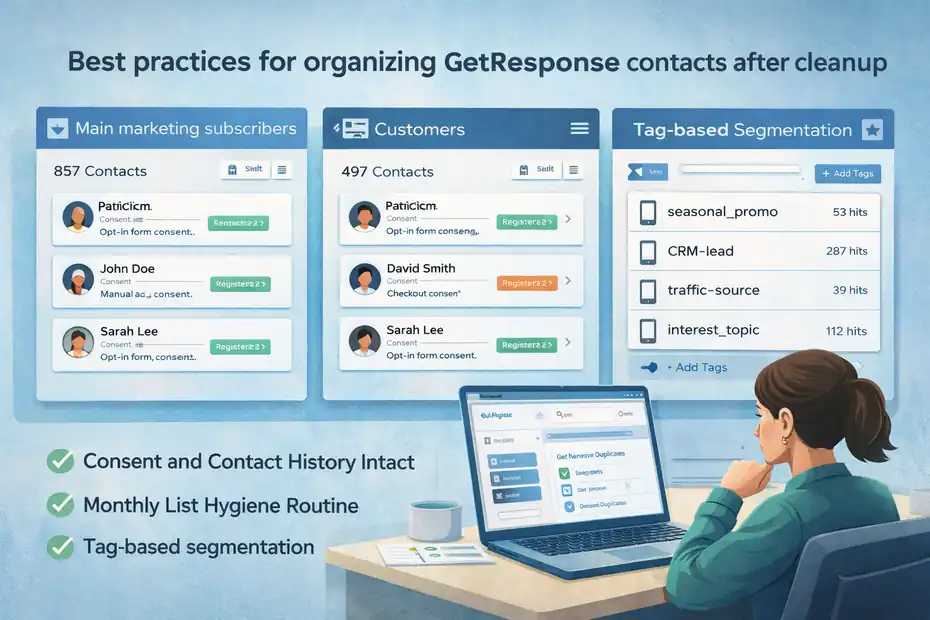
Once duplicates are removed, your next goal is a contact structure that stays manageable as your account grows.
Use lists for major permission groups, not micro-segmentation
This is a strategic rule that saves a lot of pain. Use lists only when there is a real business reason, such as different brands, different consent frameworks, or clearly separate communication types.
Do not create separate lists for every:
- lead magnet
- newsletter topic
- campaign test
- seasonal offer
- registration source
That is what tags and fields are for.
GetResponse also provides list-based filtering inside workflows, which is useful, but that does not mean every distinction should become a new list.
A cleaner structure could be:
- List: Main marketing subscribers
- List: Customers
- List: Partner or affiliate leads
- Tag-based segmentation: source, interest, campaign, funnel stage
I recommend reviewing every existing list and asking one blunt question: “If this were a tag instead, would anything break?” In many accounts, the honest answer is no.
Keep consent and contact history intact when consolidating
When cleaning duplicates, preserve the data that matters most: subscription source, consent, tags, and important custom fields.
GetResponse notes that consent fields can be created, stored, and tracked, and that consent status is visible in contact details. It also notes that if a contact is in multiple lists, the current consent state is based on the last known declaration.
That means cleanup should not just be about reducing counts. It should protect the integrity of permission and history.
My advice is simple: Before deleting redundant copies, make sure the surviving record or list structure still reflects what you need for compliance and targeting. Fast cleanup is good. Blind cleanup is dangerous.
Create a monthly list hygiene routine
The best duplicate solution is boring consistency. A quick monthly hygiene check is usually enough for small and mid-sized accounts.
Your recurring checklist can be:
- Check 1: Review new imports from the last 30 days.
- Check 2: Audit any newly created lists.
- Check 3: Spot-check automations for repeated entries.
- Check 4: Review contact movement or copy actions.
- Check 5: Run duplicate cleanup on redundant legacy lists when needed.
GetResponse’s List Hygiene area is useful here because it gives you a proper place to manage bulk deletion and duplicate cleanup actions.
I like monthly because it is frequent enough to prevent pileups, but not so frequent that it becomes busywork.
Common mistakes that make duplicate problems worse
Most duplicate problems get bigger because people react too quickly. I’ve made versions of these mistakes myself, and they always cost more time later.
Deleting contacts before mapping the source of truth
The biggest mistake is cleaning first and thinking later. If you do not know which list is your keeper list, you can easily delete useful segmentation or subscriber history.
A better order is:
- decide the source of truth
- export it
- identify redundant lists
- clean target lists
- verify automation impact
That order feels slower, but it is actually faster because you avoid rollback work.
Using copy instead of move without a reason
GetResponse allows both copy and move actions between lists. Copy is useful in some cases, but it also increases the risk of duplicate list membership when used casually.
If your team uses “copy to list” as a habit, duplicates can grow silently.
A simple internal policy helps:
- Use move: When replacing one list structure with another.
- Use copy: Only when the contact truly needs to remain in both lists.
That tiny rule prevents a surprising amount of mess.
Solving a list problem with more lists
This one is almost funny, but it happens all the time. A team notices duplicates, then creates a new “clean master list” without retiring the old ones properly. Now you have the original duplicate problem plus another layer of migration confusion.
In my experience, every extra list should have to justify its existence. If it cannot, it should probably be a tag.
Advanced cleanup and scaling tips for larger accounts
If your account is bigger, or connected to multiple systems, you need a more disciplined model. The good news is that the same core principles still work.
Standardize naming and ownership for every subscription path
Large duplicate problems are often governance problems. Nobody owns list structure, so everyone creates what they need in the moment.
Set standards such as:
- List naming: brand-purpose-region.
- Tag naming: source:leadmagnet or stage:customer.
- Import owner: one person approves bulk uploads.
- Automation owner: one person audits duplicate entry rules.
This does not sound exciting, but it is the kind of boring discipline that keeps databases healthy.
Use controlled migration instead of endless patchwork
If your GetResponse account has years of history, a gradual consolidation plan may be smarter than random cleanup. GetResponse supports moving or copying contacts across lists, which gives you a path for structured migration.
A realistic migration plan could be:
- month 1: define the master list and tagging model
- month 2: move active contacts into the new structure
- month 3: update forms and integrations
- month 4: retire legacy lists after verification
That approach is slower than a one-day purge, but much safer for mature accounts.
Protect reporting by tracking unique audience logic
One hidden cost of duplicates is decision quality. If your list counts are inflated by cross-list duplicates, campaign planning gets distorted.
You may think audience growth is stronger than it really is, or misread funnel performance because repeated identities are spread across lists.
I suggest tracking three numbers separately:
- total list entries
- estimated unique people
- active subscribers in your master structure
That simple separation gives you much more honest reporting and helps you see whether your cleanup is actually working.
Final answer: the clean-fast fix that usually works best
The best GetResponse duplicate contacts problem solution is usually this: keep one primary list, export the list you trust, remove overlaps from redundant lists through List Hygiene, then rebuild segmentation with tags and controlled automations.
GetResponse’s own documentation supports the key parts of that workflow, including import controls, moving or copying contacts, workflow filtering with Unique contacts, and duplicate cleanup through List Hygiene.
If I were cleaning a messy account today, I would do it in this exact order:
- Audit repeated emails across lists.
- Choose one source-of-truth list.
- Export that list as your reference.
- Remove overlap from redundant lists using List Hygiene.
- Review automations and add Unique contacts where needed.
- Stop creating new lists for every lead source.
- Use tags and fields for segmentation going forward.
That is the fast path, but it is also the sustainable one.
Most duplicate issues in GetResponse are not a sign that your account is broken. They are a sign that your contact structure got more complicated than it needed to be. Once you simplify that structure, the whole platform gets easier to trust, easier to report on, and a lot easier to grow.
FAQ
What causes duplicate contacts in GetResponse?
Duplicate contacts in GetResponse usually happen when the same email exists across multiple lists or is re-imported without updating existing records. Automation workflows and integrations can also create repeated entries if contacts enter from different sources without proper filtering or structure.
How can I quickly remove duplicate contacts in GetResponse?
The fastest way to remove duplicates is by exporting your main list, then using the List Hygiene feature to delete overlapping emails from other lists. This method allows you to clean redundant entries without losing your primary contact data or important subscriber information.
Does GetResponse count duplicates as separate contacts?
Yes, GetResponse can treat the same email address as separate contacts if they exist in multiple lists. This affects automation, reporting, and email delivery, which is why managing list structure and using tags instead of multiple lists is important for accurate tracking.
How do I prevent duplicate contacts from happening again?
To prevent duplicates, use one main list and segment with tags and custom fields instead of creating multiple lists. Also, set import rules to update existing contacts and apply filters in automation workflows to stop the same contact from entering multiple times.
Will deleting duplicates affect my email marketing performance?
Yes, removing duplicates usually improves performance by preventing over-emailing and cleaning your analytics. You get more accurate open rates, better segmentation, and a cleaner subscriber experience, which can improve deliverability and overall campaign effectiveness.

I’m Juxhin, the voice behind The Justifiable.
I’ve spent 6+ years building blogs, managing affiliate campaigns, and testing the messy world of online business. Here, I cut the fluff and share the strategies that actually move the needle — so you can build income that’s sustainable, not speculative.
Related posts:
 How to Integrate Aweber with ClickFunnels
 What Is MailerLite Used For? Powerful Features Explained
 Aweber Autoresponder: Expert Setup & Automation Guide
 Top Aweber Competitors Compared: Best Email Tools
 How I Increased Signups With MailerLite WordPress Plugin
 Top MailerLite Integrations for Automating Sales