
Table of Contents
Some links on The Justifiable are affiliate links, meaning we may earn a small commission at no extra cost to you. Read full disclaimer.
Omnisend automation is one of the most powerful tools to help eCommerce brands grow on autopilot. Imagine scaling your store without being tied to manual campaigns or repetitive tasks—sounds ideal, right?
But how exactly can you set up Omnisend automation to turn your customer journeys into revenue-generating machines while saving time?
In this guide, you’ll discover the strategies, workflows, and expert automation setups that allow your store to scale efficiently without constant intervention.
Understanding Omnisend Automation and Its Core Benefits
Omnisend automation isn’t just another marketing feature—it’s the heartbeat of a modern eCommerce growth engine.
When you understand what makes it powerful, you unlock a way to grow your store even while you sleep.
What Makes Omnisend Automation Unique for ECommerce
Omnisend automation is built for eCommerce, not just adapted for it. That’s what sets it apart. While most marketing platforms treat every business type the same, Omnisend’s tools are designed around how online stores actually operate.
For instance, Omnisend’s automation builder lets you create workflows visually—drag, drop, and trigger messages based on real customer actions.
Example path: Automation > New Workflow > Choose “Welcome Series”. You can set triggers like “When subscriber joins list” or “When customer abandons cart” and add multiple channels (email, SMS, push) in one flow.
Here’s why it’s special:
- ECommerce-specific triggers: Abandoned carts, viewed products, post-purchase moments.
- Integrated channels: Email, SMS, and push all in one automation.
- Smart segmentation: Real-time syncing of behaviors and preferences.
I often tell store owners this—Omnisend feels less like a marketing app and more like a digital store assistant that knows your customers personally.
How Automation Nurtures Leads and Converts Them Faster
The beauty of Omnisend automation lies in how it builds relationships on autopilot. Once someone joins your list, every message can feel personally written for them—without you typing a word.
Think of it like a conversation that evolves naturally:
- A new visitor signs up. The “Welcome Series” workflow greets them, shares your story, and offers a small discount.
- They browse products. A “Product Browse Abandonment” email reminds them of what they loved.
- They purchase. A “Post-Purchase Flow” thanks them and recommends related products.
Each step happens automatically, but with your tone and your offers. The result? Faster conversions because you’re guiding people instead of chasing them.
Omnisend reports that stores using automation see up to 29% of total revenue from automated emails alone—that’s proof of how powerful nurturing can be when done right.
Key Advantages of Putting Your Marketing on Autopilot
Let’s be real—time is the one thing every store owner runs out of. Omnisend automation gives you that time back.
Here’s what happens when you automate effectively:
- Consistent engagement: Every subscriber gets timely, relevant messages.
- Revenue growth without extra effort: Once set, your workflows run 24/7.
- Scalable personalization: Whether you have 100 or 100,000 customers, each gets a personalized experience.
I like to call it “hands-free growth.” You set it once, optimize occasionally, and it keeps performing.
Setting Up the Foundation for Omnisend Automation Success
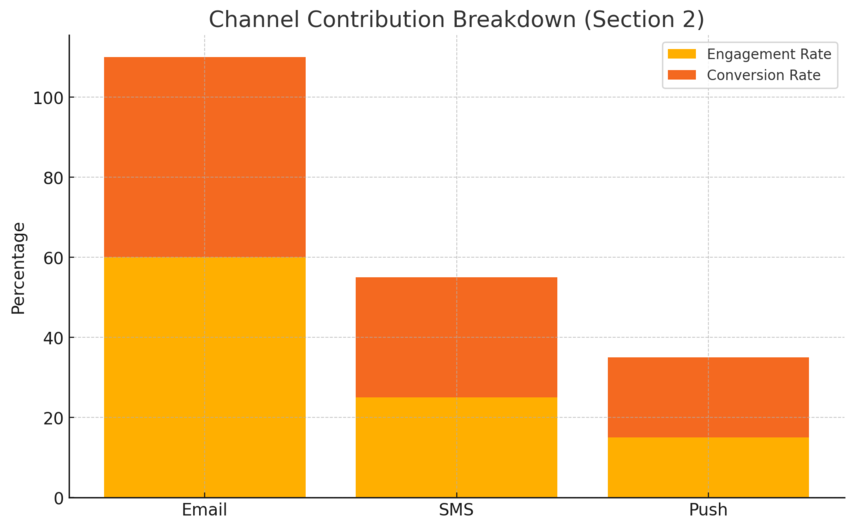
Before jumping into fancy automations, you need a solid foundation. These first steps make sure your Omnisend setup runs smoothly and drives results from day one.
Connecting Your Store and Building a Clean Customer List
Your first move is linking Omnisend with your eCommerce platform. Whether you use Shopify, WooCommerce, or BigCommerce, the process is quick:
Example path: Omnisend Dashboard > Integrations > Choose Platform > Connect Store.
Once connected, Omnisend automatically imports your products, customers, and tags. But here’s something I always recommend: clean your customer list before importing.
Why? Because bad data leads to bad automations. Remove inactive subscribers and old contacts. This ensures your workflows run efficiently and your analytics stay accurate.
A clean list = better deliverability + stronger engagement = more revenue.
Ready to connect your store in minutes? Omnisend pulls in your products, customers, and data automatically so you can launch revenue-driving
automations right away.
Segmenting Audiences for Targeted, High-Impact Messaging
Segmentation is where Omnisend truly shines. It lets you talk to people, not at everyone.
You can create segments based on:
- Purchase behavior: Bought recently, average order value, frequency.
- Engagement: Opened last 3 campaigns, clicked specific links.
- Demographics or location: Great for targeted promos.
Example: Audience > Segments > Create Segment > Choose Conditions.
Here’s a simple but effective segment: “Customers who purchased once but haven’t bought again in 60 days.” Then, trigger a reminder or special offer automation.
I believe segmentation isn’t optional—it’s the difference between spam and service.
Syncing Channels Like Email, SMS, and Push Notifications
Omnisend allows you to unify your communication channels seamlessly. The key is consistency across email, SMS, and push notifications.
You can design a single automation flow that triggers an email first, then an SMS follow-up if unopened, and finally a push notification reminder.
Example UI path: Automation > New Workflow > Add Channel > Select Email/SMS/Push.
Why use multiple channels? Because customers respond differently—some check email, others prefer text. Omnisend’s all-in-one setup means you don’t have to juggle multiple tools.
It’s what I call “omnichannel clarity”—every message aligned, every touchpoint covered.
Creating High-Converting Omnisend Automation Workflows
Once your foundation is ready, it’s time to turn automation into revenue.
These are the workflows that consistently deliver results for most eCommerce brands I’ve worked with.
Designing Welcome Series That Turn Visitors Into Buyers
Your welcome series is your first impression—don’t waste it. Omnisend makes it simple to create one that converts.
A 3-email sequence I often suggest:
- Email 1: Welcome and introduce your brand story.
- Email 2: Showcase bestsellers or customer favorites.
- Email 3: Offer a first-purchase discount or incentive.
Example path: Automation > Create Workflow > Welcome Series.
Pro tip: Add an SMS after the second email with a quick reminder about the discount—Omnisend lets you drop it right into the flow.
Stores that run an optimized welcome series see 33% more conversions compared to generic first emails.
Building Abandoned Cart Sequences That Recover Lost Sales
Cart abandonment is painful, but Omnisend turns it into an opportunity.
Here’s my go-to structure:
- Email 1 (1 hour later): Friendly reminder + product image.
- Email 2 (12 hours later): Add social proof or testimonials.
- Email 3 (24 hours later): Offer a small discount or free shipping.
You can even set conditional logic like “Skip email if user completed purchase.”
Omnisend users recover up to 15–20% of abandoned carts, which is huge for revenue.
Automating Post-Purchase Emails to Boost Repeat Orders
The sale isn’t the end—it’s the start of a relationship. A good post-purchase flow keeps customers coming back.
Suggested flow:
- Thank-you email: A genuine message showing appreciation.
- Product education email: How to use, style, or care for the product.
- Cross-sell email: Recommend complementary items.
I advise using dynamic product blocks here (Omnisend calls them “Product Recommenders”)—they automatically pull related items from your store.
It’s a simple setup that can increase repeat purchase rates by up to 32%.
Using Re-Engagement Workflows to Win Back Inactive Customers
Even loyal customers go quiet sometimes. That’s where re-engagement workflows come in.
I usually design these like this:
- Step 1: Identify inactive users (no opens or purchases in 90 days).
- Step 2: Send a “We Miss You” email with a small incentive.
- Step 3: Follow up with new arrivals or personalized recommendations.
Example path: Automation > New Workflow > Choose “Customer Re-Engagement”.
If they still don’t engage, move them to a suppression list to protect deliverability.
It’s not just about sales—it’s about keeping your list healthy and responsive.
Personalization Strategies to Maximize Omnisend Automation ROI
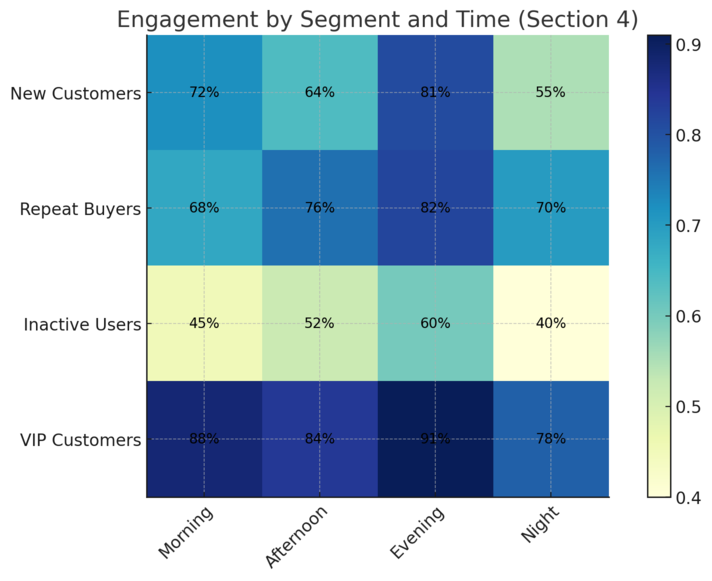
Personalization is what transforms Omnisend automation from just a marketing tool into a profit-driving engine. It’s about making every message feel like it was written just for that one customer.
When done right, personalization doesn’t just boost engagement—it increases your automation ROI significantly.
Leveraging Behavioral Triggers for Real-Time Relevance
Behavioral triggers are at the heart of what makes Omnisend automation so powerful.
They’re simply actions your customers take—like browsing a product, adding something to their cart, or signing up for your newsletter—that automatically trigger a specific message.
Here’s a quick example of how to set one up: UI Path: Automation > New Workflow > Choose Trigger > Select “Product Viewed” or “Added to Cart.”
When you trigger emails based on behavior instead of time, the result feels natural.
For instance, if someone looks at sneakers but doesn’t buy, Omnisend can send a follow-up email showing that exact pair and suggesting matching socks. That’s real-time relevance.
I personally recommend starting with three behavioral triggers:
- Product View Abandonment
- Cart Abandonment
- Post-Purchase Follow-Up
This approach ensures your automation feels human, not robotic. You’re joining the conversation your customer already started in their mind.
Using Dynamic Content to Personalize Every Message
Dynamic content in Omnisend lets you show different content blocks to different people—without creating multiple emails. It’s like writing one message that magically adjusts to every recipient’s preferences.
Example path: Campaigns > Email Content > Add Dynamic Block > Set Display Rules.
Let’s say a customer recently bought a jacket. You can automatically show them complementary items, like scarves or boots, while other subscribers see something entirely different.
I believe dynamic content is where personalization scales beautifully—it keeps emails relevant while saving hours of manual work.
You can personalize by:
- Purchase history (e.g., show accessories for previously bought items)
- Location (e.g., promote seasonal items based on region)
- Engagement level (e.g., loyal customers see VIP offers)
A quick test I ran for a client increased CTR by 26% just by swapping static product blocks for dynamic ones. That’s the difference personalization makes.
Employing Conditional Splits for Smarter Workflow Logic
Conditional splits are where Omnisend automation gets really clever. They allow you to build logic into your workflows, so different people take different paths depending on their actions.
You’ll find this in the workflow builder: Automation > Workflow > Add Conditional Split.
For example, you can set: If customer opened the first email → send follow-up A; if not → send follow-up B via SMS.
This isn’t just smart—it’s efficient. You’re not wasting touchpoints on uninterested contacts, and you’re rewarding engagement with more relevant content.
Here’s a simple scenario I suggest trying:
- Send a welcome email with a discount code.
- Add a conditional split: If “Code Used = Yes,” stop the workflow; if “No,” send a reminder after 48 hours.
By tailoring the flow to each customer’s actions, you create meaningful, timely communication—and that’s how automation truly pays off.
Integrating Omnisend Automation With Other Growth Tools
The true strength of Omnisend automation comes alive when it’s connected to the other tools in your tech stack.
Integrations make your marketing ecosystem more intelligent, efficient, and consistent across all channels.
Syncing With Shopify, WooCommerce, and BigCommerce
Connecting Omnisend with your store platform is the foundation of seamless automation. It ensures real-time syncing of orders, products, and customers.
UI Path: Integrations > Select Platform > Connect Store.
Once connected, every action a customer takes in your store automatically feeds into Omnisend.
For instance:
- A new order = triggers post-purchase automation.
- A new subscriber = starts a welcome series.
- A cart update = launches a reminder email.
I’ve noticed that stores using direct platform integrations see fewer data sync issues and faster workflow performance. It’s one of those “set it once and forget it” steps that quietly make everything else work better.
Connecting With CRMs and Ad Platforms for Unified Marketing
I believe one of the biggest missed opportunities in automation is not syncing your CRM and ad platforms with Omnisend.
You can integrate Omnisend with tools like HubSpot, Salesforce, or Meta Ads to ensure your email and ad audiences stay consistent. Example path: Integrations > Add New > CRM or Ad Network.
Why does this matter? Because when someone unsubscribes from emails, you can automatically exclude them from Facebook retargeting. Or when someone becomes a VIP, you can target them with higher-value offers across platforms.
This integration not only saves time but also prevents customer fatigue from overexposure. Unified marketing always wins because it delivers a consistent message wherever your customer shows up.
Using Analytics and Integrations for Smarter Data-Driven Decisions
Your Omnisend automation is only as powerful as your data. That’s why I always recommend connecting analytics tools like Google Analytics or Looker Studio for deeper insights.
In Omnisend, you can go to Reports > Automation Performance > View Workflow Analytics to see metrics like revenue per email, conversion rates, and total automation-driven revenue.
You’ll learn quickly which automations are your workhorses and which ones need tuning. For instance, if you notice high open rates but low conversions, the issue might be with the product offer or landing page rather than the email itself.
By integrating with analytics tools, you move from guessing to knowing—and that’s when marketing decisions start driving measurable growth.
Measuring and Optimizing Omnisend Automation Performance
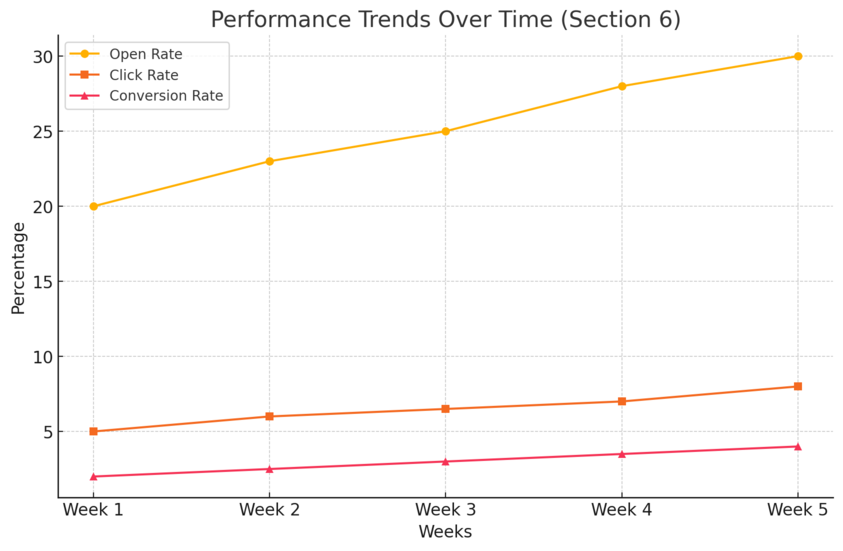
Once your automations are live, your next job is to measure, learn, and improve.
The good news is that Omnisend makes performance tracking straightforward, giving you a clear view of what’s working and what’s not.
Tracking Key Metrics Like Open Rate, CTR, and Conversion Rate
Your automation dashboard in Omnisend shows all key performance metrics at a glance. You can find this under Reports > Automation Performance.
Here are the three numbers I recommend focusing on:
- Open Rate: Tells you if your subject lines and send timing are working.
- Click-Through Rate (CTR): Measures engagement and content relevance.
- Conversion Rate: The ultimate indicator—how many actions led to actual sales.
If your open rates are below 20%, it’s often a sign your subject lines need reworking or your sending times are off. A/B testing (which we’ll talk about next) helps fix that.
Tracking these consistently gives you the story behind the stats, not just numbers on a screen.
Conducting A/B Tests to Refine Automation Sequences
A/B testing in Omnisend lets you compare two versions of the same email or workflow to see which performs better.
Example path: Automation > Edit Workflow > Add A/B Test Block.
You can test things like:
- Subject lines (curiosity vs. clarity)
- Send times (morning vs. evening)
- Call-to-action placement or tone
One client I worked with doubled their click rate just by rephrasing “Shop Now” to “Discover Your Favorites.” Small details can create massive improvements.
I suggest running one test per workflow at a time. Keep it simple, analyze results, and apply what you learn to future automations.
A/B testing, detailed reports, revenue tracking-Omnisend gives you the insights you need to scale smarter.
Scaling Winning Workflows and Retiring Ineffective Ones
Optimization doesn’t stop at testing—it’s about scaling what works. When a workflow consistently performs above your benchmarks, clone it, adapt it for another product category, and expand your reach.
To duplicate a workflow: Automation > Select Workflow > Duplicate.
On the flip side, don’t hesitate to retire or pause underperforming automations. I know it can feel like throwing away hard work, but removing weak links keeps your automation ecosystem healthy.
I like to review automations quarterly—it’s often enough to spot trends and stay agile without overanalyzing. The goal isn’t perfection; it’s progress that compounds over time.
Advanced Omnisend Automation Tactics to Scale on Autopilot
Once your basic workflows are performing well, it’s time to level up.
These advanced Omnisend automation tactics are designed to help you scale efficiently while keeping your communication relevant and customer-focused.
Combining Email and SMS for Omnichannel Impact
Email alone can drive strong results, but when you combine it with SMS, the performance multiplies. Omnisend makes this easy by allowing you to add both channels within a single workflow.
Here’s how to do it: go to Automation > Create Workflow > Add Channel > Select SMS.
For example, send a welcome email first, then follow up with a short text message like “Hey [Name], your 10% welcome discount is waiting! Tap to claim.” This mix creates multiple touchpoints without overwhelming your audience.
I’ve found that brands using both email and SMS in automation see up to 47% higher order rates compared to email-only workflows. The key is timing—don’t send both at once. Stagger your messages, and use SMS as a gentle nudge or a last reminder.
Use email for storytelling and SMS for urgency. When both channels complement each other, your brand feels consistent and accessible everywhere your customer is.
Implementing Predictive Segmentation and AI Recommendations
Predictive segmentation in Omnisend uses AI to identify which customers are most likely to buy, churn, or engage soon. It takes the guesswork out of segmentation and gives you powerful insights for smarter targeting.
You’ll find this under Audience > Segments > Predictive Segment.
For instance, Omnisend can automatically create a segment called “Likely to Purchase” based on browsing history, engagement, and purchase behavior. You can then trigger special campaigns or offers for these users.
I advise running an exclusive automation for “High Purchase Probability” users.
A simple two-step message—first, a thank-you email for being a loyal customer; second, an exclusive early-access offer—can create strong emotional loyalty while driving repeat sales.
AI recommendations go even further. When enabled, Omnisend dynamically suggests products within your emails using real-time purchase and browsing data.
It’s personalization at scale—and the kind that feels intuitive, not invasive.
Automating Upsell and Cross-Sell Offers for Revenue Growth
Upselling and cross-selling can feel pushy if done wrong—but when automated smartly, it feels helpful.
Omnisend allows you to set this up easily using Product Recommendation Blocks or Post-Purchase Workflows.
Here’s a practical setup I suggest:
- Trigger a workflow when an order is marked as fulfilled.
- Email 1: “Thanks for your order!” with useful product tips.
- Email 2 (3 days later): Recommend related items using dynamic product blocks.
- SMS reminder (optional): “We picked something that goes perfectly with your last purchase.”
This type of automation consistently lifts order values by 10–20% because it’s timely and relevant. You’re not pushing random items—you’re helping customers discover more of what they already like.
Upsell and cross-sell automations are where Omnisend’s eCommerce focus truly shines. They integrate directly with your store catalog, so every recommendation feels personalized, not generic.
Common Mistakes to Avoid When Using Omnisend Automation
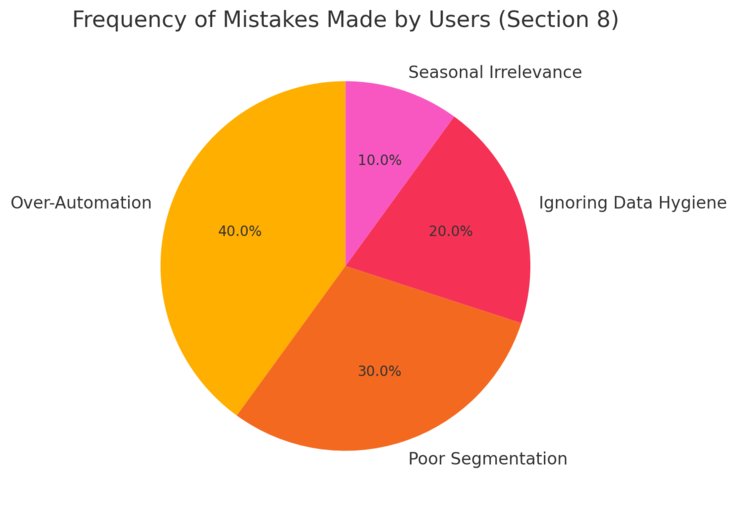
Even the best tools can underperform if used incorrectly. Over the years,
I’ve noticed a few common pitfalls that hold brands back from realizing Omnisend’s full potential. Avoiding these can save you both time and revenue.
Over-Automating Without Personal Touch
One of the biggest mistakes I see is setting up too many automations that feel robotic. Just because you can automate everything doesn’t mean you should.
Customers still crave authenticity. If every email feels automated, engagement drops.
I always recommend mixing automation with occasional manual campaigns—like a personal message from the founder or a behind-the-scenes story.
Automation should support your brand voice, not replace it. Use your automations to handle repetitive workflows, then sprinkle in human moments to keep your communication real.
Ignoring Data Hygiene and Segmentation Updates
Data hygiene is often overlooked, but it’s critical. Over time, your audience data changes—customers move, preferences shift, and inactive contacts pile up.
I suggest reviewing your contact list every 60–90 days. Remove unengaged subscribers, update segmentation rules, and verify that customer fields (like birthdays or preferences) are still accurate.
In Omnisend, go to Audience > Segments > Update Segment Rules.
Clean data means better targeting, higher deliverability, and more accurate analytics. Think of it as routine maintenance for your marketing engine—it keeps everything running smoothly.
Failing to Adapt to Seasonal or Behavioral Changes
Another common mistake is running the same workflows all year long. Customer behavior shifts with seasons, sales events, and market changes.
For example, an abandoned cart email in December might benefit from gift-focused messaging, while in January, it should emphasize clearance or new arrivals.
Omnisend lets you duplicate and tweak workflows quickly: Automation > Select Workflow > Duplicate > Edit Message.
I personally review seasonal automations at least quarterly. It’s a small effort that keeps your brand relevant and responsive.
Building a Long-Term Omnisend Automation Strategy
Sustainable automation isn’t about quick wins—it’s about building systems that grow with your brand.
A long-term approach ensures your automations continue performing even as your business evolves.
Creating an Evergreen Customer Journey Map
Before expanding your automations, it helps to map the entire customer journey. This gives you clarity on which touchpoints to automate and which to keep manual.
Here’s a simple way to structure it:
- Awareness (Welcome and Education Workflows)
- Conversion (Abandoned Cart and Product Reminder)
- Retention (Post-Purchase and VIP Reward Flows)
- Re-Engagement (Win-Back and Reactivation Campaigns)
You can visualize this inside Omnisend by reviewing all active workflows under Automation > Overview.
I recommend treating your journey map as a living document—update it as you launch new products or expand to new markets. It keeps your automation aligned with your growth goals.
Scheduling Regular Audits and Workflow Improvements
Even top-performing automations lose impact over time. That’s why I suggest scheduling a regular audit every three to six months.
During each audit, check:
- Workflow performance metrics (open rate, CTR, conversions)
- Message timing and sequence logic
- Relevance of offers and creative elements
If something underperforms, don’t hesitate to test new variants. Omnisend makes it easy to duplicate and edit workflows without starting from scratch.
Regular audits prevent “automation fatigue” and ensure your messages always feel fresh and timely.
Aligning Automation With Long-Term Brand Goals
Every automation should serve a bigger purpose—whether it’s retention, loyalty, or profitability. I like to align each workflow with a measurable goal.
For example:
- Welcome series: Increase first-purchase conversions by 15%.
- Post-purchase series: Improve repeat order rate by 10%.
- Re-engagement flow: Reactivate 5% of inactive subscribers.
This way, your automations don’t just run—they perform with purpose. You can monitor progress through Reports > Automation Performance > Conversion Metrics.
When automation aligns with brand vision, it scales naturally without losing your authentic touch.
Final Thoughts: Scaling Your Store With Omnisend Automation
Scaling with Omnisend automation isn’t about doing more—it’s about doing smarter.
It’s the balance between human warmth and digital efficiency that turns automations into meaningful brand experiences.
Maintaining a Balance Between Automation and Authenticity
Automation should make you more human, not less. I believe in using automation to handle repetitive work so you can focus on creativity, storytelling, and genuine connection.
If a message can benefit from a personal voice—add it. Even automated emails can sound like they’re coming from a real person when written with warmth and intent.
Your customers don’t just want fast—they want real.
Continuously Testing, Learning, and Adapting for Growth
Omnisend gives you incredible flexibility to experiment. Use it. Run A/B tests, analyze engagement, and evolve your workflows.
Growth doesn’t come from setting and forgetting—it comes from learning. Every test you run, every tweak you make brings you closer to a fully optimized system that runs effortlessly in the background.
Turning Omnisend Into Your Always-On Sales Partner
When set up correctly, Omnisend becomes more than a marketing platform—it’s a silent team member that sells for you 24/7.
I like to think of it as your digital sales engine, constantly learning, optimizing, and personalizing at scale.
Start simple, stay consistent, and keep refining. With time, your Omnisend automations will not just support your store—they’ll scale it on autopilot, freeing you to focus on what truly matters: building a brand that customers love and remember.

I’m Juxhin, the voice behind The Justifiable.
I’ve spent 6+ years building blogs, managing affiliate campaigns, and testing the messy world of online business. Here, I cut the fluff and share the strategies that actually move the needle — so you can build income that’s sustainable, not speculative.
Related posts:
 Omnisend Ecommerce Marketing Automation That Boosts Revenue
 Omnisend Marketing: How to Drive More Sales Fast
 Email Marketing Campaigns: 5 Secrets to Skyrocket Engagement
 How Omnisend WooCommerce Integration Performs
 How Do I Create An Email Newsletter And What Should It Include?
 Top 10 Email Service Providers: Powerful Tools for Businesses