Table of Contents
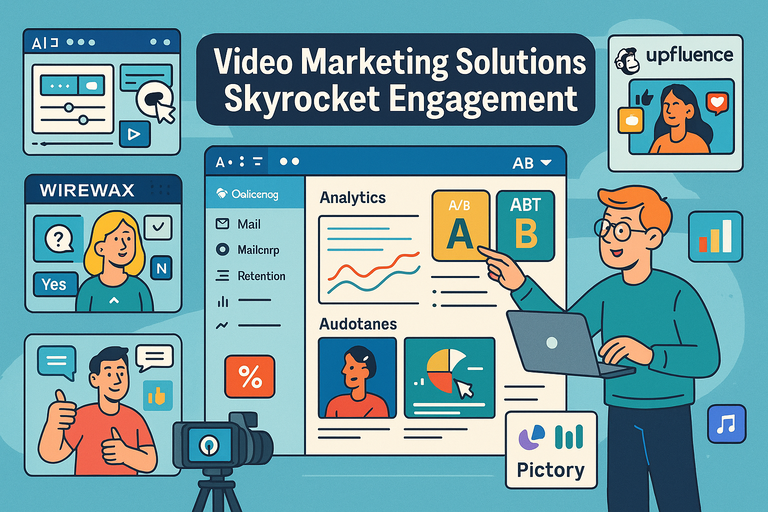
Video marketing solutions are changing the way brands connect with audiences—fast. With attention spans shrinking and competition rising, how do you make sure your videos don’t just get views but actually engage people?
The right tools and strategies can turn average campaigns into viral success stories.
In this guide, I’ll walk you through 10 proven video marketing solutions that help boost engagement, retention, and conversions across every platform.
1. AI-Powered Video Editing Platforms
AI-powered video marketing solutions have revolutionized how creators and brands produce polished, high-quality videos—without spending hours in editing software.
These tools use machine learning to automate tedious processes like trimming, transitions, and color correction, helping you focus on creativity instead of mechanics.
Automate Editing For Faster, Sharper Content
If you’ve ever spent hours cutting clips, syncing audio, or adjusting lighting, AI editors can feel like magic. Platforms such as Pictory, Descript, and Runway ML automatically edit raw footage, detect scenes, and even remove filler words or awkward pauses.
For example, with Descript, you can edit a video just like a document: delete a word in the transcript, and the matching video clip disappears instantly.
This automation reduces production time by up to 70%, based on data shared by Descript’s team.
Key benefits:
- Cuts editing time from hours to minutes
- Maintains visual consistency and pacing automatically
- Ideal for repurposing webinars, podcasts, or interviews
I suggest using these platforms when you’re working on consistent, high-volume content such as YouTube series or short-form videos where speed and output matter more than complex effects.
Personalize Videos With Dynamic AI Tools
AI can also personalize content at scale—something traditional editing can’t do efficiently.
Tools like Synthesia and Quillbot generate videos with AI avatars that deliver personalized messages using customer data, such as names or purchase history.
Imagine sending a “thank you” video to each new customer automatically, where the AI avatar says their name and highlights their recent purchase.
That’s the kind of personalization that deepens engagement and feels genuinely human.
Tip: Always test tone and pacing; while AI can automate, emotional nuance still needs your creative touch.
Use Templates That Boost Storytelling Quality
AI video editors often include smart templates designed from proven engagement patterns. Platforms like Lumen5 and InVideo recommend layouts, captions, and background music that match your brand’s tone and video goals.
For instance, Lumen5 can take a blog post URL, summarize it, and turn it into an engaging social video in minutes—complete with on-brand visuals and transitions.
Quick takeaway: AI templates help non-editors create professional videos that still feel creative. The trick is customizing them slightly—update color schemes, transitions, and soundtracks—to avoid the cookie-cutter look.
2. Interactive Video Platforms That Drive Action
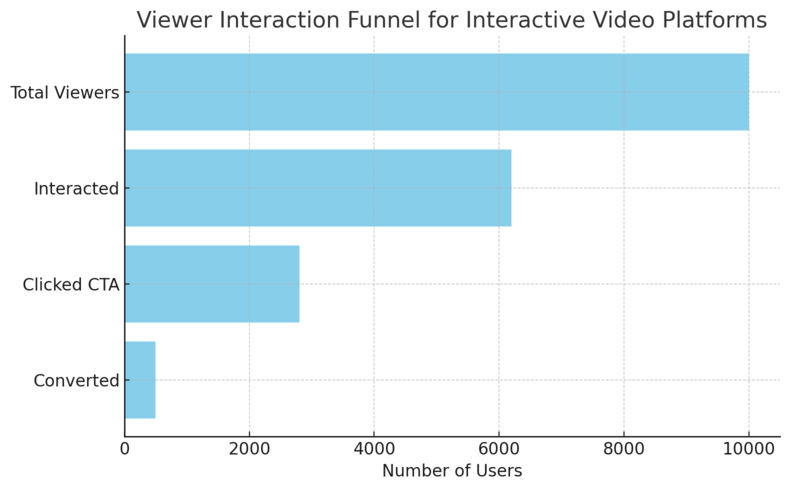
Interactive video marketing solutions are turning passive viewers into active participants.
By embedding clickable elements, polls, or quizzes, you can increase watch time, conversions, and memory retention.
Add Clickable CTAs To Increase Viewer Interaction
Tools like Wistia, Vidalytics, and Vidyard allow you to embed clickable CTAs (calls to action) directly inside videos. Instead of placing links below the player, viewers can click within the content—right when they’re most engaged.
For example, a coaching brand might insert a “Book Your Session” button at minute 2:35 of a testimonial video. This reduces friction, making it easier for viewers to act immediately.
Pro insight: Track which CTA timestamps perform best to refine placement and copy over time.
Gamify Content To Encourage Participation
Gamification—adding game-like elements such as challenges or rewards—keeps viewers involved longer. Platforms like Rapt Media let you build “choose-your-own-path” videos where users decide what happens next.
Think of a marketing video where viewers pick between two customer journeys or product demos. This creates agency, fun, and memory retention. Studies show interactive videos can increase engagement rates by over 45%.
I recommend using this approach for educational or eCommerce content, where exploration naturally supports the viewer’s goal.
Use Polls And Quizzes For Real-Time Feedback
Adding polls and quizzes is another way to turn engagement into insight. Tools like Eko let you insert questions mid-video, gathering feedback without viewers ever leaving the page.
This approach is excellent for webinars or training sessions—viewers can respond instantly, helping you measure understanding and adapt content later.
Example UI path: In Eko, go to “Interactivity → Add Poll” to insert a timed multiple-choice question. Then, check Analytics → Poll Responses to see how engagement varies by segment.
3. Live Streaming Tools To Build Real-Time Connection
Live streaming tools are among the most authentic video marketing solutions for building connection and trust.
They combine immediacy, interaction, and transparency—key factors in driving engagement today.
Stream Across Multiple Channels Seamlessly
Using tools like StreamYard, Restream, or OBS Studio, you can broadcast live content simultaneously to YouTube, LinkedIn, and Facebook. This maximizes reach while maintaining a unified brand experience.
In StreamYard, for instance, you can connect your accounts via Destinations → Add Platform and go live everywhere with one click. This eliminates the need to manually upload or re-stream later.
Why it works: Multi-streaming not only increases visibility but also helps you test where your audience is most responsive.
Engage Audiences With Live Q&A Sessions
Live Q&As humanize your brand and build loyalty. Using Ecamm Live, you can highlight viewer comments on-screen and respond in real time, making people feel seen and heard.
Example scenario: A SaaS company might hold a monthly “Ask Us Anything” session, showing product demos and answering questions directly. These sessions often boost audience trust and retention significantly.
Expert tip: Prep 3–5 seed questions before going live to avoid awkward silence if the chat starts slow.
Integrate Real-Time Analytics For Better Insights
Data transforms live streaming from a one-off event into a strategic asset. Platforms like Restream Analytics and YouTube Live Control Room track metrics such as average watch time, peak concurrent viewers, and chat activity.
You can view this data immediately post-stream to understand what resonated—and what didn’t.
Key insight: According to Restream, live videos generate 27% more engagement on average than pre-recorded ones, largely because viewers feel part of something happening now.
Pro Tip: The most powerful video marketing strategies blend these tools. Imagine an AI-edited video clip (Pictory) leading into an interactive CTA (Vidyard) and closing with a live Q&A (StreamYard). That’s a full-funnel experience—automated, engaging, and deeply human at the same time.
4. Short-Form Video Tools Optimized For Social Media
Short-form video marketing solutions have become the backbone of modern engagement. Platforms like TikTok, Instagram Reels, and YouTube Shorts reward consistency, creativity, and speed—so using the right tools can make or break your social media reach.
These tools simplify editing, trend tracking, and repurposing, helping you publish more without sacrificing quality.
Repurpose Long Videos Into Snackable Clips
If you’re creating podcasts, webinars, or YouTube videos, short-form repurposing tools like OpusClip and Quso.ai can save hours of manual work. They automatically detect high-engagement moments in long videos and cut them into shorter, shareable clips.
For example: With OpusClip, you can upload a 30-minute video, click “Auto-Clip”, and get multiple 15–30 second highlights optimized for vertical formats like TikTok or Instagram. The tool uses AI to detect emotional peaks and captions them automatically.
Here’s why I recommend it: these micro-clips increase brand visibility and consistency. A single podcast episode can generate a week’s worth of social content—each tailored to platform algorithms that prefer quick, digestible videos.
Quick tip: Keep your clips under 30 seconds and always include dynamic captions—silent autoplay is common on mobile feeds, so text drives retention.
Leverage Trending Sounds And Effects
Using trending sounds is one of the fastest ways to boost organic reach. Tools like CapCut, InShot, and Splice now integrate real-time trend libraries, showing which audio tracks or effects are performing well across social platforms.
Inside CapCut, go to “Sounds → Trending” to browse popular tracks and apply them to your clip instantly. I’ve found that pairing relevant sounds with on-brand visuals often doubles engagement rates within the first 48 hours of posting.
Trends move quickly, though. I suggest checking trend dashboards every few days or following creators in your niche who spot new patterns early. A little timing can turn an average clip into a viral post.
Use Platform-Specific Editing Features
Each platform’s algorithm favors content created within its own app. That’s why even if you edit videos elsewhere, you should finish them using tools inside TikTok, Instagram Reels, or YouTube Shorts.
These built-in editors offer filters, transitions, and AR effects that improve visibility and discoverability. For instance, TikTok’s “Add Text → Animate” feature increases viewer retention by adding kinetic motion to captions.
Why it matters: Native elements often signal authenticity to both users and algorithms. So, instead of exporting a finished video, try uploading the raw version and applying effects directly in-app before publishing.
5. Video Analytics Platforms For Smarter Decisions
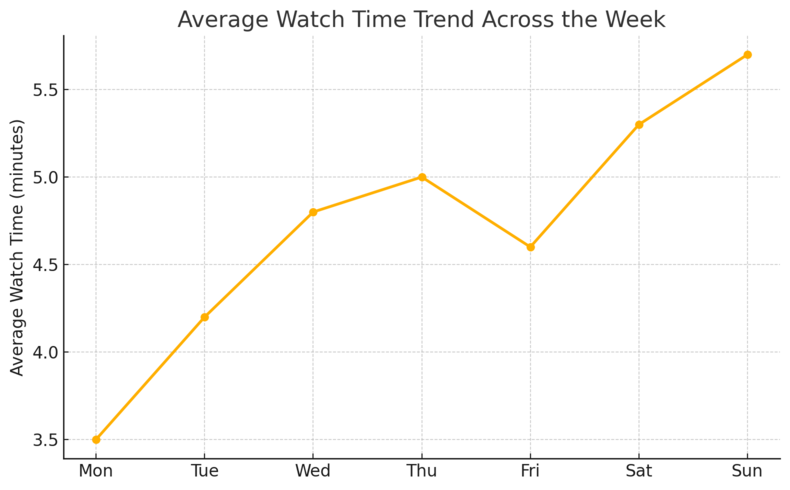
No video marketing strategy works without data. Video analytics platforms help you understand what’s actually driving engagement—and what’s wasting your effort.
With the right insights, you can make smarter creative and budget decisions across campaigns.
Track Engagement Metrics That Actually Matter
Many people focus on vanity metrics like views, but I’ve found that watch time, retention rate, and click-throughs tell a far clearer story. Tools like Wistia, Vidyard, and Google Analytics 4 (GA4) go beyond surface numbers to reveal how audiences interact with your videos.
For example, in Wistia, you can navigate to “Engagement → Heatmaps” to see which sections viewers rewatch or skip. That kind of data helps identify your strongest hooks and most engaging segments.
Here’s what I recommend tracking consistently:
- Average engagement time – Shows content relevance.
- Play rate – Measures thumbnail effectiveness.
- Conversion actions – Tracks ROI from CTAs or form fills.
These numbers help refine creative choices—making each video better than the last.
Identify Drop-Off Points To Improve Retention
If viewers aren’t finishing your videos, it’s not always the content—it’s often pacing or structure. Tools like TubeBuddy, YouTube Analytics, or VidIQ visualize drop-off points in your video timeline, showing where attention fades.
For example, if you see a big dip at the 10-second mark, that might signal a weak intro. Try tightening your hook or using jump cuts to re-engage viewers.
I suggest testing small edits, then reuploading updated versions to compare retention. This kind of iteration turns data into creative intuition over time.
A/B Test Video Thumbnails And CTAs
Small visual changes can drastically impact click-through rates. Platforms like Vimeo, Vidalytics, and YouTube Studio Experiments allow A/B testing of thumbnails and calls-to-action.
In YouTube Studio, go to “Content → Experiments” and select “Test Thumbnail” to upload variations. After a few days, analytics will reveal which version drives more clicks.
Example: One of my clients boosted CTR by 38% simply by adding human faces with direct eye contact to thumbnails—viewers respond faster to perceived emotion than to abstract visuals.
Testing CTAs works the same way: compare “Watch Now” vs. “See How It Works” to find what resonates. The data will surprise you more often than not.
6. Video Hosting Solutions With Advanced Customization
Video hosting platforms aren’t just about storing content—they shape the viewing experience.
The best hosting solutions let you customize players, improve SEO, and make your videos feel like a seamless part of your brand ecosystem.
Customize Players To Match Brand Identity
Platforms like Vimeo, Wistia, and SproutVideo let you remove logos, change colors, and adjust layouts to match your branding. This is essential for creating a professional look, especially on landing pages.
In Wistia, for example, go to “Customize → Appearance” to choose your brand palette and upload your logo overlay. This simple touch boosts trust and cohesion across your marketing materials.
I suggest using these tools for gated content or product demos—places where design consistency reinforces credibility.
Add Chapters And Playlists For Easier Navigation
Chapters improve user experience by letting viewers jump to specific sections. YouTube, Vimeo, and SproutVideo offer easy chapter creation directly within upload settings.
For instance, in YouTube Studio, open “Details → Add Chapter Timestamps” and insert times like 0:00 Intro, 1:15 Product Demo, 3:45 Q&A. These clickable markers increase average watch time since viewers can skip to what matters most.
Playlists also help you organize content into logical sequences—useful for courses, tutorials, or multi-part series.
Use Embedding Tools To Boost SEO
Embedding videos strategically can improve both on-page SEO and dwell time. Platforms like Wistia and Vimeo automatically generate SEO metadata, helping search engines index your videos properly.
In Wistia, enable “SEO Metadata → Auto-Injection” before embedding to ensure your titles and descriptions sync with search crawlers. This small setting can raise your video visibility in Google’s SERP snippets.
Pro tip: Place videos near relevant text on your webpage and use descriptive schema markup—this increases the chance of rich snippets appearing in search results.
Expert Insight: I believe the real magic happens when these solutions work together. Imagine repurposing your webinar with OpusClip, tracking performance through Wistia analytics, and hosting the best-performing clips on Vimeo with branded customization.
That’s not just efficient video marketing—it’s a data-driven engagement loop that keeps improving itself.
7. Email Video Marketing Tools That Boost Click Rates
Email remains one of the most reliable ways to nurture relationships—but plain text or static images often fall flat.
Embedding videos can instantly lift engagement by adding motion, emotion, and personality to your messages.
Email video marketing solutions help you do exactly that—without hurting deliverability or loading times.
Embed Videos To Increase Open And Click-Through Rates
Videos in email can increase click-through rates by up to 300%, according to Campaign Monitor. Tools like BombBomb, Mailchimp, and ActiveCampaign let you embed videos or animated GIF previews directly into emails.
In BombBomb, for example, click “Record → Video Message”, then the platform automatically embeds the video thumbnail with a play button into your email. Recipients see a human face instead of a block of text—something that makes them far more likely to engage.
I suggest keeping embedded videos under 60 seconds and adding a compelling call-to-action (CTA) beneath the thumbnail. For Gmail or Outlook, where autoplay may be restricted, replace the video with a clickable thumbnail that opens a landing page or YouTube link.
Quick tip: Use a subject line like “I made a quick video for you”—it sparks curiosity while staying personal and non-spammy.
Use Personalized Thumbnails For Higher Engagement
Personalized visuals make emails feel one-to-one instead of one-to-many. Tools such as Vidyard and Hippo Video generate thumbnails that include the recipient’s name, company logo, or even a screenshot of your face holding a whiteboard with their name written on it.
To do this in Vidyard, record your video, click “Thumbnail Options → Personalized Thumbnail”, and upload a frame overlay or text field for customization. This small tweak can make your email stand out in a crowded inbox.
I’ve seen campaigns where simply adding a person’s name on a thumbnail boosted open rates by 19%. People love seeing something that looks made just for them.
Automate Follow-Up Sequences After Video Plays
If you’re using ActiveCampaign or Aweber, you can trigger automated workflows after someone watches a video. For instance, if a prospect watches more than 75% of a demo video, the system can send a follow-up email offering a free trial or call.
In ActiveCampaign, go to “Automations → Start Trigger → Video Engagement” to define actions based on view percentage.
Why this works: You’re following up based on intent, not guesswork. These data-driven sequences nurture leads while keeping your outreach relevant and timely.
8. Influencer Video Collaboration Platforms
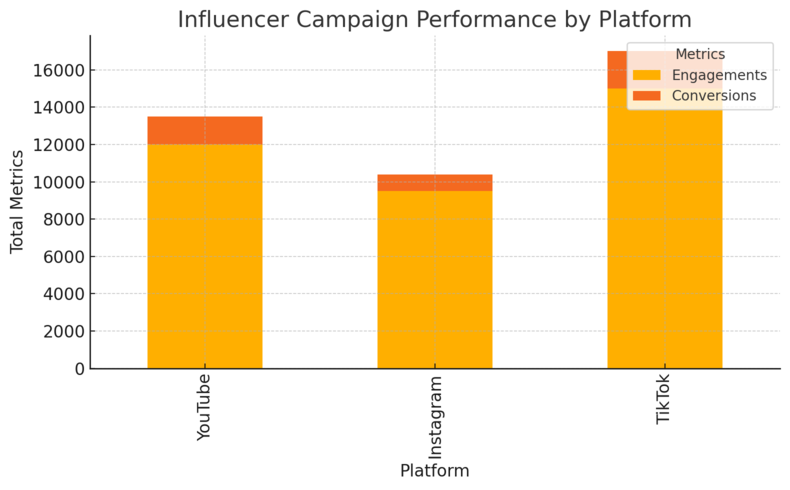
Influencer collaborations are one of the most effective video marketing solutions for building credibility fast.
Modern platforms make it easier to discover, vet, and manage influencer partnerships that actually align with your brand.
Find And Vet Influencers Who Match Your Brand
Tools like Upfluence, CreatorIQ, and Afluencer help you find creators based on audience demographics, engagement rates, and niche relevance.
For example, in Upfluence, you can filter creators using “Audience → Age/Location/Interest” filters, then review engagement scores before outreach. This ensures you partner with influencers who can deliver genuine resonance—not just vanity metrics.
I recommend focusing on micro-influencers (5K–50K followers). They often drive higher engagement and trust compared to celebrity accounts, especially in specialized niches.
Co-Create Authentic Video Campaigns
Authenticity drives performance. The best influencer collaborations happen when brands give creators creative freedom instead of rigid scripts. Tools like Collabstr and GRIN simplify this process by managing creative briefs, feedback, and payments in one place.
A good practice: share key talking points, not a word-for-word script. Let the influencer interpret your product in their voice—it feels more natural to their audience.
For example, one fitness brand used GRIN to manage 12 influencers simultaneously, increasing conversions by 22% through authentic product walkthroughs instead of direct ads.
Measure ROI And Audience Overlap Effectively
Platforms like CreatorIQ and Traackr provide detailed campaign analytics, including reach, engagement, conversions, and audience overlap.
In CreatorIQ, open “Campaign Dashboard → Performance → Audience Duplication” to see how many followers overlap across your influencer network. This prevents wasted budget and helps you scale efficiently.
Pro insight: Track both quantitative ROI (clicks, sales) and qualitative ROI (sentiment, brand mentions). True success isn’t just about numbers—it’s about trust and advocacy.
9. AI Scriptwriting And Captioning Tools
Whether you’re writing for YouTube, ads, or corporate videos, the blank page can be brutal.
AI scriptwriting and captioning tools eliminate that hurdle by generating, optimizing, and localizing content at scale.
Generate Engaging Scripts Tailored To Audience Needs
Tools like Jasper, Copy.ai, and Runway ML can create full video scripts based on your topic, tone, and target audience.
For instance, in Jasper, select “Video Script Outline → Audience Persona”, enter your topic (e.g., “fitness tips for busy professionals”), and it generates a structured draft including hook, value points, and CTA.
I often use AI-generated outlines as a base, then refine with human flair—adding humor, pacing, and emotion. That balance between automation and personality keeps content relatable.
Add Accurate Captions To Improve Accessibility
Captions aren’t just for accessibility—they boost watch time and comprehension, especially on muted autoplay feeds. Tools like Rev, Descript, and Happy Scribe auto-generate captions and let you edit them manually for accuracy.
Example UI path: In Descript, click “Captions → Generate Transcript” to create captions automatically, then use “Timeline View” to fix any misheard words.
Captions also help SEO since they provide readable text for search engines. I suggest exporting both SRT and VTT files for broader compatibility across platforms.
Translate Videos To Reach Global Audiences
Localization opens your content to entirely new markets. Tools like VEED.io, DeepDub, and Papercup translate and even dub videos using synthetic voiceovers in multiple languages.
For example, Papercup uses AI to clone your voice and re-synthesize it in another language while maintaining emotional tone. A brand using this feature expanded to Spanish-speaking markets and saw 35% more international engagement.
Tip: Always review AI translations with a native speaker before publishing. Even advanced tools can miss cultural nuances that affect brand tone.
10. Video SEO Tools For Better Visibility
No matter how good your video is, it won’t perform if it can’t be found.
Video SEO tools help your content rank higher on platforms like YouTube and Google by optimizing metadata, keywords, and structure.
Optimize Metadata For YouTube And Search Engines
Tools like TubeBuddy and VidIQ simplify metadata optimization—titles, tags, and descriptions. These elements tell algorithms what your video is about.
In TubeBuddy, go to “SEO Studio → Optimization Score” to get keyword suggestions and automatically test title variations. The goal is to balance relevance with click appeal.
I suggest including your primary keyword in the title, first 100 characters of the description, and file name (e.g., video-marketing-solutions.mp4). This improves both YouTube and Google indexing.
Create Video Sitemaps To Boost Indexing
Video sitemaps help search engines understand your video’s content and structure. Tools like Screaming Frog SEO Spider or Google Search Console can generate or validate video sitemaps automatically.
In Google Search Console, navigate to “Indexing → Sitemaps → Add Sitemap” and submit your video sitemap URL (e.g., yourdomain.com/video-sitemap.xml).
Doing this ensures your videos appear in Google’s “Video” tab and can even show as rich results—improving click-through rates.
Use Keyword Research To Guide Video Topics
Understanding search intent helps you create videos people actually want to watch. Tools like Ahrefs, Semrush, and AnswerThePublic reveal trending questions and phrases related to your niche.
For example, searching “video marketing tips” in Ahrefs Keywords Explorer might show related terms like “YouTube engagement strategies” or “AI video tools for marketing.” Use these insights to plan your next content batch strategically.
Personal insight: I often look for keywords with high engagement potential but moderate competition—topics that big channels overlook but audiences crave.