
Table of Contents
Some links on The Justifiable are affiliate links, meaning we may earn a small commission at no extra cost to you. Read full disclaimer.
A flutter freelancer builds a career where technical skill meets true independence, and that mix creates a path many developers dream about. I’ve walked enough of this road to know it can feel confusing at the start.
How do you go from learning the framework to landing high-paying gigs consistently? This guide answers that question step-by-step.
Understanding What Clients Expect From Flutter Freelancers
When you start working as a Flutter freelancer, success depends on more than just writing Dart code.
Clients aren’t just buying your time—they’re buying trust, reliability, and the confidence that you can deliver exactly what they need without constant hand-holding.
Knowing the Core Deliverables Clients Prioritize
Every client measures value differently, but most care about three key deliverables: performance, maintainability, and timely delivery.
- Performance: Your Flutter apps should feel smooth and native-like on both iOS and Android. Clients often check this by running the build on mid-range phones to see if animations lag or screens take too long to load.
- Maintainability: Clients expect clean, modular code that new developers can understand later. Using a structure like BLoC (Business Logic Component) or Riverpod shows you understand scalable app architecture.
- Delivery: On-time delivery is non-negotiable. Many developers overpromise and underdeliver—clients quickly learn to spot those patterns.
I recommend breaking deliverables into small milestones with clear outcomes: for example, “Complete authentication module with Firebase” or “Implement custom drawer navigation.” This makes your progress measurable and gives clients confidence.
Understanding How Businesses Evaluate Technical Skill
Businesses rarely test freelancers with formal exams. Instead, they look at subtle cues that reflect competence.
- Portfolio Relevance: If your portfolio includes Flutter apps that solve real problems (like e-commerce checkouts, chat interfaces, or dashboards), you’ll stand out.
- Problem-Solving Approach: Clients pay close attention to how you handle challenges during the project. Do you panic or propose options calmly?
- Tool Mastery: Using Git for version control, Firebase for backend, and Flutter DevTools for debugging shows you’re production-ready.
I believe your technical depth should shine through conversations—speak confidently about performance optimization, state management, or deployment, and clients will sense your expertise.
Recognizing the Importance of Clear Project Communication
Technical talent alone won’t get you repeat work. Clear communication builds trust faster than a perfect UI.
Here’s what helps:
- Weekly or biweekly updates: Use tools like Notion or ClickUp to summarize progress.
- Plain-language explanations: Avoid overloading clients with tech jargon. Instead of saying “I’ll refactor the widget tree for better state isolation,” try, “I’ll make sure each screen runs smoother and is easier to update later.”
- Feedback loops: Ask for early feedback on designs or functionality to prevent misalignment later.
Good communication makes clients feel part of the process—and that emotional connection often leads to referrals and ongoing projects.
Identifying Red Flags That Cause Clients to Walk Away
Even skilled Flutter freelancers lose clients for reasons unrelated to code. Some warning signs
I’ve seen firsthand include:
- Ignoring timelines or updates – Silence creates anxiety; clients interpret it as a lack of progress.
- Overcomplicating solutions – Using unnecessary libraries or architecture patterns when simpler approaches would do.
- Inflexibility – Refusing small change requests or being defensive about feedback signals ego, not professionalism.
I suggest building a reputation as “easy to work with.” That simple trait alone separates average freelancers from those earning $50–$100 per hour consistently.
Essential Skills Required to Thrive as a Flutter Freelancer
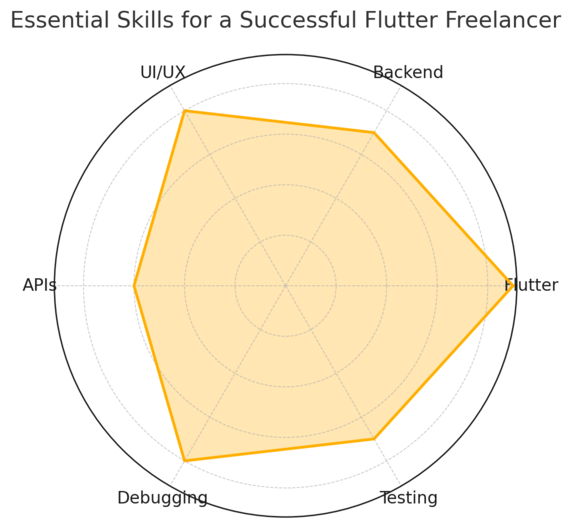
Technical excellence fuels reputation and income in freelancing. To stay competitive, you need more than a grasp of Flutter syntax—you must think like a product owner, not just a coder.
Mastering Flutter Fundamentals for Real-World Projects
You can’t fake fundamentals. Flutter’s unique approach to UI through widgets makes it powerful—but only if you deeply understand it.
Key areas to focus on:
- Widget Lifecycle: Know when to use StatefulWidget versus StatelessWidget. Misusing these leads to inefficient rebuilds.
- State Management: Learn one pattern well—Provider, Riverpod, or BLoC. For complex apps, BLoC often scales best for separating logic from UI.
- Navigation 2.0: Understanding named routes and deep linking gives you control over user flow.
I suggest practicing by rebuilding a popular app (like a weather or note app) from scratch. Real projects expose weaknesses that tutorials never do.
Strengthening Backend Knowledge for Production-Level Apps
Flutter handles the front end beautifully, but most clients want full-stack freelancers—people who can connect their apps to real data.
- Firebase: Perfect for startups and MVPs. It handles authentication, database (Firestore), and hosting easily.
- REST APIs: Learn to consume APIs efficiently using the http or dio package.
- Node.js or Python Basics: Understanding how APIs are built helps you debug backend issues faster.
From experience, clients love developers who “just make it work.” When you can fix both the mobile and server sides, you become indispensable.
Improving UI and UX Skills for More Polished Mobile Apps
A beautiful app wins client trust instantly. Flutter gives you total control over visuals, but UX (user experience) is where your apps truly stand out.
Practical tips:
- Use Material Design guidelines – Flutter’s built-in components follow these principles, so lean into them.
- Test on multiple devices – An app that looks great on a Pixel may break on an iPhone 12 Mini.
- Micro-interactions matter – Animations, haptic feedback, and loading indicators make your app feel premium.
I once rebuilt a client’s onboarding flow with shorter text and a visual progress bar—conversion improved by 18%. Small UX tweaks can have massive ROI.
Learning Debugging Habits That Reduce Project Delays
Debugging isn’t glamorous, but it’s where professionals prove their worth. Flutter gives you robust tools; learn to use them well.
- Flutter DevTools: Visualize rebuilds, inspect widgets, and profile performance in real time.
- Error Boundaries: Wrap risky sections in try-catch blocks and use FlutterError.onError to handle crashes gracefully.
- Testing: Write unit and widget tests for major features. Clients rarely ask for tests—but they’ll notice when nothing breaks.
I recommend logging errors using Sentry or Firebase Crashlytics. That extra reliability turns clients into long-term partners who trust your craftsmanship.
Creating a Portfolio That Attracts Quality Flutter Clients
A strong portfolio can make or break your success as a Flutter freelancer.
It’s not just about showing what you’ve built—it’s about proving how you think, how you solve problems, and what kind of results clients can expect when they work with you.
Showcasing Projects That Prove Your Problem-Solving Skills
Clients aren’t looking for flashy UIs alone; they want developers who can solve business problems through code. I suggest including three to five projects that highlight practical results.
For example:
- A Flutter e-commerce app that reduced cart abandonment by 25% after improving checkout flow.
- A fitness tracker with integrated Google Fit API, showing you can handle third-party integrations.
- A restaurant ordering app with offline capabilities, proving your adaptability for low-connectivity environments.
Each project should include a short summary of the challenge, your approach, and the outcome.
Instead of saying “Built using Flutter,” say, “Implemented dynamic layouts using Flutter’s LayoutBuilder to optimize responsiveness across iOS and Android.” That level of detail shows real-world understanding.
Demonstrating Code Quality Through Public Repositories
Your GitHub or GitLab profile acts as a live resume. It reflects how you structure code, name variables, and document logic—all of which matter to serious clients.
I recommend pinning 3–4 repositories that demonstrate:
- Clean Architecture: Using folder separation (models, views, services).
- Meaningful Commits: Each commit message should describe why a change was made, not just what.
- Tests and Documentation: Include short README files with project goals and setup instructions.
You can also use branches to show evolution—like an “optimization” branch where you improved load times using lazy loading or caching. This communicates growth and technical depth.
Presenting Case-Like Walkthroughs Without Using Case Studies
Case studies are overused and time-consuming. Instead, use case-like walkthroughs: simple narrative breakdowns that show your reasoning without sounding academic.
For instance: “I built a local delivery app for a small business using Flutter and Firebase. The challenge was syncing order data between drivers and store owners.
I created a stream-based update system using Firestore snapshots, which cut delivery delays by 40%.”
These mini stories feel personal, authentic, and fast to read. They’re perfect for freelance portfolios or LinkedIn posts.
Using Visuals to Communicate App Functionality Clearly
Visuals turn your work from abstract code into something tangible.
Include:
- Screen recordings showing transitions and animations.
- Before-and-after comparisons for redesigned apps.
- Short UI flow diagrams using tools like Figma or Miro.
If you’re showcasing an app, include a quick “user path” (for example: Home → Add to Cart → Checkout). It helps non-technical clients immediately understand your design thinking.
Setting Freelance Rates That Reflect Your Flutter Expertise
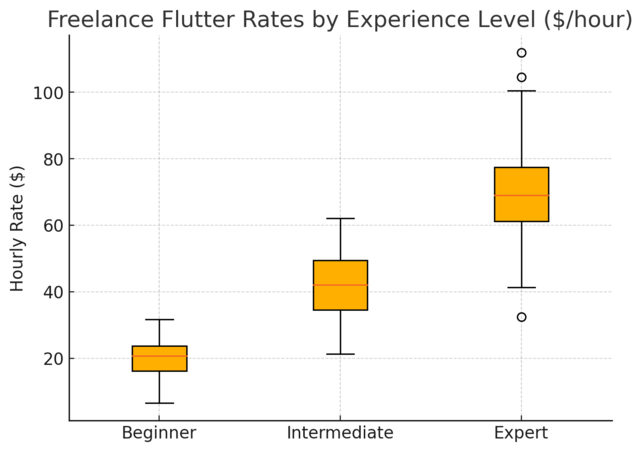
Pricing is both strategy and psychology. The right rate positions you as an expert; the wrong one can trap you in low-paying cycles that hurt growth.
Developing a Pricing Structure That Avoids Undervaluing Your Skills
Many new Flutter freelancers undercharge to get clients fast—but that often backfires. Low prices attract micromanaging clients who value cost over quality.
I recommend starting with a project-based model instead of hourly billing for early gigs.
For example:
- Simple app prototype: $500–$1,000
- Full MVP (Minimum Viable Product): $2,000–$4,000
- Advanced Flutter app with backend integration: $5,000+
When clients ask for hourly rates, you can reference a range ($35–$70/hr) and explain that your goal is results, not just hours worked. This communicates confidence and professionalism.
Using Market Research to Define Competitive Freelance Rates
Use platforms like Upwork, Toptal, or Arc.dev to gauge Flutter market rates. Sort by “Top Rated” or “Expert-Vetted” profiles—these freelancers typically earn what the market’s upper tier pays.
You can also check job listings on LinkedIn and Indeed for full-time roles, then calculate equivalent freelance rates (divide salary by 2,000 to get approximate hourly rate).
I’ve seen Flutter freelancers with two years of experience charging $50/hr confidently once they demonstrate consistent delivery and portfolio depth. That’s achievable if your client experience feels smooth and premium.
Knowing When to Adjust Pricing as Your Experience Grows
Your pricing shouldn’t be static. Each new project should either refine your process or expand your expertise—both justify a rate increase.
Raise rates when:
- You’ve added backend or DevOps capabilities (e.g., integrating Firebase or AWS).
- You start getting repeat clients or inbound leads.
- You’ve improved delivery time through automation or reusable widgets.
I advise increasing your rate gradually—10–15% every few projects—to test market response without scaring away prospects.
Communicating Pricing Confidently During Client Discussions
The secret is simple: confidence, not arrogance. When clients ask for your rate, deliver it calmly, without overexplaining.
Try something like: “My standard rate for projects of this scope is $60/hour. That covers complete development, testing, and communication. If that fits your budget, I can prepare a milestone-based proposal today.”
Confidence shows you know your worth. Clients respect that tone far more than defensive explanations or apologies about pricing.
Finding High-Paying Freelance Gigs in the Flutter Market
Finding high-paying work as a Flutter freelancer isn’t luck—it’s strategy. You need visibility, credibility, and a system that consistently brings qualified leads.
Using Job Boards That Regularly Feature Mobile Development Roles
Some platforms are flooded with low-budget offers, but a few consistently attract quality clients:
- Toptal – Focuses on elite developers; you’ll need to pass screening tests but can earn $60–$150/hr.
- Arc.dev – Specializes in remote tech roles and contract-based Flutter work.
- Upwork – Competitive but effective if your profile is optimized with detailed project descriptions and client testimonials.
I suggest using filters like Mobile Development > Flutter and setting a minimum budget threshold (e.g., $1,000+). This weeds out low-value listings and saves hours of scrolling.
Leveraging Social Proof to Attract Premium Flutter Clients
Social proof—reviews, testimonials, and visible endorsements—builds instant trust. When potential clients see you’ve delivered great work before, price becomes secondary.
To boost your credibility:
- Request short LinkedIn recommendations after successful projects.
- Add screenshots of positive client messages or emails to your portfolio.
- Post snippets of your work or progress updates on Twitter or dev communities.
I’ve noticed developers who post their Flutter UI animations on X (Twitter) or Reddit often attract recruiters naturally. It’s a simple form of passive lead generation.
Applying Outreach Techniques That Get Faster Responses
Cold outreach works—if done well. The trick is to personalize every message. Avoid sending generic “I can build your app” notes.
Instead, structure your message like this:
- Start by acknowledging their problem or project idea.
- Offer a specific solution with one Flutter feature (“I’d use Flutter’s StreamBuilder for real-time updates.”).
- End with a clear next step (“Would you like a quick 15-minute call to explore options?”).
This approach shows initiative and expertise, leading to higher reply rates.
Positioning Yourself as a Specialist Instead of a Generalist
The more specific your niche, the higher your value. A Flutter freelancer who specializes in fintech apps, fitness platforms, or delivery apps instantly appears more credible.
You can brand yourself as:
- “Flutter Developer for SaaS and Subscription Apps”
- “Cross-Platform Developer for Startups Using Flutter and Firebase”
Clients love experts who “get” their industry. When your niche aligns with their business type, trust builds faster—and rates go up.
Pro tip: The freelancers who win big in Flutter don’t just code—they present themselves like partners in the client’s success. Every project, email, and quote should reinforce that you’re not just building an app—you’re building value.
Using Expert Platforms and Tools to Get Flutter Projects
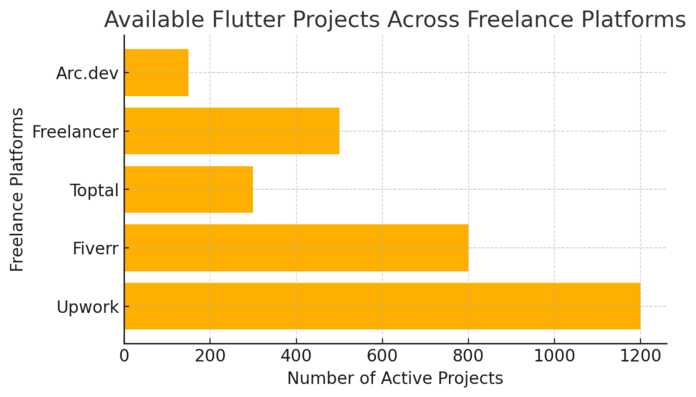
Getting consistent work as a Flutter freelancer depends on visibility and credibility. The best developers use a mix of platforms and tools to position themselves where quality clients are already looking.
Leveraging Upwork, Toptal, and Fiverr for Quality Opportunities
Each platform serves a different purpose, and knowing how to use them strategically makes all the difference.
- Upwork: Ideal for mid-level to advanced Flutter developers. I recommend creating a detailed profile highlighting projects with measurable results (for example, “Built a Flutter delivery app that reduced load times by 40%”). Use the keyword “Flutter developer” naturally in your title and tags, and always submit proposals that address client goals, not just project requirements.
- Toptal: Toptal’s screening process is strict, but once you’re in, the clients are premium. Expect to take coding tests and technical interviews. The benefit? You’ll work with startups and enterprises paying $60–$150/hour.
- Fiverr: Best for building momentum early on. Start with small Flutter gigs—like UI conversion, bug fixes, or plugin integration. As you gain reviews, raise your pricing and add complex services such as Firebase setup or cross-platform app optimization.
Each platform rewards consistency. I’ve seen freelancers double their income simply by updating their gig images, adding project walkthroughs, and replying to messages quickly.
Using GitHub and GitLab to Build Trust With Technical Clients
Technical clients often check how you code before hiring. Public repositories on GitHub or GitLab make that evaluation easier.
To build trust:
- Keep repositories active with clean commits and documentation.
- Include README files explaining what your Flutter projects do and how to run them.
- Use GitHub Actions or GitLab CI/CD pipelines to show you understand automated testing and deployment.
For example, I once landed a fintech project because my repo included automated test coverage reports. Clients respect freelancers who think like engineers, not just coders.
Working With Trello, Notion, or Jira for Professional Delivery
Once hired, how you organize the workflow matters just as much as writing good code.
- Trello: Great for small Flutter projects. You can create lists like To Do → In Progress → Testing → Completed to keep clients updated visually.
- Notion: Perfect if you prefer a more flexible workspace. I use it to document features, timelines, and even meeting notes.
- Jira: Suited for larger, more structured projects where multiple developers collaborate. You can create “sprints” and assign specific issues to milestones.
Sharing your project board with clients creates transparency. They instantly see progress, dependencies, and deadlines—reducing back-and-forth communication.
Using Communication Tools to Keep Clients Updated Seamlessly
Strong communication builds client confidence. Choose tools that make updates easy and real-time.
- Slack: Ideal for daily communication and sharing quick updates.
- Zoom or Google Meet: Best for weekly syncs or demos.
- Loom: Lets you record short video updates of the app or your screen—perfect for explaining UI changes or bugs visually.
I suggest ending every week with a 2-minute Loom video showing what’s done and what’s next. It’s a small effort that builds immense trust and keeps clients engaged without micromanaging you.
Managing Client Workflows for Predictable Flutter Results
To deliver consistent results as a Flutter freelancer, you need structure.
A predictable workflow keeps projects on track and reduces client stress, making you look professional even when projects get complex.
Structuring Projects With Milestones That Clients Understand
Breaking projects into milestones makes timelines clear and builds accountability.
For example:
- UI/UX completion
- Core functionality
- Testing and bug fixes
- App store deployment
Each milestone should include a short description of deliverables, deadlines, and payment triggers. I recommend including a “buffer” period between milestones for revisions—clients appreciate that flexibility.
A client once told me that milestone-based progress “felt like project insurance.” It’s simple but powerful—clients can see tangible results before paying for the next phase.
Using Revision Frameworks to Prevent Endless Feedback Loops
Revisions are part of freelancing, but uncontrolled revisions kill timelines. A structured revision framework helps you stay in control.
- Define revision limits clearly in your contract (for example: “Up to two rounds of revisions per milestone”).
- Ask for consolidated feedback—encourage clients to share all comments at once instead of piecemeal updates.
- Use tools like Marker.io or Figma comments to capture specific feedback visually.
The goal isn’t to be rigid—it’s to guide clients gently toward clarity. When clients know exactly how feedback works, projects run smoother.
Creating Documentation That Reduces Project Misunderstandings
Good documentation is your silent assistant. It keeps both you and the client aligned from start to finish.
Here’s what I usually include:
- Feature overview: What each module does.
- Tech stack summary: Flutter version, key dependencies, backend setup.
- Deployment steps: How to rebuild or update the app in the future.
I store all documentation in Notion or Google Drive and share it with clients at handoff. This small effort often earns repeat projects because clients remember how “organized” you were.
Handling Deadlines Without Overworking or Burning Out
Overcommitting is a trap many Flutter freelancers fall into. The key is realistic planning and self-discipline.
- Use time-tracking apps like Clockify to understand how long tasks actually take.
- Estimate future projects based on real data, not wishful thinking.
- Block daily time for code reviews, client communication, and rest.
I’ve learned the hard way that working 12-hour days kills creativity. When you pace yourself, quality goes up—and so does client satisfaction.
Scaling Your Freelance Business as a Flutter Developer
Once you’ve built momentum, the next step is scaling your freelance career. The goal isn’t just more work—it’s better work, with higher rates and stronger relationships.
Building Long-Term Client Relationships for Recurring Work
Retaining a client is easier than finding a new one. Treat every project as the start of a long-term partnership.
You can build loyalty by:
- Offering maintenance packages for app updates or bug fixes.
- Checking in every few months with value-based suggestions (“I noticed Flutter 3.24 added new Material widgets—want me to optimize your app?”).
- Delivering small favors, like quick fixes, for loyal clients.
I’ve maintained client relationships for years this way—and those recurring updates provide a stable income base between big projects.
Outsourcing Small Tasks While Maintaining Quality
As your workload grows, you’ll need to delegate without compromising standards.
I suggest starting by outsourcing non-core tasks like:
- UI asset preparation
- Basic QA testing
- Simple bug fixes
Use GitHub pull requests to review external contributions. This ensures you maintain final control over quality.
You can find reliable subcontractors on platforms like Freelancer.com or Lemon.io—just test them on small jobs first.
Developing a Personal Brand That Attracts Higher Rates
Your brand is how clients perceive your value before they even meet you.
Start by building a personal website that includes:
- A clean portfolio showcasing your best Flutter apps.
- A short bio explaining what makes your process unique.
- Testimonials or LinkedIn recommendations.
Use social media wisely—share mini Flutter tutorials, app demos, or behind-the-scenes development tips. This kind of content builds authority fast and attracts clients who already trust your expertise before reaching out.
Transitioning Into an Agency Model When You’re Ready
Once you’re consistently booked and earning well, you can expand into a small Flutter agency.
Steps to get started:
- Hire a few trusted developers or designers to handle overflow work.
- Build standard operating procedures (SOPs) for app builds and client onboarding.
- Rebrand your site to reflect a team identity, not just a solo freelancer.
An agency model allows you to take on larger contracts—like multi-platform enterprise apps—while maintaining your creative control.
Pro tip: Every top Flutter freelancer I know treats freelancing like a growing business, not a side hustle. When you combine solid technical skills with smart systems, your income stops being unpredictable—and starts scaling like a true digital business.

I’m Juxhin, the voice behind The Justifiable.
I’ve spent 6+ years building blogs, managing affiliate campaigns, and testing the messy world of online business. Here, I cut the fluff and share the strategies that actually move the needle — so you can build income that’s sustainable, not speculative.
Related posts:
 Top 6 Freelancing Jobs That Promise Financial Freedom
 Freelance Developer: How to Find the Perfect Fit for Your Project
 9 Best Freelance Websites for Beginners to Start Today
 Freelance Data Entry Jobs You Can Start From Home Today
 The Best Platforms to Find Freelance Writing Jobs Fast
 13 Top Freelance Websites to Land Jobs That Pay Well