
Table of Contents
Some links on The Justifiable are affiliate links, meaning we may earn a small commission at no extra cost to you. Read full disclaimer.
If you’ve been searching for strategies to grow online business that actually work, you’re in the right place.
Whether you’re running an eCommerce store, a coaching brand, or a digital service, the core principles of online growth remain the same—but how do you apply them effectively in your niche?
This guide breaks down ten proven, practical strategies you can use to expand your reach, attract loyal customers, and build a business that thrives in any market.
1. Identify a Profitable Niche and Target Audience
Before you dive into building an online business, it’s crucial to find a niche that not only excites you but also has real market demand.
The right niche sets the tone for everything—your content, marketing, pricing, and even your brand personality.
Research Market Demand and Competition
Finding a profitable niche starts with understanding what people actually want. I always suggest beginning with keyword and trend research tools like Google Trends, Ahrefs, or SEMrush.
Here’s how I approach it:
- Look for upward trends: Search your topic in Google Trends to see if interest is growing or fading.
- Analyze competition: Use Ahrefs’ Keyword Explorer to check how competitive a niche is. If search volume is strong but competition is manageable, that’s a green flag.
- Identify content gaps: Browse Reddit, Quora, or niche Facebook groups to spot unanswered questions—these are untapped opportunities.
From experience, the sweet spot is a niche with consistent search demand, moderate competition, and clear customer problems you can solve.
For example, “eco-friendly pet products” might sound niche, but rising sustainability trends make it a goldmine right now.
Define a Specific Audience Persona
Once you’ve found a promising niche, it’s time to define who you’re serving. I like to create a simple persona sheet that captures details such as:
- Demographics: Age, location, and income level.
- Psychographics: Motivations, fears, and goals.
- Behavioral traits: Where they hang out online and what kind of content they consume.
For instance, if you’re targeting “freelance designers,” your persona might be Lara, 29, based in London, works remotely, wants to earn steady income without burnout.
This clarity helps tailor your messaging and offers to her needs directly.
Validate Your Business Idea Before Launch
Before spending time or money building a full website or product, I recommend testing the waters.
Here’s a simple validation path:
- Run small ads (like $50 Facebook or Google Ads) to gauge interest.
- Create a landing page with a sign-up form using tools like Carrd or Unbounce.
- Track conversions: If people are subscribing or clicking through, you’re onto something.
I’ve seen many entrepreneurs skip this step and later discover there’s no actual demand. Validation early saves time, money, and heartbreak.
2. Build a Strong Brand Identity That Stands Out
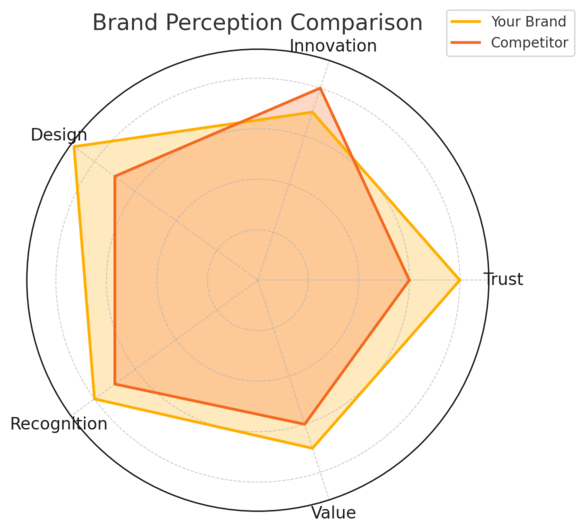
Your brand is more than a logo—it’s how people feel when they interact with your business. In competitive markets, a strong, consistent identity makes you memorable and trustworthy.
Create a Clear Brand Message and Voice
A strong message answers a simple question: Why should people choose you?
Start by defining your unique value proposition (UVP)—what makes your offer different and better. For example, if you sell handmade jewelry, your UVP might be “sustainably crafted pieces that tell personal stories.”
Then, decide on your brand voice—whether it’s friendly, professional, witty, or inspirational. If your target audience is Gen Z creators, use relatable, conversational language. But if you serve B2B clients, clarity and authority matter more than playfulness.
Design a Memorable Logo and Visual Identity
You don’t need to spend thousands on design, but your visuals must align with your brand values. Use tools like Canva Pro or Adobe Express to design a professional-looking logo and color palette.
Consider:
- Color psychology: Blue often communicates trust; orange suggests creativity.
- Typography: Clean, modern fonts feel approachable, while serif fonts suggest tradition or expertise.
Visual identity consistency builds subconscious recognition—think of how you instantly know Starbucks by its green logo and typography, even without reading the name.
Maintain Consistency Across All Platforms
Consistency is where many businesses fail. Every touchpoint—your website, Instagram posts, email templates—should look and sound like the same brand.
Here’s a quick checklist I use:
- Use the same profile photo or logo across channels.
- Stick to one color palette and tone of voice.
- Create brand templates for social media and newsletters.
I also recommend creating a simple brand guide document (you can do this in Google Docs) outlining logo usage, tone, fonts, and key messaging. It keeps your brand identity intact, even as your team or content grows.
3. Develop a Conversion-Driven Website
A website isn’t just a digital brochure—it’s your 24/7 salesperson. Every page should guide visitors toward taking meaningful action, whether it’s subscribing, buying, or booking.
Optimize Website Speed and User Experience
Website performance directly impacts conversions. In fact, studies show that if a page takes more than 3 seconds to load, over half of users leave.
Quick wins to improve speed:
- Use Google PageSpeed Insights to identify slow elements.
- Compress images with TinyPNG.
- Use lightweight themes (I suggest GeneratePress or Astra for WordPress).
Beyond speed, focus on intuitive navigation. Users should find what they need in two clicks or less. I usually organize menus into clear categories like Home, About, Services, Blog, Contact—simple, familiar, and effective.
Use Clear CTAs and Simple Navigation
A clear call-to-action (CTA) is the bridge between interest and conversion. Don’t hide it behind vague text like “Learn More.” Instead, use action-focused words such as “Get Started,” “Book a Call,” or “Try It Free.”
Keep one primary CTA per page to avoid confusion.
For instance:
- Homepage: Start Your Free Trial
- Blog post: Subscribe for More Tips
- Product page: Buy Now
Navigation should be clean and uncluttered. Avoid burying your key pages in dropdowns. Think of it as designing a store—you want visitors to move naturally from browsing to buying.
Implement Mobile-First Design Principles
More than 60% of online traffic now comes from mobile devices. That means your design should prioritize smartphones first, not as an afterthought.
When I audit websites, I check three things immediately:
- Responsive layout: Text and images should adapt fluidly on all screens.
- Clickable buttons: CTAs must be large enough for thumbs, not mouse clicks.
- Readable text: Avoid small fonts and long paragraphs.
A good rule of thumb is to test your website on different devices—your phone, a tablet, and desktop. If navigation feels smooth everywhere, you’re good to go.
4. Leverage SEO to Drive Long-Term Organic Traffic
If you want your online business to grow steadily, SEO (Search Engine Optimization) is your best long-term investment. It’s the foundation that helps you attract visitors naturally, without constantly paying for ads.
I believe SEO is like planting a digital garden—the effort you put in now continues to pay off month after month.
Conduct Keyword Research for Your Niche
Keyword research is about understanding how your audience searches for information, products, or solutions.
I usually start by listing 5–10 core topics related to the business, then use tools like Ahrefs, Google Keyword Planner, or Ubersuggest to dig deeper.
Here’s a simple process I follow:
- Start broad: Type your main topic (e.g., “organic skincare”) into Ahrefs Keyword Explorer.
- Look at keyword difficulty: Focus on terms with moderate competition and steady monthly volume.
- Group related terms: Build keyword clusters—like “organic skincare routine,” “vegan moisturizers,” and “natural face masks.”
You can also use Google Autocomplete and the “People Also Ask” section to find real user queries. These are goldmines for creating helpful, intent-based content.
I recommend saving keywords in a spreadsheet with their volume and difficulty scores—it makes content planning smoother later.
Optimize On-Page Elements for Better Rankings
Once you’ve found your keywords, the next step is to optimize your pages so search engines and readers understand what your content is about.
Here’s what I pay attention to:
- Title Tag: Include your main keyword naturally near the beginning.
- Meta Description: Write a short summary (under 160 characters) that encourages clicks.
- Headings (H1, H2s): Use variations of your main keyword in subheadings where it fits logically.
- Internal Links: Connect related blog posts or product pages. This helps users stay longer on your site and helps Google understand your content structure.
I also suggest improving readability. Tools like Rank Math give real-time suggestions inside WordPress. These plugins highlight issues like missing alt text, long paragraphs, or overused keywords. It’s like having an SEO coach inside your dashboard.
Build Quality Backlinks and Authority
Backlinks—links from other websites to yours—are like votes of confidence for search engines. But it’s not about quantity; it’s about quality.
I usually use three approaches:
- Guest posting: Write valuable articles for established sites in your niche. Include a link back to your site naturally in your bio or content.
- Resource link building: Create high-value assets (like guides, statistics, or infographics) that others naturally want to reference.
- Partnership outreach: Reach out to complementary businesses for content swaps or joint webinars.
For example, when I worked with a small SaaS brand, a few strategic guest posts on niche blogs doubled their organic traffic in under six months.
Consistent backlinking builds credibility not only with Google but also within your industry community.
5. Master Content Marketing to Build Trust and Authority
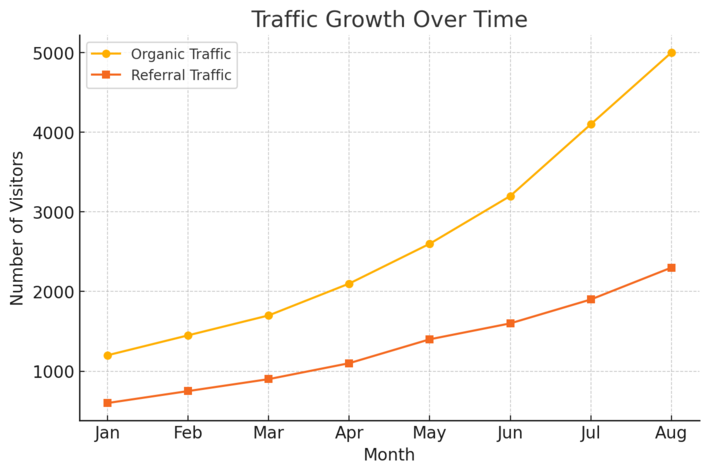
SEO might bring people to your site, but content marketing is what keeps them there.
It’s how you demonstrate expertise, build relationships, and turn readers into loyal customers.
Create Value-Driven Blog Posts and Guides
Good content solves problems, not just fills space. I always start by identifying real audience pain points through keyword data or customer feedback.
Then, I structure my blog posts around how-to guides, step-by-step tutorials, or comparison posts.
A quick structure that works well:
- Problem: Describe the challenge in relatable terms.
- Solution: Explain actionable steps.
- Example: Add a real-world application or short story.
- CTA: Invite readers to take the next step (like downloading a checklist or signing up).
One strategy I like is using pillar content—comprehensive guides that act as hubs—and linking smaller, related posts to it. This not only improves SEO but also enhances user experience by creating clear topic pathways.
Use Storytelling to Connect With Your Audience
Facts tell, but stories sell. Sharing authentic stories helps readers emotionally connect with your brand. You don’t need to be overly dramatic; just be real.
Let’s say you sell handmade candles. Instead of just writing about ingredients, you could tell the story of how a scent was inspired by your grandmother’s kitchen.
I’ve seen simple narratives like that make customers feel emotionally invested in the product.
Pro tip: Use the “Hero’s Journey” framework—start with a problem, introduce a transformation, and show the success outcome. It humanizes your brand while subtly promoting your offer.
Repurpose Content Across Multiple Platforms
You don’t need to reinvent the wheel every time. I often take a single long-form blog post and turn it into:
- Short Instagram carousel posts highlighting key takeaways
- A 2-minute YouTube summary video
- A newsletter edition with added commentary
- LinkedIn posts quoting interesting insights
Tools like Notion or ClickUp make tracking repurposing easier—I just tag each post by content type and platform. Repurposing not only saves time but also ensures your message reaches people where they already spend time.
6. Use Social Media Strategically to Expand Reach
Social media isn’t just for visibility—it’s a powerful engine for engagement, trust, and traffic when used intentionally.
The key is to choose platforms that align with your audience and stay consistent.
Choose the Right Platforms for Your Audience
Not all platforms work equally well for every business. I usually match platforms to audience behavior:
- Instagram: Great for lifestyle and product-based brands.
- LinkedIn: Ideal for B2B and service providers.
- TikTok: Perfect for creative, visually engaging storytelling.
- Pinterest: Strong for traffic-heavy niches like home decor, food, or fashion.
Before committing, analyze where your competitors are getting engagement. Tools like Social Blade or Hootsuite Analytics can help you compare growth patterns.
I suggest mastering one platform first before expanding to others.
Post Consistently and Engage Authentically
Consistency builds momentum. You don’t need to post every day—just keep a reliable rhythm. I usually recommend a 3–4 times per week schedule with a mix of content types:
- Educational: Teach something valuable.
- Personal: Share your journey or lessons learned.
- Promotional: Announce offers or products.
Engagement goes both ways. Reply to comments, thank followers, and share user-generated content. Genuine interaction builds a loyal community faster than any algorithm tweak ever could.
Collaborate With Influencers or Micro-Influencers
Influencer marketing can give your business a quick boost of visibility, especially in niche markets. The key is finding creators whose audiences genuinely match your target demographic.
I’ve found micro-influencers (those with 5,000–50,000 followers) deliver higher engagement rates than big names. They often charge less and promote products with authentic enthusiasm.
You can find them through platforms like Upfluence or even directly on Instagram by searching hashtags relevant to your niche.
For example, a wellness brand I worked with partnered with ten micro-influencers for a product launch. The campaign tripled their website traffic and led to a 35% increase in sales—all from genuine word-of-mouth power.
7. Build and Nurture an Email List for Long-Term Growth
Email marketing is one of the most reliable strategies to grow an online business because it builds a direct relationship with your audience—no algorithm interference, no platform dependence.
I often say your email list is like your digital safety net. When built right, it consistently brings traffic, sales, and loyal fans.
Offer Lead Magnets That Solve Real Problems
People don’t sign up for newsletters anymore—they subscribe for value. That’s why your lead magnet (the freebie you offer in exchange for an email) needs to solve a specific, immediate problem.
Here’s what I usually recommend:
- Ebooks or guides: Example: “The 7-Step Roadmap to Launching a Profitable Etsy Store.”
- Templates or checklists: Quick, actionable tools like social media planners or budget trackers.
- Mini courses or video lessons: Use platforms like MailerLite or Aweber to deliver short, value-packed lessons automatically.
A small test I often run is promoting two different lead magnets with short paid ads ($10–$20 each) and seeing which converts better. You’ll quickly discover what your audience finds irresistible.
Also, always include the opt-in form in logical places: on your homepage, blog sidebar, and at the end of your posts. The easier it is to subscribe, the more likely people will.
Segment Subscribers for Personalized Campaigns
Once you have subscribers, the real magic begins—personalization. Not everyone on your list wants the same thing. Segmenting your audience means grouping subscribers based on their interests, purchase behavior, or engagement level.
Most email tools like ActiveCampaign let you do this with tags or automation triggers.
For example:
- If someone downloads your “Beginner’s Guide,” tag them as New Learner.
- If they buy a product, move them into a Customer segment.
- If they haven’t opened an email in 30 days, tag them as Re-engagement Needed.
This lets you send more relevant emails, which I’ve found can increase open rates by up to 40%. Personalized subject lines alone can lift click-through rates significantly.
Automate Email Sequences to Increase Conversions
Automation keeps your email list alive without manual effort. I suggest creating a basic 3–5 email welcome sequence to introduce your brand, share value, and lead subscribers toward a product or service.
Here’s a simple structure that works well:
- Welcome & Introduction: Thank them for joining and share what to expect.
- Value Email: Provide a quick win or tip related to your niche.
- Story Email: Share a personal story that connects emotionally.
- Soft Offer: Introduce your product or service naturally.
- Follow-Up: Include testimonials, case studies, or a time-limited offer.
With tools like HubSpot, you can easily set up these flows using a drag-and-drop editor (e.g., Automation > Create Sequence > Add Email Steps). Once built, it runs on autopilot—freeing you to focus on scaling.
8. Utilize Paid Advertising for Quick Visibility
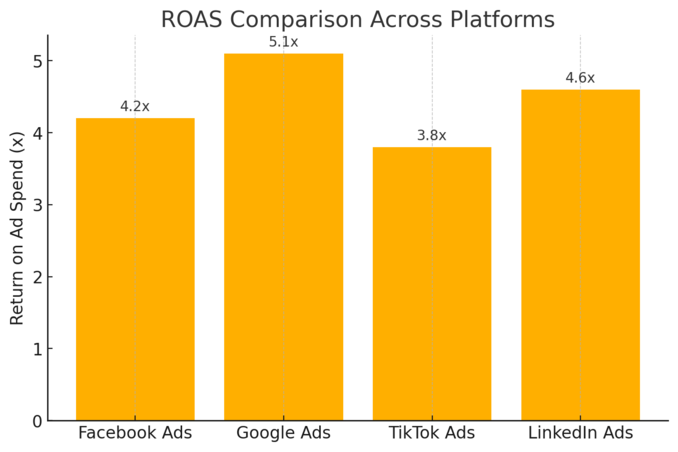
Paid ads are the fastest way to put your business in front of your ideal audience.
I look at them as the accelerator pedal—you just need to know how to steer. When done strategically, they can generate leads and sales while you build organic momentum.
Set Clear Goals and Budgets Before Running Ads
Jumping into ads without clear goals is like driving blindfolded. Define exactly what you want to achieve: traffic, leads, or direct sales.
Here’s how I approach it:
- Traffic Campaigns: Use them to boost brand awareness or test audiences.
- Lead Generation Campaigns: Offer a lead magnet and collect emails.
- Conversion Campaigns: Focus on sales or sign-ups using proven audiences.
Start small—I recommend beginning with $10–$20 per day. Tools like Meta Ads Manager (for Facebook/Instagram) and Google Ads allow you to cap budgets and pause campaigns anytime. This keeps spending controlled while you test what works.
Test Multiple Ad Formats and Targeting Options
The key to success with ads is experimentation. What works for one niche won’t necessarily work for another.
Some ad formats to test:
- Image ads: Great for brand awareness and storytelling.
- Video ads: Perform best for product demonstrations or testimonials.
- Carousel ads: Useful for showing multiple products or benefits in one go.
When setting up targeting, use lookalike audiences (on Facebook) or custom intent audiences (on Google) to reach people similar to your existing customers.
I also recommend testing 3–5 different creatives simultaneously—let data decide what converts best.
Measure ROI and Optimize Campaigns Continuously
Running ads is a constant feedback loop. Always track ROI (Return on Investment) and key metrics like CTR (Click-Through Rate), CPA (Cost Per Acquisition), and conversion rate.
Most platforms, like Google Ads and Facebook Ads Manager, show these stats in your dashboard (Campaigns > Performance). I usually check results after 48–72 hours and pause underperforming ads.
A simple rule:
- If an ad has a CTR below 1%, your creative needs improvement.
- If conversions are low, re-evaluate your landing page or targeting.
Paid ads reward patience and testing. Once you find a profitable setup, scale it slowly—don’t triple the budget overnight.
9. Implement Analytics to Track and Improve Performance
Analytics turn guesswork into strategy. Without data, you can’t know what’s working or where to improve.
I always say analytics are your compass—they guide every business decision you make.
Use Google Analytics and Search Console Effectively
Start with the essentials: install Google Analytics (GA4) and Google Search Console.
Here’s what each does:
- Google Analytics: Tracks user behavior—how long people stay, what pages they visit, and which sources drive traffic.
- Search Console: Monitors your website’s search performance, including keyword rankings and click-through rates.
A quick setup example: In GA4, go to Admin > Data Streams > Add Stream > Website, then paste the tracking code into your website’s header (or use a plugin like MonsterInsights if on WordPress).
I check these dashboards weekly. Seeing where visitors drop off helps me tweak content or fix technical issues before they become costly.
Measure KPIs That Align With Business Goals
Not all data matters equally. Focus on KPIs (Key Performance Indicators) that align with your specific business goals.
For instance:
- Ecommerce store: Conversion rate, cart abandonment, and average order value.
- Content business: Bounce rate, time on page, and email sign-ups.
- Service business: Form submissions and booked consultations.
I advise keeping a simple dashboard in Google Looker Studio—it automatically visualizes your KPIs in charts. This helps you see trends at a glance instead of sifting through endless spreadsheets.
Adjust Strategies Based on Real Data Insights
Data only helps if you act on it. Use monthly reviews to refine what’s working and fix what’s not.
For example, if your blog post on “DIY home decor” gets high traffic but low conversions, test a new call-to-action or lead magnet. If a landing page has a 70% bounce rate, simplify the design or improve load speed.
In my own projects, these small, data-driven tweaks often produce a 20–30% performance improvement within a few weeks.
10. Build Scalable Systems and Automations
Growth without structure leads to burnout. That’s why I’m a big believer in building scalable systems early. Automation helps you focus on strategy and creativity rather than repetitive tasks.
Automate Repetitive Business Tasks
Automation saves hours every week. You can automate nearly any recurring activity—social media posting, invoicing, email responses, or data entry.
Some tools I often recommend:
- Zapier: Connects apps (e.g., Google Sheets → Slack → Gmail).
- Later: Automates social media scheduling.
- QuickBooks: Handles bookkeeping and recurring invoices automatically.
Set it once, and let it run. I once calculated that automating just social posts and emails saved me around 10 hours a week. That’s time you can reinvest in strategy or product development.
Use CRM and Workflow Tools for Efficiency
A CRM (Customer Relationship Management) system keeps customer data, communication, and deals organized in one place. Tools like HubSpot or Pipedrive make it simple.
For example, in HubSpot: Go to Contacts > Create Pipeline > Add Stages > Automate Follow-Up Emails.
This ensures no lead slips through the cracks.
If your team is growing, workflow tools like ClickUp or Asana help assign tasks, set deadlines, and track progress transparently. You’ll instantly see where bottlenecks occur.
Outsource Strategically to Focus on Growth
You don’t have to do everything yourself—nor should you. Outsourcing allows you to stay in your zone of genius while experts handle other areas.
Here’s how I usually decide what to outsource:
- Repetitive or technical tasks (e.g., video editing, bookkeeping).
- Areas that aren’t my strengths (e.g., paid ad management).
- Time-consuming activities with low ROI.
Platforms like Upwork and Fiverr Pro make it easy to find vetted freelancers. Just remember: outsourcing works best when you’ve already built clear systems and SOPs (Standard Operating Procedures). That way, new team members can plug in smoothly.
Pro Tip: Sustainable growth happens when you combine smart systems with human creativity. Automation should free your time for strategy—not replace the personal touch that makes your business truly stand out.

I’m Juxhin, the voice behind The Justifiable.
I’ve spent 6+ years building blogs, managing affiliate campaigns, and testing the messy world of online business. Here, I cut the fluff and share the strategies that actually move the needle — so you can build income that’s sustainable, not speculative.
Related posts:
 Increase Landing Page Conversion Rate
 How to Grow Your Online Business Fast and Scale to 6 Figures
 How to Grow Online Business Through Social Media Step by Step
 How to Grow Online Business on Instagram Organically and Quickly
 Online Business Courses: Start Your Entrepreneurial Journey Today
 How to Grow an Online Business That Scales While You Sleep