
Table of Contents
Some links on The Justifiable are affiliate links, meaning we may earn a small commission at no extra cost to you. Read full disclaimer.
If you’ve been looking into doba shopify as a potential solution for running a dropshipping store, you’re probably wondering whether it’s actually worth your time and money or just another platform that sounds better on paper.
This article is for Shopify store owners, beginners exploring dropshipping, and experienced sellers considering Doba as a supplier network.
I’ll answer one core question clearly: is Doba Shopify worth using for dropshipping stores today?
What Is Doba Shopify And How Does It Work With Shopify
Doba Shopify is a dropshipping integration that connects your Shopify store to a curated network of wholesale suppliers.
Instead of finding suppliers one by one, Doba acts as a middle layer that manages product access, inventory updates, and order routing for you.
How Doba Connects Suppliers To Shopify Stores
At its core, Doba is a supplier marketplace with a built-in Shopify app. Once you install the app, you’re essentially plugging your store into Doba’s supplier directory.
How the connection works in practice:
- Doba maintains relationships with hundreds of suppliers, mainly US-based wholesalers.
- You browse products inside the Doba dashboard, not supplier websites.
- When you choose a product, Doba becomes the bridge between your store and the supplier.
From what I’ve seen, this setup appeals most to store owners who don’t want to negotiate with suppliers directly or worry about minimum order quantities.
The tradeoff is control. You’re relying on Doba’s rules, pricing, and supplier standards rather than building direct partnerships.
One thing worth knowing upfront: Doba is not a supplier itself. It’s a platform that aggregates suppliers and standardizes how you work with them.
That distinction matters when issues pop up, because support often sits between you and the actual product source.
Product Import And Sync Process Inside Shopify
Importing products from Doba into Shopify is relatively straightforward, but it’s not as lightweight as some newer tools.
What the import process looks like:
- Select products inside the Doba dashboard.
- Push them into your Shopify store with mapped titles, descriptions, variants, and images.
- Set pricing rules manually or with markup presets.
Inventory and price syncing happens automatically, but updates are not always real-time.
In my experience, this delay can matter if you’re selling fast-moving items or running ads. If a supplier runs out of stock, your Shopify listing may lag behind by a few hours.
Another thing to watch is product content quality. Many listings use generic wholesale descriptions. You’ll almost always want to rewrite copy and optimize images if you care about conversion rates or SEO.
Order Fulfillment Flow From Customer To Supplier
Order fulfillment is where Doba tries to save you time, but it’s also where complexity shows up.
The typical order flow:
- A customer places an order on your Shopify store.
- The order syncs to Doba automatically.
- Doba forwards the order to the supplier.
- The supplier ships the product and provides tracking back through Doba.
You don’t manually place orders, which is helpful. However, you also don’t control fulfillment speed directly. If a supplier is slow to process, you’re the one explaining delays to customers.
This setup works best for stores with clear shipping expectations listed upfront. If you promise fast delivery, you may run into friction depending on the supplier behind the product.
Automation Level Compared To Other Dropshipping Tools
Doba Shopify sits in the middle of the automation spectrum.
What Doba automates well:
- Supplier access without outreach
- Order forwarding
- Inventory syncing
Where it feels limited:
- No advanced dynamic pricing rules
- Limited branding or packaging customization
- Slower product research workflows compared to newer tools
Compared to tools like DSers or Spocket, Doba feels more “enterprise wholesale” than “growth hacker friendly.” That’s not good or bad by default. It just means it’s better suited for methodical store builders than trend-driven dropshippers.
Doba Shopify Pricing Plans And Real Cost Breakdown
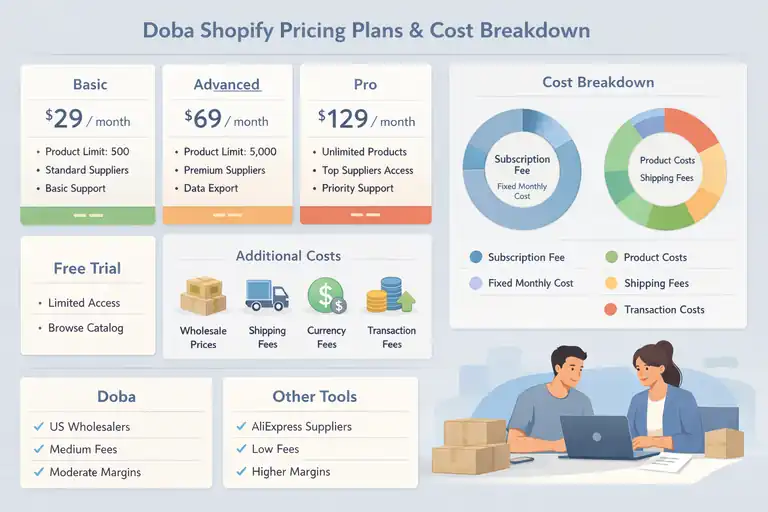
Pricing is one of the biggest decision points with Doba Shopify, especially for new store owners watching margins closely. Doba uses a subscription model, which means you pay before you sell anything.
Monthly Subscription Tiers And Feature Differences
Doba typically offers multiple pricing tiers, billed monthly or annually.
Common plan differences include:
- Number of products you can list
- Access to premium suppliers
- Data export and reporting features
- Priority support
Entry-level plans are designed for small catalogs, while higher tiers unlock broader supplier access. What’s important to understand is that pricing does not include product costs or shipping. You’re paying for access, not inventory.
In my opinion, this pricing structure makes sense only if you plan to actively list and test products. Paying a monthly fee while experimenting slowly can feel expensive fast.
Hidden Costs That Affect Dropshipping Profit Margins
The subscription fee is just the starting point.
Additional costs many sellers overlook:
- Higher wholesale prices compared to direct suppliers
- Separate shipping fees per order
- Limited ability to negotiate bulk discounts
- Currency or transaction fees depending on supplier location
Because Doba sits between you and suppliers, margins are often thinner than AliExpress-style dropshipping. That’s not necessarily a dealbreaker, but it means pricing strategy matters more. Low-ticket impulse products are harder to make work here.
Free Trial Limitations And What You Can Actually Test
Doba does offer a free trial, but it’s more of a preview than a full test environment.
What you can usually do:
- Browse the product catalog
- Explore supplier data
- Test the dashboard interface
What’s restricted:
- Full order processing
- Long-term product performance testing
- Real fulfillment speed evaluation
This means you can validate usability, but not profitability. I always suggest using the trial to assess product quality and data accuracy rather than expecting it to prove ROI.
Cost Comparison With Other Shopify Dropshipping Tools
Here’s a simple comparison to put Doba Shopify in context:
| Platform | Monthly Fee | Supplier Type | Margin Flexibility | Best For |
| Doba | Medium–High | US Wholesalers | Moderate | Structured wholesale dropshipping |
| Spocket | Medium | US/EU Suppliers | Higher | Faster shipping, branded stores |
| DSers | Low | AliExpress | High | Trend testing, low-cost entry |
Doba is rarely the cheapest option, but it can reduce operational friction if you value supplier consistency over experimentation. Whether that’s worth the cost depends entirely on your business model and risk tolerance.
Product Selection Quality And Supplier Network Depth
This is where most people either gain confidence in Doba or quietly lose interest.
The platform lives or dies by the quality of its catalog and the reliability of the suppliers behind it, so it’s worth slowing down here.
Size And Diversity Of Doba Product Catalog
Doba advertises access to millions of products, but raw numbers don’t tell the full story. In reality, the catalog feels wide rather than deep.
You’ll find strong coverage in:
- Home goods and furniture
- Office supplies and B2B-style products
- Health, wellness, and personal care
- Electronics accessories and general merchandise
Where it struggles is trend-driven categories like viral TikTok products or fast-fashion items. From what I’ve seen, Doba is better suited for evergreen products that sell steadily over time rather than quick-hit trends.
One practical example: if you’re building a home office Shopify store, Doba can stock desks, chairs, lighting, and accessories from multiple suppliers in one place. If you’re chasing the next impulse-buy gadget, you may feel limited fast.
Supplier Vetting Standards And Reliability Factors
Doba does vet suppliers, which is one of its biggest selling points. Suppliers are typically established wholesalers, not random overseas factories.
What vetting usually includes:
- Business verification and tax documentation
- Warehouse location checks
- Shipping capability validation
That said, vetting doesn’t equal perfection. Some suppliers are excellent communicators. Others are slow and transactional. Because Doba sits in the middle, you don’t always get direct visibility into supplier performance until orders are already flowing.
In my experience, reliability varies by category. Office and industrial suppliers tend to be more consistent than lifestyle or gift-focused vendors.
Brand Restrictions And Reselling Limitations
This is an area that catches new sellers off guard.
Many Doba products come with:
- MAP pricing rules (minimum advertised price)
- Brand resale restrictions
- Marketplace exclusions (Amazon, Walmart, etc.)
You need to read supplier terms carefully before listing. Some products are Shopify-only. Others prohibit paid ads using brand names. If you ignore these rules, listings can be pulled or accounts flagged.
If your goal is brand-building or private labeling, Doba is not ideal. Packaging and branding control is minimal, and you’re usually selling generic wholesale items.
Product Data Accuracy And Inventory Updates
Product data quality is mixed but serviceable.
Strengths include:
- Structured SKUs and variants
- Consistent supplier pricing formats
- Basic spec information
Weak spots show up in:
- Generic product descriptions
- Occasional image reuse across multiple sellers
- Inventory sync delays during high-volume periods
Inventory updates are automated, but not always instant. For low-volume stores, this rarely matters.
For ad-driven stores, a few hours of delay can mean overselling. I usually recommend setting conservative stock rules inside Shopify to avoid awkward customer emails later.
Doba Shopify Integration Performance And Ease Of Use
Doba’s Shopify integration feels functional rather than flashy. It does the job, but it won’t wow you with speed or modern UX.
Shopify App Setup Experience For New Store Owners
Installing the Doba Shopify app is straightforward, even if you’re new.
The basic setup flow looks like:
- Install the app from Shopify
- Connect your Doba account
- Configure pricing rules and import settings
- Sync products into your store
Most users can get through setup in under an hour. The biggest slowdown usually comes from decision fatigue, not technical issues. Choosing products, pricing, and categories takes more time than the actual integration.
If you’ve never used a dropshipping app before, Doba’s terminology can feel a bit “wholesale-heavy,” but it’s manageable.
Dashboard Usability And Workflow Efficiency
The Doba dashboard is information-dense. It’s built for managing catalogs, not browsing inspiration.
What works well:
- Clear supplier attribution
- Centralized order management
- Search and filtering for large catalogs
What feels dated:
- Slower page loads
- Less visual product discovery
- Extra clicks for common actions
Compared to newer tools, workflows feel more manual. You’ll spend more time reviewing products and less time rapidly testing ideas. For some store owners, that’s a feature, not a bug.
Sync Errors, Glitches, And Common Technical Issues
No integration is perfect, and Doba is no exception.
Common issues reported by sellers include:
- Products importing without full descriptions
- Variant mismatches between Shopify and supplier data
- Delayed tracking updates
Most issues are fixable, but not always instantly. Support response times are reasonable, though resolution may depend on the supplier, not just Doba.
My advice: don’t launch ads on day one. Let products sit live for a few days and watch how data syncs before driving traffic.
Learning Curve For Non-Technical Users
For non-technical users, Doba Shopify is approachable but not beginner-friendly in the modern sense.
You’ll need to be comfortable with:
- Shopify product management
- Pricing math and margin planning
- Reading supplier terms carefully
There’s no hand-holding wizard that builds your store for you. But if you’re willing to learn, the system is stable and predictable.
I’ve found that sellers who enjoy structure tend to like Doba more than those who want speed and experimentation.
Shipping Times, Fulfillment Speed, And Tracking Accuracy
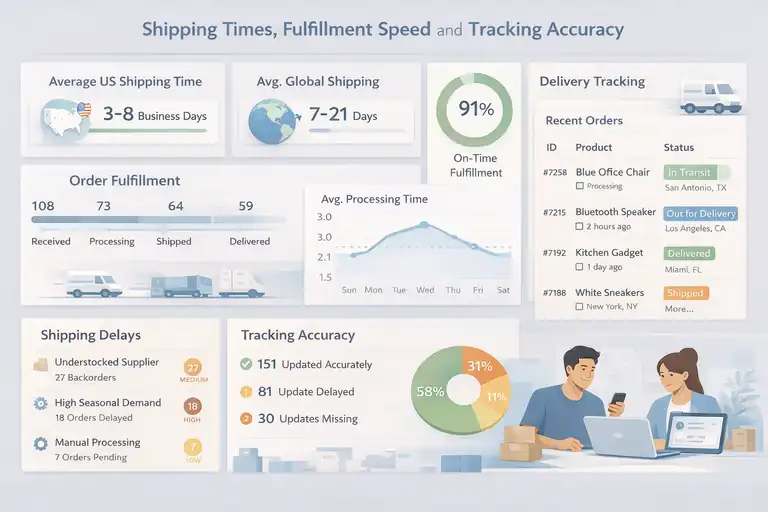
Shipping is where theory meets reality. You can have a great-looking Shopify store, but if orders arrive late or tracking goes dark, customers lose trust fast.
With doba shopify, shipping performance depends heavily on the supplier behind each product.
Average Shipping Speeds Across US And Global Orders
Most Doba suppliers are US-based, which is a real advantage compared to overseas dropshipping. That said, “US-based” doesn’t automatically mean fast.
Here’s what shipping usually looks like in practice:
- US domestic orders: 3–8 business days after fulfillment
- Processing time before shipping: 1–4 business days
- International orders: 7–21 days, depending on supplier and carrier
From what I’ve seen, this places Doba squarely in the “acceptable but not impressive” range. It’s faster than AliExpress standard shipping, but slower than premium US fulfillment networks.
A real-world scenario: if you sell a $120 office chair, a 7-day delivery window feels reasonable to customers. If you sell a $25 impulse item, that same shipping speed suddenly feels slow. Product type matters a lot here.
Order Processing Delays And Backorder Risks
Processing delays are the silent killer of customer satisfaction.
Common causes include:
- Supplier stock discrepancies
- High seasonal demand
- Manual fulfillment queues at the supplier level
Doba does sync inventory, but updates aren’t always instant. That creates backorder risk, especially during sales spikes.
In my experience, the safest approach is to avoid selling products with low available stock unless you’re comfortable pausing ads quickly.
One practical tip: build a buffer into your delivery messaging. Saying “Ships in 5–10 business days” reduces support tickets dramatically compared to overly optimistic promises.
Tracking Updates And Customer Communication
Tracking exists, but it’s not always smooth.
What usually works well:
- Tracking numbers are provided once shipped
- Shopify updates automatically in most cases
Where issues show up:
- Tracking numbers activate late
- Carrier updates lag behind actual movement
- International tracking can be vague
Customers don’t mind waiting nearly as much as they mind uncertainty. I suggest setting up proactive shipping emails that explain the process clearly, especially if tracking doesn’t update for a few days.
Impact Of Shipping Performance On Customer Trust
Shipping performance directly affects:
- Refund requests
- Chargebacks
- Repeat purchases
Even a one-day delay can feel big if expectations aren’t managed. Doba Shopify works best when you position your store as reliable and transparent, not “Amazon-fast.” Trust comes from clarity, not speed alone.
Profit Margins And Scalability For Shopify Dropshipping
Margins are where many sellers quietly struggle with Doba. It’s not impossible to be profitable, but the math needs to work from day one.
Wholesale Pricing Versus Market Competition
Doba’s wholesale pricing is consistent, but rarely the cheapest.
What that means in real terms:
- You’re often competing with sellers using direct suppliers
- Price wars are harder to win
- Value positioning matters more than discounts
In my experience, Doba works better for stores that sell solutions rather than commodities. Bundles, niche positioning, and content-driven sales pages help offset tighter pricing.
Margin Constraints On Popular Product Categories
Some categories are especially challenging.
Lower-margin categories include:
- Consumer electronics accessories
- Generic fitness gear
- Small home gadgets
Higher-margin opportunities tend to be:
- Furniture and large items
- B2B or office products
- Specialized home improvement goods
If your gross margin after ads is under 30%, scaling becomes stressful fast. I usually aim for products that can support at least a 40–50% gross margin before marketing costs.
Scaling Challenges With Volume-Based Orders
Scaling with Doba isn’t just about ads. It’s about operations.
Common scaling friction points:
- Supplier capacity limits
- Inconsistent fulfillment times at higher volume
- Limited negotiation leverage without direct supplier relationships
Because Doba sits between you and suppliers, scaling past a certain volume can feel constrained. You don’t always get priority treatment, even if you’re moving serious units.
Long-Term Viability For Growing Shopify Stores
Long term, Doba Shopify works best as:
- A starting point for validated products
- A low-risk way to test wholesale demand
- A bridge to direct supplier relationships
Many successful sellers eventually graduate away from Doba once they identify winning products. That’s not a failure of the platform. It’s actually a sign it did its job.
Pros And Cons Of Using Doba Shopify For Dropshipping
This is the part where we cut through marketing and talk honestly. Doba Shopify has clear strengths, but it also comes with tradeoffs that matter depending on how you run your store.
Strengths That Make Doba Appealing To Some Sellers
Doba shines for sellers who value structure and predictability.
Where Doba genuinely helps:
- Access to vetted US-based wholesale suppliers
- No minimum order quantities for most products
- Centralized order routing and inventory syncing
- Lower risk of scam suppliers compared to open marketplaces
In my experience, this is comforting if you’ve ever dealt with disappearing suppliers or inconsistent product quality. You’re trading flexibility for stability, and for some stores, that’s a smart move.
Doba also works well for higher-priced items. Selling a $200 desk or a $300 office cabinet feels more natural through a wholesale-style system than a fast-fashion dropshipping setup.
Weaknesses That Commonly Frustrate Store Owners
This is where expectations matter.
Common frustrations include:
- Monthly subscription costs before profits
- Thinner margins compared to direct sourcing
- Limited branding and customization options
- Slower product discovery compared to trend-based tools
I’ve seen sellers quit Doba not because it’s broken, but because it didn’t match their mindset. If you want speed, experimentation, and viral product testing, Doba will feel slow and rigid.
Situations Where Doba Makes Sense Strategically
Doba Shopify makes strategic sense when:
- You’re building a niche store with evergreen products
- You want US-based fulfillment without supplier outreach
- You prefer stable catalogs over constant product testing
- You plan to validate products before sourcing directly
Think of Doba as a controlled environment. It’s not flashy, but it’s steady. For some business models, that’s exactly what you want.
When Doba Is Likely The Wrong Choice
Doba is probably not for you if:
- You rely on ultra-low product costs
- You want private labeling or custom packaging
- You plan to scale aggressively with paid ads
- You thrive on testing dozens of products weekly
There’s nothing wrong with those goals. They just don’t align well with how Doba is built.
Doba Shopify Compared To Top Dropshipping Alternatives
Context matters. Doba Shopify doesn’t exist in a vacuum, so let’s compare it directly to other popular tools.
Doba Vs Spocket For US-Based Dropshipping
Spocket focuses on faster shipping and more modern UX.
| Feature | Doba | Spocket |
| Supplier Type | US Wholesalers | US/EU Suppliers |
| Shipping Speed | Moderate | Faster |
| Branding Options | Limited | Better |
| Pricing | Higher Entry | Mid-Range |
If shipping speed and branded invoices matter to you, Spocket usually wins. If you prefer wholesale stability, Doba has the edge.
Doba Vs DSers For AliExpress-Focused Stores
DSers is built for AliExpress automation.
| Feature | Doba | DSers |
| Product Costs | Higher | Lower |
| Shipping Speed | Faster Than AliExpress | Slower |
| Trend Testing | Weak | Strong |
| Subscription Cost | Higher | Lower |
If you’re testing trends or scaling ads quickly, DSers is more flexible. Doba is safer, but slower.
Doba Vs Modalyst For Brand-Centric Products
Modalyst leans toward brand-friendly dropshipping.
| Feature | Doba | Modalyst |
| Branded Products | Rare | Common |
| Private Label | No | Limited |
| UX Modernity | Basic | Polished |
| Supplier Control | Low | Medium |
Modalyst is better if aesthetics and brand perception matter. Doba feels more transactional.
Doba Vs SaleHoo For Supplier Research
SaleHoo is a directory, not a fulfillment tool.
| Feature | Doba | SaleHoo |
| Fulfillment Automation | Yes | No |
| Supplier Vetting | Yes | Yes |
| Direct Supplier Contact | No | Yes |
| Best Use Case | Hands-Off Ops | Direct Relationships |
If you want control and negotiation power, SaleHoo is better. If you want convenience, Doba wins.
Who Should Use Doba Shopify And Who Should Avoid It
This final decision comes down to alignment, not hype.
Best-Fit Store Types And Business Models
Doba Shopify works best for:
- Niche Shopify stores with focused catalogs
- Higher-ticket or B2B-style products
- Sellers who value supplier reliability over speed
- Store owners testing wholesale demand safely
If you’re patient and methodical, Doba can feel refreshing.
Beginner Scenarios Where Doba Helps Or Hurts
For beginners, Doba is a mixed bag.
It helps if you:
- Want fewer supplier headaches
- Prefer guided structure
- Are okay paying for stability
It hurts if you:
- Have a tight budget
- Expect fast wins
- Don’t understand pricing math yet
I’ve seen beginners succeed with Doba, but only when expectations are realistic.
Advanced Sellers And Brand Builders Considerations
Advanced sellers often use Doba as a stepping stone.
Typical progression:
- Validate product demand using Doba
- Identify top-performing SKUs
- Source directly from suppliers or manufacturers
- Improve margins and branding
Doba isn’t the endgame for most brands, and that’s okay.
Decision Checklist Before Committing To Doba
Before committing, ask yourself:
- Can my margins support a subscription fee?
- Am I selling evergreen, not trendy, products?
- Do I value reliability over experimentation?
- Am I okay without custom branding?
If you answer yes to most of these, doba shopify may be worth using for your dropshipping store.
FAQ
Is Doba Shopify good for beginners?
Doba Shopify can work for beginners who want structured supplier access and fewer scams, but it’s not ideal if you’re on a tight budget. The monthly fee and thinner margins mean beginners need basic pricing and profit math skills before jumping in.
Is Doba Shopify profitable for dropshipping?
Doba Shopify can be profitable, but margins are usually tighter than AliExpress-style dropshipping. It works best for higher-ticket or evergreen products where shipping reliability and supplier stability matter more than ultra-low costs.
Is Doba Shopify better than other dropshipping tools?
Doba Shopify is better for sellers who want vetted US-based suppliers and hands-off fulfillment. It’s not better for trend testing, private labeling, or fast ad-driven scaling, where tools like DSers or Spocket perform better.

I’m Juxhin, the voice behind The Justifiable.
I’ve spent 6+ years building blogs, managing affiliate campaigns, and testing the messy world of online business. Here, I cut the fluff and share the strategies that actually move the needle — so you can build income that’s sustainable, not speculative.
Related posts:
 What Is Headless Commerce and Why Does It Matter?
 Ecommerce Website Design Tips That Boost Conversions Fast
 How Do You Grow Online Business Without Big Marketing Budgets?
 15 Trending Dropshipping Products That Sell Right Now
 Dropshipping Guide: Build a Store That Actually Sells
 Start Dropshipping Today: A Simple Guide for Complete Beginners