
Table of Contents
Some links on The Justifiable are affiliate links, meaning we may earn a small commission at no extra cost to you. Read full disclaimer.
If you’re searching for a brevo review for small business, you’re probably trying to answer one simple question: Is Brevo actually worth using for email marketing and automation in 2026?
Small businesses don’t have the luxury of wasting time migrating between tools, dealing with hidden costs, or struggling with complicated marketing software.
In this review, we’ll break down what Brevo really offers—from pricing and automation to real-world results—so you can decide whether it’s the right platform for your business.
Brevo Review For Small Business: What It Actually Offers
If you’re reading this brevo review for small business, you’re probably trying to understand whether Brevo can actually replace multiple marketing tools.
Brevo positions itself as an all-in-one marketing platform that combines email marketing, automation, CRM, transactional emails, and SMS in a single dashboard—something that can significantly simplify marketing operations for small teams.
Email Marketing Capabilities For Small Business Campaigns
At its core, Brevo is an email marketing platform designed for businesses that want to communicate with customers regularly without complex software.
In practical terms, Brevo gives small businesses the tools to create newsletters, promotional campaigns, product launches, and automated email sequences.
Here’s what the email marketing toolkit typically includes:
- Drag-and-Drop Email Builder: Allows you to design emails visually without coding.
- Pre-built Templates: Useful for promotions, newsletters, announcements, and ecommerce campaigns.
- Contact Segmentation: You can divide subscribers based on behavior, location, purchase history, or engagement.
- Personalization Tokens: Insert first names, product recommendations, or custom fields automatically.
Imagine you run a small online clothing store. Instead of sending one generic email to everyone, you could segment subscribers like this:
- Customers who purchased in the last 30 days
- Customers who abandoned carts
- Subscribers who have never purchased
Each segment can receive tailored messaging, which typically increases open rates and conversions.
From what I’ve seen across many campaigns, segmentation alone can improve email revenue by 20–30% compared to sending bulk emails.
Brevo also allows A/B testing, which means you can test two subject lines or email layouts to see which performs better. For small businesses trying to optimize marketing without hiring a full marketing team, this is a huge advantage.
Another small but useful feature is the send-time optimization option. It analyzes previous engagement and sends emails when your subscribers are most likely to open them.
Marketing Automation Workflows Small Teams Can Build
One of the reasons Brevo has gained traction with small businesses is its automation builder. Automation simply means emails (or messages) that send automatically based on customer behavior.
Let me break it down with a simple example.
Imagine someone signs up for your email list through your website.
Instead of manually emailing every subscriber, Brevo lets you create an automated sequence.
Example workflow:
- Trigger: Visitor subscribes to your email list.
- Email 1: Welcome email introducing your brand.
- Email 2: Sent 2 days later with educational content.
- Email 3: Sent 4 days later with a discount or offer.
This entire process runs automatically.
Small teams can build several useful automations:
- Welcome sequences for new subscribers
- Abandoned cart recovery emails
- Post-purchase follow-ups
- Customer re-engagement campaigns
- Lead nurturing for service businesses
For example, a local digital agency could build a workflow where someone downloads a free SEO checklist and then receives a 5-email educational series that gradually introduces their services.
Brevo’s automation editor uses a visual workflow builder, meaning you can drag triggers, conditions, and actions into a sequence. You don’t need coding knowledge.
In my experience, even simple automation flows can drive 30–50% of total email revenue for many small businesses.
CRM And Contact Management Built Into Brevo
One of Brevo’s biggest differentiators is that it includes a built-in CRM (Customer Relationship Management system).
Most email marketing tools focus only on sending campaigns, but Brevo also helps you manage relationships with leads and customers.
Here’s what the CRM allows you to do:
- Store detailed contact profiles
- Track customer interactions
- Manage sales pipelines
- Add notes and tasks to contacts
- Track deals and opportunities
Let’s say you run a consulting business.
Instead of keeping leads in spreadsheets, you can store them directly inside Brevo’s CRM. Each contact profile can show:
- Email engagement history
- Website activity
- Sales notes
- Deal stage
You can even assign contacts to different sales stages like:
- New lead
- Contacted
- Proposal sent
- Negotiation
- Closed deal
For service businesses, this becomes extremely helpful because marketing and sales live in the same system.
From what I’ve seen, this eliminates the need for separate CRM tools like HubSpot or Pipedrive for many smaller businesses.
Transactional Email And SMS Marketing Features
Another major advantage Brevo offers is transactional messaging.
Transactional emails are automated messages triggered by user actions, such as:
- Order confirmations
- Password resets
- Shipping notifications
- Account updates
If you run an ecommerce store, these emails are critical.
Brevo provides a dedicated transactional email system that can be connected to your website or store through API or integrations.
This infrastructure is actually one of Brevo’s strongest technical features because the platform originally focused heavily on email infrastructure and deliverability.
In addition to email, Brevo also supports SMS marketing.
This allows you to send:
- Flash sale alerts
- Appointment reminders
- Order updates
- Event notifications
SMS typically has open rates above 90%, which makes it extremely effective for time-sensitive messages.
For example, a restaurant might send an SMS to subscribers at 4 PM promoting a dinner special for the evening.
Combining email and SMS in one platform simplifies customer communication significantly.
Brevo Integrations With Ecommerce And Website Tools
Most small businesses already use several platforms for their website, store, or CRM. Brevo integrates with many of these tools so you can connect everything together.
Common integrations include:
For example, if you run a Shopify store, Brevo can automatically sync:
- Customer lists
- Order data
- Product purchases
- Abandoned carts
This data can then trigger automated email campaigns.
Example automation:
- Customer abandons cart
- Brevo automatically sends reminder email
- If no purchase occurs within 24 hours, send discount offer
This type of automation is widely used in ecommerce because abandoned cart recovery alone can recover 10–15% of lost sales.
Zapier integration also allows Brevo to connect with thousands of apps, meaning you can trigger automations based on events from other software tools.
For small businesses trying to streamline marketing operations, these integrations make Brevo much more flexible than basic email tools.
Brevo Pricing For Small Business: Plans And Real Costs
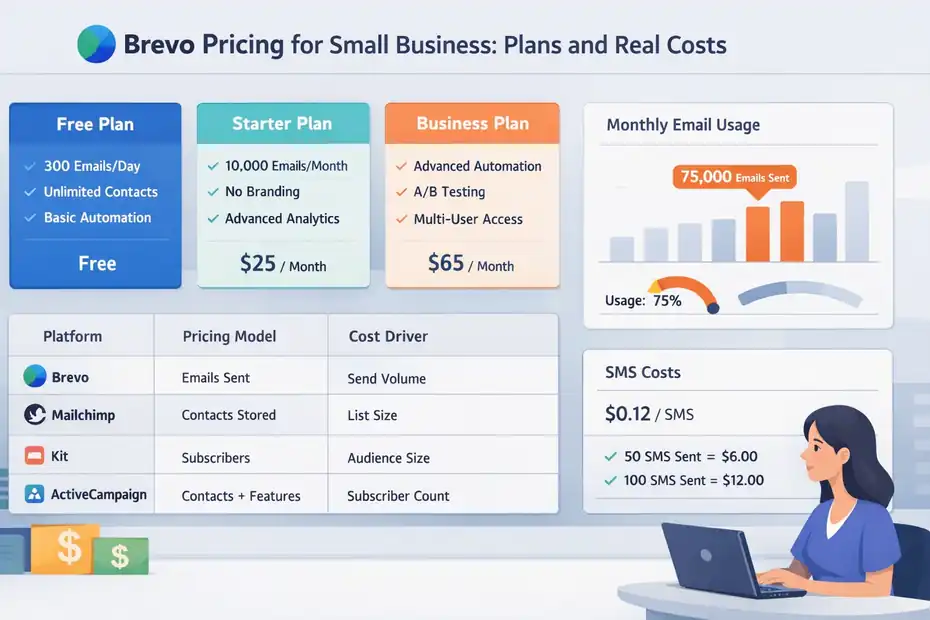
Pricing is one of the biggest reasons small businesses consider Brevo in the first place. Unlike many email marketing platforms that charge based on contact list size, Brevo primarily charges based on the number of emails you send.
This pricing model can make a huge difference for businesses with large contact lists but moderate sending frequency.
Free Plan Limits And What You Can Actually Do
Brevo’s free plan is surprisingly capable compared to most email marketing platforms.
Here’s what it typically includes:
- Up to 300 emails per day
- Unlimited contacts
- Email campaign builder
- Basic automation workflows
- Transactional email capability
- CRM access
For new businesses or bloggers, this plan is often enough to start building an email list.
Let’s say you’re starting a blog and collecting leads through a simple newsletter signup form.
With 300 emails per day, you could send:
- A weekly newsletter to 2,000+ subscribers
- Automated welcome emails
- Basic marketing campaigns
However, there are a few limitations.
Emails sent on the free plan include Brevo branding, and advanced automation features are restricted.
Still, compared to many competitors that limit contact numbers on free plans, Brevo’s unlimited contacts feature makes it particularly attractive for early-stage businesses.
Starter Plan Features And When It Makes Sense
The Starter plan is where Brevo becomes a realistic marketing tool for growing businesses.
This plan removes many of the free plan limitations and increases sending capacity.
Key features typically include:
- Higher monthly email sending limits
- No Brevo branding in emails
- Advanced campaign analytics
- Email support
This plan works well for businesses sending newsletters regularly but not yet relying heavily on automation.
For example, imagine a small ecommerce store with 10,000 subscribers sending weekly campaigns.
With Brevo’s pricing model, you pay based on email volume rather than list size. That means you’re not penalized for having a large audience.
From what I’ve seen, this can significantly reduce email marketing costs compared to platforms like Mailchimp.
Business Plan Automation And Advanced Marketing Tools
The Business plan unlocks Brevo’s more advanced marketing capabilities.
This tier includes:
- Advanced marketing automation workflows
- A/B testing
- Predictive send-time optimization
- Advanced reporting dashboards
- Multi-user collaboration
For growing businesses running multiple campaigns and automation sequences, this plan often provides the most value.
For example, an ecommerce store might use the Business plan to run:
- Abandoned cart recovery automation
- Post-purchase product recommendation sequences
- VIP customer segmentation campaigns
These advanced automations can dramatically increase revenue.
Industry studies show that automated email campaigns generate 320% more revenue than non-automated campaigns, according to research from Campaign Monitor.
Hidden Costs Small Businesses Should Know About
One of the most common concerns with marketing platforms is unexpected costs.
Brevo is generally transparent, but there are a few areas where costs can increase depending on your needs.
Examples include:
- SMS credits purchased separately
- Additional email sending limits
- Dedicated IP addresses for high-volume senders
- Extra automation features on higher plans
For many small businesses, SMS usage is the most common additional expense.
SMS pricing varies by country and message volume.
However, most businesses only use SMS for high-impact messages like flash sales or appointment reminders, so the cost tends to remain manageable.
How Brevo Pricing Compares To Competitors
When comparing Brevo pricing to other platforms, the biggest difference is the email-volume model instead of list-size pricing.
Here’s a simplified comparison:
| Platform | Pricing Model | Typical Cost Driver |
|---|---|---|
| Brevo | Emails sent | Monthly send volume |
| Mailchimp | Contacts stored | List size |
| Kit | Subscribers | Audience size |
| ActiveCampaign | Contacts + features | Subscriber count |
For businesses with large lists but fewer campaigns, Brevo is often significantly cheaper.
For example: A business with 25,000 subscribers sending 4 emails per month may pay far less on Brevo than on platforms that charge based on subscriber count. However, if your business sends daily campaigns to massive lists, pricing differences become less dramatic.
Overall, Brevo’s pricing structure tends to favor:
- Growing email lists
- Moderate sending frequency
- Small teams wanting predictable costs
Brevo Email Marketing Performance: Deliverability And Results
Even the best marketing platform is useless if emails don’t reach the inbox. Deliverability and campaign performance are critical factors in any email marketing platform evaluation.
Email Deliverability Rates And Inbox Placement
Email deliverability refers to the percentage of emails that successfully land in subscribers’ inboxes instead of spam folders.
Brevo has historically invested heavily in its email infrastructure, which is one reason the platform gained popularity.
Industry benchmarks suggest typical email deliverability rates range between 85% and 95%, depending on list quality and sender reputation.
Brevo generally performs within this range.
Several factors contribute to strong deliverability:
- Dedicated sending infrastructure
- Reputation monitoring
- Spam compliance tools
- Authentication protocols like SPF and DKIM
In simple terms, these technical systems help email providers trust the messages being sent.
However, deliverability also depends on how you use the platform.
For example: If you import old or purchased email lists, your open rates will likely drop and spam complaints may increase.
In my experience, maintaining a clean email list and sending relevant content matters far more than the platform itself.
Campaign Analytics And Reporting Features
Brevo includes a solid analytics dashboard that helps businesses measure campaign performance.
Key metrics include:
- Open rate
- Click-through rate
- Unsubscribe rate
- Bounce rate
- Revenue tracking (via integrations)
For small businesses, these metrics provide valuable insight into what’s working.
Example scenario:
Imagine you send two campaigns promoting the same product.
Campaign A has:
- 32% open rate
- 3% click rate
Campaign B has:
- 24% open rate
- 8% click rate
Even though fewer people opened the second email, the higher click rate may generate more sales.
Brevo’s reporting tools help you identify these patterns so you can optimize future campaigns.
Automation Performance For Lead Nurturing
Automation sequences often outperform regular campaigns because they target users based on behavior.
Typical examples include:
- Welcome sequences
- Lead nurturing emails
- Educational onboarding series
For many businesses, automated emails generate the majority of engagement.
A well-structured welcome sequence often achieves:
- 50–70% open rates
- 10–20% click rates
These numbers are significantly higher than standard promotional campaigns.
From what I’ve seen, small businesses that implement even simple automation flows see dramatic improvements in engagement and conversions.
SMS Marketing Results For Small Business Promotions
SMS marketing works differently from email because it reaches customers instantly on their phones.
Typical SMS metrics:
- Open rates above 90%
- Click rates between 20–35%
For local businesses especially, SMS can be incredibly effective.
Examples include:
- Appointment reminders for service providers
- Event notifications
- Limited-time promotions
The key is moderation. Sending too many SMS messages can quickly annoy customers.
A good strategy is to combine email and SMS.
Example campaign:
- Email announcement for a weekend sale
- SMS reminder on the final day
This approach increases visibility without overwhelming subscribers.
Real Marketing Outcomes Businesses See With Brevo
Ultimately, the real question behind any brevo review for small business is simple: Does it actually produce results?
From what I’ve observed across many businesses, Brevo performs well when used strategically.
Typical outcomes include:
- Increased email engagement from segmentation
- Higher revenue from automated campaigns
- Improved customer retention through follow-ups
Imagine a small ecommerce brand with 5,000 subscribers.
By implementing three automation workflows:
- Welcome sequence
- Abandoned cart emails
- Post-purchase cross-sell emails
They could generate a steady stream of automated sales each month.
For many small businesses, the biggest benefit isn’t just email marketing—it’s having email, CRM, automation, and SMS together in one platform.
Brevo Pros For Small Business Marketing Teams
In this part of the brevo review for small business, we’ll look at where Brevo genuinely stands out.
For many small companies, the biggest advantage isn’t just email marketing—it’s having several marketing tools combined into one simple platform.
All-In-One Marketing Platform Without Multiple Tools
One of Brevo’s biggest strengths is that it consolidates several marketing systems into a single dashboard. Instead of juggling separate tools for email marketing, CRM, automation, and SMS campaigns, Brevo bundles these features together.
For many small businesses, this matters more than it sounds. Running multiple tools often creates operational friction.
Imagine a typical small business marketing stack:
- Email marketing platform
- CRM system
- SMS marketing service
- Automation software
- Analytics dashboard
Managing these tools individually can create integration headaches and additional monthly costs.
Brevo simplifies this by combining:
- Email campaigns
- Marketing automation
- CRM pipelines
- SMS marketing
- Transactional emails
Let me give you a realistic scenario.
Imagine you run a local fitness studio. A new visitor signs up through your website for a free trial class.
Here’s how Brevo could handle that process automatically:
- Contact enters CRM as a new lead
- Automated welcome email is sent
- SMS reminder is scheduled before the class
- Follow-up email asks for feedback after the visit
All of this can happen without switching between platforms.
From what I’ve seen, this consolidation is one of the biggest productivity wins for small teams. Instead of learning five different systems, you manage everything in one place.
Affordable Pricing Compared To Major Email Platforms
Another reason Brevo has become popular among small businesses is its pricing model.
Most email platforms charge based on subscriber count. That means the larger your email list becomes, the more expensive your marketing software gets.
Brevo takes a different approach.
Instead of charging primarily for contacts, it focuses on the number of emails sent each month.
This can dramatically reduce costs for businesses with growing lists.
Let’s look at a simplified example.
| Platform | Pricing Model | Typical Cost Driver |
|---|---|---|
| Brevo | Emails sent | Monthly send volume |
| Mailchimp | Subscribers | List size |
| Kit | Subscribers | Audience size |
| ActiveCampaign | Contacts | Contact count |
Imagine a small ecommerce store with 20,000 subscribers sending four campaigns per month.
With contact-based pricing platforms, costs could increase significantly once you pass certain subscriber thresholds.
With Brevo, you may pay far less if your email frequency remains moderate.
In my experience, this pricing structure works especially well for:
- Ecommerce stores
- Bloggers building large audiences
- SaaS startups with many inactive users
It removes the fear of growing your email list too quickly.
Built-In CRM Useful For Lead And Customer Tracking
Brevo includes a built-in CRM, which is surprisingly useful for service-based businesses and agencies.
CRM stands for Customer Relationship Management. In simple terms, it’s a system that helps you track leads, conversations, and sales opportunities.
Many small businesses still manage leads using spreadsheets or scattered email threads.
Brevo’s CRM organizes this information in one place.
Here’s what you can typically track inside the contact profile:
- Email engagement history
- Website activity
- Sales pipeline stage
- Internal notes about the customer
- Task reminders for follow-ups
Imagine you run a freelance web design business.
A potential client downloads a pricing guide from your website.
With Brevo’s CRM, you could automatically:
- Add them to your CRM pipeline
- Tag them as a design lead
- Trigger a follow-up email sequence
Later, when you review your pipeline, you’ll see where each lead stands in the sales process.
For small teams without a dedicated sales system, this built-in CRM removes the need for separate tools like Pipedrive or Zoho CRM.
Powerful Automation Without Technical Complexity
Marketing automation is where many platforms become complicated.
Some tools are powerful but require technical knowledge to set up properly. Brevo attempts to solve this by using a visual automation builder.
Instead of writing complex logic, you build workflows using a drag-and-drop interface.
Let me break down a simple automation example.
- Step 1: Trigger – A visitor subscribes to your newsletter.
- Step 2: Action – Send welcome email immediately.
- Step 3: Delay – Wait two days.
- Step 4: Action – Send educational content email.
- Step 5: Condition – Check if the subscriber clicked a link.
- Step 6: Action – Send promotional offer.
This entire process runs automatically.
Even beginners can build workflows like:
- Welcome sequences
- Abandoned cart recovery
- Product recommendation emails
- Lead nurturing campaigns
According to email marketing research, automated email flows generate roughly 320% more revenue than standard campaigns.
In my opinion, the real advantage of Brevo is that it gives small teams automation power without requiring a marketing automation specialist.
Strong Transactional Email Infrastructure
Transactional email is one of Brevo’s most technically strong features.
These are emails triggered by user actions rather than marketing campaigns.
Examples include:
- Order confirmations
- Password reset emails
- Shipping updates
- Account notifications
Brevo originally built its reputation as an email infrastructure provider. That means its transactional email system is reliable and scalable.
If you run an ecommerce store, transactional emails often represent the most important communication with customers.
Customers expect these emails to arrive instantly.
Brevo’s system supports:
- API-based email sending
- SMTP relay connections
- Dedicated IP addresses for large senders
For developers and ecommerce platforms, this infrastructure makes Brevo more than just an email marketing tool.
It becomes a full messaging platform.
Brevo Cons Small Businesses Should Consider First
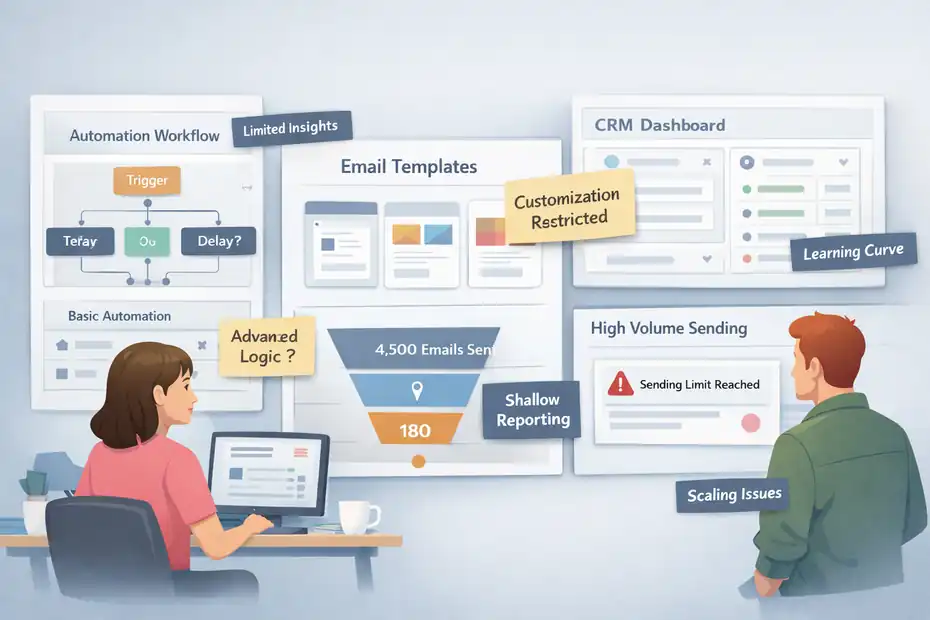
No platform is perfect. In this brevo review for small business, it’s important to look at the potential downsides as well.
Brevo works very well for many small teams, but there are areas where it may not be the best choice depending on your needs.
Automation Builder Limitations Compared To Advanced Tools
Brevo’s automation builder is powerful for most small business use cases, but it’s not as advanced as specialized automation platforms.
Tools like ActiveCampaign provide deeper automation logic.
For example, advanced marketing automation platforms often include:
- Predictive customer behavior tracking
- Multi-branch behavioral segmentation
- Deep conditional logic
- Machine-learning personalization
Brevo focuses on simplicity.
This is great for beginners, but advanced marketers may eventually feel limited.
Let me explain with a scenario.
Imagine you run a SaaS product and want to trigger email campaigns based on very specific behaviors like:
- Feature usage frequency
- In-app behavior patterns
- Complex scoring models
Brevo can handle basic event triggers, but it may struggle with extremely detailed automation logic.
For most small businesses, this won’t be a problem. But for complex growth marketing strategies, more advanced platforms may offer better flexibility.
Template And Design Flexibility Constraints
Brevo includes a drag-and-drop email editor and several email templates. For most campaigns, these templates work well.
However, designers who want full creative freedom may find the editor slightly restrictive.
Some limitations include:
- Fewer advanced design blocks
- Limited animation or interactive features
- Template customization boundaries
For example, brands with very specific design systems may prefer tools that allow deeper HTML customization.
That said, Brevo does allow custom HTML emails.
But building those often requires developer knowledge.
In my experience, most small businesses prioritize speed over perfect design anyway. If you just want to launch professional-looking campaigns quickly, Brevo’s editor does the job.
Learning Curve For CRM And Automation Setup
Although Brevo tries to simplify its interface, the platform still contains several features packed into one system.
For new users, the dashboard can initially feel overwhelming.
You’re dealing with multiple modules like:
- Email campaigns
- Automation workflows
- CRM pipelines
- Transactional messaging
- Contact segmentation
Understanding how these pieces connect takes some time.
When I first explored platforms like this, the biggest learning curve was understanding automation triggers and segmentation rules.
Once you learn these concepts, the system becomes much easier to manage.
But beginners should expect to spend a few hours learning the workflow builder and CRM structure before everything feels intuitive.
Reporting Depth Compared To Enterprise Platforms
Brevo provides useful campaign analytics, but it does not reach the level of enterprise marketing platforms.
Advanced platforms sometimes include:
- Customer lifetime value tracking
- Multi-touch attribution modeling
- AI-driven engagement predictions
- Advanced revenue attribution dashboards
Brevo focuses more on core metrics like:
- Open rates
- Click-through rates
- Bounce rates
- Conversion tracking
For most small businesses, these metrics are more than enough.
However, large marketing teams analyzing complex funnel performance may prefer tools with deeper reporting capabilities.
Scaling Challenges For High-Volume Senders
Brevo works extremely well for small to medium email volumes.
However, very large senders may encounter limitations.
For example, businesses sending millions of emails per month often require:
- Dedicated sending infrastructure
- Custom deliverability monitoring
- Enterprise-level support
Brevo supports dedicated IP addresses, but some large companies eventually move to enterprise email platforms designed specifically for massive sending volumes.
That said, the majority of small businesses will never reach these limits.
For typical email marketing volumes, Brevo remains more than capable.
Brevo Vs Other Email Platforms Small Businesses Use
Choosing an email marketing platform often comes down to comparing several popular options. In this part of the brevo review for small business, we’ll look at how Brevo stacks up against other well-known tools.
Brevo Vs Mailchimp For Small Business Marketing
Mailchimp has long been one of the most recognizable email marketing platforms.
However, its pricing model has changed significantly over the years.
Key differences include:
| Feature | Brevo | Mailchimp |
|---|---|---|
| Pricing Model | Email volume | Contact-based |
| CRM Included | Yes | Limited |
| SMS Marketing | Yes | Limited |
| Automation | Good | Good |
| Ease of Use | Moderate | Very beginner-friendly |
Mailchimp often wins when it comes to beginner-friendly interfaces.
However, many businesses eventually switch because pricing increases rapidly as contact lists grow.
Brevo’s pricing structure often becomes more attractive for larger email lists.
Brevo Vs Kit For Creators And Email Automation
Kit is popular among bloggers, YouTubers, and digital creators.
Its automation and tagging systems are designed specifically for audience-driven businesses.
Key differences include:
| Feature | Brevo | Kit |
|---|---|---|
| Target Audience | Businesses | Creators |
| CRM | Included | Minimal |
| Email Automation | Visual builder | Strong tagging system |
| Pricing Model | Email volume | Subscriber-based |
Kit works extremely well for content creators who rely on audience segmentation.
However, Brevo offers a broader feature set for businesses needing CRM, SMS marketing, and transactional messaging.
Brevo Vs ActiveCampaign For Advanced Automation
ActiveCampaign is often considered one of the most powerful automation platforms available.
Key differences include:
| Feature | Brevo | ActiveCampaign |
|---|---|---|
| Automation Complexity | Moderate | Advanced |
| CRM | Included | Advanced CRM |
| Ease of Setup | Easier | More complex |
| Pricing | Lower | Higher |
ActiveCampaign excels in complex marketing automation.
However, many small businesses find its setup and pricing overwhelming.
Brevo provides a simpler solution for teams that want automation without technical complexity.
Brevo Vs HubSpot For CRM And Marketing Features
HubSpot is a full-scale marketing and CRM ecosystem used by many larger companies.
Key differences include:
| Feature | Brevo | HubSpot |
|---|---|---|
| CRM | Included | Industry-leading |
| Marketing Automation | Good | Advanced |
| Pricing | Affordable | Expensive |
| Target Audience | SMBs | Growing companies |
HubSpot is incredibly powerful, but it can become expensive quickly.
Brevo offers a more budget-friendly option for businesses that want similar core features without enterprise pricing.
Which Platform Is Best Based On Business Size
Choosing the right platform depends heavily on the size and complexity of your business.
Here’s a simple guideline I often suggest:
- Small startups or bloggers: Brevo or Kit
- Small ecommerce stores: Brevo or Mailchimp
- Growing SaaS companies: ActiveCampaign
- Larger companies with sales teams: HubSpot
From what I’ve seen, Brevo hits a sweet spot for small businesses that want:
- Email marketing
- Automation
- CRM
- SMS messaging
All within a single platform that remains relatively affordable as the business grows.
Brevo Setup Process For Small Businesses Starting Today
Getting started with Brevo is fairly straightforward, but the quality of your setup matters more than most people realize.
In my experience, small businesses get better results when they treat setup like infrastructure, not admin work, because list quality, domain trust, tracking, and automation logic all start here.
Creating A Brevo Account And Verifying Your Domain
The first step is simple: Create your account, add your sender details, and verify the domain you plan to send from. Brevo requires sender verification for transactional emails, and domain authentication improves trust with inbox providers by using DNS records such as SPF, DKIM, and domain verification TXT records.
Here’s how I’d do it if I were setting up a small business account from scratch:
- Step 1: Create the account using a real business email tied to your domain, not a generic free address.
- Step 2: Add your sender name and sender email so your campaigns look consistent.
- Step 3: Verify the sender if prompted.
- Step 4: Authenticate the domain in your DNS settings so your emails are more likely to land in the inbox instead of spam.
This is the part many people rush through, and then they wonder why opens are weak. I believe domain authentication is one of the highest-leverage setup tasks you can do on day one. If you skip it, you’re basically asking mailbox providers to trust a stranger.
A practical tip: use a sending address like hello@yourdomain.com or newsletter@yourdomain.com and keep it stable. Consistency helps subscribers recognize you faster, and that recognition often improves opens over time. For many of us, better deliverability starts long before the first campaign is written.
Importing Contacts And Organizing Email Lists
Once your account is live, the next job is importing contacts the right way. Brevo supports contact imports and then lets you organize people using lists, attributes, and segmentation logic, which is much better than dumping everyone into one giant bucket.
Its automation system is built around contact management and predefined conditions, so structure matters early.
Let me break it down in a way that actually works for a small business:
- Tip 1: Import only permission-based contacts.
- Tip 2: Separate customers, leads, newsletter subscribers, and inactive contacts.
- Tip 3: Add useful attributes like first name, product interest, city, service type, or last purchase date.
- Tip 4: Tag the source so you know whether someone came from a form, checkout, lead magnet, or manual upload.
Imagine you run a local home cleaning company. Instead of one master list, you could organize contacts into groups like quote requests, past customers, recurring clients, and seasonal leads. That makes future campaigns much more relevant.
I suggest cleaning your spreadsheet before import. Remove duplicates, obvious spam addresses, and old contacts you haven’t emailed in years. A smaller clean list will usually outperform a larger messy one. That’s not exciting advice, but it’s real. You do not need 10,000 cold contacts. You need the right 1,000.
Creating Your First Campaign Using Brevo Templates
Brevo includes a drag-and-drop editor and templates, which makes your first campaign easier to build without coding. The platform is designed so beginners can create emails, build contact lists, and set preferences without needing a developer.
For a first campaign, keep it simple. I recommend using one goal, one audience, and one main call to action.
Here’s a clean first-campaign framework:
- Step 1: Choose a template that matches the purpose, not just the prettiest design.
- Step 2: Add your logo, colors, and business details so the email feels familiar.
- Step 3: Write a subject line that is specific, not clever for the sake of it.
- Step 4: Use one clear CTA such as book now, shop the offer, or reply to get a quote.
- Step 5: Send a test email to yourself and check mobile formatting before launch.
A realistic example: if you own a bakery, your first email does not need five sections, three banners, and an identity crisis. A much better version is a short weekly special email with one strong image, one offer, and one order button.
From what I’ve seen, small businesses often overdesign their first campaign. The better move is clarity. Plain, helpful, and relevant usually beats fancy. If your subscriber can understand the offer in five seconds, you’re already ahead of many brands.
Building Your First Automation Workflow
This is where Brevo starts becoming more than an email sender. Its automation tools are built around triggers and actions, and the Brevo tracker can connect website activity to automations, segments, and visitor behavior in real time.
The tracker records page views automatically and, when installed through supported plugins, can also track purchase events like cart updates and completed orders.
For your first workflow, do not start with something complicated. Build one automation that solves one obvious business problem.
A strong beginner workflow looks like this:
- Automation 1: Welcome series for new subscribers.
- Trigger: A person joins your list.
- Email 1: Welcome and brand introduction.
- Email 2: Best offer, best content, or next step.
- Email 3: Reminder or proof-driven follow-up.
If you sell services, replace the discount with a booking CTA. If you run ecommerce, use product education or a first-order incentive. If you run a local business, send timing-based reminders.
I believe the smartest first automation is the one you would otherwise send manually every single week. That is usually your best automation candidate because it already reflects real customer behavior. Fancy branching workflows can wait.
Also, think about timing. Too many businesses dump three emails into two days and call it nurturing. Give people space to act. Automation should feel useful, not clingy.
Connecting Brevo To Ecommerce Or Website Platforms
Brevo becomes much more powerful once it is connected to your site or store. Its tracker can monitor page views, form submissions from Brevo forms, and website actions, while ecommerce plugins can sync customers, orders, products, and customer events into the platform.
WooCommerce sync, for example, can import contacts during setup, keep new and updated contacts synced in real time, sync ecommerce data automatically, and install the Brevo tracker on the store.
This matters because connection creates context. Context creates better automation.
A practical setup path looks like this:
- Step 1: Connect your website or store integration.
- Step 2: Confirm that contacts are syncing correctly.
- Step 3: Check whether ecommerce data or page activity is being recorded.
- Step 4: Build campaigns and automations around actual customer behavior instead of guesses.
Imagine you run a small online pet store. Once your store is connected, you can identify people who viewed a category, abandoned a cart, or completed an order, then follow up with smarter messaging. That’s a major jump from generic newsletters.
One caution here: always verify consent settings during sync. Just because a platform can import contacts does not mean every contact should receive marketing email automatically. Clean syncing and clear consent will save you from deliverability trouble later.
Brevo Use Cases That Work Best For Small Businesses
Brevo is not equally valuable for every business model. It performs best when you need a mix of email marketing, customer data, automation, and follow-up messaging without building a huge software stack around it.
Local Businesses Running Promotional Campaigns
For local businesses, Brevo is strongest when the goal is repeat visibility and simple promotions. A restaurant, salon, gym, clinic, or boutique usually does not need enterprise-level marketing complexity. They need a reliable way to collect contacts, send timely offers, and stay top of mind.
A smart local setup usually includes:
- A welcome email after signup.
- A monthly or biweekly promotion.
- Reminder messages tied to events or seasonal demand.
- Basic segmentation by location, service type, or visit history.
Imagine you run a med spa. You could collect leads from a booking form, send a welcome email, follow up with a treatment introduction, and promote a limited seasonal package a week before demand spikes. That is practical, measurable, and easy to maintain.
In my experience, local businesses get the best results when the messaging is tied to real customer timing moments. Examples include back-to-school, summer prep, holiday appointments, slow weekdays, or membership renewals. That timing is often more important than flashy copy.
Where people struggle is overcomplicating the strategy. You do not need a 17-step funnel to fill Tuesday appointments. You need a relevant offer, a clean list, and consistent follow-up. Brevo fits that model well because it can handle email, SMS, and basic automation without forcing a giant learning curve.
Ecommerce Stores Sending Transactional Emails
Ecommerce is one of the clearest use cases for Brevo because the platform combines marketing email with transactional email. Brevo offers transactional sending, email API options, and ecommerce syncing that can bring orders, customers, products, and real-time store activity into your account. Its WooCommerce integration also installs tracking and syncs ecommerce data automatically.
This matters because online stores need two kinds of messaging:
- Transactional messages: Order confirmations, shipping updates, password resets.
- Marketing messages: Welcome emails, cart recovery, product recommendations, repeat-purchase nudges.
Brevo is a strong fit when you want both under one roof.
Imagine you’re running a small skincare store. A customer places an order and receives the confirmation instantly. A few days later, they get a follow-up with usage tips. Two weeks after that, they receive a cross-sell email for a related product. That sequence feels natural because it follows the buying journey.
I suggest ecommerce brands start with three automations before doing anything fancy:
- Welcome flow.
- Abandoned cart recovery.
- Post-purchase follow-up.
Those three flows usually do more revenue work than endless one-off campaigns. And they are easier to maintain when customer and order data are already synced.
Service Businesses Managing Leads With CRM
Service businesses often care less about bulk promotions and more about lead movement. That’s where Brevo’s CRM side becomes useful. Brevo supports pipelines, stages, deals, companies, tasks, and task reminders, which helps turn scattered inquiries into a visible sales process.
You can also automate deal and task creation based on triggers such as form submissions or lead scoring events.
This setup works well for businesses like:
- Consultants.
- Agencies.
- Coaches.
- Law firms.
- B2B service providers.
- Home service companies with quote requests.
Imagine you run a web design studio. A new lead submits a contact form. Instead of letting that inquiry sit in an inbox graveyard, you can move it into a pipeline, assign a deal stage, add follow-up tasks, and trigger a short nurture sequence.
I believe this is one of Brevo’s most underrated use cases. A lot of small service businesses buy separate systems for email and sales follow-up when what they really need is one place to keep leads moving. If your business wins through relationships and follow-ups, the CRM layer matters more than people think.
The key is to keep the pipeline simple. Too many stages create fake sophistication and real confusion. Start with something like new lead, discovery booked, proposal sent, won, lost. Simple pipelines are easier to manage and easier to trust.
Agencies Managing Email Campaigns For Clients
Agencies can use Brevo effectively when they need to manage campaigns, automations, and lead flows for smaller clients that do not need an enterprise platform. This works especially well for agencies serving local businesses, small ecommerce brands, or service companies that want results without massive software costs.
The reason this setup works is not magic. It’s operational simplicity.
An agency can usually standardize:
- Client onboarding flows.
- Promotional campaign templates.
- Reporting check-ins.
- Welcome automations.
- Re-engagement sequences.
- Basic CRM pipeline logic for sales-led clients.
Imagine a boutique marketing agency managing five local business accounts. If each client has a basic promotion calendar, one welcome workflow, and one seasonal campaign structure, the workload becomes repeatable rather than chaotic.
From what I’ve seen, agencies get the most value when they productize their service around clear deliverables instead of promising unlimited custom automation. Brevo is a better fit for repeatable execution than for wildly custom enterprise architecture.
One honest note: agencies should still be careful with account structure, approvals, and list hygiene. A bad client import can damage performance fast. The platform can help you move quicker, but it cannot save you from messy client data.
SaaS Startups Using Automation For User Onboarding
Brevo can also work well for SaaS startups, especially in earlier stages where the team needs lifecycle messaging without enterprise overhead. Marketing automation in Brevo is built around triggers tied to user actions, website behavior, and contact management, which suits onboarding and activation flows well.
A good SaaS onboarding sequence usually aims to do three things:
- Get the user to the first meaningful action.
- Reduce drop-off in the first week.
- Introduce the next upgrade or retention step.
Imagine a startup offering appointment scheduling software. A trial user signs up but does not connect their calendar. That should trigger a reminder. If they connect the calendar but do not publish a booking page, that should trigger a setup tutorial. If they reach activation, that should trigger upgrade education.
That is where Brevo can be useful. It helps you respond to user behavior instead of blasting everyone with the same generic onboarding emails.
I would not recommend starting with 25 branches and perfect behavioral scoring. I’d start with the core blockers that stop users from reaching value. In many SaaS businesses, the winning onboarding email is not the prettiest one. It’s the one that removes friction at the exact moment a user gets stuck.
Who Brevo Is Best For And Who Should Avoid It
This is where a good brevo review for small business should get honest. Brevo is a strong fit for many companies, but not all.
The right decision depends less on hype and more on your business model, sending volume, team size, and how advanced your automation needs really are.
Small Businesses That Need Affordable Marketing Tools
Brevo is often a strong choice for small businesses that want solid marketing features without paying for a bloated stack. Its pricing page positions the platform around marketing, sales, and transactional tools, and it is built so beginners can create emails, lists, and preferences without heavy technical setup.
I believe Brevo makes the most sense when you need:
- Email marketing.
- A usable CRM.
- Basic to mid-level automation.
- Transactional messaging.
- Room to grow without a dramatic pricing shock.
This is especially attractive if your team is small and one person is doing a bit of everything. That’s the real small business situation most of the time. You are not building a giant martech ecosystem. You are trying to get campaigns out, follow up with leads, and keep customers warm.
A good fit often looks like this: one founder, one marketing assistant, one sales process, and one need for clearer customer communication. In that situation, affordability matters, but so does tool consolidation. Brevo checks both boxes better than many platforms built for larger teams or more specialized use cases.
Businesses Switching From Expensive Email Platforms
Brevo is also worth considering if you’re tired of paying more every time your contact list grows. Brevo’s pricing is centered around plans for marketing, sales, and transactional messaging, while some competing email platforms still heavily emphasize marketing plans tied to list or plan thresholds.
Mailchimp’s official pricing pages, for example, revolve around plan tiers for marketing and upsells as contact needs grow.
This matters if you’re dealing with migration fear, which is real. A lot of businesses stay in expensive tools because switching feels annoying, not because the value is still there.
A move to Brevo tends to make sense when:
- Your list is growing faster than your revenue.
- You are paying for features you barely use.
- You want one tool instead of several subscriptions.
- You are sending moderate campaigns, not extreme enterprise volume.
In my experience, the best time to switch is before your software cost becomes emotionally painful. Once you resent every invoice, you start avoiding list growth, and that is the opposite of what good email marketing should do.
Teams That Want Email, CRM, And SMS In One Platform
Some businesses do not need the absolute best standalone email tool, CRM, and SMS system. They need one platform that does all three well enough. That is a very different buying decision.
Brevo is a sensible option for teams that want:
- Email campaigns for ongoing communication.
- CRM visibility for leads and deals.
- SMS for reminders or urgent promotions.
- Automation connecting all of the above.
The value here is operational clarity. You can see what a contact did, where they are in the pipeline, and what message they should receive next without bouncing between unrelated tools.
Imagine a small B2B company with a five-person team. Marketing needs newsletters, sales needs lead tracking, and customer success needs simple follow-up workflows. That team usually benefits more from connected systems than from elite specialized tools that do not talk to each other cleanly.
From what I’ve seen, this is one of the strongest reasons to choose Brevo. Not because every module is the deepest in the market, but because the overall system reduces friction. And for small teams, less friction often means more execution.
Companies That May Need More Advanced Automation
Brevo may not be the best fit if your business depends on highly sophisticated automation logic, deep behavioral modeling, or complex revenue attribution. Brevo’s automation is built around triggers and conditions, but some specialized platforms are designed for much more advanced branching and customer journey analysis.
Brevo’s own automation documentation describes automations as repetitive tasks initiated by predefined conditions and user actions, which is powerful, but not the same as enterprise-grade orchestration.
Here’s the practical test I use: if your team is talking constantly about lead scoring models, product-qualified leads, multi-touch attribution, predictive branching, and custom event architecture, you may outgrow Brevo faster.
That does not mean Brevo is weak. It means your use case may be unusually demanding.
I suggest being honest about whether you really need that complexity right now. Many businesses say they need advanced automation when what they actually need is one welcome sequence, one nurture flow, and better segmentation. But if advanced journey design is truly core to growth, another platform may fit better.
When Another Platform Might Be A Better Fit
Another platform may be a better fit if your business falls into one of these categories:
- Creator-first brand needing audience-centric tagging and monetization flows.
- Enterprise sales team needing deep CRM customization.
- High-volume sender needing custom deliverability infrastructure.
- Marketing team needing advanced attribution and reporting depth.
- Complex SaaS lifecycle team needing heavy product-event orchestration.
This is where platform choice becomes more about operating model than features on a checklist.
I believe Brevo is strongest in the middle: growing small businesses, lean teams, practical automation, and consolidated messaging. It is weaker at the extremes, where businesses need either ultra-simple creator tools or highly advanced enterprise systems.
So who should avoid it? Usually, companies that already know they need a specialist tool. If your business is unusually content-driven, sales-heavy, or automation-obsessed, it may be smarter to choose a platform built specifically for that style of work from day one.
FAQ
What is Brevo and how does it help small businesses?
Brevo is an all-in-one marketing platform that combines email marketing, automation, CRM, SMS messaging, and transactional email tools. For small businesses, it helps manage customer communication, automate marketing campaigns, and track leads in one place without needing multiple marketing tools.
Is Brevo good for small business email marketing?
Yes, Brevo works well for small business email marketing because it offers affordable pricing, automation workflows, and segmentation tools. Businesses can send newsletters, promotional campaigns, and automated emails while tracking engagement metrics like open rates and click-through rates to improve performance.
How much does Brevo cost for small businesses?
Brevo offers a free plan with limited daily emails and paid plans based on email sending volume rather than subscriber count. This pricing structure makes it affordable for small businesses with growing email lists because costs depend on how many emails you send each month.
What are the main pros and cons of Brevo for small businesses?
The biggest advantages of Brevo include affordable pricing, built-in CRM features, automation tools, and email plus SMS messaging in one platform. The main drawbacks include limited advanced automation compared to enterprise tools and fewer design customization options in email templates.
Is Brevo better than Mailchimp for small businesses?
Brevo can be more affordable than Mailchimp for small businesses because pricing is based on email volume instead of subscriber count. Businesses with large contact lists but moderate email sending often find Brevo more cost-effective while still providing strong automation and marketing features.

I’m Juxhin, the voice behind The Justifiable.
I’ve spent 6+ years building blogs, managing affiliate campaigns, and testing the messy world of online business. Here, I cut the fluff and share the strategies that actually move the needle — so you can build income that’s sustainable, not speculative.
Related posts:
 Constant Contact Pricing: Which Plan Is Right for You?
 Aweber Systems Review: Reliable Email for Marketers
 Top 10 Email Service Providers: Powerful Tools for Businesses
 What Is Aweber Communications
 What Is MailerLite Used For? Powerful Features Explained
 GetResponse Vs Omnisend: Best Ecommerce Email Flow Builder