
Table of Contents
Some links on The Justifiable are affiliate links, meaning we may earn a small commission at no extra cost to you. Read full disclaimer.
If you’re asking whether is it hard to migrate from Klaviyo is a real concern, I’d say this: the migration itself usually is not the hardest part. The hard part is protecting your revenue, deliverability, segmentation logic, and subscriber consent while you move.
In most cases, exporting contacts, templates, and basic assets is very doable. What catches people off guard is everything around the move, like rebuilding flows, checking form behavior, mapping fields correctly, and making sure you do not accidentally email suppressed contacts or break live automations.
The honest answer: migrating from Klaviyo is manageable, but rarely effortless
Most people ask this question because they fear a painful rebuild. That fear is valid, but it helps to separate “data transfer” from “system replacement.”
The first part is often simple. The second part is where the real work lives.
Why the move feels harder than people expect
At a surface level, Klaviyo gives you a clear offboarding path. Its own migration-off guide tells you to pause flows, cancel scheduled campaigns, update forms, export contacts, export suppression data, export templates, remove code snippets, disable integrations, and export analytics before canceling the account.
That tells you something important right away: leaving Klaviyo is not just “download CSV and upload elsewhere.” It is an operational project with multiple dependencies.
In my experience, this is why migrations feel emotionally heavier than technically difficult. You are not only moving subscriber records.
You are moving business logic. That includes welcome flows, abandoned cart timing, pop-up behavior, event triggers, custom properties, SMS compliance details, and reporting history.
A lot of that can be recreated, but not always copied over one-to-one. Klaviyo explicitly recommends drafting flows instead of deleting them because deleted flow data is not recoverable. That is a small detail, but it says a lot about the stakes.
Here is the truth no one tells you: the more successful your Klaviyo setup is, the harder it is to leave cleanly. If your account is basic, migration is usually straightforward.
If you have years of segmentation rules, dozens of triggers, SMS logic, and layered revenue attribution, the project becomes less like a simple migration and more like a controlled reimplementation.
What usually transfers easily and what usually does not
Some assets are relatively portable. Contact data can usually be exported and imported through CSV-based processes. Klaviyo supports exporting core contact data and suppression-related data, and platforms like Mailchimp and HubSpot support importing or updating contact records through file imports.
Omnisend even offers a Klaviyo-specific import path for contacts and states that it can transfer email addresses, phone numbers, subscription statuses, custom properties, and consent records.
What does not always transfer cleanly is structure. For example, Mailchimp uses tags and audience organization differently from Klaviyo’s list-and-segment model, so some segmentation has to be rethought rather than copied exactly.
HubSpot also treats marketing eligibility and workflow-based messaging according to its own model, which means imported contacts may still need to be marked as marketing contacts before they behave as expected in campaigns and automations.
That is why I would not call the move “hard” in a purely technical sense. I would call it detail-sensitive. And detail-sensitive projects are exactly the ones that hurt when rushed.
When migrating from Klaviyo is actually easy
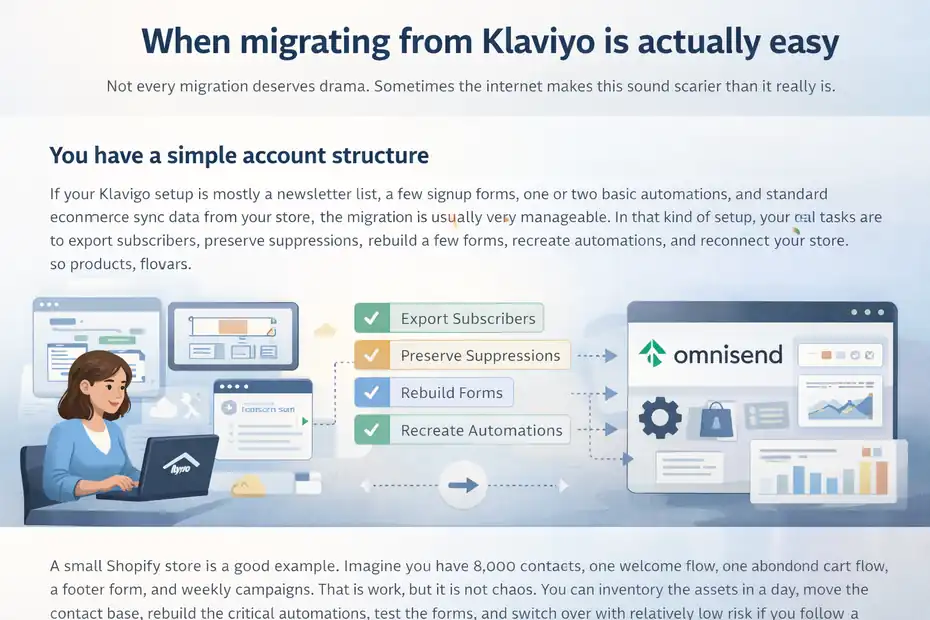
Not every migration deserves drama. Sometimes the internet makes this sound scarier than it really is.
You have a simple account structure
If your Klaviyo setup is mostly a newsletter list, a few signup forms, one or two basic automations, and standard ecommerce sync data from your store, the migration is usually very manageable.
In that kind of setup, your real tasks are to export subscribers, preserve suppressions, rebuild a few forms, recreate automations, and reconnect your store so products, orders, and customer activity flow into the new platform.
Klaviyo’s own migration-off steps align with this kind of straightforward checklist. Omnisend’s migration docs also suggest a fairly structured path when moving from another ESP after the store is connected.
A small Shopify store is a good example. Imagine you have 8,000 contacts, one welcome flow, one abandoned cart flow, a footer form, and weekly campaigns. That is work, but it is not chaos.
You can inventory the assets in a day, move the contact base, rebuild the critical automations, test the forms, and switch over with relatively low risk if you follow a staged checklist.
This is also where I suggest people relax a bit. If your account is simple, the hardest part is usually not the software. It is just staying organized enough not to miss an edge case.
Your destination platform has a defined import path
Migration becomes much easier when the new provider already expects people to leave Klaviyo. Omnisend is the clearest example from the sources here.
It has both a migration guide from Klaviyo and a Klaviyo data import tool that transfers contacts, consent records, subscription statuses, custom properties, and phone numbers. That does not remove all the work, but it cuts down the manual lift significantly.
Mailchimp and HubSpot also support import workflows, but those experiences feel more generic because they are broader platforms rather than Klaviyo-specific import paths.
Mailchimp’s import process supports adding or updating contacts via CSV or connected apps, while HubSpot supports object imports and workflow-based automated emails, but neither source promises a near-native “clone your Klaviyo setup” experience.
That difference matters. When a platform has a dedicated Klaviyo migration route, it usually means the team has already thought through field mapping, consent handling, and subscriber-state issues that would otherwise become your manual cleanup problem.
Your team is willing to rebuild instead of perfectly replicate
This is a mindset shift that saves a lot of pain. The smoothest migrations usually happen when the team says, “We’re going to move the essentials first and improve the rest in version two.”
The roughest ones happen when people try to recreate every branch, conditional split, template variation, and historical quirk exactly as it existed before.
I believe this is one of the biggest hidden advantages of switching. Migration gives you a forced cleanup moment. You can remove dead segments, retire underperforming flows, simplify naming conventions, and stop carrying around automation baggage you no longer need.
Klaviyo itself recommends exporting analytics before leaving, which is useful because it lets you document performance before deciding what deserves to be rebuilt at all.
In other words, migration gets easier the moment you stop treating every old asset like sacred architecture.
When migrating from Klaviyo becomes genuinely difficult
This is the part most articles skip. Not every account should move quickly, and not every move saves money or effort in the long run.
You rely heavily on custom events, deep segmentation, or SMS logic
Klaviyo is strong because it pulls together data, messaging channels, and automation in one environment, and its current positioning emphasizes unified data plus email, SMS, and even WhatsApp-related expansion.
When an account is built around that kind of connected behavior, a migration gets more complex because you are not simply moving campaigns. You are moving triggered logic tied to customer actions and channel permissions.
The biggest friction usually shows up in three places. First, custom properties and event names may not map neatly into the new system. Second, segmentation rules often need to be rebuilt because each platform handles audiences differently.
Third, SMS migrations add extra complications like number porting, keyword audits, and consent handling. Klaviyo specifically tells users leaving SMS to remove or port numbers and audit custom keywords. That is not a casual task.
If your revenue depends on behavior-based automation, I would treat the migration like a mini replatforming project, not just an ESP swap.
You do not have clean data or documented consent
Dirty data turns a manageable migration into a mess. Subscriber records with inconsistent fields, duplicate formatting, outdated tags, unclear opt-in states, or mixed regional compliance rules create problems on import and even bigger problems after go-live.
Mailchimp’s import documentation and troubleshooting pages both make it clear that formatting issues, syntax issues, duplicates, bounces, and unsubscribe status can affect what gets imported successfully.
Omnisend’s Klaviyo import tool highlights consent records for a reason: without a reliable consent trail, your imported database may not behave the way you think it will.
This is one of those areas where I get a bit opinionated. If your team cannot explain exactly how email consent, SMS consent, suppression, and lifecycle status are stored today, you are not ready to migrate next week.
You may still migrate, but the project is going to cost you extra time in validation, cleanup, and post-launch risk control.
You are moving mainly because of price, without measuring the rebuild cost
Pricing is a real reason to leave. Klaviyo still positions its platform around a free entry point, then paid tiers for expanded usage, while alternatives like Omnisend, Mailchimp, and HubSpot have very different pricing structures and plan logic.
Omnisend’s official pricing support content says plans start at $16 per month, Mailchimp’s pricing page highlights plan-based send limits and contact-based tiers, and HubSpot’s pricing structure is broader because it sits inside a larger marketing software ecosystem.
But here is what often gets missed: subscription savings are only part of the equation. You also need to value the internal labor to rebuild flows, re-test event triggers, restyle forms, remap fields, retrain your team, and watch deliverability after launch.
A platform that is $200 or $500 cheaper per month can still be the more expensive choice if the move breaks automations that were quietly producing revenue.
This does not mean price-based migration is wrong. It means it should be modeled like a business decision, not treated like a software impulse purchase.
What you need to audit before you migrate
A good migration starts with an inventory, not an export button.
Audit your live revenue-driving assets first
Before you touch anything, identify the assets that actively make money or capture subscribers. Klaviyo’s own exit guidance starts with flows, scheduled campaigns, and signup forms for a reason.
Those are the moving parts most likely to create either duplicate messaging or immediate revenue loss if mishandled.
Start with a compact audit list:
- Step 1: List every live flow and note its trigger, goal, audience, and average monthly attributed value.
- Step 2: List all active forms, embedded forms, flyouts, popups, and hosted pages.
- Step 3: Check all scheduled campaigns and content calendars for the next 30 days.
- Step 4: Identify every integration that sends data into Klaviyo or relies on Klaviyo events.
- Step 5: Export current performance snapshots so you have a benchmark after the move.
This sounds basic, but it prevents the most common mistake: migrating “data” while forgetting “systems.”
Map every field before you import anything
Field mapping is where silent mistakes happen. A CSV import can look successful while still mangling the details that make segmentation and personalization work.
Mailchimp explicitly discusses formatting guidelines for imports, including tag structure. HubSpot supports more advanced object import behavior, but that flexibility also means you need a clear mapping strategy.
I suggest creating a field map spreadsheet with five columns: source field, destination field, data type, default behavior if empty, and business importance. This forces clarity.
For example, “VIP_customer” might seem obvious until you realize the new platform stores that as a boolean, a tag, or a calculated segment instead of a text property.
The same goes for lifecycle states like active, suppressed, unsubscribed, SMS-only, or email-and-SMS. Those are not cosmetic labels. They determine who can legally and operationally receive messages.
Protect suppression and consent data like it is your most valuable asset
A lot of teams focus on who they want to email and forget to protect who they must not email. That is dangerous. Klaviyo specifically tells users to export suppression data when migrating off the platform.
Omnisend’s Klaviyo import documentation also calls out consent records. These are not side details; they are your safety rails.
If you lose suppression history or import it incorrectly, you can do real damage fast. That could mean mailing people who unsubscribed, texting users without clean permission records, or contaminating your sender reputation with bounced or invalid contacts.
Even if the new platform allows the import, you still need to verify that the imported states behave correctly inside segmentation and sending rules.
I recommend treating suppression validation as a launch blocker. If it is not clean, the migration is not done.
How to migrate from Klaviyo without breaking everything
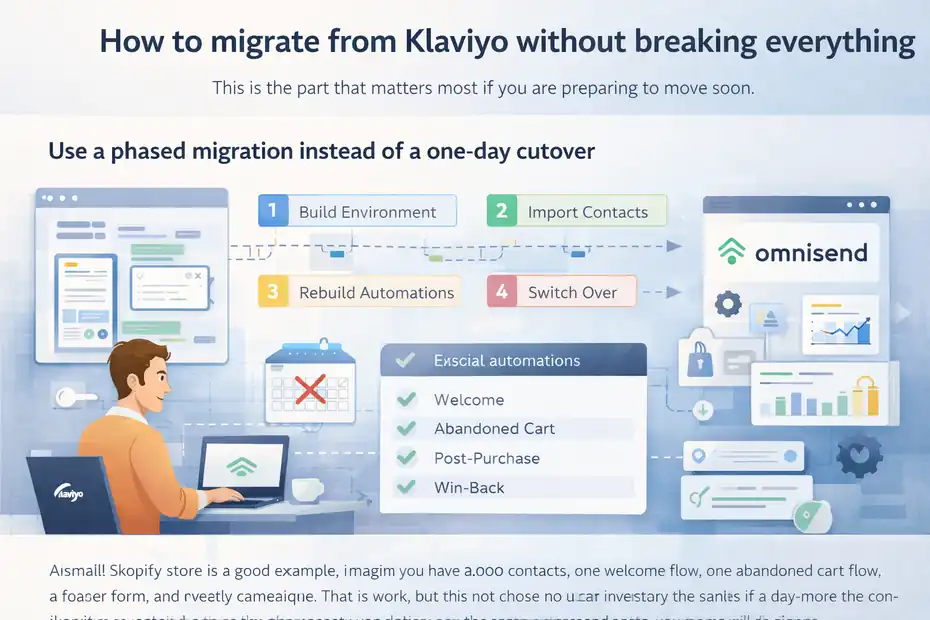
This is the part that matters most if you are preparing to move soon.
Use a phased migration instead of a one-day cutover
A full hard switch sounds efficient, but I rarely think it is the safest option unless your setup is tiny.
Klaviyo recommends turning flows to draft, canceling scheduled campaigns, updating forms, exporting analytics, and only then canceling the account. That sequence naturally supports a phased approach.
A practical migration sequence looks like this:
- Build the new platform environment.
- Connect the store or core data source.
- Import a test sample of contacts.
- Rebuild the essential flows first.
- Recreate forms and subscription capture points.
- Validate suppressions, tags, and custom properties.
- Run internal tests.
- Switch forms and automation entry points.
- Monitor performance.
- Shut down the old platform only after stability is confirmed.
The hidden benefit here is risk isolation. If something breaks, you know where to look.
Rebuild your core automations in priority order
Do not start with the prettiest templates. Start with the automations that protect revenue. For most ecommerce brands, that usually means welcome, browse abandonment if used, abandoned cart, post-purchase, and win-back.
For B2B or lead-gen brands, it may mean lead magnet delivery, inquiry follow-up, lifecycle nurture, and sales handoff emails.
HubSpot documents automated emails through workflows, Omnisend supports migration of workflows and templates from Klaviyo, and Mailchimp supports automation-linked audience structures, but none of that changes the core principle: rebuild by business impact first.
A simple scoring model helps:
- Revenue criticality: High, medium, low
- Trigger complexity: Easy, moderate, hard
- Data dependency: Low, medium, high
- Compliance sensitivity: Low, medium, high
Anything high revenue and low-to-moderate complexity should move first. This avoids the classic mistake of spending two days perfecting a low-impact newsletter template while your abandoned cart flow is still offline.
Test like you do not trust the platform or yourself
I say this with love: migrations fail because people assume imports equal correctness. They do not. You need testing at the level of subscriber state, trigger logic, template rendering, link tracking, suppression enforcement, and attribution expectations.
Mailchimp’s troubleshooting guidance shows how imports can run into duplicate, bounce, unsubscribe, formatting, and syntax issues.
Omnisend notes that initial store sync can take from one to 24 hours depending on platform and volume. That matters because you can misread a temporary sync lag as a broken automation.
My preferred test set includes:
- Example 1: New email signup through a live form
- Example 2: Existing suppressed contact imported into the new system
- Example 3: Customer who abandoned cart
- Example 4: Repeat buyer entering a post-purchase branch
- Example 5: SMS-eligible and email-only subscribers with different consent states
If those five paths work, you are already in much safer territory.
Common migration mistakes that make people think Klaviyo is impossible to leave
Most migration pain is self-inflicted. That sounds harsh, but it is often true.
Treating migration like a data project instead of a customer journey project
A spreadsheet mindset is useful for exports. It is not enough for launch safety. A customer does not experience your platform through CSV rows. They experience it through forms, messages, timing, personalization, and unsubscribe behavior.
This is why Klaviyo’s own checklist includes hosted pages, code snippets, and integrations, not just contacts. Those pieces shape the customer journey before a message ever gets sent. If you only move the contact table and a few templates, you may still leave broken capture points or ghost scripts on your site.
I have seen brands think a migration was complete because the subscriber count matched. Then they discover their footer form still points to the old stack, or their on-site event tracking no longer feeds a key automation. On paper, the move looked successful. In reality, the pipeline was leaking.
Over-migrating old clutter
Not every list, segment, flow, or property deserves to survive. This is one of the easiest ways to turn a clean project into a bloated one.
Mailchimp’s tag model, HubSpot’s object import structure, and Omnisend’s migration support all give you ways to recreate organization, but that does not mean you should rebuild years of legacy labels and dead logic just because it exists.
I recommend a simple rule: If an asset has not driven measurable value, strategic relevance, or operational necessity in the last six to twelve months, question whether it belongs in the new system at all. Migration is one of the few moments when deleting complexity creates immediate value.
Cancelling Klaviyo too early
This one is more common than people admit. Klaviyo’s migration-off guide places account cancellation at the end of the process, after exports, updates, and cleanup. That ordering matters.
You need overlap time. Not forever, but long enough to verify that forms are capturing correctly, flows are firing, and key reporting is stable. If you cancel too soon, you lose an easy point of comparison and may lose access to configuration details you forgot to document.
My advice is simple: Do not shut the old door until the new one has opened, closed, and opened again without sticking.
Which platforms make leaving Klaviyo easier or harder
The “difficulty” question also depends on where you are going next.
Omnisend is often the smoothest move for ecommerce-heavy brands
Based on the official materials reviewed here, Omnisend appears to make the most explicit effort to welcome Klaviyo users. It offers a Klaviyo-specific migration path, an import tool for Klaviyo contacts, and documentation around templates, forms, and workflows.
Its pricing support content says plans start at $16 per month, and its main site also markets ecommerce-focused returns, including a claim of $79 for every $1 spent.
That ROI figure is vendor-provided marketing, so I would treat it as a claim rather than an independent benchmark, but it still tells you how strongly Omnisend is positioning itself for revenue-focused ecommerce teams.
If you are a Shopify or WooCommerce brand that wants email and SMS without rebuilding your whole marketing operating model, this is probably one of the more natural transition paths.
Mailchimp can work, but the mental model is different
Mailchimp supports contact imports, tags, and list organization, and it has long-standing email infrastructure. But for former Klaviyo users, the bigger challenge is usually conceptual.
Audience structure, tagging, and automation logic may require adaptation rather than direct translation. Its pricing page also frames plans through send limits and contact tiers, which may or may not align with how your current costs scale.
I would consider Mailchimp less a direct “Klaviyo clone replacement” and more a move into a different workflow philosophy. That is not bad. It just changes the migration effort.
HubSpot may be right strategically, but it is rarely the easiest like-for-like swap
HubSpot can be a strong choice if you want CRM, marketing, and broader lifecycle orchestration in one system. Its knowledge base supports imports, marketing contact handling, and workflow-based automated emails.
But that breadth also means the migration is often more strategic than tactical. You are not only replacing email. You may be changing how contacts are classified, how objects are associated, and how your team works across marketing and sales.
So is it hard to migrate from Klaviyo into HubSpot? Not necessarily hard in a technical sense. But it is usually a bigger operational decision than moving from Klaviyo to another ecommerce-first messaging platform.
Final verdict: is it hard to migrate from Klaviyo?
No, not by default. But it becomes hard fast when your account is deeply customized, your consent data is messy, your team has not documented the current setup, or you expect a perfect one-click recreation.
The most honest answer I can give you is this: leaving Klaviyo is easy for data, moderate for workflows, and hard for operations if you rush it.
Klaviyo’s own documentation makes that clear because the offboarding process includes flows, forms, campaigns, templates, analytics, code snippets, integrations, suppression exports, and SMS-specific tasks, not just contact exports.
If you want the migration to feel manageable, focus on three things. First, protect suppression and consent data. Second, rebuild only the high-impact journeys first.
Third, keep overlap long enough to test real customer paths before you fully shut Klaviyo down. Do that, and the move is usually far less scary than people imagine.
And honestly, that is the truth no one tells you: The software migration is rarely the real problem. The real problem is whether your business has enough process discipline to move without breaking the systems that quietly drive growth.
FAQ
Is it hard to migrate from Klaviyo?
Migrating from Klaviyo is not technically difficult, but it requires careful planning. Exporting contacts is simple, but rebuilding automations, forms, and segmentation takes time. The real challenge is maintaining deliverability, consent data, and revenue-generating flows during the transition.
What is the hardest part of leaving Klaviyo?
The hardest part is not data transfer but rebuilding workflows and ensuring nothing breaks. Automations, segmentation logic, and integrations must be recreated accurately. If these are not handled properly, you risk losing revenue or sending incorrect messages to subscribers.
Can you transfer all data from Klaviyo to another platform?
Most core data like contacts, email lists, and custom properties can be transferred. However, flows, templates, and segmentation structures often need to be rebuilt manually. Each platform uses a different system, so a perfect one-to-one transfer is rarely possible.
How long does it take to migrate from Klaviyo?
The timeline depends on account complexity. A simple setup can take a few days, while advanced accounts with multiple flows and integrations may take several weeks. Testing, validation, and phased migration are key to avoiding issues during the process.
Will migrating from Klaviyo affect email deliverability?
Yes, it can affect deliverability if not handled correctly. Warming up the new sending domain, maintaining clean suppression lists, and verifying consent data are essential. If done properly, most businesses can transition without long-term negative impact.

I’m Juxhin, the voice behind The Justifiable.
I’ve spent 6+ years building blogs, managing affiliate campaigns, and testing the messy world of online business. Here, I cut the fluff and share the strategies that actually move the needle — so you can build income that’s sustainable, not speculative.
Related posts:
 Top 10 Email Service Providers: Powerful Tools for Businesses
 Email Marketing Service: Top Picks & Expert Reviews
 How to Advertise Your Business: Utilizing Email Marketing Strategies
 Email Platform: 12 Proven Strategies for Higher ROI
 What Is Aweber Communications
 How To Migrate From Klaviyo Without Losing Data Or Revenue