
Table of Contents
Some links on The Justifiable are affiliate links, meaning we may earn a small commission at no extra cost to you. Read full disclaimer.
Klaviyo automation limits catch a lot of people off guard because the platform makes automation feel unlimited, while the real constraints usually show up later in sending, billing, timing, and logic. If you’ve ever built a flow that looked perfect but underperformed, skipped people, or quietly got more expensive as your list grew, you’re not imagining it.
In my experience, the biggest Klaviyo mistakes happen when brands focus on building more automations instead of understanding the limits that shape how those automations actually behave in the real world.
What Klaviyo automation limits really mean
Most people hear “limits” and think of a hard cap, like “you can only build 10 flows.” That is usually not the problem. The real issue is that Klaviyo automations, called flows, operate inside a set of practical limits tied to profile count, message frequency, channel rules, billing tiers, and flow status behavior.
Klaviyo itself defines flows as automated sequences triggered by behavior or dates, with delays, branching, and multiple actions layered in.
Klaviyo does not just limit automation by count
The part they do not tell you clearly enough is that “automation limits” are often operational rather than visible. You can build a welcome flow, browse abandonment flow, abandoned cart flow, winback flow, post-purchase flow, back-in-stock flow, and more without immediately hitting a visible platform wall. The trouble starts when those flows compete for the same subscriber’s attention.
A person might subscribe on Monday, browse on Tuesday, abandon a cart on Wednesday, then purchase on Thursday. On paper, every one of those actions can trigger a flow.
In practice, message timing, Smart Sending, filters, consent requirements, and profile eligibility determine what really gets delivered.
Klaviyo’s own help center notes that flows can trigger from many behaviors and data points, but it also shows that message delivery depends on how each step is configured and whether the message is live, manual, or draft.
I believe this is the first mindset shift you need: Klaviyo automation limits are less about how many automations you can create and more about how many automations can run cleanly without stepping on each other.
Why brands misunderstand the word “limit”
A lot of ecommerce teams assume automation means “set it and forget it.” That sounds nice, but it hides the actual work. You are not just building flows. You are managing a customer communication system with rules. Those rules act like invisible limits.
Here is where confusion usually happens:
- Build limit: You can create many flows, so it feels unlimited.
- Send limit: Your plan only supports a certain number of active profiles and sends. Klaviyo’s free plan, for example, includes up to 250 active profiles and 500 emails per month, plus 150 mobile message credits.
- Logic limit: Filters, delays, and draft/manual settings can stop people from receiving what you thought they would receive.
- Frequency limit: Smart Sending can skip people and will not automatically reschedule those skipped messages.
- Channel limit: SMS, email, push, and transactional messaging each have their own rules.
That is why two brands can both say, “We use Klaviyo automation,” while one generates steady revenue and the other feels like the platform is randomly blocking results.
The limits most brands notice too late
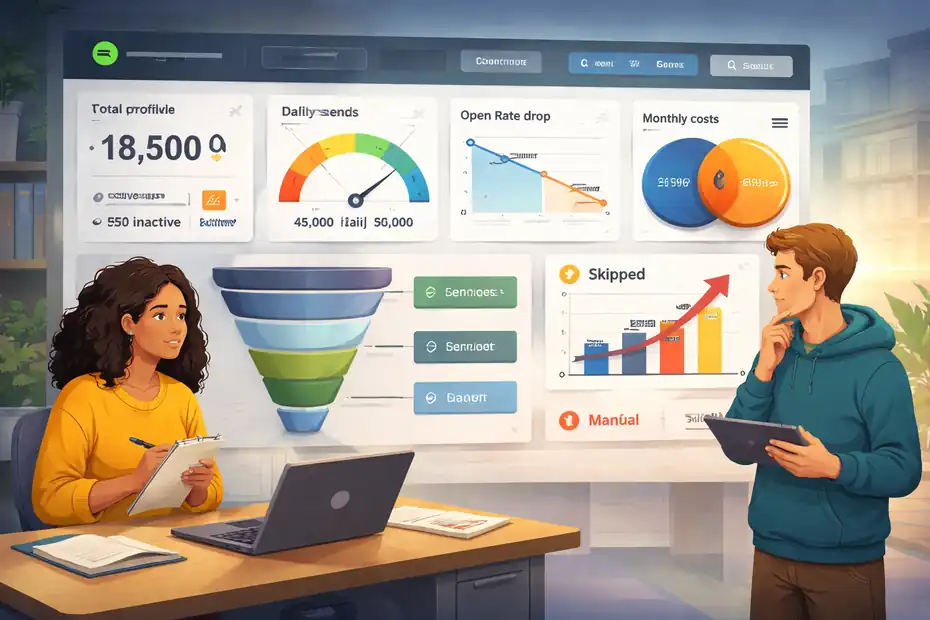
This is where the pain usually starts. A brand launches several flows, sees early revenue, then notices flat open rates, odd skips, rising costs, and lower-than-expected total reach.
hat is usually not a copy problem. It is a systems problem.
Active profile limits quietly shape everything
If you run email in Klaviyo, your plan is tied to active profiles and sending volume. Klaviyo says every user needs a base plan tied to the number of active profiles, and if your profile count exceeds plan capacity, you may be automatically upgraded on the next billing cycle. The free tier is capped at 250 active profiles and 500 emails per month.
This matters more than most people realize because automations love to grow. Every form, signup source, and synced ecommerce event expands your addressable audience. If you never clean inactive profiles, your automations become more expensive even when performance gets worse.
Imagine you run a store with 18,000 profiles. Only 4,500 have engaged in the last 90 days, but your flows still evaluate the broader database. You may end up paying for list size while earning revenue from a much smaller engaged segment. That creates the illusion that Klaviyo automations are becoming less profitable, when the real issue is list hygiene.
I suggest treating profile count as an automation limit, not just a billing metric. When your active profile base grows faster than engagement, every automation gets more expensive to operate.
Smart Sending is a real automation limit, not a small setting
Klaviyo’s Smart Sending prevents people from receiving too many messages in a set period. The default windows are 16 hours for email, 24 hours for SMS, and 24 hours for push notifications. Klaviyo also states that skipped messages are not automatically rescheduled.
That single detail changes how you should build flows.
A common example: someone enters a welcome series, then abandons a cart six hours later. Your abandoned cart email may be more valuable than the second welcome email, but if both are set with Smart Sending and poor timing rules, one message may get skipped entirely. Not delayed. Skipped.
This is one of the biggest hidden Klaviyo automation limits because it reduces total flow delivery without showing up as an obvious technical error. Your automations are “working,” but your audience is receiving fewer messages than you mapped on your whiteboard.
I recommend deciding which flows deserve priority before you build them. Otherwise, your highest-intent revenue emails can lose to lower-intent nurture messages simply because the timing collided.
Draft, manual, and live status create invisible delivery gaps
Klaviyo flow messages are not all equally active. If a message is set to draft, people skip it. If a message is set to manual, it is active in the flow but requires manual review and sending. If all messages in a flow are draft, nobody enters until at least one message is live or manual.
This sounds basic, but it causes real leaks. I have seen teams clone a flow, update the first email, forget that the second email is still in draft, and assume the flow is fully live. People move through the automation, but one key conversion touchpoint never sends.
For date-based flows, there is another wrinkle: recipients are only scheduled for messages set to live or manual, and the timing can cause newly activated flows to miss near-term dates because the system checks ahead.
That means your “birthday automation” may technically exist but still underperform if you turned it live too late or left part of it in the wrong status.
How flow logic creates hidden bottlenecks
The more advanced your account gets, the less your main problem is “how do I build a flow?” and the more it becomes “how do I stop my logic from canceling my own strategy?”
Trigger overlap is where automation gets messy
Klaviyo flows are event-driven. A person joins, clicks, views, starts checkout, purchases, reaches a date, or matches another trigger. That flexibility is powerful, but it also creates overlap. Klaviyo notes that flows can be triggered by many kinds of synced data, behavior, and dates.
The issue is not that overlap exists. The issue is that many brands do not design for it.
Here is a realistic overlap chain for a fashion store:
- A visitor joins the email list.
- They view three products.
- They add one to cart.
- They leave without buying.
- They come back through a campaign.
- They purchase two days later.
That one person could qualify for a welcome series, browse abandonment, abandoned cart, campaign sends, and post-purchase flow. If your filters are weak, you are not running a customer journey. You are running a traffic jam.
A better setup uses exclusion logic. Your browse abandonment flow should usually exclude people who started checkout. Your welcome series should often exit recent purchasers from later promotional education steps.
Your abandoned cart flow should usually suppress after purchase. These are not “nice-to-have” refinements. They are how you stay inside the real limits of attention and message volume.
Filters solve more problems than extra flows
I think many marketers add a new flow when they actually need better filters in an existing one. Klaviyo’s documentation explains that trigger and message filters evaluate whether someone qualifies based on profile properties or past actions.
That matters because filters are how you control relevance without multiplying complexity.
Instead of building separate abandoned cart flows for every scenario, you can often improve one flow with tighter logic:
- High-value cart branch: Only send a stronger offer when cart value crosses a threshold.
- First-time buyer branch: Use more reassurance and brand education.
- Repeat buyer branch: Remove beginner content and shorten the delay.
- Recent purchaser exclusion: Prevent awkward reminders after conversion.
This is one of those hands-on truths that gets missed in generic advice. More flows do not always mean better automation. Often they just create more overlap, more maintenance, and more chances to trip on Klaviyo’s practical limits.
Delay structure changes revenue more than people expect
Klaviyo lets you place delays between actions, but delays are not neutral. They shape which flow wins when multiple flows compete. Klaviyo also notes that a time delay needs a following flow action set to live or manual, otherwise profiles can skip the delay and exit.
I advise mapping delays around buying intent, not around your team’s calendar.
For example:
- Welcome email 1: Immediately after signup
- Welcome email 2: 1 day later
- Welcome email 3: 3 days later
- Abandoned cart email 1: 2 to 4 hours after checkout starts
- Abandoned cart email 2: 20 to 24 hours later
- Browse abandonment: Often 6 to 20 hours later, but only if checkout did not begin
That ordering protects high-intent automations. If you stack everything with generic 1-day delays, Smart Sending and audience fatigue do the prioritizing for you. That usually ends badly.
The billing and sending limits behind automation scale
This is the section a lot of brands skip until finance asks why email software costs jumped. Automation success creates more sends, more profiles, more touchpoints, and more pressure on your plan.
Email, SMS, and push do not behave the same way
Klaviyo’s Smart Sending windows are managed separately by channel, which means email does not block SMS and SMS does not block push in the same way. Klaviyo explicitly says the channels are independent for Smart Sending purposes.
That sounds like good news, and sometimes it is. But it also means you can accidentally over-message across channels while technically staying compliant with each channel’s separate limit.
A person might receive:
- one email in the last 16 hours,
- one SMS in the last 24 hours,
- one push notification in the last 24 hours.
The platform may see that as acceptable. The customer may see it as annoying.
So when people ask about Klaviyo automation limits, I think the smarter question is this: what is the human limit, not just the platform limit?
That is why channel orchestration matters. If SMS is your urgency channel, protect it for high-intent moments like abandoned cart, shipping updates, or post-purchase service. Do not let every flow earn SMS just because it can.
Transactional message rules are stricter than most people assume
Transactional messaging sounds like a loophole until you read the fine print. Klaviyo says that with an approved case and a paid account, only certain flow messages can be marked transactional.
For email, only messages in metric-triggered flows can be marked transactional, excluding price drop flows. For SMS, only SMS in post-purchase flows can be marked transactional. Push messages cannot be marked transactional in Klaviyo.
This matters because some brands try to stretch promotional flows into transactional territory to improve reach or bypass constraints. That is not a dependable strategy.
A better approach is to separate true service communication from revenue automation:
- Post-purchase order support
- Delivery updates
- Service reminders
- Time-sensitive customer actions
Then keep promotional nurture where it belongs. The hidden limit here is policy. Even if your flow logic can send something, that does not mean the message qualifies for the category you want.
API and integration limits affect advanced automation builds
If your automation setup relies on custom development, middleware, or external systems, Klaviyo’s API rate limits become another real constraint.
Klaviyo states that its newer endpoints use burst and steady rate limits, with standard tiers ranging from 1 request per second and 15 per minute on the low end up to 350 per second and 3500 per minute on the high end, depending on the endpoint. It also notes that hitting limits can return HTTP 429 errors.
For most small stores, this is not the first issue. For larger brands syncing custom events, loyalty systems, support data, or real-time recommendation logic, it can absolutely matter.
Here is the practical takeaway: if you want sophisticated Klaviyo automation, you need to design for data flow reliability, not just email copy. Slow or throttled event syncing can break the timing that automations depend on.
Common mistakes that make automations feel “broken”
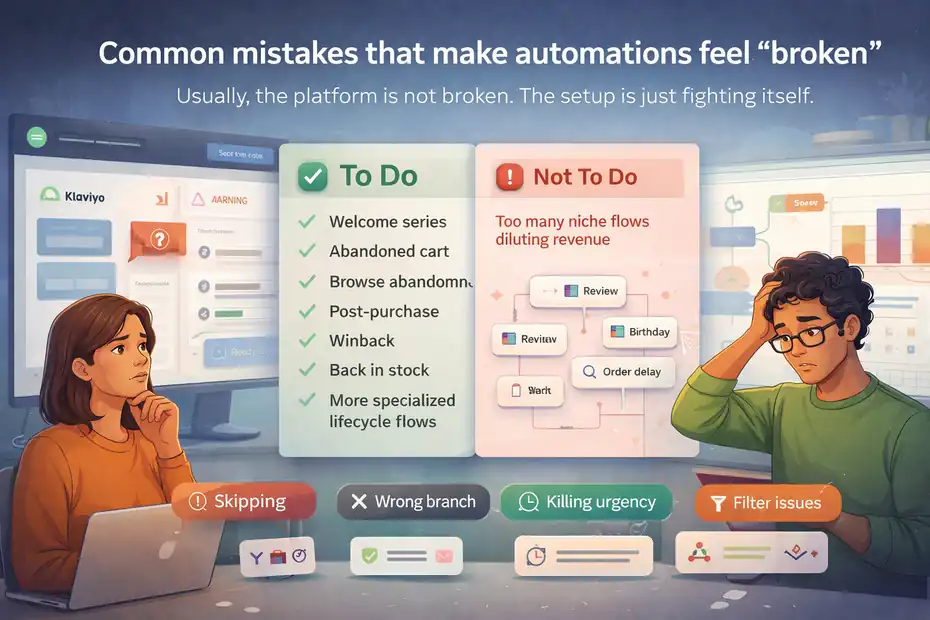
Usually, the platform is not broken. The setup is just fighting itself.
Too many low-priority flows dilute your best revenue moments
I have a strong opinion here: most accounts need fewer flows, not more. Brands often add niche automations before fixing the core ones. Then when results flatten, they blame Klaviyo automation limits.
A better order is usually:
- Welcome series
- Abandoned cart
- Browse abandonment
- Post-purchase
- Winback
- Back in stock
- More specialized lifecycle flows
Klaviyo itself highlights several of these as key flows to set live first, including welcome series, abandoned cart, browse abandonment, winback, review request, and post-purchase.
The mistake is not building more later. The mistake is treating every possible trigger like it deserves equal importance. It does not. Your best automation setup is not the one with the most branches. It is the one that protects your highest-buying-intent moments.
Not testing logic before going live
Klaviyo provides preview and testing tools for flow content and logic, including checking whether profiles are correctly evaluated.
Still, many teams test the email design but not the automation behavior.
That leads to problems like:
- people skipping steps because a message stayed in draft,
- someone qualifying for the wrong branch,
- recent buyers still receiving browse reminders,
- delays stacking in ways that kill urgency,
- exclusion filters blocking more people than intended.
When I first started auditing flow-heavy accounts, I noticed the same pattern over and over: the prettier the automation looked in the builder, the less likely the team had tested the messy real-life edge cases.
You need test profiles that simulate actual journeys, not just sample renders. One recent buyer. One non-buyer. One repeat customer. One SMS subscriber. One email-only subscriber. That kind of testing reveals the hidden limits faster than any dashboard.
Ignoring list quality while expanding automation
This is a quiet profitability killer. Automation can make a weak list look okay for a while because flows target behavior and usually outperform campaigns. But once your active profiles swell with unengaged contacts, your costs rise and your deliverability can suffer.
Klaviyo recommends suppressing inactive profiles to reduce billable counts and protect performance.
That is not just billing hygiene. It is automation hygiene.
Think about it this way: if your welcome series converts at 5%, your abandoned cart flow recovers 7%, and your browse abandonment flow earns decent click-through rates, that still does not save you if your database quality keeps sliding. The bigger your account gets, the more expensive low-quality automation becomes.
How to optimize around Klaviyo’s real constraints
This is where things get practical. You do not beat Klaviyo automation limits by forcing more sends through the system. You beat them by designing smarter.
Build a flow priority system before you add anything new
Every account should have a simple priority framework. Mine usually looks like this:
- Tier 1: Revenue-critical flows such as abandoned cart, checkout recovery, and post-purchase service
- Tier 2: Relationship-building flows such as welcome and post-purchase education
- Tier 3: Opportunistic flows such as browse abandonment, winback, price-based reminders, and niche campaigns
Once you do that, delay timing and Smart Sending decisions become easier. If an overlap happens, you already know which message should win.
A simple example:
- Welcome flow email 2 conflicts with abandoned cart email 1
- Tier 1 beats Tier 2
- You shorten the welcome series or exclude active cart starters from later welcome emails
That is how you work with the platform’s limits instead of discovering them after performance drops.
Use one source-of-truth map for entry, exit, and exclusion rules
I recommend documenting every flow with three things:
- Entry rule: What behavior starts it
- Exit rule: What event ends it
- Exclusion rule: Who should never be in it
This sounds boring, but it is how advanced accounts stay sane.
Here is a compact example:
| Flow | Entry rule | Exit rule | Key exclusion |
|---|---|---|---|
| Welcome series | Joins list | Purchases or completes series | Existing customers |
| Browse abandonment | Views product | Starts checkout or purchases | Recent checkout starters |
| Abandoned cart | Starts checkout | Purchases | Suppressed contacts |
| Post-purchase | Places order | Completes education path | Refund-heavy segments if needed |
Without this map, you are guessing. With it, Klaviyo automation limits become easier to manage because you reduce duplicate messaging and wasted sends.
Reduce send pressure with better segmentation, not silence
Some brands respond to poor flow performance by pausing messages too aggressively. I think that is usually the wrong move. The smarter fix is segmentation.
Instead of turning off an underperforming flow entirely, narrow it:
- only higher-intent categories,
- only first-time buyers,
- only customers with certain AOV ranges,
- only products with enough margin,
- only engaged subscribers in the last 90 days.
That lets you keep automation running while reducing list strain, cost, and overlap.
Klaviyo’s filter logic supports this kind of qualification at the message and flow level.
Advanced strategies for scaling without losing control
Once your core automations work, scaling is not about cloning more templates. It is about increasing relevance while protecting profitability.
Design around intent tiers, not just lifecycle stages
Lifecycle is helpful, but intent is often more useful.
For example, two people can both be “subscribers,” but one is casually browsing while the other has started checkout twice this week. They should not receive the same automation pressure.
I suggest grouping your automation logic by intent tier:
- Low intent: New subscriber, early browsing, informational content
- Medium intent: Product views, category engagement, repeat sessions
- High intent: Cart, checkout, replenishment timing, service moments
This helps you set frequency rules more intelligently. High-intent flows deserve faster response times and cleaner priority. Low-intent flows should be more patient.
That one shift can improve revenue per recipient without increasing total message volume.
Treat automation analytics like portfolio management
Not every flow deserves the same amount of energy. A healthy Klaviyo account usually has a few flows doing most of the work.
I like to review flows with these questions:
- What percent of total flow revenue comes from the top three flows?
- Which flows have high sends but weak placed-order rate?
- Which flows are creating clicks but not purchases?
- Which flows are mostly hitting low-engagement profiles?
- Which flows are likely being suppressed by Smart Sending collisions?
Klaviyo includes flow analytics and built-in reporting on its platform, even on the free plan at a basic level.
Here is a mini scenario. Say your browse abandonment flow sends 18,000 emails per month and earns $3,000, while your abandoned cart flow sends 4,000 and earns $14,000. The lesson is not “browse abandonment is bad.” The lesson is that higher-intent automation is far more efficient. You optimize around that truth.
Know when complexity stops helping
There is a point where more branches, more conditions, and more exceptions stop improving performance. In my experience, that point comes earlier than most teams think.
A flow should get more complex only when one of these is true:
- the extra branch reflects a truly different buyer intent,
- the branch changes timing meaningfully,
- the branch changes offer logic,
- the branch protects user experience,
- the branch improves measurement.
If the branch exists because “we can do it in Klaviyo,” that is usually not enough.
The most profitable automations are often surprisingly simple. Clear trigger. Smart exclusions. Strong timing. Relevant message. Clean exit. That is it.
Final thoughts on Klaviyo automation limits
Klaviyo automation limits are real, but they are rarely the limits people expect. The biggest constraints are not “how many automations can I build?”
They are how many profiles you can support cost-effectively, how often people should hear from you, how your flows collide, how your statuses are configured, and whether your logic respects real customer behavior.
Klaviyo’s current documentation makes clear that flows, Smart Sending windows, plan-based profile counts, message statuses, transactional rules, and API rate limits all shape what your automation system can actually do.
If you take one thing from this guide, let it be this: the way to scale Klaviyo is not to build more. It is to make each automation earn its place.
FAQ
What are Klaviyo automation limits?
Klaviyo automation limits are not strict caps on the number of flows you can build. Instead, they come from factors like active profiles, sending limits, Smart Sending rules, and flow logic. These constraints affect how many messages are actually delivered and how efficiently your automations perform.
Why are my Klaviyo flows skipping messages?
Flows often skip messages due to Smart Sending settings, draft or manual status, or filter conditions blocking recipients. If someone recently received another message, Klaviyo may skip rather than delay the next one, which can reduce total flow delivery without obvious errors.
Does Klaviyo limit the number of automations I can create?
Klaviyo does not impose a strict limit on how many automations you can create. However, practical limits arise from overlapping triggers, audience fatigue, and billing constraints tied to active profiles, which can impact performance as your automation system grows.
How do Klaviyo automation limits affect pricing?
Klaviyo pricing is primarily based on active profiles and message volume. As your automations grow, more profiles enter flows, increasing costs. Without proper list cleaning and segmentation, you may pay more while seeing lower engagement and reduced return on investment.
How can I optimize Klaviyo automations despite limits?
You can optimize by prioritizing high-intent flows, improving segmentation, and using clear entry and exit rules. Reducing overlap, adjusting timing, and cleaning inactive profiles helps maintain performance while keeping costs controlled and improving overall automation efficiency.

I’m Juxhin, the voice behind The Justifiable.
I’ve spent 6+ years building blogs, managing affiliate campaigns, and testing the messy world of online business. Here, I cut the fluff and share the strategies that actually move the needle — so you can build income that’s sustainable, not speculative.
Related posts:
 Email Marketing Tips: Improve Email Marketing Results
 Target Audience: How to Effectively Leverage It for Email Marketing
 How To Use Email Marketing For Small Business
 How To Design An Email Marketing Campaign
 How To Improve Email Deliverability In GetResponse: Proven Tips
 How To Build Product Launch Email Sequences In GetResponse