
Table of Contents
Some links on The Justifiable are affiliate links, meaning we may earn a small commission at no extra cost to you. Read full disclaimer.
Aweber low email open rate fix usually starts with something simpler than most people expect: the right message, sent to the right people, with the right setup behind it.
If your open rates feel stuck, you probably do not need a full rebuild. You need a cleaner diagnosis, a few fast adjustments, and a better testing rhythm.
In this guide, I’ll walk you through nine practical wins you can apply inside your AWeber setup, plus the technical and strategic fixes that help those gains stick instead of disappearing after one campaign.
Why Your Open Rate Feels Low In AWeber
A low open rate is not always a writing problem. In many cases, it is a mix of list quality, inbox placement, timing, segmentation, and measurement noise.
What Counts As A “Low” Open Rate Today
Open rate benchmarks are messy now, so I recommend using them as a reference point, not a verdict.
AWeber says a good email open rate often falls between 17% and 28%, while Mailchimp reports an average around 34.23% across its benchmark data and MailerLite reports a median open rate of 43.46% across 3.6 million campaigns.
That gap is not because one provider is “better.” It shows how audience mix, industry, privacy protections, list age, and calculation methods can change the number dramatically.
What matters more is your pattern. If you used to get 28% and now you are at 14%, that is a real problem. If you sell weekly to a colder list and sit around 20% with strong clicks and sales, that may be perfectly healthy.
Campaign Monitor also notes that open rate still matters, but it is no longer fully reliable on its own because of Apple Mail Privacy Protection and similar changes.
I believe the most useful way to judge an AWeber account is this: compare open rate with click rate, unsubscribes, complaint risk, and list trend over the last 30 to 90 days.
If opens are weak and clicks are weak too, you have an attention problem. If opens look decent but clicks are flat, the real issue is inside the email, not above the fold.
The Four Real Causes Behind Poor Opens
Most “bad open rate” cases come from four buckets, and it helps to know which one you are actually dealing with before you start changing everything.
- Audience mismatch: You are sending one broad email to people with very different interests, purchase stages, or signup sources. AWeber’s segmentation and tags exist for exactly this reason.
- Inbox trust issues: Your sender reputation, domain authentication, or subscriber inactivity is dragging performance down before your subject line even gets a chance. AWeber supports DKIM and DMARC setup and recommends reactivation for inactive subscribers.
- Weak message packaging: The subject line, preview text, sender name, and timing are not giving subscribers a clear reason to open. AWeber’s own split testing feature is built around testing those elements.
- Measurement confusion: Privacy changes inflate or distort opens for some audiences, so you may be fixing the wrong metric unless you also watch clicks and downstream action.
In my experience, most accounts do not need a dramatic “hack.” They need three things: a cleaner list, a tighter promise in the inbox, and a better habit of testing one variable at a time.
Start With A 15-Minute Open Rate Audit
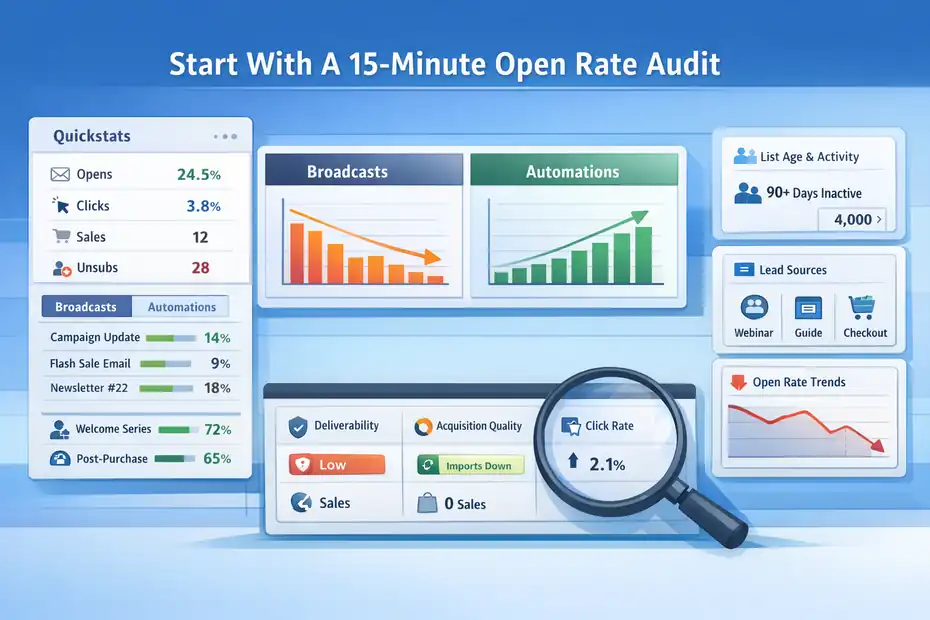
Before you touch the next campaign, spend a few minutes checking where the drop is actually happening.
This is the part people skip, and it is the reason they end up blaming subject lines for a list hygiene problem.
Review Quickstats And Separate Broadcasts From Automations
AWeber’s Quickstats is useful because it lets you compare opens, clicks, sales, and unsubscribes across messages instead of reacting to one send in isolation. Look at the last 10 to 20 sends and split them into two groups: broadcasts and automations.
Broadcasts often behave very differently from welcome emails, post-purchase flows, or lead magnet delivery sequences.
Here is the pattern I suggest you look for:
| Signal | What It Usually Means |
|---|---|
| All emails low | Deliverability, sender trust, or list quality issue |
| Broadcasts low, automations fine | Relevance or timing issue |
| Recent drop after import or lead source change | Acquisition quality problem |
| Opens okay, clicks low | Offer or message-body problem |
| Open spikes but no sales | Curiosity subject lines attracting the wrong opens |
This kind of split matters because welcome-style messages often open far better than regular newsletters. Campaign Monitor cites welcome emails around 91.43% open rate, which shows how strong intent can be at the moment of signup.
If your welcome email opens well but your weekly emails do not, your main issue is probably not technical deliverability. It is expectation drift.
Check List Age, Inactivity, And Signup Source
One of the fastest ways to wreck open rates is continuing to mail people who stopped caring months ago.
AWeber’s community guidance recommends removing subscribers who have not opened in the last 90 days to keep the list focused on engaged people, and its reactivation workflow guidance explains how to build inactive segments before sending re-engagement campaigns.
Let me break that down in plain English. If you have 10,000 subscribers but 4,000 of them have not engaged in months, your headline metric gets dragged down by dead weight.
That makes every future campaign look worse than it really is, and over time it can also hurt inbox placement because providers see weak engagement signals.
I suggest grouping subscribers by source too. A lead magnet list from a pricing guide will behave differently from webinar registrants, checkout customers, or footer form subscribers.
If one source is consistently underperforming, you may not have an email problem at all. You may have a lead quality problem.
9 Fast Wins To Fix Low AWeber Open Rates
These are the fastest practical improvements I’d test first. They are ordered from highest-impact and easiest-to-implement to more advanced improvements.
Win 1: Rewrite Your Subject Lines Around Specific Value
Subject lines still do most of the heavy lifting. AWeber notes that recipients often decide whether to open based on the subject line, and its split-testing tools specifically support testing subject lines, preview text, content, and send time.
The mistake I see most often is writing a subject line that sounds polished but says almost nothing. “A Quick Update” is clean, but it is vague. “3 Pricing Mistakes Costing Shopify Stores Margin” is useful, concrete, and aimed at a real problem.
A better subject line usually has one of these traits:
- Clarity: The reader knows what they will get.
- Specificity: The promise feels concrete, not fluffy.
- Relevance: It matches why they joined your list.
- Curiosity with boundaries: It creates interest without feeling bait-y.
Here is a simple upgrade example. Instead of “Email Tips For Better Results,” try “Why Your Last 5 Emails Underperformed.” Instead of “New This Week,” try “The Template We Use To Recover Cold Subscribers.”
In my experience, the best AWeber low email open rate fix is not making subject lines more clever. It is making them more useful. Clever gets a few opens.
Useful builds a repeat habit. When subscribers learn that your emails consistently help them solve one concrete problem, your sender name starts doing part of the work for you.
Win 2: Use Preview Text As A Second Subject Line
A lot of senders waste preview text with browser links, boilerplate, or repeated copy. That is a miss, because preview text acts like the second line of your pitch in crowded inboxes. AWeber’s split testing feature explicitly lets you test preview text, not just the subject line.
Think of the pairing this way:
- Subject line: Gets attention.
- Preview text: Confirms the value.
- Sender name: Supplies trust.
Imagine you send this:
- Subject: Your Cart Email Is Losing Opens
- Preview: Three small fixes before your next promotion goes live
That combination works because the first line names the issue and the second line lowers the effort required. It tells the reader, “This is practical, and you can use it today.”
I suggest avoiding preview text that repeats the subject line word for word. Use it to answer the unspoken question in the reader’s head: “Why should I open this now?”
Also check mobile display, because many subscribers see only a short subject line and clipped preview text. AWeber’s own Black Friday guidance points out how heavily mobile shapes email results, and that matters far beyond holiday campaigns.
This is one of those fixes that feels small but can move opens quickly because it improves the packaging without requiring new content, new automation, or a full strategy change.
Win 3: Clean Your List Before You Send More Broadcasts
If your list is bloated with inactive contacts, your open rate will keep looking worse than it should. AWeber provides documentation for re-engaging inactive subscribers and community guidance that specifically recommends removing subscribers who have not opened in the last 90 days.
I know list cleaning feels emotionally hard. Many of us hate the idea of shrinking a number we worked hard to grow. But a smaller, active list beats a larger sleepy one almost every time.
A practical workflow looks like this:
- Step 1: Build a segment of subscribers who have not opened in 60 to 90 days.
- Step 2: Send a short reactivation email with a clear reason to stay.
- Step 3: Send one follow-up to non-responders a few days later.
- Step 4: Suppress or remove people who still do not engage.
Here is a realistic example. Say you have 8,000 subscribers and average a 14% open rate. If 2,500 of those people are truly inactive, cleaning the list can raise headline performance fast, sometimes without changing your content at all.
More importantly, future engagement signals become healthier. That gives your next subject line test a fairer chance.
This is not vanity optimization. It is maintenance. A stale list makes every problem look like a copywriting problem.
Win 4: Segment By Interest Instead Of Sending One Generic Email
AWeber’s segmentation tools let you target broadcasts by tags, behaviors, and other subscriber attributes, and its documentation is very clear about why that matters: more relevant content tends to improve opens, clicks, and unsubscribe rates.
If you send the same email to everyone, you are asking one message to do too many jobs. That usually leads to a subject line that is broad enough to fit everyone and compelling enough for no one.
A simple segmentation model can be enough:
- By intent: Beginner, active buyer, repeat buyer, dormant lead
- By topic: SEO, ecommerce, coaching, SaaS, local business
- By behavior: Clicked pricing, downloaded checklist, watched webinar
- By source: Lead magnet, product customer, checkout abandoner, newsletter signup
Let’s say you run a digital product business. Your general list gets “New Resources This Week.” Your customers who clicked a pricing guide get “The Pricing Page Fix That Lifted Conversions.” Same brand, same week, much better relevance.
This is where tags become powerful inside AWeber. Tags are simply labels that help group subscribers, and AWeber supports using them for segments and automations. When someone clicks a link about one topic, that click can help decide what you send next.
I suggest starting with one split only. Do not build a giant segmentation maze on day one. Just separate your most engaged topic group from your general list and compare the open rate difference over three sends.
Win 5: Change The Sender Name And From Address Strategy
Subscribers do not open subject lines in a vacuum. They open from people and brands they recognize. If your sender identity is inconsistent, overly corporate, or unfamiliar, you make the inbox decision harder than it needs to be.
AWeber emphasizes authentication and domain setup because trust starts at the sender layer too. Its docs explain DKIM and DMARC setup, and note that these records help verify your sending identity.
There are two parts to fix here. The first is brand familiarity. “Company Notifications” is weaker than “Maya From BrightCart” if your audience knows Maya and BrightCart. The second is domain trust.
A branded sending domain that is properly authenticated looks more credible than a random generic address.
I usually recommend choosing one sender format and sticking with it for at least a month:
- Personal-brand led: Jenna From Northlane
- Brand led: Northlane Team
- Hybrid: Jenna At Northlane
What you want is instant recognition. The reader should know who you are before they process the subject line.
Do not keep rotating sender names just because you are bored with them. Familiarity compounds. If your welcome email comes from one identity and your broadcast comes from another, you create friction you did not need.
For many brands, this is an overlooked AWeber low email open rate fix because it feels too simple to matter. It matters a lot.
Win 6: Test Send Time Instead Of Guessing
Timing is not magic, but it absolutely affects visibility. AWeber’s split testing lets you test send times, and its own guidance on best send times points to 9:00 AM to 11:00 AM in the recipient’s local time as a strong general starting point.
AWeber also supports send windows in workflows so emails can go out at more intentional times.
The important part is not memorizing one “best” hour. It is testing when your audience is most likely to notice and act.
Here is a practical way to do it:
- Week 1: Send Tuesday morning.
- Week 2: Send Thursday morning.
- Week 3: Send Tuesday afternoon.
- Week 4: Send Sunday evening.
Keep the audience and email type as consistent as possible. Then compare not just open rate, but clicks and downstream action. A send time that raises opens but lowers clicks may be catching people in the wrong context.
For example, B2B audiences often behave differently from creator audiences. A consultant’s list may open during weekday work blocks. An ecommerce list may respond better outside work hours. From what I’ve seen, “best time” advice fails when it ignores audience rhythm.
If you run automations, use send windows instead of firing everything immediately. Fast is not always better. A lead magnet follow-up at 2:13 AM local time is technically prompt, but strategically unhelpful.
Win 7: Resend To Non-Openers With A New Angle
This is one of the fastest wins available when the first email was solid but under-seen. AWeber’s own campaign guidance for promotional periods recommends resending to non-openers with a different subject line, and its reactivation and segmentation tools make targeted follow-up possible.
The key is not sending the same email again like nothing happened. Change the angle.
Here is a simple format:
- First send: Direct benefit-led subject line
- Second send to non-openers: Curiosity or urgency-led version
- Optional tweak: Tighten preview text and opening sentence
Example:
- Send 1 subject: 5 Ways To Raise Open Rates This Week
- Resend subject: Most Lists Miss This Open Rate Problem
Same core email. Different reason to pay attention.
I like this tactic because it extracts more value from work you already did. You already wrote the email. You already built the offer. You are simply giving missed subscribers another entry point.
That said, do not overuse it. If every campaign gets resent, the tactic loses power and inbox fatigue goes up. I suggest reserving resends for your best messages: launches, strong educational emails, important updates, or content with proven click value.
Used carefully, this can produce one of the quickest lifts in total opens without needing more content production.
Win 8: Authenticate Your Domain And Fix Deliverability Basics
Sometimes your subject lines are fine and your segmentation is decent, but you are still losing because mailbox providers are unsure whether they should trust your messages. That is where authentication matters.
AWeber provides guidance for authenticating your email domain with DKIM and DMARC, and explains that DMARC works with DKIM and SPF to help domain owners declare how mail should be handled when authentication fails.
AWeber also notes that when sending through its system, SPF changes on your own domain are not always the main deliverability lever, while DKIM and DMARC are central to the branded domain setup.
Here is the simple version:
- DKIM: Proves the message is authorized by your domain.
- DMARC: Tells receiving servers what to do if authentication fails.
- SPF: Still part of the broader ecosystem, but the exact setup depends on who sends the mail.
If this sounds technical, the takeaway is still straightforward. A branded, authenticated sender setup can improve trust, and trust supports inbox placement. No open rate fix survives long if your emails are landing in junk or promotions more aggressively than they should.
I recommend checking authentication before you obsess over micro-copy changes. A five-point subject line improvement cannot rescue a deliverability problem.
Win 9: Align Your Email Promise With Why People Subscribed
This is the strategic fix that keeps the quick wins from fading. If your current emails do not match the promise implied at signup, open rates will sag no matter how hard you work on subject lines.
AWeber’s own examples around milestone emails and targeted engagement show that message type matters. For example, milestone emails can produce much higher engagement than generic campaigns because they are timely and personally relevant.
Imagine someone joins your list for a “10-Point Product Launch Checklist.” They expect practical launch help. If the next five emails are vague mindset notes, partner promotions, and company updates, the inbox relationship weakens quickly. The open rate drop is not random. The message promise drifted.
I suggest writing down one sentence for each signup source: “These people joined because they want ___.” Then check your next three broadcasts against that sentence.
- Lead magnet subscribers: Want the next practical step.
- Customers: Want help getting value or improving results.
- Webinar subscribers: Want deeper implementation guidance.
- Newsletter subscribers: Usually want insights tied to a clear theme.
In my experience, this is where great email programs separate from noisy ones. The best lists do not just send “content.” They continue the conversation the subscriber thought they were starting.
How To Use AWeber Features Without Overcomplicating The Fix
The goal is not to use every feature. The goal is to use the few features that directly improve relevance, timing, and trust.
Split Test One Variable At A Time
AWeber supports split testing with up to three email variations and allows testing of subject lines, preview text, content, and send time. That is useful, but only if you keep the experiment clean.
Do not test subject line, sender name, and send time all at once. If the winner gets more opens, you will not know why.
I recommend this order:
- Subject line
- Preview text
- Send time
- Sender name
- Body framing for click quality
Use a large enough sample to matter, and keep your success metric tied to the variable. If you test a subject line, open rate is the first thing to watch. If you test body framing, clicks and sales matter more. AWeber’s split-testing guidance follows that same logic by pairing the variable to the metric you are measuring.
This sounds basic, but disciplined testing is rare. Most people are “testing” in the sense that they are constantly changing things. That is not testing. That is guessing with extra steps.
Use Tags And Segments To Build A Smarter Repeat System
AWeber tags let you group subscribers by interest or behavior, and segments let you save those criteria for future targeting. The real win here is not organizing your list for the sake of organization. It is making your next send more relevant than the last one.
A very manageable setup might look like this:
- Tag: clicked-pricing
- Tag: interested-seo
- Tag: customer
- Tag: inactive-60-days
Then you can build segments from those tags and send broadcasts that actually fit the audience. You can also exclude specific tagged subscribers from certain sends when needed. AWeber provides documentation for both sending to segments and excluding subscribers using tags.
For many of us, the biggest mistake is waiting until we have the “perfect” taxonomy. You do not need that. You need just enough structure to stop blasting every message to every person.
Add Simple Automations Based On Click Behavior
AWeber supports click-based automations, which means you can tag or trigger follow-up logic when a subscriber clicks a link in a campaign or broadcast. That is one of the easiest ways to improve future opens because clicks reveal real interest better than assumptions do.
Here is a useful example. If a subscriber clicks a link about ecommerce pricing, tag them accordingly and send the next relevant email on that topic. That follow-up email tends to get better opens because it is based on demonstrated behavior, not a guess about who might care.
This is where open rate and click rate help each other. A click today improves targeting tomorrow. And better targeting tomorrow tends to improve open rate next week.
Common Mistakes That Keep Open Rates Stuck
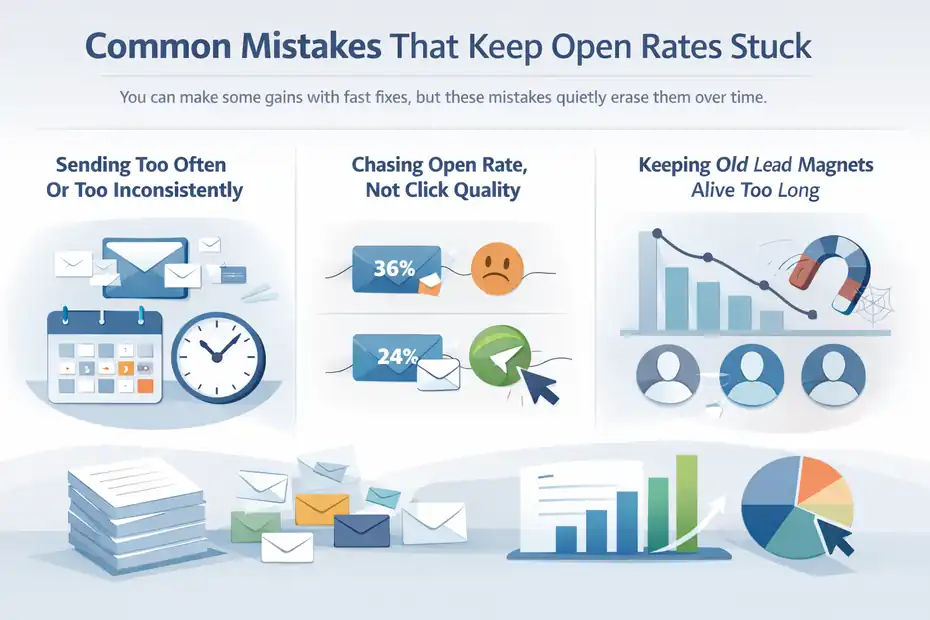
You can make some gains with fast fixes, but these mistakes quietly erase them over time.
Sending Too Often Or Too Inconsistently
Frequency problems happen in both directions. Send too often and people tune you out. Send too rarely and they forget who you are. Neither one is good for opens.
I suggest choosing a rhythm you can keep. Weekly works well for many brands because it builds familiarity without overwhelming people. The bigger issue is consistency. When your timing is random, your sender identity weakens. Subscribers stop expecting you, and expected emails usually perform better than surprise ones.
From what I’ve seen, the sweet spot is less about a universal number and more about matching message value with audience tolerance. A daily tactical email can work for active traders or deal-focused shoppers. It can feel exhausting for a general coaching list.
Chasing Open Rate While Ignoring Click Quality
Because open rate is visible and emotionally loud, people over-optimize it. They write curiosity-heavy subject lines that get opens from the wrong people and disappoint once the email is opened.
Campaign Monitor notes that open rate still matters, but should be read alongside other metrics because privacy changes reduced its reliability as a standalone measure. AWeber’s Quickstats also emphasizes clicks, sales, and unsubscribes, not opens alone.
I would rather see a 24% open rate with strong click intent than a flashy 36% open rate with weak downstream action. The first one is healthier.
Keeping Old Lead Magnets Alive Too Long
One hidden cause of low open rates is a lead magnet that no longer attracts the right kind of subscriber. The list keeps growing, but the wrong people are joining, so engagement falls over time.
If your last six months of subscribers open worse than older cohorts, do not just blame the email copy. Check the signup asset, landing page promise, traffic source, and targeting. The fix may start before the inbox.
A 30-Day Action Plan To Lift Opens Fast
If you want a practical roadmap, this is the order I would follow.
Week 1: Clean Diagnosis And Technical Setup
- Task 1: Review your last 10 to 20 sends in AWeber Quickstats. Separate broadcasts from automations.
- Task 2: Check whether your sending domain has DKIM and DMARC configured in AWeber.
- Task 3: Identify subscribers inactive for 60 to 90 days and create a segment.
At the end of this week, you should know whether your main problem is relevance, list quality, or sender trust.
Week 2: Improve Packaging
- Task 1: Rewrite the next three subject lines for clarity and specificity.
- Task 2: Add intentional preview text to every campaign.
- Task 3: Standardize your sender name.
This week is about making it easier for the reader to recognize, trust, and understand your message before opening.
Week 3: Segment And Resend Smarter
- Task 1: Build one interest-based segment using tags.
- Task 2: Send one broadcast to that segment instead of the whole list.
- Task 3: Resend your best-performing email to non-openers with a different subject line.
This is usually where you start seeing visible movement.
Week 4: Test Timing And Follow-Up Logic
- Task 1: Run one A/B split test on send time or subject line.
- Task 2: Add one click-based automation tag for future relevance.
- Task 3: Compare opens, clicks, and unsubscribes against your baseline.
By the end of 30 days, you should have a cleaner list, better message packaging, and a more reliable pattern to build on.
What A Good Result Looks Like After The Fix
The best outcome is not just “higher opens.” It is a healthier email system.
The Metrics I’d Watch Beyond Open Rate
Track these together:
- Open rate trend: Is it improving over 4 to 8 sends?
- Click rate: Are more opens turning into action?
- Click-to-open rate: Are the people who open actually interested?
- Unsubscribe rate: Is the message attracting the right audience?
- Segment performance: Which groups consistently respond best?
AWeber’s Quickstats is built around exactly this kind of broader review, which is why I like using it as the center of account diagnosis instead of obsessing over one campaign result.
When To Keep Optimizing Vs. When To Change Strategy
Keep optimizing when the list is healthy and the trend is moving, even slowly. Change strategy when the same audience has seen the same message style for months and engagement keeps falling.
That usually means your content promise, acquisition quality, or list segmentation needs deeper work.
I believe this is the honest answer many email guides skip. Not every low open rate is fixable with subject lines alone. Sometimes the business has outgrown the way the list was originally built.
Final Thoughts
If you came here looking for one magic Aweber low email open rate fix, I hope this guide helped in a more useful way.
The real win is stacking a few small improvements that reinforce each other: cleaner lists, better subject lines, stronger preview text, tighter segments, trusted sender setup, and smarter follow-up.
AWeber already gives you the pieces for most of that. The part that matters now is using them in the right order. Start simple, track the trend, and let relevance do most of the work.
FAQ
What is the fastest aweber low email open rate fix?
The fastest aweber low email open rate fix is improving your subject line and preview text while cleaning inactive subscribers. These changes immediately boost visibility and engagement without needing complex automation or new campaigns, making them the quickest way to see measurable improvement in open rates.
Why are my AWeber email open rates so low?
Low open rates usually come from poor list quality, weak subject lines, inconsistent sending, or low inbox placement. In many cases, inactive subscribers and irrelevant messaging are the main causes, not the email platform itself. Fixing targeting and engagement often produces faster results than redesigning emails.
Does cleaning my email list improve open rates in AWeber?
Yes, removing inactive subscribers can significantly improve open rates. When disengaged contacts are removed or suppressed, your emails are sent to people more likely to open them, which improves both your metrics and your sender reputation over time.
How often should I send emails to improve open rates?
Consistency matters more than frequency. Sending emails on a predictable schedule, such as once per week, helps build familiarity and trust. Irregular sending patterns often reduce open rates because subscribers stop recognizing your emails or forget why they signed up.
Should I resend emails to non-openers in AWeber?
Yes, resending to non-openers with a new subject line can increase total opens without creating new content. This strategy works best when used selectively for important emails, ensuring you reach subscribers who may have missed the original send without overwhelming your list.

I’m Juxhin, the voice behind The Justifiable.
I’ve spent 6+ years building blogs, managing affiliate campaigns, and testing the messy world of online business. Here, I cut the fluff and share the strategies that actually move the needle — so you can build income that’s sustainable, not speculative.
Related posts:
 Email Best Practices You Need to Start Using Today
 B2C Email Marketing Best Practices You Can’t Afford to Ignore
 Email Marketing Tips: Improve Email Marketing Results
 How to Master AWeber Email Marketing in Just a Few Steps
 Create a Marketing Email That Readers Can’t Ignore
 Aweber Email Automation Examples: Templates & Pro Insights