Table of Contents
Some links on The Justifiable are affiliate links, meaning we may earn a small commission at no extra cost to you. Read full disclaimer.
AppScenic dropshipping review searches usually come from one place: you are trying to figure out whether this platform is actually useful, or just another polished tool that looks better in ads than it performs in a real store. I get it.
When you are choosing a dropshipping platform, the wrong decision does not just waste money. It can create stock errors, late shipments, support headaches, and a store that feels impossible to scale.
In this guide, I’ll break down what AppScenic does well, where it falls short, who it fits best, and the hidden truths that matter before you commit.
What AppScenic Is And What It Promises
AppScenic positions itself as an AI-powered dropshipping and sourcing platform built around verified suppliers, fast shipping regions, and store automation.
On its official site, it highlights over 1 million products, verified domestic suppliers, AI features, and integrations with Shopify, WooCommerce, Wix, Ecwid, eBay, and Walmart.
It also says it serves 80,000+ retailers and supports product sourcing across regions including the US, UK, EU, Canada, Australia, and more.
Where AppScenic Fits In The Dropshipping Market
If you have used older dropshipping models, especially supplier marketplaces built around very long shipping times, AppScenic is trying to solve that exact problem. Its pitch is not “find random cheap products fast.” Its pitch is closer to “build a more stable store using vetted suppliers and stronger automation.” That difference matters.
For many store owners, the real appeal is not the catalog. It is operational control. AppScenic emphasizes automatic ordering, 24/7 price and stock sync, tracking imports, and pricing rules. Those are the kinds of features that reduce manual work once your order count starts climbing.
In my experience, that positioning makes AppScenic more interesting for people who want to build a semi-branded or cleaner general store, not just test dozens of low-ticket impulse products. If your goal is a store with faster regional shipping and fewer supplier surprises, AppScenic is at least aiming at the right pain points.
The hidden truth here is simple: AppScenic is less about “easy money from dropshipping” and more about “reducing store operations chaos.” That is a better promise, but it also means you need to judge it on execution, not marketing language.
The Core Features That Matter Most
The feature list is where AppScenic starts to look strong on paper.
According to its official integrations and pricing pages, key features include automatic ordering, instant stock and price sync, auto-imported tracking, bulk or one-click product import, smart pricing formulas, AI-powered translations in 100+ languages, and AI tools for product content and marketing support.
That sounds like a lot, but not all features carry equal weight. The ones that really matter are:
- Automatic Ordering: Saves time and reduces the risk of forgetting to place supplier orders manually.
- Price And Stock Sync: Helps avoid selling out-of-stock items or outdated prices.
- Tracking Automation: Useful for customer communication and lowering support tickets.
- Regional Supplier Access: This is a big one if you care about shipping expectations in the US, UK, or EU.
I believe these are the real make-or-break features for any serious dropshipping platform. Fancy AI copy tools are nice. Reliable order flow is better.
How AppScenic Actually Works In Practice
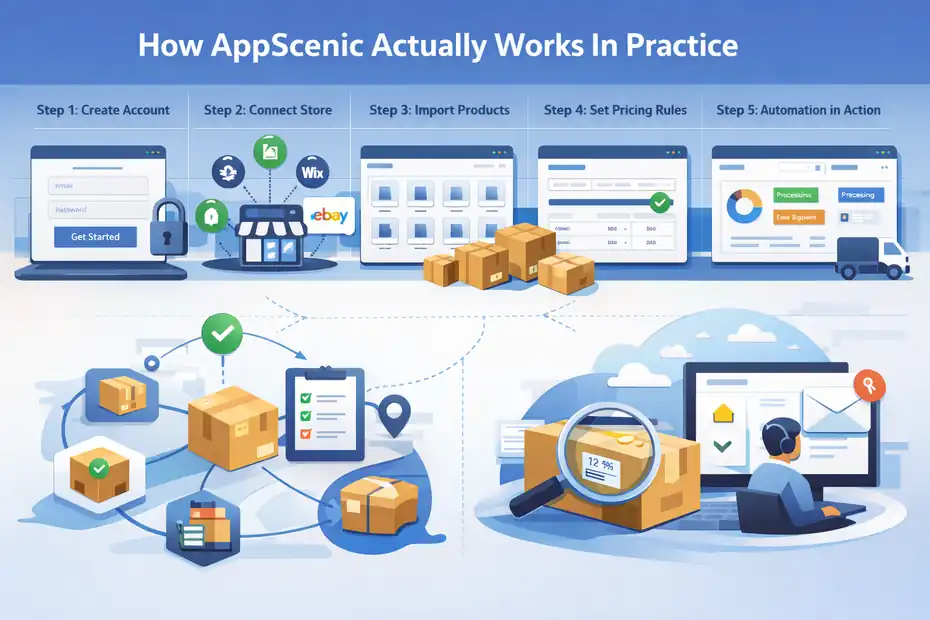
The platform’s workflow is fairly standard: create an account, connect your store, import products, set pricing rules, publish listings, then let the automation handle ordering and tracking.
AppScenic says you can connect a store, import products in bulk or one by one, and automate order processing from supplier to customer.
The Typical Setup Flow For A New Store
The practical process usually looks like this.
- Step 1: Create An Account: AppScenic says you can start with email only and a free trial.
- Step 2: Connect Your Store: Supported storefronts listed publicly include Shopify, WooCommerce, Wix, Ecwid, eBay, and Walmart.
- Step 3: Import Products: You can import one product at a time or in bulk from its catalog of over 1 million products.
- Step 4: Set Pricing Rules: AppScenic promotes smart pricing formulas to automate markup.
- Step 5: Let Automation Run: Orders, tracking, and inventory updates are meant to flow automatically.
That sounds smooth, and for many stores, it probably is. But here is the part I would not ignore: setup quality depends heavily on the products you choose, how clean the product data is, and whether the supplier listings are well structured. Automation only saves time after the catalog is set up correctly.
A beginner can absolutely get started fast here. The bigger challenge is building a store that still feels organized after 50, 100, or 500 products.
What The Automation Does Well
Automation is clearly AppScenic’s strongest selling point. It publicly emphasizes automatic ordering, stock syncing, price syncing, tracking imports, and pricing formulas, which are exactly the features that remove repetitive store admin work.
Imagine you are running a home goods store and one of your suppliers updates stock levels overnight. Without synchronization, you could wake up to three paid orders for an item that is already unavailable. With proper stock sync, that risk drops dramatically. That is the kind of boring backend improvement that saves real money.
Tracking automation also matters more than most beginners expect. When tracking numbers are pushed into your store automatically, customers get updates faster, and your support inbox usually stays calmer. That means fewer “Where is my order?” emails and fewer chargeback risks.
From what I’ve seen, a platform wins or loses on small operational details like these. AppScenic seems to understand that well. If you are evaluating the platform, I would spend more time testing sync quality than admiring the dashboard.
Where Real-World Friction Can Show Up
This is where the “hidden truths” part becomes important. Automation platforms almost always look better in demos than they feel during edge cases. Personalized products, product variants, supplier disruptions, and slow support response times are the kinds of problems that expose a platform’s real weaknesses.
On the Shopify App Store review page, some users praise AppScenic’s support, AI tools, and product access, but there are also complaints around issues such as missing engraving or personalization details and product variant organization.
One review from March 2026 describes problems with custom engraving data not reaching the AppScenic dashboard, while another from November 2024 says some products are listed separately when they should be combined as variants.
That does not make AppScenic bad. It makes it normal. Every dropshipping system looks strong until a store starts doing anything slightly non-standard.
My advice is simple: if you sell personalized products, bundles, or complex variant-heavy catalogs, test those workflows before you trust them with paid traffic.
AppScenic Pricing: Is It Worth The Cost?
Pricing changes how attractive the platform feels. AppScenic currently shows a Free plan at $0 per month, a Standard plan at $39 per month, Pro at $79 per month, and Elite at $99 per month, along with a 7-day free trial on paid plans.
The Free plan allows catalog browsing and some sync visibility, but it does not include orders.
Standard includes 100 pushed products and 20 AI tokens per day, Pro includes 5,000 pushed products and premium products, and Elite expands store and AI limits further.
What You Get At Each Pricing Tier
Here is the practical breakdown.
- Free Plan: Best for browsing and testing the platform interface, but not enough to run a real order workflow because it includes no orders.
- Standard Plan ($39/mo): Good for small stores, but the 100-product cap means you need to be selective.
- Pro Plan ($79/mo): Probably the sweet spot for many stores because it allows 5,000 pushed products, 3 connected stores, and premium products.
- Elite Plan ($99/mo): More suited to agencies, advanced sellers, or operators managing multiple stores.
I think the key question is not whether $39 or $79 is expensive in isolation. It is whether the automation saves enough time and prevents enough mistakes to justify the fee.
If you are only testing one-product stores or learning ecommerce from scratch, the paid plans may feel heavy. If you already know how expensive stock errors, missed tracking updates, and supplier admin can become, the pricing starts to make more sense.
The Hidden Cost Most Reviews Skip
Most AppScenic review articles focus only on subscription price. That is too shallow. The bigger cost is what happens when you choose the wrong platform for your business model.
If your supplier data stays clean, your automation works, and your shipping expectations match your audience, the platform fee can be minor compared to saved time.
But if you use it for a store with complex personalization, messy variants, or unsupported edge cases, the monthly fee is not the real problem. The real cost is wasted ad spend, delayed fulfillment, refunds, and time spent troubleshooting.
There is also historical evidence of transaction fees mentioned in older AppScenic materials, where the company explained that fees could vary by plan. That is older content, so I would treat it as context rather than the final word and confirm current order economics before scaling hard.
That is why I suggest evaluating the platform based on total operating cost, not just the headline subscription.
Supplier Quality, Product Selection, And Shipping Reality
AppScenic repeatedly emphasizes verified domestic suppliers and fast regional shipping.
It shows supplier coverage across the US, UK, EU, Canada, Australia, and additional countries, and says its suppliers follow strict quality standards.
Are The Suppliers Actually Better Than Average?
This is one of the strongest reasons people consider AppScenic. It is not trying to compete on “cheapest possible product.” It is leaning into local or regional supplier access and a more curated environment.
That can be a real advantage. In dropshipping, supplier quality affects almost everything: shipping speed, product consistency, return rates, customer satisfaction, and refund volume. A better supplier network usually gives you a better chance of building a store customers trust.
At the same time, “verified” does not mean “perfect.” Even on the Shopify App Store review page, AppScenic publicly responded to a complaint by explaining that a supplier faced a severe storm disruption that caused warehouse closure and unfulfilled orders.
The company said it unpublished products from that supplier once aware of the issue.
That response is actually helpful because it reveals the real-world truth: supplier marketplaces still depend on outside businesses, warehouses, and logistics. No software platform can fully remove that risk.
How To Judge Product Selection The Right Way
A catalog with 1 million+ products sounds impressive, but quantity is not the same as quality.
When I review a dropshipping platform, I do not ask, “How many products are there?” I ask:
- Does the catalog have enough products in one niche to build a coherent store?
- Are images, variants, and descriptions clean enough to publish with light editing?
- Are suppliers concentrated in the markets I sell to?
- Are shipping times realistic for my customer promise?
- Do the margins still work after ad costs?
That is how you should look at AppScenic too. The best-case use is not importing hundreds of random products. It is finding a tighter set of items that match one audience and can be fulfilled reliably.
If you build a store around product coherence instead of catalog size, AppScenic becomes more useful.
Integrations, Store Compatibility, And Ease Of Use
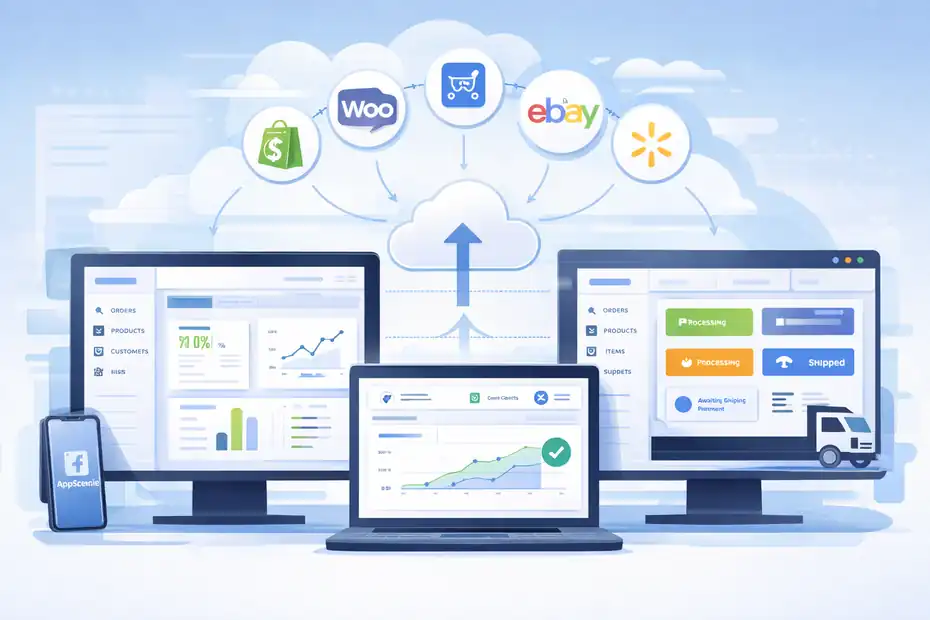
AppScenic publicly lists integrations with Shopify, WooCommerce, Wix, Ecwid, eBay, and Walmart, and highlights apps or built-in connection flows for several of those ecosystems.
Best Ecommerce Platforms To Pair With AppScenic
For most users, Shopify and WooCommerce are the most relevant pairings. AppScenic has dedicated pages for both and promotes automatic order import, tracking sync, and stock updates for those setups.
If you want speed and simplicity, Shopify is usually the easier route. The setup tends to be cleaner, and app-based integrations are often less technical for beginners. If you want more control and lower long-term platform fees, WooCommerce can work very well, but it often requires more comfort with plugins, WordPress, and site maintenance.
I believe AppScenic is more appealing when matched with a system that keeps the storefront side simple. That means many beginners will probably find the Shopify route easier, while more technical sellers may appreciate WooCommerce flexibility.
The platform support is broad enough to be useful, but breadth only matters if the actual sync quality holds up on your chosen stack.
User Experience And Learning Curve
Based on AppScenic’s public messaging and customer reviews, the platform aims to feel approachable, even for relatively new store owners. The setup steps are straightforward, and many positive reviews mention ease of navigation, clean layout, and smooth integration.
That said, ease of use and ease of success are not the same thing.
A platform can be simple to click through and still require smart decisions around supplier choice, product positioning, margin planning, and customer experience.
Beginners sometimes confuse “easy dashboard” with “easy business.” AppScenic can help with operations, but it does not solve bad product-market fit or weak branding.
I would describe the learning curve like this: the software side looks reasonably accessible, but the business side still needs judgment. That is fair. No real ecommerce tool can automate taste, positioning, or product selection for you.
The Pros, Cons, And Hidden Truths You Should Know
This is the section most people actually want. So let me be direct. AppScenic has real strengths. It also has tradeoffs that glossy review posts often skip.
What AppScenic Does Really Well
The biggest strengths seem to be automation, regional supplier access, and a platform direction that feels more serious than “cheap product import and hope for the best.”
Officially, AppScenic offers automatic ordering, tracking sync, instant stock and price sync, pricing formulas, and support for multiple sales channels. It also claims AI and translation features that can help streamline catalog work.
Here are the standout advantages in plain language:
- Less Manual Work: Strong automation is the clearest value proposition.
- Better Regional Fulfillment Angle: Supplier coverage beyond one low-cost sourcing region can support faster shipping expectations.
- Scalable Product Management: Smart pricing formulas and bulk imports become more valuable as your catalog grows.
- Multi-Store Potential: Higher plans allow multiple connected stores, which can matter for advanced operators.
If you already understand ecommerce basics, these features can save real time.
Where AppScenic May Frustrate You
The weak spots are not necessarily unique to AppScenic, but they matter.
Recent review signals show complaints around customization handling, some support responsiveness issues, and product structure quirks like variants being separated awkwardly.
Positive reviews still outnumber those complaints on visible channels, but the friction points are exactly the sort of issues that matter once you start processing real orders.
The likely downsides are:
- Edge-Case Complexity: Personalized products may need extra testing.
- Catalog Cleanup Work: Some listings or variants may need manual refinement.
- Support Timing Limitations: At least one recent reviewer described delays during urgent troubleshooting.
- Price May Feel High For Beginners: Especially if you are still validating your niche.
The hidden truth is that AppScenic looks strongest for operators who want more stable operations, not for people chasing the absolute cheapest path into dropshipping.
Who Should Use AppScenic And Who Should Skip It
Not every seller needs this platform. The smartest decision depends on your store model, experience level, and catalog complexity.
AppScenic Is A Good Fit For These Sellers
I would seriously consider AppScenic if you fit one of these profiles:
- You Want Faster Regional Shipping: Especially for US, UK, or EU audiences.
- You Care About Automation: You do not want to manually manage orders, tracking, and inventory.
- You Are Building A More Curated Store: Niche store, branded feel, cleaner customer experience.
- You Already Know Your Niche: So the subscription cost supports a real plan, not vague experimentation.
- You Manage More Than One Store: Higher plans make this more attractive.
For these users, the platform’s strengths line up with actual business needs.
You May Want To Skip It If This Sounds Like You
I would be more cautious if:
- You Are On A Very Tight Budget: The paid tiers may feel expensive before you validate product-market fit.
- You Need Heavy Product Customization: Engraving, personalization, or unusual option logic should be tested carefully.
- You Prefer Ultra-Simple Beginner Tools: AppScenic is accessible, but it still expects you to think like an operator.
- You Want Massive Product Testing At The Lowest Cost: A leaner setup elsewhere may fit early-stage testing better.
In other words, AppScenic is better for intentional store building than random product gambling. I think that is a compliment, but it also narrows the audience.
How To Test AppScenic Before You Commit
The smartest way to review a platform is not by reading feature lists. It is by creating a controlled test.
A Simple Evaluation Framework
Here is how I recommend testing AppScenic over a short trial period:
- Step 1: Import 10 To 20 Products: Choose items in one niche, not random categories.
- Step 2: Review Product Data: Check titles, descriptions, variants, images, and margins.
- Step 3: Set Pricing Rules: Make sure your markup still leaves room for ads and returns.
- Step 4: Simulate Customer Experience: Check estimated delivery expectations, tracking flow, and storefront presentation.
- Step 5: Stress-Test Edge Cases: Variants, bundles, personalization, and supplier communication.
- Step 6: Contact Support Once: Not because something is wrong, but because you need to feel their responsiveness before scaling.
This tells you far more than any YouTube roundup ever will.
The Final Verdict
So, is AppScenic worth it?
My honest take is this: AppScenic looks like a serious dropshipping platform with a strong automation angle, broad store integrations, and a more quality-focused supplier story than many low-end alternatives. Its public pricing is not cheap for a beginner, but the operational features can justify that cost for the right seller.
The hidden truths are not scandalous. They are practical. You still need to test supplier quality, product structure, customization workflows, and support speed. Some recent public reviews show exactly those friction points.
If you are building a store that values automation, cleaner fulfillment workflows, and better regional shipping potential, AppScenic deserves a serious look. If you are still in pure experimentation mode, you may want to move carefully and validate the economics first.
That is probably the fairest conclusion for an appscenic dropshipping review in 2026: promising, useful, and potentially very strong for the right store, but definitely not something you should subscribe to blindly.
FAQ
What is AppScenic and how does it work?
AppScenic is a dropshipping platform that connects your store to verified suppliers and automates product imports, order processing, stock updates, and tracking. It works by syncing your store with its supplier network so you can sell products without holding inventory.
Is AppScenic good for beginners in dropshipping?
AppScenic can work for beginners due to its clean interface and automation features, but it may feel expensive if you are just testing products. It is better suited for users who want a more structured store rather than experimenting with many low-cost items.
Does AppScenic offer fast shipping?
AppScenic focuses on regional suppliers in the US, UK, EU, and other areas, which can improve shipping times compared to traditional dropshipping. However, delivery speed still depends on the specific supplier, product location, and current logistics conditions.
How much does AppScenic cost?
AppScenic offers a free plan for browsing and paid plans starting around $39 per month. Higher tiers increase product limits, automation features, and store connections. The real cost depends on how much value you get from automation and reduced manual work.
Is AppScenic worth it for dropshipping in 2026?
AppScenic is worth it if you want automation, better supplier quality, and more stable operations. It may not be ideal for beginners testing random products, but it can be valuable for building a more reliable and scalable ecommerce store.

I’m Juxhin, the voice behind The Justifiable.
I’ve spent 6+ years building blogs, managing affiliate campaigns, and testing the messy world of online business. Here, I cut the fluff and share the strategies that actually move the needle — so you can build income that’s sustainable, not speculative.