
Table of Contents
Some links on The Justifiable are affiliate links, meaning we may earn a small commission at no extra cost to you. Read full disclaimer.
Semrush not showing accurate keyword data is one of those problems that can make you question your whole SEO process.
I’ve seen it happen when the numbers look too low, too high, or just don’t match Google Search Console, Keyword Planner, or what you’re seeing in real traffic.
The good news is that this usually is not a “broken tool” problem. It is almost always a data interpretation, database, location, matching, or timing problem.
Once you know where the gap comes from, you can fix your research workflow and make much better keyword decisions.
Why Semrush Keyword Data Can Look Wrong
When Semrush numbers feel off, the first thing to understand is that Semrush is working from modeled keyword data, not your private Google account data or your site’s exact analytics.
Semrush says its search volume is calculated with machine learning and large-scale search engine data, while Google Search Console and Google Ads Keyword Planner each use different datasets and reporting logic.
That means disagreement is normal before it is a problem.
Search Volume Is An Estimate, Not A Live Counter
A lot of frustration starts here. Many people assume “monthly search volume” means a precise live count of searches happening right now. It does not.
Semrush describes search volume as a calculated metric built from algorithms and accumulated search engine data. Google Keyword Planner also frames its numbers as estimates and forecasts rather than exact organic SEO truth.
Even Search Console only shows performance for your property and limits how much query data appears in reports. Those three systems are useful, but they are measuring different things.
Here is the practical takeaway:
- Semrush: Best for market-level keyword research and competitive discovery.
- Search Console: Best for your site’s real impressions, clicks, CTR, and average position.
- Keyword Planner: Best for paid search estimates and advertiser-oriented forecasting.
I recommend treating Semrush as a directional tool. If a keyword shows 1,300 searches in Semrush and 900 impressions in Search Console for one page over a time range, that does not mean one of the tools is “lying.” It usually means the tools are measuring different slices of demand.
Different Databases Create Different Numbers
Semrush’s keyword coverage depends on the database and country you are searching.
Semrush explains that its database is built around keywords with meaningful search volume and that low-volume terms can be omitted to make room for more popular and relevant keywords. That matters a lot if you are researching niche, local, or brand-new queries.
This is where many people trip up. Imagine you run a small B2B cybersecurity consultancy in Dallas. You search a very specific keyword like “fractional ciso for law firms dallas.” If Semrush has light coverage for that phrase in the selected database, the keyword may show low or no useful volume.
That does not automatically mean no one searches it. It can simply mean the term is too narrow, too fresh, or too low-volume to be represented well in that database.
In my experience, once a keyword becomes more specific, you need to validate it through clusters rather than a single phrase. Instead of trusting one exact-match term, look at related modifiers, SERP behavior, and real impressions in Search Console.
Search Intent, Geography, And Timing Change Everything
Google itself notes that results can vary by time, place, device, and recent search history. That same reality flows into keyword tools too. If you check a keyword in the wrong country database, during a seasonal dip, or without understanding intent, the data can look inaccurate even when it is technically fine.
A simple example: “tax software” in February and “tax software” in July do not behave the same way. “Black friday laptop deals” in April is not the same as in November. Google Ads also says its forecasts are refreshed daily and adjusted for seasonality, which is another reminder that keyword demand is not static.
So before you call the data wrong, check whether you are comparing the same keyword, country, device expectations, and timeframe.
How To Diagnose The Real Accuracy Problem
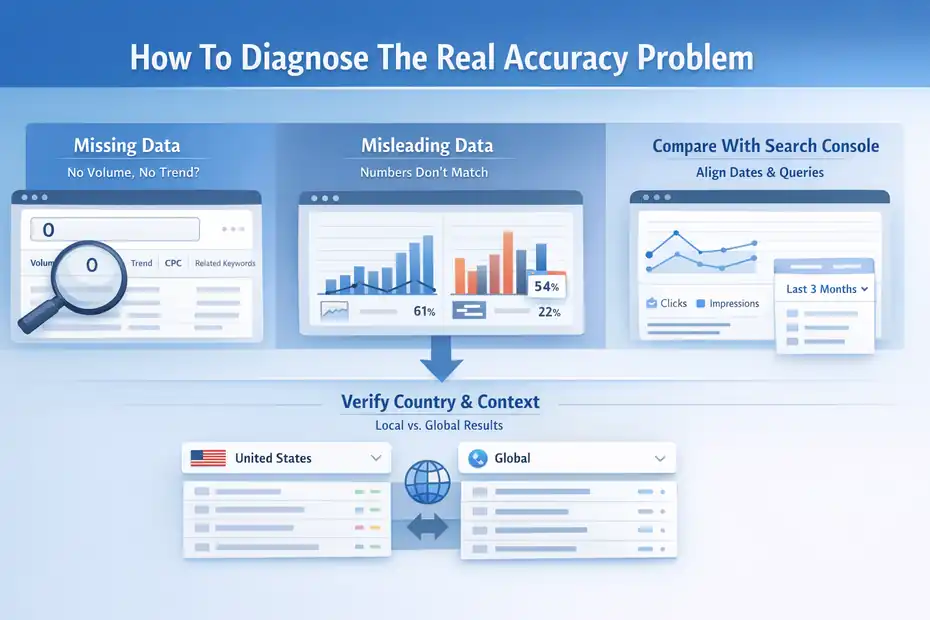
Before you try random fixes, you need to identify what kind of inaccuracy you are seeing. This step saves a lot of wasted time.
Check Whether The Problem Is Missing Data Or Misleading Data
There are two very different problems:
- Missing data: Semrush shows no volume, no trend, no CPC, or very thin related keyword coverage.
- Misleading data: Semrush shows numbers, but they do not align with Search Console, campaigns, or market reality.
That distinction matters because the fix is different. Missing data often points to database coverage, location selection, or low-volume query limitations. Misleading data usually points to intent mismatch, broad clustering assumptions, seasonal distortion, or comparing apples to oranges across tools.
I suggest opening your notes and tagging each suspect keyword into one of these two buckets. It sounds simple, but it immediately clarifies what you should test next.
Verify The Country And Search Context First
Semrush’s Keyword Overview supports local, national, and global views. If your market is the United States and you are checking a global or wrong-country database, the numbers can look wildly off. Semrush explicitly highlights that keyword metrics vary across local, national, and global scales.
This is one of the fastest fixes I know:
- Search the keyword in the exact target country.
- Compare the local database to global volume.
- Check whether the SERP shown actually matches your audience.
- Repeat for close variants.
A SaaS company targeting U.S. buyers can get misled by global data because a term may have strong volume in India, Brazil, or the UK but weak U.S. commercial value. In that case, Semrush is not inaccurate. The researcher is using the wrong lens.
Compare With Search Console The Right Way
Search Console is often used as the “truth checker,” but people misuse it all the time. Google says the Performance report shows your site’s clicks, impressions, CTR, and average position, but only up to 1,000 top queries are visible in the table, and rare queries may be hidden for privacy.
Search results also vary by time, place, and user context.
That means you should not compare Search Console and Semrush like this:
- Semrush monthly volume for one keyword
- versus
- Search Console impressions for one page during a random date range
That comparison is too sloppy.
Use a cleaner process instead:
- Match the date range: Compare recent months against recent months.
- Match the geography: Use the same country focus.
- Match the query family: Compare a keyword cluster, not only one exact phrase.
- Match the intent: Informational terms and transactional terms behave very differently.
When I do this properly, the “Semrush is wrong” complaint usually turns into “my comparison method was wrong.”
Step-By-Step Fix For Semrush Keyword Data Problems
Now let’s get into the actual fix process. This is the workflow I would use if I were cleaning up a messy keyword research project today.
Fix 1: Re-Run The Keyword In The Correct Database
Start with the most obvious correction. Enter the same keyword again, but change the country and review both local and global views. Semrush’s keyword tools provide metrics across local, national, and global scales, and that alone can change how the term looks.
Use this quick check:
- Target market only: Use your revenue-driving country first.
- Global view second: Use it to spot broader interest, not to set SEO expectations.
- Variant testing: Check singular, plural, reordered phrasing, and intent modifiers.
For example, “crm for nonprofits,” “nonprofit crm,” and “best crm for nonprofits” may carry different intent and volume behavior. If you only check one version, you can misread the opportunity.
I believe this is one of the biggest hidden issues in keyword research. People search one phrase, see one number, and build strategy around it. That is too thin for modern SEO.
Fix 2: Validate The Keyword With Related Variants And Clusters
Semrush’s Keyword Overview and related keyword features are much more useful when you stop thinking in isolated exact-match terms. Semrush also notes that its database and overview tools connect into broader keyword discovery, including related opportunities.
Instead of asking, “Is this one keyword accurate?” ask, “Does this topic cluster show reliable demand?”
Here is a better cluster validation method:
- Core term: The main keyword you care about.
- Commercial variant: A buying-intent version.
- Question variant: A problem-solving version.
- Comparison variant: A decision-stage version.
- Long-tail variant: A more specific phrase.
Imagine the topic is payroll software for restaurants. Your cluster may include:
- payroll software for restaurants
- best restaurant payroll software
- restaurant payroll system
- how to run payroll for restaurant staff
- restaurant payroll software pricing
If Semrush shows healthy related demand and the SERP is clearly active, you have enough evidence even if one exact phrase looks odd. In my experience, cluster consistency matters more than perfect exact-match accuracy.
Fix 3: Use Search Console To Confirm Actual Demand On Your Site
Semrush helps you estimate market demand. Search Console helps you verify whether Google is already exposing your site to that demand. Google says the Performance report lets you see the queries most likely to show your site, alongside clicks and impressions.
This is how I use both tools together:
- Use Semrush to pick the topic.
- Use Search Console to confirm whether your site already gets impressions for that topic family.
- Use gaps between the two to guide content updates.
Example: Semrush says “semrush not showing accurate keyword data” and similar variants have real demand. Search Console shows your article is already getting impressions for “semrush keyword volume wrong” and “semrush inaccurate search volume.”
That is enough signal to optimize the page around the cluster, even if one phrase’s numeric estimate feels imperfect.
This approach is much stronger than obsessing over whether the headline keyword is 170 or 260 monthly searches.
Fix 4: Check The SERP Before Trusting The Number
This is one of my favorite sanity checks because it cuts through tool noise fast. If Semrush reports keyword demand but the search results are weak, mixed, or off-topic, the opportunity may be less valuable than the volume suggests.
If the SERP is full of highly relevant pages, forums, product docs, and fresh articles, the demand is probably real enough to act on.
Semrush’s keyword tools pair search volume with intent, CPC, and SERP analysis, which is exactly how they should be used. Search volume alone never tells the whole story.
I suggest asking these four questions:
- Does the SERP match the intent you want to target?
- Are the top results recent and clearly optimized?
- Are there ads, product pages, or support docs dominating the page?
- Do the related searches make topical sense?
If the answer is yes, the keyword is probably actionable even if the volume number is a little messy.
The Most Common Reasons Semrush Looks Inaccurate
These are the patterns I see most often when someone says Semrush keyword data is wrong.
Low-Volume Keywords Are Often The Messiest
Semrush explains that lower-volume keywords can be omitted from databases in favor of more popular or relevant terms. Google Ads also notes that very low search volume keywords may not be discoverable or forecastable in Keyword Planner.
That means low-volume SEO research is messy across the board, not just in Semrush.
This especially affects:
- local service keywords
- niche B2B phrases
- new product category terms
- branded modifiers
- long question queries
A local plumber may know that “24 hour pipe burst repair naperville” converts beautifully, but no keyword tool will always model that phrase perfectly.
In these cases, I recommend relying more on cluster logic, service-page relevance, and Search Console feedback after publishing.
Fresh Trends And Seasonal Terms Distort Historical Averages
Keyword tools love averages, but real search behavior spikes. Google Keyword Planner says forecasts are refreshed daily and adjusted using recent data and seasonality, while Semrush presents monthly search estimates and trend context rather than real-time organic truth.
That creates a classic issue: A trending keyword can look underreported if you catch it early, and a fading keyword can look stronger than it really is if you only look at historical monthly averages.
A realistic example is “best ai note taker for meetings.” During a hot trend cycle, the true opportunity can move faster than the average monthly number suggests. In that situation, I pay more attention to trend curves, publishing velocity in the SERP, and how quickly competitors are launching pages.
You Are Comparing Paid And Organic Signals As If They Are The Same
Semrush shows CPC and competition data that relate to Google Ads, while keyword difficulty is an SEO metric. Google Keyword Planner is built for ad planning, forecasts, and bid behavior. Those are useful signals, but they are not the same as organic opportunity.
This matters because a keyword can have:
- high CPC but weak organic informational intent
- strong organic potential but low advertiser competition
- large broad-match paid demand but narrower SEO page intent
I see this mistake a lot with affiliate and SaaS content. Someone spots high CPC, assumes high SEO value, and then gets confused when organic traffic does not match the expectation. The keyword was valuable for advertisers, not necessarily for the page they planned.
How To Build A More Accurate Keyword Research Workflow
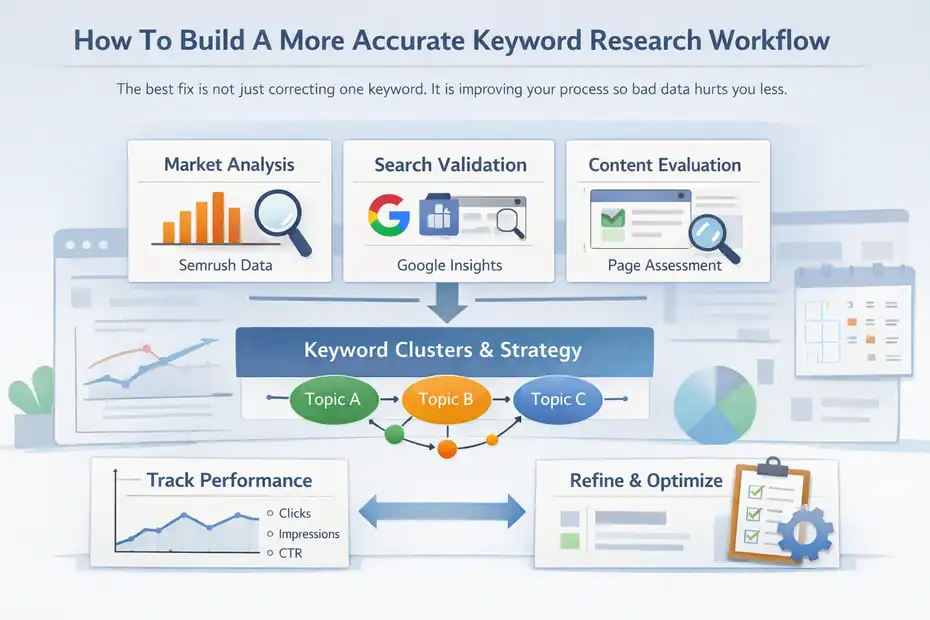
The best fix is not just correcting one keyword. It is improving your process so bad data hurts you less.
Use A Three-Layer Validation System
I recommend a simple three-layer workflow:
- Layer 1: Semrush market estimate. Use this for topic size, related variants, difficulty, and SERP structure.
- Layer 2: Google confirmation. Use Search Console for actual impressions and Keyword Planner for advertiser demand patterns.
- Layer 3: Page-level judgment. Decide whether the topic fits your site, funnel, and content format.
This keeps you from becoming overly loyal to one tool. Semrush gives scale, Search Console gives reality for your site, and Keyword Planner adds another demand lens. Google and Semrush both make clear that their metrics are estimates or filtered views of data, not interchangeable exact counts.
I like this system because it reflects how modern SEO actually works. We do not need perfect numbers. We need enough confidence to make better publishing and optimization decisions.
Prioritize Keyword Clusters Over Single Keywords
Semrush’s own keyword guidance emphasizes looking at search volume alongside difficulty, intent, CPC, and related opportunities. That is a strong reminder that SEO strategy should be topic-based, not single-keyword obsessed.
Here is the mindset shift:
- Bad workflow: “This keyword says 260, so it is worth it.”
- Better workflow: “This topic cluster has enough demand, relevant SERP intent, realistic competition, and content fit.”
For many of us, this change is what finally makes keyword data feel useful again.
Track Post-Publish Performance Instead Of Guessing Forever
At some point, you have to stop researching and publish. Then measure what happens.
Search Console gives you the cleanest signal for whether Google is surfacing your page for the intended queries. Google says the report helps you see which queries are most likely to show your site and how CTR and impressions behave over time.
A useful post-publish check looks like this:
- Week 2 to 4: Are impressions appearing for the target cluster?
- Week 4 to 8: Are secondary variants emerging?
- Month 2 to 3: Is CTR reasonable for the page type and ranking range?
- Month 3+: Should you expand the page based on query data?
I’ve found that this loop is where keyword research becomes genuinely accurate. Not because the tool got perfect, but because your workflow got smarter.
Mistakes That Make The Data Look Worse Than It Is
This section matters because sometimes the issue is not Semrush at all. It is our research habits.
Treating One Number As A Promise
A keyword volume estimate is not a traffic guarantee. It is not a ranking guarantee either.
Semrush’s keyword tools show volume, intent, CPC, and difficulty because one metric alone is not enough. Search volume only tells you that some amount of demand likely exists.
It says nothing about whether your page deserves to rank, whether the query will click through, or whether the SERP is packed with giant brands.
I suggest replacing “this keyword gets X searches” with “this keyword likely represents X-level demand within this market and context.” That framing is more honest and a lot more useful.
Ignoring Search Intent Mismatch
A keyword can have decent volume and still be terrible for your business if the intent is wrong.
Take a phrase like “best crm.” Huge demand, yes. But the SERP may be dominated by comparison posts, listicles, review sites, and product category pages. If your page is a simple homepage or a support article, the mismatch can make the keyword feel “inaccurate” because your result underperforms.
This is why I tell people to read the SERP before trusting the metric. Often the number is fine. The content match is the problem.
Overreacting To Tiny Differences Across Tools
A difference between 1,000 and 1,300 monthly searches usually is not strategy-changing. A difference between 100 and 10,000 is. Learn the difference between useful disagreement and dangerous disagreement.
If Semrush, Search Console, and Keyword Planner all point in the same broad direction, that is usually enough. If one tool says there is meaningful demand and the others show zero signal at all, that deserves more investigation.
Advanced Tips To Get Better Results From Semrush Data
Once you fix the basics, these are the moves that make your research much stronger.
Use Difficulty, CPC, And SERP Signals Together
Semrush highlights keyword difficulty, search intent, CPC, and SERP analysis because those signals create context around the volume number. It also says its keyword difficulty system uses a large keyword database and multiple ranking-related factors.
A practical decision framework looks like this:
- High volume + high difficulty + strong SERP competition: Usually a long-term target.
- Mid volume + moderate difficulty + clean intent match: Often the sweet spot.
- Low volume + high buying intent + weak SERP: Sometimes the best ROI keyword on the board.
- High CPC + mixed organic intent: Great for paid research, maybe weaker for SEO.
I believe this is where experienced SEOs quietly outperform everyone else. They do not chase the biggest number. They chase the best combination of fit, intent, and realistic rankability.
Look For Topic Coverage Gaps, Not Just “Wrong” Volume
Semrush’s broader keyword ecosystem is useful for finding related terms, questions, and competitor angles. That means you can turn an “inaccurate keyword” complaint into a content expansion opportunity.
For example, if a page targeting “semrush not showing accurate keyword data” starts getting impressions for:
- semrush search volume wrong
- semrush keyword data inaccurate
- semrush keyword volume not matching google
- semrush traffic estimate wrong
that is a signal to expand the article with a troubleshooting section, comparison workflow, and FAQ. In other words, even imperfect keyword data can reveal the real topical map you should cover.
Make Peace With Directional Accuracy
This is my honest opinion: in SEO, directional accuracy usually beats false precision.
Semrush has a very large keyword database and says its data is regularly updated with crawling and machine learning. Google Ads and Search Console also make it clear that their systems use estimates, filters, privacy limits, and contextual variation.
None of these tools were designed to give you a magical exact view of demand for every query in every moment.
So the real win is building a research system that answers these questions:
- Is there enough demand to justify content?
- Is the intent clear?
- Can my site realistically compete?
- Does the topic connect to revenue, leads, or authority?
- Can I validate performance after publishing?
If the answer is yes, the keyword data is accurate enough to act on.
Final Fix: What To Do When Semrush Still Feels Wrong
At the end of the day, semrush not showing accurate keyword data usually means one of five things: wrong database, low-volume query limits, poor comparison method, seasonal distortion, or intent mismatch.
The fix is not to throw out the tool. The fix is to validate the keyword from multiple angles and make decisions based on clusters, SERPs, and real performance data.
Here is the simplest action plan I recommend:
- Recheck the keyword in the correct country database.
- Compare local and global views.
- Validate the term with close variants and related clusters.
- Review the SERP for intent and freshness.
- Cross-check with Search Console impressions and query patterns.
- Use Keyword Planner only as a supporting demand signal, not the only truth source.
- Publish or optimize based on the topic, then measure real performance.
That is the real semrush not showing accurate keyword data fix. Not a hack. Not a hidden setting. Just a better research workflow that is much harder to mislead.
FAQ
What causes semrush not showing accurate keyword data?
Semrush not showing accurate keyword data usually happens due to database limitations, incorrect location settings, or low-volume keywords. It can also occur when comparing data with Google Search Console or Keyword Planner, since each tool uses different data sources and calculation methods.
Why does semrush keyword volume differ from Google Search Console?
Semrush provides estimated search volume across a market, while Google Search Console shows real impressions for your website. These tools measure different data sets, so differences are expected. Search Console reflects actual performance, while Semrush reflects broader keyword demand trends.
How do I fix semrush not showing accurate keyword data?
To fix semrush not showing accurate keyword data, check the correct country database, analyze keyword variations, review search intent, and validate with Search Console. Using keyword clusters instead of relying on a single keyword also improves accuracy and decision-making.
Is semrush keyword data reliable for SEO decisions?
Semrush keyword data is reliable when used as a directional guide rather than exact numbers. It helps identify trends, competition, and opportunities. Combining it with other tools and analyzing search intent ensures more accurate and effective SEO strategies.
Why are low-volume keywords inaccurate in semrush?
Low-volume keywords often appear inaccurate because Semrush prioritizes higher-demand queries in its database. Very specific or new keywords may not have enough data to model accurately, so their volume may appear lower or missing despite real search activity.

I’m Juxhin, the voice behind The Justifiable.
I’ve spent 6+ years building blogs, managing affiliate campaigns, and testing the messy world of online business. Here, I cut the fluff and share the strategies that actually move the needle — so you can build income that’s sustainable, not speculative.
Related posts:
 Website SEO Marketing: Easy Way
 What Scenario is Best for SEO Purposes
 The Impact Of SEO On Digital Marketing
 Squirrly SEO – The Ultimate WordPress SEO Plugin for Boosting Your Website’s Rankings
 SEO Checker: The Secret Weapon of Top 5% Webmasters
 Internal Links: 7 Tips for a Stronger SEO Foundation