
Table of Contents
Some links on The Justifiable are affiliate links, meaning we may earn a small commission at no extra cost to you. Read full disclaimer.
If you’re wondering whether is monday worth it for small business owners is a real question or just another software debate, I think it’s a fair concern. Small businesses do not have time or budget for tools that look polished but create extra admin.
Monday.com can be a strong fit, but only when your team needs structure, visibility, and automation badly enough to justify the monthly cost.
The short version is this: it’s not overpriced for every small business, but it absolutely can be if your workflows are still simple, your team is tiny, or you will not use the features that make the platform valuable.
What Monday.com Actually Is And Why Small Business Owners Consider It
Monday.com is a work management platform built to organize projects, tasks, processes, and team communication in one place.
The company positions it as an AI-powered work platform, and its work management product includes boards, dashboards, docs, automations, integrations, mobile apps, templates, and multiple views for tracking work.
For a small business owner, that usually means replacing some mix of spreadsheets, scattered chat messages, sticky notes, and “I thought you were handling that” confusion.
What Problem Monday.com Solves For Small Teams
Many small businesses do not fail because the team is lazy. They fail at coordination. A client request gets buried in email, a deadline slips because nobody owns it, or a repeat process lives only in one employee’s head.
Monday.com is designed to fix that kind of operational mess by giving you one visible system for who is doing what, when it is due, and what is blocked.
- In practice: A five-person agency can track leads, client onboarding, content production, invoices, and follow-ups in separate boards connected by automations.
- Why that matters: Small teams usually cannot afford operational waste. One missed handoff hurts more when you only have a few people.
- My view: This is where Monday earns its keep. Not in “task management” alone, but in making the business more predictable.
That said, not every small business needs this level of structure. If you run a solo consulting practice or a local shop with very repeatable routines, you may end up paying for flexibility you will barely use.
How Monday.com Works In Simple Terms
At the core, Monday.com runs on boards. A board is basically a structured workspace where rows represent tasks, leads, clients, projects, or anything else you want to track. Columns store status, deadlines, owners, files, budgets, priorities, and other data points.
Then you can view that data as a table, timeline, calendar, Kanban board, dashboard, or chart depending on what helps your team make decisions faster.
- Board: Your main workspace for a process or project.
- Item: A single row, such as one task or one client.
- Column: The data fields that describe that item.
- View: A different way to see the same information.
- Automation: A rule that triggers an action, like assigning a task when status changes.
- Integration: A connection to another tool so data moves automatically.
I suggest thinking of Monday less like a to-do app and more like an operations layer. That distinction matters because it explains both the platform’s value and why some owners feel overwhelmed at first.
Why Small Business Owners Are Attracted To It
Monday.com appeals to small businesses for three main reasons: it looks approachable, it is highly customizable, and it can support different departments without forcing everyone into the same rigid workflow.
Officially, Monday offers templates, docs, dashboards, mobile access, automations, integrations, and AI features across the platform.
Third-party reviewers also regularly highlight its ease of use and flexibility, even while noting that pricing and complexity can become sticking points for smaller teams.
Imagine you run a seven-person home services business. Your office manager cares about job scheduling, your sales person cares about lead follow-up, and your field team cares about daily task lists. A tool that can support all three without making everyone learn separate systems is genuinely attractive.
That is the promise. The real question is whether the cost and setup effort match the value you will actually get.
Monday.com Pricing: Where The “Overpriced” Debate Starts
This is where many small business owners hesitate, and honestly, I understand it.
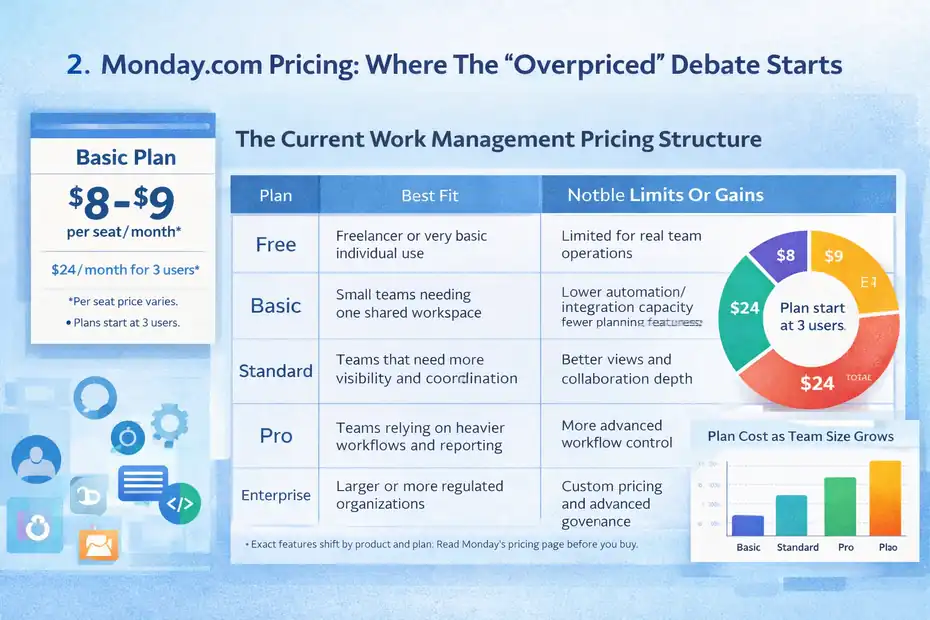
Monday.com may advertise entry pricing from $8 or $9 per seat per month depending on page and billing context, but the company also states that plans start from three users, which means your real minimum monthly spend is higher than the headline number suggests.
On its pricing page, Monday says pricing starts at $24 per month for three users and scales by plan and team size.
The Current Work Management Pricing Structure
Monday Work Management currently offers Free, Basic, Standard, Pro, and Enterprise tiers, with the Free plan available only for work management.
Official support documentation confirms those plan types, and the pricing page highlights feature differences tied to each tier. The paid tiers scale by seat count, with teams over 40 users moving into quote-based pricing.
Here is the practical view:
| Plan | Best Fit | Notable Limits Or Gains |
|---|---|---|
| Free | Freelancer or very basic individual use | Limited for real team operations |
| Basic | Small teams needing one shared workspace | Lower automation/integration capacity and fewer advanced planning features |
| Standard | Teams that need more visibility and coordination | Better views and collaboration depth |
| Pro | Teams relying on heavier workflows and reporting | More advanced workflow control |
| Enterprise | Larger or more regulated organizations | Custom pricing and advanced governance |
The exact features can shift by product and plan, so I always recommend reading the current Work Management pricing page before buying. That is especially important if you need dashboards, time tracking, advanced automations, or higher action limits.
Why Monday Can Feel Expensive For Small Business Owners
The pricing pain is usually not about the sticker price alone. It is about the gap between what small businesses need and where the most useful features begin.
Monday’s paid plans charge per seat, require a minimum number of users, and reserve more advanced workflow power for higher tiers.
Support docs also note that automations and integrations consume actions, which means high-usage teams need to pay attention to limits, not just plan names.
Here is where that becomes frustrating:
- Seat minimums: A two-person business can still feel pushed into paying at a three-user threshold.
- Feature gating: The cheapest plan may not include the features that solve your actual bottleneck.
- Scaling cost: As you add staff, the monthly software stack grows quickly.
- Multiple use cases: If you want project management, CRM-like tracking, and service workflows, costs can compound across products.
In my experience, “overpriced” usually means one of two things: either the company bought too much software too early, or they bought the right software but never implemented it well enough to see return.
When The Price Is Fair And When It Is Not
I believe Monday is fairly priced when the software replaces real operational chaos. If one missed client renewal, one delayed project, or one duplicated admin process costs you more than the subscription, the economics start making sense fast.
Monday’s own marketing emphasizes ROI, time savings, and automation benefits, while external reviewers often praise usability and flexibility.
But I would call it overpriced in these situations:
- You are a solo owner with simple needs: A calendar and spreadsheet may still be enough.
- Your team hates updating systems: Even the best platform fails when adoption is weak.
- You only need personal task tracking: Monday is more than you need.
- You are buying Pro-level power for Basic-level problems: That mismatch is expensive.
That is the heart of the value debate. Monday is not cheap software for tiny teams. It is potentially high-return software for small businesses with coordination problems.
The Features That Make Monday Worth Paying For
After pricing, the next question is simple: what are you actually paying for?
For small business owners, the answer is not one feature. It is the combination of visibility, customization, automation, and reporting in a system your team may actually use consistently.
Monday’s Work Management product includes unlimited items, templates, docs, dashboards, automations, integrations, and mobile apps, with feature depth increasing by plan.
Dashboards, Views, And Visibility
This is one of Monday’s strongest advantages. Small businesses often suffer from fragmented visibility. One person knows the sales pipeline, another tracks delivery in a spreadsheet, and nobody can answer “what is behind?” without asking three people.
Monday’s dashboards and multiple views help turn raw task data into something a business owner can actually use.
- Calendar view: Useful for content, appointments, launches, and deadlines.
- Timeline or Gantt-style planning: Useful when multiple tasks depend on each other.
- Kanban view: Helpful for simple stage-based work.
- Dashboards: Better for owners who want one-screen visibility across projects.
Let me make that real. Imagine you run a small marketing firm. You want to know which client campaigns are at risk, how many deliverables are due this week, and whether your designer is overloaded. A dashboard can surface that without a meeting.
That kind of clarity is hard to price until you have lived without it. Then it becomes obvious.
Automations And Integrations That Reduce Admin Work
Monday’s automation system is one of the clearest reasons a small business might justify the cost. The platform lets you trigger actions based on rules, and it supports integration actions for connecting with outside tools.
Monday’s support center explains that automations and integrations consume monthly action allotments, which is important because it ties value directly to usage.
A few examples that matter for small business owners:
- Lead follow-up: When a lead status changes to qualified, assign it to sales and set a due date.
- Client onboarding: When a deal closes, create implementation tasks automatically.
- Operations: When a job is marked complete, notify billing.
- Escalation: If a task is overdue, alert the owner or move it into a risk view.
I recommend judging Monday less by how many features it lists and more by how many repetitive steps it can remove from your week. If you save five to ten manual touches per client or project, the subscription starts looking much smaller.
AI Features: Helpful Or Just Hype?
Monday is leaning heavily into AI, and officially the company now highlights AI blocks, AI workflows, AI-powered automations and columns, AI board suggestions, and AI assistants across the platform.
These features are meant to help extract information, categorize, translate, summarize, and automate repetitive work.
For a small business, I would not buy Monday purely for AI. I would treat AI as a bonus layer on top of a solid workflow system.
Where AI may help:
- Summarizing updates: Useful when owners do not want to read every thread.
- Classifying incoming information: Helpful for support, lead intake, or request routing.
- Generating workflow suggestions: Good for teams still learning the platform.
Where it may be overhyped:
- If your core process is still messy: AI does not fix bad operational design.
- If your team rarely uses the platform: AI value depends on good data and active usage.
- If you expect magic: It is still software, not an operator replacing your staff.
My take is simple: The automation and visibility layers matter more than the AI headline for most small businesses.
When Monday.com Is A Smart Buy For A Small Business
This is where the answer gets more useful. The better question is not “Is Monday good?”
It is “For what kind of small business does Monday produce enough operational value to justify the cost?”
Best-Fit Small Business Scenarios
Monday tends to make the most sense when your business has recurring workflows, multiple moving parts, and at least a few people who need shared visibility. Monday itself markets heavily to SMBs and cross-functional teams, emphasizing connected processes, collaboration, and centralization.
I would put these businesses near the top of the fit list:
- Agencies: Client projects, creative reviews, approvals, timelines, and recurring delivery.
- Service businesses: Job scheduling, team coordination, and status tracking.
- Small sales teams: Lead stages, follow-ups, deal visibility, and pipeline reporting.
- Operations-heavy businesses: Anything with handoffs, deadlines, and standard operating processes.
- Growing startups: Teams moving beyond spreadsheets but not ready for rigid enterprise software.
Example: a 10-person agency billing $15,000 to $50,000 monthly per client can easily lose more than a month of Monday fees from one poorly managed project. In that case, the software cost is not the main financial risk. Poor execution is.
Signs You Will Probably Get Strong ROI
From what I’ve seen, Monday becomes worth it when your business is already feeling operational strain. That might show up as missed deadlines, bottlenecks, too many check-in meetings, duplicate work, or confusion around ownership.
Monday’s mix of templates, dashboards, automations, and centralized task visibility is designed for exactly that stage of growth.
You are more likely to get good ROI if:
- You manage projects with many handoffs
- You need owners and due dates visible in one place
- You want less status-chasing
- You run repeatable processes
- You can commit to setup and team adoption
A useful rule of thumb is this: if work slipping through the cracks already costs you money, Monday may be cheap compared to staying disorganized.
Why Some Owners End Up Loving It
The businesses that love Monday usually say the same things: it gives them a cleaner overview, it is easier to train people on than older enterprise systems, and it can stretch across different workflows without forcing a rebuild every month.
Third-party reviews consistently mention user-friendly design, customization, and collaboration benefits, even when they also call out learning curve and pricing concerns.
That pattern makes sense. Owners do not love software because it has features. They love software because it reduces friction. If Monday helps your team stop asking where things stand, it becomes emotionally valuable as well as financially useful.
When Monday.com Is Probably Not Worth It
This section matters just as much as the positive case. A lot of buyers get trapped by good demos. Monday looks polished, flexible, and modern, which it is.
But that does not mean it is the right business decision for every small company.
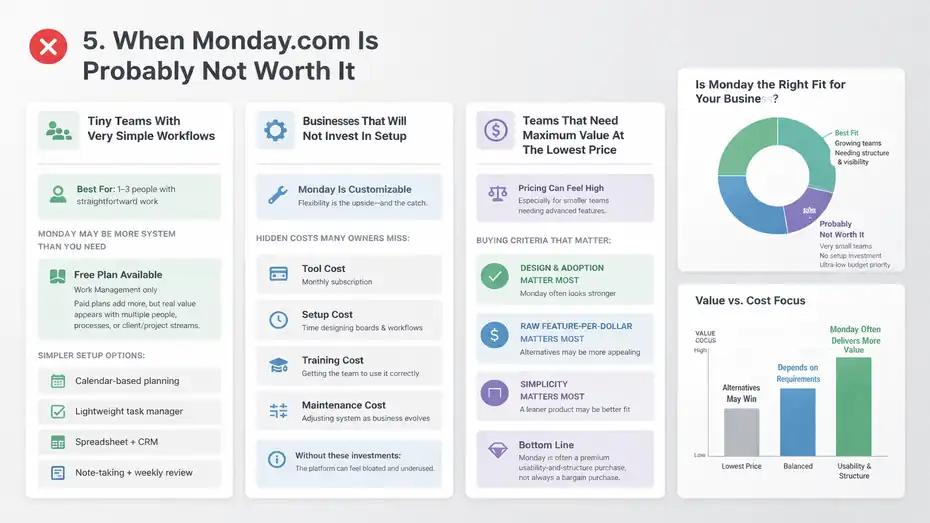
Tiny Teams With Very Simple Workflows
If your team is one to three people and your work is straightforward, Monday may be more system than you need.
The company does offer a Free plan for Work Management and entry-level paid options, but the real collaborative value usually appears once you are managing several people, several processes, or several client/project streams at once.
A solo consultant might be better off with:
- Calendar-based planning
- A lightweight task manager
- A spreadsheet plus a CRM
- A note-taking system tied to a simple weekly review
That is not anti-Monday advice. It is just honest budget discipline. Buying flexible workflow software before you truly need flexible workflows is how small businesses end up calling tools “overpriced.”
Businesses That Will Not Invest In Setup
Monday is customizable, and that is both the upside and the catch. Flexible software still requires someone to define statuses, workflows, ownership, rules, and reporting logic. Monday offers templates and onboarding resources, but you still need a real implementation mindset.
Here is the hidden cost many owners miss:
- Tool cost: The monthly subscription
- Setup cost: Time spent designing boards and workflows
- Training cost: Getting the team to use it correctly
- Maintenance cost: Adjusting the system as the business evolves
If your company is unlikely to invest in those steps, the platform will feel bloated fast. I have seen this pattern often with small teams: they buy a powerful tool to solve a discipline problem, but what they really needed was a simpler process and stronger follow-through.
Teams That Need Maximum Value At The Lowest Price
If your priority is squeezing the most features possible from the lowest monthly spend, Monday may not always win that contest. Even favorable third-party reviews note that pricing can be a drawback for smaller businesses, especially when more advanced functionality is needed.
That does not mean competitors are automatically better. It means your buying criteria matters:
- If design and adoption matter most: Monday often looks stronger.
- If raw feature-per-dollar matters most: You may find alternatives more appealing.
- If simplicity matters most: You may prefer a leaner product.
In other words, Monday is often a premium usability-and-structure purchase, not always a bargain purchase.
How To Decide If Monday Is Worth It For Your Business
I think this is the most important part of the whole discussion. You do not need a universal verdict. You need a decision framework that fits your business.
Start With The Cost Of Operational Chaos
Before comparing subscription fees, estimate what disorganization is currently costing you. I recommend looking at the last 30 to 90 days and asking:
- How many deadlines slipped?
- How many client or lead follow-ups were delayed?
- How much time was spent in status meetings?
- How often did staff ask for missing information?
- How many tasks depended on memory instead of a system?
If the answer is “more often than I’d like,” you already have an operational cost problem. Monday is valuable when it helps lower that cost through visibility, assignment, process standardization, and automation.
A simple scenario: if your team loses just four hours a week to status chasing and admin, that may already be more expensive than a software subscription depending on labor costs.
Match The Plan To Your Real Use Case
Do not buy based on aspiration. Buy based on today’s workflow needs plus near-term growth. Monday’s official plan pages make clear that feature access differs substantially by tier, so the right buying move is to map your must-haves before comparing price.
Ask yourself:
- Do we mainly need task visibility? Basic may be enough.
- Do we need advanced collaboration and planning views? Standard may be the better entry point.
- Do we rely heavily on automation, reporting, or more complex workflows? Pro may be necessary.
- Do we have compliance, security, or governance demands? That points toward Enterprise.
I suggest writing down your top five operational problems first, then checking whether the cheapest suitable plan solves them. That keeps you from paying for features you admire but will not use.
Use The Trial Like A Real Pilot, Not A Tour
Monday offers a 14-day free trial for the Pro plan on key products, according to its pricing FAQ. Use that time like a pilot program, not like casual browsing.
Test one real workflow, such as:
- New lead intake to quote
- Client onboarding
- Content production
- Weekly operations management
- Support request handling
Then track a few practical questions:
- Did people actually update it?
- Did it reduce follow-up messages?
- Did owners get better visibility?
- Did any automation save real time?
- Did the workflow feel clearer after one week?
That is how you decide whether Monday is worth it. Not by watching polished landing pages, but by measuring whether your team works better inside it.
Common Mistakes Small Business Owners Make With Monday
Even good software can produce bad outcomes when implementation is sloppy. Most disappointment with Monday comes from avoidable mistakes, not from the platform failing to do what it promised.
Mistake 1: Building Too Much Too Early
The biggest mistake is overbuilding on day one. Owners create too many boards, too many statuses, too many custom fields, and too many automations before the team even learns the basics.
I recommend starting with one core process and making it boringly useful. That could be client delivery, lead tracking, or weekly team operations. Once the team trusts the system, then expand.
- Better approach: Start with one board and one dashboard.
- Better approach: Keep statuses simple and obvious.
- Better approach: Add automations only after observing repeated friction.
Monday gives you a lot of building flexibility. That is helpful, but it also means restraint is part of successful setup.
Mistake 2: Treating It Like A Fancy To-Do List
If you only use Monday as a place to dump tasks, you may never feel the value. The platform becomes worth it when you use linked workflows, ownership, deadlines, automations, dashboards, and team visibility together.
That is where it starts acting like an operations system rather than a prettier checklist.
A weak setup sounds like this: “We put all tasks in Monday.”
A stronger setup sounds like this: “When a sale closes, onboarding tasks are created, assigned, tracked, and surfaced on one owner dashboard automatically.”
That difference is huge.
Mistake 3: Ignoring Adoption And Training
You can buy the best platform in the category and still waste money if the team never adopts it. Monday’s interface is generally praised for usability, but even easy software needs standards and habits.
A few adoption habits matter more than fancy configuration:
- Assign one owner for each workflow
- Set one weekly review rhythm
- Define what “done,” “stuck,” and “priority” mean
- Make Monday the source of truth, not just a backup
I believe this is where many small businesses quietly succeed or fail with project software. The tool matters, but the operating discipline matters more.
Final Verdict: Is Monday Worth It For Small Business Owners Or Just Overpriced?
So, is monday worth it for small business owners? My honest answer is yes for the right kind of small business, and no for the wrong one.
Monday.com is worth it when your business has growing complexity, repeatable workflows, multiple people involved in delivery, and a real need for visibility and automation.
Its official feature set, broad customization, dashboards, integrations, automations, and newer AI capabilities make it a serious operations platform, not just a task app.
Reviews from major software sites also consistently frame it as flexible and user-friendly, though they regularly mention pricing and learning curve as tradeoffs.
It is overpriced when:
- Your workflows are still simple
- Your team is too small to use the collaboration depth
- You are unwilling to invest in setup
- You need the cheapest possible feature stack
It is worth it when:
- Work is slipping through the cracks
- You want one system across projects and processes
- Your team needs shared visibility
- You can save real admin time with automations
- You are buying for operational clarity, not just aesthetics
If I were advising a small business owner one-on-one, I would say this: do not ask whether Monday is “cheap.” Ask whether your current way of running work is costing you more than the tool would. For many growing small businesses, that answer is yes. And that is exactly where Monday stops looking overpriced and starts looking practical.
FAQ
Is monday worth it for small business owners with small teams?
Monday can be worth it for small teams if you manage multiple tasks, clients, or workflows. It helps centralize work and reduce confusion. However, for very small or simple operations, the cost may outweigh the benefits if you do not use its automation and collaboration features.
Why do some small business owners think monday is overpriced?
Many small business owners feel monday is overpriced because of per-user pricing and feature limitations on lower plans. If your team is small or your workflows are simple, you may not fully use the advanced features, making the cost feel higher than the value received.
What makes monday valuable for growing small businesses?
Monday becomes valuable when your business grows and needs better organization, visibility, and automation. It helps manage projects, track progress, assign tasks, and reduce manual work, which can save time and prevent costly mistakes in daily operations.
Can monday replace other tools for small businesses?
Yes, monday can replace multiple tools like spreadsheets, task managers, and basic CRMs by combining them into one system. This reduces tool switching and improves efficiency, but only if you set it up properly and your team consistently uses it.
Is monday better than simpler task management tools?
Monday is more powerful than simple task tools because it offers customization, automation, and team collaboration features. However, if you only need basic task tracking, simpler tools may be more cost-effective and easier to maintain.

I’m Juxhin, the voice behind The Justifiable.
I’ve spent 6+ years building blogs, managing affiliate campaigns, and testing the messy world of online business. Here, I cut the fluff and share the strategies that actually move the needle — so you can build income that’s sustainable, not speculative.
Related posts:
 Monday Pricing Breakdown For Small Businesses: What You’ll Really Pay
 QuickBooks Online Pricing 2025: Is It Still Worth the Cost?
 HubSpot Pricing Breakdown: What You Really Pay For
 Zoho CRM Pricing Hacks: Save Big on Your Subscription
 Project Management Software Monday: My Review
 Monday Program Review: Features That Actually Work