
Table of Contents
Some links on The Justifiable are affiliate links, meaning we may earn a small commission at no extra cost to you. Read full disclaimer.
Is SurveyMonkey worth it for ecommerce feedback? In many cases, yes, but only if you use it for the right kind of feedback and not as a catch-all customer insight system.
I’ve seen store owners buy survey software expecting it to magically explain low conversion rates, weak repeat purchases, or rising returns.
That usually does not happen.
What does happen is this: When SurveyMonkey is used for structured post-purchase feedback, NPS, CSAT, product research, and simple customer segmentation, it can become genuinely useful.
The real question is not whether it is good. It is whether it fits your ecommerce workflow, budget, and decision-making style.
What SurveyMonkey Actually Does For Ecommerce Feedback
SurveyMonkey is best understood as a structured feedback collection platform. That sounds basic, but it matters.
In ecommerce, you usually do not need “more data.” You need clearer customer language, cleaner patterns, and faster answers to questions like: Why are returns increasing?
Why are shoppers buying once but not again? Which product page promise is not matching reality?
What Problem It Solves Best
SurveyMonkey works best when you already know what you want to ask and you need an efficient way to collect answers at scale. For ecommerce brands, that often means post-purchase surveys, customer satisfaction surveys, product feedback, NPS surveys, and lightweight market research.
SurveyMonkey offers customer feedback templates, including CSAT and NPS options, and its customer satisfaction template has been used hundreds of thousands of times, which tells you the platform is heavily optimized for standard feedback workflows.
That makes it useful for stores that want consistency. If you run a Shopify, WooCommerce, or custom store and need a repeatable way to ask customers the same core questions every week or every month, SurveyMonkey is strong here.
You can build a survey once, reuse it, compare responses over time, and stop guessing.
Where it is weaker is passive behavior tracking. It will not replace your analytics stack. It will not tell you where a user rage-clicked, where a scroll stopped, or why a checkout field created friction unless you actively ask about it.
That distinction matters because many ecommerce teams confuse feedback tools with behavior tools.
Where It Fits In The Ecommerce Stack
I think the easiest way to judge SurveyMonkey is to place it in the right job category. It belongs in the “voice of customer” layer, not the “site analytics” layer. In simple terms, it helps you collect what people say, not everything they do.
That means SurveyMonkey pairs well with tools you already use for revenue and behavior tracking. Your store platform tells you conversion rate, repeat purchase rate, average order value, and refund trends. SurveyMonkey helps explain the “why” behind those metrics.
Qualtrics describes this well in a broader sense: website feedback gives a different perspective from operational analytics by explaining why something is happening, not just what happened.
Imagine you notice your repeat purchase rate is dropping. Analytics may show the decline, but a short SurveyMonkey email sent 10 days after delivery can reveal that shipping was fine, product quality was good, but sizing was inconsistent or instructions were unclear.
That is the kind of insight that can actually change your merchandising or CX decisions.
What Kinds Of Ecommerce Teams Benefit Most
SurveyMonkey is usually most worth it for three ecommerce groups.
- Small stores with growing order volume: They have enough customers to generate useful survey data but not enough internal research infrastructure to run formal feedback programs.
- Mid-sized brands with repeat customers: They benefit from NPS, satisfaction tracking, and post-purchase trend monitoring across products or segments.
- Lean teams that need fast setup: SurveyMonkey provides templates, standard question formats, and a familiar interface, which reduces setup friction.
For very early stores with low order volume, it can feel premature. If you only get a handful of sales each week, direct customer conversations may teach you more than a formal survey tool.
On the other end, very advanced brands may outgrow it if they need highly customized, event-triggered onsite feedback programs tied deeply to product analytics or customer data platforms.
How Ecommerce Feedback Works When You Use It Well
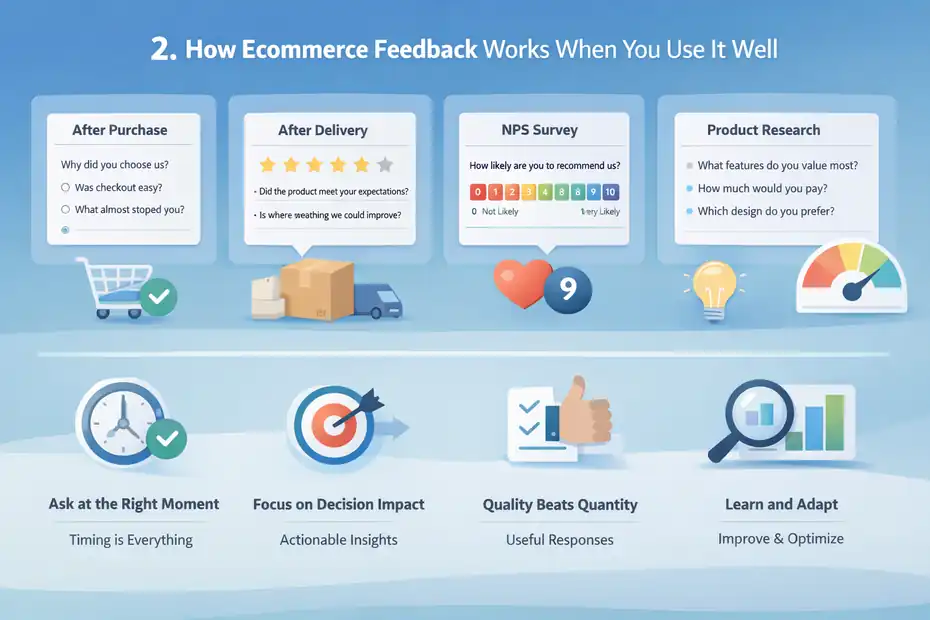
Good ecommerce feedback is not about asking customers everything. It is about asking the right person, at the right time, in the right format. This is where many stores get disappointing results.
They blame the tool, but the real issue is survey design and timing.
The Four Main Survey Types That Matter
For ecommerce, you usually do not need ten survey types. You need four that match clear business questions.
- Post-purchase feedback: Ask about checkout ease, shipping expectations, trust, or purchase motivation.
- Post-delivery satisfaction: Ask whether the product matched expectations, whether setup was easy, and whether the customer would buy again.
- NPS surveys: Measure loyalty and future recommendation intent with the standard 0–10 format. SurveyMonkey supports NPS templates and automatic score calculation.
- Product research surveys: Use these to test price sensitivity, feature interest, packaging ideas, or product line expansion. SurveyMonkey specifically positions pricing surveys and market research as core use cases.
In my experience, stores get the best results when each survey is tied to one business decision. If a survey exists only because “we should ask customers for feedback,” response quality usually drops.
Timing Matters More Than Most People Think
Timing can make or break the usefulness of your data. Qualtrics notes that immediate feedback can be 40% more accurate than feedback collected 24 hours later. That should immediately change how you think about ecommerce survey flows.
For example, a checkout experience survey should go out soon after the order is placed. A product satisfaction survey should wait until the customer has had enough time to receive and use the item.
A packaging survey sent before delivery is obviously useless, but I still see brands make timing mistakes like this all the time.
Here is a simple way to map timing:
- Right after purchase: Ask why they chose you, whether checkout felt easy, and what almost stopped the purchase.
- After delivery: Ask if the product matched expectations and whether anything felt disappointing.
- After repeat usage: Ask about durability, satisfaction, and whether they would reorder.
- After support interaction: Ask about issue resolution and service quality.
A tool like SurveyMonkey helps with structure, but you still need to think like a merchant, not a survey creator.
Why Response Quality Matters More Than Response Volume
A lot of people obsess over response rate, but I believe response usefulness is the more important metric. Delighted’s benchmark data found average response rates ranging from 6% for email to 8% for web and 16% for iOS SDK surveys in its dataset.
A Qualtrics community discussion also highlights that “good” response rates vary widely depending on program type and audience.
That means you should not panic if your email survey only gets single-digit response rates.
In ecommerce, a small but representative stream of high-quality answers can still reveal strong patterns. If 40 customers repeatedly mention poor sizing guidance, that insight can be worth far more than a 20% response rate on vague questions.
I suggest focusing on three quality signals instead: answer completeness, consistency of themes, and decision usefulness. If the feedback changes a landing page, a size guide, a return policy, or a product description, it is doing its job.
The Real Benefits Of SurveyMonkey For Ecommerce Stores
This is where SurveyMonkey can earn its price.
Not because it is flashy, but because it is fast to launch, familiar to teams, and good at repeatable feedback collection. That combination matters more than many store owners realize.
Fast Setup And Low Learning Curve
One reason SurveyMonkey remains popular is that it is easy to get moving. The platform offers templates for customer satisfaction, NPS, and other common workflows, which reduces blank-page friction.
SurveyMonkey also positions itself around easy survey creation, forms, and broad distribution methods like web links, email invitations, social sharing, QR codes, and website/app embeds on paid plans.
For ecommerce teams, this is practical. You do not need a specialized researcher or developer just to start collecting useful customer input. If your operations lead, CX manager, or founder wants to launch a post-purchase survey this week, they probably can.
That matters in real life because momentum is everything. A “good enough” feedback system that ships today is often more valuable than an ideal system that gets delayed for three months.
Strong For Standardized Feedback Programs
SurveyMonkey is especially useful when you want consistency over time. NPS, CSAT, product satisfaction, and purchase motivation surveys all benefit from stable question design. When the survey stays mostly the same, trendlines become more meaningful.
Let’s say you sell supplements, skincare, apparel, or home goods. You may want to compare responses by product category, season, first-time versus repeat buyer, or country. SurveyMonkey makes that type of recurring program easier than ad hoc spreadsheets or improvised forms.
This is also where standard survey logic helps. Customers become easier to segment. Reporting becomes easier to share. Team members know what the score means. Your retention lead can track sentiment changes without rebuilding the process each month.
In many ecommerce businesses, this is the hidden value: not just collecting data, but creating a reliable habit of listening.
Helpful AI And Thematic Analysis Features
SurveyMonkey’s paid plans now highlight AI-assisted survey building, AI-driven analysis, and thematic analysis for open-ended responses.
Advantage and higher plans mention AI build tools, AI insight summaries, and automatic grouping of open-text answers into themes.
I think this is more useful than it sounds, especially for small ecommerce teams. Open-ended feedback is where some of the best insights live, but it is also where teams get overwhelmed.
If you receive 200 responses about a product launch, manually sorting comments into themes can take hours. Automatic theme grouping can speed up the first pass.
That does not mean you should trust every AI summary blindly. You still need human review, especially if comments are nuanced or emotional. But for spotting clusters like “shipping took too long,” “fit ran small,” or “instructions were confusing,” these features can make SurveyMonkey more practical for busy merchants.
Where SurveyMonkey Falls Short For Ecommerce Brands
This is the part many review articles soften too much. SurveyMonkey is useful, but it is not a perfect ecommerce feedback platform.
If you buy it expecting deep behavioral insight or highly advanced event-based customer intelligence, you may be disappointed.
It Does Not Replace Onsite Behavior Tools
SurveyMonkey can add surveys to websites and apps on some paid plans, but that is not the same as having a dedicated behavior analytics or friction-detection platform.
The platform can collect what shoppers tell you, yet it does not replace tools designed to analyze real-time user interaction patterns.
This matters because ecommerce problems are often behavioral before they are verbal. A shopper may abandon checkout because discount code logic is confusing, payment trust is weak, or mobile input fields are frustrating.
Many users will not articulate that clearly in a survey, especially if the question is vague.
Baymard reports that the global average cart abandonment rate is around 70%, which shows how much friction still exists across ecommerce checkout experiences.
SurveyMonkey can help you ask customers why they hesitated, but it cannot show you every micro-friction point in the journey by itself.
So if your core need is conversion diagnosis, SurveyMonkey should be part of the answer, not the whole answer.
Pricing Can Feel Expensive For Small Stores
SurveyMonkey’s free plan is extremely limited for any serious ecommerce use. The homepage says the Basic plan allows unlimited surveys but only 25 free responses on each survey.
Paid pricing currently starts around $39 per month billed annually for Advantage, $139 per month billed annually for Premier, and team pricing starts at $30 per user per month for Team Advantage with at least three users.
Standard Monthly is listed at $99 per month with 1,000 responses per month, and additional responses may incur extra cost.
For a bootstrap ecommerce brand, that can be hard to justify. If you are only sending a few customer surveys a month, you may feel like you are paying for flexibility you are not using.
This is why the answer to “is SurveyMonkey worth it for ecommerce feedback” depends heavily on order volume and the value of your decisions.
If better feedback can reduce returns, improve conversion, or increase repeat purchase rate even slightly, the tool may pay for itself. If you are still validating product-market fit, it may feel premature.
Collaboration And Scale Features Are Behind Higher Tiers
SurveyMonkey’s stronger team workflows, branding controls, shared asset libraries, collaboration, user roles, and larger response allowances sit in higher-tier team and enterprise plans.
That means a solo founder can still use it, but the platform becomes much more valuable once multiple people need access.
For example, a CX manager may want survey ownership, a product manager may want response segmentation, and a marketing lead may want brand consistency. Those needs are real, but they raise cost.
I would describe SurveyMonkey as a platform that gets more efficient as your team and survey maturity grow. That is good for scaling brands, but less attractive if you want deep capability on a tiny budget.
Pricing, Plans, And What You Actually Need
Pricing is where most ecommerce buyers either overbuy or underbuy.
Let me make this simple: choose based on feedback frequency, team size, and response volume, not on feature excitement.
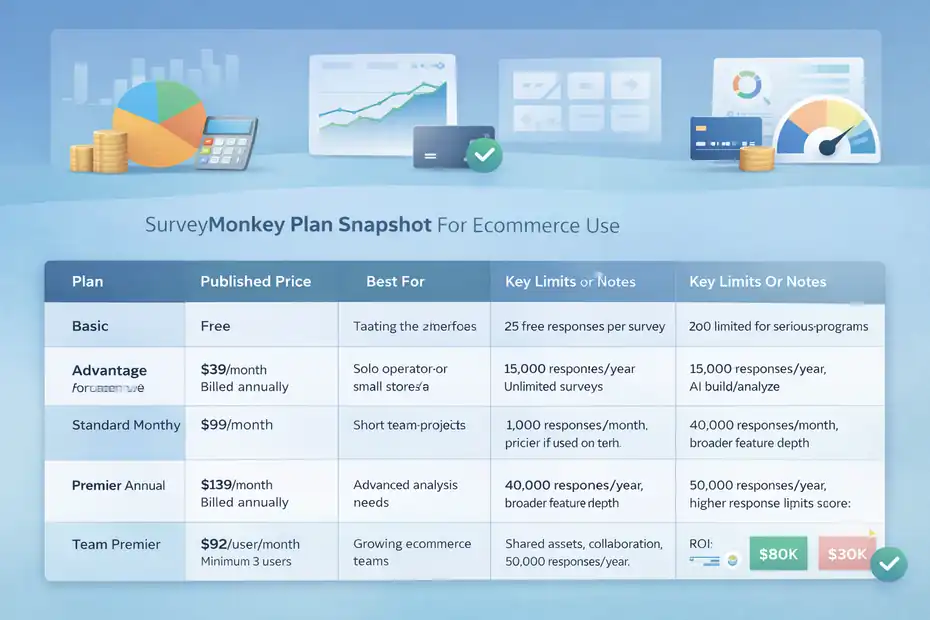
SurveyMonkey Plan Snapshot For Ecommerce Use
Here is a practical view of the plans based on SurveyMonkey’s published pricing and features.
| Plan | Published Price | Best For | Key Limits Or Notes |
|---|---|---|---|
| Basic | Free | Testing the interface | 25 free responses per survey; too limited for serious programs |
| Advantage Annual | $39/month billed annually | Solo operator or small store | 15,000 responses/year, unlimited surveys, AI build/analyze, integrations |
| Standard Monthly | $99/month | Short-term projects | 1,000 responses/month; pricier if used long term |
| Premier Annual | $139/month billed annually | Advanced analysis needs | 40,000 responses/year, broader feature depth |
| Team Advantage | $30/user/month, minimum 3 users | Growing ecommerce teams | Shared assets, collaboration, 50,000 responses/year |
| Team Premier | $92/user/month, minimum 3 users | Larger teams needing scale | Higher response limits and more advanced team controls |
Source data comes from SurveyMonkey’s pricing pages and help documentation.
Which Plan Is Usually Worth It
For most ecommerce businesses, the sweet spot is likely Advantage if one person owns feedback. It gives you enough room to build recurring surveys, analyze results, and integrate with a broader workflow without instantly pushing you into enterprise-level spending.
I would move to Team Advantage only when feedback becomes cross-functional. That usually happens when more than one person needs access every week, or when your surveys affect product, CX, and marketing decisions at the same time.
Premier is only worth it if you know you need the extra analysis depth or higher allowances. I would not buy it “just in case.”
A Simple ROI Test Before You Buy
Here is the easiest way I know to judge whether SurveyMonkey is worth the cost.
Ask yourself these three questions:
- How many customer decisions will this influence each month?
- What is one resolved insight worth in dollars?
- Can the tool help you act faster than your current method?
Imagine your store does $80,000 a month in revenue. If feedback from 100 customers helps you improve a product page and lift conversion by even a small amount, or reduces return-related losses, the subscription can be easy to justify.
But if your store is doing low volume and you are not likely to act on the data, paying for the platform will not create value by itself.
Tools do not generate ROI. Decisions do.
The Best Ecommerce Use Cases Where SurveyMonkey Is Worth It
SurveyMonkey becomes much easier to justify when tied to a specific use case. The more concrete the business problem, the more value you will usually get.
Post-Purchase And Post-Delivery Surveys
This is probably the clearest use case. A simple survey after checkout can tell you what convinced the customer to buy, what almost stopped them, and which trust signal mattered most. A second survey after delivery can reveal whether expectations matched reality.
This is incredibly useful for stores that struggle with return rates, weak repeat orders, or confusing product positioning. Sometimes the feedback is surprisingly specific.
You might learn that customers loved the product but found the setup card unclear, the color different from photos, or the packaging too generic for gifting.
These are not “nice to know” comments. They are conversion, retention, and brand experience inputs.
Because SurveyMonkey supports email distribution, links, and website embedding depending on plan, it can handle these common flows without much complexity.
NPS And Loyalty Tracking
NPS is not perfect, but for ecommerce brands with repeat customers it is still useful when tracked consistently. SurveyMonkey offers dedicated NPS templates and automatic score calculation, which reduces setup complexity.
What I like about NPS in ecommerce is not the headline score itself. It is the follow-up text. That is where people explain why they would or would not recommend you. Those comments often uncover loyalty drivers that are invisible in analytics.
For example, if promoters repeatedly mention “easy reordering,” “surprisingly good quality,” or “customer service fixed my issue fast,” you now know what to emphasize in retention messaging.
If detractors repeatedly mention “not worth the price” or “looked different in person,” you have messaging and merchandising problems to solve.
Product Development And Pricing Research
SurveyMonkey also makes sense before a product launch. Its pricing and research content highlights willingness-to-pay and value perception use cases.
That matters for ecommerce brands launching bundles, premium variants, subscription offers, or new categories. You can ask customers what feature matters most, which product variation they prefer, what would make them buy sooner, or what price feels fair.
I would not use survey data as the only product decision input, but it is a great way to reduce blind spots. It is especially valuable when your internal team is too close to the product and starts assuming customers care about the same details they do.
How To Set Up SurveyMonkey For Ecommerce Feedback Step By Step
If you decide to use it, the setup matters more than the subscription. A mediocre survey process can make a good tool feel useless.
Step 1: Define One Decision Per Survey
Before writing a single question, decide what action the survey should inform. One survey should equal one decision zone.
Examples:
- Checkout survey: Find the biggest friction point before order completion.
- Post-delivery survey: Find expectation gaps causing returns or dissatisfaction.
- NPS survey: Measure loyalty and uncover repeat purchase barriers.
- Product research survey: Test demand for a new feature, bundle, or price point.
The biggest mistake I see is trying to combine all of these into one giant survey. That lowers response quality and makes analysis messy. People do not want to answer twelve unrelated questions after buying socks, skincare, or pet supplies.
Keep the business goal narrow. That alone improves relevance.
Step 2: Build Short Surveys Around Customer Context
SurveyMonkey can help you create surveys quickly, but your question design still needs context. The customer should feel that the survey fits what they just experienced.
A good post-purchase survey might ask:
- What nearly stopped you from placing your order?
- What made you confident enough to buy from us today?
- Was anything unclear during checkout?
A good post-delivery survey might ask:
- Did the product match what you expected from the product page?
- What, if anything, disappointed you?
- How easy was it to start using the product?
Keep most surveys to a few key questions. The more relevant they feel, the better the answers tend to be. SurveyMonkey’s templates can speed up structure, but I recommend editing language to sound like your brand, not generic research copy.
Step 3: Match The Send Time To The Experience
I touched on timing earlier, but it deserves a setup step because it changes response usefulness dramatically. Immediate feedback can be significantly more accurate, according to Qualtrics, so your send logic should follow the customer journey closely.
A practical timing framework looks like this:
- Order placed: Send within hours if the goal is checkout experience.
- Delivered: Send after the customer has had realistic use time.
- Repeat purchase window: Send when evaluating satisfaction or loyalty.
- Support ticket closed: Send while the interaction is still fresh.
For products with delayed utility, like supplements or skincare, do not send too early. For impulse accessories or low-consideration items, you can ask sooner.
This sounds obvious, but getting it right can be the difference between shallow opinions and feedback that genuinely helps optimize the store.
Common Mistakes That Make SurveyMonkey Feel Not Worth It
A lot of negative tool experiences are really workflow failures. When SurveyMonkey disappoints ecommerce teams, the problem is often not the platform itself.
Asking Generic Questions That Produce Generic Answers
Questions like “How was your experience?” or “Any feedback for us?” feel easy to write, but they usually produce weak insights. Customers respond with vague positives, vague negatives, or nothing at all.
Better questions narrow the moment and the decision. For example:
- What almost stopped you from buying today?
- What felt different from what you expected?
- What information was missing from the product page?
- What would have made this purchase easier?
These questions connect directly to revenue, returns, or trust. That is what makes them useful.
I recommend reviewing every question with this test: if the answer changes nothing, remove the question.
Surveying Too Many People Without Segmentation
Not every customer should get the same survey. A first-time buyer should not always receive the same questions as a subscription customer, VIP, or recent return requester.
Without segmentation, you get muddy data. Your best customers answer loyalty questions differently than shoppers who bought once during a sale. If you mix them together, your conclusions become less actionable.
Even basic segmentation by order type, product category, or customer lifecycle stage can make SurveyMonkey insights dramatically better. This is not a fancy research tactic. It is basic ecommerce common sense.
Collecting Feedback But Never Closing The Loop
This is the most expensive mistake because it destroys trust and wastes money. If customers repeatedly share the same issue and nothing changes, your feedback program becomes performative.
You should create a monthly rhythm: review themes, assign owners, prioritize fixes, and record what changed. SurveyMonkey’s analysis features can help organize results, but your business still needs an operating system around the feedback.
In my opinion, SurveyMonkey is only worth it if your team treats customer comments like decision inputs, not decoration.
Advanced Ways To Get More Value From SurveyMonkey
Once the basics are working, SurveyMonkey can become more than a simple survey sender. The key is tying insights to commercial outcomes.
Connect Feedback To Revenue Signals
Do not stop at “customers said X.” Compare survey themes with actual store metrics. If comments about confusing sizing increase at the same time as return rates climb, that is a much stronger signal. If promoters spend more over time than detractors, your loyalty feedback gains financial meaning.
This is where survey data becomes strategic. You move from anecdotal feedback to pattern-backed action. Even if SurveyMonkey is not your analytics hub, it can still provide the customer language that explains your numbers.
I suggest tagging key themes such as shipping, price, fit, quality, trust, support, and packaging. Then compare them against product performance, refund trends, or repeat purchase cohorts.
Use Open-Ended Responses More Intelligently
Open-text answers are messy, but they are often where the gold lives. SurveyMonkey’s thematic analysis features can help cluster comments into themes automatically.
Still, I would not rely only on automation. Read a sample manually every month. You will catch nuance AI summaries may miss, especially around emotion, sarcasm, or subtle confusion.
For example, a comment like “The product is good, but I had to watch a random video to figure it out” may get grouped under product satisfaction when the real issue is onboarding friction. Human reading catches that.
Build A Feedback Flywheel, Not A Survey Habit
The most mature ecommerce teams use surveys as part of a loop:
- Collect feedback.
- Identify themes.
- Prioritize fixes.
- Test improvements.
- Re-measure impact.
That is the real compounding value. SurveyMonkey is worth more when it supports that cycle consistently. Used this way, it becomes less of a survey tool and more of a customer learning system.
Final Verdict: Is SurveyMonkey Worth It For Ecommerce Feedback?
For many ecommerce brands, SurveyMonkey is worth it for ecommerce feedback when the goal is structured, repeatable customer insight rather than deep behavioral diagnosis.
It is especially useful for post-purchase surveys, NPS tracking, customer satisfaction measurement, and product research. Its strengths are ease of use, strong templates, scalable survey distribution, and increasingly practical AI-assisted analysis.
Where it falls short is equally important. It does not replace behavioral analytics, it can feel expensive for very small stores, and its best team collaboration features live in higher plans.
So here is my honest answer.
SurveyMonkey is worth it if:
- You have enough order volume to collect meaningful feedback regularly.
- You know what decisions the feedback will shape.
- You need a reliable system for post-purchase, satisfaction, or loyalty surveys.
- Your team will actually review and act on the responses.
SurveyMonkey is probably not worth it if:
- You are still at very low sales volume.
- You mainly need behavioral conversion diagnostics.
- You want an all-in-one customer insight stack on a tiny budget.
- You are unlikely to operationalize the feedback.
I believe the right way to think about SurveyMonkey is not “Is it the best survey tool in the world?” The better question is, “Will it help me hear customers clearly enough to improve revenue, retention, and experience?”
If the answer is yes, it can absolutely be worth the cost. If not, even a great platform will feel overpriced.
For ecommerce, clarity beats complexity almost every time. SurveyMonkey’s real value is that it can give you that clarity fast—provided you ask better questions and actually use the answers.
FAQ
Is SurveyMonkey worth it for ecommerce feedback?
Yes, SurveyMonkey is worth it for ecommerce feedback if you need structured customer insights like post-purchase surveys, NPS, and product feedback. It works best when tied to clear decisions, such as improving conversion rates or reducing returns, rather than acting as a full analytics replacement.
What type of ecommerce feedback can SurveyMonkey collect?
SurveyMonkey can collect post-purchase feedback, customer satisfaction scores, NPS data, and product insights. It helps ecommerce businesses understand why customers buy, what issues they face, and how products perform after delivery, giving context behind key metrics like retention and returns.
Is SurveyMonkey better than analytics tools for ecommerce?
SurveyMonkey is not better than analytics tools but complements them. Analytics tools show what customers do, while SurveyMonkey explains why they do it. Using both together provides a clearer understanding of conversion issues, customer experience gaps, and purchase behavior.
How much does SurveyMonkey cost for ecommerce use?
SurveyMonkey pricing starts with a limited free plan, while paid plans begin around $39 per month. For ecommerce, most businesses need a paid plan to unlock enough responses, advanced analysis, and integrations required for consistent and scalable feedback collection.
When should ecommerce stores use SurveyMonkey surveys?
Ecommerce stores should use SurveyMonkey after key moments like purchase, delivery, or customer support interactions. Timing surveys correctly ensures more accurate responses, helping businesses identify friction points, improve customer experience, and make better product or marketing decisions.

I’m Juxhin, the voice behind The Justifiable.
I’ve spent 6+ years building blogs, managing affiliate campaigns, and testing the messy world of online business. Here, I cut the fluff and share the strategies that actually move the needle — so you can build income that’s sustainable, not speculative.
Related posts:
 SurveyMonkey Pros And Cons For Freelancers: Smart Tool Or Overpriced?
 App Omnisend: How to Run Email Campaigns From Anywhere
 SurveyMonkey Review For Small Business Surveys: Worth It Or Waste?
 SurveyMonkey Review For Ecommerce Customer Feedback: Worth Using?
 SurveyMonkey Review For Affiliate Marketers: Can It Boost Conversions?
 SurveyMonkey Honest Review For Bloggers Collecting Emails: Smart Or Risky?