
Table of Contents
Some links on The Justifiable are affiliate links, meaning we may earn a small commission at no extra cost to you. Read full disclaimer.
Is SurveyMonkey worth it for startups? In many cases, yes—but only when your team actually needs structured feedback, cleaner analysis, and room to grow beyond a basic form builder.
If you are still validating a rough idea and only need a few quick responses, it can feel expensive fast.
But if you are testing positioning, onboarding, pricing, customer satisfaction, or product-market fit, SurveyMonkey can save a startup a surprising amount of time and bad guesswork.
The real question is not whether it is “good.” It is whether it fits your stage, budget, and research habits right now.
What SurveyMonkey Actually Does For A Startup
Before you decide whether SurveyMonkey is worth the money, it helps to strip away the marketing and look at the real job it does.
At its core, SurveyMonkey is a survey and forms platform built to help you collect feedback, organize responses, and turn messy opinions into something you can actually act on.
What Startups Usually Need From A Survey Tool
Most startups do not need a “survey platform” in the abstract. They need answers to practical questions. Why are trial users dropping off? Which headline gets the best reaction? What feature matters most? Would people pay more for a premium plan?
That is where SurveyMonkey starts to make sense. It supports unlimited surveys on paid plans, more advanced question types, logic, branding, exports, and analysis features that go well beyond a basic free form.
On the free plan, you can create unlimited surveys, but you are limited to 10 questions and 25 responses per survey, which is fine for light testing but restrictive for serious research.
For startups, that means the platform is most useful when feedback needs to become a repeatable process rather than a one-off task.
- Early-stage use case: Validate demand, test messaging, and collect onboarding feedback before building too much.
- Growth-stage use case: Run customer satisfaction surveys, segment users, and compare trends across multiple surveys.
- Ops use case: Standardize internal forms, hiring feedback, event registrations, or partner intake.
I believe this is the first real dividing line. If you only need “a form someone can fill out,” SurveyMonkey can be overkill. If you need decisions backed by structured customer data, it starts earning its keep.
How It Differs From A Simple Form Builder
A lot of founders compare SurveyMonkey to tools like Google Forms and think, “Why would I pay for this?” That is a fair question. The answer is that SurveyMonkey is not just selling form collection. It is selling research workflow.
Paid plans unlock skip logic, question and answer piping, custom branding, exports, AI-assisted analysis, thematic analysis, sentiment analysis, crosstabs, and multi-survey analysis. SurveyMonkey also supports 200+ native integrations and team collaboration features on team plans.
That matters because startup decisions usually hinge on patterns, not single responses. You do not just want 50 comments about onboarding. You want to know whether users from paid acquisition channels answer differently from referrals, or whether your high-intent leads care more about integrations than price.
Here is the simple version: a basic form tool helps you collect responses. SurveyMonkey helps you design better surveys and analyze them with more discipline.
Where SurveyMonkey Fits In The Startup Journey
From what I have seen, SurveyMonkey is rarely the perfect tool for every startup stage. It tends to fit best in these moments:
- Problem validation: You want to test whether a pain point is real before building.
- Positioning refinement: You need to know which value proposition actually lands.
- Customer experience tracking: You want ongoing CSAT, NPS, or post-support feedback.
- Pricing research: You want more rigorous methods than “Would you pay for this?”
- Team reporting: You need charts, exports, and repeatable survey programs instead of ad hoc spreadsheets.
SurveyMonkey says more than 260,000 organizations use the platform globally, and the company has built out both AI creation and AI analysis features across the survey lifecycle.
That scale does not automatically make it right for your startup, but it does suggest the product is mature enough for teams that need more than a lightweight tool.
When SurveyMonkey Is Actually Worth It For Startups
This is the part most founders care about. Not “What features exist?” but “Will this save me time, improve decisions, or help me avoid expensive mistakes?”
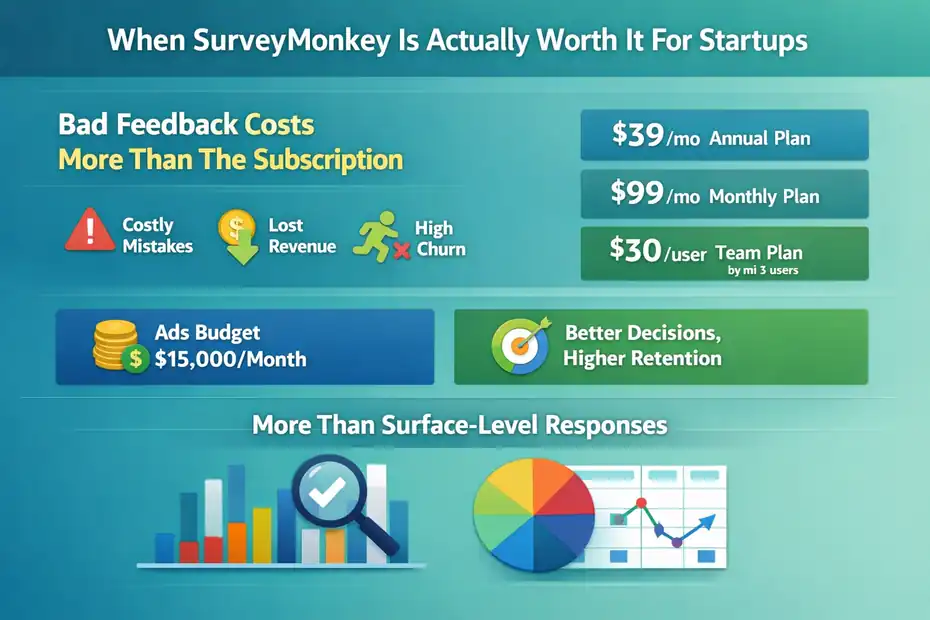
It Is Worth It When Bad Feedback Costs You More Than The Subscription
The easiest way to judge value is to compare the subscription cost to the cost of making weak product or marketing decisions. SurveyMonkey’s individual Advantage Annual plan is listed at $39 per month billed annually, while Standard Monthly is $99 per month.
Team Advantage starts at $30 per user per month billed annually with a 3-user minimum, and Team Premier starts at $92 per user per month billed annually.
That sounds expensive if you compare it to free tools. It sounds cheap if it helps you avoid building a feature nobody wants, launching the wrong pricing page, or misreading customer churn reasons.
Imagine you are a startup with a $15,000 monthly paid ads budget. If clearer feedback helps you improve landing page conversion by even a small amount, the tool can pay for itself quickly. The same logic applies to retention. A single pattern uncovered in cancellation surveys can be worth far more than the subscription.
I suggest thinking of SurveyMonkey less like a “survey expense” and more like a research cost. If you are making repeated product or go-to-market bets, structured feedback is not optional.
It Is Worth It When You Need More Than Surface-Level Responses
A startup usually outgrows basic forms when three things happen at once: you need more questions, cleaner logic, and better analysis.
SurveyMonkey’s free plan caps you at 10 questions per survey and 25 responses per survey. Paid plans unlock unlimited questions, and the Advantage Annual plan includes 15,000 responses per year.
That is a meaningful jump for a small team running customer, lead, and employee surveys regularly.
The more important difference is the analysis layer. SurveyMonkey includes thematic analysis for open-ended answers, sentiment analysis, AI-generated insights, crosstabs, statistical significance, and multi-survey analysis on higher plans.
That becomes valuable when you are no longer reading responses manually in a spreadsheet and hoping patterns jump out.
- Founder pain point: “We have feedback, but it is all over the place.”
- SurveyMonkey advantage: Organizes and compares responses faster.
- Business outcome: Faster decisions with less guesswork.
It Is Worth It When Research Becomes A Habit, Not A One-Time Project
This is where many teams get it wrong. They buy a tool, send one survey, and decide it was not worth it. The real value comes when feedback becomes part of how the company operates.
SurveyMonkey now offers “Programs,” which connect surveys over time so teams can track trends across customer insights, employee feedback, and similar recurring workflows. That is especially helpful for startups trying to build a steady system around NPS, onboarding feedback, beta testing, or support quality.
In my experience, the startups that get the most value from tools like this are not the ones with the biggest budgets. They are the ones that ask smart questions regularly and act on the answers.
If your team will run one survey every six months, SurveyMonkey may be too much. If your team will run customer interviews, win/loss surveys, feature prioritization polls, and satisfaction tracking every month, it starts looking like a smart operational tool.
When SurveyMonkey Feels Like A Waste Of Money
To be fair, there are absolutely situations where SurveyMonkey is not worth it for startups. This is not a “buy it no matter what” tool.
It Feels Wasteful At The Idea Stage
If you are pre-revenue, pre-audience, and still trying to figure out whether anyone cares about your idea, a paid plan can be unnecessary. At that stage, you often need fewer surveys and more direct conversations.
A founder with 20 early users can learn more from five strong customer interviews than from a polished survey dashboard. That is not a knock on SurveyMonkey. It is just a reminder that tools do not replace judgment.
The free plan may be enough here. Since it allows unlimited surveys but only 10 questions and 25 responses per survey, it works best for quick concept checks, lightweight event feedback, or a short follow-up form.
I would not advise most very early startups to jump straight into a team plan unless they already have a meaningful user base and clear research goals.
It Is A Poor Fit If You Only Need A Contact Form Or Simple Intake Form
SurveyMonkey has form capability, but a lot of startups do not need advanced survey logic or analytics. They just need a waitlist form, a newsletter signup, a basic application form, or a lead magnet opt-in.
In those cases, the tool can feel like too much platform for too little problem. You end up paying for analysis and research features you barely touch.
This is especially true if your team already lives inside another ecosystem. A startup heavily invested in Google Workspace, Notion, or a CRM-native stack may prefer a simpler workflow that creates fewer moving parts.
A good rule is this: If your submission data goes straight into another operational system and you never analyze patterns inside the survey tool, SurveyMonkey may not be your best spend.
It Can Be Overkill For Tiny Teams With Low Survey Volume
Pricing is one of the biggest friction points. Team plans start at 3 users, which means a small startup cannot just casually add one person for collaboration. Team Advantage begins at $30 per user per month billed annually, so your starting point is higher than many founders expect.
That is not outrageous for a funded company, but it can feel heavy for a bootstrapped startup with one founder and a contractor.
This is where honesty matters. If you are only sending a dozen survey links per quarter and exporting results manually once in a while, you may never unlock enough value to justify the spend.
Breaking Down The Features That Matter Most
Not every SurveyMonkey feature matters equally to startups. Some are genuinely useful. Others are nice, but not worth paying for unless your research is more mature.
Survey Design Features That Help You Collect Better Data
The biggest practical strength of SurveyMonkey is survey design. Better structure leads to better answers.
Paid plans include unlimited questions, skip logic, question and answer piping, custom themes, logos, URLs, and access to more advanced question types and templates. SurveyMonkey also offers 500+ templates and 25+ question types according to its free-vs-paid comparison page.
That matters more than it sounds. A messy survey creates noisy data. Respondents drop off. Questions confuse people. You end up making decisions from flawed input.
Here is where these features help:
- Skip logic: Keeps surveys shorter by showing only relevant questions.
- Piping: Personalizes later questions using earlier answers.
- Branding: Makes your survey look more trustworthy and aligned with your startup.
- Question variety: Lets you measure more than basic yes/no reactions.
I recommend founders pay attention to completion rate. A shorter, smarter survey with good logic usually beats a longer, generic one every time.
Analysis Features That Save Founders Time
This is the real differentiator for many startups. Collecting data is easy. Interpreting it is where teams lose momentum.
SurveyMonkey offers real-time charts, filters, crosstabs, sentiment analysis, thematic analysis for open text, AI-generated charts and summaries, statistical significance tools, and multi-survey analysis on more advanced plans.
For a lean team, that means less manual sorting and less time spent cleaning open-text responses in spreadsheets.
Imagine you send a churn survey and receive 200 comments. Without analysis help, someone has to read, tag, group, and summarize those answers. With thematic analysis and sentiment tools, you get a faster first pass and can focus on decision-making instead of administrative work.
I would not rely blindly on AI summaries, but I do think they are valuable for spotting early patterns. Founders still need to sanity-check the output.
Integrations, Collaboration, And Workflow Fit
SurveyMonkey also connects with 200+ native integrations, including tools like Slack, HubSpot, Mailchimp, and Microsoft Teams, according to its official plan pages. For startups, that matters when survey data needs to move quickly into marketing, support, or product workflows.
Team plans add collaboration features like commenting, tagging, shared asset libraries, and consolidated billing.
That can be useful if multiple people touch research:
- Product wants feature feedback.
- Marketing wants messaging insights.
- Customer success wants NPS tracking.
- Leadership wants a shared dashboard.
If that sounds like your team, SurveyMonkey fits better than a solo, isolated tool. If one founder handles everything alone, those collaboration features may not matter much yet.
Pricing Reality For Startups
This is where the decision gets practical. SurveyMonkey can absolutely be worth it for startups, but the value equation changes a lot depending on how often you use it.
Current Pricing Snapshot
Here is a simple view of the pricing details most relevant to startups based on SurveyMonkey’s official pricing pages.
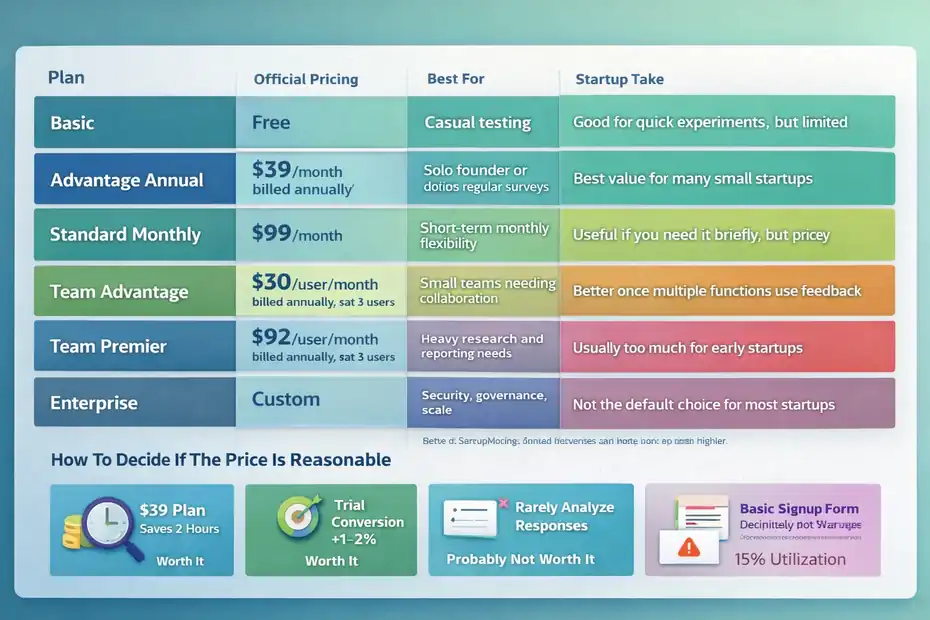
| Plan | Official Pricing | Best For | Startup Take |
|---|---|---|---|
| Basic | Free | Casual testing | Good for quick experiments, but limited |
| Advantage Annual | $39/month billed annually | Solo founder or operator doing regular surveys | Best value for many small startups |
| Standard Monthly | $99/month | Short-term monthly flexibility | Useful if you need it briefly, but pricey |
| Team Advantage | $30/user/month billed annually, starting at 3 users | Small teams needing collaboration | Better once multiple functions use feedback |
| Team Premier | $92/user/month billed annually, starting at 3 users | Heavy research and reporting needs | Usually too much for early startups |
| Enterprise | Custom | Security, governance, scale | Not the default choice for most startups |
Sources: SurveyMonkey’s official individual and feature comparison pages.
How To Decide If The Price Is Reasonable
I like to pressure-test software purchases using one simple question: “What would this tool need to save or improve each month to justify itself?”
For example:
- If a $39 plan saves you two hours of analysis time, that may be enough.
- If it helps improve trial conversion by 1–2%, it may be a bargain.
- If you only run one small survey every few months, it is probably overpriced for your needs.
Here is a founder-friendly way to judge it:
- Worth it: You run recurring research and act on it.
- Probably not worth it: You collect responses rarely and barely analyze them.
- Definitely not worth it: You just need a basic signup or contact form.
The Hidden Cost Is Not Just Price, It Is Underuse
One thing people overlook is utilization. The expensive tool is not always the one with the higher monthly fee. Sometimes the expensive tool is the one you barely use.
SurveyMonkey becomes a bad investment when a startup buys advanced capability but keeps asking weak questions. On the other hand, it becomes a smart investment when the team builds a habit of collecting feedback at important decision points.
That means the real cost is partly operational. You need someone to own survey design, response review, and follow-up action. Otherwise, even a good platform turns into shelfware.
How SurveyMonkey Compares To Startup Alternatives
A startup should never ask, “Is SurveyMonkey good?” in isolation. The better question is, “Is it better for us than the simpler or cheaper options?”
Quick Comparison Table
| Tool | Typical Strength | Pricing Signal | Best Startup Scenario |
|---|---|---|---|
| SurveyMonkey | Strong survey logic, analysis, research workflows | Free plan, then paid plans from $39/month annually for individuals | Teams doing real customer or market research |
| Google Forms | Simplicity and zero cost | Free | Very early validation and simple forms |
| Jotform | Flexible forms plus operational workflows | Free and paid tiers | Intake forms, workflows, registrations |
| Typeform | Better respondent experience and conversational feel | Paid tiers higher than basic free tools | Brand-forward lead gen and polished UX |
SurveyMonkey’s official pages highlight deeper analysis, AI, crosstabs, significance testing, and research methods. Third-party roundups in 2026 commonly position it as stronger for research, while simpler tools are often favored for lightweight forms or lower-cost collection.
SurveyMonkey Vs Google Forms
If cost is your main concern, Google Forms usually wins. It is simple, familiar, and good enough for many early-stage needs.
Where SurveyMonkey wins is rigor. You get better logic, stronger analysis, more polished reporting, and a more obvious path from raw feedback to decision-making. That matters once your startup starts collecting feedback as part of growth, retention, or product work instead of occasional admin.
My honest take: Google Forms is better for “just get answers.” SurveyMonkey is better for “let’s learn something we can trust.”
SurveyMonkey Vs Jotform Or Typeform
Jotform tends to appeal to startups that want flexible forms and workflow utility. Typeform tends to appeal to teams that care a lot about experience and conversion-friendly presentation.
SurveyMonkey fits a different lane. It is strongest when the main objective is research quality rather than form aesthetics. If your startup is sending satisfaction surveys, pricing tests, feature prioritization surveys, or customer research studies, SurveyMonkey often makes more sense than a prettier but lighter alternative.
That said, if your main goal is lead capture with a polished conversational interface, I would look very hard at alternatives before paying for SurveyMonkey.
How To Use SurveyMonkey Properly In A Startup
A tool like this is only as good as the workflow around it. Let me break down a practical way to use it so it actually creates value.
Start With One High-Value Survey, Not Ten Random Ones
The best first survey is usually the one closest to money or retention.
Examples:
- New trial signup feedback
- Churn or cancellation reasons
- Post-onboarding satisfaction
- Lost deal feedback
- Feature prioritization from active users
Do not start by surveying everyone about everything. Pick one decision area where better data would change action.
A good startup survey usually does three things:
- Identifies the respondent segment clearly.
- Focuses on one business question.
- Ends with one open-ended question that reveals nuance.
If you try to combine pricing research, feature feedback, support quality, and brand perception into one survey, the data gets muddy fast.
Use Logic To Shorten The Experience
Survey fatigue is real. Founders often write surveys the way they brainstorm: too many questions, no filtering, too much internal language.
SurveyMonkey’s skip logic and piping features help reduce that problem by showing only relevant questions and personalizing the experience based on prior answers.
That matters because response quality drops when respondents feel trapped in irrelevant questions.
Here is a simple structure I recommend:
- Step 1: Ask one qualifying question early.
- Step 2: Route people into the right path with logic.
- Step 3: Keep most surveys under 5 minutes unless you are doing deeper research.
- Step 4: Use open-text sparingly, then analyze patterns.
In most cases, a shorter, sharper survey outperforms a “comprehensive” one.
Turn Responses Into Decisions Fast
The value of surveying is not the response count. It is the action taken afterward.
SurveyMonkey’s real-time charts, filters, exports, thematic analysis, sentiment analysis, and AI-assisted summaries make it easier to go from raw data to a working conclusion.
But the startup still needs a simple review process.
I suggest this rhythm:
- Weekly: Review new responses.
- Monthly: Tag the top recurring issues.
- Quarterly: Compare patterns across surveys.
- After every major survey: Decide what changes because of the data.
If nothing changes after the survey, the tool is not your problem. The workflow is.
Common Mistakes Startups Make With SurveyMonkey
Even good software gets blamed for bad process. Most failures come from how startups use the tool, not from the platform itself.
Mistake 1: Asking Questions That Sound Smart But Produce Useless Answers
Questions like “Would you use this?” or “Do you like our product?” sound harmless, but they are weak. People are polite. They guess. They answer aspirationally.
Better startup questions focus on behavior, friction, and tradeoffs:
- What nearly stopped you from signing up?
- What task were you trying to complete?
- Which feature mattered most in your decision?
- What would make you cancel in the next 30 days?
SurveyMonkey can help structure the survey well, but it cannot rescue a vague research question. Founders still need to ask sharper things.
Mistake 2: Over-Surveying A Small Audience
Startups with small customer bases often send too many surveys because they finally have a tool to do it. That backfires. Response rates drop, goodwill falls, and your most engaged users start ignoring you.
I believe it is better to survey fewer moments with better intent. Choose high-impact touchpoints:
- Right after onboarding
- After a support interaction
- At cancellation
- After a major product change
- During annual or quarterly customer reviews
Quality beats volume almost every time.
Mistake 3: Paying For Features You Never Operationalize
This is the classic SaaS trap. You buy advanced analysis, integrations, and collaboration, then keep using the product like a free form tool.
A simple fix is to define success before subscribing:
- Goal: Reduce onboarding confusion
- Survey: New user activation feedback
- Metric: Completion rate and top blockers
- Action owner: Product manager or founder
- Review cadence: Weekly
If you cannot define that clearly, you may not be ready for a paid plan yet.
Final Verdict: Smart Tool Or Waste?
So, is SurveyMonkey worth it for startups?
For many startups, yes. It is a smart tool when you need reliable feedback, stronger analysis, better survey logic, and a more repeatable research process.
It is especially useful once your startup is making ongoing decisions about product, pricing, messaging, or customer experience and needs more than a free form can provide.
SurveyMonkey’s official limits and pricing make that tradeoff pretty clear: the free tier is useful but narrow, while paid plans unlock the capabilities that make the platform genuinely strategic.
But it can absolutely be a waste if you are still very early, rarely run surveys, or mainly need simple forms instead of research infrastructure.
Here is my honest recommendation:
- Use the free plan first if you are validating an idea, have a tiny audience, or only need simple feedback.
- Upgrade to Advantage when feedback becomes recurring and decisions depend on better survey design and analysis.
- Move to a team plan only when multiple people will actively collaborate on research and reporting.
- Skip it entirely if your real need is lead capture, basic intake forms, or one-off forms with minimal analysis.
That is the clean answer. SurveyMonkey is not automatically worth it for startups. It becomes worth it when your startup treats customer feedback like an operating system, not a side task.
FAQ
Is SurveyMonkey worth it for startups?
SurveyMonkey is worth it for startups that regularly collect and analyze customer feedback. It helps structure data, improve decisions, and save time. However, for early-stage startups with minimal survey needs, free tools may be more practical and cost-effective.
When should a startup start using SurveyMonkey?
A startup should start using SurveyMonkey when feedback becomes a recurring need. This typically happens during product validation, onboarding optimization, or customer experience tracking, where structured surveys and deeper analysis can directly influence business decisions.
What are the limitations of SurveyMonkey’s free plan?
SurveyMonkey’s free plan limits users to 10 questions and 25 responses per survey. While it allows unlimited surveys, these restrictions make it suitable only for basic testing, not for ongoing or large-scale customer research.
Is SurveyMonkey better than Google Forms for startups?
SurveyMonkey is better than Google Forms when startups need advanced logic, deeper analysis, and structured reporting. Google Forms is ideal for simple data collection, while SurveyMonkey is designed for more serious research and decision-making workflows.
How much does SurveyMonkey cost for startups?
SurveyMonkey pricing starts around $39 per month billed annually for individual plans. Team plans begin at a higher cost with multiple users required, making it more suitable for growing startups rather than very small or solo founders.

I’m Juxhin, the voice behind The Justifiable.
I’ve spent 6+ years building blogs, managing affiliate campaigns, and testing the messy world of online business. Here, I cut the fluff and share the strategies that actually move the needle — so you can build income that’s sustainable, not speculative.
Related posts:
 SurveyMonkey Review For Small Business Surveys: Worth It Or Waste?
 Freshworks Sign Up Guide: Start in Minutes
 SurveyMonkey Pros And Cons For Freelancers: Smart Tool Or Overpriced?
 SurveyMonkey Review For Affiliate Marketers: Can It Boost Conversions?
 SurveyMonkey Honest Review For Bloggers Collecting Emails: Smart Or Risky?
 Is SurveyMonkey Worth It For Ecommerce Feedback: Real Value