
Table of Contents
Some links on The Justifiable are affiliate links, meaning we may earn a small commission at no extra cost to you. Read full disclaimer.
SurveyMonkey review for online course creators usually comes down to one practical question: will it help you collect better student feedback and make smarter course decisions without turning your workflow into a mess?
I think that is the right way to judge it. You are not just buying a survey tool. You are choosing how you will validate lessons, measure student satisfaction, test ideas, and spot drop-off before it hurts revenue.
After looking at SurveyMonkey’s current plans, feature set, AI analysis, integrations, and survey logic, I’d say it can be a strong fit for established creators, but it is not the automatic best choice for everyone.
What SurveyMonkey Means For Online Course Creators
If you create and sell courses, SurveyMonkey is less about “sending surveys” and more about building a feedback system around your student journey.
Why Course Creators Use Survey Tools In The First Place
Most course creators do not need more opinions. They need better signal. That usually means finding out where students get confused, what made them buy, what almost stopped them, and which lessons create the biggest “aha” moment.
SurveyMonkey is built around that kind of structured data collection, with templates, logic, quizzes, and analytics that go beyond a basic one-page form.
SurveyMonkey also positions itself as both a survey and form platform, with AI-assisted survey creation, 500+ templates, and analytics designed to turn responses into usable insights.
For a course business, that matters because your data needs change as you grow. Early on, you may only want a short pre-sale validation survey. Later, you may need post-purchase feedback, lesson evaluations, cohort check-ins, NPS tracking, and support quality surveys.
SurveyMonkey supports logic, branching, piping, randomization, and response analysis, which means you can ask different students different questions based on what they actually experienced.
In my experience, that is where serious creators begin to separate from hobby sellers. The creators who improve fastest usually have a repeatable way to collect structured feedback every month, not just random DMs and testimonials.
The Real Job It Needs To Do In A Course Business
For most online course creators, SurveyMonkey has to prove itself in five places:
- Pre-launch validation: Find out whether your topic, angle, and pricing feel compelling.
- Student onboarding: Learn what students want before they start.
- Lesson improvement: Identify confusing modules and weak teaching points.
- Retention tracking: Measure satisfaction before refund requests and disengagement rise.
- Offer expansion: Discover what students want next.
Imagine you sell a cohort-based course on email marketing. A simple form tool can ask, “Did you like the course?” SurveyMonkey can route advanced students toward questions about depth, beginners toward questions about clarity, and non-finishers toward questions about friction.
That is much more useful because the feedback becomes segmented instead of blended into one average score.
Survey logic is one of SurveyMonkey’s strongest practical advantages for creators who want cleaner feedback from different student types.
How SurveyMonkey Works For A Typical Course Creator Workflow
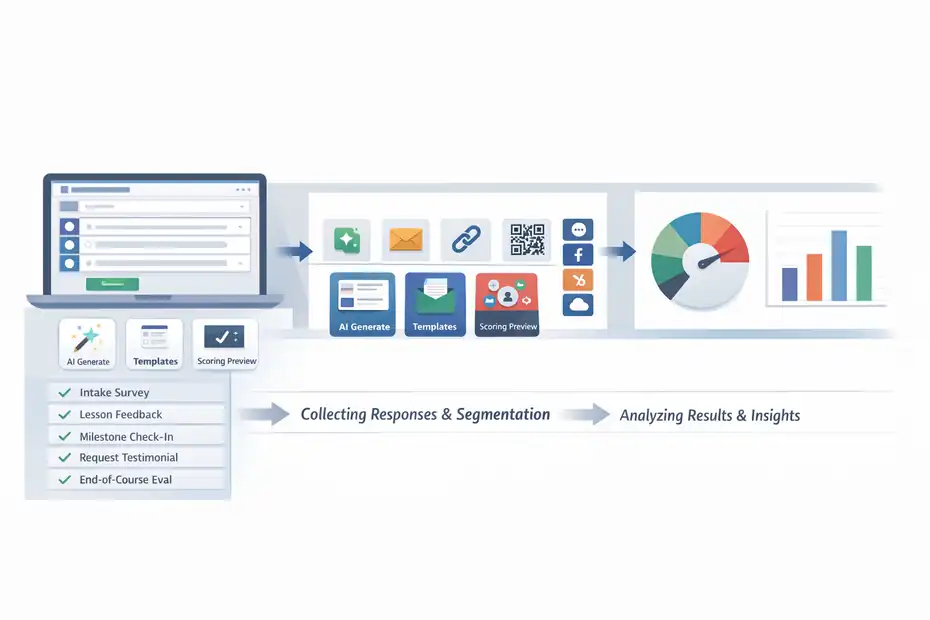
This is where the platform either earns its price or starts to feel heavy.
Building Surveys, Evaluations, And Quick Feedback Loops
SurveyMonkey lets you create surveys, forms, and quizzes, then distribute them through different collection methods. For creators, the most useful formats are usually course intake surveys, lesson feedback surveys, milestone check-ins, testimonial requests, and end-of-course evaluations.
SurveyMonkey also has a dedicated evaluation-form use case page aimed at measuring quality, effectiveness, and satisfaction, which lines up well with education and training workflows.
The creation side is fairly mature. You can start from templates, write your own questions, or use the AI survey generator to draft a survey from a prompt. SurveyMonkey also offers a survey scoring system in preview that uses machine learning to flag structural issues and estimate completion impact before you send the survey.
That is especially helpful if you tend to write too many questions or create confusing layouts.
I like this for course creators because surveys often get overbuilt. Many of us think more questions equal more insight, but long surveys usually reduce completion rates and bias results toward only the most motivated students.
SurveyMonkey’s own best-practice guidance emphasizes keeping surveys concise and mobile-friendly, and warns against overloading grids or response options.
Collecting Responses Without Making Students Work Too Hard
Collection is a big deal. A survey can be perfectly written and still fail because you sent it at the wrong moment. SurveyMonkey supports multiple send methods and integrates with marketing and CRM platforms, which makes it easier to embed surveys into existing course journeys instead of treating feedback like a separate task.
Its integrations page specifically highlights Mailchimp, HubSpot, Marketo, Slack, and other tools for segmentation, targeting, and automation.
For example, you can send a short “Module 1 complete” survey to students after they hit a milestone in your email platform or CRM, then segment people based on their answers.
SurveyMonkey’s integration with Mailchimp supports sending surveys to contacts and segmenting based on who responded, while the HubSpot integration lets teams use survey data for contact qualification and segmentation.
That said, the tool works best when you use feedback as part of your operational rhythm. If you only send one big annual survey, you are paying for a level of capability you may never fully use.
The Best SurveyMonkey Features For Online Course Creators
This is the section where SurveyMonkey looks strongest.
Survey Logic That Makes Feedback More Useful
Survey logic is a real strength here. SurveyMonkey supports branching, skip logic, piping, and randomization, which lets you personalize the path based on a respondent’s answer and keep the survey relevant.
In practice, that means a student who says they never finished your course does not need to answer questions about your final certification lesson.
That sounds small, but it changes the quality of feedback. Shorter, more relevant surveys usually feel easier to complete, and they give you cleaner data because respondents are not guessing at irrelevant questions.
For course creators, I would use logic in at least three places: onboarding surveys, dropout diagnosis surveys, and segmented testimonials. A beginner can be asked about clarity and pace. An advanced learner can be asked about implementation depth and missing case studies.
Here is a simple creator-friendly setup:
- Step 1: Ask whether the student finished the course.
- Step 2: Route completers to satisfaction, results, and testimonial prompts.
- Step 3: Route non-completers to friction, clarity, time, and motivation questions.
- Step 4: Ask both groups what topic they want next.
This is one of the clearest reasons I would recommend SurveyMonkey over a simpler form builder for established educators.
Quiz And Scoring Features For Assessments
SurveyMonkey also supports quiz-style question scoring, which can be useful if your course includes knowledge checks, onboarding assessments, or mini certifications.
The quiz feature lets you score multiple choice, checkbox, image choice, and dropdown questions by marking correct answers and assigning point values.
For online course creators, this is useful but should be used carefully. It is good for lightweight comprehension checks, pre-course skill assessments, and post-module recap quizzes. It is not a full learning management system.
In other words, it can help you measure understanding, but it is not meant to replace a true assessment engine inside a course platform.
A realistic example: Suppose you teach SEO writing. Before students enter your advanced module, you send a 10-question assessment to check whether they already understand search intent, title tags, and internal linking.Students who score highly can be segmented into an advanced support sequence. Students who struggle can be encouraged to review your foundations lessons first. That kind of use case is practical and smart.
I would not buy SurveyMonkey just for quizzes. I would buy it if quizzes are one part of a bigger feedback and research workflow.
AI Analysis For Open-Ended Responses
One of the most attractive features for busy creators is SurveyMonkey’s AI-assisted analysis. The platform highlights AI features for generating surveys, analyzing responses, detecting sentiment, identifying themes, and even filtering out low-quality responses like rushed answers or gibberish.
Sentiment analysis is available for open-text responses, and SurveyMonkey says these AI features are available on Advantage, Premier, Team, and Enterprise tiers.
Why does that matter? Because open-text feedback is incredibly valuable but annoying to process at scale. If 200 students tell you what confused them in Module 3, you do not want to manually tag every comment.
AI categorization can help you quickly spot patterns such as “too advanced,” “unclear examples,” “needs templates,” or “videos too long.”
In my view, this is where SurveyMonkey becomes more attractive for course creators with volume. If you are running several cohorts per year, these analysis features can save real time. If you only get 20 responses per month, manual review may still be faster and cheaper.
Pricing, Plans, And Whether The Cost Makes Sense
This is where many creators hesitate, and honestly, I understand why.
Current Pricing And Response Limits
SurveyMonkey’s official pricing currently lists Team Advantage at $30 per user per month and Team Premier at $92 per user per month, with team plans starting at three users and billed annually.
On the individual side, the pricing page shows Premier Annual at $139 per month, while Standard Monthly includes 1,000 responses per month.
The pricing details page also notes additional response charges in some cases, and official help documentation explains that per-survey response limits apply by plan, with over-limit responses not viewable and subject to deletion.
That response-limit detail matters more than many creators expect. A lot of people focus on features and forget about volume. If you run free lead-gen surveys, webinar feedback, student intake, and post-course evaluations from one account, your response count can build faster than you think.
Here is a simple snapshot of what matters most:
| Plan Area | What Stands Out For Creators | Why It Matters |
|---|---|---|
| Team Advantage | $30 per user per month, 3-user minimum, annual billing | Better for small teams that need collaboration and logic |
| Team Premier | $92 per user per month, 3-user minimum, annual billing | Better for higher-volume or more advanced reporting needs |
| Individual Standard Monthly | 1,000 responses per month | Can work for a solo creator with modest volume |
| Individual Premier Annual | $139 per month | Expensive unless you use advanced features often |
| Response Limits | Plan-based limits apply, over-limit responses may not be viewable | Critical for launches, cohorts, and large audiences |
Is It Worth The Price For A Solo Creator?
My honest take: SurveyMonkey is often worth it for a mature course business, but it can feel overpriced for solo creators still validating an offer.
If your course business is making steady revenue, serving multiple segments, and using surveys for retention, product development, and audience research, the cost can be justified because better feedback can improve sales pages, onboarding, curriculum, and renewal decisions.
SurveyMonkey also offers 200+ integrations, advanced logic, AI analysis, and strong export/reporting options, which makes it more operationally useful than a bare-bones form tool.
But if you are just starting out, a lower-cost tool may cover 80% of what you need. Many newer creators do not need heavy branching, AI text analysis, or a multi-user team plan yet. They need simple validation, clear questions, and consistent action on responses.
I believe this is the biggest pricing truth: SurveyMonkey becomes more valuable as the cost of bad feedback goes up. If one unclear lesson causes refunds, low completion, and weak testimonials, paying more for better insight can make sense very quickly.
Where SurveyMonkey Fits Best In The Course Creation Journey
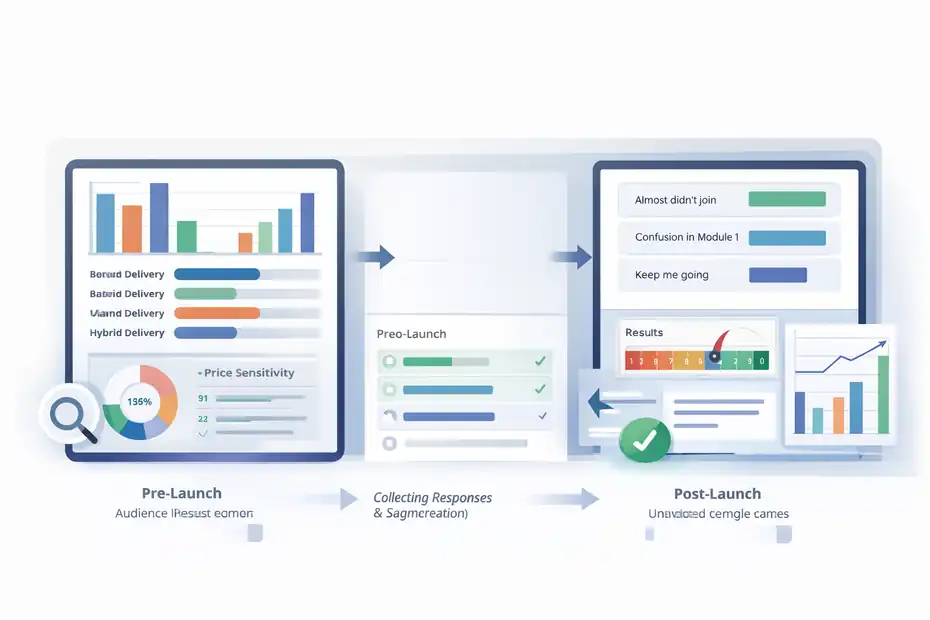
The answer changes depending on your stage.
Best Use Cases Before You Launch A Course
Before launch, SurveyMonkey is useful for audience research, topic validation, pricing sensitivity, and problem discovery. Its templates, logic, and AI-assisted creation make it easier to build more thoughtful research surveys than a blank form would.
A pre-launch creator might use it like this:
- Ask subscribers what outcome they want most.
- Segment by skill level.
- Route beginners toward basics and advanced users toward implementation problems.
- Ask whether they prefer self-paced, cohort, or hybrid delivery.
- End with a willingness-to-pay question.
This works especially well if you have more than one audience segment. For example, a creator teaching Notion systems could separate freelancers, agency owners, and employees, then compare which pains show up most often in each group.
SurveyMonkey’s logic features make that kind of segmentation much easier than trying to cram everyone through the same question path.
The main benefit here is message-market fit. You are not guessing what the sales page should say. You are collecting language directly from the audience.
Best Use Cases After Students Start Learning
Once the course is live, SurveyMonkey becomes a quality-improvement tool. This is where I think it has the strongest ROI for educators. Its evaluation workflows, analytics, exports, and AI sentiment tools are particularly useful when you want to improve curriculum based on actual student experience.
A few high-value post-purchase survey moments include:
- After onboarding: “What almost stopped you from joining?”
- After Module 1: “What is still unclear?”
- Mid-course: “What would help you keep going?”
- Completion: “What result did you get?”
- 30 days later: “What have you implemented?”
This is the kind of system that turns feedback into growth. Instead of asking one giant “How was the course?” question at the end, you diagnose specific experience stages.
The Biggest Drawbacks Course Creators Should Know
No serious review is useful without the trade-offs.
It Can Be More Powerful Than You Actually Need
SurveyMonkey has a mature feature set, and that is both a strength and a weakness. Logic, analytics, AI analysis, integrations, quizzes, exports, and team collaboration are excellent when you need them.
But they also make the platform feel heavier than necessary for a creator who only wants a lead survey and a post-course feedback form.
In real life, that can create two problems. First, you may pay for complexity you do not use. Second, you may overbuild your surveys because the tool makes advanced setup possible.
I have seen creators create long branching surveys when a four-question check-in would have delivered better completion and cleaner insight.
SurveyMonkey’s own best-practice guidance points toward brevity and simplicity, which is worth remembering. The existence of advanced features does not mean every survey should use them.
So yes, the platform is capable. The real question is whether your feedback process is mature enough to benefit from that capability.
Pricing And Response Caps Need Real Attention
The second drawback is cost structure. Official pricing shows meaningful monthly costs, especially once you move into higher tiers or multi-user plans. Response limits also matter because if you cross them, there can be restrictions on what you can view.
This becomes especially important during launches, free challenges, large webinars, or evergreen funnels with heavy top-of-funnel traffic. A survey sent to a 20,000-person list can create a very different cost picture than a carefully targeted student-only survey.
My advice is simple: Estimate your total yearly response volume before buying. Count not just student surveys, but lead research, application forms, event feedback, and internal team evaluations too.
How To Set It Up The Smart Way As A Course Creator
A strong tool still needs a smart implementation.
A Simple Starter Setup That Actually Works
If I were setting up SurveyMonkey for an online course business, I would begin with only four survey types:
- Audience research survey before launch.
- Student onboarding survey after purchase.
- Mid-course friction survey.
- Completion and testimonial survey.
That is enough to cover your major search-intent and business-intent moments without creating survey fatigue. SurveyMonkey’s AI builder, templates, and logic tools can speed up this setup, but the real win comes from deciding what each survey is supposed to change in your business.
Here is the framework I recommend:
- Question 1: What decision will this survey help me make?
- Question 2: What segment do I need to separate?
- Question 3: What action will I take if the answers go one way versus another?
- Question 4: Can I ask fewer questions and still get the insight?
That last question matters most. SurveyMonkey can support deep survey design, but your students still want speed.
Using Integrations Without Overcomplicating The Stack
SurveyMonkey’s integrations are useful when they support a clear feedback workflow, not when they exist just because you can connect them.
Officially, the platform highlights 200+ native integrations, and partner/help documentation shows practical connections with Mailchimp and HubSpot for survey sends, segmentation, and workflow use.
For most creators, I suggest one of these lightweight paths:
- Email-first path: Send milestone surveys through your email tool and segment contacts by responses.
- CRM-first path: Use responses to tag buyer intent, satisfaction, or support risk.
- Reporting path: Export results regularly for curriculum reviews and launch analysis.
The best integration is usually the one that saves you a repeated manual task. If it does not save time or improve follow-up, skip it.
Optimization Tips, Advanced Uses, And Final Verdict
This is where you turn SurveyMonkey from “a survey tool” into a course-growth asset.
Optimization Tips For Better Response Quality
SurveyMonkey offers response quality detection and survey scoring tools, which already push creators toward stronger survey design.
Beyond that, a few practical habits matter most: send surveys at specific milestones, keep most surveys very short, use logic to avoid irrelevant questions, and ask open-text questions only where you genuinely plan to analyze them.
I also recommend pairing one metric question with one explanation question. For example:
- “How satisfied are you with Module 2?”
- “What made you choose that score?”
That is often enough to uncover the real problem. You get a trackable number and the context behind it. If you collect a lot of open responses, SurveyMonkey’s sentiment and text analysis tools become more valuable because they help you find patterns without manual coding.
Another tip I strongly believe in: Do not wait until course completion to collect insight. Mid-course feedback is usually more actionable because you can still fix the experience while future students are moving through it.
Final Verdict: Is SurveyMonkey Worth Using?
Yes, but only for the right kind of creator.
SurveyMonkey is worth using if you are an online course creator who treats feedback as a business system, not an occasional task. Its strongest advantages are survey logic, structured evaluations, AI-assisted analysis, quiz scoring, integrations, and mature reporting/export capabilities.
Those features make it especially useful for established creators, education businesses, agencies, and teams running multiple offers or cohorts.
It is less compelling if you are a new solo creator with simple needs, low response volume, and no real use for advanced branching or analysis. In that case, the price and response-limit considerations may feel harder to justify.
My verdict is this: SurveyMonkey is not the cheapest option, and it is not always the simplest option, but it is a strong option for course creators who want better student insight, cleaner segmentation, and a more professional feedback operation. If your course business is already growing, that can absolutely be worth paying for.
FAQ
What is SurveyMonkey used for in online courses?
SurveyMonkey is used by online course creators to collect structured student feedback, validate course ideas, and improve learning experiences. It helps you understand student behavior, identify weak lessons, and measure satisfaction through surveys, quizzes, and evaluations, making it easier to optimize your course content and delivery over time.
Is SurveyMonkey worth it for course creators?
SurveyMonkey is worth it for course creators who need advanced feedback tools like survey logic, segmentation, and AI analysis. If you run multiple courses or cohorts and rely on data to improve results, it offers strong value. For beginners with simple needs, lower-cost tools may be enough initially.
Can SurveyMonkey help improve course completion rates?
Yes, SurveyMonkey can help improve completion rates by identifying where students drop off and why. By using mid-course surveys and feedback loops, you can spot confusion, pacing issues, or content gaps early and make adjustments that keep students engaged and progressing through your course.
Does SurveyMonkey integrate with course platforms?
SurveyMonkey integrates with email tools, CRMs, and marketing platforms, allowing course creators to automate surveys and segment responses. While it may not directly connect to every course platform, it fits easily into most workflows through integrations, making it useful for managing feedback and student insights efficiently.
What are the limitations of SurveyMonkey for creators?
SurveyMonkey can feel expensive for solo creators and includes response limits depending on your plan. Its advanced features may also be more than needed for simple surveys. If you only need basic feedback collection, the platform might feel overly complex compared to simpler alternatives.

I’m Juxhin, the voice behind The Justifiable.
I’ve spent 6+ years building blogs, managing affiliate campaigns, and testing the messy world of online business. Here, I cut the fluff and share the strategies that actually move the needle — so you can build income that’s sustainable, not speculative.
Related posts:
 SurveyMonkey Review For Small Business Surveys: Worth It Or Waste?
 SurveyMonkey Review For Ecommerce Customer Feedback: Worth Using?
 Is SurveyMonkey Worth It For Ecommerce Feedback: Real Value
 Is SurveyMonkey Enough For Professional Surveys: Expert Verdict
 SurveyMonkey Review For Market Research Beginners: Easy Or Confusing?
 Is SurveyMonkey Worth It For Small Business: Honest ROI Breakdown