
Table of Contents
Some links on The Justifiable are affiliate links, meaning we may earn a small commission at no extra cost to you. Read full disclaimer.
A SurveyMonkey review for market research beginners really comes down to one question: can you get useful research data without feeling like you need a statistics degree first?
In my experience, SurveyMonkey is one of the easiest places to start, but that does not mean it is always simple. It gives you templates, AI survey help, calculators, an audience panel, and analysis tools that can shorten the learning curve.
At the same time, beginners can still get tripped up by pricing limits, weak survey design, and overconfidence in early results.
What SurveyMonkey Is And Who It Fits Best
If you are brand new to market research, this is the part that matters most: SurveyMonkey is not just a “survey app.”
It is a research platform that helps you create questionnaires, collect responses, and turn those responses into patterns you can actually use.
What SurveyMonkey Actually Does For Beginners
When most beginners hear “market research,” they imagine expensive reports, giant spreadsheets, and complicated dashboards. SurveyMonkey sits in the middle ground.
It lets you build surveys manually or with AI assistance, start from templates, distribute the survey yourself, or pay to reach respondents through its audience tools. SurveyMonkey also promotes built-in analysis, exports, and reporting so you do not need to stitch together five tools just to understand your answers.
The company says it offers 500+ templates, 200+ integrations, AI-powered survey creation, and access to a global audience panel of 335M+ people in 130+ countries.
For a beginner, that matters because the platform reduces friction in three places. First, it helps you write questions faster. Second, it helps you collect enough responses to see patterns. Third, it helps you avoid getting stuck in raw data. That combination is why SurveyMonkey keeps showing up in beginner conversations.
What I like is that you can start small. You do not need to run a giant national study on day one. You can test a product idea, check demand for a service, compare two offers, or ask customers why they did not buy. That is often enough to make a better business decision.
The Kind Of User Who Will Probably Like It
SurveyMonkey fits best if you are one of these people:
- A solo founder trying to validate an idea before spending money
- A small business owner wanting customer feedback with less guesswork
- A marketer testing messaging, pricing signals, or audience preferences
- A student or junior researcher learning the basics of survey-based research
- A team that needs something faster than a full-service research agency
I believe the platform works best when your goal is practical insight, not perfect academic rigor. That is an important distinction. If you are writing a PhD-level research project, you may need more advanced statistical control and methodology support than a beginner tool can comfortably deliver.
But if you are trying to answer questions like “Which product benefit matters most?” or “Would people pay more for this version?” SurveyMonkey can absolutely get you there.
Where It Can Feel Easy And Where It Can Feel Confusing
This is where the honest review starts. SurveyMonkey feels easy when you are doing these things:
- Launching a simple feedback or concept test survey
- Using templates to avoid blank-page stress
- Sending a survey to your own audience
- Viewing top-level charts and response summaries
- Using built-in calculators to estimate sample size or margin of error
It starts feeling confusing when you move into pricing logic, response caps, audience targeting choices, and interpreting whether your results are actually meaningful.
SurveyMonkey’s own feature pages note that free users are limited to 10 questions per survey, and response access varies by plan. Paid plans can also incur overage charges above response limits.
That is why beginners often mistake platform ease for research ease. The software is easier than most people expect. Good research is still harder than it looks.
How SurveyMonkey Works For Market Research
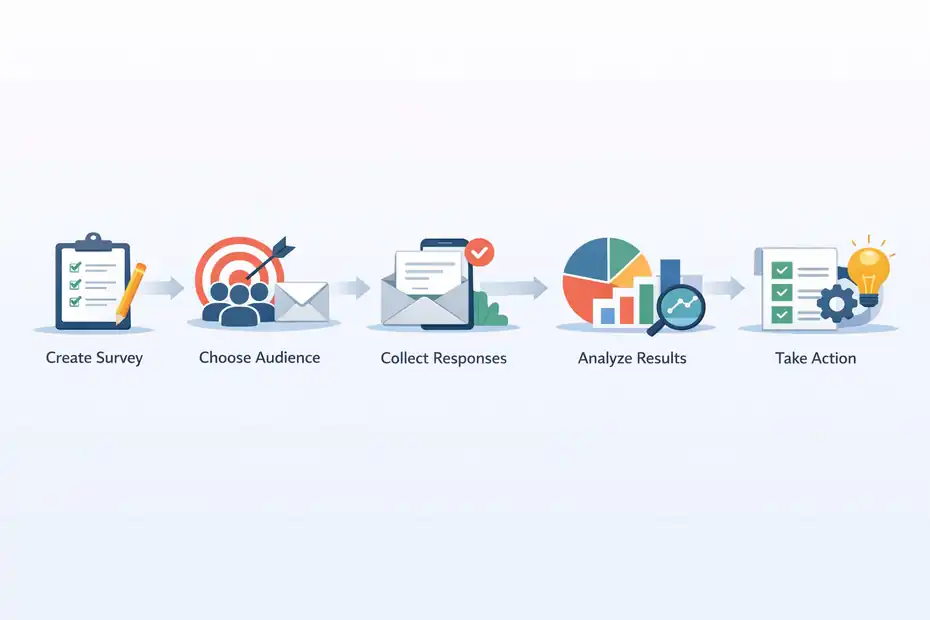
Before you decide whether this tool is easy or confusing, you need to understand the basic workflow. Once you see the process, the platform feels a lot less intimidating.
The Basic Research Workflow Inside SurveyMonkey
The simplest way to think about SurveyMonkey is this: you create questions, choose who will answer, collect responses, then analyze patterns. That sounds obvious, but beginners often skip the logic between those steps.
A normal research workflow looks like this:
- Define the decision you need to make
- Turn that decision into a few answerable research questions
- Build a short survey around those questions
- Send the survey to the right people
- Review the results for patterns, differences, and surprises
- Translate those findings into an action
For example, imagine you run a small skincare brand. You are not trying to “do market research” in the abstract. You are trying to answer something real, like: should we position this product around sensitive skin, fast results, or natural ingredients?
That is a much easier project to design. You would write a survey that compares messages, measures purchase intent, and asks what concern matters most.
In my experience, beginners do better when they think in decisions, not data. SurveyMonkey helps you collect information, but you still need to decide what business question comes first.
The Different Ways You Can Collect Responses
This is one area where SurveyMonkey becomes genuinely useful. You can either collect responses from people you already know or reach people through SurveyMonkey’s audience products.
The platform highlights a global audience panel with 335M+ people across 130+ countries, which is meaningful if you do not already have a customer list or email audience.
For a beginner, there are usually three paths:
- Send to your own audience: best for customer feedback, product satisfaction, and brand-specific questions
- Use a broader audience panel: better for category demand, general consumer opinions, or concept testing beyond your followers
- Mix both: useful when you want customer truth and market truth side by side
That last option is underrated. Your current customers may love your offer for reasons the broader market does not care about. On the other hand, a cold audience may misunderstand your brand completely. Looking at both can give you a more balanced view.
Why “Easy To Use” Does Not Always Mean “Easy To Get Right”
This is the biggest beginner trap. You can absolutely launch a survey in one afternoon. SurveyMonkey’s AI builder, template library, and guided setup make that possible. The help documentation says AI-generated survey prompts are limited to 25 per hour and can handle long prompts, which shows the company is actively pushing beginner-friendly creation tools.
But fast setup creates a false sense of confidence. A bad survey can still look professional. You can choose the wrong audience, ask leading questions, force weird answer choices, or collect too few responses. The charts will still render nicely. That does not make the insight trustworthy.
So here is my honest take: SurveyMonkey is easy to operate. It is only moderately easy to use well. That is not a flaw unique to SurveyMonkey. It is true of almost every survey platform. The difference is whether the tool gives beginners enough support to avoid common mistakes. SurveyMonkey does a decent job there, but not enough to replace good judgment.
Getting Started Without Wasting Time Or Responses
The smartest way to use SurveyMonkey as a beginner is not to explore every feature. It is to launch a small, focused project first.
Start With One Decision, Not A Full Research Program
I suggest you pick one business decision and build your first project around that. Not five decisions. Not your entire go-to-market strategy. One.
Good beginner research questions look like these:
- Which headline makes this offer clearer?
- What is the top reason people choose a competitor?
- Which of these three product ideas is most appealing?
- What price range feels acceptable for this service?
- What stops people from buying right now?
Bad beginner questions sound like this: “Tell us everything you think about our market.” That is too broad, too vague, and too hard to act on.
SurveyMonkey becomes much easier when the scope is tight. A focused survey is shorter, gets better completion rates, and is easier to analyze. It also protects your response limit, which matters because free and lower-tier plans have clear caps on questions and accessible responses.
If I were advising a first-time user, I would say this: your first survey should answer one meaningful question in under 10 total questions. That forces clarity and helps you learn the platform faster.
Use Templates And AI As A Starting Point, Not A Final Draft
SurveyMonkey offers expert templates and AI-generated survey creation, which is genuinely useful when you do not know how to structure questions yet. The platform says users can start with 500+ templates and generate surveys from prompts with AI.
That said, I would not publish the first draft untouched.
Templates are strong for structure. AI is strong for speed. Neither one fully understands your audience, your category, or the exact decision you are trying to make. Beginners often trust generated surveys too much because the wording sounds polished.
Here is a better workflow:
- Generate a draft with a template or AI
- Delete any question that is “nice to know” instead of decision-critical
- Replace vague wording with specific wording
- Make sure each answer choice is realistic
- Read the survey out loud once before sending it
That final step sounds small, but it catches a lot. If a question sounds awkward out loud, it will probably confuse your respondents too.
Pilot The Survey Before You Go Wide
This is one of those unglamorous habits that saves you from embarrassment. Before you send your survey to 300 people or buy responses, test it with 5 to 10 people first.
Ask them:
- Did any question feel unclear?
- Were answer options missing?
- Did the survey feel too long?
- Did anything make you hesitate or drop off?
- What did you think the survey was trying to learn?
That last question is gold. If testers misunderstand the survey’s purpose, your real respondents probably will too.
I have seen this happen constantly with beginner research. The creator thinks they are testing pricing, but half the questions are really about product awareness. Or they think they are testing demand, but they are actually measuring politeness. A small pilot catches these problems before they become expensive.
The Core Features Beginners Will Actually Use
A lot of software reviews become giant feature lists. That is not useful here. Let me focus on the features beginners are most likely to touch first.
Survey Builder, Templates, And Question Logic
SurveyMonkey’s core strength is still the survey builder. You can create surveys from scratch, use templates, or use AI-assisted creation. Paid plans include unlimited questions, while the free plan is capped at 10 questions per survey.
For a beginner, that 10-question limit is not always a bad thing. In fact, it can force discipline. Most early surveys are too long anyway.
The real value comes from question variety and logic. You can build multiple-choice questions, rating scales, open-text questions, ranking questions, and logic paths that show different follow-up questions based on earlier answers. Logic sounds technical, but it simply means respondents do not all have to see the same next question.
Imagine you ask: “Have you purchased this kind of product before?” People who answer yes can get usage questions. People who answer no can get barrier questions. That makes the survey feel smarter and shorter.
I think this is where SurveyMonkey starts to feel more professional than a bare-bones form builder. You are not just collecting answers. You are shaping a respondent path.
Analysis, Exports, And Visual Reporting
Beginners usually do not need advanced analytics on day one. They need clean summaries they can understand quickly. SurveyMonkey leans into that with charts, filtering, exports, and reporting tools.
The product pages also mention custom reporting and exports, including CSV, PDF, PNG, PPT, XLS, and SPSS on certain plans or products.
That matters because beginners often need to do one of three things after the survey closes:
- Show results to a boss or client
- Make a simple decision internally
- Move the data into another tool for deeper analysis
The built-in summaries are usually enough for directional insight. You can spot top responses, compare segments, and visualize trends. Where people get into trouble is assuming that prettier charts equal better conclusions. They do not.
My advice is simple: Use the visuals to spot patterns, then go back to the raw question logic. Ask yourself whether the result is strong enough to act on. If 41% picked option A and 39% picked option B from a tiny sample, that is not a massive signal. It is a hint.
Audience Access, Data Quality, And Research Support
One reason SurveyMonkey stays relevant for market research is that it is not only about survey creation. It also promotes audience targeting and data quality support.
Its market research pages talk about survey design review, response quality tools, metadata for detecting speeding, and poor-quality response replacement in some audience contexts.
For beginners, this can be a big advantage. If you have no audience, no customer list, and no social reach, most survey tools become empty shells. You can create the perfect survey and still have nobody to answer it.
SurveyMonkey is stronger than basic form tools here because it gives you a path to respondents. That does not mean every audience purchase will be perfect. It means you have a realistic way to test ideas without already owning traffic.
Pricing, Limits, And The Hidden Beginner Friction
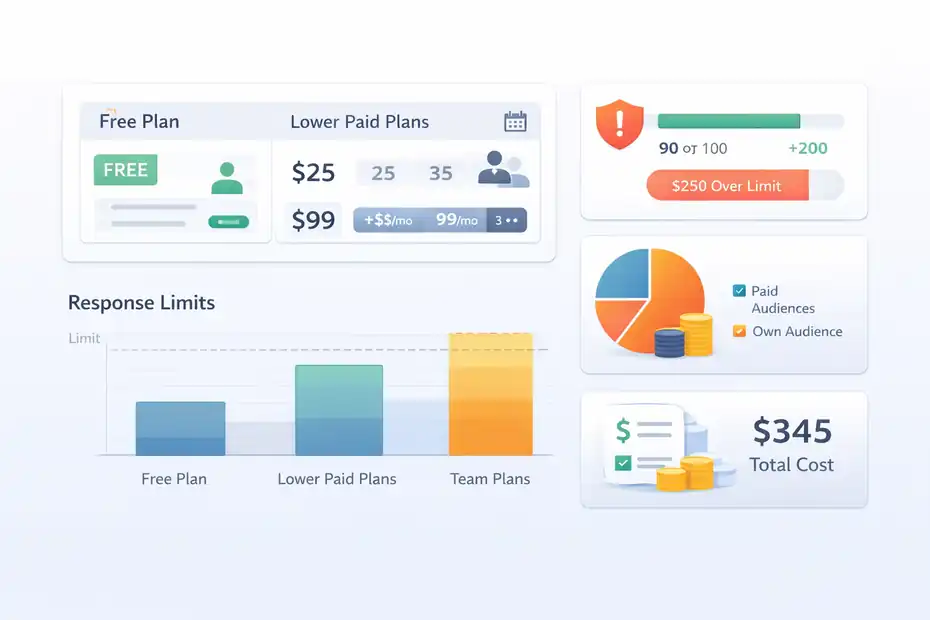
This is the part many reviews gloss over. I do not think beginners should choose SurveyMonkey without understanding the pricing logic first.
What The Free And Paid Plans Mean In Real Life
SurveyMonkey offers a free entry point, but the most important limitations show up quickly. According to the pricing details, free users can create surveys with up to 10 questions, and response access is limited.
Paid tiers raise response limits and unlock more features. Individual plan pages show Standard Monthly at $99 per month and annual options such as Starter at $25 per month billed annually, while team plans scale higher.
Here is the beginner translation:
| Plan Area | What It Means For Beginners | Why It Matters |
|---|---|---|
| Free plan | Good for testing the interface and basic short surveys | You will hit limits quickly |
| Lower paid plans | Better for solo users running real surveys | More flexibility, but still watch response caps |
| Team plans | Better for collaboration and larger workflows | Often overkill for a first-time user |
| Audience add-ons or research spend | Separate cost consideration | Can become the biggest expense |
The important point is this: software cost and response cost are not the same thing. Some beginners think, “I bought the plan, so I am covered.” Not always. If you need respondents, targeting, or larger volumes, the total research cost rises fast.
The Response Limit Problem Most Beginners Miss
This is probably the most frustrating surprise for new users. SurveyMonkey’s pricing pages note response limits by plan, and paid plans may charge for responses above the included cap.
That means beginners can make two expensive mistakes:
- Sending a survey too broadly before validating it
- Collecting more responses than they can comfortably use or afford
This is why I recommended piloting first. If your survey has a logic error or bad answer options, every extra response just multiplies the damage.
In practical terms, always estimate:
- How many completed responses you actually need
- Whether those responses come from your own audience or paid audiences
- Whether your current plan supports that volume cleanly
A beginner does not need “as many responses as possible.” A beginner needs enough good responses to support a real decision.
When SurveyMonkey Feels Worth The Cost
I think SurveyMonkey feels worth the money in three situations.
First, when you value speed. You can go from idea to live survey faster than with many traditional research workflows.
Second, when you need audience access. This is a major differentiator for people without an existing list.
Third, when you need enough analysis and reporting to avoid a messy DIY stack.
It feels less worth it when you only need an occasional basic form, have no budget for respondents, or are not yet sure what question you are asking. In that stage, even a good tool can feel like overkill.
Using SurveyMonkey For Real Beginner Research Projects
The easiest way to judge a tool is to imagine how you would use it on an actual project. Let me walk through a few realistic examples.
Project Example: Testing A New Product Idea
Imagine you want to launch a subscription snack box for busy office workers. Before building the full offer, you want to know whether the audience actually cares about convenience, healthy ingredients, or price more.
A beginner-friendly survey could include:
- Primary buying motivation
- Preferred delivery frequency
- Acceptable monthly price range
- Most appealing product promise
- Biggest hesitation before subscribing
This kind of study is a great fit for SurveyMonkey because it is focused, quick, and decision-oriented. You are not trying to build a 70-page report. You are trying to identify which value proposition deserves your attention first.
The mistake many beginners make here is stuffing in demographic curiosity questions that do not change anything. Keep it lean. If age or work arrangement will affect your offer, ask it. If not, skip it.
Project Example: Comparing Messages Before Running Ads
This is one of my favorite beginner uses for survey research. Before spending on ads, test messaging.
Let us say you sell accounting software for freelancers. You are debating these angles:
- Save time on invoicing
- Stop missing tax deductions
- Look more professional to clients
A short concept test can show which message creates the strongest interest. You can ask respondents which headline feels most relevant, most credible, and most likely to make them learn more.
SurveyMonkey works well here because the structure is simple and the analysis is straightforward. You are looking for directional winners, not a Nobel Prize. If one message consistently outperforms the others, you have something actionable before you spend on creative production.
Project Example: Learning Why People Do Not Buy
This is where beginners often get the biggest value. Instead of guessing at objections, they ask.
If you already have site visitors, email subscribers, or recent leads, you can use SurveyMonkey to understand barriers such as:
- Price confusion
- Trust concerns
- Feature gaps
- Timing issues
- Competitor preference
The answers may surprise you. Many founders assume non-buyers want more features, when the real issue is simply that the offer is unclear.
In my experience, objection research creates faster wins than many flashy trend reports because it points directly to fixes in your landing page, sales process, or pricing communication.
Common Beginner Mistakes That Make The Platform Feel Confusing
A lot of frustration blamed on SurveyMonkey is actually research design friction. The platform gets the blame because it is where the mistakes show up.
Writing Questions That Sound Smart But Produce Weak Data
This is mistake number one. Beginners write questions that are broad, abstract, or flattering.
Examples of weak questions:
- How much do you love innovation?
- Would you be interested in a better product experience?
- Do you care about quality?
Almost everyone says yes to vague positive wording. That gives you comforting garbage.
Better questions are concrete:
- Which of these problems frustrates you most?
- How likely are you to switch if this feature existed?
- Which price range feels too expensive to consider?
SurveyMonkey can help you present the question cleanly. It cannot save weak thinking.
My rule is simple: Every question should help you make or improve one real decision. If it does not, remove it.
Asking Too Many Questions Because The Tool Makes It Possible
Paid plans allow unlimited questions, which sounds generous. It is also a trap.
Beginners often think, “Since I have the space, I might as well ask everything.” That leads to longer surveys, lower completion rates, careless answers, and muddy analysis.
Most first-time market research projects should stay tight. The more questions you add, the more energy respondents lose. And once energy drops, data quality drops too.
I suggest this rough beginner rule:
- 5 to 8 questions for very focused concept tests
- 8 to 12 questions for light market discovery
- More only when you truly need segmentation or branching
If you cannot explain why a question exists, it does not belong there.
Misreading Small Samples As Big Proof
SurveyMonkey offers sample size and margin of error tools, which beginners should absolutely use. The company’s guides explain that sample size depends on population, margin of error, confidence level, and research purpose.
This matters because early users often see a pattern in 20 or 30 responses and treat it like market truth. Sometimes it is useful directional feedback. Sometimes it is noise.
Here is the healthier mindset: Small studies are excellent for spotting ideas, clarifying language, and identifying obvious red flags. They are weaker for making fine-grained claims about the whole market.
That does not mean small surveys are useless. It means you should match confidence to sample quality and scale.
How To Optimize Your Surveys For Better Results
This is where a beginner becomes a competent researcher. You do not need advanced math. You need better habits.
Keep The Survey Short, Clear, And Decision-Focused
The best optimization strategy is still clarity. Every extra second of confusion hurts quality.
Try this structure:
- Briefly explain why the respondent is taking the survey
- Start with easy, relevant questions
- Put your most important decision questions in the middle
- Save optional open-text questions for later
- End quickly
I also recommend writing in plain language. Fancy wording impresses nobody. If your audience has to reread a question, you already introduced error.
And please avoid double-barreled questions like: “How satisfied are you with the price and product quality?” That is really two questions pretending to be one.
Use Segmentation Without Overcomplicating Things
Segmentation means analyzing answers by meaningful groups, such as new vs returning customers, men vs women, heavy vs light users, or beginners vs experienced buyers.
SurveyMonkey’s analysis features can support filtered views and comparison workflows, which is useful because averages hide too much.
For example, suppose your overall results say price is the top barrier. Once you segment the data, you might discover that new customers care about price, but repeat customers care more about trust and speed. That leads to smarter messaging.
Beginners should not segment everything. Just segment where it could change the decision. Otherwise you end up staring at tiny subgroups and inventing stories from weak data.
Improve Response Quality Instead Of Chasing Volume Alone
More responses are not always better. Better responses are better.
SurveyMonkey’s market research materials mention response quality tools, speed detection metadata, and survey design review support in some contexts.
Even without advanced features, you can improve quality by:
- Screening out irrelevant respondents
- Keeping surveys shorter
- Avoiding repetitive grids
- Using realistic answer options
- Removing ambiguous wording
- Piloting before launch
This is one of those areas where beginners can level up quickly. You do not need a fancy dashboard to improve quality. You need to respect respondent attention.
SurveyMonkey Vs Beginner Expectations
Most beginners do not need a perfect platform. They need one that matches what they think they are buying.
Where SurveyMonkey Matches The Promise
SurveyMonkey largely delivers on beginner-friendly setup. The combination of templates, AI drafting, built-in calculators, analysis tools, and optional audience access lowers the barrier to entry in a very real way.
If your expectation is, “I want to launch a useful survey this week and learn something practical,” SurveyMonkey is a good fit.
It is also strong if you want one platform that covers creation, collection, and reporting without forcing you into a patchwork workflow.
Where It Falls Short Of Beginner Hopes
The main disappointment usually comes from one of three expectations:
- Expecting deep research confidence from a tiny sample
- Expecting all useful features to fit comfortably inside the free plan
- Expecting the platform to fix weak question design automatically
That is where “easy or confusing?” becomes both. Easy to start, slightly confusing in cost logic, and still demanding enough that poor research habits show up fast.
My Honest Verdict For New Researchers
I believe SurveyMonkey is easy enough for market research beginners to start with and good enough for many of them to stay with. It is not the cheapest-feeling path once you move beyond basic use, and it does require a little discipline around planning, response limits, and question writing.
But for beginners who want a mainstream platform with real research capabilities, it is much more helpful than a basic form builder and much less intimidating than enterprise research software.
Final Verdict: Easy Or Confusing?
Here is my straight answer: SurveyMonkey is easy to start, moderately easy to use well, and only confusing when you skip the research basics or misunderstand the pricing.
If you are a beginner doing market research for the first time, I would not judge the platform by whether you can click through the builder. You probably can. I would judge it by whether it helps you go from uncertainty to a better decision. On that standard, SurveyMonkey does a solid job.
It gives you a practical path to:
- Build a survey quickly
- Reach respondents
- Analyze answers without drowning in spreadsheets
- Learn enough to improve your next decision
That is valuable.
At the same time, I would go in with realistic expectations. The platform will not rescue a vague objective, a bad sample, or bloated questions. And depending on your plan and response needs, pricing can become part of the learning curve.
SurveyMonkey’s official materials make clear that limits, feature access, and overages vary by plan, so it pays to check the details before launching a real study.
So, is it easy or confusing?
For most market research beginners, it is easy enough to begin and powerful enough to grow into. The confusion usually comes from research design, not the interface itself. If you start with one decision, keep the survey short, pilot before launch, and respect sample size, SurveyMonkey can feel surprisingly approachable.
And honestly, that is probably the best compliment you can give a research tool.
FAQ
Is SurveyMonkey good for market research beginners?
SurveyMonkey is a solid starting point for beginners because it simplifies survey creation, response collection, and basic analysis. Its templates and AI tools reduce setup time, but beginners still need to focus on clear questions and proper sampling to get reliable insights.
Is SurveyMonkey easy to use or confusing for first-time users?
SurveyMonkey is generally easy to use at the surface level, especially with templates and guided setup. However, beginners may find pricing limits, response caps, and interpreting results slightly confusing without basic research knowledge or planning.
Can I use SurveyMonkey for free as a beginner?
Yes, SurveyMonkey offers a free plan that allows beginners to create simple surveys with up to 10 questions. However, access to responses and advanced features is limited, which often requires upgrading for more serious market research projects.
How many responses do beginners need for market research?
Most beginners can start with 50 to 100 responses for directional insights. The ideal number depends on your goal, but smaller samples work well for early-stage validation, while larger samples are needed for more confident, data-driven decisions.
What are common mistakes beginners make using SurveyMonkey?
Beginners often ask too many questions, write vague or leading questions, and rely on small samples for big conclusions. These mistakes reduce data quality and make results less actionable, even if the survey looks professional on the surface.

I’m Juxhin, the voice behind The Justifiable.
I’ve spent 6+ years building blogs, managing affiliate campaigns, and testing the messy world of online business. Here, I cut the fluff and share the strategies that actually move the needle — so you can build income that’s sustainable, not speculative.
Related posts:
 SurveyMonkey Review For Small Business Surveys: Worth It Or Waste?
 SurveyMonkey Pros And Cons For Freelancers: Smart Tool Or Overpriced?
 Is SurveyMonkey Worth It For Ecommerce Feedback: Real Value
 Is SurveyMonkey Enough For Professional Surveys: Expert Verdict
 Is SurveyMonkey Worth It For Startups: Smart Tool Or Waste?
 Is SurveyMonkey Good For Customer Research: Real Insights Or Noise?