
Table of Contents
Some links on The Justifiable are affiliate links, meaning we may earn a small commission at no extra cost to you. Read full disclaimer.
If you’re wondering whether SurveyMonkey is good for customer research, the honest answer is yes, but only when you use it for the right kind of questions. It is strong at collecting structured feedback fast, especially for customer satisfaction, segmentation, concept testing, and trend validation.
Where people get disappointed is when they expect a survey tool to magically produce deep customer truth without good targeting, clean survey design, or follow-up analysis.
In my experience, SurveyMonkey can absolutely surface useful signals, but it is not a shortcut around research fundamentals.
What SurveyMonkey Is Actually Good At
SurveyMonkey works best when you need to turn customer opinions into patterns you can measure, compare, and act on.
It is less useful when your real goal is discovery-heavy research that needs long interviews, deep observation, or emotional nuance.
SurveyMonkey Is Built For Fast, Structured Feedback
When you strip away the marketing language, SurveyMonkey is a survey platform with templates, logic, analytics, and respondent access through SurveyMonkey Audience.
That makes it useful for customer research tasks where you need a lot of answers in a relatively short time, such as satisfaction tracking, message testing, feature prioritization, and post-purchase feedback.
SurveyMonkey says its platform is used by more than 260,000 global organizations, which tells you something important: it is designed for repeatable business feedback workflows, not just one-off hobby surveys.
What I like here is the practicality. You do not need a dedicated research ops team just to launch a competent customer survey. You can start with templates, customize them, add skip logic, and distribute through email, web links, embedded flows, or a panel.
That is a very real advantage for small teams that need answers this week, not after a six-week procurement process. SurveyMonkey also offers 400+ templates, including customer satisfaction and NPS templates that are widely used on the platform.
The catch is that “easy to send” is not the same as “easy to research well.” A fast survey can still produce weak data if you ask vague questions, survey the wrong people, or rely only on whatever customers happen to respond first. So yes, the tool is good, but the method still matters.
It Excels At Quantitative Research More Than Deep Discovery
This is the part many articles skip. SurveyMonkey is primarily a quantitative research tool. That means it is best when you want to measure the size of a problem, compare groups, rank preferences, or validate whether a pattern you suspect is real across a larger audience.
Imagine you run a mid-sized ecommerce brand and you keep hearing that shipping speed matters more than discounts. A dozen support tickets might hint at that, but a structured survey can tell you whether 12%, 38%, or 71% of your customers feel that way. That is where SurveyMonkey shines. It helps you move from anecdotes to percentages.
It is much weaker when you are still trying to understand what customers even care about in the first place. If you do not yet know the language customers use, their hidden objections, or the context behind their decisions, a survey can trap you inside your own assumptions.
In that situation, interviews or open-ended feedback should come first, and SurveyMonkey should come second.
I believe this is the clearest way to think about it: SurveyMonkey is great for validation and prioritization. It is not the best first tool for raw discovery.
The Biggest Strength Is Scale Without Heavy Complexity
One reason teams choose SurveyMonkey is that it gives them a middle ground. It is more robust than a simple free form builder, but it is not as heavy as a full enterprise research stack.
You can add skip logic, route different users through different paths, analyze NPS responses, tag text, and export data for broader reporting.
SurveyMonkey also promotes AI-assisted survey creation and analysis, plus 200+ integrations with tools like Slack, Salesforce, Microsoft Teams, and others.
That middle ground matters. For many teams, the real competition is not a high-end research platform. It is messy spreadsheets, scattered Typeform links, random email threads, and a product manager trying to “summarize customer feedback” from memory.
In that context, SurveyMonkey can be very good for customer research because it creates consistency. You can ask the same question at the same moment, compare cohorts over time, and actually build a feedback system instead of collecting random opinions.
When SurveyMonkey Gives You Real Insights
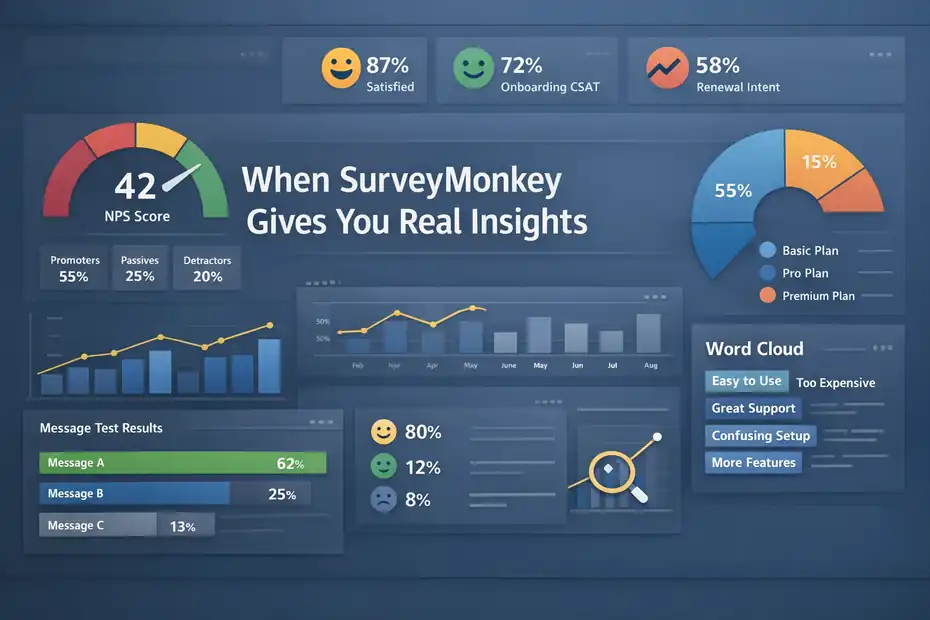
The strongest use cases are the ones where the survey format matches the decision you need to make.
That sounds obvious, but it is where most research gets better fast.
Customer Satisfaction And Loyalty Tracking
SurveyMonkey is a natural fit for CSAT, CES, and NPS-style surveys because these are standardized, repeatable formats that benefit from scale and trend tracking.
SurveyMonkey offers dedicated NPS templates and automatic NPS-related analysis features, including filtering, comparisons, text analysis, and sentiment analysis on open-ended responses.
Here is a practical example. Say you manage a subscription software product. You do not just want to know whether customers are “happy.” You want to know whether onboarding satisfaction fell after a pricing page redesign, whether support interactions improved renewal intent, and whether first-month users score differently from long-term customers.
SurveyMonkey helps with that because the same survey framework can be repeated across touchpoints.
This is where structured tools outperform casual feedback collection. You can segment by plan type, customer tenure, acquisition channel, or support outcome. Suddenly, the data becomes more than a pile of comments. It becomes decision material.
I suggest using SurveyMonkey here when your main goal is to monitor change over time. It is especially useful for identifying movement in key metrics before revenue or churn numbers fully catch up.
Message Testing, Concept Testing, And Prioritization
SurveyMonkey is also useful when you have multiple options and need to compare them. Maybe you are testing homepage messages, pricing page language, new packaging concepts, or proposed product features. The survey format lets you expose customers to a controlled set of choices and then analyze patterns across groups.
SurveyMonkey’s market research product and Audience panel are positioned for this kind of work, including access to targeted respondents and fast turnaround. SurveyMonkey states that Audience projects can start at $1 per response, and its panel can deliver target-market feedback in as little as an hour for some studies.
That speed can be genuinely useful. If your team is stuck between three positioning options for a campaign, you do not always need a month-long research sprint. A tightly written survey can help you identify which message feels clearest, most credible, or most differentiated.
The important part is writing questions that force trade-offs instead of collecting polite approval. Customers will often say every option is “pretty good.” Better research asks which option feels most relevant, which seems easiest to understand, or which one would most increase purchase intent.
Journey Feedback At Specific Touchpoints
Some of the best customer research is not broad. It is moment-based. A post-purchase survey, onboarding check-in, cancellation survey, or support follow-up can reveal exactly where friction shows up in the customer journey.
SurveyMonkey’s integration ecosystem helps here because you can automate surveys around events, such as case closure or customer milestones, instead of manually sending ad hoc forms. The company highlights integrations and workflow automation as a core part of the product.
This matters because recall degrades quickly. If you ask someone about their support experience three months later, the answers get fuzzy. If you ask within a day, the signal is cleaner.
A realistic scenario: Your team believes customers cancel because of price. A short cancellation survey may show that price is only the final trigger, while the deeper reasons are slow setup, weak onboarding, or missing integrations.That changes what you fix first. Used this way, SurveyMonkey can reveal much more than a vanity score.
When SurveyMonkey Creates Noise Instead
This is the uncomfortable half of the answer. SurveyMonkey is not bad for customer research, but it can make weak research look polished.
That is dangerous because dashboards can feel authoritative even when the underlying data is shaky.
Bad Sampling Produces False Confidence
The most common problem is not the software. It is who you ask. If your survey only reaches your most engaged customers, newest users, discount buyers, or loudest detractors, your results will skew.
SurveyMonkey can help you collect answers, but it cannot magically correct a poor sampling plan unless you deliberately design for that.
This is why many “customer research” surveys end up being customer opinion snapshots from whoever bothered to reply. That can still be useful, but it is not the same as representative insight.
For example, imagine an online store emails a survey only to recent repeat buyers. The results show strong satisfaction and high purchase intent. Great.
But that survey completely missed one-time buyers who left because the checkout was confusing. The team then makes decisions based on loyal-customer feedback and misses the leakage point hurting growth.
I recommend deciding first what population you need to understand: all customers, recent purchasers, churned users, enterprise accounts, trial users, or a specific segment. Only after that should you worry about survey design.
Poor Questions Turn Real Customers Into Bad Data
SurveyMonkey’s own best-practice guidance stresses clarity, bias reduction, and concise surveys for reliable answers. That matters because survey wording changes outcomes more than most teams expect.
A bad question is not always obviously bad. Sometimes it is just too broad. “How was your experience with our brand?” sounds fine, but it gives the respondent no anchor. Are they rating the website, the product, the support rep, shipping, or the invoice email?
You end up with an answer that feels useful and says almost nothing.
Another problem is stacking assumptions inside the question. “How much do you love our simple, affordable onboarding?” is basically a polite attempt to force agreement. Even subtler leading language can distort findings.
I have seen teams collect hundreds of responses and still learn less than they would have from ten careful interviews, simply because the questions were too vague, too biased, or too disconnected from a real decision.
Response Rate And Completion Rate Still Matter
Survey data quality depends partly on who starts and who finishes. External benchmarks vary, but a broad 2025 range for many external online surveys lands around 20% to 30%, while channel choice can push rates higher or lower.
In-app surveys can perform better than some email surveys, and SMS can sometimes outperform email depending on context.
That means a poorly timed, too-long customer survey can quietly filter out the very people you most need to hear from. The result is survivorship bias: only the most patient or motivated respondents finish.
SurveyMonkey can reduce this problem with logic that hides irrelevant questions and keeps paths shorter for each segment. Its skip logic features are explicitly designed to show respondents only relevant questions.
Still, the tool does not solve survey fatigue for you. If your research question needs a 20-minute survey, that is often a sign you are trying to solve too many problems at once.
How To Use SurveyMonkey Well For Customer Research
If you want real insights instead of noise, your process matters more than the brand name on the survey tool. Here is the workflow I would use.
Start With One Clear Research Decision
Before you write a single question, define the decision the survey will inform. Not the general topic. The decision.
- A weak goal sounds like this: “We want customer feedback.”
- A strong goal sounds like this: “We need to know which of three onboarding issues hurts activation most for first-time users” or “We need to understand whether customers prefer faster delivery or lower cost at checkout.”
That clarity changes everything. It tells you who to survey, what to ask, and what data would actually count as useful.
When teams skip this step, surveys become junk drawers. A little brand feedback, a little product feedback, a few demographic questions, one random NPS question, and an open text box at the end. That kind of survey feels thorough but rarely leads to action.
I suggest writing this sentence before building the survey: “After reading these results, we will decide whether to ____.” If you cannot fill that blank, you are not ready to launch.
Keep The Survey Short, Specific, And Segmented
SurveyMonkey itself advises concise surveys, and I completely agree. Shorter surveys reduce drop-off and improve answer quality, especially for customer research where attention is limited.
A practical structure often looks like this:
- Step 1: Ask one screening or context question.
- Step 2: Ask two to five core decision questions.
- Step 3: Add one open-ended follow-up for nuance.
- Step 4: End with only the segmentation fields you truly need.
This is where logic matters. Paid SurveyMonkey plans include skip logic features that let you direct respondents down relevant paths, reducing unnecessary questions and improving data quality.
Say you are researching a mobile banking app. New users and long-term users should not get the exact same questions. New users may need onboarding questions. Long-term users may need trust, reliability, and feature-depth questions.
If you force both groups through the same survey, you generate noise. If you segment them properly, the survey becomes much sharper.
Mix Scaled Questions With Open Text The Right Way
A common mistake is going all-in on rating scales because they are easy to chart. Another is going all-in on open text because it feels more “qualitative.” The best customer research usually combines both.
Use scaled questions to measure frequency, satisfaction, importance, preference, or agreement. Then use one targeted open-ended question to explain the why behind the score.
For example, do not just ask, “How satisfied are you with checkout?” Follow it with, “What almost stopped you from completing your purchase today?” That second question often contains the real insight.
SurveyMonkey’s analysis features, including text and sentiment analysis in some templates and plans, can help you organize open-ended feedback at scale.
In my experience, this blended approach gives you both direction and language. The scale tells you the magnitude of the issue. The verbatim responses tell you how customers describe it in their own words, which is gold for product, UX, and copywriting teams.
SurveyMonkey Features That Matter Most For Research
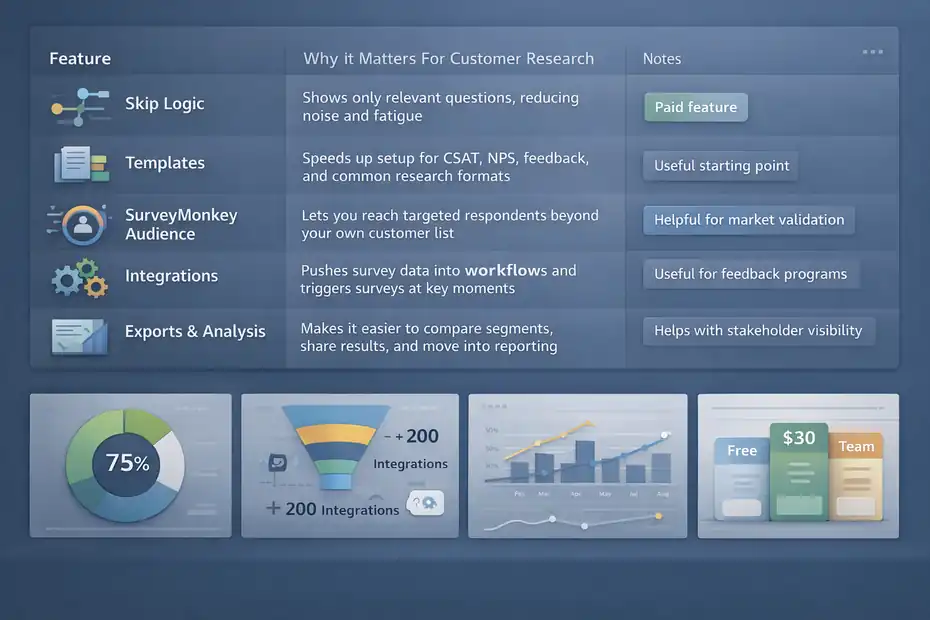
Not every feature matters for customer research. Some are nice extras. Some directly affect data quality and decision speed.
The Most Useful Features For Serious Customer Research
Here is a practical view of what matters most.
| Feature | Why It Matters For Customer Research | Notes |
|---|---|---|
| Skip Logic | Shows only relevant questions, reducing noise and fatigue | Paid feature on applicable plans |
| Templates | Speeds up setup for CSAT, NPS, feedback, and common research formats | Useful starting point, not a substitute for custom thinking |
| SurveyMonkey Audience | Lets you reach targeted respondents beyond your own customer list | Helpful for market validation and concept testing |
| Integrations | Pushes survey data into workflows and triggers surveys at key moments | Useful for ongoing feedback programs |
| Exports And Analysis | Makes it easier to compare segments, share results, and move into reporting | Especially helpful for teams that need stakeholder visibility |
What I appreciate is that these features solve operational problems, not just cosmetic ones. Skip logic improves relevance. Audience expands reach. Integrations reduce manual work. Exports help teams actually use the findings.
That said, I would not choose SurveyMonkey just because it has a long feature list. I would choose it when those features match your workflow.
Pricing And Plan Fit Matter More Than Most People Expect
SurveyMonkey has a free entry point, but many research-friendly features sit behind paid plans.
Its pricing page currently lists paid plans beginning around $30 per user per month, while higher team tiers go much higher, and Audience projects are priced separately.
SurveyMonkey also notes that Audience projects include advanced survey design and analysis features, unlimited responses, and up to 50 questions per survey in that context.
Here is the practical takeaway. SurveyMonkey is usually worth it when:
- You run customer feedback regularly, not once a year.
- You need logic, collaboration, or stakeholder reporting.
- You want panel access or faster research cycles.
- You need integrations to turn survey collection into a system.
It is less compelling if you only need a very basic form a few times per year. In that case, you may pay for features you never use.
I believe this is where many buyers get frustrated. They judge the tool based on the free experience, then expect advanced research outcomes. In reality, serious customer research often needs the paid features.
SurveyMonkey Versus “Cheaper” Survey Options
I will keep this simple. Cheaper tools can collect answers. SurveyMonkey is stronger when you need repeatability, logic, analysis, integrations, panel access, and a more professional feedback operation.
If your use case is a quick internal pulse survey, you probably do not need it. If your use case is customer research tied to product, retention, positioning, or service quality, the extra structure can pay for itself fast.
A rough rule I use is this: If the cost of one bad decision is higher than the cost of the software, buying the better research setup is usually reasonable.
Common Mistakes, Optimization Tips, And The Final Verdict
This is where the difference shows between “we sent a survey” and “we learned something useful.”
Common Mistakes That Make Results Less Trustworthy
The first mistake is asking customers to do your thinking for you. Questions like “What features should we build next?” sound customer-centric, but most customers are not prioritization frameworks. They answer from their own situation, not your roadmap constraints.
The second mistake is mixing different research goals into one survey. Satisfaction, pricing, feature demand, brand positioning, and demographics do not all belong in the same instrument.
The third mistake is over-trusting averages. A mean score can hide huge differences between new customers, premium customers, churn-risk accounts, or power users. Segment analysis often reveals that the “average customer” does not really exist.
The fourth mistake is failing to close the loop. SurveyMonkey’s own customer feedback guidance emphasizes acting on feedback and telling customers what changed. That is not just polite. It improves trust and can improve future participation.
Finally, many teams stop at collection. They gather responses, build a chart, and move on. Real customer research only pays off when someone makes a decision differently because of the findings.
How To Optimize SurveyMonkey For Better Research Outcomes
A few simple upgrades can improve results a lot.
- Tip 1: Use event-based timing. Ask close to the experience you are studying.
- Tip 2: Segment before analysis. Compare cohorts, not just totals.
- Tip 3: Ask fewer questions, but make each one decision-oriented.
- Tip 4: Pair scores with one open-text follow-up.
- Tip 5: Use SurveyMonkey Audience when your own customer list is too narrow for the question.
Here is a mini scenario. Imagine you are testing a new pricing page. Instead of sending a long general survey to all users, you send a short survey only to visitors who reached the pricing page in the last seven days. You ask which plan felt most relevant, what was confusing, and what nearly stopped them from signing up. Then you compare new versus returning visitors. That is targeted, actionable research. It is also the kind of work SurveyMonkey handles well.
From what I have seen, better research outcomes usually come from narrowing scope, not expanding it.
Final Verdict: Is SurveyMonkey Good For Customer Research?
Yes, SurveyMonkey is good for customer research when your goal is to collect structured feedback, validate hypotheses, compare customer segments, and track patterns over time. Its strengths are speed, accessibility, logic, templates, panel access, integrations, and analysis features.
Those make it genuinely useful for customer satisfaction studies, concept testing, touchpoint feedback, and ongoing voice-of-customer programs.
But it is not automatically good just because it is popular. If you use weak sampling, vague questions, bloated surveys, or treat surveys as a replacement for deeper discovery, you will get polished-looking noise.
So my honest answer is this: SurveyMonkey is not the research strategy. It is the delivery system. If your research design is sound, it can help you get real insights fast. If your design is sloppy, it can help you scale bad assumptions faster.
That is why I would recommend it for customer research with one condition: use it to answer clear decisions, not to collect random opinions and call that insight.
FAQ
Is SurveyMonkey good for customer research?
SurveyMonkey is good for customer research when used for structured feedback like satisfaction tracking, concept testing, and segmentation. It works best for quantitative insights but requires proper sampling and clear questions to avoid misleading results.
What type of research is SurveyMonkey best suited for?
SurveyMonkey is best suited for quantitative research such as customer satisfaction surveys, NPS tracking, and feature prioritization. It helps measure trends and validate assumptions but is less effective for deep discovery or emotional insights.
Can SurveyMonkey replace customer interviews?
SurveyMonkey cannot fully replace customer interviews. Surveys provide measurable data at scale, while interviews uncover deeper motivations, behaviors, and context. The best approach combines both methods for a complete understanding of customer needs.
Why do some SurveyMonkey surveys produce poor results?
Poor results usually come from bad sampling, unclear questions, or overly long surveys. If the wrong audience is surveyed or questions are biased, the data may look credible but fail to reflect real customer behavior.
How can I improve customer research results with SurveyMonkey?
You can improve results by focusing on one clear research goal, targeting the right audience, keeping surveys short, and combining rating questions with open-ended responses. Segmenting results also helps uncover more accurate insights.

I’m Juxhin, the voice behind The Justifiable.
I’ve spent 6+ years building blogs, managing affiliate campaigns, and testing the messy world of online business. Here, I cut the fluff and share the strategies that actually move the needle — so you can build income that’s sustainable, not speculative.
Related posts:
 SurveyMonkey Pros And Cons For Freelancers: Smart Tool Or Overpriced?
 Is SurveyMonkey Worth It For Ecommerce Feedback: Real Value
 Is SurveyMonkey Enough For Professional Surveys: Expert Verdict
 SurveyMonkey Review For Small Business Surveys: Worth It Or Waste?
 SurveyMonkey Review For Digital Marketers: Growth Tool Or Just Data?
 SurveyMonkey Review For Ecommerce Customer Feedback: Worth Using?