Table of Contents
Some links on The Justifiable are affiliate links, meaning we may earn a small commission at no extra cost to you. Read full disclaimer.
When I first started exploring the best site to start a blog, I remember feeling overwhelmed by how many platforms promised to be “beginner-friendly.” From drag-and-drop editors to built-in SEO tools, every site seemed to offer something unique.
But here’s the truth—choosing the right platform isn’t just about features. It’s about finding one that fits your goals, your tech comfort level, and the kind of blog you want to grow.
Let’s break down the top blogging platforms for beginners so you can confidently pick the one that’s best for you.
WordPress.org – The Most Powerful Blogging Platform for Growth
If you want the most control, flexibility, and long-term growth potential, WordPress.org is usually where people end up. Let me walk you through why it works so well for beginners who want room to grow.
Why WordPress.org Is Ideal for Long-Term Blogging Success
WordPress.org gives you full ownership of your site, which means you’re not locked into a platform’s limits or pricing changes. That freedom alone is why nearly 43 percent of all websites run on WordPress today (W3Techs, 2026).
- Unlimited customization: You can adjust every pixel of your blog as your skills grow.
- Scalable for any size: Whether you publish a weekly hobby post or run a full content business, WordPress handles it.
- SEO-friendly foundations: Search engines tend to crawl WordPress sites efficiently, giving you a head start on visibility.
- Huge community support: Whenever I hit a roadblock, I’ve always found clear answers from the WordPress community or documentation.
From what I’ve seen, if you want a blog that can evolve into a real brand or business, WordPress.org gives you the space to do it without forcing you into a box.
How to Set Up a WordPress Blog Without Coding
Setting up WordPress might look intimidating, but it’s surprisingly doable, even if you’re not technical.
Start with choosing a hosting provider. Many hosts now offer one-click WordPress installation. It feels almost like installing an app on your phone—quick and painless.
After installation, you’ll choose a theme. I suggest starting with a lightweight theme—something simple and fast. You can always redesign later. Once your theme is active, you’ll customize it using the built-in editor. No code required.
To publish your first post, go to Posts → Add New, write, add an image or two, and hit Publish. That’s all it takes to get your blog live.
The real beauty is that you don’t need to touch code unless you want to explore it later. WordPress grows with you instead of overwhelming you at the start.
Key Plugins Every Beginner Should Install
Plugins add features to your site without needing coding skills. Over time, you’ll curate your own list, but here are a few essentials I typically recommend to beginners:
- SEO plugin: Helps you optimize your posts for search engines so people can actually find your blog.
- Caching plugin: Improves load speed, which boosts your user experience and SEO.
- Backup plugin: Automatically saves copies of your site in case something breaks.
- Spam protection: Keeps unwanted bot comments off your pages.
These plugins don’t just add convenience—they save hours of manual troubleshooting and improve your blog’s performance in ways you’ll feel immediately.
Common Mistakes Beginners Make With WordPress Setup
I’ve made a few of these myself, and I see beginners repeat them often.
One of the biggest mistakes is choosing a slow or bloated theme because it “looks pretty.” Pretty is great, but if your site loads in five seconds, readers will leave.
Another common issue is installing too many plugins. More plugins don’t mean more power—they usually mean slower load times.
A third mistake is skipping backups entirely. Even small updates can sometimes break a site, and having a backup avoids panic.
I also see beginners forget about permalinks, which shape your URL structure. Choosing a clean format early helps SEO and prevents messy redirects later.
If you avoid these pitfalls, your WordPress foundation will feel much more solid.
Wix – The Best Site to Start a Blog With Visual Design Flexibility
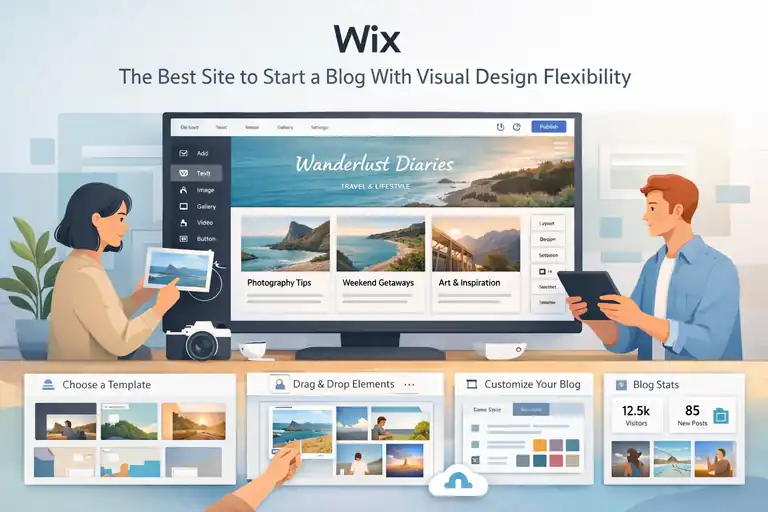
Wix is great if you want to drag and drop your way into a beautiful blog without touching a single line of code.
What Makes Wix Perfect for Creative Bloggers
Wix shines for bloggers who care about visuals and ease. Its editor works exactly like a design tool—you drag elements around until your page looks just right.
Creative bloggers tend to love Wix because:
- The design canvas feels intuitive: You’re literally arranging your site like a digital mood board.
- Templates are polished: Many look like lifestyle magazines, which helps you stand out right away.
- Easy media handling: If your blog relies heavily on visuals—art, photography, travel—Wix makes uploading and customizing images simple.
From what I’ve seen, Wix lets beginners feel like designers without requiring any design background.
Step-by-Step: Building Your First Blog With Wix
Creating a blog on Wix feels almost playful because of how visual everything is.
- Choose a template that matches your style.
- Enter the Wix editor and replace the demo text with your own.
- Add blog pages or sections using the Add menu.
- Drag and drop elements—images, galleries, text boxes—exactly where you want them.
- Publish with one click.
Because Wix handles hosting and security automatically, you don’t worry about technical maintenance.
In my experience, this makes the setup process stress-free for beginners who just want to start writing.
Pros and Cons of Using Wix for Blogging
Wix has some strengths that make life easy for beginners but also a few limits you’ll want to understand upfront.
Pros:
- Drag-and-drop editing is extremely beginner-friendly.
- Templates look modern and polished.
- Hosting and security are fully managed for you.
Cons:
- Flexibility is limited compared to WordPress.
- Once you choose a template, switching later can be tedious.
- Sites can feel slower if heavily customized with animations.
It’s worth weighing these trade-offs before you commit, especially if you see yourself expanding your site in the future.
When to Upgrade to a Paid Plan on Wix
Wix’s free plan is helpful for testing the platform, but upgrading becomes essential once you want a professional presence.
I usually recommend upgrading when:
- You want your own domain name instead of a Wix subdomain.
- You need more storage for photos or longer blog posts.
- You intend to monetize your blog with ads or affiliate links.
- Brand credibility matters for your niche.
A paid plan removes distractions like Wix ads and gives you more control over how people experience your site.
Squarespace – The Easiest Platform for Stylish Blogging
Squarespace is a favorite for bloggers who want a professional, portfolio-like aesthetic without spending hours tweaking layouts.
Why Squarespace Is Great for Design-Focused Blogs
Squarespace thrives on design. Every template feels intentional and balanced, which helps even beginner blogs look polished from day one.
- Consistent visual style: Your blog, pages, and images flow together naturally.
- Clean typography: Text always looks crisp and easy to read.
- Aesthetic-driven workflows: The editor encourages simple, minimalistic layouts that feel premium.
If visuals matter to you—and you don’t want to fuss with too many settings—Squarespace gives you beautiful results with less friction.
Customizing Templates to Match Your Blog’s Branding
Squarespace templates act almost like branding kits. You set a few visual decisions, and the platform automatically applies them everywhere.
To personalize your site, you can adjust:
- Colors
- Fonts
- Image styles
- Page layouts
What I love is that the system prevents you from making clashing or chaotic design choices. It’s like having a friendly creative director keeping your site aligned.
If you’re someone who struggles with design decisions, Squarespace quietly streamlines the process for you.
SEO and Marketing Tools Built Into Squarespace
Squarespace includes a suite of tools that help your blog get discovered without requiring additional plugins.
- Built-in SEO fields for every page
- Automated sitemaps
- Clean URL structures
- Mobile-optimized layouts
- Basic analytics for traffic insights
While it’s not as customizable as WordPress SEO plugins, it covers what most beginners need.
In my experience, Squarespace sites tend to perform well because they avoid messy code or layout inconsistencies.
Limitations to Know Before Choosing Squarespace
Squarespace is beautifully simple, but that simplicity comes with a few boundaries.
You might find limitations if:
- You want deep customization beyond the editor’s options.
- You plan to scale into a complex blog with advanced features.
- You need app integrations that Squarespace doesn’t support.
- You prefer a drag-and-drop experience like Wix—Squarespace is more structured.
These aren’t deal-breakers for everyone, but they’re worth considering if you hope to expand your blog far beyond its initial purpose.
Blogger – The Simplest Free Platform for Beginners
If you want something that feels as easy as opening a notebook and writing, Blogger is still one of the simplest ways to get a blog online fast.
It’s not fancy, but sometimes simple is exactly what you need.
How to Start a Blog on Blogger in Minutes
Starting a blog on Blogger takes almost no setup, which is why so many beginners try it first.
- Go to Blogger.com: Sign in with your Google account.
- Choose a blog name: This becomes your blog’s identity.
- Pick a template: These are basic, but they get the job done.
- Start writing: Blogger’s post editor works like Google Docs—very familiar and low stress.
I’ve always appreciated how Blogger removes technical hurdles. You don’t worry about hosting, updates, or security because Google handles everything behind the scenes.
For someone who just wants to hit Publish without thinking too hard, Blogger makes that possible.
Pros and Cons of Using Blogger in 2025
Even though Blogger is extremely beginner-friendly, it comes with real limitations you should consider before committing to it long-term.
Pros:
- Completely free with no hosting fees.
- Simple interface that beginners understand instantly.
- Tight integration with Google tools like Analytics and Drive.
Cons:
- Limited customization, especially compared to modern platforms.
- Dated templates that don’t always feel professional.
- Ownership concerns—Google can discontinue products, and Blogger hasn’t seen major updates in years.
From what I’ve observed, Blogger works best as a starter home. It’s comfortable and easy… but you probably won’t stay there forever.
How Blogger Compares to WordPress and Wix
Blogger’s simplicity sets it apart from more robust platforms, but that simplicity comes with trade-offs.
- WordPress.org: Far more customizable and scalable. If you want growth or monetization, WordPress wins by a mile.
- Wix: Much more design-friendly with better templates and a visual editor. Blogger feels minimal compared to Wix’s creative freedom.
If Blogger were a tiny studio apartment, WordPress would be the large house you renovate over time, and Wix is the stylish loft ready to decorate. Blogger just isn’t designed for long-term brand building the way the others are.
When It’s Time to Migrate From Blogger
Most beginners eventually outgrow Blogger, and it’s surprisingly easy to know when that moment arrives.
You might want to migrate when:
- You want a custom domain without Google branding.
- You need a more professional design for your niche.
- You’re ready to monetize with ads, affiliates, or products.
- You need features Blogger simply doesn’t offer.
I like to think of Blogger as training wheels—fantastic for getting started, but eventually you’ll want a platform built for long-term growth.
Kit – The Best Site for Creators Who Want to Blog and Build an Email List
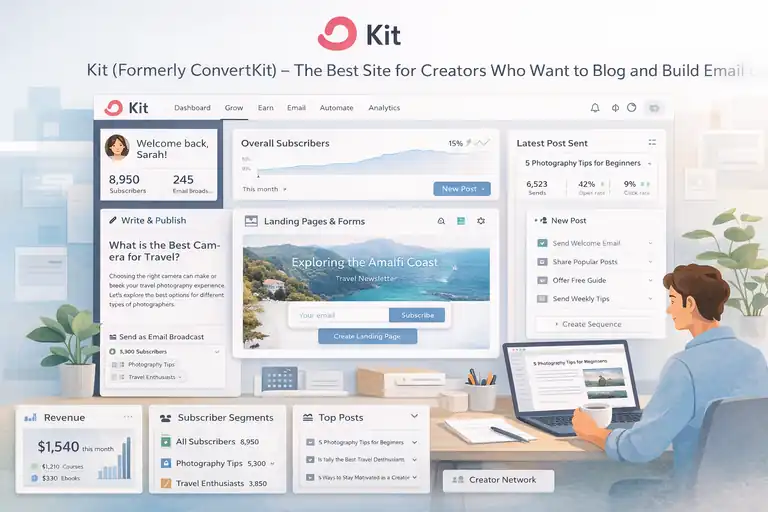
Kit is perfect if your blog is part of a bigger creator ecosystem—like newsletters, courses, digital products, or community building.
Everything works together in one place, which makes life easier when you’re wearing every hat yourself.
How Kit Combines Blogging and Email Marketing
Kit blends blogging and email into one unified workflow. Instead of juggling multiple tools, you write a post, publish it, and email it to subscribers seamlessly.
- Blog posts double as email broadcasts.
- Landing pages and forms are included—no extra tools required.
- You can segment subscribers based on what they read.
I love this because it keeps your audience-building efforts in one home instead of scattered across platforms. It feels efficient and intentional.
Setting Up Your First Blog Post on Kit
Publishing on Kit feels a lot like writing inside a clean, distraction-free editor.
- Open the Creator Dashboard.
- Click Grow and choose Posts.
- Write your blog content using the built-in editor.
- Choose whether to send it to your email subscribers.
- Publish instantly or schedule it.
What I appreciate most is how minimal the editor feels. There aren’t dozens of buttons—just words and white space, which helps you focus on writing instead of fiddling with formatting.
Why Kit Works Best for Personal Brands and Creators
If you plan to build an audience rather than a traditional blog, Kit fits beautifully.
Personal creators benefit from Kit because:
- Your blog and email are integrated.
- You can sell products, courses, and subscriptions without extra plugins.
- You own your audience instead of relying on social media.
I’ve seen creators thrive simply because everything they need is on one platform. Less time switching tools means more time creating.
How to Grow Your Audience With Kit’s Built-In Tools
Kit gives you several growth tools that help build deeper relationships with your readers.
- Landing pages: These help you capture subscribers for specific topics.
- Email sequences: A series of automated emails that introduce new readers to your best content.
- Tags and segmentation: Lets you deliver content that matches someone’s interests.
- Creator Network: Allows you to collaborate with other creators and share audiences.
I’ve found that even simple automation—like a welcome sequence—can dramatically boost engagement. When someone receives a warm introduction to your content, they stick around longer.
Medium – The Best Platform to Share Your Writing Fast
Medium is where you go when you want people to read your ideas without dealing with design, hosting, or tech setup.
It’s like joining a giant library where millions of readers are already browsing.
Why Medium Is Perfect for Writers and Thought Leaders
Medium is designed for writing first. If your goal is to express ideas, tell stories, or share expertise, you can start publishing within minutes.
Here’s why writers love it:
- The editor is incredibly clean and distraction-free.
- Medium has built-in distribution through its algorithm and publications.
- Readers are already there, actively searching for quality writing.
I’ve always felt that Medium gives new writers confidence because the platform “holds” your work beautifully without any design effort on your part.
How to Build Readership and Get Featured on Medium
Growing on Medium takes consistency, but you can speed things up with the right habits.
- Join publications: These are curated hubs where editors feature high-quality stories.
- Write for specific topics: Medium categories like Productivity, Relationships, and Tech have huge readerships.
- Engage with others: Comments, highlights, and follows help boost visibility.
- Use compelling story hooks: Medium readers decide quickly whether to continue.
One trick that’s worked well for me is republishing blog posts from my main site onto Medium. You get extra exposure without doing extra work.
The Pros and Cons of Blogging on Medium
Medium has some clear advantages, but it’s not a full replacement for owning your own website.
Pros:
- Instant audience potential.
- Zero maintenance—no plugins, design, or hosting.
- Monetization through the Medium Partner Program.
Cons:
- You don’t own the platform or the audience fully.
- Limited customization.
- Earnings depend on Medium’s algorithm and member reading time.
Medium is fantastic for exposure, but if you want full ownership, it shouldn’t be your only platform.
When to Move From Medium to Your Own Domain
Medium is great for discovering your voice, but eventually you may want a home you control.
You’ll know it’s time to move when:
- You want to create a brand with a unique look and feel.
- You plan to sell products or grow an email list.
- You want complete ownership of your SEO.
- You’re building a business, not just publishing essays.
Many writers use Medium as a “content discovery engine,” then guide readers to their personal site for deeper engagement. It’s a powerful combination.
Ghost – The Best Platform for Serious Writers and Newsletter Bloggers
Ghost is one of those platforms that feels intentionally built for writers who care about clean design, fast performance, and owning their audience.
If you want a writing-focused space without the noise, Ghost delivers exactly that.
What Makes Ghost Different From Other Blogging Sites
Ghost sets itself apart by keeping everything lean, fast, and built around publishing. There’s no clutter, no unnecessary tools, and no confusing dashboard areas.
- Minimal, distraction-free editor that feels calming to write in.
- Lightning-fast performance thanks to its modern architecture.
- Built-in membership and subscription features for monetization.
I often describe Ghost as the platform that strips away anything that doesn’t help you write, publish, or build a reader community.
It’s especially helpful if you want something cleaner than WordPress but more powerful than Medium.
Setting Up a Ghost Blog for the First Time
Getting started with Ghost is surprisingly smooth once you pick how you want to host it. Ghost(Pro) is the hosted version that handles everything, while self-hosting gives you control if you’re comfortable with servers.
To get started on Ghost(Pro):
- Create an account and choose a plan.
- Pick a theme or use the default clean layout.
- Customize your homepage and member settings.
- Start publishing posts or newsletters.
The editor feels almost therapeutic—it’s just text, space, and a few simple formatting tools. You can toggle between blog posts and newsletters, which makes it easy to stay consistent with both without switching platforms.
How Ghost Helps You Monetize Your Writing
Ghost includes monetization features built directly into the platform, which makes it ideal if you want to earn from your writing without relying on ads.
- Membership tiers for exclusive content.
- Paid newsletters without platform fees.
- Stripe integration so you get paid directly.
A lot of creators use Ghost to build private communities or paid blogs because everything is handled in one place. One writer I follow moved from Substack to Ghost because the fee savings alone made a huge difference in their income.
Owning your platform really does matter when monetization becomes part of your strategy.
Ghost vs WordPress: Which Is Better for Growth?
Both platforms can grow with you, but they grow in different ways.
WordPress is the better choice if you want maximum flexibility, thousands of plugins, or a site that can evolve into anything over time. Ghost is simpler and more focused—it’s the better option if your growth comes from publishing consistently and selling subscriptions.
Think of WordPress as a toolbox and Ghost as a beautifully designed writing studio. Neither is wrong, but they support very different creative styles.
Weebly – A Beginner-Friendly Blogging Site With Simple Tools
Weebly is one of those platforms that just feels easy. If you want a place to write without overthinking templates or settings, Weebly helps you get online quickly with minimal decisions.
Why Weebly Is Great for Hobby Bloggers
Weebly appeals to people who want a simple blog and don’t need advanced features.
- Drag-and-drop editing makes customization stress-free.
- Templates are straightforward and beginner-friendly.
- Hosting and security are included with no extra setup.
If you’re blogging for fun—maybe sharing recipes, DIY projects, or travel notes—Weebly gives you enough tools to make your blog look clean and inviting without overwhelming you.
Setting Up Your Blog With Weebly Step-by-Step
Getting started on Weebly usually takes less than an hour.
- Create an account and pick a theme.
- Use the drag-and-drop editor to arrange text, images, and sections.
- Add a Blog Page from the menu.
- Start writing your first post inside the visual editor.
- Publish when ready.
Weebly’s editor feels almost like arranging building blocks. If you drag a text block somewhere, it just goes there—no odd formatting surprises.
This simplicity is why many first-time bloggers find Weebly unintimidating compared to platforms with more complex dashboards.
Integrating E-Commerce and Blogging on Weebly
One unique perk of Weebly is its connection to e-commerce because it’s owned by Square. If you want to blog and sell simple products, Weebly makes that add-on seamless.
You can:
- Add product listings next to blog posts.
- Accept payments through Square without extra configuration.
- Showcase digital or physical products inside your layout.
For beginners who want a hybrid site—part blog, part shop—Weebly keeps things uncomplicated.
Key Limitations to Consider With Weebly
Weebly is easy, but that ease comes with trade-offs.
- Limited design flexibility compared to Wix.
- Fewer blogging features than WordPress.
- Slower updates in recent years as the company focuses more on e-commerce.
If long-term control or customization matters to you, you may eventually outgrow Weebly. I’ve noticed that hobby bloggers stay happy on it, while business-focused bloggers often move on as their needs expand.
Substack – The Best Blogging Site for Newsletter-Based Content
Substack turns your writing into a direct connection with readers through email. It’s simple, streamlined, and perfect if you want to build a community without managing a full website.
Why Substack Appeals to Writers Who Want Loyal Readers
Substack works because it blends blogging with emailing your audience automatically. When you publish something, it goes straight to your subscribers’ inboxes.
Here’s what writers appreciate:
- Minimal setup and a clean editor.
- An audience-first model that encourages deep reader relationships.
- Built-in tools for paid subscriptions.
If you’ve ever felt like social media buries your posts, Substack can feel refreshing because readers actually see what you send.
How to Launch a Blog-Newsletter Hybrid on Substack
Starting your Substack takes only a few steps, and the workflow is incredibly straightforward.
- Create an account and name your publication.
- Customize your header, logo, and about page.
- Start writing your first post in the editor.
- Choose whether it’s free or subscriber-only.
- Publish, and Substack sends it directly to your readers.
It’s a great platform if you prioritize writing over design. Everything feels calm and structured, almost like writing inside a focused journal.
How Substack Monetization Works for Bloggers
Substack’s main monetization model is paid subscriptions. Readers pay monthly or yearly to access exclusive posts, podcasts, or bonus content.
Substack takes a percentage fee, and while that can add up over time, the trade-off is simplicity—you don’t handle payment processors or membership plugins yourself.
Many bloggers see income faster on Substack because the barrier to supporting a writer is low. One compelling essay or weekly newsletter can win subscribers who genuinely want to support your work.
When to Transition From Substack to a Custom Website
Substack is wonderful early on, but over time you may want more control.
It’s time to move when:
- You want a website with pages and branding beyond text posts.
- You want to reduce platform fees.
- You’re building courses, products, or a larger business.
- You want full SEO control for long-term visibility.
A lot of creators use Substack as their “starter home,” then shift to something like WordPress or Ghost once their audience grows. You can still keep your Substack as a distribution channel—it doesn’t have to be all or nothing.
Choosing the Best Site to Start a Blog for Your Goals
Choosing the best site to start a blog really depends on what kind of blogger you want to be. Each platform shines for a different reason, and matching your goals to the platform makes everything easier.
How to Match Your Blogging Goals With the Right Platform
I always tell people to start by asking one simple question: What do you want from this blog?
- If you want full control and long-term growth, WordPress.org is the strongest option.
- If you want something visual and beginner-friendly, Wix or Squarespace feels smoother.
- If you want simplicity, Blogger or Weebly gets you writing fast.
- If you want to write and build an email list together, Kit is ideal.
- If you want instant readers, Medium or Substack gives you that boost.
Your goals shape your platform more than any feature list ever will.
Key Factors: Budget, Customization, and Ease of Use
Different bloggers prioritize different things, but most people compare platforms based on these three:
- Budget: Some platforms are free (Blogger, Medium, Substack), while others require monthly hosting or plans.
- Customization: If you want total freedom, WordPress wins. If you want guided simplicity, Squarespace or Weebly feels easier.
- Ease of use: Wix and Substack have the shortest learning curves—great if you feel nervous about tech.
I always try to balance all three before choosing a platform, because the wrong balance often leads to frustration later.
My Personal Recommendation for Absolute Beginners
If you’re brand new and feeling overwhelmed, I’d personally start with Wix or Squarespace. Both make the early steps feel friendly and fun. Once you understand your style and needs, you can always move to WordPress.org when you’re ready for more control.
I’ve found that starting simple helps you stay consistent—and consistency matters more than the perfect platform.
Pro Tip: Start Simple, Then Scale With the Right Tools
Here’s the truth I’ve learned after helping a lot of beginners: The best blogging setup is the one you’ll actually use.
Start with a platform that feels comfortable. Write your first ten posts. Learn what you enjoy. Then scale up with tools or platforms that match your growth.
Your blog doesn’t have to be perfect on day one. It just has to begin.
FAQ
What is the best site to start a blog for beginners?
The best site to start a blog for beginners is WordPress.org if you want long-term growth, or Wix if you want the easiest setup with minimal technical work.
Which blogging platform is easiest for beginners to use?
Wix and Squarespace are the easiest blogging platforms for beginners because they include hosting, simple editors, and ready-made designs.
Should beginners start a blog for free or paid?
Beginners can start a blog for free to test ideas, but a paid platform is better if you want control, branding, and long-term growth.

I’m Juxhin, the voice behind The Justifiable.
I’ve spent 6+ years building blogs, managing affiliate campaigns, and testing the messy world of online business. Here, I cut the fluff and share the strategies that actually move the needle — so you can build income that’s sustainable, not speculative.