
Table of Contents
Some links on The Justifiable are affiliate links, meaning we may earn a small commission at no extra cost to you. Read full disclaimer.
When I first looked into doba and shopify as a beginner-friendly dropshipping setup, I had the same question most new sellers do: can this combo actually make money, or is it just hype?
This article is for beginners who are considering using Doba with Shopify and want a clear, honest answer about whether it’s profitable.
I’ll directly answer whether Doba and Shopify work well together for beginners, what makes or breaks profitability, and what you should realistically expect before investing your time and money.
How Doba And Shopify Work Together For Beginners
If you’re brand new to dropshipping, doba and shopify can look like a clean, plug-and-play setup on the surface.
In reality, the way these two platforms connect has a few strengths—and a few friction points—that matter a lot when you’re just getting started.
How Doba Integrates With Shopify Stores
Doba connects to Shopify through its official app, which acts as a bridge between your store and Doba’s supplier marketplace. In simple terms, it lets you push products from Doba into your Shopify store without manual uploads.
Here’s how it works in practice:
- You install the Doba app from the Shopify App Store
- You connect your Doba account
- You import products directly into your Shopify product catalog
What I like here is speed. You can go from zero products to a populated store in an afternoon. For beginners, that removes a lot of technical friction.
Where it feels clunky is customization. Product titles, descriptions, and images often need cleanup. If you don’t edit them, your store can look generic fast, which hurts trust and conversions.
From what I’ve seen, beginners who take time to rewrite listings do noticeably better, even with the same products.
What The Doba Supplier Network Means For New Sellers
Doba doesn’t manufacture products. Instead, it aggregates suppliers—mostly US-based wholesalers and some international vendors—into one dashboard.
What that means for you:
- You’re choosing from pre-vetted suppliers
- You don’t negotiate pricing directly
- You rely on Doba for supplier access and data accuracy
This setup lowers risk but also limits flexibility. You’re paying for convenience. For beginners, that’s not necessarily bad. It removes the need to cold-contact suppliers or manage multiple vendor accounts.
The trade-off is margin control. Because suppliers know Doba brings them customers, prices are often higher than sourcing directly. If you’re expecting AliExpress-style margins, this is usually where reality hits.
How Product Importing And Order Syncing Actually Works
Once products are imported, Doba handles order routing automatically. When a customer places an order on your Shopify store:
- Shopify records the sale
- Doba receives the order data
- The supplier fulfills and ships the product
Tracking numbers are sent back to Shopify, so customers get updates without manual work from you. This automation is genuinely helpful, especially if you’re juggling ads, customer emails, and store tweaks.
That said, syncing isn’t always instant. I’ve seen delays of several hours, occasionally longer. For beginners, this can be stressful if customers ask for shipping updates early. It’s manageable, but it’s not real-time magic.
Where Beginners Typically Get Confused With This Setup
Most confusion happens in three areas:
- Pricing rules inside Shopify don’t always match Doba’s costs
- Shipping fees vary by supplier and product
- Inventory levels can change without warning
New sellers often assume automation means “hands-off.” It doesn’t. You still need to monitor margins, check stock levels, and test checkout totals. Once you understand that Doba simplifies logistics—not business decisions—the setup makes a lot more sense.
Real Startup Costs When Using Doba With Shopify
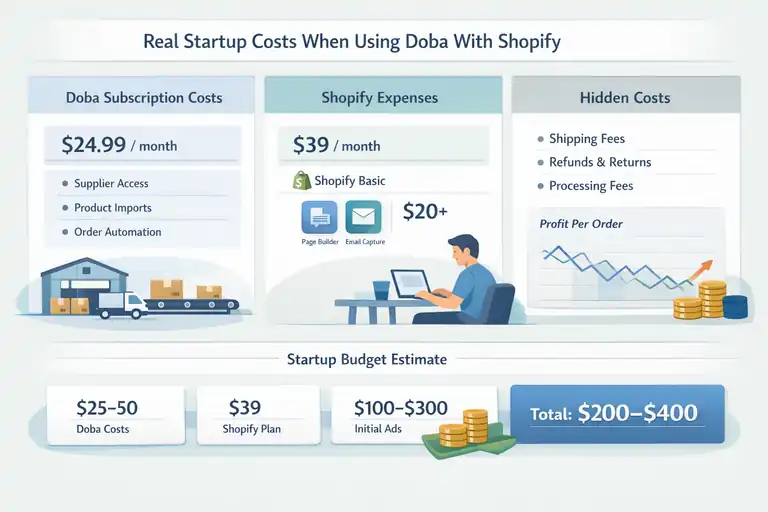
This is where expectations matter. Doba and shopify isn’t a zero-cost beginner model, and underestimating startup costs is one of the fastest ways to burn out early.
Doba Subscription Plans And What You Actually Pay
Doba is not free. As of now, plans typically start around $24.99 per month and scale up depending on features.
What you’re paying for:
- Access to suppliers
- Product data and imports
- Order automation and tracking
There’s no per-order commission, which sounds great at first. But the subscription fee means you’re paying before you’ve made a single sale. In my experience, beginners feel this pressure quickly if traffic or conversions are slow.
A useful mental check: If your average profit per order is $15, you need at least two sales a month just to cover Doba.
Shopify Monthly Fees And Required App Expenses
Shopify’s Basic plan usually runs around $39 per month. On top of that, many beginners add at least one extra app for:
- Page building
- Upsells
- Email capture
It’s very easy for monthly costs to hit $60–$80 without noticing. None of these tools are bad. The mistake is stacking apps before validating products.
If I were starting over, I’d run lean for the first 30 days and only add tools once sales data justifies them.
Hidden Costs That Impact Beginner Profit Margins
This is the part most tutorials skip.
Hidden costs often include:
- Higher-than-expected shipping fees
- Refunds due to long delivery times
- Payment processing fees (around 2.9% + $0.30 per order)
These small leaks add up. A product that looks profitable on paper can shrink fast after real-world expenses. Beginners who track net profit per order from day one tend to adapt faster and quit less often.
Budget Threshold Needed Before Seeing Any Returns
From what I’ve seen, a realistic beginner budget looks like this:
- $25–$50 for Doba
- $39 for Shopify
- $100–$300 for initial traffic testing
That puts you in the $200–$400 range before meaningful feedback. Could you spend less? Yes. But it usually slows learning.
If your budget is extremely tight, Doba and Shopify may feel stressful rather than empowering. If you can afford a small test window, the clarity you gain is often worth the cost—even if you pivot later.
Product Pricing And Margin Limits With Doba Suppliers
This is the section where most beginners have an “ohhh” moment.
Doba and Shopify can work, but pricing and margins are the make-or-break factor, especially when you’re new and still learning how money actually flows through a store.
Wholesale Pricing Structure Inside Doba Marketplace
Doba’s marketplace shows you wholesale prices upfront, which sounds beginner-friendly—and it is. But wholesale here doesn’t always mean cheap.
Here’s what’s happening behind the scenes:
- Doba suppliers are usually established wholesalers
- Prices already include supplier margins
- You’re paying for convenience and vetted access
In plain English, you’re not buying factory-direct. You’re buying from middlemen who expect smaller-volume sellers.
One thing I’ve noticed: Doba pricing works best for products priced $40–$120 retail. Low-ticket items struggle because there’s not enough room to absorb fees, shipping, and ads. If you try to sell a $15 product, the math almost always collapses.
Why Doba Product Costs Are Higher Than AliExpress
This comparison comes up constantly, so let’s be honest about it.
AliExpress products are cheaper because:
- Many sellers are manufacturers or very close to them
- Shipping is subsidized or slow
- Quality control varies widely
Doba costs more because:
- Suppliers are often US-based
- Shipping is faster and more predictable
- Product quality is usually more consistent
From what I’ve seen, beginners often underestimate how much customer trust matters. Faster shipping and fewer complaints can offset lower margins, especially if you’re building a brand instead of chasing quick wins.
It’s not better or worse—just a different trade-off.
How Shipping Fees Affect Shopify Store Profitability
Shipping is the silent margin killer.
On Doba, shipping fees vary by supplier, weight, and destination.
That means:
- Two similar products can have very different shipping costs
- Flat-rate shipping strategies can backfire
- “Free shipping” needs careful pricing math
I recommend baking average shipping into your product price instead of showing it at checkout. Stores with surprise shipping fees convert worse—sometimes 20–30% worse, based on general ecommerce benchmarks.
A simple habit that helps: before launching a product, place a test order to your own address. It’s the fastest way to understand real costs and delivery time.
Margin Scenarios Beginners Can Realistically Expect
Let me give you realistic numbers, not hype.
Common beginner margin ranges:
- Low-end: $8–$12 profit per order
- Mid-range: $15–$25 profit per order
- High-end: $30+ but harder to scale
After ad costs, many beginners net closer to $10–$15 per sale early on. That’s not passive income—but it is data. Once you know which products convert, you can improve margins with pricing tests, bundles, or upsells.
The mistake is quitting before you reach that learning point.
Ease Of Use For First-Time Shopify Store Owners
If pricing is the math test, usability is the stress test. Doba and Shopify are fairly beginner-friendly, but they’re not foolproof—and that difference matters.
Learning Curve For Managing Doba Inside Shopify
The Doba dashboard is functional, not elegant. You’ll spend time learning:
- How product imports work
- How supplier rules affect fulfillment
- How order statuses sync
Expect a few “Where did that go?” moments early on. That’s normal.
In my experience, most beginners feel comfortable within a week if they:
- Import only a few products at first
- Manually review each listing
- Track one order end-to-end
Trying to scale before understanding the flow is where frustration starts.
Product Research Difficulty Compared To Other Platforms
Doba doesn’t spoon-feed winning products.
Unlike trend-based platforms, Doba requires:
- Manual filtering
- Price and shipping comparisons
- Demand validation using external tools
This is harder—but also healthier long term. You’re forced to think like a store owner, not a product flipper.
If you pair Doba with basic keyword research or Shopify analytics, you can spot demand gaps others miss. It’s slower upfront, but it builds better instincts.
Order Fulfillment Speed And Reliability For Beginners
Fulfillment speed depends entirely on the supplier.
Typical ranges I’ve seen:
- US suppliers: 3–7 business days
- International suppliers: 7–14 days
That’s faster than many overseas dropshipping setups, but still not Amazon-fast. Setting clear expectations on your product pages reduces refunds and support tickets dramatically.
Reliability is generally solid, but no system is perfect. Occasional delays happen. How you communicate matters more than the delay itself.
Common Beginner Mistakes Using Doba With Shopify
These are the mistakes I see most often:
- Importing too many products at once
- Ignoring shipping costs until checkout
- Copying supplier descriptions word-for-word
- Expecting automation to replace decision-making
Doba simplifies logistics, not judgment. Once you accept that, it becomes a tool instead of a disappointment.
Doba Product Selection And Niche Profit Potential
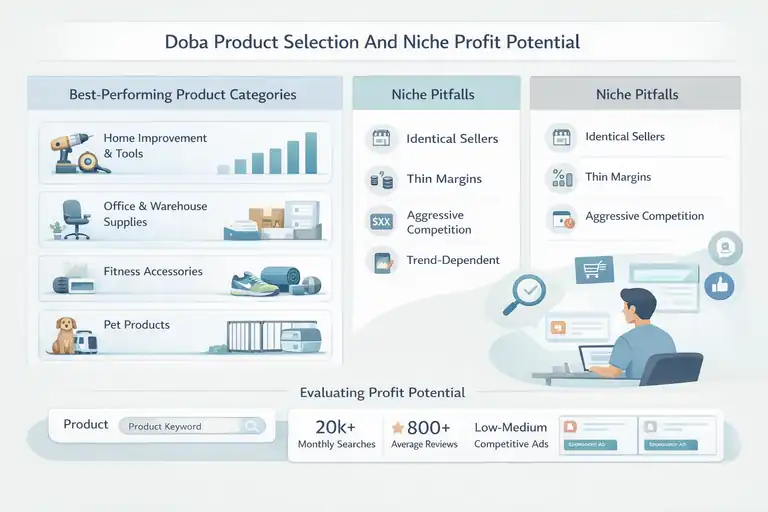
This is where doba and shopify either click—or quietly fall apart. Doba isn’t a “sell anything to anyone” platform.
Product and niche choice matter more here than almost any other dropshipping setup I’ve worked with.
Types Of Products That Perform Best From Doba
From what I’ve seen, Doba works best when you lean into practical, higher-perceived-value products rather than impulse buys.
Products that tend to perform better:
- Home improvement and tools with clear use cases
- Office, business, or warehouse supplies
- Fitness accessories priced above bargain level
- Pet products that solve a specific problem
These categories work because customers are less price-sensitive. If someone needs a standing desk converter or a heavy-duty pet gate, they care more about reliability than shaving off $5.
In contrast, trend-based items struggle. Doba isn’t built for chasing TikTok virality. It’s better for evergreen demand where trust, shipping speed, and consistency matter more than hype.
Why Some Niches Fail With Doba And Shopify
Most failing niches share the same issues:
- Too many identical sellers
- Thin margins after shipping
- Customers comparing prices aggressively
Fashion accessories, phone gadgets, and novelty items are common traps. Customers can easily find the same product elsewhere cheaper, which makes ads expensive and conversions weak.
One beginner I spoke with tried selling $12 phone mounts from Doba. After ads and fees, each sale lost money. The niche wasn’t wrong—the pricing model was.
Doba rewards boring-but-needed niches. That’s not exciting, but it’s honest.
Inventory Consistency And Stock Update Challenges
Doba syncs inventory automatically, but it’s not flawless.
What can happen:
- A product shows in stock, then disappears
- Supplier stock updates lag by hours
- High-demand items sell out unexpectedly
This is frustrating, especially early on. My workaround has always been simple: avoid building a store around one single product. Instead, create small clusters of related products so you can pivot quickly if one goes out of stock.
Consistency beats “one-hit wonder” thinking here.
Evaluating Product Demand Before Importing To Shopify
Before importing anything, I suggest a quick reality check:
- Search the product on Google and Amazon
- Look at review volume and price range
- Check if ads already exist
If demand exists but pricing varies widely, that’s usually a good sign. It means customers buy based on trust and presentation, not just price.
Doba products don’t sell themselves. Validation before import saves weeks of wasted effort.
Marketing Challenges When Selling Doba Products
Marketing is where beginners feel the pressure fastest.
Doba and shopify can support a real business, but marketing exposes every weakness in pricing, positioning, and differentiation.
Paid Ads Profitability With Doba Product Margins
Paid ads are tough with Doba margins, especially early on.
Here’s the reality:
- Facebook and Google ads often cost $5–$15 per conversion
- Many Doba products only net $15–$25 profit
- One bad day of ads can erase a week of gains
This doesn’t mean ads are impossible—it means precision matters.
I’ve seen better results using:
- Retargeting instead of cold traffic
- Small test budgets
- Products priced high enough to absorb ad costs
If you rely on ads alone, pressure builds fast.
SEO And Content Marketing Limits For Beginner Stores
SEO sounds appealing, but beginners often underestimate the timeline.
Challenges include:
- Low domain authority
- Generic product descriptions
- Competing with established retailers
That said, niche-focused content can work. Instead of “best office chair,” something like “best ergonomic chair for small home offices” gives you a fighting chance.
SEO won’t save a bad product, but it can quietly support a good one over time.
Brand Differentiation Issues With Shared Suppliers
Many Doba sellers list the same products. That creates sameness.
Ways to stand out:
- Rewrite every product description
- Create bundles instead of single items
- Add simple usage guides or PDFs
Branding doesn’t need to be fancy. It just needs to feel intentional. Even small touches increase trust and conversions.
Conversion Rate Challenges On Generic Doba Products
Generic listings convert poorly. That’s not a Doba problem—it’s a presentation problem.
Conversion killers include:
- Stock supplier photos
- Vague descriptions
- No clear use case
When beginners slow down and treat each product page like a sales page, results improve. I’ve seen conversion rates double just by clarifying who the product is for and why it exists.
Doba gives you access. Shopify gives you control. Profit comes from how well you use both together.
Doba Versus Other Shopify Dropshipping Alternatives
This is where context really matters. Doba and Shopify aren’t “good” or “bad” on their own—they’re good for specific situations.
Comparing Doba to other popular Shopify dropshipping platforms helps you see where it fits and where it doesn’t.
Doba Vs Spocket For Beginner Profitability
Spocket is often pitched as a beginner-friendly alternative, especially for US and EU products. In practice, profitability depends on how you plan to sell.
Key differences that matter:
- Spocket focuses more on branded-style products
- Doba offers a broader wholesale catalog
- Spocket margins are often higher but product choice is narrower
From what I’ve seen, Spocket works better for clean, brand-first stores with fewer products. Doba works better for catalog-style stores serving specific needs, like office supplies or home tools.
If you enjoy curating a small, polished store, Spocket may feel easier. If you prefer testing multiple practical products, Doba gives you more room.
Doba Vs Modalyst For Product Quality And Margins
Modalyst leans heavily into fashion, accessories, and name-brand partnerships. That shapes everything.
What stands out:
- Modalyst has stronger perceived brand value
- Doba focuses on function over fashion
- Modalyst margins can be higher but competition is fierce
Modalyst works well if aesthetics matter. Doba works better if problem-solving matters. Beginners often struggle with Modalyst because branding expectations are higher. Doba is more forgiving if your store looks simple but works well.
Doba Vs CJdropshipping For Shipping Speed
CJdropshipping is popular because of pricing flexibility and fast international shipping options.
Key contrasts:
- CJ offers factory-direct pricing
- Doba offers supplier stability
- CJ requires more hands-on management
CJ can outperform Doba on margins, but only if you’re comfortable managing sourcing and communication. Beginners who want fewer moving parts often feel less stressed using Doba, even if profits are slightly lower.
When Doba Makes Sense Compared To These Options
Doba makes sense when:
- You value supplier reliability over lowest price
- You sell practical, evergreen products
- You want fewer fulfillment headaches
If speed-to-market or ultra-low pricing is your priority, other platforms may fit better. Doba shines when consistency matters more than hype.
Who Doba And Shopify Is Actually Best For
Not every beginner should use doba and shopify. Being honest about fit can save months of frustration.
Beginner Seller Profiles That Can Succeed With Doba
I’ve seen Doba work best for beginners who:
- Prefer structured systems
- Are comfortable learning pricing math
- Want to build something steady, not viral
If you’re patient, detail-oriented, and okay with modest early wins, Doba can feel stable and predictable.
Scenarios Where Doba Is A Poor Choice For New Stores
Doba is usually a poor fit if:
- You have almost no startup budget
- You rely heavily on paid ads from day one
- You want fast, trend-based wins
In those cases, the subscription cost and margins can feel restrictive rather than supportive.
Skill Sets That Improve Profitability With This Combo
Skills that help a lot:
- Basic copywriting for product pages
- Simple spreadsheet tracking
- Customer communication
You don’t need to be technical. You just need to think critically about numbers and messaging. That’s where many beginners quietly pull ahead.
Long-Term Scalability Limits Using Doba With Shopify
Doba scales to a point. Eventually:
- Margins cap out
- Supplier flexibility becomes limited
- Branding opportunities plateau
Many successful sellers use Doba as a learning platform, then move to private suppliers later. That’s not failure—it’s progression.
Final Verdict On Doba And Shopify Profit Potential
So, is doba and shopify a profitable combo for beginners? The honest answer is: yes, but only under the right conditions.
Can Beginners Realistically Make Money With This Setup
Yes, beginners can make money—but expectations matter. Early profits are usually small. What you’re really buying at first is experience, data, and clarity.
I’ve seen beginners hit break-even quickly, then slowly grow from there. Rarely overnight success. More often quiet progress.
Timeline Expectations For First Profitable Sales
A realistic timeline looks like:
- Month 1: Setup, testing, learning
- Month 2: First consistent sales
- Month 3: Clear signals on what works
If that feels slow, this model may frustrate you. If that feels reasonable, you’re in the right mindset.
Key Conditions Required For Doba Shopify Success
Success usually requires:
- Products priced for margin, not volume
- Clear product positioning
- Active monitoring of costs
Automation helps, but attention still matters.
When To Use Doba As A Stepping Stone Instead
In my opinion, Doba works best as a stepping stone. It teaches:
- Supplier management
- Fulfillment flow
- Pricing discipline
Once you’ve learned those skills, you can decide whether to scale deeper with Doba or move on. Either way, the experience transfers.
FAQ
Is Doba and Shopify profitable for beginners?
Yes, doba and shopify can be profitable for beginners, but only with realistic expectations. Most beginners see small margins at first, typically $10–$25 per order, and profitability depends heavily on product selection, pricing strategy, and controlling ad spend rather than relying on automation alone.
How much money do beginners need to start with Doba and Shopify?
Beginners should expect to start with $200–$400. This usually covers the Doba subscription, Shopify monthly fees, basic apps, and a small testing budget for traffic. Starting with less is possible, but it often slows learning and increases frustration.
Is Doba better than other Shopify dropshipping options for beginners?
Doba is better for beginners who want supplier reliability and simpler fulfillment, but it’s not ideal for trend-based or ultra-low-cost products. Compared to alternatives, doba and shopify work best for evergreen, problem-solving products where consistent shipping and stable suppliers matter more than maximum margins.

I’m Juxhin, the voice behind The Justifiable.
I’ve spent 6+ years building blogs, managing affiliate campaigns, and testing the messy world of online business. Here, I cut the fluff and share the strategies that actually move the needle — so you can build income that’s sustainable, not speculative.
Related posts:
 Starting an Ecommerce Business: A Realistic Step-By-Step Guide
 GoDaddy Ecommerce: What Makes It Easy for Beginners?
 Doba Review: Honest Pros, Cons, and Real Costs
 How to Make Money Dropshipping: 7 Secrets to a $10K/Month
 How To Start A Dropshipping Business With No Money
 Dropshipping Business Model Success: Tips for Long-Term Growth