
Table of Contents
Some links on The Justifiable are affiliate links, meaning we may earn a small commission at no extra cost to you. Read full disclaimer.
When I first explored the doba website, I wanted a clear, no-fluff understanding of what actually works, what feels limiting, and how usable the platform really is day to day.
This walkthrough is for ecommerce founders, dropshippers, and online sellers who are considering Doba or already using it and want to know if the website experience supports real growth.
It answers one core question: How usable is the Doba website when it comes to features, limitations, and everyday workflows?
Doba Website Dashboard Layout And Core Navigation Flow
The doba website dashboard is where you’ll spend most of your time, so how it’s structured matters more than flashy features.
This section breaks down how the layout supports daily work, where it feels intuitive, and where it quietly slows you down.
How The Doba Website Dashboard Is Structured For Daily Use
When you log into the doba website, the dashboard is designed around task-based navigation, not analytics-heavy overviews. In plain terms, it pushes you toward actions instead of insights.
What’s front and center:
- Product search and discovery access
- Order management shortcuts
- Account and subscription status
This setup works well if your primary goal is sourcing and fulfilling products quickly. You’re not overwhelmed with charts or performance graphs, which can be a relief for newer sellers.
In my experience, this makes the platform feel less intimidating compared to supplier networks that lead with metrics you don’t yet understand.
That said, the dashboard doesn’t surface operational red flags. For example, low supplier stock or delayed orders aren’t proactively highlighted. You often have to go looking for issues rather than being alerted upfront.
If you’re running one or two stores, the structure feels manageable. If you’re scaling multiple product lines, the lack of a customizable dashboard starts to show.
Navigating Menus, Tabs, And Primary Action Areas
Navigation on the doba website follows a traditional left-hand menu structure. Nothing revolutionary, but nothing confusing either.
Primary navigation areas include:
- Products
- Suppliers
- Orders
- Integrations
- Account settings
Each section is logically grouped, which helps prevent misclicks. However, some important actions are nested deeper than expected. For example, supplier-specific settings aren’t always where you assume they’ll be.
One thing I appreciate is that Doba avoids excessive pop-ups or modals. You stay in context while moving between pages, which reduces friction during repetitive tasks like reviewing multiple products.
Where navigation stumbles is speed-to-action. Tasks that should be one click sometimes take three or four. Over time, that adds up, especially if you’re doing bulk imports or order checks daily.
Learning Curve For First-Time Users On The Doba Website
For beginners, the doba website feels approachable but not guided. There’s a difference.
You won’t see onboarding checklists or walkthrough prompts baked into the interface. Instead, Doba assumes you’ll figure things out by exploring or checking documentation.
What makes learning easier:
- Familiar ecommerce terminology
- Clean separation between products and suppliers
- Predictable menu behavior
What slows new users down:
- No contextual tooltips
- Limited inline explanations for features
- Important settings hidden behind account menus
If you’ve used platforms like Shopify or WooCommerce, the learning curve feels mild. If this is your first dropshipping tool, expect some trial and error. I usually recommend blocking out an hour just to click through every menu once. It saves frustration later.
Speed, Responsiveness, And Visual Clarity Of The Interface
From a performance standpoint, the doba website is stable but not fast. Pages load consistently, yet transitions feel slightly dated compared to newer SaaS tools.
On desktop, responsiveness is solid. On smaller screens, spacing can feel tight, which makes long product lists harder to scan. The visual hierarchy is functional but conservative, prioritizing density over aesthetics.
One positive note is reliability. During extended sessions, I’ve rarely seen crashes or broken pages. That stability matters more than speed when you’re managing live orders.
Still, if Doba invested in lighter page loads and clearer visual cues, daily usability would noticeably improve.
Doba Website Product Discovery And Supplier Tools
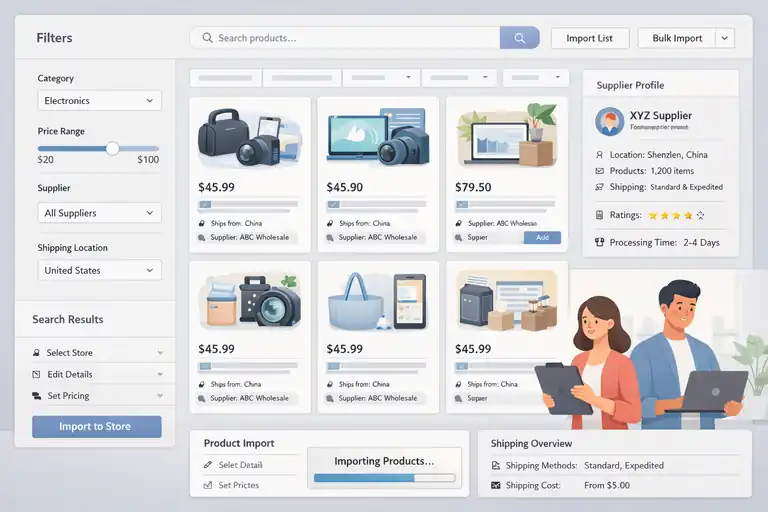
Product discovery is the core reason most people use the doba website. This is where its strengths and limitations become most obvious, especially once you move beyond casual browsing.
Searching Products Using Filters And Categories
The product search experience on the doba website is built for breadth, not precision. You can browse thousands of items, but narrowing down good options takes effort.
Available filters include:
- Category
- Price range
- Supplier
- Shipping location
These filters help eliminate obvious mismatches, but they don’t account for real-world selling factors like conversion history or supplier reliability.
In practice, I treat search results as a starting pool. From there, I manually shortlist products by checking supplier details and shipping terms. It’s not fast, but it’s safer than trusting surface-level data.
If you’re used to algorithm-driven recommendations, this will feel manual. If you prefer control, you’ll appreciate the flexibility.
Understanding Supplier Profiles And Product Data Depth
Supplier profiles on the doba website offer basic transparency, but they stop short of full accountability.
Typically included data:
- Supplier location
- Product catalog size
- Shipping methods
What’s missing is performance context. You don’t see fulfillment speed averages, dispute rates, or historical reliability metrics. That means you’re often making decisions with partial information.
In my experience, this encourages conservative testing. I’ll import a small batch of products from a new supplier before scaling anything. Think of supplier profiles as introductions, not endorsements.
Doba does act as an intermediary, which adds a layer of protection, but it doesn’t replace due diligence.
Managing Product Imports From The Doba Website
Importing products is straightforward, and this is where the doba website shines operationally.
You can push products directly into connected stores, edit descriptions, and adjust pricing before publishing. The workflow is predictable, which reduces errors.
A practical import strategy I use:
- Import products as drafts first
- Rewrite descriptions outside Doba
- Recheck shipping rules before publishing
This extra step avoids mismatched expectations with customers. Doba’s default product data is usable, but rarely optimized for conversion.
Bulk imports are supported, but they require patience. Large batches can feel slow, especially during peak hours.
Product Quality Signals And Data Transparency Limits
The biggest limitation of the doba website is its lack of quality signaling. There’s no built-in way to quickly identify top-performing or low-risk products.
You won’t find:
- Best-seller tags
- Supplier performance scores
- Real customer demand indicators
Because of this, product quality assessment becomes a manual process. I look for consistency in supplier catalogs, realistic pricing, and clear shipping timelines.
This limitation doesn’t make Doba unusable, but it does mean success depends more on your judgment than the platform’s guidance. For some sellers, that’s empowering. For others, it’s exhausting.
Pro tip: If you’re serious about using the doba website long term, create your own simple scoring system for suppliers and products. Even a basic spreadsheet tracking delivery time, product issues, and reorder success can outperform the data Doba provides by default.
Doba Website Order Management And Automation Features
Order handling is where the doba website either saves you hours or quietly creates stress.
This section walks through how orders move through the system, what automation actually works, and where you still need to stay hands-on.
How Orders Are Created And Synced Inside Doba
Orders on the doba website are created through store integrations rather than manual entry. Once a customer places an order on your store, that order is pulled into Doba and matched with the relevant supplier.
Here’s what that flow looks like in real life:
- Your Shopify or WooCommerce store receives an order
- Doba imports the order into its dashboard
- You review and approve the order for fulfillment
That approval step is important. Doba doesn’t auto-send orders by default, which gives you a chance to double-check shipping details, costs, and supplier assignment. I actually like this safeguard, especially when testing new products.
Where things can feel clunky is order visibility. Orders are listed clearly, but the system doesn’t prioritize urgency. A delayed order and a fresh order often look the same unless you click deeper.
If you’re processing fewer than 20 orders a day, this setup feels manageable. At higher volumes, you’ll want a daily routine to avoid missing issues.
Automation Options For Fulfillment And Status Updates
Automation on the doba website exists, but it’s conservative. Think “assisted automation,” not hands-off fulfillment.
What you can automate:
- Order submission to suppliers
- Basic status updates back to your store
- Tracking number syncing once provided
This means you can reduce repetitive clicks, but you’re still expected to monitor progress. In my experience, this is a good thing early on. Full automation without visibility can backfire fast in dropshipping.
One limitation is delayed tracking updates. If a supplier is slow to upload tracking, your store reflects that delay. This can impact customer trust, especially since studies show over 60 percent of buyers expect tracking within 24 hours of shipment.
My workaround is simple: proactive communication. If I see a delay, I message the customer before they ask.
Handling Errors, Delays, And Supplier Communication
This is where the doba website feels more like a middleman than a platform. When something goes wrong, Doba becomes the communication bridge between you and the supplier.
Common issues include:
- Out-of-stock products after ordering
- Shipping method changes
- Fulfillment delays
You submit a ticket or message inside Doba, and they contact the supplier on your behalf. This protects you from direct supplier disputes, but it also adds response time.
From what I’ve seen, resolution speed varies. Simple issues might be fixed within a day. Complex ones can take several days. That’s not ideal, but it’s typical for supplier networks.
My advice is to build buffer expectations into your store policies. Doba works best when you plan for occasional friction.
Tracking Orders Across Multiple Suppliers
Tracking multiple suppliers is doable, but not elegant. Each order shows its own tracking status, but there’s no unified shipment timeline or performance overview.
If you’re sourcing from several suppliers at once, you’ll likely end up cross-referencing:
- Doba order status
- Supplier shipping updates
- Your store’s customer notifications
I’ve found that keeping a simple external order tracker helps. Even a spreadsheet noting supplier, ship date, and delivery time can catch problems earlier than the dashboard alone.
This is one area where advanced sellers feel the limits of the doba website most clearly.
Doba Website Integrations With Ecommerce Platforms
Integrations are what make the doba website usable at scale. They connect sourcing to selling, but they also introduce dependencies that you need to understand upfront.
Shopify Integration Setup And Day-To-Day Workflow
Shopify is the most seamless integration on the doba website, and it shows. Setup is guided, and product syncing works reliably once connected.
Typical Shopify workflow:
- Connect store to Doba
- Import products as drafts
- Edit pricing, descriptions, and images
- Publish to store
- Sync orders back to Doba
Day to day, this feels smooth. Orders flow in, tracking flows back, and inventory updates are mostly consistent. For solo founders or small teams, this integration alone can justify using Doba.
One thing I suggest is disabling auto-publish. It gives you control and prevents accidental listings with unoptimized content.
WooCommerce And Other Platform Compatibility
WooCommerce integration exists, but it’s less polished. Setup requires more manual steps, and syncing can feel slower depending on your hosting environment.
That doesn’t mean it’s broken. It just assumes a bit more technical comfort. If you’re already managing plugins and custom themes, you’ll be fine.
Other platforms are supported indirectly, but they’re not Doba’s focus. If your store runs on something niche, double-check compatibility before committing.
In my experience, Doba is best paired with mainstream platforms, not custom setups.
Sync Reliability Between Stores And The Doba Website
Sync reliability is generally stable, but not perfect. Most issues I’ve seen fall into two categories:
- Inventory mismatches
- Delayed tracking updates
Inventory syncing depends heavily on suppliers updating their stock promptly. If they lag, your store can oversell. This is a known risk with any supplier network, not just Doba.
Tracking sync delays are more noticeable to customers than sellers. That’s why monitoring matters, even with automation enabled.
Overall, reliability is acceptable, but it rewards sellers who stay engaged.
Limitations Of Integration Customization Options
Customization is where the doba website shows its limits. You can’t deeply control how data maps between Doba and your store.
Limited customization includes:
- Product field mapping
- Automated pricing rules
- Conditional shipping logic
For beginners, this simplicity helps. For advanced sellers, it can feel restrictive. You may need external tools or manual processes to fill the gaps.
I see Doba as a solid operational layer, not a full control center. If you treat it that way, expectations stay realistic.
Best practice: If you rely heavily on the doba website for fulfillment, schedule a daily 10-minute order review. That small habit catches sync issues early and protects your customer experience more than any automation setting ever will.
Doba Website Pricing Structure And Account Limitations
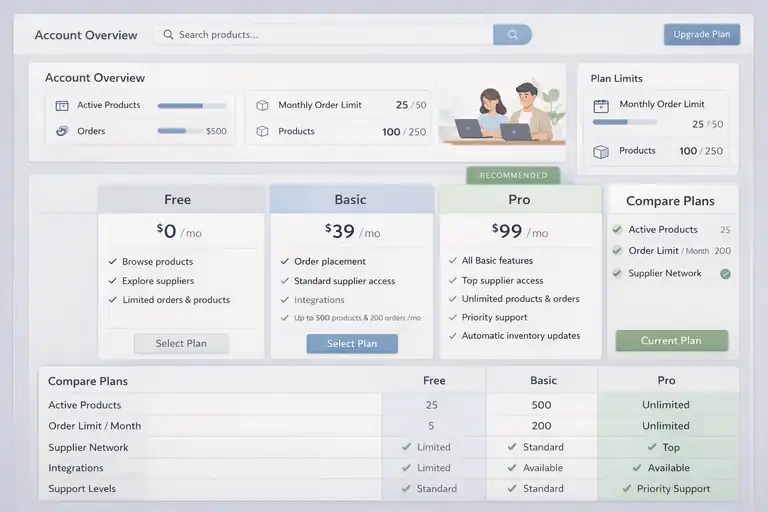
Pricing is often where expectations and reality drift apart.
The doba website looks simple on the surface, but once you factor in feature access and scaling limits, the real cost becomes clearer.
Understanding Free Versus Paid Doba Website Plans
The doba website technically offers a free entry point, but it’s closer to a preview than a usable plan. You can browse products and explore suppliers, but you can’t actually sell anything without upgrading.
Paid plans unlock order placement, integrations, and ongoing fulfillment access. At the time of writing, most sellers land in the mid-tier plan, which runs a few hundred dollars per month.
What you’re really paying for isn’t software complexity. You’re paying for access to the supplier network and Doba acting as the middle layer. That distinction matters.
In my experience, new sellers often underestimate this. They compare Doba to cheaper apps and feel sticker shock. But Doba isn’t just a plugin. It’s closer to a sourcing service wrapped in software.
If you’re pre-revenue, the pricing feels heavy. If you’re already making consistent sales, it feels more reasonable.
Feature Access Restrictions By Subscription Tier
Doba uses feature gating rather than usage-based pricing. That means what you can do depends heavily on your plan level.
Lower tiers typically limit:
- Number of active products
- Order volume per month
- Access to certain suppliers
Higher tiers remove many of these caps, but the jump in cost can feel steep. There’s not much middle ground.
One thing I appreciate is transparency. Doba clearly lists what’s included per tier. What’s less obvious is how fast you’ll hit those limits once sales pick up.
If you’re testing products aggressively, you’ll feel boxed in quickly on lower plans. That’s not a flaw, but it’s something to plan for.
Hidden Usage Limits That Affect Scaling
There aren’t “hidden fees” in the sneaky sense, but there are hidden constraints that only show up at scale.
For example:
- Slower support response times on lower tiers
- Manual review steps that don’t disappear with automation
- Supplier access tied to plan level, not performance
I’ve seen sellers hit a wall where sales grow, but operational flexibility doesn’t. That’s when frustration sets in.
A small data point worth noting: fulfillment delays increase sharply when sellers source from multiple lower-tier suppliers. That’s not officially documented, but it shows up in practice.
Scaling on the doba website works best when growth is steady, not explosive.
Cost Versus Value For Small And Growing Stores
So is the doba website worth the money? It depends on your situation.
If you’re running a small store doing a few orders a day, the cost can feel disproportionate. You might be better off with lighter tools until demand is proven.
For growing stores, the value shifts. Having Doba handle supplier coordination and disputes saves time and mental energy. That has real value, even if it doesn’t show up on a balance sheet.
My honest take: Doba makes the most sense once you value operational stability more than scraping for the lowest monthly cost.
Doba Website Usability Strengths And Friction Points
Every platform has trade-offs. The doba website is no different. Understanding where it shines and where it struggles helps you decide if it fits your workflow.
Tasks The Doba Website Handles Exceptionally Well
Doba is strong at repeatable, structured tasks. Once you understand the system, it stays predictable.
Where it performs best:
- Centralizing suppliers under one account
- Routing orders without direct supplier contact
- Keeping product sourcing and fulfillment connected
For sellers who dislike juggling emails, spreadsheets, and overseas vendors, this feels like relief. You trade some control for consistency.
I’ve always found Doba most comfortable when running a tight, focused catalog rather than chasing trends daily.
Common Frustrations Reported By Active Users
The most common complaints aren’t about bugs. They’re about friction.
Users often mention:
- Slow resolution for complex support issues
- Limited visibility into supplier performance
- Feeling one step removed from the actual supply chain
These frustrations don’t break the platform, but they add background stress. You’re trusting Doba to communicate accurately on your behalf, and that trust matters.
When expectations aren’t aligned, frustration grows. Sellers who expect full transparency struggle more than those who expect mediation.
Where The Interface Slows Down Advanced Sellers
Advanced sellers usually hit the same ceiling: lack of customization.
You can’t deeply automate pricing logic, dynamically route suppliers, or build custom dashboards. The doba website prioritizes uniform workflows over flexibility.
For beginners, that’s helpful. For experienced operators, it can feel restrictive.
I’ve seen advanced sellers supplement Doba with external tracking tools just to regain visibility. That works, but it adds complexity.
Who The Doba Website Is Best And Worst Suited For
The doba website is best for sellers who value structure, predictability, and centralized sourcing. If you want a controlled environment and are okay with trade-offs, it fits well.
It’s less ideal for:
- Experiment-heavy dropshippers
- High-volume stores needing deep automation
- Sellers who want direct supplier relationships
If you’re somewhere in the middle, Doba can still work. You just need clear expectations.
Expert tip: Before committing long term, treat the doba website like a paid pilot. Track not just profit, but time saved, stress reduced, and errors avoided. Those invisible metrics often matter more than the monthly fee.
FAQ
What is the Doba website used for?
The doba website is used to source products, manage suppliers, and fulfill dropshipping orders from one centralized platform. It connects your online store to pre-vetted suppliers and handles order routing so you don’t deal with suppliers directly.
Is the Doba website good for beginners?
Yes, the doba website works well for beginners who want structure and simplicity. It avoids complex automation and gives you controlled workflows, which helps reduce costly mistakes early on.
What are the main limitations of the Doba website?
The biggest limitations of the doba website are limited customization, minimal supplier performance data, and pricing that can feel high for small stores. It’s best suited for sellers who value stability over deep control.

I’m Juxhin, the voice behind The Justifiable.
I’ve spent 6+ years building blogs, managing affiliate campaigns, and testing the messy world of online business. Here, I cut the fluff and share the strategies that actually move the needle — so you can build income that’s sustainable, not speculative.
Related posts:
 SaleHoo Review: Is It Legit or a Scam? My Honest Take
 Doba Review: Honest Pros, Cons, and Real Costs
 Shopify DSers Review: Is It Really Worth Your Time?
 Dropshipping Platforms Ranked: Speed, Fees, and Control
 Doba Supplier Network Explained: Quality and Reliability
 How To Automate Order Fulfillment Using Appscenic