
Table of Contents
Some links on The Justifiable are affiliate links, meaning we may earn a small commission at no extra cost to you. Read full disclaimer.
GetResponse vs dedicated SMTP email sending platforms is not really a “which one is better?” question. It is more a question of what kind of email job you actually need done.
If you want campaigns, automation, forms, landing pages, and customer journeys in one place, GetResponse makes a lot of sense.
If you mostly care about raw transactional delivery, app-level integration, IP control, and sending infrastructure, a dedicated SMTP platform usually fits better.
I’ve seen businesses waste months choosing the wrong category, so let me break this down in a practical way.
Why this comparison confuses so many buyers
This topic gets messy because people often compare tools that solve adjacent problems, not identical ones.
GetResponse and dedicated SMTP tools are built for different cores
A lot of buyers compare GetResponse to platforms like SendGrid, Mailgun, Postmark, or Amazon SES as if they all sit in the same product bucket. They do not.
GetResponse is first an email marketing and automation platform, with transactional sending available in its MAX offering via SMTP or API. Dedicated SMTP platforms are built around programmatic sending, infrastructure control, and delivery operations first.
GetResponse’s pricing pages and feature pages position transactional email, dedicated IP, and premium support inside MAX, while SendGrid, Mailgun, Postmark, and Amazon SES position API/SMTP sending as their main value.
That difference matters more than most feature checklists. If your team says, “We need abandoned cart flows, newsletters, segmentation, signup forms, and funnels,” you are probably not shopping for a pure SMTP relay.
If your team says, “We need password resets, OTPs, invoices, event-triggered sends, webhooks, logs, and clean app integration,” then you are closer to dedicated SMTP territory.
I believe this is the biggest mistake in the whole market: people compare “marketing suite” against “email infrastructure” and expect one tool to dominate both. Usually, it does not.
A simple way to think about it is this:
- GetResponse: Better when email is part of a broader marketing system.
- Dedicated SMTP platforms: Better when email is part of your product or backend system.
- Hybrid setups: Common when a business needs both.
That last point is important. Many serious teams end up with both categories, not one winner.
The real decision is workflow, not brand preference
Most businesses do not fail at email because they chose a “bad” provider. They fail because the platform does not match the internal workflow.
Imagine you run a SaaS company. Your product sends login links, onboarding emails, billing alerts, and usage notifications. Marketing also wants newsletters and lifecycle campaigns.
If you try to run every message through a pure SMTP platform, your marketers may feel boxed in. If you force your developers to use a marketing suite for product-triggered mail, they may hate the integration layer.
That is why the smarter question is not “Which platform has more features?” It is “Which team is the primary user?”
- Marketing-led workflow: GetResponse has the stronger natural fit.
- Engineering-led workflow: Dedicated SMTP platforms usually win.
- Mixed workflow: You need clean separation between marketing and transactional traffic.
Postmark explicitly emphasizes separating promotional and transactional traffic through separate infrastructure, and SendGrid documents API and SMTP sending for programmatic use cases. Mailgun also leans heavily into API-first sending, domain control, and dedicated IP logic for higher-volume senders.
From what I’ve seen, the cleanest setups respect team boundaries. Marketers should not need developer work for every campaign. Developers should not rely on drag-and-drop campaign builders to ship critical password resets.
What GetResponse actually does well

Before comparing categories, it helps to be honest about where GetResponse is genuinely strong.
GetResponse is strongest when marketing and sending live together
GetResponse is built around email marketing, automation, lead capture, and conversion workflows. Its pricing and feature pages center on email marketing, AI tools, landing pages, automation, and high-volume business features, with MAX adding dedicated IP and transactional capabilities.
That bundled model is attractive for businesses that do not want a fragmented stack. You can collect leads, segment contacts, build nurture flows, and manage campaign logic without stitching together five different tools.
For a lean ecommerce brand or B2B team, that convenience is real. Fewer tools often means fewer sync issues, fewer messy handoffs, and less reporting chaos.
Here is where I think GetResponse becomes compelling:
- You want one platform for campaigns, automations, forms, and audience building.
- Your team is marketing-heavy, not engineering-heavy.
- Transactional email is important, but not the center of your tech stack.
- You value built-in conversion tooling more than deep infrastructure control.
A practical example: imagine you run a cosmetics store with 40,000 subscribers. You send weekly campaigns, post-purchase flows, cart reminders, and occasional account emails.
In that case, having automation, audience logic, and revenue-focused email tools in one place may save more money than chasing the cheapest per-1,000-send SMTP rate.
That is the hidden truth many buyers miss. Operational simplicity has value too.
GetResponse transactional email is real, but it is not the whole platform identity
GetResponse does support transactional email through SMTP and API, but it is sold as part of its MAX environment rather than as the default identity of the platform.
Its help documentation explains that transactional emails are sent and tracked through SMTP or API after purchasing the add-on, and its MAX materials highlight transactional emails, dedicated IP, and premium support as higher-tier capabilities.
That matters because a dedicated SMTP provider wakes up every morning thinking about sending infrastructure. GetResponse wakes up thinking about marketing outcomes first, then supports transactional sending within that broader system.
This is not a criticism. It is a positioning reality.
In my experience, that means GetResponse can be a strong fit when transactional mail supports a broader customer lifecycle. For example:
- Order confirmations tied to customer journeys
- Post-purchase cross-sell flows
- Cart recovery connected to segmentation
- Educational onboarding sequences after signup
But if you need advanced developer workflows like deep event instrumentation, dedicated infrastructure management, granular suppression logic, IP pools, and engineering-led observability at scale, dedicated SMTP players usually feel more native.
So yes, GetResponse can send transactional email. The real question is whether you want a marketing platform with transactional capability, or a delivery platform with marketing optionality.
What dedicated SMTP email sending platforms do better
This is where the gap becomes clearer.
Dedicated SMTP platforms are purpose-built for infrastructure and app sending
SendGrid, Mailgun, Postmark, and Amazon SES all emphasize API or SMTP sending as a core product function.
SendGrid describes its Email API as a service to create, send, and manage email at scale through REST APIs or SMTP relay. Mailgun positions itself as an API-first transactional email provider with free and paid sending tiers.
Postmark focuses on fast, reliable transactional and bulk sending with message stream separation. Amazon SES is built as a scalable, cost-effective email service and states it processes more than a trillion emails each year.
That focus changes everything about the user experience.
Dedicated SMTP platforms usually give you more control over:
- Programmatic sending via API or relay
- Sending domains and authentication
- Webhooks and event data
- Dedicated IP strategy
- Logging, rate handling, and delivery workflows
- High-volume scaling patterns
Amazon SES also documents sending quotas and ramp-up logic clearly, which is a big clue about the kind of customer it expects: senders who need to manage throughput, reputation, and delivery at infrastructure level.
If you run a product with triggered messages from your app, those controls matter more than landing page templates or broadcast builders.
I usually describe dedicated SMTP platforms this way: they are closer to plumbing than publishing. That sounds less exciting, but plumbing is exactly what you want when an order receipt or verification email must arrive now, not eventually.
Dedicated platforms usually give you cleaner separation of mail types
One of the biggest operational advantages of dedicated sending platforms is the ability to separate message categories.
Postmark is especially explicit here. It says promotional and transactional emails should not mix and routes those classes through separate infrastructure using message streams.
SendGrid supports IP pools so senders can separate transactional and marketing streams for better reputation control. Mailgun also discusses separate dedicated IP usage and domain-level isolation for different sending types.
This matters because mailbox providers do not judge all your mail in a vacuum. If your promotional mail starts underperforming, it can affect the reputation context around your important emails unless your setup is separated well.
A simple scenario shows the risk. Imagine a retailer sends a huge holiday promo blast with weak engagement. Open rates drop, spam complaints rise, and inbox placement gets shaky.
If that same sending setup also handles password resets and shipping notifications, now critical emails may suffer too. That is not a theoretical problem. It is one of the most common email architecture mistakes growing brands make.
Dedicated SMTP platforms often make this separation easier because that is the job they were built for.
Pricing reality: cheap is not always cheaper
This is where a lot of comparisons go off the rails.
Per-email pricing favors SMTP platforms, especially Amazon SES
If you compare raw sending cost, dedicated SMTP platforms often look much cheaper than marketing suites. Amazon SES lists outbound email pricing at $0.10 per 1,000 emails.
Mailgun’s pricing starts with a free tier of 100 emails per day and paid plans beginning around $15 per month for 10,000 emails. Postmark starts with a free test tier and then plans from $15 per month for 10,000 emails.
SendGrid offers free sending for 100 emails per day for 60 days, then pricing starting at $19.95 per month for up to 100,000 emails on its SMTP service page.
So if your lens is only “What is the cheapest way to push transactional email?” then Amazon SES in particular is very hard to beat on pure cost.
Here is the rough pricing logic buyers often see:
| Platform | Entry pricing signal | Best interpreted as |
|---|---|---|
| Amazon SES | $0.10 per 1,000 outbound emails | Lowest-cost infrastructure sending |
| Mailgun | From $15/month, free 100/day | API-first transactional sending |
| Postmark | From $15/month for 10,000 emails | Premium transactional focus |
| SendGrid | From $19.95/month for 100,000 emails on SMTP page | Broad API/SMTP scale option |
| GetResponse | Marketing plans start at $19/month, transactional and dedicated IP tied to MAX/custom | Marketing suite with higher-tier transactional capability |
But raw send cost is not total cost. That is where many “cheap” decisions become expensive.
Total cost depends on people, setup time, and feature overlap
Let’s be honest: a lower sending bill can still cost you more if the setup creates extra technical work, reporting fragmentation, or campaign complexity.
If your team uses Amazon SES because it is inexpensive, but then needs extra engineering time for templates, dashboards, analytics, event handling, unsubscribe logic, and marketing workflow connections, the “cheapest” tool may become costly in salary and opportunity cost.
On the other hand, paying more for a broader platform can also be wasteful if you only need product emails and have no use for campaign builders, forms, landing pages, or automation journeys.
I suggest thinking about pricing in three layers:
- Layer 1: Sending cost per 1,000 emails
- Layer 2: Operational cost to run the system
- Layer 3: Revenue impact from better workflows or deliverability control
A smart ecommerce brand may justify GetResponse because the extra automation and conversion tooling increase revenue enough to outweigh a higher platform bill.
A SaaS company sending 3 million password resets, invoices, and notifications each month may justify SES or Mailgun because infrastructure efficiency matters more than campaign extras.
That is the real truth. Cheap email and profitable email are not always the same thing.
Deliverability, IPs, and reputation: where serious senders should pay attention
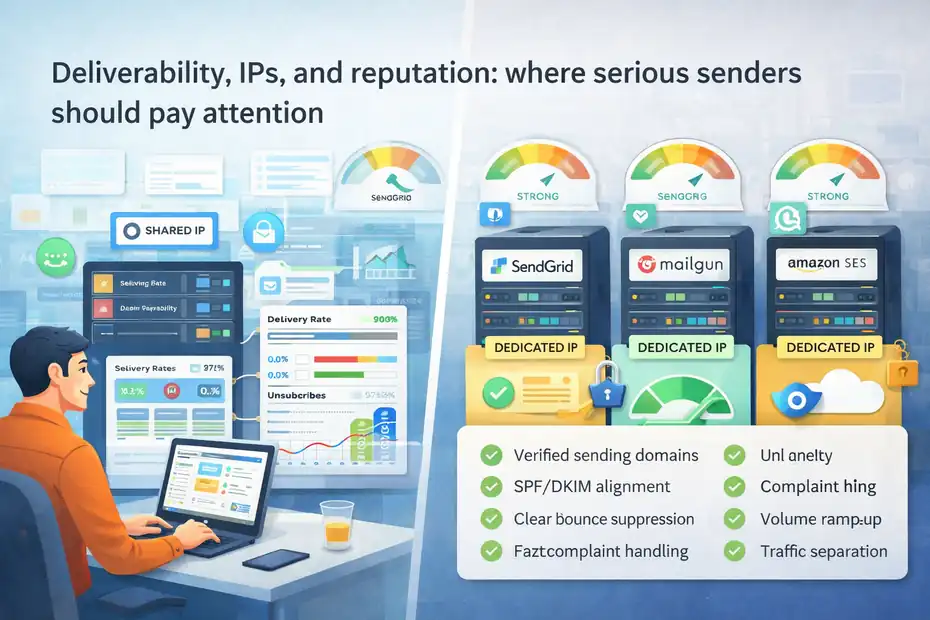
Most buying guides talk about features. Serious operators talk about reputation.
Dedicated IP control matters more as volume and complexity grow
Dedicated IPs are not mandatory for every sender, but they matter once your volume, message mix, or reputation sensitivity increases. GetResponse includes dedicated IP capability in MAX. SendGrid notes that its Pro plan offers a dedicated IP for higher send volumes.
Mailgun includes one dedicated IP in certain higher plans and allows additional IPs for a monthly fee. Postmark offers managed dedicated IPs starting at $50 per month for customers sending at least 300,000 emails per month.
The reason this matters is simple: shared environments are efficient, but reputation is partially communal. If your sending program is mature and you need tighter control, dedicated IPs reduce dependence on neighboring senders.
That said, I do not recommend chasing a dedicated IP too early. If your volume is low or inconsistent, a warmed shared environment can actually perform better than a cold dedicated IP.
Mailgun’s best-practices materials discuss warm-up and scaling logic, and Amazon SES also documents gradual send quota growth and reputation management practices.
The practical rule is this:
- Low volume or inconsistent volume: Shared may be better.
- Stable high volume: Dedicated often becomes worth it.
- Mixed transactional and marketing streams: Separation becomes especially important.
A business sending 20,000 emails one month and 300,000 the next usually has different infrastructure needs from a business sending 1 million steady monthly app events.
Deliverability is partly platform, mostly sending behavior
Platforms help, but they do not rescue bad sending behavior.
GetResponse claims a 99% deliverability rate for its transactional email service. Amazon SES documentation focuses on sender identity verification, complaint monitoring, bounce handling, and authentication like SPF and DKIM.
Those details are important because they show what every provider really depends on: sender quality.
In other words, the provider matters, but your practices matter more.
A healthy sending setup usually includes:
- Verified sending domains
- SPF, DKIM, and ideally DMARC alignment
- Clear suppression of hard bounces
- Fast complaint handling
- Consistent volume ramp-up
- Separation of transactional and promotional traffic
I have seen teams switch providers hoping for a deliverability miracle, only to discover the real issue was poor list hygiene or weak authentication. The provider changed, but the problem stayed.
So when someone asks me, “Will dedicated SMTP improve deliverability?” my honest answer is: it can improve control, but control only helps if your sending discipline is strong.
Which platform fits which business model
This is the part most readers actually need.
GetResponse usually wins for marketing-led businesses
If your business lives and dies by campaigns, funnels, segmentation, and lifecycle marketing, GetResponse is often the better strategic fit.
Think about these cases:
- Ecommerce store with newsletters, cart recovery, post-purchase flows, and product recommendations
- Coach or creator selling through email funnels
- B2B company using forms, nurture campaigns, and webinars
- Mid-market brand wanting one place for list growth and automation
GetResponse’s broader suite gives these businesses more direct leverage over revenue activities than a pure SMTP relay does. Its platform messaging centers on automation, email marketing, AI-assisted growth tools, forms, and high-volume plans for larger teams.
In this world, transactional mail matters, but it is not the only game. The winning move is often convenience plus conversion tooling.
I recommend GetResponse when your internal conversation sounds like this: “We need to grow our audience, convert leads, automate journeys, and keep customer communication in one system.”
That is very different from “We need a backend mail service.”
Dedicated SMTP platforms usually win for product-led and engineering-led teams
Dedicated SMTP platforms are usually the better fit when your email needs originate from software events, not campaign calendars.
Good examples include:
- SaaS products sending authentication, onboarding, billing, and usage messages
- Marketplaces sending event-triggered notifications
- Fintech products sending security alerts and receipts
- Agencies managing high-volume transactional traffic for multiple apps
In these cases, engineering usually cares about API integration, logs, event data, throughput, queue handling, dedicated IPs, and sending-domain structure. That is the natural habitat of SendGrid, Mailgun, Postmark, or SES.
My general fit view looks like this:
- Amazon SES: Best when cost efficiency and AWS alignment matter most.
- Mailgun: Best when developers want API-first sending and flexible infrastructure features.
- Postmark: Best when transactional reliability and message-type separation are top priorities.
- SendGrid: Best when you want mature API/SMTP scale with broader ecosystem familiarity.
Those are not absolute rules, but they are solid defaults based on how these products position themselves and how teams usually use them.
Common mistakes people make in this comparison
This is where I think most “vs” articles are too polite. Some decisions are just avoidable mistakes.
Mistake 1: Buying infrastructure when you really need marketing execution
A lot of smaller businesses get excited by low per-email pricing and choose a dedicated SMTP platform too early. Then they discover they still need forms, segmentation, automation, campaign design, testing, and reporting layers.
Suddenly they are patching together extra tools and trying to recreate what a marketing platform already handled.
That does not mean SMTP tools are bad. It means they are not substitutes for a marketing engine.
You can usually spot this mistake when the buyer says, “We want cheaper email,” but the deeper problem is actually “We need better lifecycle marketing.”
That is not the same project.
Mistake 2: Forcing developers to build around a marketer-first stack
The reverse mistake happens too. A company with serious application sending needs chooses a broad marketing suite because the team likes the interface. Then engineering has to bend product workflows around a system that was not primarily chosen for backend sending.
This often shows up as:
- Limited observability for app events
- Awkward template workflows
- Hard-to-scale message routing
- Mixed reputation between campaigns and critical mail
- Slower dev velocity
If your app experience depends on fast, reliable triggered mail, I suggest choosing the sending architecture first, not the prettiest campaign builder.
Mistake 3: Comparing features without comparing operating model
This might be the biggest one. Buyers compare “number of features” instead of “how the work gets done.”
A feature grid may say both tools support SMTP, APIs, analytics, templates, and webhooks. But the real experience can still be wildly different.
Always ask:
- Who will use this every week?
- Which team owns delivery issues?
- How much control do we need over streams and IPs?
- Are we optimizing for marketing velocity or backend reliability?
- Will one platform reduce stack sprawl, or create it?
That lens usually reveals the right answer faster than another 40-row comparison table.
The smartest setup for many companies is hybrid
This is the part I wish more businesses understood earlier.
You do not always need one winner
A hybrid setup often beats an either-or choice.
For example, you might use GetResponse for:
- Newsletters
- Lead nurturing
- Cart recovery
- Promotional automation
- Audience segmentation
And use a dedicated SMTP platform for:
- Password resets
- OTPs
- Receipts
- Invoices
- Shipping or system notifications
This split gives each team the environment that matches its job. It also protects critical transactional email from promotional reputation swings.
Postmark, SendGrid, and Mailgun all support concepts that reinforce this kind of separation, whether through message streams, IP pools, or dedicated-IP/domain strategy.
In my experience, hybrid setups become especially attractive when a company passes one of these thresholds:
- Marketing team and engineering team both need autonomy
- Email volume is growing fast
- Transactional mail has business-critical consequences
- Reporting and deliverability issues need cleaner ownership
It is not the simplest architecture on day one, but it often becomes the cleanest architecture by stage two or three of growth.
How to decide in 10 minutes
Here is the fastest decision framework I know.
Choose GetResponse when most of these are true:
- You need email marketing, automation, and list growth in one system
- Marketers are the primary operators
- Transactional email supports the customer journey, but is not your core infrastructure need
- You value convenience over deep sending control
Choose a dedicated SMTP platform when most of these are true:
- Your product or app triggers most emails
- Developers are the main operators
- You need strong control over domains, streams, logs, quotas, or IPs
- Low per-email cost or delivery architecture matters heavily
Choose hybrid when both sets are true.
Honestly, that one framework will save many teams from overthinking this comparison.
Final verdict: the real truth about GetResponse vs dedicated SMTP email sending platforms
This comparison has a simple answer once you stop treating both categories as direct substitutes.
GetResponse is usually the better choice when you want a marketing-led platform that can also support transactional sending in its higher-tier environment.
Dedicated SMTP email sending platforms are usually the better choice when your main need is app-driven, infrastructure-heavy, high-control sending.
So the real truth is this: GetResponse is not “worse” than dedicated SMTP platforms. It is broader.
Dedicated SMTP platforms are not “better” than GetResponse. They are more specialized.
That distinction changes everything.
If I were advising a business owner personally, I would say:
- Pick GetResponse if email is a revenue channel managed by marketers.
- Pick dedicated SMTP if email is a product system managed by engineers.
- Pick both if your business is large enough to need separation and focus.
That is the decision most companies eventually reach anyway. The smart ones just reach it sooner.
FAQ
What is the main difference between GetResponse and dedicated SMTP email sending platforms?
GetResponse is a marketing-focused platform with automation, campaigns, and audience tools, while dedicated SMTP platforms are built for sending transactional emails through APIs or SMTP. The key difference is that GetResponse supports marketing workflows, whereas SMTP platforms focus on backend email delivery and infrastructure control.
Is GetResponse suitable for transactional email sending?
Yes, GetResponse supports transactional email through SMTP or API in its MAX plans. However, it is primarily designed for marketing automation, so while it can handle transactional emails, dedicated SMTP platforms offer more control, scalability, and flexibility for high-volume application-based sending.
Which is cheaper: GetResponse or dedicated SMTP platforms?
Dedicated SMTP platforms like Amazon SES or Mailgun are generally cheaper per email sent, especially at scale. GetResponse may cost more because it includes marketing tools, automation, and audience management features, which can provide higher overall value depending on your business needs.
When should I choose a dedicated SMTP email platform?
You should choose a dedicated SMTP platform if your emails are triggered by an application, such as password resets or notifications. These platforms are ideal for developers who need API control, detailed logs, and scalable infrastructure for sending high volumes of transactional emails reliably.
Can I use both GetResponse and a dedicated SMTP platform together?
Yes, many businesses use a hybrid setup where GetResponse handles marketing campaigns and automation, while a dedicated SMTP platform manages transactional emails. This approach improves deliverability, keeps workflows clean, and allows each tool to perform its specific role effectively.

I’m Juxhin, the voice behind The Justifiable.
I’ve spent 6+ years building blogs, managing affiliate campaigns, and testing the messy world of online business. Here, I cut the fluff and share the strategies that actually move the needle — so you can build income that’s sustainable, not speculative.
Related posts:
 Email Marketing Tips: Improve Email Marketing Results
 Target Audience: How to Effectively Leverage It for Email Marketing
 How To Use Email Marketing For Small Business
 How To Create An Email Marketing Campaign
 How To Design An Email Marketing Campaign
 Direct Email Marketing That Works: Tips for More Sales