
Table of Contents
Some links on The Justifiable are affiliate links, meaning we may earn a small commission at no extra cost to you. Read full disclaimer.
If you’re searching for how to start with Spocket step by step, you probably want something simple, practical, and realistic, not another vague dropshipping guide that skips the hard parts.
I get it. Spocket can be beginner-friendly, but only if you set it up in the right order and avoid the usual mistakes early.
In this guide, I’ll walk you through exactly how to go from zero experience to a working Spocket store, including store setup, product selection, pricing, fulfillment, and optimization, so you can launch with more confidence and fewer expensive surprises.
Understand What Spocket Actually Does
Before you touch settings or import products, it helps to understand what Spocket is really good at.
What Spocket Is Best For
Spocket is a dropshipping platform that connects your store to suppliers and lets you import products, sync inventory, and process orders without holding stock yourself.
Its official materials emphasize product sourcing, one-click imports, order syncing, sample orders, and integrations with platforms like Shopify, WooCommerce, Wix, BigCommerce, Squarespace, Ecwid, eBay, and Square.
For a beginner, that matters because Spocket is not your store builder by itself. Think of it as the product sourcing and fulfillment layer that sits behind your storefront. You still need a store platform where customers browse and buy.
In my experience, Spocket makes the most sense when you want faster domestic or regional shipping and a cleaner supplier workflow than manually sourcing random products. That does not mean every product is automatically a winner. It just means the system is designed to make sourcing and fulfillment easier.
A simple way to picture it is this: Your store gets the sale, Spocket helps route the order, and the supplier ships the item. That setup saves you from buying inventory upfront, but it also means your margins, shipping promises, and supplier quality control become your real job.
How The Spocket Workflow Works Step By Step
This is the basic workflow you’ll follow with Spocket, and honestly, most beginners do better once they see the whole chain first.
- Step 1: Create a store on a platform like Shopify or WooCommerce, because Spocket needs a storefront connection to work properly.
- Step 2: Create your Spocket account and connect that store.
- Step 3: Browse the catalog, filter products, and import selected items into your store with your own edits. Spocket’s official FAQ says products can be imported in one click.
- Step 4: A customer places an order on your store.
- Step 5: The order appears in Spocket, where you process it and pay the supplier cost plus shipping.
- Step 6: The supplier ships the product to your customer, and tracking updates flow through the system. Spocket says it monitors price and stock, and provides order tracking as part of order management.
The key lesson here is that Spocket simplifies operations, but it does not remove business decisions. You still choose products, set prices, write product pages, handle customer questions, and protect your margins.
Pick The Right Store Setup Before You Start
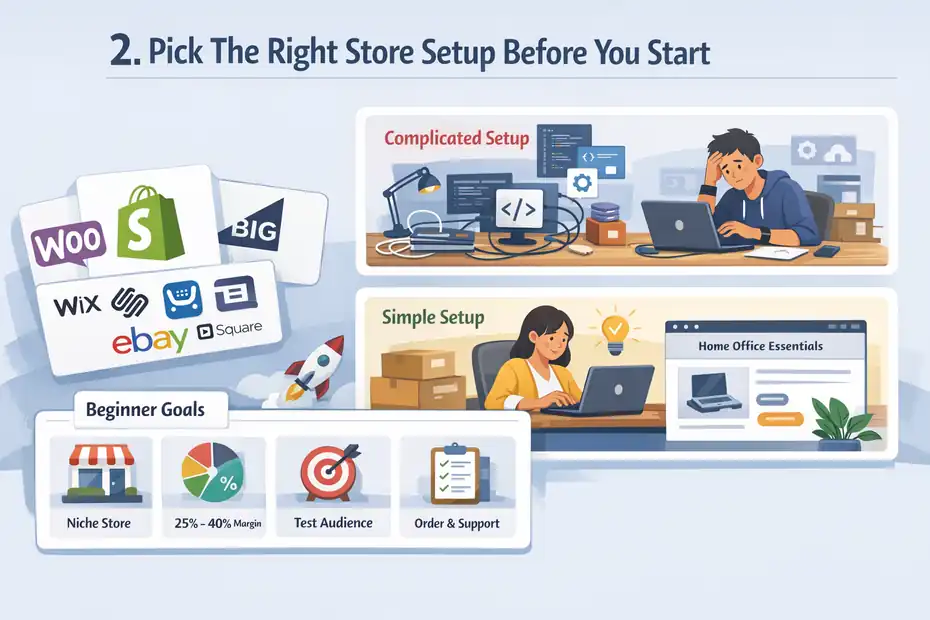
This is where most people either save themselves weeks of confusion or create a messy setup they regret later.
Choose Your Store Platform First
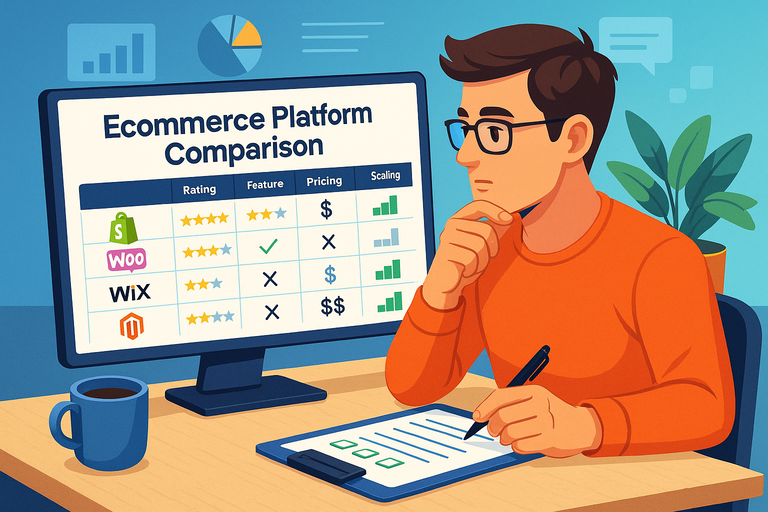
Spocket officially supports multiple ecommerce platforms, including Shopify and WooCommerce, along with BigCommerce, Wix, Squarespace, Ecwid, eBay, and Square.
If you are completely new, I usually suggest choosing based on how much technical work you want to handle.
- Shopify: Easier for beginners, cleaner setup, fewer moving parts, faster launch.
- WooCommerce: More flexibility, but you handle more technical details inside WordPress.
- Other platforms: Useful if you already have an existing store there, but not always the easiest starting point for a first-time seller.
I believe beginners often overestimate how much customization they need and underestimate how valuable a smooth launch is. If your goal is to learn how to start with Spocket step by step without getting lost in setup issues, a simpler store environment is often the smarter move.
Imagine two beginners starting on the same day. One spends three days polishing fonts and plugins. The other spends those same three days validating products, editing listings, and testing a sample order. The second person usually learns faster and gets to real feedback sooner.
Set A Beginner-Friendly Business Goal
After choosing the platform, set a small target for your first 30 days. Not a huge income fantasy. A workable operating target.
Here is a realistic version:
- Goal 1: Launch one niche store with 10 to 20 carefully chosen products.
- Goal 2: Keep average gross margin targets above 25% to 40%, depending on shipping costs.
- Goal 3: Test one or two audience angles instead of trying to sell everything to everyone.
- Goal 4: Learn order flow, fulfillment, and customer support before scaling.
This matters because Spocket gives you product access, but focus gives you a business. A scattered catalog with 100 random products usually performs worse than a tighter catalog built around one use case, one type of shopper, or one lifestyle theme.
For example, a “home office productivity” store can feel coherent. A store that sells yoga mats, dog bowls, jewelry, and phone tripods all at once feels like a garage sale. Customers notice that.
Create Your Spocket Account And Connect Your Store
Once your store platform is ready, now you can connect the engine.
Sign Up And Choose A Plan Without Overbuying
Spocket’s pricing page currently lists Starter at $39.99 per month, Professional at $59.99 per month, Empire at $99.99 per month, and Unicorn at $299.99 per month on monthly billing, with lower annual equivalents shown as well.
The same page also says “Pay only after the 7-day trial,” while another section on the pricing page mentions a 14-day free trial, so there appears to be conflicting trial information on Spocket’s own pages right now.
That inconsistency is exactly why I suggest checking the live checkout details before subscribing. Do not assume the trial length from a blog post or old video.
For most beginners, you do not need the expensive plan immediately. What you need is enough room to learn product research, import listings, and process your first orders.
Spocket’s pricing page shows Starter includes 25 unique products, unlimited orders, bulk checkout, and access to a large catalog, which is enough for a focused first store.
My advice is simple: Start as small as your catalog needs allow. Upgrade only when limits are actually slowing down growth, not when a feature sounds exciting in theory.
Connect Spocket To Shopify Or WooCommerce
Spocket’s official Shopify help guide says you can connect in two ways: from your Spocket dashboard by entering your Shopify store URL, or from the Shopify App Store by installing the Spocket app. Once installed through Shopify, a Spocket account is automatically created.
For WooCommerce, Spocket’s help guide says you install the plugin in WordPress, activate it, then connect to Spocket or use an auth key if you already have an account. The same help article notes a specific issue: using the same email for both a Shopify and WooCommerce shop may cause authentication to fail.
That little note is easy to miss, and it is the kind of detail that saves real frustration. If your connection fails, check the account email and integration method before assuming the app is broken.
After connection, verify three things immediately:
- Check 1: Imported products actually appear in your store admin.
- Check 2: Order sync is enabled and visible in your dashboard.
- Check 3: Currency, shipping regions, and storefront basics match your target market.
Find Products That Make Sense To Sell
This is the section that decides whether your store looks like a business or a random product dump.
Use Product Filters Like A Real Operator
Spocket’s core pitch focuses on supplier access, faster shipping advantages, and easier importing. Merchant review summaries on the Shopify App Store also highlight quick shipping across the US and EU, often around 3 to 7 days, though that is a marketplace summary rather than a guarantee for every item.
That means your first product filter should not be “looks cool.” It should be “can I sell this with confidence?”
Here is how I suggest filtering:
- Shipping region: Prioritize products that ship to your target country fast.
- Product fit: Choose items that match one customer type and one store theme.
- Price-to-margin room: Avoid products so cheap that shipping destroys profit.
- Visual quality: Skip products with weak images unless you plan to replace them.
- Problem-solving angle: Products that solve a clear problem usually convert better than novelty-only items.
A beginner shortcut I genuinely recommend is this: build around “boring usefulness” before trendy impulse products. A kitchen organizer with clear value can outperform a flashy gadget that gets clicks but no trust.
When I look at early stores, I often notice the same issue. The owner chose products they personally liked, not products they could explain, position, and price clearly. That difference matters more than most people think.
Validate Products Before Importing Too Many
Spocket’s help center says you can order product samples directly from the dashboard, and one sample order can include up to five units of an item. They specifically frame samples as a way to test products and take your own high-definition photos.
That is one of the smartest early steps you can take.
Here is a simple validation process:
- Step 1: Shortlist 10 products.
- Step 2: Cut the list to 3 to 5 based on shipping logic, margin room, and store fit.
- Step 3: Order samples for your top products when possible.
- Step 4: Review packaging, quality, delivery speed, and whether the product feels worth the price.
- Step 5: Use your findings to decide what deserves a proper product page.
This matters because product pages built from supplier images alone often look generic. Your own photos, notes, and honest observations can instantly make your store feel more credible.
Imagine you are selling a desk organizer set. Supplier images show the item floating on a white background. Your sample photos show it on a real desk, beside a laptop, with actual dimensions in context. That small upgrade can change conversion rates more than endlessly tweaking button colors.
Import Products And Build Better Listings
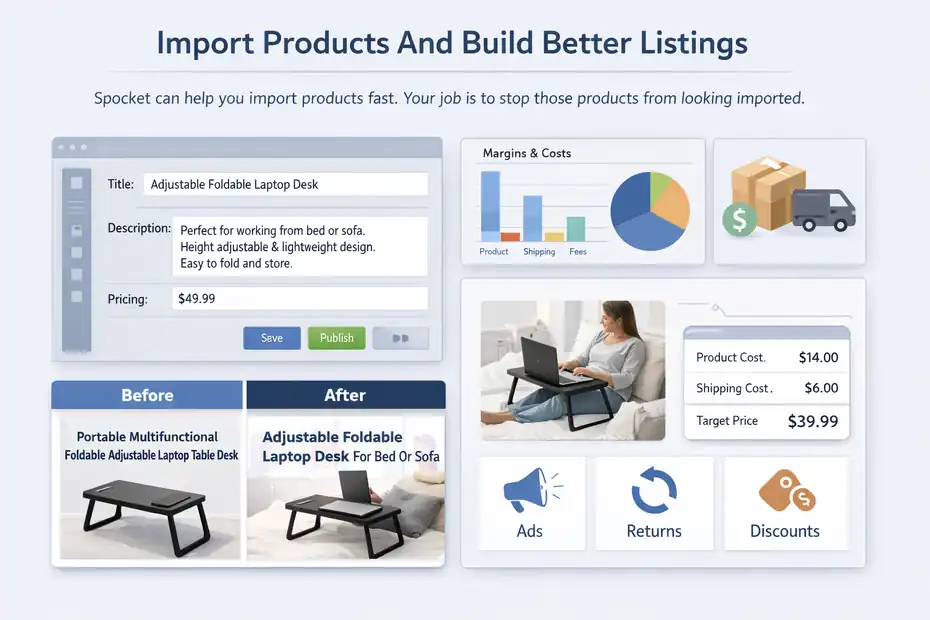
Spocket can help you import products fast. Your job is to stop those products from looking imported.
Edit Titles, Descriptions, And Pricing For Humans
Spocket says you can import products in one click. That convenience is great, but one-click publishing is where weak stores are born.
You need to rewrite imported listings so they sound like your brand, not a supplier feed.
Focus on these areas:
- Title: Make it clear, clean, and benefit-led.
- Description: Explain what it is, who it is for, and why it helps.
- Features: Translate technical specs into everyday benefits.
- Images: Reorder or replace them so the first image sells the outcome, not just the object.
- Variants: Keep only options you are comfortable supporting.
Here is a simple example. A supplier title might say, “Portable Multifunctional Foldable Adjustable Laptop Table Desk.” That is keyword soup. A cleaner title would be “Adjustable Foldable Laptop Desk For Bed Or Sofa.”
The same idea applies to descriptions. Do not just say “made from premium material.” Say what that means for the customer. Does it feel sturdy? Wipe clean easily? Save space in a small apartment? That is what buyers care about.
Set Prices With Margin And Shipping In Mind
Spocket processes orders by charging you the product base cost and shipping cost when you check out the order to the supplier. Their help content also mentions shipping configuration details such as domestic and international base shipping costs and incremental item costs.
So pricing is not just “product cost times two.” You need to account for:
- Product cost
- Shipping cost
- Platform fees
- Refund risk
- Promotional discounts
- Customer acquisition cost if you run ads
A fast way to avoid beginner pricing mistakes is to use a minimum target contribution margin before publishing any product. For example, if a product costs $14 and shipping is $6, your landed cost is already $20 before store fees. Selling it at $24.99 may look competitive, but it leaves almost no room for ads, returns, or discounts.
I suggest building a simple spreadsheet before launch. Even a basic model can stop you from importing products that look profitable on the surface but collapse the moment you advertise them.
Set Up Your Storefront So People Trust It
At this point, you are not just learning how to start with Spocket step by step. You are learning how to make your store believable.
Build A Store That Matches The Products
After import, your store needs to feel consistent. Spocket can supply the products, but brand trust still comes from your storefront experience.
Here is what customers quietly judge in seconds:
- Homepage clarity: Can they tell what you sell immediately?
- Navigation: Is it easy to browse by product type or problem solved?
- Product page depth: Are there real benefits, dimensions, shipping expectations, and returns info?
- Visual consistency: Do images, colors, and tone feel like one store?
- Policy visibility: Can they find shipping, returns, contact, and FAQ pages?
I have seen average products sell in well-positioned stores and good products fail in sloppy ones. People do not buy on product alone. They buy on confidence.
A niche angle helps a lot here. A store focused on “compact home organization” can create clearer collections, better copy, and stronger product recommendations than a general store trying to serve everyone. Narrower stores also make customer questions easier to answer because your product range shares common use cases.
Add Brand Touches Early
Spocket offers branded invoicing, and its help center explains that you can customize the invoice in your store settings. Higher-tier plans on the pricing page also list branded invoices as a feature.
This sounds small, but it is one of those details that helps dropshipping feel less like obvious dropshipping.
Your early branding checklist should include:
- Logo and favicon
- Matching product-page tone
- Branded invoice if your plan supports it
- Order confirmation email copy
- Simple packaging expectations in your FAQ
- Contact page with a real support email
I believe beginners should start branding sooner than they think. Not because branding alone creates sales, but because it improves trust at every step. Even one detail like a branded invoice or cleaner order email can make the post-purchase experience feel more legitimate.
Learn How Order Processing And Fulfillment Work
This is the part you want to understand before your first order arrives, not after.
Process Orders Without Confusion
Spocket’s help center says that when an order comes in, you can go to Orders, click Checkout, add notes for the supplier, and place the order. At that point, the product base cost and shipping cost are charged to your card, and the supplier is notified to fulfill the order.
That means the money flow is important to understand.
Your customer pays you first through your store. Then you pay the supplier through Spocket to fulfill the order. So yes, you need enough cash flow or available credit to cover fulfillment, especially once order volume increases.
Here is the beginner-safe order routine:
- Step 1: Check the order details in your store and in Spocket.
- Step 2: Confirm the shipping address and ordered variant.
- Step 3: Add any necessary note for the supplier.
- Step 4: Place the order in Spocket promptly.
- Step 5: Monitor tracking and send updates to the customer if needed.
This becomes much smoother once you treat order management like a daily operating habit. Even if you only have one sale, act like you have twenty. That discipline makes scaling easier later.
Use Samples And Tracking To Reduce Risk
Spocket says sample orders can be placed directly from the product page, and official materials also mention tracking support and automatic order syncing.
I strongly recommend doing at least one sample order before serious promotion, especially for products where quality perception matters. That includes apparel, home goods, beauty accessories, and products where texture, size, or finish can disappoint customers.
Use that sample process to answer practical questions:
- How long did delivery really take?
- Did the packaging feel acceptable?
- Did the product match the listing photos?
- Would you feel comfortable refunding a disappointed customer out of your own pocket?
That last question is more useful than it sounds. If you would not personally stand behind the product, it probably should not be in your store.
Avoid The Mistakes That Hurt Most Beginners
This is where a lot of first stores quietly bleed time and money.
The Most Common Early Mistakes
Spocket can simplify sourcing, but it does not protect you from bad store decisions. And while many merchants praise the platform, the Shopify App Store also shows an overall 3.9 rating with a noticeable share of 1-star reviews, which tells you setup and operational issues still happen in the real world.
That does not mean “avoid Spocket.” It means “operate carefully.”
The most common mistakes I see are:
- Mistake 1: Importing too many products before validating any.
- Mistake 2: Choosing products with weak margins after shipping.
- Mistake 3: Leaving supplier descriptions mostly untouched.
- Mistake 4: Promising shipping speeds without checking the actual product listing.
- Mistake 5: Running ads before the store looks trustworthy.
- Mistake 6: Ignoring support and refund planning.
A lot of beginners assume product import equals launch readiness. It does not. Import is the starting line. Trust, pricing, quality control, and customer experience are where the business is really built.
Troubleshoot Problems Before They Become Expensive
Spocket’s help content includes guidance for store connections, inventory status, notifications, order management, and shipping setup. That tells you something useful: there are enough moving parts that you should expect occasional issues and build a checklist for them.
Use this troubleshooting mindset early:
- If products do not sync: Recheck app connection and store authorization.
- If checkout margins look too thin: Recalculate including shipping and promo discounts.
- If a supplier listing looks vague: Skip it or test it with a sample.
- If customers ask the same question repeatedly: Update the product page and FAQ.
- If delivery feels inconsistent: Pause ads to that item until you confirm reliability.
In my experience, the stores that survive are not the ones with zero problems. They are the ones that catch issues while the stakes are still small.
Optimize Your Store Once The Basics Work
Once your first setup is done, the next job is improvement, not random expansion.
Improve Conversion Before Adding More Products
It is tempting to keep importing products because it feels productive. But once your store is live, your best gains usually come from improving the pages you already have.
Start with:
- Headline clarity: Make the main benefit obvious.
- Image sequencing: Put the strongest lifestyle image first.
- Offer framing: Show value clearly if you use bundles or compare-at pricing.
- FAQ depth: Answer shipping, returns, dimensions, and use-case objections.
- Social proof: Add reviews carefully and honestly where allowed by your platform setup.
Spocket’s features around pricing rules, compare-at pricing, and inventory monitoring can help operationally, but conversion still depends on your positioning.
Here is a simple example. Suppose a product gets clicks but no sales. Most people think “bad traffic.” Sometimes the issue is much simpler: the product page never explains who the item is for, how big it is, or why it costs more than a marketplace alternative. Better clarity often beats more traffic.
Build A Better Product Portfolio
As your store develops, do not add products just because your plan allows more imports. Spocket’s plans increase product limits significantly as you move up tiers, but more slots do not automatically mean more revenue.
Instead, grow your catalog like this:
- Phase 1: One niche, 10 to 20 products.
- Phase 2: Add complementary products with the same buyer profile.
- Phase 3: Build bundles, cross-sells, or themed collections.
- Phase 4: Remove weak performers regularly.
I suggest reviewing products every two to four weeks. Keep the ones that get attention, fit your brand, and hold margin. Remove the ones that create confusion or never get traction.
A lean store with 18 well-positioned products can outperform a bloated catalog of 150 items. I have seen that happen many times.
Scale Carefully Once You Have Proof
This final stage is where beginners often rush. You do not need to rush.
Know When You Are Ready To Scale
You are ready to scale a Spocket store when a few things are already true:
- Your best products convert consistently
- Your margins survive shipping and promotions
- Your order flow is smooth
- Your customer questions are predictable
- Your supplier reliability is good enough to trust with more volume
Spocket’s higher plans add features like branded invoicing, VIP support, multiple store support, and larger product allowances, which can matter later. But features are not a substitute for proof.
I would not upgrade just because you feel like “it is time.” I would upgrade when you can point to a real bottleneck: product cap reached, support needs growing, or you are actively managing multiple storefronts.
That is a much healthier way to scale because it keeps expenses tied to traction.
A Simple 30-Day Beginner Action Plan
To wrap this up, here is the version I would follow if I were starting from scratch today.
- Days 1 to 3: Set up your store platform, connect Spocket, choose a niche, and review pricing and trial terms directly on checkout.
- Days 4 to 7: Research products, shortlist 10, and narrow to the strongest 3 to 5 based on shipping logic, margin room, and store fit.
- Days 8 to 12: Order samples where possible, rewrite product pages, clean your branding, and build your policy pages.
- Days 13 to 18: Import your first small catalog and test storefront flow from homepage to checkout.
- Days 19 to 24: Place a mock order, review fulfillment steps, and prepare support responses for shipping, returns, and product questions.
- Days 25 to 30: Launch traffic slowly, monitor customer behavior, and optimize your top pages before adding more products.
That is the cleanest answer to how to start with Spocket step by step: start small, validate early, price carefully, and act like an operator from day one. Spocket can make the mechanics easier, but your judgment is what turns it into a real business.
FAQ
What is Spocket and how does it work for beginners?
Spocket is a dropshipping platform that connects your online store to suppliers. You import products, set prices, and when a customer orders, the supplier ships directly to them. It simplifies product sourcing, order fulfillment, and inventory syncing for beginners with no prior experience.
How to start with Spocket step by step as a beginner?
To start with Spocket step by step, create an online store, sign up on Spocket, connect your store, choose products, edit listings, and publish them. When a customer places an order, you process it through Spocket, and the supplier handles shipping directly to the customer.
Do I need money to start using Spocket?
Yes, you need a small budget to start using Spocket. While there is a trial period, you’ll need funds to pay for a subscription, cover product costs when orders come in, and handle basic store expenses like domain, apps, or marketing if you plan to scale.
Is Spocket better than other dropshipping platforms?
Spocket is often preferred for faster shipping and access to US and EU suppliers. However, whether it’s better depends on your goals, product niche, and target market. It works well for beginners who want reliable suppliers and a simpler fulfillment process.
Can I make money with Spocket as a beginner?
Yes, beginners can make money with Spocket if they choose the right products, price them correctly, and build a trustworthy store. Success depends on product selection, margins, and consistent testing rather than the platform alone, so results vary based on effort and strategy.

I’m Juxhin, the voice behind The Justifiable.
I’ve spent 6+ years building blogs, managing affiliate campaigns, and testing the messy world of online business. Here, I cut the fluff and share the strategies that actually move the needle — so you can build income that’s sustainable, not speculative.
Related posts:
 How to Start Dropshipping for Free and Still Make a Profit
 Dropshipping for Beginners: The Complete No-Fluff Guide
 How to Start Dropshipping Using Appscenic
 Dropshipping Guide: Build a Store That Actually Sells
 Ecommerce Platform Comparison: Which One Fits Your Brand?
 Why the Salehoo Wholesale Directory Helps You Scale