
Table of Contents
Some links on The Justifiable are affiliate links, meaning we may earn a small commission at no extra cost to you. Read full disclaimer.
A mailerlite vs aweber comparison matters more than most people expect, because email platforms are sticky. Once your forms, automations, segments, and landing pages are built, switching gets annoying fast.
I’ve looked at both through the lens that actually matters in 2026: pricing, ease of use, automation depth, support, integrations, and how well each platform fits different business models.
The simple answer is this: MailerLite usually wins on value and simplicity, while AWeber stands out when you want stronger hands-on support, phone access, and a more guided migration experience.
What MailerLite And AWeber Are Really Built For
Both platforms promise email marketing, automation, landing pages, and audience growth tools.
But they do not feel the same in day-to-day use, and that difference matters more than feature checklists.
MailerLite In Plain English
MailerLite is built for businesses that want a lean, modern email marketing system without paying enterprise-style pricing. Its core offer includes email campaigns, automations, signup forms, landing pages, websites, and audience tools.
On the free plan, MailerLite allows up to 500 active subscribers, campaign creation, automations, a website, and up to 10 landing pages. Its free plan page also says you can send up to 12,000 emails per month before needing to upgrade.
What I like here is the product direction. MailerLite feels designed for creators, bloggers, lean ecommerce brands, coaches, and small teams that want a single place to capture leads and send email without getting buried in settings.
It also supports websites and blogs inside the platform, which is unusual at this price point. Its help center includes site creation, blog setup, Stripe selling, landing page testing, and form analytics, which tells you MailerLite is trying to be more than “just newsletters.”
In practical terms, MailerLite is usually the better fit when your priority is getting live quickly, keeping costs predictable, and building a clean funnel without extra software.
I would not call it the deepest automation platform on the market, but for most small businesses, it covers the 80 percent that drives results.
AWeber In Plain English
AWeber is also built for small businesses, but it feels more support-led and service-oriented.
The official site positions it as email marketing plus landing pages, automation, ecommerce features, web push, integrations, and in-house help. It also highlights free migrations and direct access to support by phone, live chat, and email.
That tells you a lot about the product strategy. AWeber is not only selling software. It is selling reassurance. If you are the kind of business owner who wants to call someone, ask setup questions, or get help moving over from another platform, AWeber has a clear advantage. Its migration team says it can move content and subscribers for free in five business days or less.
AWeber also feels like it is trying to reduce friction for less technical users. That matters for local businesses, service businesses, nonprofits, solo entrepreneurs, and established newsletters that value support more than shaving every possible dollar off software spend.
My honest take is that AWeber makes more sense when email is important to your business but not something you want to tinker with alone. It is the platform I would point to for people who want more human help and less self-serve guesswork.
Pricing Is Where Most Buyers Decide
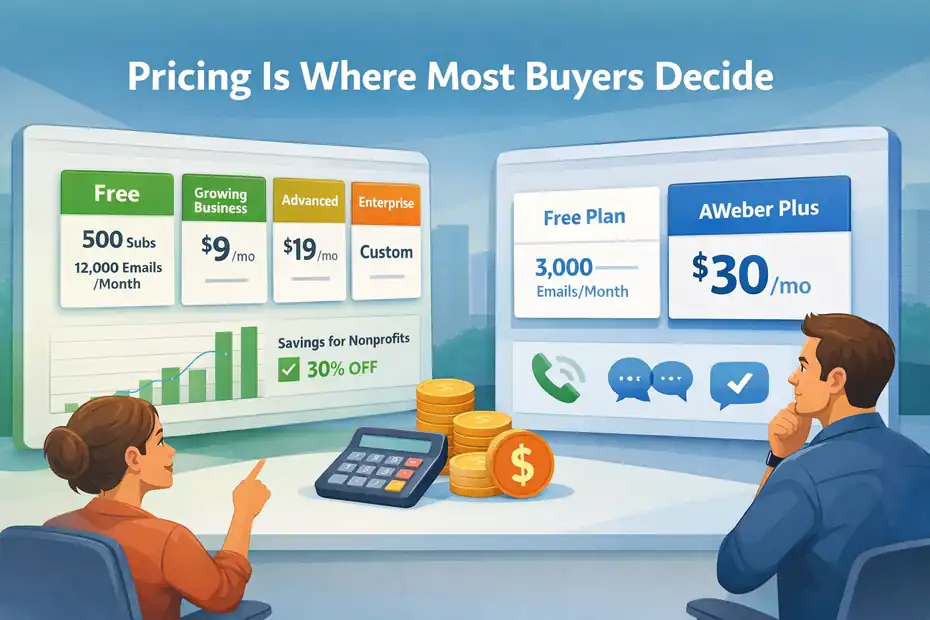
This is the section most people care about first, and I get it. Pricing changes the math fast when your list starts growing.
MailerLite Pricing: Lower Starting Cost And More Room To Grow Cheaply
MailerLite offers four plan options: Free, Growing Business, Advanced, and Enterprise. The free plan is capped at 500 active subscribers, and MailerLite says sending is locked if you exceed that subscriber limit until you upgrade or reduce active subscribers.
Its public free plan page says you can send up to 12,000 emails per month on free, and paid plans start as low as $9 per month.
That is the first big reason MailerLite wins so many head-to-head comparisons. For a beginner, that starting point is much easier to justify. You can build forms, pages, automations, and basic campaigns before your email costs start feeling heavy.
There is also a practical budget advantage for growing lists. MailerLite’s pricing language is framed around affordability, and even its nonprofit page says customers save an average of $53.18 per month compared with named alternatives on that page. It also offers a 30 percent nonprofit discount.
I would describe MailerLite’s pricing philosophy like this: it is trying to remove the fear of committing. That matters when you are building an audience from scratch and every extra monthly tool feels personal.
AWeber Pricing: Clear, But More Expensive Earlier
AWeber’s pricing is more expensive at the low end. Its help docs list AWeber Plus starting at $30 per month monthly, or $20 per month billed annually at $240, with 500 subscribers and 6,000 sends at that tier.
The free account allows 3,000 messages per month, which AWeber says works out to around 100 per day.
That pricing structure changes who it makes sense for. If you are a brand-new creator with a tiny list, AWeber can feel expensive faster than MailerLite.
But if you value hands-on support, phone help, or migration services, part of what you are paying for is service around the software, not just sending emails. AWeber also says all plans include free chat, email, and phone support.
One thing I always advise here: do not compare only the entry price. Compare the cost of doing your real workflow. If you need migration help, frequent support, or you tend to break things during setup, AWeber’s higher price may be justified.
If you are self-sufficient and want maximum value, MailerLite usually comes out ahead.
Quick Pricing Snapshot
| Factor | MailerLite | AWeber |
|---|---|---|
| Free subscriber limit | 500 active subscribers | Free plan exists; paid tiers start at 500 subscribers |
| Free send limit | Up to 12,000 emails/month on free plan | 3,000 messages/month on free plan |
| Lowest published paid entry point | As low as $9/month | $30/month monthly or $20/month billed annually for Plus starting tier |
| Nonprofit discount | 30% off for nonprofits | Not confirmed in the sources reviewed |
| Migration help | Migration tools highlighted | Free expert migration in 5 business days or less |
My verdict on price is simple: MailerLite is the better value buy for most users. AWeber is the better “support-inclusive” buy for users who need more guidance.
Ease Of Use And Setup Experience
Features matter, but if the interface annoys you, your system gets neglected. That is when open rates, testing, and segmentation all start slipping.
MailerLite Feels More Modern And Lightweight
MailerLite’s current product positioning leans hard into a drag-and-drop experience for emails, automations, forms, landing pages, and websites. The platform also offers a 14-day premium trial with no credit card required, which lowers the friction of testing advanced tools before committing.
In my experience, this kind of setup matters because it reduces “tool fatigue.” You log in, build a form, connect a page, create a welcome sequence, and move on. That simplicity is one of MailerLite’s strongest selling points. For many people, especially solo operators, that is worth more than a longer feature list.
A realistic example: imagine you run a paid newsletter and a few digital products. You need a lead magnet page, a nurture sequence, a weekly campaign, and maybe a simple website. MailerLite can cover that entire setup in one environment.
That means fewer integrations to babysit and fewer places for data sync issues to appear. Its help docs specifically mention blogs, websites, Stripe selling, A/B testing on landing pages, and surveys or quizzes on landing pages.
I would give MailerLite the edge for interface clarity. It tends to feel less cluttered and more “get stuff done” from day one.
AWeber Feels More Guided And Support-Backed
AWeber’s interface is designed for accessibility, but the bigger story is the support structure around the setup. The company prominently advertises 24/7 contact options and phone support during weekday business hours, with chat and ticket support available 24/7.
That changes the setup experience in a meaningful way. If you are not comfortable troubleshooting forms, imports, automations, or integrations on your own, AWeber removes some of the emotional friction. You are less likely to stall out.
There is also a real difference for migrations. AWeber’s migration team will move content and subscribers at no cost, and says migrations are completed in five business days or less. That is a strong convenience feature for businesses switching from another platform.
So while I think MailerLite feels cleaner, AWeber feels safer for non-technical users. That is not a small distinction. Many businesses do not fail because the software is missing one feature. They fail because nobody finishes the setup.
Email Creation, Landing Pages, And Website Tools
This is where the platforms start separating by style. Both can send newsletters. The question is how much publishing infrastructure you want wrapped around email.
MailerLite Is Stronger As An All-In-One Publishing Stack
MailerLite positions itself as email marketing, automations, landing pages, signup forms, and websites in one platform. Its landing page builder includes 70+ pre-made blocks, reusable blocks, AI features on higher tiers, and the ability to publish 10 landing pages even on the free account. On paid plans, you can publish unlimited pages, and MailerLite also supports blogs and websites in its sites help section.
This matters if you want fewer tools in your stack. A lot of smaller businesses do not need a complex CMS plus a page builder plus a separate email platform. They need something that works and does not become a second job.
I especially like this for creators, consultants, and lean ecommerce brands. You can launch a lead capture page, attach it to an automation, and start collecting subscribers without paying for multiple tools. That is where MailerLite feels unusually efficient.
A small but important point: landing page templates are not available on the free plan, but you can still publish up to 10 landing pages. That nuance matters when you are budgeting. Free gets you function, but paid unlocks more speed and polish.
AWeber Covers The Essentials Well, But With Less “Mini Website” Appeal
AWeber clearly supports landing pages, ecommerce connections, and pre-written campaigns, and its integrations cover common business tools and shopping carts.
The platform’s homepage and landing page integration pages emphasize landing pages, automation, ecommerce, and web push as core use cases.
For many businesses, that is enough. If your main use case is collecting leads and sending email, you may never care that MailerLite goes further into websites and blogs. AWeber still gives you the components needed to create pages, connect offers, and build subscriber flows.
Where I think AWeber is a little less compelling is when your vision includes publishing content, building small sites, or relying heavily on built-in page infrastructure. It does not appear to push that “website plus email” model as strongly as MailerLite does in the sources reviewed.
So here is my honest opinion: if pages are supporting email, both work. If pages are central to your growth strategy, MailerLite is the more attractive option.
Automation, Segmentation, And Growth Logic

Automation is the point where beginner-friendly tools either stay useful or start feeling small. Most buyers underestimate this section at first.
MailerLite Gives Most Small Businesses The Automation They Actually Need
MailerLite includes automations on the free plan and has a dedicated automation help center covering workflow creation, automation steps, rules and actions, ecommerce automations, abandoned cart emails, and A/B split testing for automations.
It also explicitly recommends domain authentication to maximize deliverability.
That combination is strong for the price. For a lot of businesses, your highest-value flows are simple:
- Welcome sequence
- Lead magnet delivery
- Abandoned cart reminder
- Post-purchase follow-up
- Re-engagement campaign
MailerLite covers these use cases without forcing you into a premium ecosystem too early. That is a big deal. I have seen plenty of businesses overbuy on automation before they even have consistent list growth.
There is also a nice practical advantage in ecommerce. The WooCommerce integration page specifically mentions syncing customers, importing products into campaigns, abandoned cart emails, and purchase tracking.
I would not pitch MailerLite as the most advanced automation engine in the industry. I would pitch it as one of the best “enough automation without the bloat” choices for small and midsize users.
AWeber Covers Core Automation, But The Bigger Advantage Is Usability And Support
AWeber’s official pages emphasize email automation as a core product area, along with ecommerce, landing pages, and analytics. The platform also supports AMP for Email in its documentation, which can matter for interactive email experiences in certain use cases.
What I think matters more, though, is how approachable the setup feels for non-specialists. AWeber tends to be a solid choice for standard automation patterns rather than highly complex branching logic. If your automation goals are practical and straightforward, that is completely fine.
Think of a local service business. You may only need a lead capture form, a booking reminder flow, a testimonial request, and a monthly newsletter. In that scenario, AWeber’s support and ease may be more valuable than squeezing out one more branching condition in a workflow.
So the automation verdict is this: MailerLite wins for value and breadth relative to price. AWeber remains competitive for users who prioritize dependable basics and want more human help while building them.
Support, Migration, And Day-To-Day Help
This is the category where AWeber has its cleanest win. If support matters to you, do not skip this section.
AWeber Has The Stronger Human Support Story
AWeber says users can contact support 24/7 for email marketing and landing page questions. Its contact pages list phone support Monday through Friday from 8:00 AM to 8:00 PM ET, plus 24/7 ticket and chat support, with weekend live chat and email support also available. AWeber also says all plans include free chat, email, and phone support.
That is a meaningful advantage, especially for businesses where email is tied directly to revenue. If a form breaks, an automation stops, or an import gets messy, fast human support can be worth a lot more than a cheaper subscription.
AWeber also offers free expert migration and says it can move content and subscribers in five business days or less. For businesses switching platforms, that is not a minor perk. It can save hours of manual rebuilding and lower the risk of losing list structure along the way.
If I were advising a business owner who gets stressed by tech, I would give AWeber a serious edge purely on the support experience.
MailerLite Support Is Good, But More Tier-Dependent
MailerLite’s official support pages say contact via email or chat is only available on paid plans, while everyone can access the self-service center.
Another help page says Advanced plan users get 24/7 live chat support, while the company’s broader marketing pages highlight 24/7 award-winning support and one page references a 97 percent satisfaction rate with a 5-minute average live chat response time.
That tells me two things. First, MailerLite clearly invests in support. Second, access to the best support experience is tied more closely to plan level than it is with AWeber.
For self-serve users, this may not matter much. MailerLite’s knowledge base is broad, and many users will never need frequent live help. But if support access is one of your top buying criteria, AWeber is still the easier recommendation.
My simple rule here is this: If you are comfortable figuring things out, MailerLite is fine. If you know you will want to talk to a human, AWeber deserves extra weight.
Integrations, Ecommerce, And Technical Flexibility
No email platform lives alone. The real test is how well it connects to the rest of your stack.
MailerLite Has A Solid Integration Footprint And Strong Small-Business Use Cases
MailerLite says it connects with 130+ popular web and marketing SaaS tools. Its integration pages also show direct options for WordPress, WooCommerce, and multiple email verification services like Kickbox, BriteVerify, and DeBounce.
The WooCommerce integration specifically highlights customer syncing, product import, abandoned cart emails, and purchase tracking.
For many small businesses, that is more than enough. WordPress content site? Covered. WooCommerce store? Covered. Need list hygiene tools to reduce bounces? Covered. Need API access? MailerLite’s developer docs list a global rate limit of 120 requests per minute.
I especially like MailerLite for creator-commerce hybrids. If you sell a course, digital download, or subscription product while also publishing content, its overall ecosystem feels practical and compact.
AWeber Is Broadly Connected And Especially Friendly For Businesses With Existing Stacks
AWeber’s integration library says it connects with hundreds of third-party tools and platforms, including social media, shopping carts, landing page tools, WooCommerce, Shopify, PayPal, WordPress, Facebook, and Zapier. Its ecommerce pages and integration library make it clear that connecting into an existing business stack is a major part of the product.
That makes AWeber a comfortable choice for businesses that already have an established tool stack and want email to plug into it without drama. It also has an API and webhook documentation center for developers.
My read is that both platforms are integration-capable enough for most SMB use cases. MailerLite feels slightly more attractive when you want to replace extra tools. AWeber feels slightly more attractive when you want to connect to tools you already rely on and have support available if something breaks.
Common Mistakes People Make When Choosing Between Them
A lot of buyers ask the wrong question. They ask which platform has more features, when they should be asking which platform matches the way they work.
Mistake 1: Choosing Based Only On The Cheapest Monthly Price
Yes, MailerLite is usually the cheaper option at the starting tiers. That is real and important. But the wrong cheap tool can still cost more if it slows down setup, causes migration pain, or leaves you stuck when something breaks.
MailerLite’s lower entry price is one of its biggest strengths, while AWeber justifies higher early costs with more accessible support and migration assistance.
So I recommend calculating total operating comfort, not just subscription cost. Ask yourself:
- How often will I need help?
- Am I switching from another platform?
- Do I need phone support?
- Will I actually use built-in pages or websites?
That exercise usually makes the right answer much clearer.
Mistake 2: Overestimating How Advanced Your Automation Needs Are
A lot of us imagine we need complicated automations with endless branches. Most businesses do not. Most need a welcome flow, lead delivery, sales nurture, and a few behavior-based follow-ups.
MailerLite is strong because it gives you automation coverage early, including workflows, rules, actions, ecommerce automation support, and split testing in automations. AWeber covers core automation well too, but its more obvious strength is support and guided usability.
I suggest buying for your next 12 months, not your imaginary five-year future. You can always migrate later, but buying a more expensive platform today for a setup you may never use is rarely the smart move.
Who Should Choose MailerLite
If you want the quick recommendation, this is the platform I would choose most often for lean growth.
MailerLite Is Better For Budget-Conscious Creators, Bloggers, And Lean Ecommerce Brands
MailerLite is the better fit when you want strong value, simple setup, built-in pages, websites, and decent automation without paying heavily at the start. Its free tier and low paid entry point are simply easier for solo creators and growing brands to justify.
Free accounts get up to 500 active subscribers, automations, a website, and up to 10 landing pages, while the free plan page also advertises up to 12,000 monthly emails.
I would especially recommend it if your business looks like one of these:
- A newsletter creator building an audience and selling digital products
- A blogger using WordPress who wants forms and lead magnets
- A coach or consultant building a small funnel
- A WooCommerce store that wants abandoned cart and purchase tracking
- A nonprofit that wants lower software costs and a discount
That last point matters too. MailerLite offers a 30 percent nonprofit discount, which can materially change long-term costs.
In plain language, MailerLite is the better choice when you want more value per dollar and do not need constant human support.
Who Should Choose AWeber
AWeber does not win on price, but it wins in a few very practical situations.
AWeber Is Better For Users Who Want Support, Migration Help, And Reassurance
AWeber is the better fit when you care deeply about accessible support, free migration help, and having a team available when something goes wrong. It offers phone support on weekdays, 24/7 chat and ticket support, and free expert migration that it says can be completed in five business days or less.
That makes it attractive for:
- Local businesses that want to call support
- Established small businesses switching from another email provider
- Teams that value migration assistance
- Less technical users who want more setup reassurance
- Operators who treat support as part of the product
I also think AWeber is underrated for businesses that already have tools in place and just need email to connect cleanly into the stack. Its integrations and support model help reduce risk during implementation.
If your top fear is not price but “I do not want this to become a mess,” AWeber becomes much easier to recommend.
Final Verdict: Which Platform Is Better?
If you want the clearest possible answer to the mailerlite vs aweber comparison, here it is: MailerLite is the better platform for most people, while AWeber is the better platform for a smaller group of users who need stronger human support and migration help.
That conclusion lines up with the current pricing gap, free plan limits, site-building angle, and support differences shown on their official pages.
My final recommendation looks like this:
- Choose MailerLite if you want lower cost, cleaner setup, built-in landing pages and websites, and solid automation for a small or growing business.
- Choose AWeber if you want direct support access, phone help, free expert migration, and a more guided experience even if it costs more.
If I were starting a small creator business, content site, or lean ecommerce brand today, I would personally choose MailerLite first. If I were moving a revenue-generating list for a business owner who values support above almost everything else, I would lean AWeber.
That is really the core of it. MailerLite wins the value fight. AWeber wins the support fight. Your best choice depends on which one matters more to you.
FAQ
What is the main difference in a mailerlite vs aweber comparison?
The main difference in a mailerlite vs aweber comparison is pricing and support. MailerLite focuses on affordability and simplicity, making it ideal for beginners, while AWeber offers stronger customer support, including phone access and migration help, which is better for users who want guidance.
Is MailerLite cheaper than AWeber?
Yes, MailerLite is generally cheaper than AWeber, especially for beginners. It offers a free plan with more generous email sending limits and lower starting paid plans, while AWeber’s pricing starts higher but includes more hands-on support and assistance.
Which platform is better for beginners?
MailerLite is better for most beginners because of its simple interface, lower pricing, and all-in-one features like landing pages and websites. However, AWeber may suit beginners who prefer direct support and step-by-step guidance during setup and migration.
Does AWeber have better customer support than MailerLite?
Yes, AWeber has stronger customer support than MailerLite. It offers phone, chat, and email support, including 24/7 assistance, while MailerLite mainly provides support through chat and email, with priority access depending on your plan.
Which is better for email automation, MailerLite or AWeber?
MailerLite is generally better for value-driven automation, offering advanced workflows at a lower cost. AWeber provides solid automation features but focuses more on usability and support rather than offering the most advanced automation capabilities.

I’m Juxhin, the voice behind The Justifiable.
I’ve spent 6+ years building blogs, managing affiliate campaigns, and testing the messy world of online business. Here, I cut the fluff and share the strategies that actually move the needle — so you can build income that’s sustainable, not speculative.
Related posts:
 How to Integrate Aweber with ClickFunnels
 What Is MailerLite Used For? Powerful Features Explained
 Aweber Autoresponder: Expert Setup & Automation Guide
 How I Increased Signups With MailerLite WordPress Plugin
 GetResponse Vs Omnisend: Best Ecommerce Email Flow Builder
 GetResponse Duplicate Contacts Problem Solution: Clean Fast