
Table of Contents
Some links on The Justifiable are affiliate links, meaning we may earn a small commission at no extra cost to you. Read full disclaimer.
If you’ve been researching email platforms lately, you’ve probably asked yourself: should I use Brevo for email marketing, or is it one of those tools that looks good on paper but causes problems later?
With so many platforms promising better deliverability, automation, and pricing, choosing the wrong one can waste months of effort and thousands in lost revenue.
In this guide, we’ll break down exactly when Brevo makes sense, when it doesn’t, and what real users should consider before committing.
Brevo Overview: What The Platform Actually Offers
If you’re asking yourself should I use Brevo for email marketing, the first step is understanding what the platform actually includes.
Brevo is designed as an all-in-one marketing platform that combines email campaigns, automation, CRM features, and messaging tools inside one dashboard.
Email Marketing Tools Available Inside Brevo
Brevo’s core feature is its email campaign builder. At its simplest, it lets you design newsletters, promotional emails, and automated campaigns without needing technical knowledge.
The platform includes a drag-and-drop editor that allows you to build emails using content blocks such as images, text, buttons, and product sections. If you’ve used modern website builders, the experience feels familiar.
Some practical tools inside the email builder include:
- Pre-built templates: You can start with dozens of responsive templates for newsletters, announcements, ecommerce promotions, and onboarding emails.
- Personalization tags: Insert subscriber data such as first name, company, or custom fields so emails feel personalized.
- A/B testing: Test two subject lines or email designs to see which version generates better open rates.
- Send-time optimization: Automatically schedule campaigns at times when subscribers are most likely to open emails.
In my experience, the email builder is one of the easier tools for beginners to learn. If someone has never used an email platform before, they can usually build their first campaign in about 15–20 minutes.
Another useful feature is segmentation. Instead of sending one email to everyone, you can create segments such as:
- Subscribers who joined in the last 30 days
- Customers who purchased a specific product
- Leads who clicked a link but never bought
That ability to target specific groups is what makes email marketing powerful in the first place.
Built-In CRM And Contact Management Features
Brevo is not only an email tool. It also includes a lightweight CRM system designed to manage contacts, leads, and deals.
For small businesses, this is surprisingly useful because you don’t need separate software to track customer conversations. Everything lives in the same place.
The CRM allows you to:
- Store contact profiles with notes and interaction history
- Track sales pipelines and deal stages
- Assign contacts to team members
- Record tasks and reminders
Imagine you’re running a freelance marketing service. A potential client fills out a form on your website. Instead of that lead disappearing into your inbox, Brevo can automatically add them to your CRM, assign them to a pipeline stage, and trigger follow-up emails.
Each contact profile stores data such as:
- Email engagement history
- Website activity
- Campaign interactions
- Custom fields
This kind of centralized contact management becomes valuable as your list grows past a few hundred subscribers.
Automation Workflows And Behavioral Triggers
Automation is where email marketing becomes scalable. Instead of manually sending emails every week, Brevo allows you to create workflows that trigger automatically based on user behavior.
The automation builder uses a visual workflow editor. You drag steps such as “send email,” “wait,” or “check condition” into a sequence.
Common automations people build include:
- Welcome sequences for new subscribers
- Abandoned cart emails for ecommerce stores
- Lead nurturing campaigns for service businesses
- Re-engagement campaigns for inactive subscribers
Let me give you a simple example.
Imagine someone downloads a free guide from your website.
- Step 1: They join your email list.
- Step 2: Brevo sends a welcome email immediately.
- Step 3: Two days later they receive a helpful educational email.
- Step 4: A week later they receive a product recommendation.
Once the workflow is built, the system runs automatically for every new subscriber.
Brevo also supports behavioral triggers like:
- Email opened
- Link clicked
- Page visited
- Purchase completed
For beginners, this level of automation is usually more than enough. Larger companies sometimes require deeper behavioral tracking, but for most bloggers and small businesses it works well.
Transactional Emails And SMTP Capabilities
Another feature that makes Brevo stand out is transactional email infrastructure.
Transactional emails are system-generated messages such as:
- Order confirmations
- Password reset emails
- Shipping notifications
- Account verification messages
These emails are sent using SMTP servers, which simply means automated system delivery rather than manual campaigns.
For example, when someone creates an account on your website, the platform can instantly send a confirmation email.
Brevo provides an SMTP relay service that developers can connect to websites or apps. This allows businesses to send large volumes of automated emails reliably.
Why this matters:
- Transactional emails often have extremely high open rates (sometimes above 80%)
- Deliverability is optimized for system notifications
- Developers can integrate email directly into applications
Many companies actually use Brevo specifically for transactional email delivery rather than marketing campaigns.
Landing Pages, Forms, And Lead Capture Tools
Brevo also includes tools for capturing leads, which is essential if you want to grow an email list.
Instead of relying only on external form builders, you can create signup forms directly inside the platform.
The system supports several lead capture options:
- Embedded forms for websites
- Popup subscription forms
- Landing pages designed for lead magnets
- Double opt-in confirmation systems
For example, imagine you run a blog and want to offer a free checklist.
You could create a landing page with a headline, description, and signup form. When visitors submit their email address, Brevo adds them to your list and triggers a welcome sequence automatically.
Some practical advantages of these built-in tools include:
- No coding required
- Mobile-responsive pages
- Simple integrations with websites
- Automatic contact tagging
In my opinion, these lead capture tools are one of the reasons beginners often consider Brevo when deciding should I use Brevo for email marketing. It removes the need for multiple separate tools early on.
Brevo Pricing Breakdown: Is It Actually Affordable?
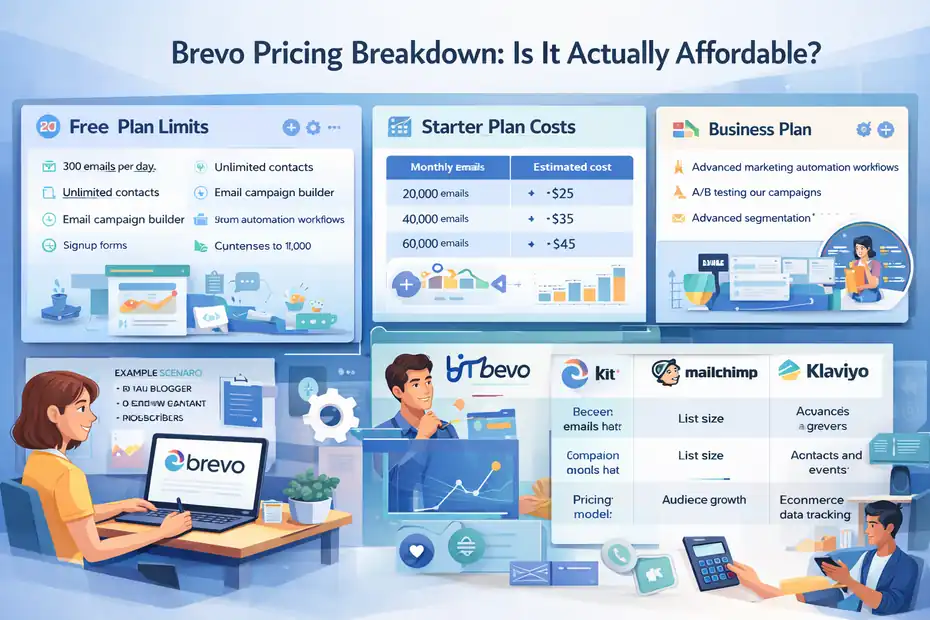
Pricing is one of the biggest reasons people consider Brevo.
Compared to many competitors, it uses a different pricing model that can be significantly cheaper depending on how often you send emails.
Free Plan Limits And What You Really Get
Brevo’s free plan is surprisingly generous for beginners, which is why many small creators start there.
Here’s what the free plan typically includes:
- Up to 300 emails per day
- Unlimited contacts
- Email campaign builder
- Basic automation workflows
- Signup forms and contact management
The daily sending limit is the biggest restriction. While 300 emails per day sounds small, it actually works fine for many early-stage email lists.
For example:
- A blogger with 1,000 subscribers sending one weekly email only needs about 143 emails per day on average.
- A freelancer with a list of 300 subscribers can send newsletters comfortably.
However, the free plan does include Brevo branding inside emails. If you want a fully professional look, most businesses eventually upgrade.
From what I’ve seen, the free plan is best used for:
- Testing the platform
- Building your first email list
- Learning automation basics
Starter Plan Costs For Growing Email Lists
The Starter plan removes the daily sending limit and instead uses a monthly email allowance.
This is where Brevo becomes interesting compared to traditional email platforms.
Many email tools charge based on number of contacts, which means your price increases as your list grows. Brevo charges primarily based on emails sent, which can be much cheaper if you don’t send emails frequently.
Example pricing structure:
| Monthly Emails | Estimated Cost |
|---|---|
| 20,000 emails | ~ $25 |
| 40,000 emails | ~ $35 |
| 60,000 emails | ~ $45 |
This pricing model benefits businesses that send occasional campaigns rather than daily broadcasts.
Imagine two scenarios:
- Scenario 1: A blogger sends one newsletter per week to 10,000 subscribers.
- Scenario 2: A retailer sends daily promotional emails.
The blogger would pay far less with Brevo because their monthly email volume is smaller.
This is one reason many people researching should I use Brevo for email marketing discover it’s often cheaper than expected.
Business Plan Features And Automation Access
The Business plan unlocks more advanced marketing features.
This tier typically includes:
- Advanced marketing automation workflows
- A/B testing for campaigns
- Advanced segmentation
- Predictive send-time optimization
- Landing page builder access
- Multi-user collaboration
For teams running serious email marketing campaigns, automation becomes the key feature.
For example, an ecommerce store might build workflows such as:
- Abandoned cart recovery sequences
- Post-purchase upsell emails
- VIP customer promotions
- Reactivation campaigns
These automated flows often generate a large portion of revenue. In many ecommerce businesses, automated emails can drive 20–30% of total email revenue.
The Business plan also removes many of the feature restrictions found in lower tiers.
Hidden Costs Many Users Overlook
While Brevo is affordable for many businesses, there are a few costs people often forget to calculate.
Some examples include:
- Additional email volume: If your campaigns exceed the monthly sending limit, extra email credits may be required.
- SMS marketing costs: Text messaging is billed separately.
- Dedicated IP addresses: Large senders may need a dedicated sending IP to improve deliverability.
- Advanced features: Some tools require higher plan tiers.
In my experience, these costs rarely surprise small businesses, but large senders should calculate them carefully.
A quick rule of thumb I suggest:
Estimate your monthly email volume before choosing a plan. Many people underestimate how many emails automation workflows will send.
How Brevo Pricing Compares To Competitors
To understand whether Brevo is affordable, it helps to compare pricing models.
Here’s a simplified comparison of how major platforms charge users.
| Platform | Pricing Model | Typical Cost Driver |
|---|---|---|
| Brevo | Based on emails sent | Campaign frequency |
| Kit | Based on contacts | List size |
| Mailchimp | Based on contacts | Audience growth |
| Klaviyo | Based on contacts and events | Ecommerce data tracking |
If your list grows large but you only send occasional newsletters, Brevo can be significantly cheaper.
However, if you send daily campaigns or run heavy automation sequences, the cost advantage may shrink.
From what I’ve seen across many small businesses, Brevo tends to be most cost-effective for:
- Bloggers and content creators
- Freelancers and service providers
- Small ecommerce stores with moderate email frequency
For companies sending millions of emails monthly, more specialized platforms may eventually offer better scalability.
Brevo Deliverability Performance: Can Emails Reach Inbox?
Deliverability is one of the most important factors when deciding “should I use Brevo for email marketing“.
Even the best email design means nothing if your messages end up in spam folders.
Shared IP Infrastructure And Deliverability Impact
Brevo uses shared IP infrastructure for most users. This means multiple senders deliver email from the same group of servers.
The advantage of shared IP systems is simplicity. You don’t need to manage server reputation yourself.
However, there is one potential downside: your deliverability can be affected by other senders on the same network.
If some users send spammy campaigns, it can impact the overall reputation of that shared IP.
Most reputable email platforms actively monitor this risk. They track spam complaints, unsubscribe rates, and bounce rates to maintain server quality.
For small businesses sending moderate volumes, shared IP infrastructure usually works perfectly fine.
Large senders sometimes upgrade to a dedicated IP address. This means your sending reputation is completely independent from other users.
Sender Reputation And Domain Authentication Setup
One of the biggest deliverability factors has nothing to do with the platform itself. It depends on how well your domain is authenticated.
Domain authentication verifies that your emails are legitimately coming from your business.
The main authentication methods include:
- SPF (Sender Policy Framework)
- DKIM (DomainKeys Identified Mail)
- DMARC (Domain-based Message Authentication)
These systems tell receiving email providers like Gmail or Outlook that your messages are legitimate.
Setting this up usually takes about 10 minutes in your domain settings.
If authentication is configured properly, deliverability improves dramatically.
In my experience, many deliverability problems people blame on email platforms actually come from missing authentication settings.
Brevo Email Warmup And Sending Limits Explained
Email warmup is the process of gradually increasing your sending volume when starting a new domain or platform.
Sending too many emails immediately can trigger spam filters because it looks suspicious.
Brevo helps prevent this by applying sending limits when accounts are new.
A typical warmup process looks like this:
- Day 1–3: Send emails to a small group of engaged subscribers.
- Week 1: Gradually increase campaign size.
- Week 2–4: Continue increasing volume while monitoring engagement.
This gradual growth builds sender reputation with email providers.
Many beginners ignore warmup entirely, which often causes deliverability issues regardless of the platform they use.
Spam Filtering Risks With Large Contact Lists
The biggest deliverability risk isn’t the platform. It’s the quality of your email list.
If you upload large lists containing inactive or purchased contacts, spam complaints increase quickly.
This causes email providers to filter your messages into spam folders.
Some common mistakes include:
- Importing old lists that haven’t been contacted for years
- Purchasing email lists from third parties
- Sending too many promotional emails too frequently
Healthy email lists typically maintain:
- Open rates above 20%
- Spam complaints below 0.1%
- Bounce rates below 2%
When those metrics stay healthy, deliverability remains strong across most platforms.
Real Deliverability Benchmarks Reported By Users
Deliverability statistics vary depending on sending practices, but several independent tests have compared email platforms.
Across multiple studies, average inbox placement rates for reputable email platforms usually fall between 80% and 90%.
From what I’ve seen in real campaigns:
- Well-maintained lists often achieve inbox placement above 90%
- Poorly managed lists can drop below 70%
The biggest factors influencing deliverability include:
- List hygiene
- Subscriber engagement
- Authentication setup
- Sending consistency
In other words, the platform matters, but sender behavior matters even more.
For most small businesses, Brevo’s deliverability is perfectly acceptable when email best practices are followed.
Brevo Automation Features: Are Workflows Powerful Enough?
Automation is often the deciding factor when people ask: should I use Brevo for email marketing? Manual newsletters are helpful, but real growth usually happens when emails run automatically based on subscriber behavior.
Brevo offers a visual automation builder designed for marketers who want automation without needing complex technical skills.
Let’s break down how powerful these workflows actually are.
Visual Workflow Builder And Automation Logic
Brevo’s automation builder uses a visual flowchart system. Instead of writing code or configuring complicated rules, you drag steps into a sequence.
Each workflow follows a simple logic structure: Trigger → Condition → Action.
Here’s a typical example for a welcome sequence.
- Step 1: A visitor subscribes to your email list through a form.
- Step 2: The system sends a welcome email immediately.
- Step 3: Wait two days before sending the next email.
- Step 4: Check whether the subscriber clicked the previous email.
- Step 5: Send different follow-up emails based on engagement.
This type of logic allows you to build personalized journeys instead of blasting the same message to everyone.
The workflow builder also allows you to insert conditions like:
- Email opened
- Link clicked
- Contact added to list
- Specific tag applied
- Contact data updated
In my experience, beginners usually understand the workflow builder within an hour. The visual layout makes it clear what happens at each step.
If you’ve ever tried building automation inside more complex enterprise platforms, you’ll appreciate how straightforward this system feels.
Behavioral Triggers Based On User Actions
Automation becomes powerful when emails respond to real user behavior rather than fixed schedules.
Brevo supports behavioral triggers, which means actions taken by subscribers can start automation workflows automatically.
Common triggers include:
- Contact subscribes to a list
- Contact clicks a specific email link
- Contact visits a page on your website
- Contact completes a purchase
- Contact becomes inactive
Imagine you run an online course business.
Example: A student downloads a free lesson.
- Step 1: They submit their email to access the lesson.
- Step 2: An automation sends the free lesson immediately.
- Step 3: If they click the lesson link, the next email promotes a paid course.
- Step 4: If they ignore the lesson, a reminder email is sent two days later.
This type of behavior-based automation can significantly improve conversions.
Marketing studies regularly show automated emails generate far higher engagement than standard broadcasts. In some industries, automated campaigns produce open rates above 40%, compared with around 20% for standard newsletters.
The key benefit is timing. The email arrives exactly when the subscriber is interested.
Segmentation Rules For Targeted Campaigns
Segmentation is the backbone of effective automation. Instead of treating every subscriber the same, segmentation allows you to group contacts based on shared characteristics.
Brevo allows you to create segments using filters such as:
- Email engagement activity
- Signup source
- Custom fields like industry or location
- Purchase history
- Website activity
Let me give you a practical example.
Imagine you run a small ecommerce store selling fitness equipment.
You could create segments like:
- Segment 1: Customers who bought resistance bands.
- Segment 2: Customers who bought dumbbells.
- Segment 3: Subscribers who opened the last three emails.
Each segment can receive different automation sequences.
For example:
- Resistance band buyers receive workout tutorials using bands.
- Dumbbell buyers receive strength training guides.
- Engaged subscribers receive early access promotions.
This approach dramatically improves relevance.
In many cases, segmented email campaigns can increase revenue by more than 700% compared to generic campaigns. The reason is simple: people respond better to content that feels tailored to them.
Multi-Step Funnels And Drip Campaign Options
Brevo supports multi-step email funnels, also known as drip campaigns.
A drip campaign is simply a sequence of emails delivered over time. Instead of sending one message, you guide subscribers through a structured series.
Here’s a simple example many bloggers use.
- Email 1: Welcome email introducing your brand.
- Email 2: Educational email teaching a useful concept.
- Email 3: Case study showing real results.
- Email 4: Soft promotion of a product or service.
These sequences often run over several days or weeks.
For ecommerce brands, drip funnels are commonly used for:
- Abandoned cart reminders
- Product education sequences
- Post-purchase upsell campaigns
- Customer onboarding emails
The biggest advantage of drip automation is scalability.
Once the funnel is built, every new subscriber enters the sequence automatically. You can focus on growing your audience while the automation handles communication.
I often suggest starting with one simple funnel: a five-email welcome sequence. That alone can significantly improve subscriber engagement.
Automation Limits Compared With Advanced Platforms
Brevo automation works well for many small businesses, but it does have limitations compared with more advanced marketing automation platforms.
Some of the areas where Brevo is simpler include:
- Limited conditional branching in complex workflows
- Fewer predictive analytics features
- Less advanced behavioral tracking across multiple channels
- Limited deep data integrations for large ecommerce catalogs
For example, enterprise automation systems often track dozens of behavioral events simultaneously. They can dynamically adjust campaigns using machine learning.
Brevo focuses on practical automation rather than complex predictive marketing systems.
For many users, this is actually an advantage. The system remains easier to manage.
But if your business requires highly advanced automation across multiple data sources, you may eventually outgrow the platform.
From what I’ve seen, Brevo automation is more than sufficient for most bloggers, creators, freelancers, and small ecommerce stores.
Brevo Email Editor: Is Campaign Creation Easy?
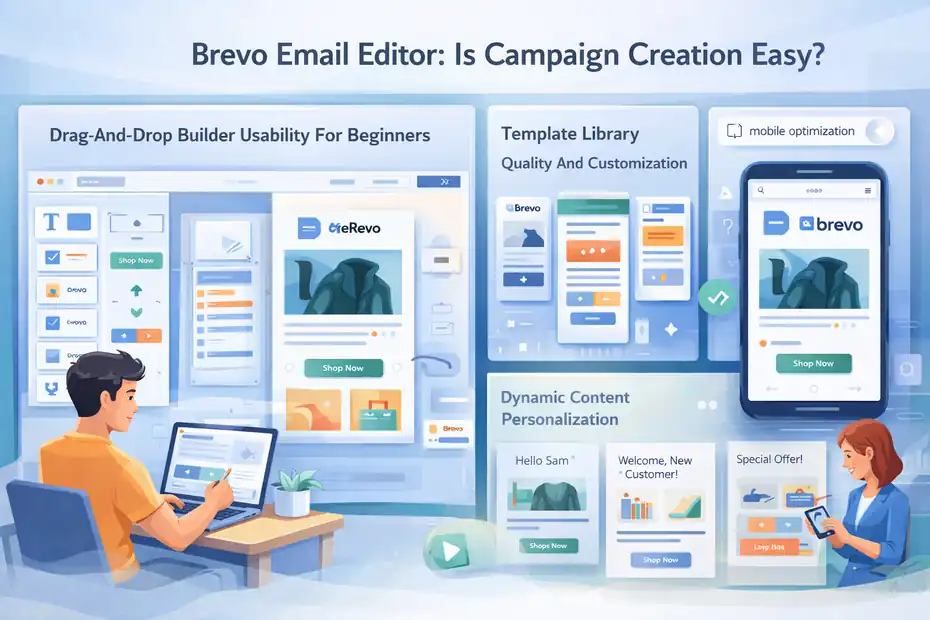
Even the best automation system won’t help if creating emails is frustrating. The usability of the email editor is one of the biggest factors when deciding should I use Brevo for email marketing.
Fortunately, Brevo’s campaign builder focuses heavily on simplicity.
Drag-And-Drop Builder Usability For Beginners
Brevo’s email editor uses a drag-and-drop interface. Instead of writing HTML code, you build emails by placing content blocks onto a canvas.
Each block represents a piece of the email layout:
- Text blocks
- Image sections
- Buttons
- Dividers
- Product sections
- Social media icons
Let me walk you through a typical workflow.
- Step 1: Choose a template or start with a blank layout.
- Step 2: Drag a text block into the email body.
- Step 3: Add an image block below the text.
- Step 4: Insert a button linking to your website.
Each block can be edited visually.
You can adjust:
- Fonts
- Colors
- Spacing
- Alignment
- Background sections
One thing I personally like is the live preview system. As you design the email, you can instantly see how it will look to subscribers.
For beginners, this removes a lot of anxiety about designing campaigns.
Most new users can build their first email campaign within 10–15 minutes, which is exactly what beginner-friendly email platforms should allow.
Template Library Quality And Customization Options
Brevo provides a library of pre-designed email templates. These templates help you avoid starting from scratch every time you create a campaign.
Templates are organized by use case, including:
- Newsletter templates
- Promotional offers
- Product announcements
- Event invitations
- Welcome emails
The templates are mobile-responsive by default, which means they automatically adjust to smaller screens.
However, templates are only starting points. Most businesses customize them to match their brand identity.
Typical customizations include:
- Changing brand colors
- Adding company logos
- Updating typography
- Adjusting spacing and layout
I usually recommend creating one master template for your brand. Once you design it properly, you can duplicate it for future campaigns instead of rebuilding emails each time.
This saves a surprising amount of time if you send emails regularly.
Mobile Optimization And Responsive Design Controls
Mobile optimization is no longer optional in email marketing. Over 60% of emails are opened on mobile devices, according to several industry studies.
Brevo’s email editor automatically generates responsive layouts, meaning the design adapts to smaller screens.
However, you can still adjust specific mobile settings manually.
Some useful controls include:
- Hiding certain sections on mobile
- Adjusting padding for smaller screens
- Resizing images automatically
- Previewing mobile layout before sending
For example, a large banner image might look great on desktop but feel overwhelming on mobile.
The editor allows you to hide that banner for mobile viewers while keeping it visible for desktop readers.
Before sending any campaign, I always recommend previewing the email in both desktop and mobile modes. Small layout issues are much easier to fix before hitting send.
Dynamic Content Personalization Capabilities
Personalization is one of the easiest ways to improve email engagement.
Brevo supports dynamic content fields that automatically insert subscriber information into emails.
Common personalization variables include:
- First name
- Company name
- Location
- Custom profile fields
Example: Instead of writing “Hello there,” you can write “Hello {{First Name}}.”
When the email is sent, the system replaces the placeholder with the subscriber’s actual name.
More advanced personalization can also display different content blocks based on subscriber data.
For example:
- Customers receive product recommendations.
- Leads receive educational content.
- Returning buyers receive loyalty offers.
This type of dynamic personalization helps emails feel less like mass marketing and more like direct communication.
Even small changes like adding first names can increase open rates and click rates in many cases.
Limitations Designers Often Encounter
While Brevo’s editor is beginner-friendly, designers sometimes encounter limitations when creating highly customized layouts.
Some of the common frustrations include:
- Limited advanced CSS customization options
- Less control over complex multi-column layouts
- Restricted font libraries compared with custom HTML emails
Professional designers who want pixel-perfect control often prefer coding emails manually.
However, manual coding comes with its own complications because email clients render HTML inconsistently.
For most marketers, the drag-and-drop editor strikes a good balance between simplicity and flexibility.
From what I’ve seen, the editor works best for:
- Standard newsletters
- Promotional campaigns
- Educational email sequences
- Ecommerce product highlights
Highly customized magazine-style email designs may require more advanced tools.
Brevo CRM And Sales Tools: Useful Or Just Extras?
One reason many people research should I use Brevo for email marketing is the platform’s built-in CRM. Instead of using separate tools for marketing and customer management, Brevo combines them into one system.
But the real question is whether these CRM features are actually useful or just extra clutter.
Built-In Contact CRM And Deal Pipelines
Brevo’s CRM allows you to manage contacts beyond simple email lists. Instead of storing only email addresses, you can create detailed customer profiles.
Each contact profile can include:
- Email engagement history
- Notes from conversations
- Tags and custom attributes
- Deal status inside sales pipelines
Pipelines allow you to track potential deals visually. Each lead moves through stages such as: Lead → Contacted → Proposal Sent → Negotiation → Won or Lost.
For service businesses, this can replace basic CRM tools entirely.
Imagine you run a web design agency.
Example: A potential client fills out your website contact form.
- Step 1: The lead automatically appears inside your CRM pipeline.
- Step 2: You assign the lead to a sales stage like “Discovery Call Scheduled.”
- Step 3: After the call, you move the deal to “Proposal Sent.”
All communication history remains connected to the contact profile.
This visibility helps prevent leads from slipping through the cracks.
Sales Automation And Task Management Features
Brevo also includes basic sales automation features that help teams follow up with leads more consistently.
You can automate tasks such as:
- Sending follow-up emails after form submissions
- Assigning leads to specific sales representatives
- Scheduling reminders for sales calls
- Updating deal stages automatically
Example: When a new lead fills out a quote request form.
- Step 1: The system automatically creates a contact record.
- Step 2: The lead is assigned to a sales pipeline stage.
- Step 3: A follow-up email is sent thanking them for the inquiry.
- Step 4: A task reminder appears for a salesperson to call the lead.
This type of automation ensures that every lead receives consistent follow-up.
In many small businesses, missed follow-ups are one of the biggest revenue leaks. Automation helps eliminate that problem.
Integrating Email Campaigns With Sales Activity
One of the most useful aspects of Brevo’s CRM is that email marketing data connects directly with customer profiles.
Instead of viewing campaign performance in isolation, you can see exactly how individual contacts interact with your emails.
For example, a sales team member might see:
- Which emails the contact opened
- Which links they clicked
- Which landing pages they visited
This insight can guide more personalized conversations.
Imagine you’re contacting a potential client who clicked a link about a specific product. The sales conversation can start with that exact topic instead of guessing their interest.
This type of visibility creates a smoother experience between marketing and sales activities.
Team Collaboration And Lead Tracking Tools
Brevo’s CRM also includes features designed for team collaboration.
Multiple team members can access contact profiles, update notes, and track interactions with leads.
Some useful collaboration features include:
- Shared pipelines visible to the whole team
- Internal notes attached to contacts
- Activity logs showing interactions over time
- Role permissions controlling user access
For small teams, this keeps everyone aligned.
Example: A marketing manager sees that a lead clicked several emails about a product. They add a note recommending a follow-up. The sales team then contacts the lead with the right message.
Without a shared CRM system, these insights often get lost.
When The CRM Becomes Valuable For Small Teams
The Brevo CRM becomes most valuable when a business reaches a stage where contacts need more structured management.
In my experience, the CRM becomes especially helpful for:
- Freelancers managing multiple client leads
- Small agencies handling inbound inquiries
- Consultants running discovery calls
- SaaS startups tracking trial users
If you only send newsletters and don’t interact directly with subscribers, you might never use the CRM features.
But once leads, deals, and conversations become part of your marketing process, having email and CRM data connected in one place can simplify workflows significantly.
For many small businesses, this integration is one of the hidden reasons Brevo becomes appealing as an all-in-one marketing platform.
Brevo Integrations: Can It Connect With Your Stack?
When deciding should I use Brevo for email marketing, integrations matter more than most people expect. Your email platform rarely operates alone. It needs to connect with your website, ecommerce store, CRM data, and sometimes custom applications.
Brevo supports a wide range of integrations that allow marketing data to flow automatically between systems. The real question is whether those integrations are strong enough for your specific workflow.
Ecommerce Integrations Including Shopify And WooCommerce
For ecommerce businesses, integrations are essential. You need your email platform to understand customer behavior such as purchases, abandoned carts, and product browsing.
Brevo integrates directly with platforms like Shopify and WooCommerce. These integrations sync store data with your email marketing system automatically.
Once connected, several important things happen behind the scenes:
- Customer accounts sync to your email contact database
- Order data becomes available for segmentation
- Product purchases trigger automation workflows
- Abandoned cart events can trigger recovery emails
Example scenario: Imagine you run an online store selling outdoor gear.
- Step 1: A customer adds hiking boots to their cart but leaves without purchasing.
- Step 2: The store integration detects the abandoned cart event.
- Step 3: An automated email reminds the customer about the boots.
This type of automation can recover a surprising amount of revenue. Many ecommerce stores report abandoned cart emails converting between 5% and 10% of lost orders.
The ecommerce integrations also allow segmentation using real purchase data. For example:
- Customers who bought product category A
- Customers who purchased in the last 30 days
- Customers with high lifetime value
That level of targeting makes email campaigns far more relevant.
CMS And Website Platform Integrations
Brevo also connects with several website platforms so forms, landing pages, and contact data can flow directly into your email list.
Common integrations include platforms like WordPress, which powers a large percentage of websites globally.
These integrations typically handle three main tasks:
- Capturing subscriber data through signup forms
- Tracking website activity from visitors
- Triggering automation when users perform actions
Example: Imagine you publish a blog post offering a free SEO checklist.
- Step 1: A visitor fills out the signup form on your website.
- Step 2: The integration automatically sends their email to your Brevo contact list.
- Step 3: An automation workflow sends the checklist download.
This process happens instantly without manual work.
Another benefit of website integrations is behavioral tracking. When visitors browse specific pages, that activity can trigger targeted email campaigns later.
For content creators, bloggers, and course creators, this connection between website activity and email automation becomes incredibly valuable.
Zapier Automation For Third-Party Connections
Not every platform has a direct integration with Brevo. This is where automation connectors become useful.
Brevo connects with Zapier, which acts as a bridge between thousands of software tools.
Zapier works by creating automated workflows called “Zaps.” A Zap listens for a trigger in one app and performs an action in another.
Example automation workflow:
- Trigger: A new lead submits a form in a project management tool.
- Action: Zapier adds the lead to your Brevo email list.
Another example:
- Trigger: A customer books a consultation through a scheduling tool.
- Action: Zapier sends their information to your email automation workflow.
This approach expands the number of potential integrations dramatically.
In practical terms, Zapier allows Brevo to connect with tools used for:
- Online forms
- Scheduling systems
- Customer support platforms
- Membership sites
- Payment systems
However, it’s worth noting that Zapier automation can introduce small delays depending on the plan used. For many businesses this is perfectly acceptable, but high-speed data syncing may require direct integrations instead.
API Capabilities For Custom Development
Brevo also provides a developer API. An API, or application programming interface, allows developers to connect software systems programmatically.
Instead of using pre-built integrations, developers can build custom connections between Brevo and internal systems.
Typical API use cases include:
- Sending transactional emails from applications
- Syncing customer data from custom databases
- Triggering automation workflows from external systems
- Managing contacts programmatically
Example scenario: A SaaS company runs a custom web application.
When a user signs up for the platform, the application automatically calls the Brevo API to:
- Create a contact record
- Apply user tags
- Trigger an onboarding email sequence
This level of flexibility is important for companies running complex software environments.
While most bloggers and small businesses won’t use the API directly, developers often rely on it to build scalable systems.
Integration Limitations That Affect Scaling
Brevo’s integration ecosystem works well for many small and medium businesses, but there are some limitations worth understanding.
A few common challenges appear when companies scale:
- Some integrations offer limited data synchronization fields
- Real-time behavioral tracking can be less advanced than enterprise marketing platforms
- Complex multi-system automation sometimes requires API customization
For example, large ecommerce companies often want extremely detailed customer behavior tracking across dozens of data points.
While Brevo supports common automation triggers, it may not track every possible user interaction across complex product catalogs.
From what I’ve seen, these limitations rarely affect beginners or small businesses.
But if you’re building highly advanced marketing systems with deep behavioral analytics, integration flexibility becomes more important over time.
Brevo Pros That Make It Attractive For Beginners
For many people researching should I use Brevo for email marketing, the biggest appeal comes from how beginner-friendly the platform feels.
Brevo focuses heavily on simplicity, affordability, and all-in-one functionality. For new creators and small businesses, these advantages can remove many of the barriers to starting email marketing.
Extremely Low Entry Cost For New Businesses
Email marketing platforms can become expensive quickly, especially when pricing is based on contact list size.
Brevo’s pricing model makes it easier for beginners to start without worrying about large upfront costs.
The free plan allows users to:
- Store unlimited contacts
- Send up to 300 emails per day
- Build automation workflows
- Design email campaigns
For someone launching their first newsletter or online business, this is more than enough to get started.
Let me give you a realistic scenario.
Example: Imagine you run a small blog and your email list grows to 2,000 subscribers.
If you send one weekly newsletter, you’re sending roughly 8,000 emails per month. With Brevo’s email-based pricing, the cost remains relatively low compared with platforms that charge based on contact count.
This pricing structure removes a common fear many beginners have: growing their email list too quickly and suddenly facing high monthly software costs.
All-In-One Marketing And CRM Platform
Another reason beginners choose Brevo is the number of tools available inside a single platform.
Instead of juggling several marketing tools, Brevo includes:
- Email marketing campaigns
- Automation workflows
- Contact CRM
- Landing page builders
- Signup forms
- SMS marketing features
For small teams or solo creators, having everything inside one dashboard simplifies daily operations.
Imagine running a small consulting business.
Your workflow might look like this:
- Step 1: A potential client signs up through a landing page.
- Step 2: Their contact record appears in your CRM.
- Step 3: An automated email sequence begins nurturing the lead.
- Step 4: You track the lead through your sales pipeline.
All of that happens within one platform.
This consolidation reduces the learning curve dramatically compared with managing multiple marketing tools.
Simple Interface For Non-Technical Users
One of the first things many users notice when opening Brevo is how straightforward the interface feels.
The dashboard organizes core features into simple categories such as:
- Campaigns
- Automation
- Contacts
- Conversations
- CRM
For non-technical users, this clarity matters a lot.
I’ve worked with many beginners who avoided email marketing simply because platforms looked intimidating. Complex dashboards often discourage new users before they even send their first campaign.
Brevo avoids that problem by focusing on guided workflows.
Example: When creating a campaign, the platform walks you through a step-by-step process:
- Step 1: Choose your email template.
- Step 2: Design your email layout.
- Step 3: Select the contact list.
- Step 4: Schedule the campaign.
This structure removes much of the confusion beginners experience with marketing software.
Built-In SMS And WhatsApp Marketing Channels
Brevo also includes additional messaging channels beyond email.
Two of the most interesting features are SMS and WhatsApp messaging.
These channels allow businesses to send:
- Appointment reminders
- Order updates
- Promotional alerts
- Event notifications
SMS marketing often produces extremely high engagement rates. Some studies show SMS open rates exceeding 90%.
For example, imagine you run a local gym.
Instead of sending only emails, you could send SMS reminders about:
- Upcoming fitness classes
- Membership renewal discounts
- Special promotions
WhatsApp messaging offers similar possibilities, particularly in regions where messaging apps dominate communication.
Having these channels inside the same platform allows businesses to experiment with multi-channel marketing without adopting additional software.
Scalable Contact Database For Growing Lists
As your audience grows, contact management becomes more important.
Brevo’s contact system allows you to store detailed subscriber information, including:
- Email engagement history
- Custom attributes like interests or preferences
- Tags for campaign segmentation
- Purchase activity from integrations
This structured data allows marketers to send highly targeted campaigns.
For example, you might tag subscribers based on:
- Content interests
- Past purchases
- Lead source
- Customer lifecycle stage
Over time, these tags help build extremely precise segmentation strategies.
From what I’ve seen, this flexibility allows businesses to grow from a few hundred subscribers to tens of thousands without needing to migrate platforms immediately.
Brevo Cons That Push Some Businesses Away
While Brevo works well for many users, it’s not perfect. Anyone seriously asking should I use Brevo for email marketing should also understand where the platform has limitations.
These drawbacks don’t necessarily make the tool bad, but they do influence whether it fits your specific business needs.
Automation Depth Compared With Advanced Platforms
Brevo’s automation builder is easy to use, but advanced marketers sometimes find it less powerful than specialized automation platforms.
For example, enterprise marketing systems often support:
- Deep behavioral scoring models
- Predictive engagement analysis
- Highly complex branching workflows
- Machine learning–driven campaign optimization
Brevo focuses on practical automation rather than advanced predictive systems.
For many businesses, this is actually helpful. Simpler workflows are easier to maintain.
However, companies running extremely sophisticated marketing funnels may eventually need deeper automation capabilities.
Example: A SaaS company tracking dozens of in-app behaviors may require automation triggered by highly detailed user events. Brevo supports many triggers, but not every possible data signal.
Reporting And Analytics Limitations
Analytics is another area where Brevo is solid but not exceptionally advanced.
The platform provides core metrics such as:
- Open rates
- Click-through rates
- Bounce rates
- Unsubscribe rates
These metrics are enough for most marketers to evaluate campaign performance.
However, more advanced analytics features may be limited compared with enterprise marketing tools.
Examples of advanced analytics some marketers expect include:
- Deep revenue attribution models
- Multi-channel performance tracking
- Complex funnel analytics across multiple customer touchpoints
For many bloggers and small businesses, these advanced analytics are unnecessary. But larger marketing teams often rely heavily on detailed performance analysis.
Deliverability Concerns With Shared Infrastructure
As mentioned earlier, Brevo primarily uses shared sending infrastructure.
Shared infrastructure means multiple users send emails from the same group of servers.
The advantage is simplicity. The downside is that your deliverability can occasionally be influenced by other senders sharing the same infrastructure.
Email providers evaluate sending reputation partly at the server level. If multiple users generate spam complaints, it can affect the overall reputation of that sending environment.
Most reputable platforms monitor their networks closely to reduce this risk.
For most small senders, deliverability remains perfectly acceptable.
But large senders sometimes prefer dedicated infrastructure to maintain full control over their sending reputation.
Limited Template Customization For Designers
Brevo’s drag-and-drop editor works well for marketers who want to create campaigns quickly.
However, designers who prefer advanced layout control sometimes encounter limitations.
Some examples include:
- Restricted control over complex grid layouts
- Limited font customization options
- Less flexibility for advanced CSS styling
Professional email designers often prefer coding custom HTML templates for maximum design control.
That said, custom HTML emails require additional testing across email clients, which can become complicated quickly.
For most everyday marketing campaigns, the visual editor provides enough flexibility.
Scaling Challenges For High-Volume Senders
Brevo works well for small and medium businesses, but high-volume senders sometimes encounter scaling challenges.
Companies sending millions of emails each month often require:
- Dedicated sending infrastructure
- Highly advanced deliverability monitoring
- Deep behavioral data integrations
- Sophisticated segmentation models
At that level of complexity, specialized enterprise platforms may offer more advanced infrastructure.
However, most creators, freelancers, startups, and small ecommerce businesses never reach those extreme sending volumes.
From what I’ve seen, Brevo comfortably supports email lists ranging from a few hundred to tens of thousands of subscribers before scaling limitations become noticeable.
Businesses That Should Use Brevo For Email Marketing
Not every email marketing platform fits every business model. If you’re asking should I use Brevo for email marketing, the answer often depends on your business type, marketing complexity, and growth stage.
Brevo tends to perform best for businesses that need affordable automation, simple campaign creation, and an all-in-one marketing dashboard without enterprise-level complexity.
Bloggers And Content Creators Starting Email Lists
Brevo is especially appealing for bloggers and creators who are just starting to build an audience. At this stage, most creators want three things: an easy way to collect subscribers, a simple email editor, and basic automation.
Brevo covers these needs without overwhelming beginners.
Imagine you’re starting a blog about travel photography.
- Step 1: You create a signup form offering a free guide called “10 Camera Settings Every Traveler Should Know.”
- Step 2: The subscriber joins your email list automatically.
- Step 3: A welcome email delivers the free guide instantly.
- Step 4: Over the next week, a short email sequence introduces your content.
This type of welcome funnel is simple to build and extremely effective.
In my experience, many creators delay starting email marketing because they assume it requires technical skills. Platforms like Brevo remove that barrier.
Another advantage is the pricing model. Since many bloggers send newsletters weekly rather than daily, the cost remains low even as the subscriber list grows.
For creators building newsletters, educational email series, or community updates, Brevo usually provides everything needed without unnecessary complexity.
Small Ecommerce Stores With Basic Automation Needs
Brevo also works well for small ecommerce businesses that want to automate common email marketing campaigns.
A typical small online store might need automations such as:
- Welcome emails for new subscribers
- Abandoned cart reminders
- Post-purchase follow-up emails
- Promotional campaigns
These workflows are exactly the type of automation Brevo handles well.
Imagine you run a small store selling handmade candles.
Example automation: A customer abandons their cart.
- Email 1: A reminder email sent one hour later.
- Email 2: A helpful email describing the candle scents.
- Email 3: A small discount offer if the purchase still hasn’t been completed.
Even simple abandoned cart flows like this can recover lost revenue.
Many ecommerce studies suggest abandoned cart emails recover between 5% and 15% of potential sales.
For stores with moderate product catalogs and basic marketing automation needs, Brevo offers enough flexibility without requiring enterprise-level tools.
Freelancers And Agencies Managing Client Campaigns
Freelancers and small marketing agencies often manage email campaigns for multiple clients simultaneously. In these situations, simplicity and organization become extremely important.
Brevo’s contact management and campaign tools make it easier to handle multiple audiences.
For example, imagine you’re a freelance marketing consultant working with three local businesses.
- Client 1: A fitness studio sending weekly class updates.
- Client 2: A restaurant promoting seasonal menu items.
- Client 3: A real estate agent sharing new property listings.
Instead of managing separate tools for each client, you can organize lists, campaigns, and automation sequences inside one dashboard.
Another helpful feature is the built-in CRM functionality. When leads submit forms or inquiries, those contacts can move into sales pipelines automatically.
For freelancers who want one platform to manage email campaigns, basic CRM tracking, and lead nurturing, Brevo offers a convenient setup.
Local Businesses Running Promotions And Newsletters
Local businesses often underestimate how effective email marketing can be for maintaining customer relationships.
Restaurants, gyms, salons, and service providers can use email to maintain regular contact with their customer base.
Example campaigns local businesses often send:
- Monthly newsletters with promotions
- Seasonal discounts
- Event announcements
- Loyalty program updates
Imagine you run a local yoga studio.
Example campaign strategy:
- Week 1: Email announcing a new class schedule.
- Week 2: Email sharing a yoga tip or health article.
- Week 3: Promotion for a discounted monthly membership.
These types of campaigns help businesses stay visible without relying entirely on social media algorithms.
Brevo works well here because campaigns are easy to create and automate.
Local businesses rarely require extremely complex automation systems, which makes Brevo a practical solution.
Startups Looking For Low-Cost Marketing Tools
Startups typically operate under tight budgets while experimenting with different marketing strategies.
Brevo’s pricing model makes it attractive during this early stage.
Many startups need:
- Landing pages for early lead capture
- Email onboarding sequences
- Product announcement campaigns
- Customer feedback emails
Example scenario: A startup launches a new productivity app.
- Step 1: Early adopters join a waiting list.
- Step 2: Subscribers receive an onboarding email sequence explaining the product.
- Step 3: Product launch emails announce new features.
This type of email-driven product launch can help startups build an engaged audience even before their product becomes widely known.
Because Brevo allows unlimited contacts on lower-cost plans, startups can grow their list without worrying about large price jumps early on.
Situations Where Brevo Is Not The Best Choice
While Brevo works well for many businesses, it’s not always the ideal solution. Some companies require more advanced capabilities than Brevo currently provides.
Understanding these limitations can help you decide whether the platform fits your long-term marketing strategy.
Large Ecommerce Brands Needing Advanced Segmentation
Large ecommerce companies often rely on extremely detailed customer segmentation.
Instead of simple segments like “recent buyers” or “newsletter subscribers,” these businesses analyze dozens of data points simultaneously.
Examples of advanced segmentation include:
- Customers who viewed product category A but bought product category B
- High-value customers who haven’t purchased in 60 days
- Shoppers who abandoned carts multiple times
These advanced targeting strategies require deep behavioral tracking.
While Brevo supports basic segmentation, large ecommerce brands often require more sophisticated customer data platforms that track hundreds of behavioral signals.
In these environments, segmentation complexity increases rapidly as product catalogs grow.
For example, a store selling thousands of products across multiple categories often needs far deeper behavioral analysis than basic automation systems provide.
SaaS Companies Requiring Deep Behavioral Automation
Software-as-a-service companies rely heavily on behavioral automation.
Unlike simple marketing campaigns, SaaS email systems often respond to very specific user actions inside the application.
Examples include:
- A user completes their first task in the software
- A user stops logging in for several days
- A user upgrades or downgrades their subscription plan
These events trigger highly customized email flows designed to improve product adoption.
Example SaaS automation:
- Email 1: Sent when a user creates an account.
- Email 2: Triggered when they complete their first project.
- Email 3: Sent if they stop using the product for five days.
These types of automations often require deep integrations between the application database and the email system.
Brevo can support some of these workflows, but large SaaS companies often rely on platforms designed specifically for product-led growth automation.
Businesses Sending Millions Of Emails Monthly
Large organizations sending massive email volumes usually require specialized infrastructure.
At this scale, companies often need:
- Dedicated sending infrastructure
- Advanced deliverability monitoring
- Reputation management tools
- Custom sending environments
For example, companies sending millions of emails monthly often monitor:
- Inbox placement rates across different providers
- Spam complaint trends across segments
- Server-level sending reputation
These technical requirements go far beyond what most small business platforms are designed to handle.
Brevo works well for moderate sending volumes, but extremely large-scale email operations often rely on enterprise-level infrastructure.
Teams That Need Enterprise-Level Analytics
Some marketing teams depend heavily on deep analytics.
Instead of focusing only on open rates and click rates, they track:
- Multi-touch attribution models
- Cross-channel conversion paths
- Customer lifetime value by campaign
- Predictive churn analysis
These types of advanced analytics require sophisticated reporting tools and data integration systems.
Brevo provides useful campaign analytics, but enterprise marketing teams often require deeper data modeling capabilities.
For organizations running large multi-channel marketing departments, analytics requirements can exceed what simpler platforms offer.
Marketers Running Complex Multi-Channel Funnels
Modern marketing often involves multiple channels working together simultaneously.
A typical funnel might include:
- Paid advertising campaigns
- Email automation sequences
- SMS reminders
- Retargeting campaigns
- In-app notifications
Managing all these channels in a unified system requires highly advanced automation infrastructure.
While Brevo supports multiple messaging channels, extremely complex multi-channel orchestration can become difficult to manage inside simpler platforms.
For marketers running large-scale funnel systems across multiple channels and data sources, specialized marketing automation tools may offer greater flexibility.
Brevo Alternatives Worth Considering In 2026
Even if you’re leaning toward Brevo, it’s smart to compare alternatives before making a final decision. Different platforms excel in different areas depending on your marketing goals.
Here are several well-known alternatives worth evaluating.
Kit For Creator-Focused Email Marketing
Kit is designed specifically for creators, bloggers, and online educators.
The platform focuses heavily on audience relationships and creator monetization.
Key strengths include:
- Creator-friendly automation workflows
- Simple tagging systems for subscriber segmentation
- Built-in tools for selling digital products
- Landing pages designed for creators
In my experience, many content creators prefer Kit because its workflow builder focuses on audience journeys rather than traditional marketing funnels.
For bloggers and newsletter creators whose primary goal is audience engagement rather than ecommerce sales, Kit can be a strong alternative.
ActiveCampaign For Advanced Automation Funnels
ActiveCampaign is known for its extremely powerful automation engine.
The platform allows marketers to build complex behavioral workflows with deep segmentation and predictive analytics.
Examples of advanced capabilities include:
- Behavioral scoring models
- Predictive sending optimization
- Highly complex conditional logic
For businesses running advanced marketing funnels with many behavioral triggers, ActiveCampaign offers significantly deeper automation capabilities.
However, this power also comes with a steeper learning curve.
Many beginners find ActiveCampaign more complex than Brevo, which is why Brevo remains appealing for simpler marketing setups.
Mailchimp For Ecommerce Integrations And Templates
Mailchimp remains one of the most widely recognized email marketing tools.
Mailchimp offers:
- Large template libraries
- Ecommerce-focused marketing features
- Extensive integrations with online store platforms
Many small ecommerce stores choose Mailchimp because of its extensive ecosystem and easy campaign design tools.
However, pricing can increase quickly as subscriber lists grow, which is one reason some users eventually migrate to alternative platforms.
Klaviyo For Data-Driven Ecommerce Marketing
Klaviyo is built specifically for ecommerce brands.
Unlike general-purpose email platforms, Klaviyo integrates deeply with online store data.
This allows highly detailed customer segmentation using data such as:
- Product browsing history
- Purchase frequency
- Average order value
- Product category preferences
For serious ecommerce marketers running advanced lifecycle campaigns, Klaviyo often provides deeper insights and targeting capabilities.
However, its pricing and complexity may be excessive for small businesses just starting out.
GetResponse For Webinar And Funnel Marketing
GetResponse focuses heavily on marketing funnels and online events.
The platform includes tools for:
- Webinar hosting
- Landing page builders
- Automated marketing funnels
- Email campaigns
Businesses selling online courses or hosting educational webinars often choose GetResponse because these features are built directly into the platform.
Compared with Brevo, GetResponse leans more heavily into full marketing funnel creation rather than simple email marketing workflows.
Final Verdict: Should I Use Brevo For Email Marketing?
After reviewing features, pricing, automation capabilities, and alternatives, the final question becomes clear: should I use Brevo for email marketing or choose a different platform?
The answer depends largely on your business stage and marketing complexity.
When Brevo Is A Smart Choice
Brevo works particularly well for businesses that want a simple, affordable email marketing system with essential automation features.
From what I’ve seen, Brevo is often a great choice for:
- Bloggers building their first email list
- Small ecommerce stores with basic automation needs
- Freelancers managing client campaigns
- Local businesses sending promotional newsletters
- Startups testing early marketing strategies
These businesses usually prioritize simplicity and affordability over complex enterprise-level marketing tools.
Brevo provides enough automation and segmentation to run effective campaigns without requiring deep technical knowledge.
For many users, this balance between functionality and simplicity makes it an excellent starting platform.
When You Should Choose A Different Platform
Brevo may not be the best option for businesses requiring highly advanced marketing infrastructure.
You might consider alternatives if your business requires:
- Advanced behavioral automation systems
- Deep ecommerce customer segmentation
- Enterprise-level marketing analytics
- Extremely high email sending volumes
Large marketing teams often need specialized tools capable of managing extremely complex marketing ecosystems.
In these cases, platforms built specifically for advanced automation or ecommerce marketing may offer better long-term scalability.
Quick Checklist Before Committing To Brevo
If you’re still unsure whether Brevo is the right platform, this quick checklist can help clarify your decision.
Ask yourself these questions:
- Do you need simple email campaigns and automation rather than complex marketing systems?
- Are you looking for an affordable platform that scales with your email volume?
- Do you want email marketing, CRM, and messaging tools in one dashboard?
- Is your email list currently under 50,000 subscribers?
If you answered yes to most of these questions, Brevo will likely meet your needs very well.
If your marketing strategy requires extremely advanced automation or enterprise-level analytics, exploring alternative platforms might be a better long-term decision.
For many creators, startups, and small businesses, Brevo strikes a practical balance between simplicity, cost, and functionality.
FAQ
What Is Brevo And How Does It Work For Email Marketing?
Brevo is an email marketing platform that allows businesses to send campaigns, automate email sequences, manage contacts, and track engagement. It combines email marketing, CRM tools, and automation workflows in one dashboard, making it easier for small businesses and creators to manage subscribers and marketing campaigns.
Should I Use Brevo For Email Marketing As A Beginner?
Yes, Brevo can be a good option for beginners because it offers a simple interface, automation tools, and affordable pricing. Many bloggers, freelancers, and small businesses choose it because they can create campaigns, automate emails, and manage contacts without needing advanced technical skills.
Is Brevo Good For Ecommerce Email Marketing?
Brevo works well for small ecommerce stores that need basic automation such as welcome emails, abandoned cart reminders, and promotional campaigns. However, larger ecommerce brands with complex customer segmentation and advanced behavioral targeting may prefer platforms designed specifically for ecommerce marketing.
What Are The Biggest Advantages Of Using Brevo?
Brevo’s biggest advantages include affordable pricing, simple automation workflows, built-in CRM tools, and multiple marketing channels like email and SMS. It allows businesses to manage campaigns, leads, and customer communication in one platform without needing several separate marketing tools.
When Should You Avoid Using Brevo For Email Marketing?
You may want to avoid Brevo if your business requires enterprise-level analytics, complex marketing automation, or extremely high email volumes. Large ecommerce brands, SaaS companies with deep behavioral automation, and advanced marketing teams may need more specialized platforms.

I’m Juxhin, the voice behind The Justifiable.
I’ve spent 6+ years building blogs, managing affiliate campaigns, and testing the messy world of online business. Here, I cut the fluff and share the strategies that actually move the needle — so you can build income that’s sustainable, not speculative.
Related posts:
 Target Audience: How to Effectively Leverage It for Email Marketing
 What Is Aweber Communications
 How to Master AWeber Email Marketing in Just a Few Steps
 Top Aweber Competitors Compared: Best Email Tools
 How to Use Aweber Pro for Smarter Email Marketing
 Best Email Marketing Solutions to Nurture Leads and Boost Sales