
Table of Contents
Some links on The Justifiable are affiliate links, meaning we may earn a small commission at no extra cost to you. Read full disclaimer.
The real question in a wp engine vs hostinger wordpress hosting comparison is not which host is “better” in the abstract.
It is which one gives you the best value for the kind of WordPress site you actually run. That is where most reviews get lazy. They compare headline prices and call it a day.
I think that misses the point. Hosting value is really a mix of speed, support, included features, room to grow, and how much technical stress you want to carry yourself.
In this guide, I’ll break it down from beginner setup to advanced decision-making so you can choose once and not regret it later.
What This Comparison Is Really Measuring
A good hosting comparison should not stop at “cheap vs premium.”
You need to know what each company is optimized to do, who it is built for, and where the tradeoffs start to matter.
What WP Engine Is Actually Selling
When you look past the branding, WP Engine is selling managed WordPress depth. Its plans include daily and on-demand backups, one-click staging, automatic WordPress and PHP updates, CDN access, and WordPress-focused support.
WP Engine also positions itself as a platform for businesses, agencies, and sites where uptime, workflow, and technical help matter more than getting the lowest monthly bill.
What that means in practice: You are paying for less maintenance overhead. If your site makes money, handles client work, or cannot afford sloppy plugin conflicts, that has real value.
In my experience, WP Engine makes the most sense when the cost of one bad outage is higher than the hosting premium.
What Hostinger Is Actually Selling
Hostinger is selling affordability with a strong feature bundle.
Its WordPress plans start far lower, include managed WordPress features, and add things that appeal to beginners and small operators, like a free domain on annual managed WordPress plans, AI-powered WordPress tools, free migration, and 24/7 support through chat or email.
Business and higher plans add daily and on-demand backups, staging, and free CDN.
Why that matters: If you are launching a blog, affiliate site, local business site, or side project, Hostinger often gives you enough performance and convenience before premium managed hosting becomes necessary.
I would call it the better “cost-per-feature” pick for early-stage sites.
The Core Value Test You Should Use
Here is the simplest way I’d frame the choice:
| Value Question | WP Engine | Hostinger |
|---|---|---|
| Lowest upfront cost | No | Yes |
| WordPress-specific support depth | Stronger | Good, but broader |
| Best for one serious business site | Often yes | Sometimes |
| Best for many low-cost sites | Usually no | Often yes |
| Advanced workflow convenience | Stronger | Solid on higher tiers |
| Beginner-friendly price | No | Yes |
That table is the real heart of this wp engine vs hostinger wordpress hosting comparison. Value changes depending on whether you are protecting revenue or stretching budget.
Pricing And Renewal Costs: Where Value Starts To Split
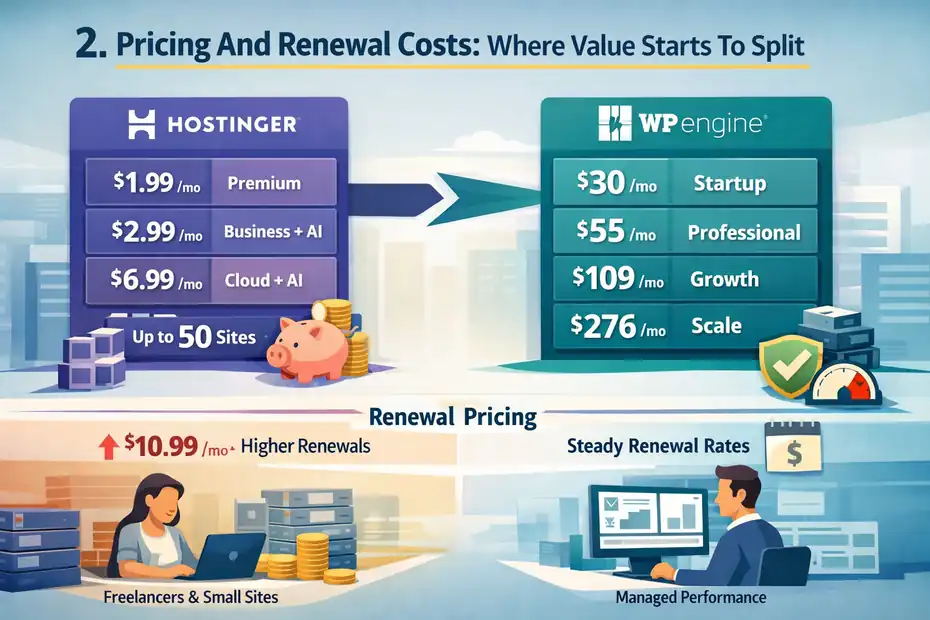
Pricing is the first thing most people compare, but it is also the easiest place to get fooled because introductory rates and renewal rates tell two very different stories.
Entry Pricing Favors Hostinger By A Mile
Hostinger’s managed WordPress lineup currently starts at $1.99 per month for Premium, $2.99 per month for Business + AI, and $6.99 per month for Cloud Startup + AI on long-term promotional terms.
WP Engine’s WordPress plans start at $30 per month for Startup, then $55 for Professional, $109 for Growth, and $276 for Scale.
My take: For pure affordability, there is no contest. If you are paying out of pocket and trying to get a WordPress site online with the least financial friction, Hostinger wins immediately. A beginner can get years of hosting for less than a couple months on WP Engine.
Renewal Pricing Matters More Than Intro Deals
Hostinger’s low intro pricing renews much higher. The Premium plan renews at $10.99 per month, Business + AI at $16.99 per month, and Cloud Startup + AI at $25.99 per month on the current offers shown.
WP Engine’s pricing is much higher from the start, but it is also more transparent about being a premium managed platform rather than a discount-first host.
That means Hostinger’s “best value” story is strongest when you are comfortable with long-term signup discounts and still find the renewal acceptable.
I always recommend checking the renewal rate first, because that is the number you live with after the excitement wears off.
Cost Per Site Changes The Math
WP Engine Startup includes 1 site, Professional includes 3, Growth includes 10, and Scale includes 30. Hostinger’s current WordPress offers show 3 websites on Premium, 50 on Business + AI, and 100 on Cloud Startup + AI.
This is where Hostinger becomes hard to ignore for freelancers, niche site builders, and small agencies managing many modest sites.
Even if WP Engine gives a smoother managed experience, Hostinger can crush it on cost per install. For someone running ten lightweight content sites, that difference is not small.
It is structural.
Performance, Caching, And Real-World Speed Potential
Performance is where cheap hosting can become expensive later. A slow site hurts rankings, user experience, and conversion rate. So the real question is not who says “fast” louder.
It is what each platform includes to help WordPress stay fast under normal use and growth.
WP Engine Leans On A Tighter Managed Stack
WP Engine highlights proprietary EverCache, a global CDN included on every plan, automated updates, backups, and a WordPress-only infrastructure.
Its support materials say every plan includes a global CDN, and its platform pages emphasize that EverCache and CDN are built into the environment.
WP Engine also says sites migrated to its platform can see speed gains, though I would treat those vendor claims as directional rather than universal guarantees.
What I think this means: WP Engine is trying to reduce the number of performance decisions you have to make yourself.
That is valuable when you want predictable WordPress performance and do not want to play plugin roulette every time traffic spikes or a theme update lands.
Hostinger Packs In More Than You Might Expect
Hostinger’s WordPress plans include WordPress acceleration features, and Hostinger’s own support content says LiteSpeed Cache is automatically installed for WordPress users.
Business and Cloud Startup also add free CDN, staging, and daily plus on-demand backups, while Hostinger support content says object cache can be enabled by default once LiteSpeed Cache is installed.
That is why Hostinger performs better than many people assume. It is not “bare bones cheap hosting.”
It gives you a reasonable modern performance setup for the money, especially if you are on Business or above. For a content site, portfolio, or small business brochure site, that can be plenty.
Which One Is Better For Speed?
For high-stakes business sites, I would still lean WP Engine. Not because Hostinger is slow, but because WP Engine’s entire offer is more tightly built around managed WordPress performance, caching, expert help, and operational stability.
For budget-conscious sites, Hostinger gives better performance value per dollar.
That distinction matters. A $2.99 to $6.99 plan does not need to outperform a $30 plan to be the better value. It only needs to be fast enough for your actual business model. That is where a lot of buyers overbuy.
Features You Actually Get: Backups, Staging, Security, And Workflow
This is where the comparison gets practical.
You are not buying “hosting” as an abstract thing. You are buying a bundle of risk reduction and daily convenience.
Backups And Recovery
WP Engine includes daily and on-demand backups and says restores can be done with a single click. Hostinger includes weekly auto backups on Premium, while Business and Cloud Startup add daily and on-demand backups.
Why this matters: If you update plugins often, test design changes, or run WooCommerce, backup frequency becomes a real business issue.
I would not personally run a revenue site on a plan without daily backups unless the savings were absolutely necessary and I had a second backup system in place.
Staging Environments
WP Engine includes one-click staging as a core managed feature.
Hostinger includes a WordPress staging tool on Business and Cloud Startup, and its support materials explain that publishing from staging can replace files and databases on the live site, which is exactly the kind of warning you want a host to make clear.
For developers and careful site owners, staging is a huge deal. It means you can test plugin changes, theme edits, and checkout updates without breaking the live site.
If you only edit content, you may not use it much. If you touch code, layout, forms, or eCommerce, you will care a lot.
Security And Protection
WP Engine says every plan includes a managed web application firewall, DDoS mitigation, automated security patching, malware scanning, SSL certificates, daily backups, and 24/7 threat detection.
Hostinger says its managed WordPress plans include a web application firewall, secure access manager, WordPress malware scanner, unlimited SSL, and automatic updates for WordPress core, themes, and plugins, with enhanced DDoS protection on Business and Cloud Startup.
That is a strong showing from both hosts. The difference is not that Hostinger lacks security. It is that WP Engine packages security as part of a higher-touch managed platform, while Hostinger packages it as a high-value feature set inside a more budget-oriented ecosystem.
Ease Of Use For Beginners, Small Businesses, And Non-Technical Users
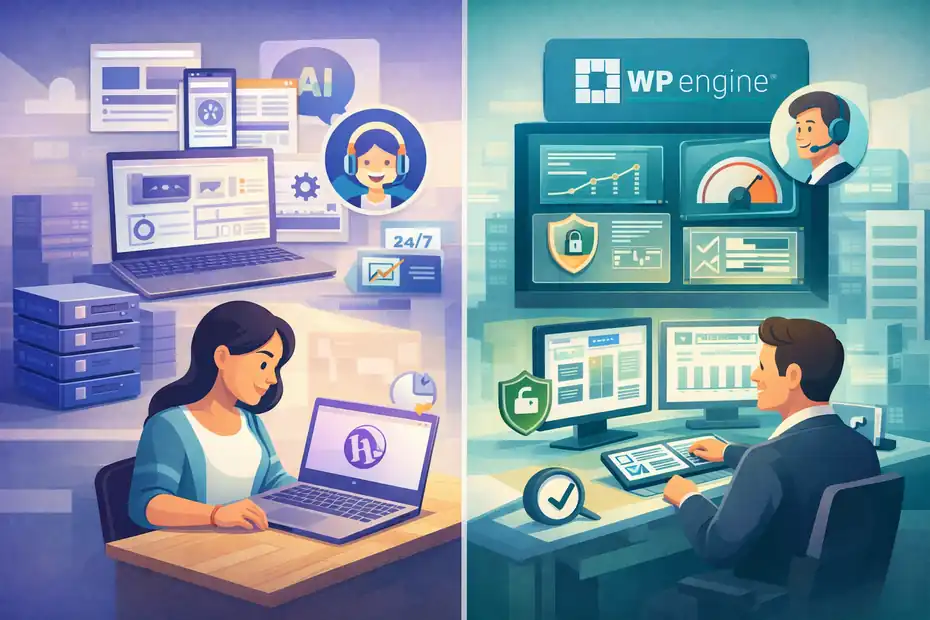
A host can have excellent specs and still be a bad fit if the control panel, setup flow, or support style makes you feel like you are babysitting the server.
Hostinger Is Easier To Recommend To Beginners
Hostinger leans hard into beginner-friendly setup. Its WordPress plans include free migration, free domain on annual plans, AI-powered site creation and troubleshooting on higher plans, and managed WordPress features aimed at reducing setup friction. The company also says support is available 24/7 through live chat or email and aims to respond in under two minutes.
I think this is one of Hostinger’s biggest strengths. If you are building your first site, the combination of low price, onboarding help, and AI-assisted tools can remove a lot of that “I have no idea what I’m doing” feeling. That matters more than advanced developer features for many users.
WP Engine Is Easier To Trust Once The Site Matters
WP Engine is not hard to use, but its value is more obvious after you have already felt the pain of WordPress maintenance.
It emphasizes expert support, migration guidance on eligible plans, a 40-point performance and security checklist, and platform-level help with uptime and performance issues.
That feels different from entry-level hosting. It feels more like having a specialist team around your site.
For a founder, marketer, or agency that has already been burned by plugin conflicts, slow support, or risky migrations, that difference can be worth the monthly premium very quickly.
The Best Fit Depends On Your Stress Tolerance
Here is the plain-English version:
- Choose Hostinger when low cost, fast setup, and “good enough plus extras” are the priority.
- Choose WP Engine when you want fewer operational surprises and stronger WordPress-specific support around a serious site.
I believe that is the most honest interpretation of value here. One is not replacing the other. They are solving different buyer problems.
Support, Migrations, And Help When Something Breaks
Support quality looks boring right up until the moment your site goes down five minutes before a campaign launch.
WP Engine Has The Stronger WordPress Support Positioning
WP Engine says it offers true 24/7/365 support from trained WordPress experts, with 90% of cases fixed on the first interaction.
It also distinguishes between support levels, with chat support on smaller plans and chat plus phone support with faster escalation on higher tiers.
That is one of the clearest reasons people pay for WP Engine. You are not just paying for server space. You are paying for a support model built around WordPress operations.
If your team is small and you need someone to help stabilize problems, that can be a major part of the value equation.
Hostinger Support Is Better Than Many Budget Buyers Expect
Hostinger offers 24/7 support, says its agents are multilingual, and promotes live chat as its main support channel. It also includes free website migration and says unlimited free WordPress and other website migrations are available after purchase.
That is excellent for the price. The tradeoff is more about specialization than availability. In other words, Hostinger support is very accessible, but WP Engine’s pitch is that its support is more deeply centered on WordPress technical operations.
That is the distinction I would pay attention to, not just “both have 24/7 support.”
Migration Scenarios
For straightforward site moves, Hostinger’s free migration is attractive. For more complex WordPress sites, WP Engine highlights expert migration support on eligible plans, including DNS, SSL, and environment configuration help.
So the smarter question is not “Who offers migration?” Both do. The smarter question is “How risky is my site?” If you are moving a basic brochure site, Hostinger is usually enough.
If you are moving a membership, store, or client-critical site, WP Engine’s managed migration support starts looking more compelling.
Which Host Is Better For Different Types Of WordPress Sites?
This is the section most readers actually need, because hosting value is always tied to site type.
Best For A Personal Blog Or Portfolio
For a personal blog, resume site, hobby site, or simple portfolio, Hostinger is usually the better value.
The entry price is dramatically lower, the setup is easier, and you still get managed WordPress support features without paying enterprise-style rates.
A lot of new site owners think they need premium managed hosting from day one. Usually, they do not.
Unless your site has unusual performance needs or business risk, Hostinger will cover this use case comfortably.
Best For A Small Business Site
This one is more nuanced. A local business site with modest traffic can do very well on Hostinger Business + AI because you get daily backups, staging, free CDN, and strong value pricing.
A more established business relying on lead generation, paid traffic, and frequent site changes may get more peace of mind from WP Engine.
I usually suggest thinking in terms of downside risk. If one broken form or slow landing page costs you real leads, WP Engine starts to make more sense. If your budget is tighter and your operations are simpler, Hostinger often wins the value argument.
Best For WooCommerce Or Revenue Sites
WP Engine’s broader managed platform and premium support make it appealing for revenue-sensitive WordPress sites, especially when checkout stability, uptime, and growth support matter.
Hostinger also has WooCommerce-ready plans and includes daily backups, staging, free CDN, and AI tools on higher tiers.
My honest opinion: For a small new store, Hostinger can be a perfectly rational choice. For a store doing meaningful revenue, I would personally lean toward WP Engine unless budget forces otherwise. Revenue sites punish cheap mistakes.
Best For Agencies And Multi-Site Setups
Hostinger is extremely strong on raw economics for many smaller installs because Business and Cloud plans allow far more websites.
WP Engine, on the other hand, has stronger agency-oriented positioning, transferable workflows, and platform credibility for agencies serving clients who care about reliability and support.
If your agency model is high-volume, low-cost site management, Hostinger is hard to beat. If your agency sells premium retainers and wants a stronger managed infrastructure story, WP Engine can justify itself much more easily.
Common Buying Mistakes In A WP Engine Vs Hostinger WordPress Hosting Comparison
This part matters because the wrong hosting choice usually comes from using the wrong buying criteria.
Mistake 1: Comparing Only Promo Price
The cheapest monthly number is not the real cost. Renewal rates, included backups, support quality, and time saved all affect value.
Hostinger wins headline affordability, but you should compare the full lifecycle cost, not just the first checkout screen.
Mistake 2: Buying Premium Hosting For A Site That Does Not Need It
I see this all the time. Someone launches a simple content site with almost no traffic and buys a premium managed host because they assume more expensive means more “professional.”
Sometimes that is just wasted budget.
Hostinger’s managed WordPress stack is enough for many low-complexity sites.
Mistake 3: Going Too Cheap For A Mission-Critical Site
The reverse mistake is just as common. A business site that supports paid ads, sales, or client delivery should not be evaluated only on price.
WP Engine’s support structure, managed security, staging, backups, and WordPress focus can reduce the risk of expensive downtime or messy updates.
Mistake 4: Ignoring Workflow Features
Staging, backup cadence, migration help, CDN setup, and support escalation are not “nice extras.” They shape how stressful your site ownership becomes.
A host that saves you two emergencies a year can be the better value even if it costs more per month.
My Verdict: Which One Offers Better Value In 2026?
This is the part where I stop being diplomatic.
Hostinger Is The Better Budget Value
If your goal is to spend as little as possible while still getting modern WordPress hosting features, Hostinger is the winner.
The pricing gap is huge, the feature set is generous, and the higher WordPress tiers include the things most growing sites actually need: daily backups, staging, CDN, security features, AI tools, and free migration.
For beginners, bloggers, smaller businesses, and multi-site users watching costs, Hostinger gives the stronger value-to-price ratio.
I would not call it the “better host” in every sense, but I would absolutely call it the better bargain.
WP Engine Is The Better Premium Value
WP Engine wins when your definition of value includes expert support, managed security, smoother workflows, and lower operational risk.
Its plans are far more expensive, but they are built around a deeper managed WordPress experience rather than discount hosting economics.
If your site is central to revenue, lead generation, publishing, or client service, WP Engine can absolutely be the better value despite the price. In those situations, saving money on hosting but losing time, stability, or support quality is often false economy.
The Simplest Recommendation I Can Give You
Choose Hostinger if you want the lowest cost and a surprisingly complete WordPress toolkit for small to mid-level needs.
Choose WP Engine if you want a more premium managed WordPress platform and the cost of site issues would hurt more than the monthly fee.
That is the clearest answer to this wp engine vs hostinger wordpress hosting comparison. Hostinger wins value for budget-conscious users.
WP Engine wins value for business-critical WordPress users. Neither answer is flashy, but it is the one most people actually need.
Final Decision Framework Before You Buy
You do not need one more vague recommendation. You need a buying filter you can use today.
Choose Hostinger If These Statements Sound Like You
- I am launching a new site and want to keep costs low.
- I want a free domain, easy migration, and beginner-friendly setup.
- I manage several smaller sites and care about cost per site.
- I want daily backups, staging, and CDN without premium-managed pricing, so I am fine choosing Business or Cloud Startup.
Choose WP Engine If These Statements Sound Like You
- My WordPress site is important enough that better support is worth paying for.
- I want a stronger managed environment with backups, staging, CDN, and security included by default.
- I run a business, store, publication, or agency project where downtime is expensive.
- I would rather pay more upfront than spend hours troubleshooting WordPress problems later.
My Final Advice
If you are stuck between the two, do not ask which brand sounds more premium. Ask which mistake would bother you more six months from now: paying too much for hosting you did not need, or saving money and wishing you had more support and stability. That answer usually tells you which host is right.
And because prices and promotional terms can change, always confirm the current plan details on the official pricing pages before checking out. That last five-minute review can save you from choosing based on an expired discount or feature assumption.
FAQ
What is the main difference between WP Engine and Hostinger WordPress hosting?
The main difference is pricing and management level. WP Engine offers premium managed WordPress hosting with advanced support and performance tools, while Hostinger provides affordable hosting with strong features for beginners and small websites. Your choice depends on budget, technical needs, and how critical your site performance is.
Is WP Engine worth the higher price compared to Hostinger?
WP Engine is worth it if your website generates revenue or requires high reliability. It includes expert support, better performance optimization, and managed security. Hostinger is more cost-effective for smaller or new websites, but WP Engine provides more stability and less technical responsibility over time.
Which hosting is better for beginners, WP Engine or Hostinger?
Hostinger is generally better for beginners due to its low cost, simple setup, and beginner-friendly tools. It includes AI features, easy WordPress installation, and free migration. WP Engine is easier to manage long term but may feel expensive and unnecessary for someone just starting out.
Can Hostinger handle high traffic WordPress websites effectively?
Hostinger can handle moderate to high traffic websites, especially on its Business or Cloud plans with CDN and caching. However, for consistently high traffic or mission-critical sites, WP Engine offers more stable performance and better infrastructure designed specifically for demanding WordPress environments.
Which is better for WooCommerce, WP Engine or Hostinger?
WP Engine is better for serious WooCommerce stores because of its performance, uptime reliability, and expert support. Hostinger can work well for smaller or new stores, but as your store grows and revenue increases, WP Engine provides more consistent performance and fewer risks during peak traffic.

I’m Juxhin, the voice behind The Justifiable.
I’ve spent 6+ years building blogs, managing affiliate campaigns, and testing the messy world of online business. Here, I cut the fluff and share the strategies that actually move the needle — so you can build income that’s sustainable, not speculative.
Related posts:
 Kinsta Web Hosting vs Competitors: Who Comes Out on Top?
 SiteGround Hosting Reviews: Why Users Love (or Hate) It
 Bluehost WordPress Hosting vs Competitors: Who Wins?
 Namecheap WordPress Hosting vs Bluehost: Who Wins?
 WP Engine WordPress Hosting Review: Speed, Security, and Value
 Webhostingpad: Everything You Need to Know