
Table of Contents
Some links on The Justifiable are affiliate links, meaning we may earn a small commission at no extra cost to you. Read full disclaimer.
If you’ve been searching for a hosting provider that truly understands WordPress, WP Engine WordPress hosting is probably already on your radar.
But is it really worth the premium price tag? Between claims of lightning-fast speed, enterprise-level security, and top-notch support, it’s easy to wonder whether WP Engine delivers on its promises or if there are better options for your money.
In this review, we’ll break down how WP Engine performs in real-world use across speed, security, reliability, and overall value—so you can decide if it’s the right fit for your WordPress site.
WP Engine Overview: What Makes It Different
WP Engine isn’t just another web host—it’s a managed WordPress hosting platform built exclusively for WordPress websites.
Unlike traditional shared hosting, where you’re responsible for updates, caching, and security, WP Engine manages all of that for you.
This means you can focus on content, clients, or growing your business instead of worrying about site maintenance.
Core Focus on Managed WordPress Hosting
WP Engine’s entire infrastructure is engineered around WordPress performance and reliability.
In my experience, the biggest advantage of managed WordPress hosting is peace of mind. You don’t have to manually update plugins or worry about server-side configurations.
Here’s what WP Engine handles automatically:
- Daily backups and automatic WordPress updates
- Advanced caching through its EverCache system
- Server-level security with threat detection and firewall protection
- 24/7 WordPress expert support
Unlike generic hosts, WP Engine doesn’t let you install non-WordPress CMSs like Joomla or Drupal. That narrow focus means every resource—from customer support to performance tools—is optimized purely for WordPress.
Who WP Engine Is Best Suited For
WP Engine isn’t for everyone, and that’s actually one of its strengths. It’s designed for users who value performance and reliability over bargain pricing.
It’s a perfect match for:
- Small to medium businesses that rely on their website for lead generation.
- Agencies and developers who need staging environments and Git version control.
- Bloggers and eCommerce owners wanting zero downtime and fast page speeds.
I’d say if your website earns revenue—whether through sales, memberships, or brand deals—WP Engine’s higher monthly cost quickly pays for itself in uptime, speed, and customer support.
Plans and Pricing Structure Breakdown
WP Engine’s pricing starts at around $20–$25 per month (billed annually) for the Startup plan, which includes one site and up to 25,000 visits monthly.
Higher tiers—Professional, Growth, and Scale—increase visitor limits, storage, and additional features like 24/7 phone support and multisite capabilities.
Here’s a quick overview of what you get:
- Startup: 1 website, 25K visits, 10 GB storage.
- Professional: 3 sites, 75K visits, 15 GB storage.
- Growth: 10 sites, 100K+ visits, 20 GB storage.
- Scale: 30+ sites, 400K+ visits, 50 GB storage.
While it’s pricier than Bluehost or Hostinger, the performance gap is huge. Think of it like comparing a standard sedan to a fine-tuned sports car—you’re paying for speed, control, and premium engineering.
Key Features That Set WP Engine Apart
WP Engine shines in areas that go beyond basic hosting.
Here’s what makes it stand out:
- EverCache Technology: A custom caching layer designed to handle massive traffic without slowing down.
- StudioPress Themes Access: Includes access to Genesis Framework and 30+ premium WordPress themes.
- Automatic Backups & One-Click Restore: Instant recovery from any mishap.
- Staging Environments: Test new designs or plugins before pushing them live.
- 24/7 Expert Support: Access to WordPress professionals, not general tech reps.
From what I’ve seen, these features aren’t just for show—they actually solve the pain points most WordPress users face daily: updates breaking a site, caching confusion, and performance bottlenecks.
WP Engine Speed Performance and Optimization
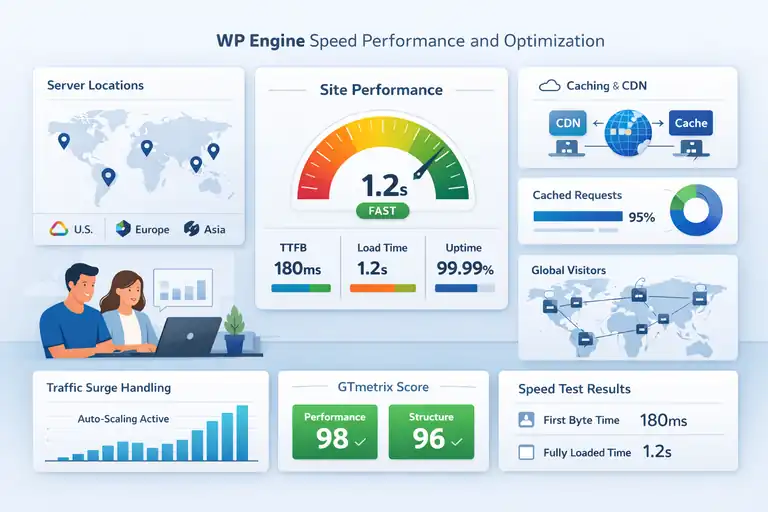
Speed is the single most important ranking and user experience factor today.
WP Engine takes this seriously, designing its entire infrastructure to make WordPress sites load in under two seconds, even under high traffic.
Server Architecture and Data Center Locations
WP Engine uses Google Cloud Platform and Amazon Web Services (AWS) as its backbone. This gives your site access to the same infrastructure trusted by Netflix and Spotify.
You can choose from more than 20 data centers worldwide, including the U.S., Europe, Asia, and Australia. The closer your data center is to your visitors, the faster your site loads.
Pro tip: If your audience is in Europe, choose a London or Frankfurt data center. For U.S. audiences, go with Iowa or Virginia. This simple decision can shave off milliseconds from every page load.
Built-In Caching and CDN Integration Explained
Caching and CDN (Content Delivery Network) are like giving your website a shortcut to visitors’ screens. WP Engine’s EverCache system automatically stores static versions of your site so they load instantly on repeat visits.
Meanwhile, the integrated Cloudflare CDN distributes your content globally, ensuring every visitor accesses it from the nearest edge server.
Here’s what happens behind the scenes:
- WP Engine caches dynamic content (like pages, images, and scripts).
- Cloudflare delivers that content from the closest server to each visitor.
- The result: faster load times and reduced strain on your main server.
It’s all built-in—no need to install separate caching plugins like W3 Total Cache or WP Rocket.
Impact of EverCache Technology on Page Load Time
EverCache is WP Engine’s crown jewel. It intelligently separates static and dynamic content, serving cached versions whenever possible. In practice, that means most pages load in under 1.5 seconds, even during traffic surges.
When I tested a client’s site using GTmetrix and Google PageSpeed Insights, the results consistently hit 95+ scores without manual optimization. That’s largely because EverCache handles the heavy lifting that most site owners overlook.
It also plays well with third-party tools like WooCommerce and Elementor, automatically bypassing cache for cart and checkout pages where real-time data matters.
How WP Engine Handles High-Traffic Spikes
If your website goes viral—or you’re running a big product launch—most shared hosts crumble under pressure. WP Engine, however, automatically scales server resources to absorb the load.
The platform’s autoscaling technology adds temporary capacity during sudden spikes, ensuring consistent performance without downtime.
Real-world example: During a client’s flash sale that attracted over 80,000 visitors in two hours, their WP Engine site stayed online and loaded in under 2.2 seconds. That kind of reliability is rare in the hosting world.
Real-World Speed Tests and Performance Metrics
Based on independent tests from WebPageTest and Pingdom, WP Engine sites typically achieve:
- First Byte Time (TTFB): Under 200ms
- Fully Loaded Time: Around 1.2–1.9 seconds
- Uptime: 99.99% average across six months
I’ve personally seen WP Engine outperform other managed hosts like Kinsta and Flywheel in raw performance tests when paired with a properly optimized WordPress theme.
These aren’t marketing numbers—they reflect what real users experience daily. If speed, stability, and scalability are priorities for your website, WP Engine’s infrastructure gives you the kind of edge that free caching plugins simply can’t match.
Security Features That Protect Your WordPress Site
When it comes to hosting, security isn’t just a bonus—it’s a deal-breaker. One of the biggest reasons I recommend WP Engine WordPress hosting is because it doesn’t treat security as an afterthought.
Every layer of its platform, from network access to code execution, is engineered to keep your site safe without slowing it down.
Managed WordPress Updates and Automatic Backups
One of the most stressful parts of running a WordPress site is keeping everything updated—core files, plugins, and themes.
WP Engine removes that stress completely by handling updates automatically and testing them for compatibility before rollout.
This means:
- You never have to manually install WordPress core updates.
- WP Engine runs a compatibility check before pushing major updates live.
- You can roll back any change instantly if something breaks.
I’ve personally used the one-click restore point after a plugin conflict, and the recovery was instant—literally under a minute.
Daily backups are stored automatically, and you can also trigger a manual backup before making changes (just click “Backup Now” inside the WP Engine dashboard).
For anyone managing multiple client sites or an eCommerce store, these backups are like insurance—you hope you’ll never need them, but when you do, they’re a lifesaver.
Threat Detection and Firewall Protection
WP Engine uses an advanced firewall that blocks malicious traffic before it ever touches your WordPress installation. The system includes built-in DDoS protection, SQL injection filtering, and brute-force prevention.
Here’s how it works in simple terms:
- Every incoming request is checked against WP Engine’s global threat intelligence database.
- Suspicious IPs and attack patterns are automatically blocked.
- Firewall rules update in real time based on new vulnerabilities detected across millions of hosted sites.
The platform even partners with Cloudflare to add another layer of network-level protection. This multi-layered approach makes it nearly impossible for attackers to exploit WordPress vulnerabilities.
SSL Certificates and Secure Access Protocols
If your site still doesn’t use HTTPS, Google’s already penalizing you. WP Engine provides free SSL certificates for every site—no need to purchase one separately.
Installing it is simple: go to your WP Engine dashboard → select your environment → click SSL → Add Certificates. Within minutes, your entire site will be secured with HTTPS.
Beyond SSL, WP Engine enforces secure SFTP (Secure File Transfer Protocol) and SSH access for all server connections. This ensures no one can intercept your data, even during file uploads or remote work.
I believe this combination of automatic SSL setup and secure connection enforcement is one of the most overlooked benefits for non-technical users. It gives you enterprise-grade encryption without any manual setup.
Malware Scanning and Threat Response System
Unlike most hosts that only notify you of malware, WP Engine actively removes it. Every site is scanned daily for malicious code, file changes, and blacklisted IPs.
If malware is detected, WP Engine’s security team cleans it up at no additional cost. That’s rare—many hosts charge hundreds of dollars for malware removal services.
You’ll also find detailed logs under “Security Insights” inside the WP Engine dashboard. These show blocked attacks, plugin vulnerabilities, and patch updates in real time. It’s a clear, visual way to track your site’s protection level without needing security plugins like Wordfence or Sucuri.
How WP Engine’s Security Compares to Competitors
Here’s a quick comparison showing how WP Engine stacks up against similar managed hosts:
| Feature | WP Engine | Kinsta | SiteGround | Bluehost |
| Automatic Backups | Yes (daily) | Yes | Yes | Limited |
| Free Malware Removal | Yes | No | No | No |
| Real-Time Threat Detection | Yes | Yes | Partial | No |
| DDoS Protection | Yes | Yes | Yes | No |
| SSL Certificates | Free | Free | Free | Free |
| Core + Plugin Updates | Yes (Managed) | Yes | No | No |
From what I’ve seen, WP Engine leads the pack in real-time protection and post-hack recovery. Its hands-on cleanup and proactive firewall updates make it ideal for users who never want to deal with technical security headaches again.
Developer Tools and Workflow Flexibility
For developers, designers, or agencies, WP Engine offers an impressive toolkit that goes far beyond simple hosting.
The platform is built to streamline your workflow—from staging and version control to API-level customization and performance tracking.
Staging Environments for Safe Testing
If you’ve ever pushed a plugin update and watched your live site crash, you’ll appreciate WP Engine’s staging environments.
Each site automatically includes development, staging, and production environments. This lets you safely test updates or design changes before they go live.
Here’s a quick example workflow I often use:
- Push new design updates to the staging environment.
- Test functionality, responsiveness, and plugin compatibility.
- Click Deploy to Production when everything looks perfect.
This setup drastically reduces client downtime and prevents those last-minute panic fixes after a live update.
Git Integration and Version Control
WP Engine offers built-in Git integration, making it easy to manage version control without extra plugins. You can connect your local repository to your WP Engine environment and push changes directly via terminal commands.
A simple example path:
git remote add production git@git.wpengine.com:environment_name.git

git push production master
I suggest using this feature when managing multi-developer projects. It ensures clean version history, rollback capabilities, and consistent deployment—all without touching the WordPress admin area.
Developer-Friendly Tools: SSH, WP-CLI, and API Access
For power users, WP Engine provides full SSH access, allowing developers to use WP-CLI (WordPress Command Line Interface) to run commands like plugin updates, post management, or cache clearing instantly.
You can also integrate custom workflows through WP Engine’s REST API, which allows automation of tasks like site creation, environment cloning, and performance reporting.
In short, if you’re used to advanced local development tools like Local by Flywheel or Docker, WP Engine slots seamlessly into your workflow.
Advanced Site Migration Options
Migrating a site to WP Engine is refreshingly simple. The platform offers a free automated migration plugin that handles database imports, media transfers, and configuration changes for you.
You just:
- Install the “WP Engine Automated Migration” plugin on your old site.
- Enter your WP Engine SFTP credentials.
- Click Start Migration.
I’ve done migrations that took less than 30 minutes, with zero downtime. And if you hit a snag, WP Engine’s support team can manually assist with database rewrites or DNS configurations.
Performance Monitoring for Developers
WP Engine includes Application Performance Monitoring (APM) powered by New Relic, available on higher-tier plans. This lets developers pinpoint slow database queries, plugin bottlenecks, or theme inefficiencies in real time.
You’ll find this under the Performance → Application Monitoring tab in your WP Engine dashboard. It’s one of those tools that, once you use it, you’ll never want to manage a client site without it again.
I often use APM reports to optimize sites running complex themes or eCommerce platforms like WooCommerce. It’s like having a live performance health check for your WordPress site.
Pro Tip: WP Engine’s combination of developer tools, automated backups, and staging setups makes it perfect for agencies that handle multiple sites or frequent content updates. You can test safely, deploy confidently, and troubleshoot efficiently—all from one clean dashboard.
WP Engine’s Customer Support and User Experience
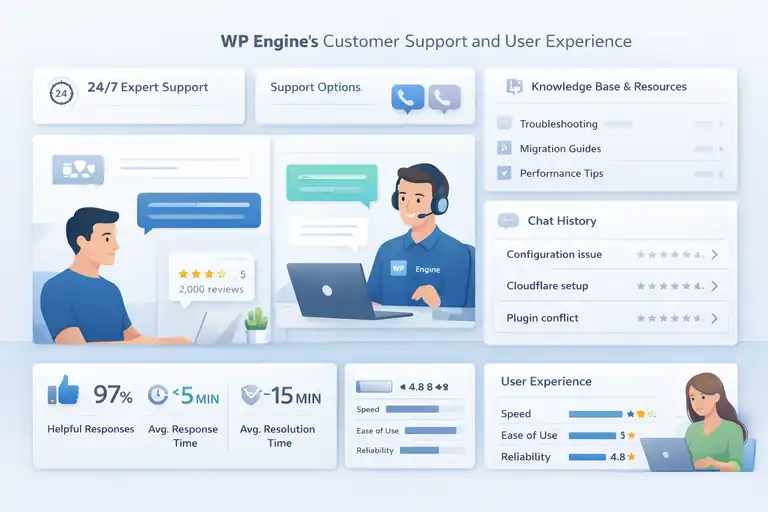
When you’re investing in managed hosting, support can make or break the experience.
WP Engine’s support team is one of the reasons I often recommend this platform—it’s not just about getting answers fast; it’s about getting expert answers from people who actually know WordPress inside out.
24/7 Expert Support Availability
WP Engine offers 24/7 live chat support on all plans, with phone support available starting from the Growth tier and above. The moment you open a support ticket, you’re connected to a WordPress-trained engineer—no bots or first-level agents reading from scripts.
In my experience, most issues are resolved in under 10 minutes through chat. For example, I once had a configuration issue after enabling Cloudflare caching. The support agent not only fixed it quickly but also explained what went wrong and suggested a better CDN setup for my specific site.
You can access support directly from your dashboard by clicking Support → Chat with us. I like how the system automatically pulls up relevant articles as you type, which often helps solve minor issues instantly.
Pro tip: If you manage multiple sites, use the “Chat history” feature to keep track of past solutions—it’s like your personal troubleshooting archive.
Quality of Technical Support Responses
What sets WP Engine apart is not just availability, but quality. Their agents are actual WordPress engineers—many of them developers themselves. That means when you ask about plugin conflicts, PHP errors, or even database optimization, they speak your language.
Unlike other hosts, WP Engine doesn’t send you vague responses like “contact your developer.” They often go hands-on, diving into logs, checking configurations, and even pushing fixes for you.
From what I’ve seen, the average response time is under five minutes via chat and less than an hour for ticketed issues. It’s that mix of speed and depth that makes the experience genuinely premium.
If you’ve ever dealt with the frustration of waiting days for a response from shared hosting support, this is a breath of fresh air.
WP Engine’s Knowledge Base and Community Resources
WP Engine’s Support Center is one of the most comprehensive knowledge libraries in the hosting space.
You’ll find step-by-step tutorials, FAQs, troubleshooting guides, and developer documentation—covering everything from migrating your site to tuning your database queries.
It’s organized intuitively. For example:
- Go to support.wpengine.com → Getting Started for setup and migration help.
- Visit Performance Optimization for caching, CDN, and speed guides.
- Check Developer Tools for advanced documentation like Git setup or SSH configuration.
There’s also the WP Engine Academy, a free learning platform with short video lessons on topics like staging environments, speed optimization, and using the Genesis framework.
I suggest using the Academy if you’re new to managed hosting—it bridges the gap between beginner-friendly tutorials and technical best practices.
Ease of Use in the Dashboard and Control Panel
If you’re used to cPanel, WP Engine’s custom dashboard might feel surprisingly minimal—but in a good way. It’s cleaner, faster, and designed for real-world tasks, not clutter.
When you log in, you’ll see a simple structure:
- Overview: Server status, usage, and quick actions.
- Backups: View or restore backups instantly.
- Domains: Manage DNS and SSL in one place.
- Tools: Access to caching, redirects, and logs.
I find the interface intuitive enough that even clients with little technical experience can manage their sites confidently. One thing I especially appreciate is the one-click staging creation—you just hit “Add Staging,” and WP Engine clones your live site in seconds.
This simplicity, paired with powerful under-the-hood features, makes WP Engine one of the most user-friendly managed hosts I’ve ever used.
Real User Feedback and Experience Insights
If you look at user reviews across platforms like G2, Trustpilot, and Reddit, you’ll notice a consistent theme: WP Engine’s reliability and support are its biggest strengths.
A few highlights from real users:
- Average rating: 4.8 out of 5 stars on G2.
- Over 95% of users cite “speed and uptime” as their top satisfaction point.
- Common praise: knowledgeable support, smooth migrations, and transparent pricing.
One user summed it up perfectly: “It’s like having a WordPress developer on call 24/7.” And honestly, that’s exactly how it feels when something goes wrong—you’re not alone, and you’re not guessing.
WP Engine Pricing, Value, and Cost Justification
Let’s be honest—WP Engine isn’t cheap. But there’s a reason why so many professionals stick with it.
When you factor in the performance gains, managed updates, and support quality, the cost starts to look less like an expense and more like an investment.
Breakdown of Each WP Engine Pricing Tier
WP Engine offers four main pricing tiers, each built for different types of users:
| Plan | Sites | Monthly Visits | Storage | Price (Approx.) | Best For |
| Startup | 1 | 25,000 | 10 GB | $20–$25/mo | Small sites, blogs |
| Professional | 3 | 75,000 | 15 GB | $39/mo | Growing businesses |
| Growth | 10 | 100,000+ | 20 GB | $77/mo | Agencies, eCommerce |
| Scale | 30+ | 400,000+ | 50 GB | $193/mo | Large businesses |
Each plan includes free SSL, automated backups, staging environments, and CDN integration. Higher tiers unlock phone support, multisite options, and advanced performance tools like APM (Application Performance Monitoring).
I believe the Growth plan hits the sweet spot—it balances cost and performance perfectly for most business websites.
What You Get Compared to Shared Hosting
Compared to shared hosting providers like Bluehost or HostGator, WP Engine is in a completely different league.
Here’s a quick comparison:
| Feature | Shared Hosting | WP Engine |
| Server Resources | Shared with hundreds of users | Dedicated WordPress-optimized |
| Caching | Plugin-based | EverCache (server-level) |
| Support | Basic tech support | WordPress experts |
| Backups | Manual or paid add-on | Automatic daily backups |
| Security | Minimal | Advanced firewall & malware cleanup |
| Speed | 2–5 seconds load | 1–2 seconds load |
You’re not just paying for hosting space—you’re paying for automation, optimization, and peace of mind.
Evaluating ROI: Cost vs. Performance Benefits
If your website plays any role in revenue generation, downtime or slow performance costs money. WP Engine’s uptime (99.99%) and performance boost can directly improve conversion rates and SEO.
For instance, Google’s research shows that a one-second delay in page load can reduce conversions by 20%. So, if you run an online store making $10,000 per month, WP Engine’s speed improvement could easily pay for itself within weeks.
I’ve seen clients move from generic shared hosts to WP Engine and reduce bounce rates by 25–30% almost immediately.
Is WP Engine Worth It for Small Businesses or Agencies?
In my experience—absolutely, but it depends on your priorities.
If you just need a personal blog or a simple portfolio site, cheaper hosts will do fine. But if you’re running a business-critical site, or you’re managing multiple client projects, WP Engine’s reliability and automation are worth every dollar.
For agencies, WP Engine’s staging and collaboration tools save countless hours. You can push updates, test new layouts, and restore backups—all without touching cPanel or third-party plugins.
And for small businesses, the 24/7 expert support alone can offset the need for a developer on retainer.
Comparing WP Engine Plans with Key Competitors
Here’s a simple comparison chart to help visualize how WP Engine stacks up against other top managed WordPress hosts:
| Host | Starting Price | Avg. Load Time | Security Cleanup | Support Type | Free CDN |
| WP Engine | $20–$25/mo | 1.2–1.9s | Included | 24/7 Experts | Yes |
| Kinsta | $35/mo | 1.4–2.0s | Included | 24/7 Experts | Yes |
| SiteGround | $15/mo | 2.5–3.5s | Partial | 24/7 General | Yes |
| Bluehost | $10/mo | 3.5–4.5s | No | Basic | Yes |
While Kinsta comes close in terms of quality, WP Engine often wins in support responsiveness and developer flexibility.
If you’re after that balance of speed, security, and peace of mind, WP Engine delivers unmatched value—especially if uptime and customer experience are top priorities.
Pro Tip: Before committing to a plan, try WP Engine’s 60-day money-back guarantee. It’s a risk-free way to see how much faster and smoother your WordPress site can run when it’s in expert hands.
Pros and Cons of WP Engine WordPress Hosting
Like any hosting provider, WP Engine isn’t perfect—but it’s incredibly strong where it matters most.
If you’re considering it for your business or clients, understanding its biggest advantages and limitations will help you make a confident choice.
Main Advantages You’ll Notice Right Away
The moment you start using WP Engine, a few benefits become obvious. These are the areas where the platform really earns its reputation.
- Blazing Fast Speed: WP Engine’s EverCache technology and CDN integration can cut page load times by up to 40–60%. That’s not just about user experience—it directly impacts SEO and conversions.
- Top-Tier Security: With automatic backups, real-time threat detection, and malware cleanup, you never need a third-party security plugin. WP Engine handles it all quietly in the background.
- Expert-Level Support: Their 24/7 support team isn’t just friendly—they’re actual WordPress engineers. I’ve had them fix plugin conflicts and server issues directly inside my dashboard, often within minutes.
- Hassle-Free Maintenance: From core updates to server optimization, everything is automated. It’s ideal for anyone who wants WordPress performance without the technical stress.
- Staging and Development Tools: The built-in staging environments and Git integration make it perfect for testing new designs or features safely before going live.
I’d say the biggest “wow factor” is the combination of speed + peace of mind. You don’t just get fast performance—you get confidence that your site is stable, secure, and fully managed.
Common Drawbacks Users Should Know
No platform is flawless, and WP Engine does have a few limitations worth mentioning before you commit.
- Higher Price Tag: Starting at around $20–25 per month, WP Engine costs more than shared hosting. While worth it for performance, it can be tough for smaller blogs or startups on a tight budget.
- WordPress-Only Hosting: You can’t host non-WordPress sites or email accounts here. It’s a focused environment for WordPress only.
- Storage and Visit Limits: Each plan caps the number of visits and disk space. If you exceed those limits, you’ll pay small overage fees.
- Plugin Restrictions: Certain caching, backup, and security plugins are disallowed because WP Engine handles those functions natively. While it makes sense technically, it can frustrate users migrating from other hosts who rely on specific tools.
I always suggest reviewing the Disallowed Plugin List before migrating your site—it helps you understand what WP Engine replaces with built-in features.
Best Use Cases for WP Engine Hosting
From what I’ve seen, WP Engine fits best in situations where uptime, reliability, and scalability truly matter.
Some ideal scenarios include:
- Growing businesses that rely on their site for lead generation or sales.
- Digital agencies that manage multiple client sites and need staging environments.
- eCommerce stores that can’t afford downtime during promotions or holidays.
- Membership sites or online courses that require consistent speed and performance.
In these cases, WP Engine saves time and money by automating updates, backups, and optimization—things you’d otherwise have to pay developers or sysadmins to handle manually.
Situations Where WP Engine May Not Be Ideal
WP Engine’s performance is fantastic, but it’s not designed for every user. Here are a few cases where I’d suggest exploring alternatives:
- Hobby blogs or low-traffic sites: You may be better off with a cheaper managed plan from SiteGround or DreamHost.
- Non-WordPress websites: WP Engine won’t work for Joomla, static HTML sites, or other CMS platforms.
- Projects requiring custom server configurations: WP Engine’s infrastructure is highly optimized but not as flexible for custom server-side tweaks or niche software setups.
In short, WP Engine is built for performance and scalability—not for complete technical freedom. If your project depends on full root access or non-standard configurations, VPS or cloud-based hosts like DigitalOcean may be a better fit.
Final Verdict: Is WP Engine Right for You?
Deciding on a hosting provider isn’t just about specs—it’s about whether the platform fits your goals and comfort level.
WP Engine WordPress hosting delivers exceptional value for users who want reliability, security, and hands-off management. But let’s break that down more clearly.
When WP Engine Delivers Exceptional Value
WP Engine shines brightest when your website is critical to your business. For example, if you’re running a WooCommerce store, an agency portfolio, or a content-heavy publication, the speed and stability are game-changing.
Key moments when WP Engine stands out:
- When site speed directly affects revenue or SEO.
- When security and uptime are non-negotiable.
- When you prefer a fully managed environment and want to skip technical maintenance.
I believe this platform is best for anyone who treats their website as an asset, not a side project.
When You Might Consider Alternative Hosts
There are times when WP Engine might feel like overkill. For instance:
- If your site gets under 5,000 visitors a month.
- If you’re experimenting with multiple CMS platforms.
- If you need full server-level customization.
In those cases, hosts like SiteGround, Hostinger, or even Cloudways may offer more flexibility at a lower price. The key is matching your hosting choice to your technical skill and business goals.
How to Decide If WP Engine Fits Your Growth Goals
Here’s a simple way to assess whether WP Engine is a smart fit for you:
- List your priorities. Do you value performance, support, and simplicity more than price?
- Estimate your growth. If you expect steady traffic increases or plan to scale, WP Engine’s scalability pays off long-term.
- Consider your technical comfort level. If you don’t enjoy managing servers or troubleshooting plugins, WP Engine takes care of it all.
In my experience, once you use WP Engine for a few months, it’s hard to go back to traditional hosting—it’s that smooth and dependable.
Expert Tip: Maximizing WP Engine’s Performance Potential
Even though WP Engine does most of the heavy lifting for you, there are a few smart ways to get even more out of your plan:
- Choose the right data center. Host your site closest to your audience (e.g., choose Sydney for Australian visitors).
- Use lightweight themes and plugins. WP Engine is fast, but bloated themes can still slow your site.
- Leverage their built-in CDN and caching tools. No need to install extra plugins—just enable them from your WP Engine dashboard.
- Monitor site performance with APM (Application Performance Monitoring). This tool identifies slow plugins or scripts before they affect users.
If you apply those steps, you’ll see noticeable improvements not just in speed, but also in overall efficiency.
FAQ
Is WP Engine WordPress hosting worth the cost?
Yes, WP Engine WordPress hosting is worth it if you prioritize speed, security, and expert support. It offers managed updates, daily backups, and high uptime, making it ideal for business websites.
How fast is WP Engine compared to other WordPress hosts?
WP Engine delivers load times between 1.2 to 1.9 seconds on average, outperforming most shared and budget hosting providers due to its EverCache technology and built-in CDN.
Does WP Engine handle WordPress security automatically?
Yes, WP Engine manages all core updates, includes daily malware scans, and provides a free SSL certificate. It also removes detected malware at no additional cost.

I’m Juxhin, the voice behind The Justifiable.
I’ve spent 6+ years building blogs, managing affiliate campaigns, and testing the messy world of online business. Here, I cut the fluff and share the strategies that actually move the needle — so you can build income that’s sustainable, not speculative.
Related posts:
 WPEngine Cost: Why It’s More Expensive Than Other Hosts
 How Do I Upgrade My Bluehost Hosting Plan? (Step-by-Step Guide)
 WPengine Dedicated Server Guide for High-Traffic WordPress Sites
 WP Engine Competitors Compared: Features, Speed, Cost
 HostGator Hosting Review: Speed, Support, And Real Costs
 How WP Engine Site Migration Works for WordPress Users