
Table of Contents
Some links on The Justifiable are affiliate links, meaning we may earn a small commission at no extra cost to you. Read full disclaimer.
Omnisend email marketing has quietly become a powerhouse for ecommerce brands—and for good reason.
If you’ve ever wondered whether a single platform could boost conversions, automate sales, and save time all at once, the answer might surprise you.
This guide breaks down the exact reasons why this platform is worth trying right now, not someday.
1. Easy-To-Use Automation That Drives Real Sales
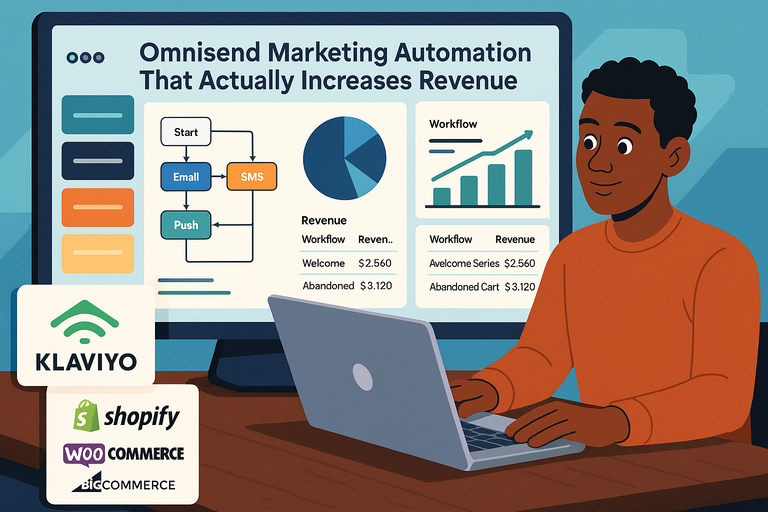
Omnisend email marketing isn’t just about sending messages—it’s about automating your entire sales funnel with ease.
Whether you’re running a growing Shopify store or managing a WordPress site, automation is the heart of how Omnisend helps you sell more while doing less.
Automating Campaigns With Minimal Effort
What I love about Omnisend is how it takes the heavy lifting out of marketing automation.
The drag-and-drop automation builder makes it incredibly easy to design workflows—no complex setup or tech skills needed.
For instance, you can create an abandoned cart recovery flow in just a few clicks:
- Choose the trigger (like “cart abandoned”).
- Add email and SMS steps (e.g., a reminder email after 1 hour, a text after 12 hours).
- Insert a discount code block directly from your product catalog.
Omnisend even provides pre-built ecommerce workflows—for welcome series, post-purchase follow-ups, and re-engagement campaigns.
I’ve seen many marketers start generating extra revenue within a week of activating these.
Pro insight: Try combining automation splits (a feature that lets you send different messages based on behavior) to see which customer group responds best. It’s an effortless way to optimize without extra tools.
Setting Up Advanced Triggers Without Coding
Here’s where Omnisend stands out. Most marketing tools make you dig into code or APIs to set up event-based triggers. Not this one.
In Omnisend, you can configure advanced triggers directly through the UI:
- Customer actions: “Added to cart,” “Browsed product,” or “Clicked link.”
- Time-based triggers: Send messages after specific delays.
- Segment-based triggers: Target only VIP buyers or inactive customers.
I recommend starting with behavioral triggers like “product viewed but not purchased.” It’s a small tweak that can recover a surprising amount of lost sales.
According to Omnisend’s own data, automated messages see up to 30% higher conversion rates than standard campaigns.
Creating Seamless Customer Journeys
The beauty of Omnisend automation lies in how well it connects multiple channels—email, SMS, and even web push notifications—into one smooth journey.
Picture this:
- A visitor adds an item to their cart.
- They get an email reminder an hour later.
- If they don’t open it, a push notification goes out the next morning.
- Finally, a personalized SMS closes the loop with a discount.
All of this happens automatically, powered by Omnisend’s unified dashboard. You can watch these workflows run in Live View, seeing how each customer moves through your funnel in real-time.
From what I’ve seen, this multi-step automation isn’t just convenient—it’s what turns browsers into loyal buyers. When every message feels timely and relevant, sales follow naturally.
Build your first abandoned cart or welcome flow in minutes. No coding, no setup hassle.
2. High ROI Potential With Omnichannel Campaigns
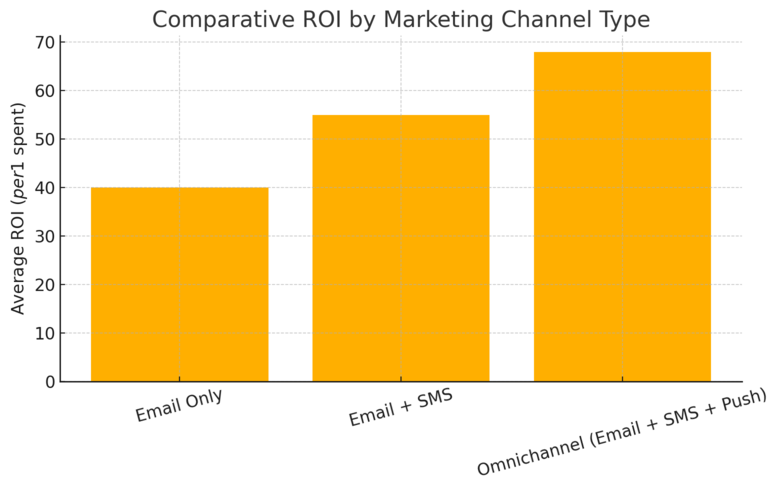
Omnisend’s biggest strength lies in its ability to merge multiple communication channels—email, SMS, and push notifications—into one campaign.
This omnichannel strategy doesn’t just look impressive on paper; it delivers a real boost in ROI.
Combining Email, SMS, and Push Notifications
When I first used Omnisend’s Omnichannel Campaigns, the difference was immediate.
Instead of managing three separate tools, everything—emails, texts, and push alerts—was perfectly in sync.
Here’s how it usually works:
- Start with an email announcing a new offer.
- Follow up with a text message for urgency.
- End with a push notification to re-engage non-openers.
Each message supports the other, creating a consistent experience across devices. According to Omnisend’s benchmarks, businesses using all three channels see up to 494% higher order rates than those using just email.
And setup? Simple. You can toggle between “Email,” “SMS,” or “Push” inside the same campaign editor—no integration headaches or channel disconnects.
Maximizing Conversions Through Smart Targeting
Omnisend’s segmentation engine is one of the smartest I’ve worked with. You can group customers based on:
- Purchase frequency (e.g., “Frequent buyers”)
- Engagement behavior (e.g., “Clicked link but didn’t buy”)
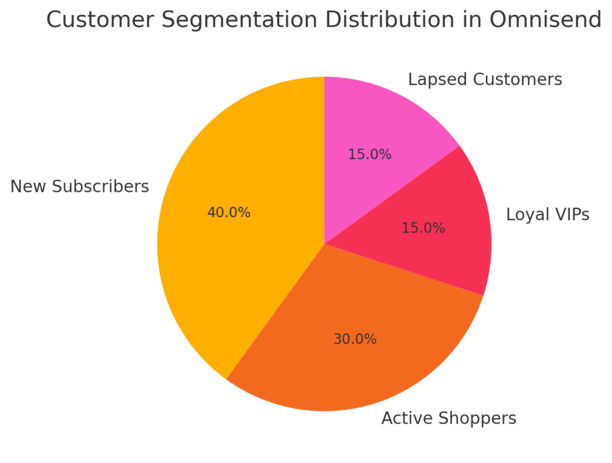
- Customer lifecycle stage (e.g., “New subscriber” vs. “Loyal VIP”)
By sending relevant content to each segment, you increase the odds of conversion without spamming your list.
I often suggest using conditional content blocks—these automatically swap sections of an email based on who’s viewing it.
For example:
- A new customer might see a welcome offer.
- A repeat customer might see a loyalty reward.
This level of personalization helps boost click-through rates and customer satisfaction.
Reducing Cart Abandonment With Automated Sequences
Cart abandonment is the silent revenue killer for online stores—but Omnisend’s automation tackles it head-on.
You can design a simple yet powerful 3-step recovery sequence:
- Reminder email (1 hour after abandonment) – “You left something behind!”
- Follow-up SMS (12 hours later) – Include a small incentive.
- Final push notification (24 hours later) – Create urgency before stock runs out.
Each step gently nudges the shopper back without being pushy. Based on Omnisend’s user data, these abandoned cart workflows typically recover 15–20% of lost sales.
If you connect your Shopify or Wix store, Omnisend automatically pulls product data and even adds dynamic product images into emails—no manual setup needed.
Expert tip: Use A/B testing inside these flows to see which message timing performs best. Sometimes, just adjusting the delay from 1 hour to 2 can make a surprising difference in recovery rates.
3. Seamless Integration With Popular Ecommerce Platforms
Omnisend email marketing shines brightest when it integrates with the tools you already use.
Whether your store runs on Shopify, WordPress, or Wix, Omnisend connects smoothly—so you can launch campaigns, sync customer data, and automate sales without any messy setup.
Connecting Omnisend to Shopify in Minutes
I genuinely appreciate how fast the Omnisend-Shopify connection is. You don’t need a developer, plugins, or complex setups.
Just go to your Shopify dashboard, open the Apps section, and search for Omnisend Email Marketing.
Click Add App, sign in, and your store data syncs instantly—products, customers, and order history included.
Once connected, Omnisend automatically builds ready-to-go automation workflows like:
- Welcome emails for new subscribers.
- Abandoned cart reminders using dynamic product images.
- Post-purchase follow-ups with product recommendations.
The integration also supports real-time data sync, so when someone buys, signs up, or unsubscribes, Omnisend updates your lists immediately.
I recommend checking the “Automation” tab in your Omnisend dashboard right after connecting—it’s where you’ll find pre-built ecommerce flows that are already optimized for Shopify’s checkout system.
If you like numbers, Shopify merchants using Omnisend report earning up to 4x more revenue per message compared to using standard email tools. It’s a direct reflection of how tightly the systems work together.
Leveraging WordPress for Flexible Marketing
If your site is built on WordPress, Omnisend connects just as easily through a dedicated plugin.
You can find it in your WordPress Admin Panel > Plugins > Add New > Omnisend for WooCommerce. Once installed, it automatically syncs your customer data and purchase behavior.
What I find particularly flexible here is the ability to use Omnisend’s email templates and automation editor right alongside WooCommerce data.
You can personalize newsletters based on product views, order frequency, or even abandoned checkout pages—all without writing code.
For example:
- Set up an Upsell Flow that sends an email suggesting related products 3 days after purchase.
- Use conditional content blocks to display unique offers for different customer groups.
I’ve seen smaller WordPress stores grow repeat purchase rates by 25–30% simply by enabling Omnisend’s Product Recommender feature.
It’s small changes like these—built right into the WordPress workflow—that make the integration worth it.
Using Wix for Fast Store Setup and Messaging
For Wix users, Omnisend feels almost tailor-made. The integration process is one of the simplest around: In your Wix dashboard, open the Apps Market, search for Omnisend, and click Connect. Within seconds, your store data flows into your Omnisend account.
Once set up, you can start building email + SMS automations immediately. Wix users especially benefit from Omnisend’s drag-and-drop visual builder—it makes it effortless to design campaigns that match your brand’s aesthetic.
Here’s an example workflow I recommend:
- Trigger: Customer adds a product to the cart.
- Step 1: Send an email reminder after 1 hour.
- Step 2: If unopened, send a text message with a discount.
- Step 3: Follow up with a push notification the next day.
This type of multichannel approach helps Wix store owners close more sales and maintain brand consistency across every customer touchpoint.
4. Powerful Personalization for Better Engagement
Personalization is where Omnisend email marketing truly stands apart.
Instead of sending one-size-fits-all emails, it allows you to tailor each message to match your customer’s actions, preferences, and shopping history.
Customizing Emails With Product Recommendations
One of my favorite Omnisend tools is the Product Recommender. It automatically suggests products for each email based on browsing history or past purchases.
In the email builder, you can drag in a “Product Recommendation” block and choose your data source—like Best Sellers, Recently Viewed, or Trending Now. Omnisend then fills in product names, prices, and images directly from your ecommerce store.
This kind of automation can easily increase click-through rates by 20–30%. I often suggest adding a “You might also like” section at the bottom of every newsletter. It’s simple but incredibly effective at keeping customers exploring your site.
If you’re short on time, Omnisend’s AI Content Assistant can even write short descriptions for each featured product, matching your tone and brand style.
Targeting Customers Based on Behavior
Behavior-based targeting is what transforms Omnisend from a marketing tool into a conversion machine.
You can set up automations that trigger emails or SMS based on:
- Website activity (e.g., viewed a product but didn’t add to cart).
- Purchase patterns (e.g., high spenders vs. one-time buyers).
- Engagement (e.g., inactive for 30 days).
I recommend starting with a simple “Reactivation Flow.” It automatically sends a friendly “We miss you” message to customers who haven’t opened your emails in a while—often paired with a small incentive like free shipping.
Another great example is the Customer Lifecycle Stage filter. It lets you identify where people are in their journey—new subscriber, active shopper, or loyal customer—and target them differently.
In my experience, this approach makes customers feel noticed instead of marketed to, which builds genuine loyalty over time.
Boosting Retention Through Segmentation
Segmentation in Omnisend isn’t just about splitting lists—it’s about understanding your audience deeply.
The platform offers unlimited segmentation, meaning you can create custom groups like:
- VIP customers who purchase monthly.
- New subscribers from a specific campaign.
- Shoppers who clicked but didn’t buy in the last 7 days.
You can then tailor campaigns for each group. For example, send VIPs early access to new collections or re-engage one-time buyers with a discount code.
Omnisend also allows dynamic segments, which update automatically as new data comes in. That means you never have to manually manage your lists.
A small tip I often give: use segmentation data in combination with A/B testing.
For example, test two subject lines—one personalized with the customer’s first name and one without. It’s a quick way to find out how much personalization really impacts your open rates.
5. Flexible Pricing That Scales With Your Business
Omnisend email marketing makes it easy for any business—small or growing—to get started without feeling locked into an expensive plan.
What I like most is how the pricing scales naturally with your contact list size and features, so you only pay for what you actually use.
Getting Started With a Free Plan
If you’re testing the waters, Omnisend’s free plan is a great entry point. It’s perfect for startups or small shops that want to explore automation and basic campaigns before investing.
Here’s what’s included in the free plan:
- Up to 500 emails per month.
- Unlimited web push notifications to engage visitors instantly.
- Access to basic email campaigns and automation workflows.
You can sign up directly from the homepage—just click Start Free and follow the prompts. The dashboard immediately walks you through connecting your store, adding contacts, and building your first campaign.
I recommend using the free plan to test a few key automations like:
- Welcome emails to greet new subscribers.
- Cart abandonment reminders to recover lost sales.
- Reactivation emails for inactive customers.
Even on the free plan, you can start generating measurable returns. Many users report seeing a noticeable lift in sales within the first few automated sequences.
Unlocking Pro Features at a Low Cost
When you’re ready to scale, Omnisend’s Standard and Pro plans give you serious value for the price.
The Standard plan starts at around $11.20 per month for 500 contacts, while the Pro plan—aimed at high-volume senders—comes in at about $41.30 per month.
Here’s what you gain as you move up:
- Unlimited emails every month.
- Global SMS messaging to reach customers anywhere.
- 24/7 priority support for faster help.
- Advanced reporting with insights into revenue by campaign.
I personally like the Pro plan’s bonus feature—you receive monthly SMS credits equal to your plan’s cost. So if you pay $41.30, you also get $41.30 in free SMS credits each month. That’s like getting an extra channel for free.
If you’re managing thousands of subscribers or running multiple campaigns, this tier gives you the power to automate at scale without overpaying.
Understanding Add-Ons for Growth
Omnisend also offers optional add-ons designed for businesses that want deeper personalization and data control.
The most popular add-on is Personalized Content, which starts at around $5 per month with the Standard plan.
It allows you to:
- Create product recommendations based on browsing or purchase history.
- Personalize campaign content with conditional logic (showing different offers to different segments).
- Integrate custom rules that trigger targeted messages.
If you’re on the Pro or Custom plan, this add-on is already included at no extra cost.
I often advise clients to add personalization once they’ve built a solid list of recurring customers—it’s where you’ll see the biggest lift in engagement and repeat purchases.
In short, Omnisend’s pricing feels fair and flexible. You can start small, scale up as your sales grow, and never pay for features you’re not ready to use.
Launch Omnisend Free — No Credit Card Required! Send up to 500 emails each month, unlock automation templates, and start your first revenue-generating workflow today.
6. Advanced Tools That Simplify Email Creation
Building emails doesn’t have to be frustrating.
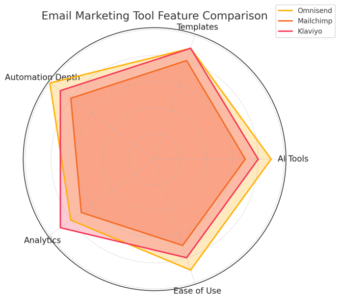
Omnisend’s email builder combines intuitive drag-and-drop tools with AI-powered assistance so you can design professional campaigns in minutes, not hours.
Using AI-Powered Templates and Builders
Omnisend’s AI tools take a lot of the creative guesswork out of campaign building. When you open the Email Builder, you can choose from over 250 templates already optimized for ecommerce.
The AI Assistant can help you by:
- Writing engaging subject lines.
- Suggesting on-brand copy for your email body.
- Generating image captions or promotional text in seconds.
If you’ve ever stared at a blank screen, this feature is a lifesaver. Just select AI Assistant > Generate Text in the editor, describe your offer, and the system produces polished, ready-to-send content instantly.
I’ve tested this across multiple brands and found that it saves an average of 60% of the time normally spent on writing and design.
Running A/B Tests for Better Results
One of the smartest ways to improve your campaigns is by running A/B tests—and Omnisend makes this process simple and data-driven.
Within the Campaigns tab, you can test:
- Subject lines.
- Email layouts or visuals.
- Send times or audience segments.
The platform automatically splits your audience and delivers the winning version to the remaining recipients.
I suggest starting with subject line tests—it’s often the quickest way to boost open rates. For example, try testing:
- A straightforward subject (“Your cart is waiting”)
- A curiosity-driven one (“Did you forget something exciting?”)
You’ll see performance data right in your campaign analytics dashboard, which helps you refine your approach every time.
Designing Campaigns Without a Learning Curve
Even if you’re not a designer, Omnisend’s visual editor makes email creation feel easy.
Everything is drag-and-drop—you just pick elements like text, images, product blocks, or discount codes and arrange them on your canvas.
A few of my favorite built-in tools include:
- Product Content Block: Automatically pulls product info from your store.
- Discount Coupon Code Block: Instantly adds unique coupon codes into your emails.
- Conditional Content: Adjusts what different audiences see in the same campaign.
This kind of automation-driven design means you can focus on strategy and creativity, not formatting. Within a few minutes, you’ll have polished, conversion-focused campaigns ready to go live.
7. Reliable Support and Proven Performance
When you’re running email and SMS marketing, having dependable support and a strong reputation behind your tools makes a big difference.
Omnisend delivers both, combining top-rated customer care with a track record trusted by over 100,000 ecommerce businesses.
Accessing 24/7 Customer Support
Omnisend’s support system is one of the best in the industry. You can reach the team any time—day or night—through live chat or email support right from your dashboard.
Every paid plan includes 24/7 access, and Pro users also get priority support with faster response times.
From what I’ve experienced, the agents are not only responsive but genuinely knowledgeable about ecommerce integrations and automation workflows.
There’s also a comprehensive Help Center filled with tutorials, guides, and video walkthroughs—ideal if you prefer solving things yourself.
I’ve personally reached out late at night over a syncing issue, and they responded within minutes with clear, step-by-step fixes. That level of reliability is rare and worth mentioning.
Benefiting From a Large User Community
Beyond direct support, Omnisend’s user community is surprisingly active. The Omnisend Blog and Knowledge Base offer regular updates, practical tips, and campaign ideas that help users stay ahead of trends.
You’ll also find community discussions where marketers share their workflows, automation setups, and best-performing templates. It’s a great way to learn from real-world users who’ve already tested different strategies.
In my view, this sense of shared learning makes Omnisend more than a software tool—it feels like a collaborative ecosystem for ecommerce growth.
Trusting a Platform Rated by Leading Ecommerce Brands
Omnisend consistently ranks among the top-rated marketing platforms for usability and support. Across major review sites, it maintains impressive averages:
- Shopify App Store: 4.8/5
- G2: 4.6/5
- WordPress: 4.9/5
- BigCommerce: 4.5/5
These ratings aren’t just numbers—they reflect real merchants who’ve seen measurable success through Omnisend’s automation and omnichannel tools.
If you’re serious about growing your ecommerce business with reliable, scalable marketing automation, Omnisend’s performance record speaks volumes.

I’m Juxhin, the voice behind The Justifiable.
I’ve spent 6+ years building blogs, managing affiliate campaigns, and testing the messy world of online business. Here, I cut the fluff and share the strategies that actually move the needle — so you can build income that’s sustainable, not speculative.
Related posts:
 How Do I Create An Email Newsletter And What Should It Include?
 Top 10 Email Service Providers: Powerful Tools for Businesses
 10 Proven Strategies to Collect Emails and Boost Your Business
 Email Platform: 12 Proven Strategies for Higher ROI
 How to Create an Aweber Landing Page That Converts Today
 Omnisend Marketing Automation That Actually Increases Revenue