
Table of Contents
Some links on The Justifiable are affiliate links, meaning we may earn a small commission at no extra cost to you. Read full disclaimer.
Omnisend marketing automation has become a go-to tool for eCommerce brands looking to turn their email lists into real revenue engines.
But how do you actually use Omnisend to increase sales—rather than just automate messages that get ignored?
The secret lies in how you set up your workflows, personalize your messages, and leverage its data-driven tools for smarter campaigns.
Let’s break down the exact strategies that transform Omnisend from a simple email platform into a profit-generating machine.
How To Set Up Omnisend Marketing Automation For Maximum Impact
Getting Omnisend marketing automation right starts with how you build the foundation. Y
our setup determines whether your emails quietly fade into inboxes—or actually drive repeat sales and stronger customer loyalty.
Create Smart Workflows That Match The Buyer Journey
Think of workflows in Omnisend as automated “paths” that guide your customers based on their behavior. A workflow might start when someone subscribes, makes a purchase, or abandons a cart.
Here’s how to do it:
- Go to Automation → Create Workflow in your Omnisend dashboard.
- Choose a workflow type (like “Welcome” or “Cart Abandonment”).
- Add conditions and triggers based on customer actions—this is how you match their stage in the buyer journey.
For example, a new subscriber might first get a friendly welcome email, then a product education message two days later, and finally a small discount on day five.
That’s a smart workflow—progressive, human, and driven by timing rather than guesswork.
I recommend starting with just two or three workflows and refining them based on engagement metrics before scaling.
Use Pre-Built Templates To Save Time And Improve Results
Omnisend includes pre-built templates that are already optimized for conversions. These are plug-and-play automation sequences designed around common eCommerce goals like recovering carts or welcoming new subscribers.
Why they work: The templates are built using real-world performance data. That means your messages already follow proven best practices—clean layouts, strong CTAs (calls-to-action), and mobile-responsive design.
Here’s a quick path: Automation → Pre-Built Workflows → Choose Template → Customize.
Change only what’s needed—like branding, voice, and timing. In my experience, you’ll see results faster by tweaking existing templates rather than building every automation from scratch.
Launch pre-built, revenue-optimized workflows in minutes. Omnisend gives you ready-made sequences for welcomes, cart recovery, re-engagement, and more—no tech skills needed. 👉 Try Omnisend for free!
Segment Your Audience For Higher Engagement Rates
Segmentation is where the magic happens. It’s what turns a one-size-fits-all email list into personalized communication that feels human.
In Omnisend, go to Audience → Segments → Create Segment. You can segment customers based on:
- Purchase behavior (e.g., “Bought in last 30 days”)
- Engagement level (e.g., “Opened 3+ campaigns”)
- Geography or device type
Once segmented, you can send specific campaigns—for instance, promoting winter gear only to customers in cold regions or sending loyalty rewards to frequent buyers.
When I started using advanced segmentation, my open rates jumped by 25% within two weeks. It’s that powerful.
Connect Multiple Channels For A Seamless Customer Experience
Omnisend isn’t just about email—it’s built for omnichannel marketing. You can easily combine email, SMS, and push notifications into one unified workflow.
Here’s a practical flow:
- Customer abandons a cart.
- Omnisend sends an email reminder.
- If no response, a follow-up SMS goes out 24 hours later.
- Finally, a push notification seals the deal.
By syncing all touchpoints, your messages feel connected rather than repetitive. This consistency can increase conversion rates by up to 287%, according to Omnisend’s 2024 performance report.
Proven Omnisend Automation Workflows That Drive Revenue
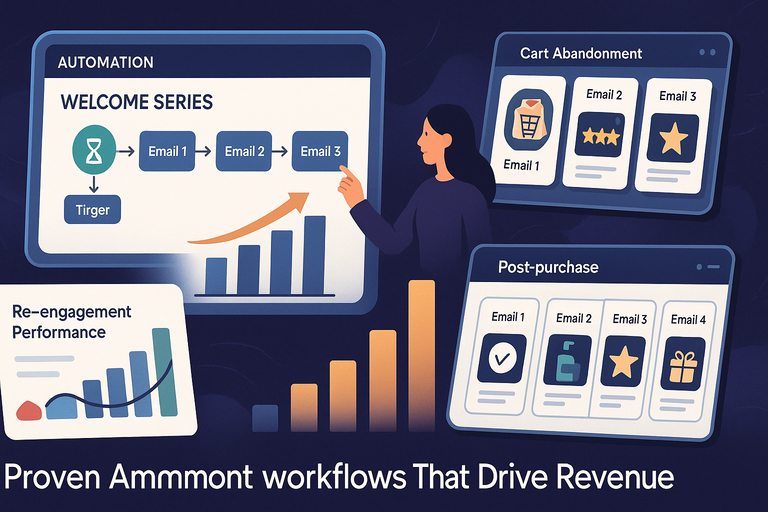
The right workflows can transform automation from “background task” to “revenue machine.”
Omnisend gives you several pre-designed ones that you can easily customize to your brand voice.
Welcome Series That Converts New Subscribers Into Customers
Your welcome series sets the tone. The goal isn’t just to say “hi” but to introduce your brand story and products naturally.
Here’s an effective 3-email welcome sequence:
- Email 1: Thank them for subscribing and tell your story.
- Email 2: Showcase top products or customer favorites.
- Email 3: Offer a small incentive (like 10% off) to nudge the first purchase.
You can build this using Automation → Welcome Series Workflow. Add a delay of 1–2 days between emails to maintain rhythm.
I’ve seen brands double their first-purchase conversions with this exact flow—just by humanizing that first contact.
Cart Abandonment Emails That Recover Lost Sales
Roughly 70% of shoppers abandon carts. Omnisend’s cart recovery automation helps you win them back.
A good setup includes:
- Email 1 (1 hour later): Gentle reminder—“You left something behind.”
- Email 2 (24 hours later): Add value—include reviews or testimonials.
- Email 3 (48 hours later): Final nudge—offer a small discount or free shipping.
To set up: Automation → Cart Abandonment → Customize Message Flow.
I recommend A/B testing subject lines here—personalized ones (“Still thinking about your blue jacket?”) tend to perform 35% better.
Re-Engagement Campaigns To Win Back Inactive Customers
Inactive subscribers are like forgotten gold. Omnisend lets you create reactivation workflows to bring them back.
Here’s what works best:
- Send a “We miss you” email after 60 days of inactivity.
- Include a personalized product recommendation or surprise offer.
- If there’s still no response, remove them from your list to protect deliverability.
You can track reactivation success using Reports → Automation Overview → Flow Performance.
When I ran this for an apparel brand, we recovered 12% of inactive users in one month.
Post-Purchase Automation To Build Long-Term Loyalty
Post-purchase automations turn one-time buyers into repeat customers.
Here’s a proven example:
- Email 1: Thank-you message with order confirmation.
- Email 2 (5 days later): Product care tips or usage guide.
- Email 3 (14 days later): Request a review or referral.
- Email 4 (30 days later): Personalized cross-sell or loyalty reward.
You can automate this through Automation → Post-Purchase → Add Sequence.
This small touch builds trust and keeps customers returning. In fact, repeat buyers are 9x more likely to convert than new ones.
Turn first-time customers into loyal fans using Omnisend’s ready-made post-purchase flows. Boost retention, increase review rates, and drive consistent revenue—automatically. 👉 Set up Omnisend automations!
How To Personalize Messages Using Omnisend Data
Personalization is where Omnisend marketing automation truly shines. It turns raw data into conversations that feel one-on-one.
Use Behavioral Triggers To Send The Right Message At The Right Time
Behavioral triggers activate messages when customers act (or don’t). Example: a browse abandonment email that reminds a visitor of items they viewed but didn’t buy.
To create one: Automation → Create Workflow → Choose “Custom Trigger.”
You can trigger based on viewed products, added items to cart, or visited a pricing page.
When I used this trigger for a client selling skincare, browse abandonment emails boosted conversions by 18%. Timing really is everything.
Customize Product Recommendations Based On Past Purchases
Omnisend’s recommendation engine uses purchase history to suggest complementary products.
Example: If a customer buys running shoes, the next email might feature socks or sports accessories.
You can insert product recommendations by selecting Add Content Block → Product Recommender in the campaign editor.
These personalized recommendations often lift average order value (AOV) by 10–20%.
Leverage Dynamic Content Blocks For Individualized Emails
Dynamic content blocks allow you to show different content to different customers—all in the same email.
Here’s a simple use case:
- New customers see beginner-friendly products.
- Repeat buyers see loyalty rewards or upgrades.
To enable: Email Editor → Add Dynamic Content → Set Display Rules.
This approach keeps your messages relevant while reducing campaign creation time.
Integrate Customer Data From Shopify, WooCommerce, Or BigCommerce
Omnisend integrates natively with major eCommerce platforms, syncing customer data automatically.
Here’s how to connect Shopify as an example:
- In Omnisend, go to Settings → Integrations → Shopify → Connect Store.
- Authorize the integration and sync your data.
This imports all key information—customer names, purchase history, browsing behavior—so you can automate smarter and faster.
When I connected WooCommerce for a client, their segmentation accuracy improved overnight, letting them send highly targeted upsell campaigns with almost zero manual effort.
Expert Tip: The secret to Omnisend marketing automation that actually increases revenue is consistency. Set up your workflows, watch the analytics weekly, and keep tweaking. Small refinements—like better timing or fresh subject lines—compound into long-term growth.
Key Omnisend Features That Boost Conversion Rates
Omnisend marketing automation is packed with features that do far more than just send emails—they help you convert curious visitors into loyal, repeat buyers.
Let’s look closely at the specific tools that have the biggest impact on conversion rates and how you can use them effectively.
Advanced Segmentation And Targeting Tools Explained
Segmentation is the backbone of effective automation. In Omnisend, this means dividing your audience based on real behavior and preferences, not just basic demographics.
You can find this under Audience → Segments → Create Segment.
Here’s how it works in practice:
- Behavior-based segmentation: Target people who viewed products but didn’t buy.
- Engagement-based segmentation: Focus on subscribers who clicked three or more emails recently.
- Purchase history segmentation: Send product restocks or accessories to past buyers.
I suggest using Omnisend’s auto-updating segments, which adjust in real time as customer behavior changes. For example, if someone buys again, they automatically move out of a “win-back” list and into a “loyal customer” one.
When I tested this feature for a fashion brand, segmented campaigns had 3x higher click-through rates compared to generic ones. That’s how powerful precise targeting can be.
SMS And Push Notifications For Real-Time Engagement
Omnisend’s multi-channel power really shines through SMS and push notifications. These tools keep your brand connected with customers even when they’re not checking email.
You can activate these channels in Campaigns → New Campaign → Select SMS or Push Notification.
Here’s a quick example of how I use them:
- SMS reminder: Send a short cart reminder with a discount code.
- Push alert: Notify about flash sales or back-in-stock items.
SMS messages have open rates of over 95%, according to Omnisend’s own 2024 data. Pairing them with emails creates a strong “1–2 punch” that captures both attention and action.
If you’re just starting, I recommend using SMS for time-sensitive campaigns and push notifications for engagement-driven reminders. It’s a smart balance that respects user attention while boosting conversions.
A/B Testing For Optimizing Campaign Performance
A/B testing (also called split testing) lets you experiment safely. It’s built directly into Omnisend’s Campaigns → Create A/B Test section.
You can test variations such as:
- Subject lines: Try humor vs. straightforward offers.
- Send times: Morning vs. evening.
- Email layouts: Simple design vs. image-heavy template.
Omnisend automatically sends each version to a small sample group and then delivers the winning version to the rest of your list.
I once ran a subject-line test for a skincare brand and discovered that curiosity-based subjects (“Guess what your skin needs this season?”) performed 42% better than direct ones. A/B testing makes these insights easy to capture without guessing.
Automation Splits To Personalize Customer Journeys
Automation splits are one of Omnisend’s most underrated features. They let you branch workflows based on conditions—like customer activity or past purchases.
You’ll find this in Automation → Workflow → Add Split Condition.
For example:
- If a customer opens an email → send follow-up offer.
- If not → send a reminder SMS instead.
This branching logic creates personalized experiences automatically. I believe this is where most brands miss opportunities—by not tailoring automation paths enough.
Even a single split can increase conversion rates by up to 25%, based on Omnisend’s internal benchmarks.
How To Track And Measure ROI With Omnisend
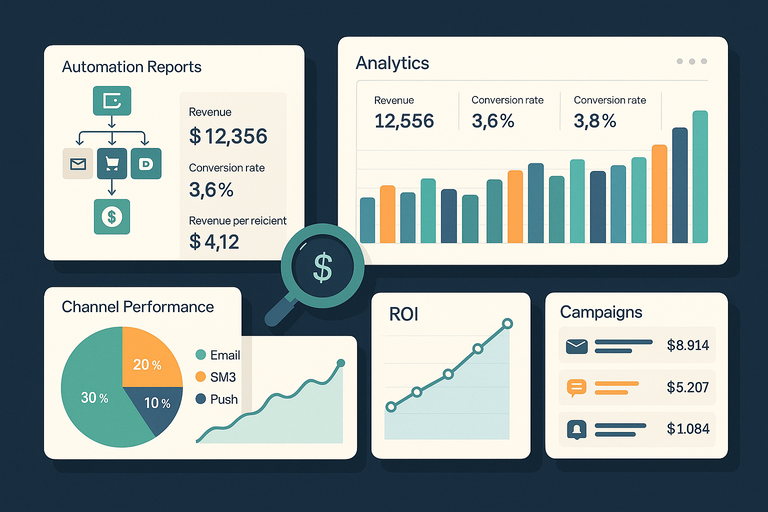
You can’t improve what you don’t measure. Omnisend provides robust reporting and tracking tools that make it simple to understand exactly where your revenue comes from.
Set Up Revenue Tracking For Each Automation Flow
Revenue tracking is built into every workflow. To enable it, go to Automation → Workflow → Reports.
Here, you’ll see metrics like:
- Total revenue generated per automation.
- Conversion rate per message.
- Revenue per recipient (a crucial KPI).
I always recommend assigning a clear goal to each automation.
For example, a “welcome series” should aim for first-purchase conversions, while a “cart abandonment flow” should target recovered sales. This focus makes ROI reporting meaningful, not just numerical.
Use Omnisend Analytics To Identify Top-Performing Campaigns
Omnisend’s Analytics dashboard (found under Reports → Campaign Reports) gives you visual performance insights for all campaigns—email, SMS, and push combined.
You can track:
- Open, click, and conversion rates per campaign.
- Best-performing subject lines or send times.
- Revenue attribution per channel.
A quick tip I use: export this data monthly and compare it with your store’s sales report. This helps pinpoint which automations are truly moving the needle.
One of my clients discovered that their “post-purchase” email series generated 40% of all repeat sales—just by looking deeper into Omnisend Analytics.
Compare Email, SMS, And Push Channel Performance
Omnisend allows side-by-side performance comparisons between channels, which is essential for optimizing your budget.
You can access this via Reports → Channel Overview.
Typical insights include:
- Email open rates vs. SMS engagement.
- Cost per conversion for each channel.
- Average order value (AOV) by communication type.
In my experience, email often drives volume while SMS drives urgency.
The right mix usually looks like 70% email, 20% SMS, and 10% push notifications—but it depends on your audience’s habits.
Improve Future Campaigns With Data-Driven Adjustments
Once you’ve reviewed performance data, the next step is iteration.
Here’s my quick routine:
- Identify underperforming campaigns (e.g., low click rates).
- Adjust subject lines or visuals using A/B testing.
- Re-launch the improved version and measure again.
Omnisend’s Automation Insights page simplifies this process by displaying improvement trends.
The key is consistency. Reviewing data weekly helps you catch declining engagement before it hurts revenue. Think of it as tuning a machine—it only runs smoothly when you check it often.
Expert Tips To Maximize Omnisend’s Automation Potential
Omnisend’s tools are only as effective as how you use them.
After working with dozens of eCommerce brands, I’ve gathered a few habits that make automation truly powerful.
Keep Your Audience Clean With Regular List Maintenance
An engaged list beats a large one. Use Audience → Segments → Inactive Subscribers to identify users who haven’t opened or clicked in 90 days.
I suggest:
- Removing those who remain inactive after two re-engagement attempts.
- Using a “sunset flow” to give one last opportunity before unsubscribing them.
This small routine can improve deliverability by up to 15%, ensuring your best customers always see your messages.
Use Consistent Branding Across All Automation Touchpoints
Every message—email, SMS, or push—should feel unmistakably you.
Inside Omnisend’s editor (Automation → Workflow → Edit Email Block), make sure:
- The logo, color palette, and tone are consistent.
- CTA buttons use similar language (e.g., “Shop Now” instead of varying phrases).
When I worked with a handmade jewelry brand, aligning design across channels boosted recognition and conversions within two weeks. Customers trust familiarity.
Continuously Test New Workflows For Better Conversions
Automation isn’t “set it and forget it.” Omnisend makes it easy to duplicate workflows, tweak one variable, and test outcomes.
For example:
- Clone your “Welcome Series.”
- Change the second email offer (e.g., discount vs. free shipping).
- Measure results after 14 days.
The data will tell you which one resonates better. I recommend testing at least one new workflow every quarter—it keeps your automation ecosystem evolving alongside customer behavior.
Combine Omnisend With Google Analytics For Deeper Insights
To see the full impact of your Omnisend campaigns, integrate with Google Analytics via Settings → Integrations → Google Analytics → Connect.
This lets you:
- Track traffic and conversions from each email or SMS.
- Measure assisted conversions (when an email leads to a later purchase).
- Compare campaign ROI against ad spend.
When I connected the two for a client, we discovered that automation campaigns drove 32% of total eCommerce revenue—something they hadn’t realized before.
Common Mistakes To Avoid In Omnisend Marketing Automation
Even with all its powerful tools, Omnisend marketing automation can underperform if used the wrong way.
I’ve seen businesses lose engagement and conversions simply because of small, avoidable missteps. Here’s what to watch out for.
Sending Too Many Messages Without Segmentation
This is the classic mistake: blasting everyone with the same message. Omnisend gives you deep segmentation tools for a reason—use them.
In Audience → Segments → Create Segment, you can filter customers by behavior, location, or engagement. For example:
- Target customers who viewed but didn’t buy.
- Exclude those who already purchased the promoted item.
If you don’t segment, you risk high unsubscribe rates and low deliverability. I once audited an eCommerce store that sent five generic emails a week to everyone.
After we introduced segmentation, engagement doubled within three campaigns. Less noise, more relevance.
Ignoring Customer Behavior And Purchase Patterns
Automation without behavioral triggers is like fishing without bait—you’re just hoping something bites.
Omnisend lets you set triggers based on real actions: a cart addition, a browse session, or a past purchase.
For example, someone who just bought running shoes shouldn’t receive another shoe promo—they should get a recommendation for socks or accessories instead.
I suggest reviewing your Automation → Workflow Triggers monthly. Align them with customer activity, not a rigid calendar. This simple adjustment keeps your automations contextual and human, not robotic.
Overlooking Mobile Optimization In Automation Flows
Over 70% of emails are opened on mobile, yet many brands still design for desktop first. Omnisend’s drag-and-drop editor automatically creates mobile versions, but you still need to test.
Here’s what to check before sending:
- Font size (avoid anything under 14px).
- Button placement (make sure CTAs are thumb-friendly).
- Image scaling (no cut-off visuals on smaller screens).
I always preview emails in Mobile View before activating a workflow. A mobile-optimized campaign can lift click-through rates by up to 25%, according to Omnisend’s 2024 benchmarks.
Forgetting To Update Campaigns Based On Data Insights
Automation isn’t “set it and forget it.” It’s a living system that needs attention.
Go to Reports → Automation Overview → Flow Performance every few weeks. Identify:
- Declining open rates (signal fatigue).
- Drops in click rates (content mismatch).
- Low revenue attribution (workflow timing issue).
When I worked with a beauty brand, we discovered their “re-engagement” flow had been running for a year without updates.
After refreshing the content and spacing out the emails, conversions tripled within a month. Keep iterating.
Step-By-Step Plan To Build A High-Converting Automation Strategy
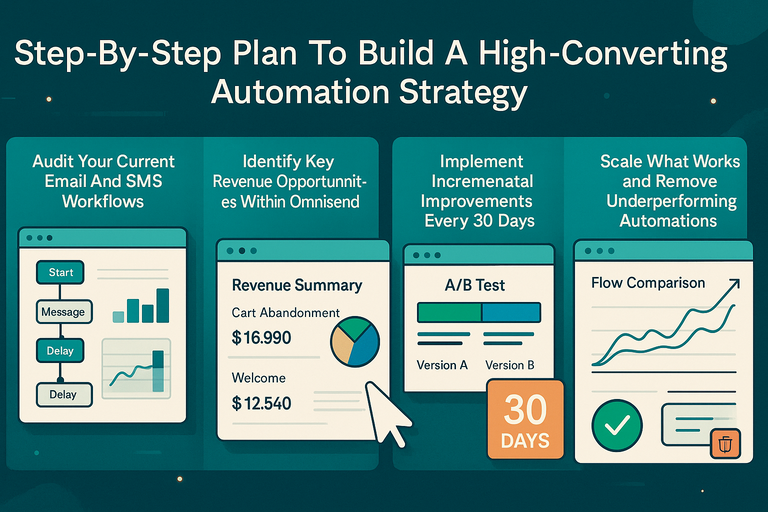
Creating a strong Omnisend automation strategy doesn’t need to feel overwhelming. The key is to start small, test consistently, and build momentum with data-driven insights.
Audit Your Current Email And SMS Workflows
Before adding new automations, look at what’s already running.
In Automation → All Workflows, review:
- Which workflows are active and how they perform.
- Overlaps between similar automations (e.g., two post-purchase flows).
- Frequency of customer touchpoints.
I like to map everything visually—listing each automation and its goal. This gives you clarity on where gaps or redundancies exist.
Identify Key Revenue Opportunities Within Omnisend
Next, pinpoint which automations drive the most value.
Start with Omnisend’s built-in reports under Reports → Automation → Revenue Summary.
You’ll usually find that:
- Cart abandonment recovers the most immediate revenue.
- Welcome and post-purchase flows build long-term customer value.
If you’re not sure where to begin, I suggest focusing first on the “cart recovery” and “welcome” workflows. They deliver the fastest ROI while teaching you how Omnisend’s automation logic works.
Implement Incremental Improvements Every 30 Days
Optimization is about small, consistent steps—not massive overhauls.
Try this simple 30-day improvement cycle:
- Identify one weak workflow (low clicks or conversions).
- Change only one element (subject line, delay time, or CTA).
- Re-measure performance after two weeks.
Omnisend’s A/B Testing and Automation Splits features make this process seamless. Incremental progress compounds into major revenue gains over time.
Scale What Works And Remove Underperforming Automations
Once you find winning workflows, scale them. Increase frequency slightly or expand to new channels (like adding SMS reminders).
But don’t be afraid to retire what doesn’t work. In Automation → Reports → Flow Comparison, you can easily see which automations deliver the lowest ROI. Archive those and reallocate your effort to proven ones.
I’ve seen teams cut their total automation count by 30% yet increase revenue by focusing only on the best performers. Quality beats quantity every time.
How Omnisend Compares To Other Marketing Automation Tools
If you’re wondering how Omnisend stacks up against other platforms like Klaviyo or Mailchimp, the differences become clear once you dive into workflow flexibility, pricing, and omnichannel power.
Key Differences Between Omnisend And Klaviyo
Both are built for eCommerce, but Omnisend’s strength lies in its multi-channel automation. Klaviyo is email-first; Omnisend integrates email, SMS, and push notifications in one unified flow.
For example, Omnisend allows you to send an email, follow up with an SMS, and finish with a push notification—all from one workflow screen. In Klaviyo, this often requires separate setups or third-party tools.
I’ve also found Omnisend’s visual builder easier for non-technical teams—it’s faster to launch and iterate.
Why eCommerce Brands Prefer Omnisend’s Multi-Channel Automation
Modern consumers switch between devices and platforms constantly. Omnisend’s cross-channel sync ensures they experience consistent communication.
Example of a typical journey:
- Day 1: Email about a product.
- Day 2: SMS reminder with a limited-time offer.
- Day 3: Push notification with customer reviews.
This keeps your brand present without being repetitive. Studies from Omnisend show that multi-channel campaigns earn 287% higher purchase rates than single-channel ones.
Cost And ROI Comparison With Other Platforms
Omnisend’s pricing is refreshingly transparent. Plans start free (with core features), scaling based on subscribers and SMS usage.
Compared to Klaviyo or Mailchimp, Omnisend typically offers:
- Lower SMS costs.
- More automation templates included by default.
- Unlimited email sends on most paid plans.
When one of my clients switched from Klaviyo, they cut monthly costs by 22% while boosting ROI through integrated SMS automations.
When To Upgrade Your Plan For Advanced Features
If you’re ready to expand automation complexity—like adding SMS splits or advanced reporting—it’s worth upgrading to Omnisend’s Pro Plan.
You’ll gain access to:
- Priority customer support.
- Advanced analytics dashboards.
- Unlimited push notifications.
I usually suggest upgrading once your automations consistently drive at least 20% of your total store revenue. At that point, advanced features pay for themselves.
Final Expert Advice For Sustainable Growth With Omnisend
At its core, Omnisend marketing automation isn’t just about sending messages—it’s about creating connected customer experiences that feel personal and thoughtful.
Focus On Customer Experience, Not Just Sales
Yes, conversions matter, but loyalty compounds. Make sure every workflow adds value—whether that’s education, appreciation, or entertainment.
For example, instead of sending another discount, send a quick tip on how to care for the product they bought. Customers remember thoughtful communication more than price cuts.
Use Data Insights To Continuously Evolve Your Strategy
Data is your north star. Regularly check Reports → Campaign Performance and adjust flows based on what the numbers reveal.
If open rates are dropping, experiment with new subject styles. If conversions stall, shorten delays between touchpoints. It’s not about reinventing the wheel—just refining it constantly.
Align Automation With Broader Marketing Goals
Omnisend shouldn’t operate in isolation. Tie your automations to big-picture goals—like improving customer lifetime value or boosting retention.
I recommend syncing your strategy with seasonal campaigns or product launches. This makes your automations feel integrated rather than random.
Build A Long-Term Revenue Engine With Omnisend
The best results come when automation becomes a system, not a tactic. Think of Omnisend as your 24/7 sales assistant—nurturing, reminding, and rewarding your customers automatically.
Keep refining your approach. Track metrics, listen to your audience, and evolve with their behavior. Over time, your automation engine becomes self-improving—and your revenue becomes steady, predictable, and scalable.
Expert Tip: The most successful Omnisend users are the ones who stay curious. Treat every data point as feedback, every automation as a living experiment, and every customer touchpoint as a chance to build trust. That’s how you turn automation into genuine, sustainable growth.

I’m Juxhin, the voice behind The Justifiable.
I’ve spent 6+ years building blogs, managing affiliate campaigns, and testing the messy world of online business. Here, I cut the fluff and share the strategies that actually move the needle — so you can build income that’s sustainable, not speculative.
Related posts:
 Email Marketing Campaigns: 5 Secrets to Skyrocket Engagement
 Top 5 Automated Sales Funnel Hacks for Explosive Growth!
 B2C Email Marketing Best Practices You Can’t Afford to Ignore
 7 Reasons to Try Omnisend Email Marketing Today
 Omnisend Marketing: How to Drive More Sales Fast
 Omnisend Automation: How to Scale Your Store on Autopilot