
Table of Contents
Some links on The Justifiable are affiliate links, meaning we may earn a small commission at no extra cost to you. Read full disclaimer.
If you’ve been exploring Freshworks sales tools, you already know they’re designed to do more than just track leads—they help you close deals faster, automate your workflow, and scale revenue growth effortlessly.
But with so many features packed inside, which ones actually drive results the fastest?
In this guide, I’ll break down the most effective Freshworks sales tools that can help your team work smarter, sell faster, and boost your revenue with precision.
Freshsales CRM: The Core of Freshworks Sales Efficiency
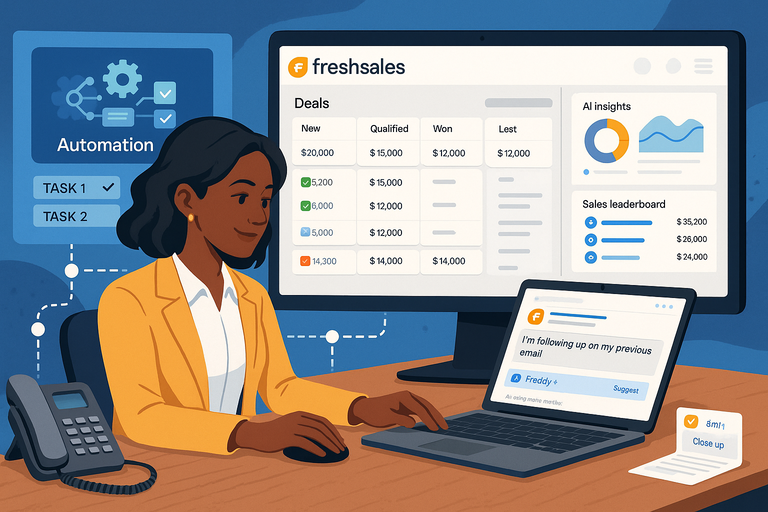
Freshsales CRM is the heartbeat of Freshworks sales—a platform built to help teams organize leads, manage deals, and automate tedious work so they can focus on what matters most: closing more sales.
I’ve seen it transform cluttered pipelines into clean, data-driven sales engines almost overnight.
Smart Lead Scoring To Prioritize High-Value Prospects
One of the most underrated yet powerful features in Freshsales is lead scoring.
It automatically ranks leads based on engagement level, behavior, and profile details—so your team knows exactly who’s most likely to convert.
Here’s how it works: You set specific criteria—like email opens, call frequency, or website visits—and Freshsales assigns a numerical score to each lead. For example:
- A lead who visits your pricing page gets +10 points.
- Someone who ignores three emails might lose -5.
I recommend customizing these rules based on your actual sales cycle.
Go to Admin Settings > Leads > Lead Scoring to tailor your parameters. It’s a small setup effort that saves hours in manual filtering later.
AI-Powered Deal Insights For Data-Driven Sales Decisions
Freshsales includes built-in AI that helps predict deal outcomes. Freddy AI (Freshworks’ intelligent assistant) analyzes historical data—like past deal size, time-to-close, and communication patterns—to forecast which deals are most likely to close.
It’s like having a data scientist in your CRM.
Imagine your team opening the Deals dashboard and instantly seeing which opportunities have the highest win probability. Those insights help reps prioritize follow-ups and keep pipelines healthy.
In my experience, combining this with visual sales reports under Analytics > Deals Overview creates a powerful 360° view of team performance.
Built-In Communication Tools For Seamless Collaboration
Freshsales eliminates the need to juggle between email, phone, and chat apps. Inside each contact record, you can send emails, make calls, or log notes—all in one interface.
This unified inbox not only saves time but also keeps your communication history centralized. You’ll find it under Contacts > Communication Timeline—a running feed of every touchpoint your team has had with that customer.
If you integrate Freshsales with Slack, you can even receive real-time deal updates right in your chat channel. It’s small touches like this that make collaboration effortless.
Automated Workflows To Reduce Manual Effort
Automation in Freshsales is the real time-saver. You can trigger workflows based on specific actions—like assigning new leads, sending follow-up emails, or updating deal stages.
Example: If a lead doesn’t respond after three days, Freshsales can automatically send a reminder email or reassign it to another rep.
You can find this under Admin Settings > Workflows. I suggest starting with automating repetitive, low-value tasks first—lead assignments, meeting reminders, and post-call follow-ups.
It’s one of those upgrades that feels invisible but adds hours back to your week.
Freddy AI: Your Virtual Sales Assistant
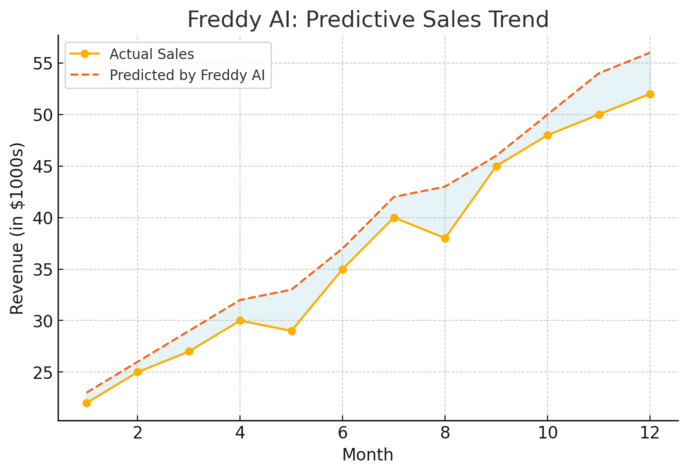
Freddy AI sits at the center of Freshworks sales intelligence.
It’s like having a personal sales analyst whispering insights in your ear—without ever needing a spreadsheet.
Predictive Lead Scoring To Identify Conversion Opportunities
Freddy AI takes lead scoring to the next level. Instead of static rules, it continuously learns from your CRM data to identify which behaviors correlate with conversion.
Let’s say you notice that leads who attend a demo within two days of signup convert 30% faster. Freddy AI will detect that pattern automatically and adjust lead scoring weights accordingly.
To activate it, go to Admin > Freddy AI Settings > Predictive Scoring. This adaptive system grows smarter the more data it has—so your predictions actually improve over time.
AI Insights To Forecast Sales Outcomes Accurately
Freddy’s forecasting insights help sales managers plan revenue with precision. It tracks each rep’s progress, identifies deal health, and predicts pipeline trends.
Think of it as a weather forecast for your sales funnel. If your upcoming quarter looks “stormy” due to delayed deals, Freddy AI alerts you early—so you can realign resources.
These insights appear directly in Reports > Forecasting Dashboard and can be filtered by rep, team, or region. I advise checking this weekly; it helps you catch potential shortfalls before they hit your numbers.
Smart Suggestions To Personalize Every Sales Interaction
Freddy also acts like a mini sales coach, recommending the best next step for each prospect.
For instance, if a lead has been inactive for a week but opened your last email twice, Freddy might suggest sending a personalized follow-up or a product demo link.
This guidance appears within the contact record itself—usually under the “Next Best Action” tab.
I’ve noticed these suggestions significantly increase engagement rates because they’re data-driven, not guesswork.
Data Enrichment Tools To Keep CRM Information Updated
Outdated data kills sales productivity.
Freddy AI helps here too, automatically enriching your contacts and company profiles with updated information from trusted sources.
Say a lead changes jobs or updates their company details—Freddy syncs that information directly into your CRM. You’ll see these updates under Contacts > Data Enrichment.
This keeps your database clean without hours of manual cleanup, which in turn makes lead scoring and segmentation far more accurate.
Freshchat: Streamlining Customer Conversations
Freshchat is the conversational engine of Freshworks sales.
It bridges marketing and sales by engaging leads the moment they show interest—without making them wait for a reply.
Omnichannel Messaging To Connect Across Multiple Platforms
Freshchat lets your team chat with customers across web, mobile, WhatsApp, and Facebook Messenger—all from one inbox. That means no more tab-hopping between apps.
You can access all messages under Inbox > Conversations, where each thread shows customer history pulled from Freshsales. This creates a smooth, context-rich experience for your reps.
I suggest integrating it with your website chat widget and WhatsApp Business account. You’ll catch more leads right at the point of intent—when curiosity is highest.
Real-Time Customer Engagement To Shorten Sales Cycles
Speed matters in sales. With Freshchat, your team can instantly reach out when a visitor browses key pages like pricing or demo requests.
Use IntelliAssign (inside Chat Settings) to automatically route chats to the right agent based on topic or availability. This ensures prospects get fast, relevant responses—reducing friction and accelerating deal closure.
A recent study by Freshworks showed that instant engagement can increase conversion rates by up to 40%. That’s not a small bump—it’s a pipeline revolution.
Automated Chatbots To Capture and Qualify Leads 24/7
Freddy AI-powered chatbots in Freshchat can handle inquiries even when your team’s offline. They can collect lead details, qualify prospects, and schedule demos automatically.
Example: You can design a bot under Admin > Chatbots > Create New Bot that asks three quick questions—like company size, use case, and contact info—and routes qualified leads directly into Freshsales.
This means your funnel never sleeps, and your reps start each morning with pre-qualified opportunities waiting.
CRM Integration For Unified Customer Context
When Freshchat and Freshsales work together, magic happens. Every conversation, note, or follow-up syncs automatically into the CRM record.
That unified view ensures no one ever loses context—whether a deal starts from chat, phone, or email. You can even view past chat history directly within a contact’s profile under Freshsales > Communication History.
I believe this is one of the most underrated aspects of Freshworks sales: it’s not just about adding tools, but connecting them so every team speaks the same language.
Freshmarketer: Converting Leads Into Loyal Customers

Freshmarketer is the marketing engine behind Freshworks sales, helping you turn warm leads into long-term customers through smart automation and personalized experiences.
I often think of it as the “bridge” between interest and commitment — it guides your prospects across that delicate middle ground where deals are won or lost.
Journey Builder To Create Personalized Customer Experiences
Freshmarketer’s Journey Builder allows you to map out how leads move through your funnel — from the first click to the final purchase.
You can visualize this under Marketing Automation > Journey Builder, where each block represents a step, trigger, or condition.
I like to think of it as a “choose-your-own-adventure” map for customers. You can set rules like:
- If a user opens an email → send follow-up in 2 days
- If no response → add to retargeting campaign
This lets you guide every lead along the most relevant path.
In my experience, personalizing these journeys by behavior — like webinar attendance or feature usage — can increase conversion rates by up to 35%.
Email Campaign Automation To Nurture Leads Efficiently
Freshmarketer’s email automation keeps your communication consistent without feeling robotic.
Under Campaigns > Email Journeys, you can schedule personalized sequences that adapt based on engagement.
For example:
- Send a product demo invite after someone downloads your eBook.
- Follow up with testimonials if they click but don’t convert.
I recommend keeping emails short, visual, and conversational. Freshmarketer also shows metrics like open rate, click-through, and unsubscribe trends, so you can easily test and tweak your strategy.
In my opinion, this is where Freshworks sales automation really shines — it gives you real-time feedback to refine your tone and timing.
Conversion Rate Optimization Tools To Maximize ROI
Freshmarketer includes conversion optimization features that help you understand what’s working on your website.
With tools like heatmaps and session replays, you can see exactly where users click, scroll, or drop off.
Here’s a quick path to try: Web > Behavior Analysis > Heatmaps.
In one client case, simply moving the CTA (call-to-action) button higher on the pricing page — based on heatmap insights — improved conversions by 22%.
I advise making one change at a time and tracking the before-and-after data. It’s the small, data-backed tweaks that often deliver the biggest revenue jumps.
A/B Testing Features To Refine Campaign Performance
A/B testing in Freshmarketer lets you compare two versions of a page, email, or form to see which performs better. You’ll find it under Experiments > A/B Tests.
You can test variables like:
- Headline text (“Start your free trial” vs. “Get started now”)
- CTA color or placement
- Email subject lines
I believe testing should be continuous — not a one-time exercise. Over time, these micro-optimizations compound to produce measurable gains.
My suggestion: Always run tests for at least a week to gather statistically reliable results before making big changes.
Freshcaller: Simplifying Sales Communication
Freshcaller is where Freshworks sales communication comes alive.
It turns every call into a structured, trackable conversation — without the complexity of traditional phone systems.
Built-In Cloud Telephony For Easy Call Management
Freshcaller runs entirely in the cloud, meaning your team can make and receive calls directly from their Freshsales dashboard or mobile app. Just head to Settings > Phone Settings > Numbers to set it up.
It’s simple: No hardware, no cables, just pure connectivity. I recommend assigning local numbers for different regions to improve pickup rates — customers are more likely to answer familiar area codes.
You can also monitor live calls, whisper advice to agents, or even barge in when needed. This kind of real-time coaching is invaluable for maintaining consistent call quality across teams.
Call Routing and Recording To Enhance Sales Follow-Ups
Call routing in Freshcaller ensures no lead ever slips through. You can set smart rules like:
- Route calls to the most available rep.
- Send high-value leads to senior agents automatically.
Set this under Admin > Call Routing Rules.
I suggest pairing routing with call recording, which you can enable for quality assurance. Listening to recordings helps identify sales bottlenecks and coaching opportunities.
In fact, one of my clients found that reviewing just 10% of weekly calls improved close rates by 18%, simply by refining tone and objection handling.
Real-Time Analytics To Monitor Sales Team Performance
Freshcaller’s real-time dashboard gives you an instant view of agent activity — from average call duration to missed call ratios. You can find this under Reports > Live Dashboard.
I use these analytics to spot trends early.
For example, if call volume drops on certain days, it might indicate a scheduling issue. If conversion rates dip after certain scripts, it’s time for an update.
Having live metrics also helps managers celebrate wins faster — and in sales, quick recognition fuels motivation.
Seamless Integration With Freshsales CRM
This integration is where Freshcaller becomes more than just a phone tool. Every call, note, and recording syncs automatically with the corresponding contact in Freshsales CRM.
That means when a rep pulls up a contact, they instantly see the full communication history — past emails, deals, and calls all in one place. It’s seamless, no copy-pasting needed.
You can activate this by going to Integrations > Freshsales inside Freshcaller.
I strongly recommend doing this on day one. The unified data experience not only saves time but also gives your team the context they need to personalize every conversation.
Freshsales Mobile App: Empowering Sales On The Go
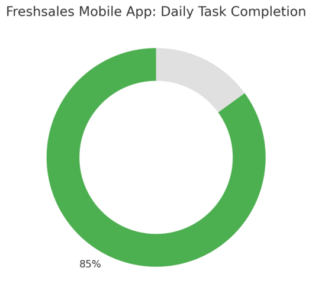
The Freshsales mobile app is a lifesaver for reps who spend their days in the field. It keeps everything — leads, deals, reminders, and insights — in your pocket.
I believe mobility isn’t just a convenience anymore; it’s a sales advantage.
Offline Access To Manage Deals Anytime, Anywhere
One of my favorite features is offline access. Even without an internet connection, you can add notes, log calls, or update deal stages. The app automatically syncs once you’re back online.
This is perfect for sales reps visiting clients in low-signal areas. Just open Deals > Offline Mode, and continue working without interruptions. It keeps your data consistent no matter where you are.
Real-Time Notifications To Stay Updated Instantly
The app’s push notifications keep you informed of new leads, deal updates, and task reminders in real time.
It’s like having a personal assistant tapping your shoulder every time something important happens.
I advise customizing notification preferences under Settings > Alerts & Notifications to prevent overload.
Focus on alerts for hot leads, meeting updates, and high-value deals. This ensures you act fast when it truly matters.
Voice Notes and Task Management For Field Sales Teams
Typing notes after every meeting can be exhausting. The voice notes feature in Freshsales mobile lets you record quick updates directly in a deal or contact profile.
Combine that with task management under Activities > Tasks, and you can assign follow-ups instantly — either to yourself or teammates.
I find this workflow especially helpful after client visits when time is tight, and accuracy matters most.
Quick Insights Dashboard To Track Progress Easily
The mobile Insights Dashboard offers a snapshot of your daily and weekly performance — deals won, calls made, tasks pending.
I like to check this every morning. It helps prioritize tasks and keeps your focus aligned with targets. Think of it as your daily sales compass, showing where to steer your efforts next.
You can find it under Home > Insights. It’s simple, visual, and a powerful motivator on busy sales days.
Pro tip: Combine Freshsales mobile updates with Freddy AI suggestions for personalized deal recommendations. It’s like having a coach and a CRM strategist right in your hand — guiding every move toward faster revenue growth.
Reporting And Analytics: Turning Data Into Sales Growth
Reporting and analytics in Freshworks sales aren’t just about numbers on a screen—they’re the pulse of your sales operation.
They turn data into decisions, helping you understand what’s working, where deals stall, and how to boost conversion without guesswork.
Customizable Dashboards For Real-Time Sales Insights
The dashboard in Freshsales gives a live snapshot of your entire pipeline. You can find it under Analytics > Dashboards, and it’s completely customizable.
You can track metrics like:
- Open deals by stage
- Average deal size
- Lead response time
- Win-loss ratio
I suggest building different dashboards for reps, managers, and executives. For example, reps can focus on deal health and daily activity, while managers can monitor revenue trends and forecast accuracy.
The visual graphs and charts make patterns obvious at a glance.
I once helped a sales team notice that most stalled deals were in the “Proposal Sent” stage. That insight led them to revamp their follow-up emails—and close rates jumped by 17% in one quarter.
Forecasting Tools To Plan Revenue More Accurately
Accurate forecasting separates proactive teams from reactive ones.
In Freshsales, go to Reports > Forecasting to project future revenue based on pipeline data, team performance, and historical trends.
You can set individual or team targets, then compare actual results against forecasts.
What I like most is Freddy AI’s predictive layer—it automatically adjusts projections based on past win rates and deal momentum.
This helps prevent overconfidence or underestimation.
I advise revisiting forecasts every two weeks, especially if your sales cycle is short. Real-time recalibration keeps your strategy grounded in reality, not hope.
Activity Tracking To Evaluate Team Efficiency
Activity tracking gives you a clear picture of how your team spends its time. You can view this under Reports > Sales Activities, where you’ll see calls made, emails sent, meetings logged, and follow-ups completed.
Here’s a simple trick I use: compare activity volume to deal outcomes. If high-activity reps aren’t closing deals, the problem may lie in message quality, not effort.
Conversely, if someone closes deals with fewer activities, study their approach—it might reveal smarter outreach methods worth replicating.
Freshsales even lets you filter activities by rep, date, or region, giving you granular visibility into what drives performance.
Data-Driven Recommendations To Refine Sales Strategies
Freddy AI’s sales insights don’t just describe what happened—they suggest what to do next. You’ll see recommendations like “Follow up on stalled deals” or “Leads from LinkedIn have a higher conversion rate.”
These insights appear directly in your Analytics Overview.
I often tell teams to use them in weekly sales meetings. Discuss one actionable insight each week and assign it to a measurable experiment. It’s a practical way to turn analytics into actual progress.
Integration Ecosystem: Expanding Freshworks Sales Capabilities
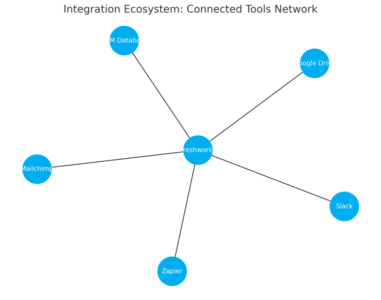
The Freshworks ecosystem connects effortlessly with popular tools you already use.
Integrations help centralize your data, improve collaboration, and reduce manual entry—all while keeping your team focused on selling, not switching tabs.
Connecting With Popular Tools Like Slack, Zapier, and Mailchimp
Freshworks integrates natively with tools like Slack, Zapier, and Mailchimp. You can connect them under Admin Settings > Integrations.
- Slack: Get instant updates on deals, tasks, and new leads directly in your channel.
- Zapier: Automate actions between Freshsales and hundreds of other apps (like automatically creating leads from Google Forms).
- Mailchimp: Sync contacts and email engagement data to refine segmentation and nurture campaigns.
I suggest starting with these three. T
hey streamline communication, automate repetitive steps, and create a steady flow of information between platforms—perfect for growing teams that juggle multiple systems.
Streamlined Data Flow Between Marketing and Sales Teams
Integration ensures marketing and sales always speak the same language.
When Freshmarketer campaigns feed leads directly into Freshsales, your reps know exactly where each lead came from and how they interacted with your brand.
This transparency eliminates the age-old “marketing vs. sales” tension.
You can find this setup in Freshmarketer > Integrations > Freshsales. Once active, marketing-qualified leads (MQLs) instantly appear in the CRM with full engagement history.
That means faster handoffs, fewer missed leads, and better-targeted follow-ups.
API Access For Custom Workflows and Advanced Use Cases
For companies with complex setups, the Freshworks API lets you build custom workflows or connect proprietary tools. You’ll find documentation under Admin > Developer Portal > API Docs.
You can, for example:
- Create an automatic lead entry from your website forms.
- Sync invoices from accounting software into customer records.
- Build internal dashboards using Freshsales data.
I believe this flexibility is a hidden gem—especially for tech-driven sales teams that need tight system coordination without compromising simplicity.
Centralized Hub For Managing All Sales Operations
The Freshworks Marketplace acts as a central hub for managing integrations.
You can browse and install apps directly from your Freshsales dashboard under Admin > Marketplace.
This ecosystem approach means you can add functionality without hiring developers.
I often recommend reviewing available integrations quarterly—new apps and updates are released frequently, and many can replace costly third-party tools.
Automation Features: Accelerating Sales Processes
Automation is where Freshworks sales becomes truly efficient.
It removes bottlenecks, speeds up response times, and gives reps more time for meaningful conversations instead of repetitive admin work.
Trigger-Based Actions To Speed Up Lead Response Time
You can automate triggers in Freshsales so actions happen instantly when conditions are met. Go to Admin Settings > Workflows > Create New Workflow to get started.
Examples include:
- Send an email when a lead fills out a contact form.
- Assign new leads to available reps automatically.
- Add deals to a specific pipeline when they reach a certain score.
I suggest tracking lead response time after implementing these triggers—it often drops by 40–60%, which directly correlates with higher close rates.
Workflow Rules To Standardize Sales Operations
Workflow rules ensure consistency across your sales team. They define how leads move through your funnel, what actions happen at each stage, and when notifications are sent.
A practical setup might include:
- Assigning leads based on territory or product interest.
- Automatically updating deal stages after calls or meetings.
- Sending reminders to reps for inactive deals.
These rules make your process repeatable and predictable—two traits every growing team needs.
Automated Follow-Ups To Improve Conversion Rates
Freshsales lets you automate follow-ups without losing personalization. Under Email Sequences, you can create a drip campaign that adjusts timing and messaging based on engagement.
Here’s how I use it: after a demo, if a lead doesn’t reply within three days, the system sends a polite check-in email. If they open it but don’t respond, a second email offers an incentive or new resource.
I’ve seen these sequences increase re-engagement by up to 25%. The key is subtle persistence—automation should feel human, not mechanical.
Task and Reminder Automation For Sales Consistency
Freshsales automatically creates reminders and tasks when certain conditions are met—like scheduling a follow-up call after a meeting or setting a renewal reminder for upcoming contracts.
You can manage this under Admin > Workflows > Tasks.
I recommend using task automation for repetitive but essential steps, such as logging post-call notes or follow-up scheduling. It keeps your pipeline moving even on your busiest days.
Expert Tip: How To Maximize ROI With Freshworks Sales Tools
Getting the most out of Freshworks sales isn’t about using every feature—it’s about using the right ones strategically.
Start With Data-Driven Insights To Set Realistic Goals
Before automating or expanding integrations, dive deep into your analytics. Use Freshsales dashboards to pinpoint where leads drop off or deals stagnate.
Setting goals based on real data ensures every improvement aligns with measurable outcomes.
Customize Automation Rules Based On Your Sales Cycle
No two sales cycles are identical. Adjust workflow rules to match how your team actually operates.
For example, if your product requires longer nurturing, extend automation delays between follow-ups to maintain authenticity.
Use Freddy AI’s Forecasts To Align Team Performance
Freddy AI gives predictive insights on deal success rates, revenue forecasts, and rep efficiency.
Review these metrics weekly with your team. It’s a fantastic way to set priorities and redirect focus before bottlenecks become problems.
Continuously Monitor Metrics To Identify Growth Opportunities
Make metrics review a habit, not a quarterly event. Look at conversion rates, lead sources, and activity reports to spot trends early.
Freshworks makes this easy with real-time analytics and weekly summaries.
Pro Tip: I recommend pairing automation with human review—set aside 10 minutes daily to check your dashboards. Data doesn’t just inform decisions; it tells the story of your business growth if you listen closely enough.

I’m Juxhin, the voice behind The Justifiable.
I’ve spent 6+ years building blogs, managing affiliate campaigns, and testing the messy world of online business. Here, I cut the fluff and share the strategies that actually move the needle — so you can build income that’s sustainable, not speculative.
Related posts:
 How to Promote a Business
 Referral Program Ideas: 10 Innovative Ways to Boost Customer Engagement
 What Is Freshworks CRM and How Does It Simplify Sales?
 Freshsales CRM Explained: How It Helps You Close Faster
 Social Media Marketing for Small Business – Best Tips
 How to Increase Social Media Followers