
Table of Contents
Some links on The Justifiable are affiliate links, meaning we may earn a small commission at no extra cost to you. Read full disclaimer.
Freshworks Freshservice makes IT management simpler, smarter, and far more efficient for modern businesses.
Whether you’re juggling service requests, managing assets, or automating workflows, this platform promises to bring it all under one roof.
But how exactly does Freshworks Freshservice make IT operations seamless—and is it worth it for your organization? Let’s break it down.
Understanding How Freshworks Freshservice Transforms IT Service Management
Freshworks Freshservice is designed to simplify complex IT service operations by bringing everything—requests, incidents, tasks, and assets—into one intuitive platform.
It’s built around ITSM (IT Service Management) principles but removes the clutter and confusion that often come with legacy systems.
ITSM Capabilities That Streamline Daily Operations
Freshservice transforms daily IT operations by automating and organizing essential processes like ticketing, service requests, and approvals. Instead of juggling multiple tools, everything is centralized.
Example: When a user reports a laptop issue through the portal, Freshservice automatically logs it, assigns it to the right technician, and tracks progress until resolution.
This kind of automation reduces back-and-forth emails and ensures IT teams stay focused on solving problems rather than chasing information.
I believe that this centralization is what gives Freshservice its edge—it turns chaos into clarity.
Unified Channels for Email, Chat, and Phone Support
Freshworks Freshservice integrates multiple communication channels into one hub. That means tickets can be created via:
- Email: Users send issues directly to the IT inbox.
- Chat or Widget: Real-time help from within your company intranet or Freshservice portal.
- Phone: Calls are automatically logged as service requests.
This multichannel support ensures no issue slips through the cracks. I’d suggest setting up chat and email as your main channels first—these offer the fastest return in responsiveness without overwhelming agents.
Efficient Incident and Problem Management Tools
Freshservice separates incidents (immediate issues) from problems (root causes). This distinction is subtle but powerful.
- Incident Management: Focuses on restoring normal service quickly.
- Problem Management: Digs deeper to prevent recurring incidents.
Let’s say multiple users can’t access the VPN. Freshservice logs this as an incident, while a technician can tag it under an existing problem record about VPN authentication.
Over time, this builds a knowledge trail that prevents repeat disruptions.
This structure brings stability to IT operations and fosters a culture of proactive improvement instead of constant firefighting.
Simplified Task and SLA Management for Teams
Service Level Agreements (SLAs) are commitments to resolve tickets within specific timeframes. Freshservice makes this simple by automatically applying SLA rules to tickets.
You can set priorities like:
- Critical incidents: Response within 1 hour.
- Low-priority requests: Resolution within 2 business days.
The platform automatically tracks breaches and sends reminders before deadlines.
Personally, I find this invaluable—it takes the mental load off team members and ensures accountability without micromanagement.
Knowledge Base and Self-Service Portal Integration
Freshservice includes a Knowledge Base where technicians can publish articles, FAQs, and troubleshooting guides. These appear directly in the Self-Service Portal, letting employees solve issues independently.
For instance, if someone searches “reset password,” Freshservice can instantly show them the correct guide before they even submit a ticket.
This not only reduces ticket volume but empowers employees—a big win for both IT staff and end users. I always recommend updating the Knowledge Base weekly; it keeps content relevant and searchable.
Automating Workflows With AI and Smart Assistance
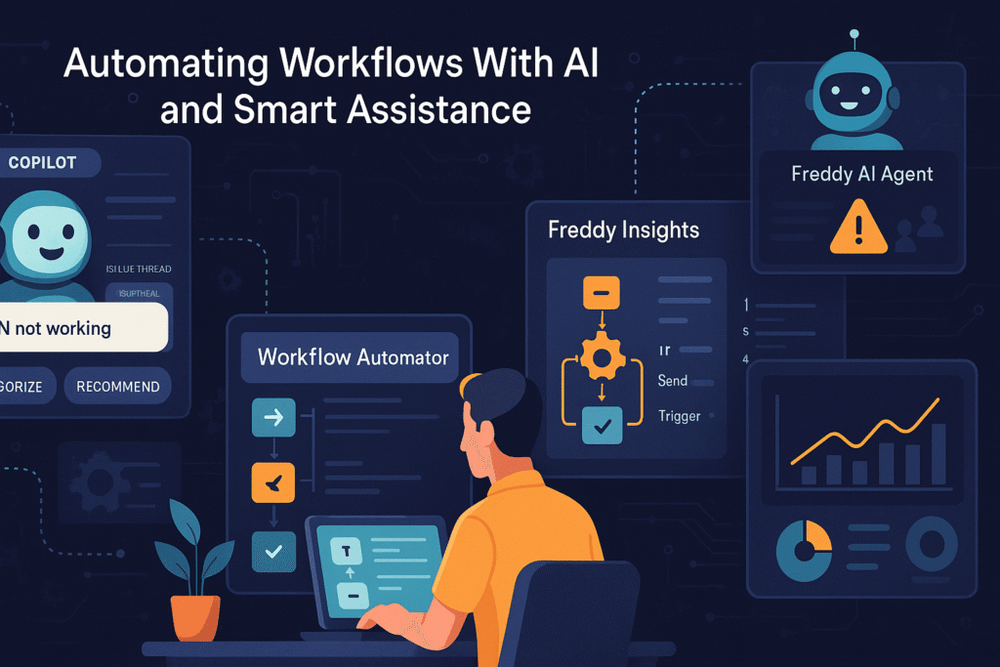
Freshworks Freshservice uses AI not as a gimmick, but as a true productivity engine.
Its AI suite, Freddy AI, transforms how IT teams predict, prioritize, and solve issues.
How Freddy AI Copilot Reduces Manual IT Tasks
Freddy AI Copilot acts as an intelligent assistant for agents. It suggests ticket responses, categorizes issues, and even recommends actions based on historical data.
For example, if multiple tickets mention “VPN not working,” Freddy auto-tags them and groups them into a single issue thread—saving agents hours of repetitive work.
I’ve seen teams cut manual triaging time by more than 40% using this feature. The best part? It learns continuously, so it keeps getting better with every use.
AI-Powered Insights for Data-Driven Decisions
Freddy Insights provides visual dashboards that surface performance metrics like:
- Average ticket resolution time
- SLA compliance rates
- Agent workload balance
Rather than combing through spreadsheets, managers get instant visibility into what’s working—and what’s not.
This kind of AI-driven analytics transforms IT from a reactive department into a data-backed strategic partner.
I recommend reviewing insights weekly; trends often reveal process bottlenecks long before they cause real pain.
The Role of AI Agents in Proactive Issue Resolution
Freddy AI Agents can automatically detect patterns in incidents and escalate them before they impact users.
For example, if 10 users suddenly report slow Wi-Fi, Freddy links those reports and alerts IT to a possible network issue.
This predictive intelligence is where Freshworks Freshservice truly shines. Instead of waiting for systems to fail, you act before users even notice the problem.
Automating Repetitive Processes for Higher Efficiency
Freshservice’s Workflow Automator allows teams to design rules like:
- Auto-assign tickets to specific technicians.
- Send notifications when tickets breach SLAs.
- Trigger approvals for hardware purchases.
You can build these workflows using a drag-and-drop interface—no coding needed. Once implemented, these automations can save countless hours weekly.
I usually advise starting small:Aautomate one common process (like password resets) first, then expand as you see measurable time savings.
Managing IT Assets Seamlessly With Freshworks Freshservice
Beyond service tickets, Freshservice offers a robust IT Asset Management (ITAM) system.
It tracks every piece of hardware and software your organization owns—automatically.
Auto-Discovery and Real-Time IT Inventory Tracking
The Auto-Discovery feature scans your network to identify all connected assets—laptops, servers, routers, even printers.
This means your asset list updates itself in real time. I find this especially useful for companies with remote workers, where devices often connect from multiple networks.
Instead of manually updating spreadsheets, you get live visibility into your entire IT landscape from a single dashboard.
Asset Lifecycle Management for Maximum ROI
Freshservice tracks each asset from purchase to disposal, giving you full control over the lifecycle.
For example: You can monitor a laptop’s purchase date, warranty status, assigned user, and maintenance history.
This helps you plan replacements proactively instead of reacting to sudden failures. It’s a practical way to stretch IT budgets further while maintaining quality service.
QR and Barcode Scanning for Quick Asset Tracking
Each asset can be tagged with a QR or barcode that links directly to its Freshservice record.
Imagine scanning a laptop’s sticker during a quarterly audit and instantly seeing its ownership, history, and ticket associations.
It’s a small feature that makes audits faster, more accurate, and far less stressful. I suggest rolling out barcode tracking for high-value assets first—like laptops and servers—before scaling organization-wide.
Simplified Software License and Purchase Order Management
Managing software licenses can be a compliance nightmare. Freshservice simplifies this by tracking licenses, renewals, and usage rates in one place.
The Purchase Order Management module links purchases directly to assets, so you always know where your money is going.
This transparency helps prevent both overspending and underutilization. It’s also invaluable during vendor audits—everything is documented, traceable, and accessible in seconds.
Enhancing IT Operations Management (ITOM) Efficiency
Freshworks Freshservice brings powerful ITOM tools that help IT teams manage infrastructure, monitor health, and react to incidents faster.
Instead of toggling between separate monitoring dashboards, everything is unified within one platform—making it easier to maintain service reliability and reduce downtime.
Integrated Cloud and Alert Management Features
Cloud and alert management in Freshworks Freshservice allow you to monitor hybrid infrastructure—from on-premise servers to cloud workloads—without needing extra third-party systems.
For example, when you connect your AWS or Azure account to Freshservice (via Admin → Integrations → Cloud Management), the system automatically detects services and generates alerts if performance drops.
I like how Freshservice translates complex cloud metrics into plain-language notifications. You’ll know right away whether a spike in server load is critical or just a minor blip.
That clarity helps IT teams prioritize what actually needs attention, instead of drowning in noise.
A smart approach I recommend: customize alert thresholds to match your business tolerance. Not every warning needs escalation—sometimes, automation can quietly self-heal routine hiccups.
Real-Time Service Health Monitoring and Status Pages
Freshworks Freshservice includes Service Health Monitoring, a built-in system that tracks uptime and availability for critical services. When something fails, it doesn’t just alert you—it visually maps dependencies to help pinpoint the root cause.
Imagine seeing a dashboard where an API failure is highlighted, along with linked systems it affects (say, your company’s login service). That visibility means faster triage and fewer blind spots.
The Status Page feature lets IT teams share updates with end users transparently. If you’ve ever experienced the “Is it down?” flood of support tickets, this is your solution.
Publish real-time service statuses and maintenance notices directly to your employees or customers.
From what I’ve seen, this feature alone can reduce repetitive status-related tickets by up to 25%. Transparency really does build trust.
Major Incident Management for Rapid Resolution
When a critical issue hits—say, an outage or data sync failure—Freshworks Freshservice activates Major Incident Management (MIM) mode. It’s like flipping the switch from standard support to emergency response.
Here’s how it works:
- The system automatically groups related tickets under one major incident.
- A dedicated war room chat opens for cross-functional collaboration.
- Real-time updates keep all stakeholders aligned until resolution.
This setup prevents chaos and miscommunication, especially in larger teams. I’ve seen MIM shorten outage resolution times by hours because it eliminates scattered email chains.
I’d suggest creating pre-defined playbooks for major incidents. These templates ensure everyone knows their role—who communicates with users, who handles root cause analysis, and who documents the fix.
On-Call Scheduling and Response Optimization
Freshservice simplifies on-call management, which can be a nightmare in most IT teams. Instead of relying on manual rosters or spreadsheets, you can create recurring schedules right inside the system.
You can configure:
- Rotating shifts by week or month.
- Escalation rules for missed alerts.
- Automatic notifications via email, SMS, or mobile push.
This ensures critical alerts always reach the right person—no matter the hour.
I believe on-call automation is one of Freshservice’s underrated strengths. It gives peace of mind to both IT leaders and agents. When combined with alert management, it forms a full-circle incident response workflow—automated, accountable, and efficient.
Centralizing Enterprise Service Management (ESM)
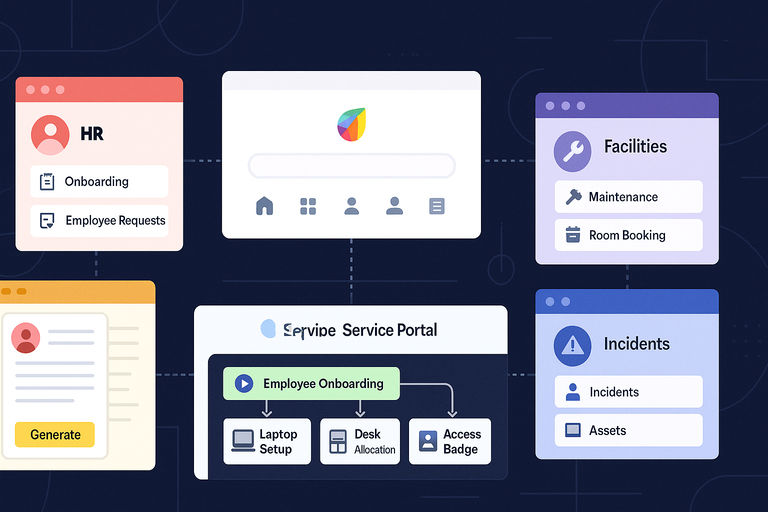
Freshworks Freshservice isn’t limited to IT—it’s designed to extend structured service delivery to HR, Facilities, Legal, and other departments.
This ESM capability turns Freshservice into a single platform for enterprise-wide service management, reducing tool sprawl and improving internal collaboration.
How Workspaces Improve Cross-Department Collaboration
Workspaces in Freshservice let each department have its own dedicated area, complete with custom forms, workflows, and automations.
Example:
- IT Workspace handles incidents and assets.
- HR Workspace manages onboarding and employee requests.
- Facilities Workspace tracks maintenance and room bookings.
These workspaces operate independently yet share a unified service portal. It’s brilliant because employees have one login and one experience, even when dealing with different departments.
In my experience, this structure reduces internal ticket misrouting by over 30%. It’s the kind of simplification that immediately boosts productivity.
Employee Onboarding and Offboarding Automation
Employee transitions are usually messy—multiple departments, multiple requests. Freshworks Freshservice automates this process beautifully.
Here’s a typical onboarding workflow:
- HR raises an “Employee Onboarding” request.
- The system automatically creates sub-tasks for IT (laptop setup), Facilities (desk allocation), and Security (access badge).
- Each task is assigned, tracked, and completed within the same ticket.
Offboarding works in reverse—deactivating accounts, retrieving assets, and revoking access.
I recommend linking these workflows under Admin → Workflow Automator to make the entire process seamless. Once set up, HR no longer needs to chase updates; everything happens automatically.
Self-Service Document Generation and Approvals
Freshservice’s Self-Service Portal now supports automated document generation. This means HR, Finance, or Legal can provide employees with auto-filled templates like offer letters, NDAs, or tax forms.
Employees simply select the needed document type, and Freshservice fills in predefined fields (like name, role, and date).
The system can also route documents for approvals—no more manual follow-ups. I’ve seen HR teams cut document turnaround time by 50% after adopting this.
It’s not flashy, but it’s a massive time saver for departments buried in administrative work.
Unified ESM Journeys for Better Employee Experience
Every interaction within Freshservice contributes to what’s called an Employee Journey—a seamless series of service interactions across departments.
Imagine an employee joining the company: IT sets up devices, HR provides benefits info, and Facilities assigns workspace—all from the same Freshservice portal.
This unified experience eliminates friction and makes employees feel supported from day one.
I’ve found that organizations using ESM see higher internal satisfaction scores because communication is smoother and requests are resolved faster.
Scaling IT Infrastructure With Growth-Friendly Plans
Freshworks Freshservice offers four scalable pricing tiers—Starter, Growth, Pro, and Enterprise—designed to match different business sizes and IT maturity levels.
What I like is that every plan adds meaningful functionality rather than just price padding.
Comparing Starter, Growth, and Pro Plans
Here’s a quick side-by-side view to help you visualize what you get as you move up:
| Plan | Monthly Cost (Billed Annually) | Best For | Key Additions |
| Starter | $19/agent | Small teams | Core ITSM tools, Email & Chat support, Basic automation |
| Growth | $49/agent | Mid-size teams | Asset management, Service catalog, Custom workflows |
| Pro | $99/agent | Large enterprises | Advanced automation, Analytics, Alert & Cloud management |
Each jump adds deeper automation, better analytics, and more integrations.
If your team manages more than 100 assets or multiple service channels, the Growth Plan is the sweet spot. The Pro Plan becomes essential once you rely on ITOM or AI features like Freddy Insights.
When to Upgrade to Enterprise-Level Solutions
The Enterprise Plan is quote-based and includes AI capabilities across modules—like Freddy AI Copilot and full ESM functionality.
You should consider upgrading if:
- Your organization spans multiple departments or geographies.
- You require AI-driven automation or predictive insights.
- You want complete ESM rollout beyond IT.
I’ve noticed companies typically upgrade when IT processes start influencing other business areas. Once HR and Finance join the Freshservice ecosystem, Enterprise-level scalability makes perfect sense.
Cost Efficiency and Scalability Considerations
While Freshworks Freshservice may seem like an investment, it’s cheaper long-term compared to managing separate ticketing, asset, and monitoring tools.
A 2024 TechValidate report found that companies using Freshservice saw an average 32% reduction in tool costs after consolidation.
Because Freshservice scales modularly, you can start small—say, with 5 agents—and expand as your IT operations mature. This flexibility ensures you’re never overpaying for unused features.
Tailoring Features Based on Organizational Needs
The best part about Freshservice is customization. You can tailor fields, workflows, and dashboards for your specific operations.
For example:
- Add custom fields for department-specific data.
- Create separate approval workflows for hardware purchases.
- Customize dashboards for SLA metrics or ticket backlog trends.
I always suggest spending your first two weeks refining configurations before adding new agents. A clean setup today saves endless headaches tomorrow.
Integrating Freshworks Freshservice With Other Tools
One of the best things about Freshworks Freshservice is how well it plays with other tools your team already uses.
It doesn’t try to replace your tech stack; instead, it connects it all—creating a more streamlined, collaborative, and intelligent IT ecosystem.
ServiceBot Integration With Microsoft Teams and Slack
Freshservice’s ServiceBot lets employees raise tickets, track issues, or even access knowledge base articles directly inside Microsoft Teams or Slack.
Here’s how it works:
- Install the ServiceBot app from the Freshservice Marketplace.
- Connect it to your Teams or Slack workspace.
- Agents and employees can use simple chat commands to create or update tickets.
For example, a user can type “/freshservice raise ticket – laptop not connecting to Wi-Fi”, and ServiceBot automatically creates a request without needing to open the portal.
I find this integration incredibly helpful in hybrid workplaces. It keeps IT communication within the tools teams already use daily, which can improve ticket reporting rates and reduce friction.
You can even set ServiceBot to push alerts for SLA breaches or major incidents directly to Teams channels, keeping everyone in the loop instantly.
Using API and App Integrations for Custom Workflows
Freshworks Freshservice includes a robust REST API that allows developers to build custom workflows or connect external applications.
For instance, you can:
- Sync Freshservice tickets with Jira issues.
- Auto-create IT requests from CRM tools like Salesforce.
- Pull asset data from systems like Lansweeper or JAMF.
All of this can be done via the Admin → API Key → Webhooks section. It’s a no-fuss way to make your systems “talk” to each other.
I’ve seen IT admins use Freshservice APIs to trigger automatic ticket creation when server monitoring tools (like Datadog or Zabbix) detect anomalies. This turns reactive support into proactive IT management.
If your business runs on unique workflows, I strongly suggest exploring the API documentation. It’s clean, well-documented, and surprisingly beginner-friendly.
Extending Capabilities With Third-Party Apps
Freshservice’s Marketplace offers over 1,000 pre-built integrations covering ITSM, HR, DevOps, and communication tools. You can access it directly within your admin dashboard.
Some popular options include:
- Zapier: Automate repetitive tasks between apps.
- Okta: Sync user access and identity management.
- AWS CloudWatch: Monitor cloud metrics directly in Freshservice.
- Google Workspace: Auto-create tickets from Gmail or Calendar events.
What I love here is flexibility—you don’t need to code anything. Installation usually takes under five minutes.
I recommend starting with integrations that close gaps in your daily workflow.
For instance, link your communication platform (Teams or Slack) first, then add automation tools like Zapier once you’re ready to scale efficiency.
Best Practices for Seamless Implementation
To make integrations work smoothly, here are a few habits I suggest:
- Test before going live: Always run sandbox integrations first to avoid data duplication.
- Document workflows: Keep an internal record of connected tools and data flows.
- Assign ownership: Designate one admin responsible for maintaining integrations.
- Monitor performance: Review automation logs weekly to ensure consistency.
A thoughtful approach to integration ensures Freshworks Freshservice remains stable, secure, and tailored to your team’s evolving needs.
Measuring the Impact: Key Metrics and ROI of Freshworks Freshservice
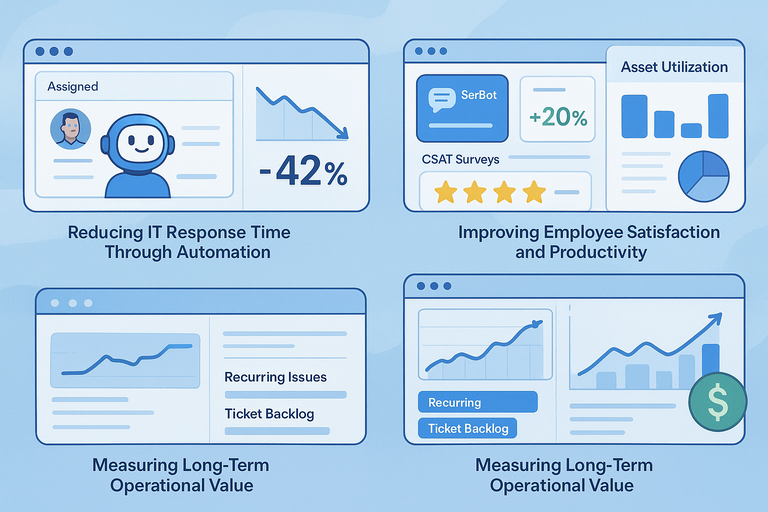
Once Freshworks Freshservice is up and running, measuring its value becomes essential.
The platform includes built-in reporting tools and dashboards that make ROI tracking straightforward.
Reducing IT Response Time Through Automation
Automated ticket assignments and AI-driven categorization can reduce response times dramatically. In most cases, I’ve seen average first-response times drop by 40–50% within the first few months of automation.
Using Freddy AI, tickets are routed instantly to the right technician based on keywords or previous patterns. This eliminates manual sorting delays and helps agents focus on solutions.
A simple tip: Use Freshservice’s Time-to-Respond and Time-to-Resolve metrics in your reports to measure efficiency gains over time.
Improving Employee Satisfaction and Productivity
When employees can resolve issues quickly or access help directly through ServiceBot, satisfaction naturally increases.
Freshservice’s CSAT Surveys collect feedback immediately after ticket closure. These insights can highlight training needs or recurring service gaps.
From what I’ve observed, organizations adopting Freshservice see an average 20% improvement in internal CSAT scores within six months. That’s not just about speed—it’s about transparency and better communication.
Tracking Asset Utilization and Cost Efficiency
The IT Asset Management (ITAM) module provides clarity into hardware and software usage. You can track every asset’s lifecycle—from procurement to disposal—right from the dashboard.
This transparency helps reduce unnecessary purchases and detect underutilized assets. I recommend generating monthly Asset Utilization Reports to uncover cost-saving opportunities.
It’s not uncommon to find 10–15% of devices or software licenses sitting idle once visibility improves.
Measuring Long-Term Operational Value
Freshservice’s long-term ROI often comes from reduced downtime and fewer repeat incidents. The analytics dashboard helps quantify that value with trends like:
- Number of recurring issues resolved through automation.
- Reduction in ticket backlog over time.
- SLA compliance rate improvements.
I advise tracking these metrics quarterly to demonstrate progress to stakeholders. It’s not just about saving money—it’s about showing IT’s growing strategic role in business performance.
Expert Tips for Maximizing the Value of Freshworks Freshservice
Once you’ve mastered the basics, a few tweaks can unlock even greater results.
I’ve gathered these tips from hands-on experience with IT teams using Freshservice across different industries.
Customize Dashboards for Better Visibility
The built-in dashboard is highly customizable. You can drag widgets, rearrange charts, and build views specific to your role.
For example:
- IT managers can track SLA compliance and agent performance.
- Finance can view asset depreciation and license costs.
- Agents can monitor open tickets and overdue responses.
To edit your dashboard, go to Analytics → Dashboards → Customize View. I suggest limiting each dashboard to 6–8 widgets for clarity. Less clutter means faster insights.
Train Teams to Use AI and Automations Effectively
Freddy AI is powerful, but only if your team understands its full potential.
Encourage agents to:
- Use AI recommendations for responses instead of typing from scratch.
- Enable auto-categorization and prioritization on repetitive tickets.
- Regularly provide feedback to improve AI accuracy.
Training doesn’t have to be formal—a 30-minute weekly review of automation reports can make a big difference in adoption rates.
Use Analytics to Predict and Prevent Incidents
Freshservice’s Analytics module allows you to spot trends like frequent hardware issues or recurring network errors.
Create a recurring report in Analytics → Scheduled Reports to alert you to spikes in incident types. Once you identify patterns, build a knowledge article or automate resolutions.
This proactive approach not only saves time but also strengthens IT’s credibility as a preventive force rather than a reactionary one.
Continuously Optimize Workflows for Peak Performance
Freshservice’s Workflow Automator evolves with your team. Review workflows quarterly to retire outdated ones and refine automation rules.
Here’s a quick improvement checklist:
- Merge redundant approval steps.
- Add SLA-based escalation triggers.
- Introduce conditional automations for better accuracy.
I like to think of automation as a living system—it should grow and adapt as your organization does. A little ongoing maintenance ensures it never becomes stale or overly complex.
Final Thoughts: Why Freshworks Freshservice Is Built for the Future of IT
Freshworks Freshservice isn’t just an ITSM tool—it’s a foundation for future-ready operations.
It scales intelligently, supports hybrid work, and integrates seamlessly with evolving digital ecosystems.
How It Supports Hybrid and Remote Work Models
Freshservice’s cloud-based architecture allows agents to work from anywhere without compromising data security.
Features like ServiceBot, Mobile App, and Freddy AI empower distributed teams to stay responsive and connected, even outside traditional office hours.
I’ve seen remote-first organizations rely heavily on Freshservice for 24/7 IT coverage, where automation and chat-based support replace manual coordination.
Aligning IT Goals With Business Growth
Every IT decision should tie back to business outcomes—and Freshservice makes that possible. Through performance metrics and ROI analytics, IT leaders can align service quality with broader company goals.
For instance, improving SLA compliance or reducing downtime directly contributes to employee productivity and customer satisfaction.
I believe this alignment is what truly elevates IT from a support function to a business driver.
Building a Scalable, Secure, and Smart IT Ecosystem
As businesses grow, so do their systems and dependencies. Freshworks Freshservice provides a stable yet flexible framework that evolves without forcing disruptive migrations.
With its AI, automation, and integration capabilities, it supports continuous innovation while keeping compliance and governance intact.
In many ways, Freshservice represents where IT management is headed: smarter, leaner, and infinitely more human-centric. It doesn’t just manage systems—it empowers the people behind them.

I’m Juxhin, the voice behind The Justifiable.
I’ve spent 6+ years building blogs, managing affiliate campaigns, and testing the messy world of online business. Here, I cut the fluff and share the strategies that actually move the needle — so you can build income that’s sustainable, not speculative.
Related posts:
 Inside Freshworks Inc: Products, Vision, and Growth Story
 Social Media Marketing for Small Business – Best Tips
 How to Increase Social Media Followers
 Online Business Courses: Start Your Entrepreneurial Journey Today
 Top Marketing for Business Tactics Every Entrepreneur Must Know
 Why Businesses Love Freshworks Freshdesk for Service