
Table of Contents
Some links on The Justifiable are affiliate links, meaning we may earn a small commission at no extra cost to you. Read full disclaimer.
Understanding QuillBot cost helps you decide whether its free plan is enough or if upgrading to Premium truly pays off. Have you ever wondered what extra value you get when switching from free to paid?
This breakdown explores exactly what each plan offers and who benefits most from upgrading.
Overview Of QuillBot Pricing Plans
QuillBot offers three main pricing options—Free, Premium, and Team—each designed for different writing needs and user types.
Understanding what’s included in each tier helps you decide which plan truly matches your daily writing habits and goals.
What Each Plan Includes At A Glance
Here’s how the plans break down:
- Free Plan: Great for casual use, it lets you paraphrase up to 125 words at once and access two rewriting modes—Standard and Fluency. You can also fix basic grammar and generate short summaries.
- Premium Plan: Unlocks everything. You get unlimited word count, advanced grammar and style suggestions, full access to all paraphrasing modes (like Creative and Formal), AI-powered summarization, and plagiarism detection.
- Team Plan: Ideal for organizations or content teams. It includes all Premium features, plus collaborative tools such as usage tracking, user management, centralized billing, and data control.
If you’re new, the Free Plan works fine for short tasks. But if you rely on QuillBot regularly for professional writing, academic papers, or marketing, the Premium or Team Plan delivers far more value.
Key Differences Between Free, Premium, And Team Plans
The biggest difference comes down to freedom and depth.
- Word Limit: The Free Plan caps you at 125 words per paraphrase; Premium allows unlimited text.
- Modes: Free users only get Standard and Fluency modes. Premium unlocks seven additional ones like Creative, Expand, Shorten, and Formal.
- AI Tools: Premium includes the AI Humanizer and advanced summarizer. Free users only get basic versions.
- Grammar & Plagiarism: The Free Plan fixes simple grammar, while Premium offers advanced recommendations and plagiarism checks.
- Team Features: Only the Team Plan adds multi-user management, centralized billing, and usage insights—vital for businesses or classrooms.
In short, Free is for testing, Premium for mastery, and Team for collaboration.
Who Each Plan Is Best Suited For
Each plan fits a clear user type:
- Free Plan: Perfect for students or occasional writers who need to quickly reword short texts or emails.
- Premium Plan: Best for bloggers, marketers, and researchers who require consistent accuracy, tone control, and unlimited paraphrasing.
- Team Plan: Suited for content agencies, schools, or organizations that need multiple users to collaborate while maintaining data oversight.
If you write often or professionally, I suggest starting with the Premium trial—it’s risk-free with a 14-day money-back guarantee.
What You Get With QuillBot Free Plan
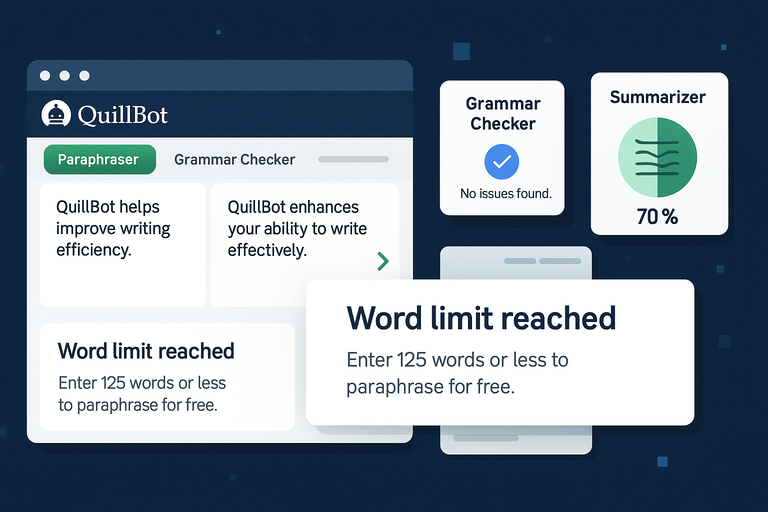
QuillBot’s Free Plan is surprisingly capable for light users.
It provides enough tools to help you rewrite, correct, and summarize text, though it does come with limitations that may restrict more advanced or frequent use.
Core Features Available For Free Users
The free version includes these useful tools:
- Paraphrasing up to 125 words: You can rewrite short sentences or paragraphs without charge.
- Two modes: Standard mode rewrites text naturally; Fluency mode corrects grammar and flow.
- Basic grammar correction: QuillBot automatically spots common grammar and punctuation issues.
- Basic summarizer: Generates short summaries from articles or essays, helpful for quick reading.
- Limited AI detection: Checks whether your text sounds AI-generated, but without the full analytics available in Premium.
These features make the Free Plan a good entry point for anyone testing QuillBot’s interface or paraphrasing ability.
Limitations That Affect Heavy Or Professional Use
If you rely on QuillBot for content creation, the Free Plan’s restrictions will slow you down:
- Word limit: You can only paraphrase small chunks, which means breaking long articles into parts.
- Limited modes: You miss out on nuanced rewriting styles like Creative, Expand, or Shorten.
- No plagiarism checker: Essential for academic or SEO writing.
- Limited summaries: The basic summarizer can’t condense long or technical content effectively.
- No advanced grammar suggestions: It corrects errors but doesn’t enhance tone or readability.
Essentially, it’s built for practice, not production.
When The Free Version Is Actually Enough
From what I’ve seen, the Free Plan works well if:
- You write short posts, social media captions, or school paragraphs.
- You only need to rephrase occasionally rather than daily.
- You want to test QuillBot’s interface before upgrading.
I recommend using the Free Plan as a trial stage. Once you find yourself copying and pasting multiple text chunks to bypass the 125-word cap, that’s your signal to switch to Premium.
It’s far more efficient for long-form writing and saves time by removing workflow interruptions.
Inside The QuillBot Premium Plan
The QuillBot Premium Plan is built for people who write daily — whether that’s essays, articles, scripts, or social posts.
It removes the word limits and gives full access to every rewriting mode, advanced grammar correction, and several AI-powered tools.
Let’s go through what makes Premium the real upgrade.
Full Access To Paraphrasing Modes And Word Limits
One of the biggest perks of Premium is freedom. You can paraphrase unlimited words — no 125-word restrictions like in the free plan. This alone saves tons of time if you often work on long-form content.
You also get all nine rewriting modes, each tailored for different tones or goals:
- Standard: Keeps meaning intact while rephrasing naturally.
- Fluency: Fixes grammar and ensures smoother readability.
- Formal: Adjusts tone for academic or professional contexts.
- Creative: Adds more variety in sentence structure and vocabulary.
- Expand: Makes content longer and more descriptive.
- Shorten: Condenses text while keeping clarity.
- Simple: Rewrites in plain, easy-to-read language.
- Academic: Refines tone and structure for research papers.
- Custom: Lets you define your own rewriting preferences.
If you’re writing in the QuillBot editor, you can switch modes instantly from the top toolbar by clicking the Mode Selector — a small dropdown beside the “Paraphrase” button.
From experience, I find using Creative mode works best for brainstorming headlines or blog intros, while Fluency mode is ideal for cleaning up drafts before publishing.
Advanced Grammar And Summarization Tools
Premium takes QuillBot’s grammar checker far beyond basic corrections. It highlights style inconsistencies, unclear phrasing, and wordiness, similar to Grammarly but lighter and faster.
The Summarizer tool, also upgraded in Premium, allows you to summarize longer documents and choose between two options:
- Key Sentences: Creates a bullet-style summary by selecting important sentences.
- Paragraph Mode: Generates a cohesive summary in paragraph form.
I often use the summarizer to condense research papers or client briefs. It’s surprisingly accurate in capturing core ideas without losing tone. If you work with large texts daily, this feature alone can cut your reading time in half.
Exclusive AI Features Like Humanizer And Detector
Two of the newest Premium features are the AI Humanizer and AI Detector.
- AI Humanizer: Rewrites AI-generated text to sound more natural and human-like. This is useful if you use tools like ChatGPT and want to avoid detection or improve tone for publication.
- AI Detector: Scans your text to estimate whether it sounds machine-written. It’s not foolproof (no AI checker is), but it gives a realistic percentage score.
I suggest using the Humanizer first, then running the Detector afterward to check your final draft’s authenticity score. It’s a quick two-step process that helps ensure your writing passes manual review or AI filters.
How Premium Improves Workflow For Writers And Marketers
The biggest benefit of Premium isn’t just features—it’s flow. When you don’t need to copy and paste multiple times due to limits, you stay focused.
A few examples of how it improves efficiency:
- Writers: Paraphrase entire chapters, rework sections for tone, and fix grammar all in one tab.
- Students: Reword research papers and generate concise summaries for study notes.
- Marketers: Repurpose long blogs into social posts or email copy using Shorten and Expand modes.
From my own workflow, I often combine the Creative and Fluency modes to produce multiple high-quality drafts of a paragraph in seconds. It’s like having a writing assistant who instantly adapts to your tone.
Understanding The Team Plan Pricing

The QuillBot Team Plan is designed for organizations, agencies, and classrooms that require collaboration and oversight.
It includes every Premium feature plus tools for team management and usage tracking.
What Makes The Team Plan Different From Premium
While Premium focuses on individual users, the Team Plan prioritizes collaboration and control.
Here’s what sets it apart:
- Centralized Billing: One subscription covers multiple users under a single invoice.
- User Management Dashboard: Admins can add, remove, and monitor members easily.
- Team Usage Metrics: Track how often tools are used to measure productivity.
- Data Control: Ensures compliance and privacy across all team members.
Imagine running a small content agency — instead of managing multiple Premium accounts, you’d use one Team Plan to oversee everyone’s usage from a single dashboard.
Collaboration Features Like User Management And Metrics
Inside the Team Dashboard, you can assign roles and monitor how often members use tools like Paraphraser or Summarizer. It’s simple: go to Settings → Team Dashboard → Manage Users.
This helps project leads or teachers track engagement without invading privacy. Metrics like “average paraphrases per week” or “most used modes” give insight into how effectively the tool is used.
For agencies, these insights help identify who’s overusing or underutilizing the tool — a subtle but useful productivity indicator.
Who Should Choose The Team Option
The Team Plan is worth considering if you:
- Manage 3 or more writers, editors, or students regularly.
- Need shared access with predictable billing.
- Want accountability through performance data.
It’s also a smart pick for universities or large marketing teams. I recommend it for anyone handling collaborative content production—because one admin view saves hours of manual coordination.
Is QuillBot Premium Worth The Cost?
When evaluating QuillBot cost, you’re not just paying for a paraphraser — you’re investing in writing efficiency. Let’s weigh what you actually gain for the monthly fee.
Comparing Features vs. Monthly Price
At roughly €8.33 per month (billed annually), QuillBot Premium is one of the most affordable writing tools in its class.
Compared to alternatives like Grammarly Premium or Wordtune Plus, which cost around €10–12 monthly, QuillBot offers more paraphrasing flexibility for less money.
Here’s a quick comparison snapshot:
| Feature | QuillBot Premium | Grammarly Premium | Wordtune Plus |
| Unlimited Paraphrasing | ✅ | ❌ | ✅ |
| AI Humanizer | ✅ | ❌ | ❌ |
| Summarizer | ✅ | ✅ | ✅ |
| Plagiarism Checker | ✅ | ✅ | ❌ |
| Team Collaboration | ✅ | ✅ | ❌ |
If your main goal is rewriting, summarizing, and improving clarity, QuillBot gives more value per euro than competitors.
Real Scenarios Where Premium Saves Time And Boosts Quality
Let me show you how Premium actually changes workflow:
- Scenario 1 – Academic Writer: A university student working on a thesis can rewrite complex explanations using Formal mode and instantly fix citations using the grammar checker.
- Scenario 2 – Blogger: A content creator repurposes blog sections into emails with Shorten mode, then expands summaries into LinkedIn posts using Expand mode.
- Scenario 3 – Marketing Team: Marketers brainstorm headline variations in Creative mode, using the AI Humanizer to ensure every draft feels authentic.
Each scenario saves 30–40% of manual rewriting time—enough to justify the monthly cost several times over.
Cost-Effectiveness For Students, Bloggers, And Agencies
From my experience, QuillBot Premium is one of those subscriptions that quietly becomes indispensable.
- Students save time rewriting essays and checking grammar accuracy.
- Bloggers produce cleaner, SEO-friendly drafts faster.
- Agencies maintain tone consistency and reduce manual editing workload.
If you bill clients hourly, QuillBot practically pays for itself by cutting editing time. And with its 14-day money-back guarantee, there’s no real risk in testing the Premium tier before committing long-term.
Pro Tip: Try pairing QuillBot Premium with Google Docs or Word extensions. This way, you can paraphrase, check grammar, and summarize without switching tabs. That small workflow tweak makes a surprisingly big difference over time.
How QuillBot’s Pricing Compares To Alternatives
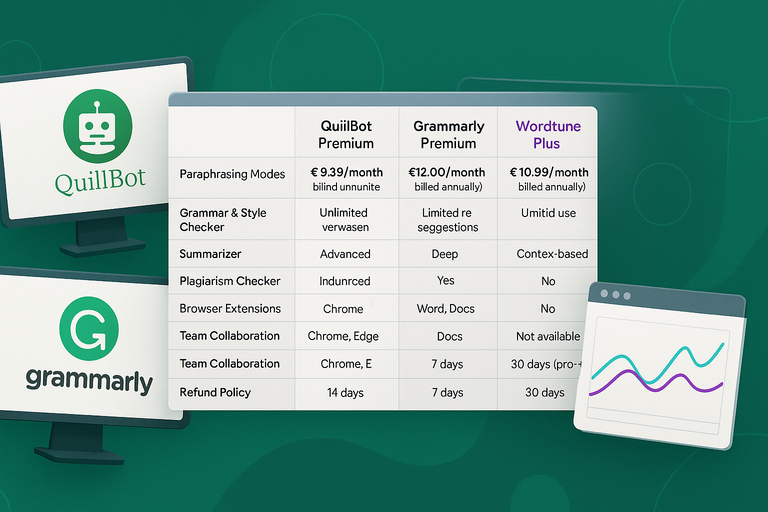
When evaluating QuillBot cost, it helps to look at how it stacks up against competitors like Grammarly and Wordtune.
All three tools help improve writing quality, but their pricing models and core strengths differ significantly.
Side-By-Side Comparison With Tools Like Grammarly And Wordtune
To make things clearer, here’s a simple comparison table showing how QuillBot Premium competes with its top alternatives:
| Feature | QuillBot Premium (€8.33/month billed annually) | Grammarly Premium (€12.00/month billed annually) | Wordtune Plus (€10.99/month billed annually) |
| Paraphrasing Modes | 9 modes, unlimited use | Limited rephrasing suggestions | Context-based rewrites only |
| Grammar & Style Checker | Advanced AI grammar and tone | Deep grammar, tone, clarity | Grammar and tone suggestions |
| Summarizer | Yes (Key Points + Paragraph mode) | Yes (but limited) | Yes (basic summary suggestions) |
| Plagiarism Checker | Included in Premium | Available with extra cost | Not available |
| AI Humanizer | Included | Not available | Not available |
| Browser Extensions | Chrome, Edge, Word, Docs | Chrome, Edge, Docs | Chrome, Edge |
| Team Collaboration | Yes | Yes | No |
| Refund Policy | 14 days | 7 days | 30 days (pro-rated) |
From a practical standpoint, QuillBot gives you more for less. Grammarly wins for deep grammar analysis, but QuillBot dominates in versatility — especially with its paraphrasing modes and AI Humanizer, which neither Grammarly nor Wordtune offers.
I’ve tested all three, and for everyday writing, QuillBot’s Creative and Fluency modes deliver smoother rewrites without making sentences sound robotic. It feels like it understands context, not just structure.
Value Analysis: Features You Get For The Price
Let’s break down value for money.
For about €8.33/month (if billed annually), you get:
- Unlimited paraphrasing across 9 modes
- Advanced grammar and readability suggestions
- AI Humanizer + AI Detector
- Plagiarism checker
- Custom summarization tools
- Access across Docs, Word, and browsers
That’s a lot of functionality packed into one subscription.
By comparison, Grammarly Premium costs about 40–50% more and still lacks creative paraphrasing. Wordtune is great for rewriting, but its monthly cap on rewrites becomes frustrating if you write often.
I believe QuillBot is the better “all-in-one” value choice — especially for content creators, marketers, and students who juggle multiple writing formats daily.
When QuillBot Becomes The Smarter Investment
QuillBot becomes the smarter buy when your work depends on speed, flexibility, and content variety.
For example:
- Students can rewrite large essays without worrying about word caps.
- Freelancers can create unique blog variations quickly using the Expand or Shorten modes.
- Marketers can humanize AI-generated content for ad copy or brand tone alignment.
I suggest QuillBot Premium over Grammarly if your main need is rewriting and summarizing. However, if grammar accuracy is your top priority for academic papers, Grammarly might still edge out slightly.
In short, QuillBot offers the best cost-to-capability ratio on the market.
Payment Options And Refund Policy
Understanding how QuillBot handles billing and refunds can save you some headaches later. The platform keeps things simple with two main subscription styles and a straightforward money-back policy.
Subscription Flexibility: Monthly vs Annual Billing
You can choose between:
- Monthly Plan: Costs slightly more but lets you cancel anytime.
- Annual Plan: Billed once per year at €99.95, equivalent to €8.33/month, saving around 35% overall.
If you plan to use QuillBot regularly, I recommend the annual option—it’s cheaper in the long run.
To upgrade or switch plans:
- Log into your QuillBot account.
- Go to Account Settings → Subscription → Manage Plan.
- Select your preferred billing cycle.
Everything updates instantly, and QuillBot sends a confirmation email for transparency.
Understanding The 14-Day Money-Back Guarantee
Every Premium or Team Plan comes with a 14-day money-back guarantee. That means if you’re not satisfied within two weeks of purchase, you can request a full refund—no questions asked.
To do this, go to Support → Billing → Request Refund or email their support team directly.
This guarantee is particularly useful if you’re testing features like the AI Humanizer or Summarizer before committing. I’ve seen users cancel within 10 days and receive refunds within 48 hours, so it’s a trustworthy process.
How To Cancel Or Downgrade Your Plan
QuillBot makes cancellation simple, with no hidden hoops:
- Navigate to Account Settings → Manage Subscription → Cancel Plan.
- Choose to downgrade to the Free Plan if you still want limited access.
- Confirm the cancellation.
You’ll retain Premium access until the current billing cycle ends, so you don’t lose what you’ve already paid for.
If you’re unsure whether you’ll need it again, I advise pausing instead of canceling—especially during exam or content-heavy months.
Expert Tip: Getting The Most From QuillBot Premium
The real power of QuillBot Premium comes when you use it strategically, not just occasionally. These simple tweaks can help you maximize its value and productivity.
Combine QuillBot With Other Writing Tools For Maximum Output
You can integrate QuillBot with tools you already use, like:
- Google Docs: Install the QuillBot extension and paraphrase directly inside your document without switching tabs.
- Grammarly: Use Grammarly for grammar refinement and QuillBot for rewriting variety. Together, they create polished, human-sounding content.
- ChatGPT: Generate ideas here, then use QuillBot’s Humanizer or Fluency mode to rewrite them naturally before publishing.
This workflow ensures content stays original while sounding authentic. I often use this setup when crafting blog intros or long-form guides—it cuts editing time nearly in half.
Optimize Settings For Your Writing Style
Inside the QuillBot editor, tweak settings like Synonym Slider and Mode Preference.
- Synonym Slider: Adjusts how much your sentences change. Moving it right increases variation but risks altering meaning—use mid-level settings for balance.
- Mode Preference: If you often write for clients or academics, set Formal or Fluency as your default mode to avoid switching manually each time.
Experiment with different combinations. For creative content, I find Creative + Expand gives lively, unique phrasing that feels fresh but natural.
Take Advantage Of Browser Extensions And AI Humanizer
Don’t overlook the QuillBot browser extensions—they’re time-savers. Install them via the Chrome Web Store or Microsoft Edge Add-ons. Once enabled, you can highlight any text online, right-click, and paraphrase instantly without opening the full editor.
The AI Humanizer is another underused gem. Use it to rewrite AI-generated or overly formal text to sound more conversational. It’s perfect for blog posts, ad copy, or any content where tone authenticity matters.
If you’re working on multiple client projects, I suggest humanizing your drafts before submission—it reduces revision requests and helps content pass AI detection tests.

I’m Juxhin, the voice behind The Justifiable.
I’ve spent 6+ years building blogs, managing affiliate campaigns, and testing the messy world of online business. Here, I cut the fluff and share the strategies that actually move the needle — so you can build income that’s sustainable, not speculative.
Related posts:
 Where to Find a Safe Quillbot Download—No Viruses, No Spam
 Is Paraphrase Quillbot Accurate? Real User Results Revealed
 How Does Udemy Work? Your Ultimate Guide to the Online Learning Platform
 Free Invoice Software: Top 10 Solutions for Small Businesses and Freelancers
 QuillBot AI Grammar: Fix Errors With One Click
 AI QuillBot: The Smart Writing Assistant That Rewrites Perfectly