
Table of Contents
Some links on The Justifiable are affiliate links, meaning we may earn a small commission at no extra cost to you. Read full disclaimer.
10 Direct Marketing Solutions That Boost Conversions Instantly – Mobile marketing solutions have transformed how brands connect with audiences, but which ones actually skyrocket engagement rather than drain your budget?
With so many platforms promising results, it’s tough to know which tools truly make your campaigns more interactive, personalized, and profitable.
In this guide, we’ll break down ten proven mobile marketing solutions that help you capture attention, drive repeat interactions, and boost conversions—no matter your industry or audience size.
1. Personalized Push Notification Platforms That Drive Action
Push notifications are one of the most direct mobile marketing solutions for engaging users instantly. The key isn’t just sending alerts—it’s sending the right alerts at the right time.
When done well, personalized push notifications can lift engagement by over 80%, according to Localytics.
Let’s break down how to make that happen.
Leverage Behavioral Data for Real-Time Targeting
Personalization starts with understanding user behavior. Tools like OneSignal, Airship, and CleverTap allow you to track what users do inside your app—what pages they visit, how long they stay, what they click on—and trigger notifications accordingly.
For example, if someone adds a product to their cart but doesn’t check out, you can automatically send a discount notification after two hours. That’s behavioral targeting in action.
Here’s what works best:
- Track real-time actions such as page visits, purchases, or abandoned carts.
- Trigger messages instantly when engagement is most likely.
- Analyze conversion data to refine targeting rules.
The magic lies in timing and relevance—showing users you’re paying attention, not just pushing messages.
Craft Contextual Messages That Increase Click-Through Rates
Even the smartest targeting fails if your copy feels robotic. I’ve found that push notifications perform best when they sound human and contextual.
A simple example: instead of “Your cart is waiting,” try “Still thinking about that navy jacket? It’s now 10% off!” This shifts from generic to conversational and specific.
Tips to improve click-throughs:
- Keep it under 40 characters for lock-screen clarity.
- Personalize with names or product references.
- Include urgency or exclusivity (“Limited stock left”).
- Use emojis sparingly—they can boost clicks by 10–15% when used right.
Context builds trust, and trust fuels engagement.
Use Segmentation Tools to Tailor Notifications to User Preferences
Platforms like Firebase Cloud Messaging let you create user segments—such as “frequent buyers,” “new users,” or “price-sensitive shoppers.”
This is powerful because one-size-fits-all notifications rarely work. You wouldn’t send a “first-time user” tutorial to a VIP customer, right?
Practical segmentation ideas:
- Interest-based: Show offers based on category views (e.g., electronics vs. fashion).
- Lifecycle-based: Tailor messages by user stage (onboarding, retention, reactivation).
- Location-based: Deliver region-specific offers or local event updates.
Segmentation ensures your messages feel intentional, not intrusive.
Test Timing and Frequency to Optimize Engagement
Push fatigue is real. Send too many, and users disable notifications altogether. I recommend A/B testing delivery times to find your sweet spot.
For instance, experiment with morning vs. evening notifications or weekday vs. weekend sends. Tools like Braze can automate testing and measure open rates.
Best practices:
- Limit notifications to 2–3 per week for general campaigns.
- Use quiet hours to avoid night-time disruptions.
- Monitor opt-out rates—if they climb, scale back frequency.
Good push strategy balances visibility with respect for user attention.
2. SMS Marketing Solutions That Boost Response Rates
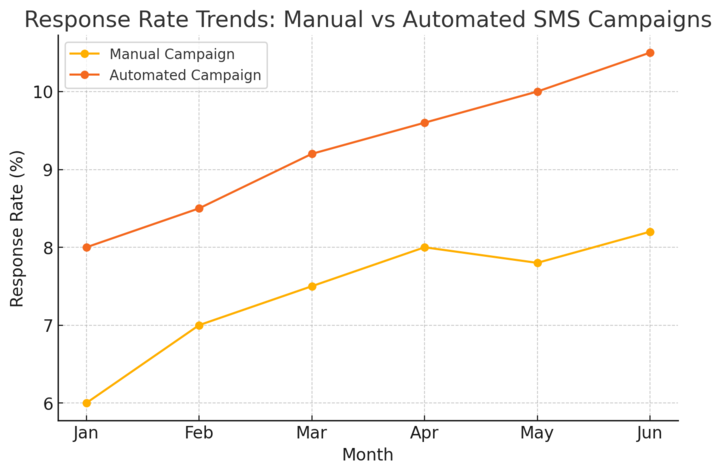
SMS marketing continues to outperform most mobile channels, boasting open rates above 90%.
The immediacy of text makes it ideal for time-sensitive offers and personal updates.
Let’s explore how to maximize it.
Automate Personalized Campaigns with Tools Like Attentive or SimpleTexting
Automation platforms simplify sending behavior-based texts. With Attentive, you can trigger messages after specific user actions—like signing up or abandoning a cart. SimpleTexting offers easy drag-and-drop workflows for scheduling and personalization.
Example: A user books a haircut appointment online. The system automatically sends a confirmation, a reminder, and a follow-up review request—no manual work required.
Automation tips:
- Set up “welcome” and “thank-you” flows.
- Use merge tags to personalize names and products.
- Automate follow-ups within 24 hours for maximum response.
When done right, automation feels personal, not robotic.
Integrate SMS with Email for a Multi-Channel Engagement Strategy
SMS shouldn’t live in isolation. Combining it with email creates stronger brand recall and consistent messaging.
For instance, send an email about an upcoming sale, then follow up with a short text reminder an hour before it starts. Tools like Omnisend make this integration seamless.
How to sync effectively:
- Align tone and offers across both channels.
- Use SMS for urgency and email for detail.
- Track customer journeys across touchpoints.
Multi-channel engagement boosts conversions by giving users options for how they prefer to connect.
Use Conversational SMS to Build Authentic Customer Relationships
The best SMS campaigns feel like two-way conversations, not broadcasts. Platforms like Postscript allow customers to reply directly—whether it’s to ask questions, confirm orders, or share feedback.
Try these approaches:
- Respond manually to key customer messages.
- Use chatbots for FAQs and order confirmations.
- Encourage engagement with polls or quick responses (“Reply 1 for Yes, 2 for No”).
Conversational SMS humanizes your brand, turning messages into meaningful interactions.
Measure ROI and Open Rates Through Built-In Analytics
Most SMS platforms offer dashboards to track open rates, CTRs (click-through rates), and opt-outs.
For example, Attentive provides clear metrics: “Delivered: 95%, Click Rate: 28%, Conversion: 12%.” That’s actionable insight.
Metrics to watch:
- Delivery rate: Detect carrier or list hygiene issues.
- Response rate: Evaluate engagement.
- Opt-out trends: Identify messaging fatigue.
Without analytics, you’re guessing. With data, you’re optimizing.
3. Mobile App Engagement Tools for Deeper User Retention
Mobile apps are powerful, but retention is the real challenge.
On average, 25% of users abandon an app after one use. Smart engagement tools can change that.
Implement In-App Messaging and Reward Systems
In-app messages (like pop-ups or banners) let you reach users while they’re active, unlike push notifications that target them externally. Tools like Braze make this simple.
Example workflow: A user completes a profile → You trigger a thank-you message + reward points.
Why it works:
- Rewards build habit loops.
- Timely feedback enhances satisfaction.
- Contextual prompts guide user flow.
A small reward or “thank-you” moment can significantly boost loyalty.
Use Gamification Features to Keep Users Coming Back
People love progress. Incorporating gamification—points, badges, levels—keeps engagement fun. Duolingo is the gold standard here.
If you run an ecommerce app, for example, reward points for reviews, referrals, or repeat purchases. Platforms like Gameball integrate gamification directly into apps.
Best practices:
- Show progress visually (badges, levels).
- Reward both effort and frequency.
- Rotate challenges to keep novelty alive.
Gamification taps into intrinsic motivation and social validation—two strong engagement drivers.
Analyze User Journeys to Identify Drop-Off Points
Analytics tools like Mixpanel visualize where users quit—like halfway through signup or checkout.
When you see drop-offs, you can design nudges to fix them (like simplifying forms or offering reminders).
Steps to follow:
- Map out every screen and event.
- Identify friction points.
- Test improvements and re-measure.
I recommend checking data weekly to stay proactive. Small friction fixes often yield massive retention gains.
Run Re-Engagement Campaigns for Dormant Users
Every app has users who drift away. Instead of letting them go, invite them back.
Using platforms like CleverTap you can set up automated re-engagement flows—offering special deals, reminders, or new feature highlights.
Ideas that work:
- “We’ve missed you” push + discount.
- Showcase new features they haven’t tried.
- Send milestone reminders (“It’s been 30 days since your last visit”).
Done right, re-engagement campaigns can recover up to 20–30% of inactive users.
Pro Tip: Every mobile engagement tactic should feel like an invitation, not an interruption. The brands that win are the ones that listen—analyzing data, responding to behaviors, and communicating like a trusted friend, not a loud advertiser.
4. Location-Based Marketing Platforms That Capture Local Audiences
Location-based marketing is one of the most precise mobile marketing solutions because it lets you connect with users exactly where they are.
Whether it’s a retail store, event, or restaurant, this strategy bridges digital intent with physical action—turning nearby users into real customers.
Use Geo-Fencing to Trigger Timely Offers and Promotions
Geo-fencing uses GPS or RFID technology to create a virtual boundary around a location. When users enter or exit that area, they receive targeted notifications or ads.
I recommend using tools like Radar or Airship because they integrate easily with apps and ad platforms.
Example in action: A coffee shop sets up a 200-meter geofence. When a user walks by, they instantly receive a push: “Need a caffeine boost? Your next latte’s 20% off if you show this message.”
What works best:
- Keep your geofence tight (100–500 meters for local offers).
- Combine timing and context—like targeting lunch hours for restaurants.
- Test multiple geofences around competitor locations for smarter conquesting.
Geo-fencing works because it’s contextual, personal, and immediate.
Analyze Foot Traffic Data for Smarter Campaign Targeting
Foot traffic analytics help you understand where your customers come from, how long they stay, and what drives visits.
Tools like Foursquare Attribution, GroundTruth, and Blis offer visual dashboards showing customer flow patterns.
If you run multiple stores, this data helps you adjust your ad budget toward high-traffic zones and refine your store hours or promotions.
Key metrics to track:
- Visit frequency and dwell time.
- Store visit lift after campaigns.
- Cross-location movement (e.g., users who visit multiple branches).
I suggest comparing pre- and post-campaign data to see how well your mobile targeting aligns with real-world results.
Integrate Location Data with CRM Systems for Personalized Outreach
When you connect location data with your CRM (Customer Relationship Management) system—like Monday or Freshsales—you can personalize offers based on where someone shops or travels most.
For example, if a user frequently visits your downtown store, your CRM can automatically tag them as “urban shopper” and send city-specific deals.
Practical integration tips:
- Sync user IDs between your app and CRM.
- Set automated triggers for location-based actions.
- Respect privacy—always get explicit location-sharing consent.
Personalization rooted in location makes outreach feel natural and helpful rather than intrusive.
Improve Store Visits Through Real-Time Proximity Alerts
Proximity marketing uses Bluetooth beacons or Wi-Fi to engage users when they’re near your store or inside a mall. Beacons are small devices placed at entrances or key spots that send signals to nearby smartphones.
Retailers like Macy’s and Sephora use this tech to offer personalized discounts or welcome messages.
Best practices:
- Send alerts within 1–3 seconds of detection for relevance.
- Use short, actionable copy (“Show this message for 10% off today”).
- Pair with loyalty programs for stronger retention.
Real-time alerts turn window shoppers into walk-ins, making them a powerful foot-traffic driver.
5. Mobile Advertising Networks That Deliver Targeted Reach
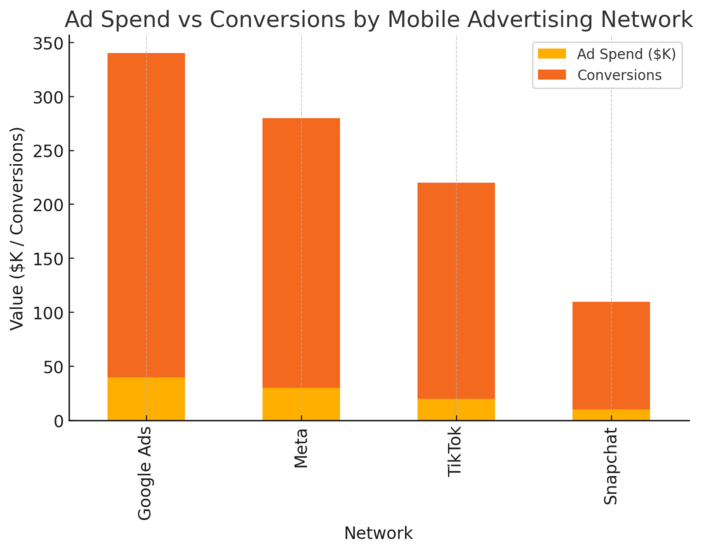
Mobile advertising networks help brands reach users across apps, websites, and social platforms.
The key is choosing networks that balance scale with precision targeting so every dollar spent drives measurable impact.
Run Dynamic Ads with Google Ads and Meta Audience Network
Dynamic ads automatically adapt content based on user behavior. If someone views a product on your site, Google Ads or Meta Audience Network can show that same product in future mobile ads—personalized and timely.
Quick example: A user browses running shoes on your site, then later sees a mobile ad showing those exact shoes with a “Shop Now” button.
Tips for stronger results:
- Link your product feed via Google Merchant Center or Meta Catalog.
- Use audience exclusions to avoid showing ads to recent buyers.
- Track dynamic remarketing ROI separately for accuracy.
Dynamic ads are efficient because they personalize at scale—no manual setup needed per product.
Use Programmatic Advertising for Precise Audience Targeting
Programmatic advertising automates ad buying using AI and real-time bidding.
Platforms like AdRoll analyze data points like device type, location, and behavior to deliver ads at the best moment.
I advise small businesses to start with managed services that guide bidding strategies until you understand metrics like CPM (cost per thousand impressions) or CTR (click-through rate).
Why it matters:
- Higher precision = less wasted spend.
- Campaigns adapt in real time to performance data.
- You can target users by time, geography, or app category.
Programmatic tech turns guesswork into science—ideal for scaling smartly.
Leverage Native Ad Formats for Seamless User Experience
Native ads match the look and feel of the platform they appear on—like in-feed social posts or recommended articles. Because they blend in, they often earn higher engagement rates than banners.
Platforms like Taboola and Outbrain specialize in native mobile placements across major publishers.
To make native ads work:
- Prioritize storytelling over hard selling.
- Keep visuals authentic, not overly polished.
- Test multiple headlines and visuals per ad set.
Native ads work best when they feel like organic content rather than disruption.
Track Cross-Device Performance to Refine Ad Spend
Users move between mobile, tablet, and desktop daily. Cross-device tracking shows which device drives conversion, helping you attribute success correctly.
Platforms like AppsFlyer consolidate this data in one dashboard, linking user behavior from ad click to purchase.
Insights worth tracking:
- How mobile clicks influence desktop purchases.
- Which device type has the lowest cost per conversion.
- Time lag between ad engagement and purchase.
When you optimize based on device patterns, your ad spend becomes sharper and ROI clearer.
6. Mobile Wallet Marketing Tools for Instant Customer Rewards
Mobile wallet marketing tools—like Apple Wallet and Google Pay—let customers store coupons, loyalty cards, and event tickets digitally.
It’s frictionless, trackable, and immediate, making it one of the smartest ways to boost repeat engagement.
Use Apple Wallet and Google Pay Passes for Loyalty Programs
You can issue branded digital passes that users save to their mobile wallets. Platforms like PassKit make it easy to design and distribute them.
For instance, a restaurant could offer a loyalty pass with a QR code that updates each time a customer visits.
Why it works:
- Customers never forget their loyalty card—it’s always in their phone.
- Passes update dynamically with new points or offers.
- Businesses save printing costs while increasing engagement.
I recommend testing digital passes with your top 10% of customers first—it’s a fast way to validate interest.
Send Push Updates for Limited-Time Offers and Coupons
Once a customer adds your wallet pass, you can send push-style updates directly to it—like a refreshed coupon or flash sale alert.
Example: A clothing store sends a wallet update: “New winter collection—get 15% off this week only.” The message appears right on the lock screen.
Tips for success:
- Limit updates to major promotions to avoid clutter.
- Include clear expiry dates to drive urgency.
- Use event-based triggers (e.g., weekends, holidays).
Wallet updates blend the immediacy of push notifications with the convenience of saved offers.
Automate Redemption Tracking and Customer Segmentation
Tools like Vouchery.io sync wallet redemptions automatically with your CRM, helping you track which customers use which offers.
This automation means you can see redemption trends, adjust offers, and segment your audience without manual data entry.
Practical benefits:
- Reduce fraud or duplicate redemptions.
- Identify your most loyal users by usage rate.
- Adjust campaigns based on engagement data.
The more data you collect from redemptions, the smarter your next offer becomes.
Enhance Post-Purchase Engagement Through Wallet Notifications
Post-purchase engagement is where many brands fall short. Wallet passes give you a direct line to follow up after a transaction—whether it’s feedback requests, product care tips, or future discounts.
Here’s how to make it effective:
- Send thank-you messages within 24 hours.
- Offer cross-sell suggestions tied to recent purchases.
- Add a loyalty reward for reviews or referrals.
This keeps your brand top of mind while nurturing repeat customers in a non-intrusive way.
Pro Tip: The most effective mobile marketing solutions share one trait—they’re seamless. Whether you’re using geo-fencing or mobile wallets, the real power lies in reducing friction, respecting attention, and showing up at the right time with something genuinely useful.
7. Interactive Content Platforms That Increase Mobile Engagement
Interactive content is one of the most effective mobile marketing solutions for turning passive scrollers into active participants.
Unlike static ads or posts, interactive tools—like quizzes, polls, and surveys—encourage users to do something, which keeps them engaged longer and helps you gather valuable insights.
Build Quizzes, Polls, and Surveys Using Outgrow or Typeform
Platforms like Outgrow and Typeform are built for engagement.
Outgrow lets you create dynamic quizzes or calculators without coding, while Typeform offers a beautiful, conversational interface that feels more like chatting than filling a form.
Example in practice: If you run a fitness app, you could create a “Find Your Perfect Workout” quiz in Outgrow. Users answer quick questions, and you recommend a plan based on their responses. It’s fun, fast, and leads straight to sign-ups.
Tips to boost participation:
- Keep it short—under 7 questions works best.
- Include progress bars for motivation.
- Offer instant results or rewards at the end.
People love discovering something about themselves, and interactive content makes them part of the story rather than just the audience.
Personalize Content Experiences Based on User Responses
Personalization doesn’t stop once someone clicks “Submit.” You can tailor follow-up messages or offers based on how they answered.
For example, if a user indicates they’re interested in budget-friendly options, your thank-you screen can recommend discounted plans or coupons.
Outgrow allows dynamic result pages, while Typeform integrates with HubSpot or Zapier to trigger custom email sequences.
Why this matters:
- Builds emotional connection through relevance.
- Increases conversion rates by matching user intent.
- Makes users feel understood rather than sold to.
I suggest reviewing response patterns monthly to refine your segmentation and messaging strategy.
Embed Interactive Elements in Mobile Ads and Emails
Adding interactive widgets to mobile ads and emails can significantly lift engagement. For example, you can embed a one-question poll or mini quiz directly inside an email using tools like Mailmodo or Interact.
Practical ideas:
- Polls: “Which new flavor should we launch next?”
- Mini games: “Spin the wheel for your discount.”
- Surveys: “Help us improve—2 quick questions.”
Even simple interactions like a “tap to reveal” coupon can double click-through rates compared to static campaigns.
Use Data Insights to Refine Future Campaigns
The hidden power of interactive content is the data it collects—preferences, habits, demographics, and intent.
Outgrow and Typeform provide built-in analytics showing completion rates, drop-off points, and response patterns.
You can export this data into Google Analytics or your CRM to enhance targeting.
How to use it effectively:
- Identify which questions lead to conversions.
- A/B test quiz titles or structures.
- Use demographic data to personalize future offers.
Interactive analytics aren’t just numbers—they’re behavioral clues. I believe this is where marketers can turn curiosity into long-term connection.
8. Mobile Email Optimization Tools for Higher Conversion
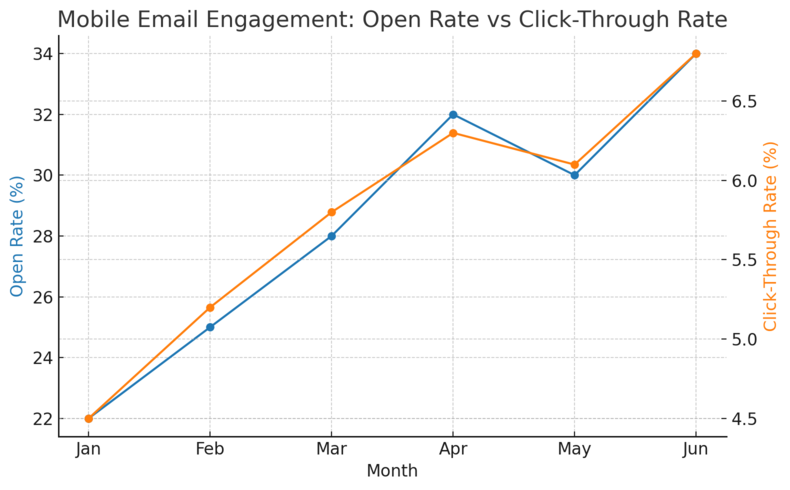
Email is still a powerhouse for mobile engagement, but if it’s not optimized for small screens, even great campaigns fall flat.
The right tools and techniques make your emails fast, readable, and conversion-focused on mobile.
Design Responsive Templates with Platforms Like Mailchimp or Brevo
Mailchimp and Brevo (formerly Sendinblue) both offer responsive templates that automatically adjust to screen size.
In Mailchimp, you can use the “Preview & Test > Enter Preview Mode” feature to see how your email looks on mobile before sending.
Best practices:
- Use single-column layouts.
- Keep text under 50 characters per line.
- Optimize images for fast loading (under 1 MB).
I suggest testing designs on both iOS and Android devices before launching—it’s surprising how different spacing or buttons can appear.
Personalize Subject Lines and Copy for Mobile Readability
Since mobile users decide in seconds whether to open an email, personalization and brevity matter.
Tools like Aweber and Mailerlite use dynamic fields (like “Hi [First Name]”) to make subject lines feel personal.
Quick personalization tips:
- Lead with emotion or curiosity (“Your weekend deal is waiting…”).
- Limit subject lines to 35–40 characters.
- Front-load the value (“Free shipping ends tonight!”).
I’ve seen campaigns with personalized subject lines improve open rates by up to 26%, especially on mobile devices.
A/B Test Mobile-Friendly CTAs to Maximize Engagement
CTA (Call-to-Action) buttons drive conversions—but only if they’re visible and tappable. Both Mailchimp and Brevo allow you to run A/B tests comparing different button text, colors, and placements.
What to test:
- Button size (make it at least 44×44 pixels).
- Copy tone (“Claim Offer” vs. “Get Started”).
- Placement (top, middle, or end).
A/B testing isn’t just for large teams—it’s the simplest way to learn what actually works for your audience.
Track Mobile vs. Desktop Open Rates for Smarter Targeting
Every good email platform offers device-level analytics. You’ll often find this under Campaign Reports > Audience Insights.
Tracking who opens on mobile vs. desktop helps you decide which content format or send time to prioritize.
Why it matters:
- If 80% of opens are mobile, shorten your copy and enlarge buttons.
- For desktop-heavy audiences, include richer visuals.
- Adjust send times—mobile users open earlier in the day.
When you optimize for the right device, you’re not just improving design—you’re respecting how your audience engages with your brand.
9. Social Media Mobile Marketing Solutions That Inspire Interaction
Social media is where most mobile users spend their screen time, making it a goldmine for engagement.
The key is to meet users where they are—with authentic, platform-native content that feels natural, not intrusive.
Use Instagram and TikTok Ads for Full-Screen Immersive Campaigns
Vertical, full-screen videos dominate attention. Instagram Reels and TikTok ads use immersive formats that feel organic to the feed.
Example: If you sell skincare, a 15-second TikTok showing “before and after” transformations feels more relatable than a banner ad.
Tips to succeed:
- Hook viewers in the first 2 seconds.
- Use captions—most people watch with sound off.
- Add a direct call to action like “Shop Now” or “Learn More.”
Both TikTok Ads Manager and Meta Ads let you preview how your ad appears on mobile feeds before publishing.
Schedule and Analyze Mobile Content via Hootsuite or Buffer
If you’re juggling multiple platforms, tools like Hootsuite and Buffer make scheduling and analytics effortless. You can plan posts, track engagement, and adjust based on what performs best—all from your phone.
How to get the most out of them:
- Schedule content for your audience’s peak hours.
- Use their analytics to compare engagement by platform.
- Repurpose top-performing posts into ad creatives.
Consistent scheduling is half the battle; data-driven posting is the other half.
Leverage User-Generated Content for Authentic Engagement
User-generated content (UGC) builds credibility and community. Encourage followers to share photos or testimonials featuring your brand, then showcase them with permission.
Ideas that work:
- Run hashtag campaigns (#MyBrandStory).
- Feature customer photos in Stories or Reels.
- Reward participants with discounts or shoutouts.
I’ve seen small businesses grow exponentially using UGC—it’s authentic, free, and incredibly persuasive.
Partner with Micro-Influencers to Drive Mobile Conversions
Micro-influencers (those with 5K–50K followers) often drive higher engagement than celebrities because their audiences trust them more.
Use platforms like Collabstr or AspireIQ to find creators aligned with your niche.
Collaboration tips:
- Provide creative freedom within brand guidelines.
- Track metrics like engagement rate and swipe-up clicks.
- Focus on long-term partnerships, not one-offs.
When influencers feel invested, their content feels genuine—and audiences respond.
10. Mobile Analytics Tools for Smarter Campaign Decisions
Mobile analytics tools reveal how users actually behave—what they tap, where they drop off, and which campaigns bring them back. This data turns guesswork into strategy.
Track User Behavior Across Devices with Google Analytics 4
Google Analytics 4 (GA4) offers unified tracking across web and app, letting you see the full customer journey.
To view mobile insights, go to Reports > Tech > Device Category. You’ll find metrics like sessions, bounce rate, and conversions broken down by device type.
Why GA4 stands out:
- Combines app and web data seamlessly.
- Tracks custom events like scrolls or video views.
- Supports predictive metrics for churn or purchase probability.
I recommend setting up event tagging early—it saves hours later when analyzing engagement trends.
Use Heatmaps and Session Recordings to Understand Interactions
Tools like Hotjar and Smartlook show visual heatmaps of where users tap or scroll. You can even watch real session replays to spot friction points.
Insights you can uncover:
- Where users drop off mid-form.
- Which buttons go ignored.
- How far users scroll before leaving.
Heatmaps turn abstract analytics into actionable design fixes. It’s like seeing your app through your user’s eyes.
Measure Lifetime Value (LTV) from Mobile Channels
LTV (Lifetime Value) measures how much revenue a customer generates over time. Platforms like Mixpanel and Amplitude calculate this automatically when you set conversion goals.
Practical tip: Compare LTV between organic users and paid users. If paid users have lower LTV, tweak your targeting or ad creative.
Tracking LTV helps you prioritize long-term profitability over short-term clicks.
Integrate Analytics into CRM Systems for End-to-End Insights
When you connect analytics with CRMs like HubSpot or Zoho, you get a 360° view of the customer journey—from ad click to final purchase.
Benefits include:
- Better segmentation for remarketing.
- Clear attribution for ad ROI.
- Personalized campaigns based on past behavior.
Integrated data means you’re not just reacting—you’re anticipating what your audience will want next.
Pro Tip: The best mobile marketing solutions don’t just gather data—they use it to create meaningful experiences. Every click, swipe, and scroll tells a story. The brands that listen and adapt are the ones that stay ahead of the curve.

I’m Juxhin, the voice behind The Justifiable.
I’ve spent 6+ years building blogs, managing affiliate campaigns, and testing the messy world of online business. Here, I cut the fluff and share the strategies that actually move the needle — so you can build income that’s sustainable, not speculative.
Related posts:
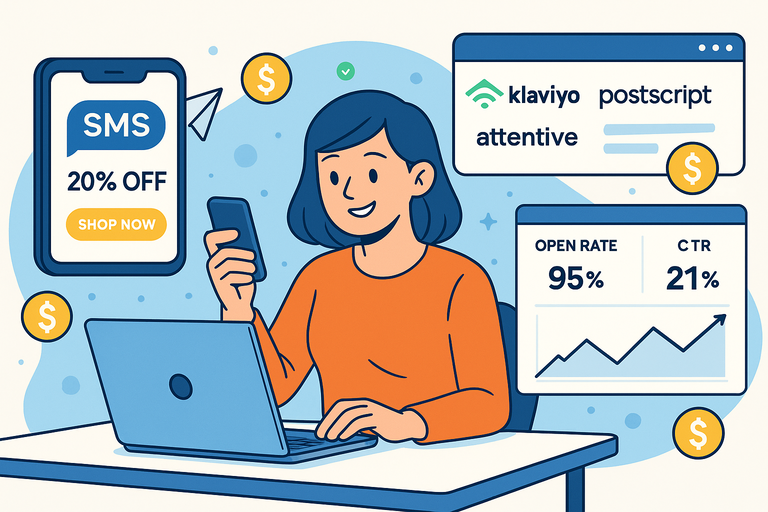 How SMS Marketing Solutions Boost Conversions Instantly
 AI-Powered Ad Creative: Smarter Ads, Better ROI!
 10 Similar Sites To Apollo IO Every Marketer Should Try
 Omnisend for WooCommerce: Boost Store Sales Instantly
 How Automated Marketing Solutions Save Time and Increase Revenue
 Top 7 Business Marketing Solutions Every Entrepreneur Needs