
Table of Contents
Some links on The Justifiable are affiliate links, meaning we may earn a small commission at no extra cost to you. Read full disclaimer.
When I first started exploring ecommerce inventory management, I underestimated how much it could make or break growth.
Managing stock levels, keeping fulfillment smooth, and syncing sales across platforms might sound tedious—but once you simplify the process, it becomes the engine that powers faster scaling.
In this guide, I’ll break down exactly how to make ecommerce inventory management simple, efficient, and growth-focused, so you can spend less time firefighting and more time expanding your store.
Understanding The Core Of Ecommerce Inventory Management
Getting the basics right is where growth starts.
Let’s break down what ecommerce inventory management really is, why accuracy is everything, and how to avoid costly mistakes that quietly slow your progress.
What Ecommerce Inventory Management Really Means
At its core, ecommerce inventory management is about keeping the right products in stock, at the right time, in the right quantities—without overstocking or running out.
Think of it like balancing two opposing forces: customer demand and operational efficiency. Too much inventory means your cash is tied up in products sitting on shelves. Too little, and you lose sales (and customer trust).
In my experience, good inventory management is not about spreadsheets anymore—it’s about visibility. Whether you use Shopify, WooCommerce, or a custom platform, the goal is to see your stock flow in real-time across all your channels and make decisions proactively, not reactively.
Quick example: Let’s say you sell eco-friendly phone cases. If your store integrates inventory with Amazon, Etsy, and your own site, one centralized system ensures when a case sells on Amazon, the count updates everywhere else instantly. That’s the power of a unified inventory system.
Why Inventory Accuracy Is The Foundation Of Business Growth
When your inventory numbers are accurate, everything else becomes smoother—marketing, fulfillment, and forecasting. Accuracy drives trust with customers and confidence in decision-making.
Here’s why it matters:
- Profit protection: Miscounts lead to stockouts, canceled orders, and refund requests that chip away at profits.
- Better forecasting: With precise data, you can plan purchases and marketing campaigns around actual demand trends.
- Customer loyalty: Consistent stock levels and accurate delivery times build repeat buyers.
I always say—accurate inventory is like oxygen for an ecommerce business. You don’t notice it when it’s right, but the moment it’s off, everything feels suffocating.
Common Mistakes That Hurt Inventory Efficiency
Even seasoned store owners fall into traps that quietly drain efficiency.
Here are the usual suspects:
- Relying on manual tracking: Spreadsheets can’t keep up with multichannel sales or fast-moving SKUs.
- Ignoring reorder points: Without automated triggers, you often reorder too late.
- Not tracking returns properly: Returned items that aren’t quickly restocked distort inventory data.
- Disorganized product listings: Missing or duplicate SKUs lead to confusion and errors.
Pro tip: Automate wherever human error can creep in—especially for reorders and stock updates. A single automated rule can save hours every week.
Signs Your Current Inventory System Is Holding You Back
You’ll know your current system needs an upgrade if you recognize these signs:
- Frequent overselling or stockouts.
- Inconsistent data between your store, warehouse, and reports.
- Slow fulfillment times even when stock is available.
- Guesswork in forecasting or reorder planning.
If two or more of these sound familiar, your system isn’t just inefficient—it’s actively limiting your growth. Investing in better tools or automation at this stage isn’t a luxury; it’s a necessity.
Building A Streamlined Inventory Tracking System
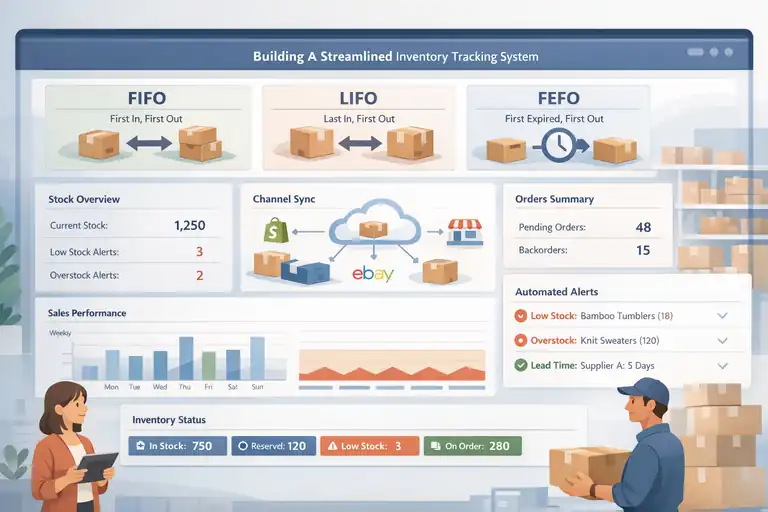
Once you understand the foundation, the next step is designing a system that keeps up with your business growth.
The goal is simple: track everything, automate where possible, and maintain full visibility across channels.
Choosing The Right Inventory Management Method (FIFO, LIFO, FEFO)
Inventory methods determine how your stock moves and how your profits are calculated.
Let’s simplify:
- FIFO (First-In, First-Out): The oldest stock sells first. Great for perishable or seasonal goods.
- LIFO (Last-In, First-Out): The newest inventory sells first. Common in industries with non-perishable goods or rising costs.
- FEFO (First-Expired, First-Out): Prioritizes products nearing expiry—ideal for cosmetics or food.
Example: If you sell skincare, FEFO ensures older batches move before new ones, reducing waste. For clothing, FIFO works better to prevent unsold seasonal items.
From what I’ve seen, most ecommerce stores benefit from FIFO—especially if you’re using Shopify or BigCommerce, since most inventory tools default to it.
How To Sync Inventory Across Multiple Sales Channels
Managing inventory across platforms like Shopify, Amazon, and eBay can feel chaotic unless you have a centralized system.
Here’s how to do it right:
- Use a unified inventory platform that automatically updates all channels when a sale happens.
- Integrate your POS system if you sell offline. Tools like Square or Shopify POS sync beautifully with online data.
- Regularly audit connections to ensure no “ghost SKUs” exist (products selling on one platform but missing on another).
Personal note: When I connected my WooCommerce and Etsy stores through a single dashboard, it cut my stock errors by almost 70% within a month.
Setting Up Automated Stock Level Alerts To Prevent Overstocking
Stock alerts are your safety net. You can set thresholds for each product so when quantities drop too low—or get too high—you get notified automatically.
Use these alert types:
- Low-stock alerts: Prevents stockouts and helps time reorders.
- Overstock alerts: Flags items that aren’t moving quickly so you can discount or bundle them.
Example: If your “Summer Bamboo Tumbler” drops below 20 units, your system sends an alert to reorder from the supplier. It’s simple but powerful—especially during peak seasons.
Tracking Real-Time Inventory Using Centralized Dashboards
A centralized dashboard is your single source of truth. It connects your store, suppliers, and warehouses in real-time.
Here’s what it should show at a glance:
- Current stock levels per SKU
- Reserved stock (for pending orders)
- Supplier lead times
- Daily or weekly sales velocity
Once I implemented a real-time dashboard, I realized I could stop relying on end-of-day reports. Decisions became faster, restocks smarter, and operations less stressful.
Simplifying SKU And Product Categorization
A messy SKU system is one of the biggest silent killers of ecommerce efficiency. Simplifying your product categorization makes reporting, forecasting, and fulfillment dramatically easier.
How To Create A Logical SKU System That Scales With Growth
An SKU (Stock Keeping Unit) should be instantly understandable to anyone in your team. The best systems use short, structured codes.
Here’s a simple SKU format: [Category]-[ProductType]-[Color/Size]
Example: TSH-UNISEX-BLK-M (T-shirt, unisex, black, medium).
Tips for building scalable SKUs:
- Keep codes under 12 characters.
- Avoid special characters (like / or &).
- Maintain consistent structure across categories.
If you expect your catalog to grow, plan your SKUs early—it’s much harder to clean up later.
Grouping Products For Easier Reporting And Forecasting
Grouping makes inventory insights faster and smarter. Instead of managing each product individually, you can categorize them by season, supplier, or sales trend.
For instance:
- Group by supplier for purchase planning.
- Group by season or collection for trend forecasting.
- Group by profit margin to identify top performers.
This approach gives you visibility into what’s actually driving sales, not just what’s sitting in storage.
Avoiding Duplicate Or Confusing SKUs Across Sales Platforms
Duplicate SKUs are a nightmare. They distort reports, confuse staff, and lead to fulfillment errors.
Here’s how to avoid that mess:
- Use a master SKU list—a single source that feeds all platforms.
- Audit your channels regularly (especially after product imports or integrations).
- Assign unique SKUs for bundles or variants to prevent overlap.
In short, consistency is your secret weapon. It keeps every sales channel synchronized and every report reliable.
Using Data To Drive Smarter Inventory Decisions
Data is the heartbeat of ecommerce inventory management. When used right, it helps you predict demand, manage cash flow, and make confident decisions about what to stock and when.
Let’s go over how to use your data wisely so every move supports growth instead of guesswork.
How To Use Sales Data To Predict Demand Accurately
Sales data tells a story—and reading it right is what separates reactive sellers from strategic ones.
Start by tracking:
- Daily and weekly sales velocity (how fast each SKU sells)
- Conversion rates from ads or campaigns
- Customer behavior patterns, such as repeat purchase timing
Once you identify trends, you can forecast demand for the next cycle. For example, if your best-selling candle scent sells 200 units monthly but spikes by 40% every December, you can plan inventory purchases accordingly instead of scrambling mid-season.
Here’s a practical tip: Export your past three months of sales data into a spreadsheet or analytics tool. Plot it to spot consistent patterns. I often use Google Sheets or Power BI for this—it’s simple, visual, and saves you from expensive stockouts.
The goal isn’t perfection; it’s progress. The more data you gather, the more precise your future orders become.
Understanding Lead Times And Reorder Points For Each Product
Every product in your store has its own lead time—the number of days between ordering from your supplier and receiving the goods. Knowing these timelines helps set accurate reorder points, so you never run out of stock unexpectedly.
A quick formula to find your reorder point:
- Reorder Point = (Average Daily Sales × Lead Time) + Safety Stock
For instance, if you sell 10 yoga mats per day, and your supplier takes 7 days to deliver, you’d reorder when stock hits 70–90 units depending on your safety buffer.
Personal tip: Don’t use one blanket reorder point for all products. High-demand SKUs need tighter control, while slower sellers can have longer reorder windows.
Keeping this data updated in your system allows you to automate purchasing decisions later on—saving hours every week.
Seasonal Trends: Planning Inventory Around High-Demand Periods
Every ecommerce store has seasons of chaos—Black Friday, holidays, or even payday weekends. Planning ahead for these spikes makes or breaks profitability.
Here’s what I suggest:
- Analyze past seasons for sales peaks. Look for months or weeks with major jumps.
- Use Google Trends or marketplace insights to confirm broader industry demand.
- Increase safety stock for your top 20% of products (these usually generate 80% of revenue).
- Negotiate with suppliers early—late orders during peak season can crush margins.
An example: One of my clients selling eco tumblers saw sales triple each summer. Instead of guessing, we started building extra stock in March, spreading supplier costs over months rather than one huge bulk order. That alone improved cash flow and delivery speed.
Using Historical Data To Optimize Stock Replenishment
Historical data acts like a compass for your replenishment strategy. Instead of treating restocks as random, you use past patterns to make calculated, data-driven decisions.
Start with:
- 12-month sales history per SKU to identify long-term cycles.
- Return and cancellation data to adjust true demand levels.
- Supplier performance metrics—delays, defects, or cost fluctuations.
From what I’ve seen, businesses that review historical data quarterly reduce overstocking by at least 15%. It’s not just about knowing what sold—it’s about understanding why it sold, when, and how fast.
If your ecommerce platform offers analytics integrations (like Shopify Analytics or Zoho Inventory), take advantage of automated reports. They save time and deliver insight that spreadsheets can’t.
Automating Ecommerce Inventory Management For Efficiency
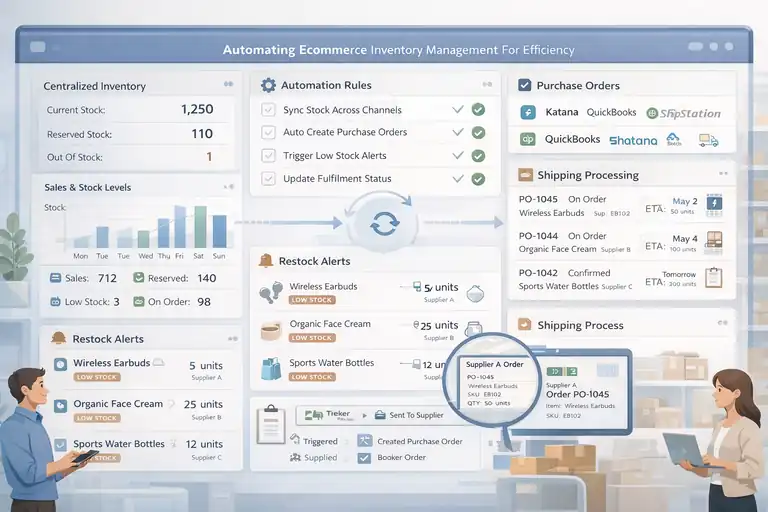
Automation is where everything clicks together. It saves time, reduces human error, and lets you scale without doubling your workload.
Let’s explore how automation transforms inventory management into a growth engine.
The Role Of Automation In Scaling Your Online Store
Automation isn’t about replacing humans—it’s about freeing your focus for strategy. When you automate inventory tasks, you stop reacting and start planning.
Examples of what you can automate:
- Stock updates across multiple channels
- Purchase orders to suppliers
- Restock notifications and low-stock alerts
- Syncing fulfillment and warehouse data
I’ve seen stores grow from 50 to 5,000 SKUs without adding staff—just by automating stock syncs and reorder flows. It’s not magic; it’s consistency powered by software.
Setting Up Automated Purchase Orders And Supplier Updates
One of the biggest time savers in ecommerce inventory management is automated purchasing. Instead of manually checking stock and emailing suppliers, your system triggers an order when stock hits the reorder point.
Here’s how it works:
- Define reorder rules for each SKU.
- Integrate supplier details (lead times, minimum order quantities).
- Auto-generate purchase orders (POs) when thresholds are met.
- Set automatic status updates for supplier confirmations or delays.
Platforms like Cin7 make this process seamless. The payoff? You’ll never forget a reorder again, and suppliers love the consistency.
Integrating Automation Tools With Your Ecommerce Platform
To make automation truly work, your ecommerce platform and inventory tools must communicate in real-time.
For instance, if you’re using Shopify:
- Integrate inventory tools like Katana, Skubana, or Brightpearl.
- Connect accounting platforms (like QuickBooks or Xero) to sync purchase costs.
- Link shipping software to instantly update order statuses.
When all your systems “talk” to each other, you eliminate silos—the biggest bottleneck in scaling ecommerce operations.
Reducing Manual Errors Through Smart Inventory Workflows
Manual updates are the silent killers of inventory accuracy. Even a single misplaced decimal or missed entry can skew your entire forecast.
To prevent this:
- Automate repetitive tasks, especially data imports and order syncing.
- Use barcode scanning or RFID tags for real-time accuracy.
- Set permissions and roles so only the right team members can modify data.
I once worked with a store that used barcoding for the first time—they cut picking and packing errors by 80% in just a month. That’s how powerful workflow optimization can be.
Balancing Stock Levels For Profitability
Profit isn’t just about selling more; it’s about managing what you already have efficiently. Balancing stock levels means maximizing revenue while minimizing waste and holding costs.
How To Maintain Optimal Inventory Without Overstocking
Optimal inventory means having just enough to meet demand—no more, no less. The key is finding that sweet spot through forecasting and automation.
Practical steps:
- Track sell-through rate (units sold ÷ units available).
- Use demand forecasts to set reorder limits.
- Review stock aging reports monthly to catch stagnant inventory early.
Personal note: When I started using sell-through rate tracking, I realized that 20% of my stock hadn’t moved in over 60 days. That insight alone freed up thousands in working capital.
Identifying Slow-Moving Products And Liquidating Them Strategically
Every store has products that just sit there, collecting dust. Instead of ignoring them, treat them as opportunities to recover cash and space.
Ways to handle slow movers:
- Bundle them with fast-selling items.
- Offer limited-time discounts or flash sales.
- Donate or recycle dead stock for tax benefits.
One store I helped bundled older phone cases with new wireless chargers—they sold out in two weeks. Creative liquidation often beats deep discounting.
Techniques For Managing Safety Stock During Market Fluctuations
Safety stock acts as your cushion against uncertainty—supplier delays, demand surges, or shipping issues.
A quick rule of thumb: Calculate average demand fluctuations and keep safety stock equal to that variation.
For example, if weekly demand varies by 15 units, and lead time is two weeks, safety stock should be around 30 units.
This small buffer prevents lost sales and frustrated customers during unpredictable times. Just avoid going overboard—too much safety stock ties up cash unnecessarily.
Balancing Fast-Moving And Seasonal Inventory Efficiently
Fast-moving items bring steady revenue, while seasonal products bring bursts of cash flow. The challenge is keeping both in sync.
Try this approach:
- Prioritize fast movers in your reorder cycles for consistent income.
- Forecast seasonal items early using last year’s sales and trend data.
- Use flexible warehousing (like 3PLs) to expand or shrink storage as needed.
Balancing these two types of inventory keeps your business agile—able to scale fast during peaks and stay lean during slow months.
Expert Tip: In my experience, the most profitable ecommerce brands aren’t those with the biggest catalogs—they’re the ones that manage inventory like a living system. Track it, adapt it, and let data, not instinct, lead the way.
Implementing Effective Warehouse And Fulfillment Practices
Your warehouse isn’t just a storage space—it’s the nerve center of your ecommerce business. When fulfillment runs smoothly, customers get their orders faster, errors drop, and your entire operation feels lighter.
Let’s look at how to make warehouse management work like a well-oiled machine.
Organizing Your Warehouse Layout For Faster Picking
A well-organized warehouse saves time, reduces labor costs, and improves order accuracy. It all starts with how you design the layout.
Think of your warehouse like a map—frequently sold products (your fast movers) should be placed closest to packing stations. Less popular items can go further back. This simple rearrangement can cut walking time by 20–30%.
Here’s how to optimize layout step by step:
- Create dedicated zones for receiving, picking, packing, and shipping.
- Use bin locations (labeled shelves or racks) so staff always know where items live.
- Keep high-volume SKUs near central aisles for quicker access.
- Maintain clear walkways to prevent delays and accidents.
In my experience, even small ecommerce businesses benefit from mapping out their layout on paper before moving inventory—it saves countless headaches later.
Using Barcode And RFID Systems For Inventory Accuracy
Barcoding and RFID (Radio-Frequency Identification) may sound technical, but they’re basically digital labeling systems that keep your stock count accurate in real time.
Barcodes use printed labels you scan with handheld devices. RFID uses chips and sensors that track items wirelessly, perfect for larger operations.
Why these systems matter:
- They eliminate manual data entry errors.
- Stock counts are updated instantly after each scan.
- Fulfillment teams can find products faster with location-linked tags.
For smaller businesses, starting with simple barcode scanners integrated into tools like Shopify or Zoho Inventory is enough. Larger sellers managing multiple SKUs or warehouses might find RFID worth the investment.
When I implemented barcode scanning for a client handling 10,000 SKUs, their pick errors dropped by 82% in just a month—proof that accuracy pays for itself.
How To Improve Fulfillment Speed Without Increasing Costs
Faster fulfillment doesn’t have to mean hiring more people or expanding space. It’s about smarter workflows.
A few proven methods:
- Batch picking: Collect multiple orders at once instead of one by one.
- Pre-packing fast movers: Box up your best-selling products ahead of time.
- Streamlined labeling: Use shipping automation tools to print labels directly from your order management system.
- Set daily cut-off times: This keeps your packing team focused and ensures same-day dispatch consistency.
Example: One Shopify store I worked with saved nearly two hours per day just by implementing batch picking and automated label printing. It’s the little systems that create massive wins.
Managing Multiple Warehouses With Centralized Control
Once your business expands, you might need more than one warehouse to serve customers faster. But multiple locations bring complexity. The key is centralized visibility.
Use a warehouse management system (WMS) that connects all locations into one dashboard.
This ensures you can:
- Track stock transfers between warehouses.
- Route orders automatically to the nearest fulfillment center.
- Monitor performance metrics (like pick speed or stock aging) across locations.
Centralized control prevents duplicate shipments, stockouts, and misrouted orders. It also lets you analyze which location is most profitable or efficient—a must for scaling ecommerce operations.
Leveraging Inventory Management Tools And Platforms
Choosing the right software can feel overwhelming, but a good inventory management tool becomes your silent partner—it automates, organizes, and scales your business with you.
Top Inventory Management Tools For Ecommerce Businesses
There’s no one-size-fits-all solution, but these tools stand out for different needs:
- Cin7: Great for omnichannel sellers who want all-in-one visibility.
- Katana: Perfect for small to mid-sized manufacturers and DTC brands.
- Zoho Inventory: Best for cost-effective automation and easy integration.
- Brightpearl: Ideal for fast-growing stores with complex order volumes.
- DEAR Systems: Designed for product-based businesses needing advanced forecasting.
If you’re just starting, I’d recommend Zoho Inventory or Katana—they’re user-friendly and scalable. Larger operations might prefer Brightpearl or Cin7 for their deeper analytics.
How To Integrate Your Ecommerce Store With Inventory Software
Integration is where the magic happens. You want your ecommerce platform, accounting software, and warehouse tools all speaking the same language.
Steps to integrate smoothly:
- Connect your store (Shopify, WooCommerce, BigCommerce, etc.) to your inventory software.
- Link accounting tools like QuickBooks or Xero for automatic cost syncing.
- Connect shipping apps (ShipStation, Shippo) for real-time order tracking.
- Test syncs regularly to prevent data mismatches.
Personal insight: I’ve seen merchants lose sales because integrations were half-configured. Always verify that data flows correctly both ways—orders in, stock out.
Comparing All-In-One Platforms Vs. Specialized Inventory Tools
You’ll face a key choice: all-in-one systems or specialized tools. Both have pros and cons.
All-in-one systems (like Cin7 or Brightpearl) include sales, fulfillment, accounting, and reporting. They’re great for simplicity and centralization.
Specialized tools (like Katana or Zoho Inventory) do one job exceptionally well but may require integrations.
If you value control and customization, specialized tools are better. If you prioritize ease and unified dashboards, go all-in-one. In my experience, hybrid setups—using one core system plus a few specialized add-ons—often deliver the best balance.
Evaluating Tool Features That Support Long-Term Growth
When choosing tools, look beyond short-term fixes. Think about scalability, automation depth, and support.
Look for these must-have features:
- Real-time stock syncing across channels
- Automated purchase order generation
- Multi-warehouse management
- Advanced analytics and forecasting
- API integrations for flexibility
The right tool should grow with you—not force you to migrate in a year. I always advise testing free trials with your real data for two weeks before committing. That’s when you’ll see if it fits your workflow naturally.
Scaling Ecommerce Inventory Management For Global Expansion
Global expansion sounds exciting, but it complicates inventory management. You’re suddenly dealing with multiple currencies, regions, and fulfillment partners. Let’s simplify how to handle global growth strategically.
Managing Cross-Border Inventory And International Fulfillment
Cross-border selling introduces shipping delays, customs issues, and varying taxes. The goal is to minimize friction for both you and your customers.
Here’s how:
- Use regional warehouses or 3PL (third-party logistics) partners to store products closer to customers.
- Offer localized delivery options through carriers like DHL eCommerce or FedEx International.
- Factor customs duties and taxes into your pricing upfront.
I’ve seen brands boost international conversion rates by up to 25% just by offering transparent, fast delivery options. The fewer surprises customers face, the higher the trust.
Handling Multi-Currency And Multi-Language Inventory Systems
If you’re managing stores in different countries, your software must handle multiple currencies and languages seamlessly.
Practical tips:
- Choose tools that automatically convert currency rates and update pricing.
- Sync localized product descriptions while maintaining one master SKU database.
- Keep regional stock buffers for each country to avoid overselling.
Even small inconsistencies—like mismatched stock numbers in different currencies—can confuse both systems and customers. Centralizing data is the best prevention.
Adapting Supply Chain Strategies For Global Market Demand
Different markets mean different demand patterns. What sells fast in one region might barely move in another.
To adapt effectively:
- Study country-level analytics to identify high-demand SKUs.
- Build regional supplier networks for faster restocks.
- Use predictive analytics tools to forecast global trends.
One of my favorite examples: a client in Australia expanded to the U.S. by splitting their top 50 SKUs into separate regional supply chains. That single change cut delivery time by 60% and boosted profit margins.
Expert Tips For Long-Term Inventory Optimization
Long-term success in ecommerce inventory management comes down to consistency, adaptability, and smart relationships.
Let’s wrap up with the strategies that keep your inventory sharp year after year.
Conducting Regular Inventory Audits To Maintain Accuracy
Inventory audits aren’t glamorous, but they’re essential. Regular checks catch hidden issues—like misplaced items, miscounts, or shrinkage—before they spiral into bigger problems.
How to make audits easier:
- Schedule cycle counts (check a portion of inventory weekly) instead of full audits.
- Compare system data with physical counts using barcode scanners.
- Analyze discrepancy reports to find recurring issues.
When audits become routine, your data becomes trustworthy, and your forecasts more accurate.
How To Create A Continuous Improvement Process For Inventory
Inventory management isn’t “set it and forget it.” You need an ongoing process to refine your workflows.
Here’s a simple cycle:
- Measure performance metrics (accuracy, fulfillment time, turnover rate).
- Identify inefficiencies and bottlenecks.
- Test one improvement at a time.
- Review results monthly or quarterly.
In my own business experience, this habit of gradual tweaks created compounding gains—what started as 5% improvements turned into 40% better performance in a year.
Building Strong Supplier Relationships For Reliable Stock Flow
Suppliers aren’t just vendors; they’re your growth partners. Maintaining healthy relationships ensures smoother communication and faster problem-solving.
To strengthen those ties:
- Be transparent about demand forecasts.
- Pay on time (it builds trust fast).
- Negotiate flexible MOQs (minimum order quantities).
I’ve noticed that reliable suppliers often prioritize repeat buyers during shortages. That’s a competitive edge you can’t buy with software.
Expert Tip: Combine Data, Automation, And Agility For Lasting Growth
If there’s one lasting lesson in ecommerce inventory management, it’s this: your best system combines data-driven insights, automated workflows, and agile thinking.
Use your numbers to plan smarter, your tools to execute faster, and your mindset to adapt quicker than competitors. Growth doesn’t come from having more stock—it comes from managing what you have brilliantly.
Pro Tip: Never stop auditing, testing, and refining. Your inventory system should evolve as fast as your business does. When it does, growth becomes not just faster—but smoother, more sustainable, and far more enjoyable.
FAQ
What is ecommerce inventory management?
Ecommerce inventory management is the process of tracking, organizing, and controlling stock levels across online sales channels to ensure accurate order fulfillment and prevent overstocking or stockouts.
How does ecommerce inventory management improve business growth?
It boosts growth by reducing costs, improving fulfillment speed, and enabling smarter forecasting through automation and real-time data visibility across all sales platforms.
What tools are best for ecommerce inventory management?
Top tools include Cin7, Katana, Zoho Inventory, and Brightpearl—each offering automation, analytics, and multichannel syncing to simplify inventory control and scale operations efficiently.

I’m Juxhin, the voice behind The Justifiable.
I’ve spent 6+ years building blogs, managing affiliate campaigns, and testing the messy world of online business. Here, I cut the fluff and share the strategies that actually move the needle — so you can build income that’s sustainable, not speculative.
Related posts:
 Creating a Website to Sell Products That Converts Fast
 How to Make Money Dropshipping: 7 Secrets to a $10K/Month
 Shopify Theme Debutify Explained: Features, Pros & Cons
 Dropshipping Marketing Strategies That Actually Drive Sales
 NetSuite Ecommerce Features That Drive Serious Growth
 Ecommerce Automation That Saves Time Without Breaking Sales