
Table of Contents
Some links on The Justifiable are affiliate links, meaning we may earn a small commission at no extra cost to you. Read full disclaimer.
When I first started comparing dropshipping platforms, I realized most guides never clearly answer the question everyone actually cares about: which platform gives you the best mix of speed, fees, and control.
This guide is for founders, solo store owners, and ecommerce teams who want a clear, side-by-side ranking of dropshipping platforms without fluff.
By the end, you’ll know exactly which dropshipping platform makes the most sense based on performance, cost structure, and how much control you really get over your store.
Shopify For Dropshipping Speed, Fees, And Store Control
Shopify is usually the first name people think of when comparing dropshipping platforms, mainly because it removes a lot of technical friction.
It’s fast out of the box, predictable on pricing, and built to get stores live quickly, but that simplicity comes with tradeoffs around cost and control.
Shopify Checkout And Hosting Speed Benchmarks
Shopify’s biggest strength is speed, especially at checkout, which is where most dropshipping stores either win or lose sales.
Because Shopify runs on a fully managed infrastructure, you don’t think about servers, caching, or CDNs. Shopify handles all of that for you automatically.
From what I’ve seen in real stores:
- Average Shopify storefront load times sit around 1.2–1.8 seconds on standard themes.
- Shopify’s checkout is optimized globally and hosted on its own infrastructure, which matters more than homepage speed once ads are running.
- Shopify Plus stores consistently handle traffic spikes during promotions without crashing.
Why this matters in practice:
- A 1-second delay in page load can reduce conversions by roughly 7%, according to Google performance studies.
- Faster checkout matters even more for impulse-driven dropshipping purchases.
If speed and reliability are your top priorities and you don’t want to touch hosting settings, Shopify delivers that better than most dropshipping platforms.
Shopify Transaction Fees And App Cost Realities
Shopify’s pricing looks simple at first, but real costs usually show up in transaction fees and apps.
Here’s how fees typically break down:
- Monthly plans range from basic tiers up to advanced plans.
- Shopify Payments avoids extra transaction fees, but third-party gateways add percentage-based fees.
- Dropshipping stores almost always rely on paid apps for automation, upsells, and tracking.
A realistic example:
- A $39/month plan
- $100–$300/month in apps once scaling begins
- Transaction fees that quietly eat into margins on lower-priced products
This is where Shopify can surprise beginners. The platform itself isn’t expensive, but the ecosystem around it is.
I usually tell people this: Shopify is predictable, not cheap. If your margins are thin, app costs matter more than you expect.
Shopify Backend Control Over Products And Pricing
Shopify gives you solid control over products, pricing rules, and collections, but it’s still a closed system.
What you can control easily:
- Product variants, pricing, and inventory syncing
- Automated discounts and basic pricing logic
- Collections for merchandising and SEO
Where control starts to fade:
- Checkout logic is mostly locked unless you’re on higher-tier plans
- Server-side customization is limited
- Complex pricing rules often require apps instead of native logic
For many dropshipping businesses, this is fine. But if you like bending systems to your will, Shopify can feel restrictive over time.
Shopify App Ecosystem For Dropshipping Automation
This is where Shopify truly shines compared to other dropshipping platforms.
The app ecosystem covers almost every dropshipping need:
- Product sourcing and import tools
- Order routing and auto-fulfillment
- Upsells, bundles, and post-purchase offers
- Analytics and conversion tracking
The upside:
- You can build a sophisticated store without writing code.
- Most workflows can be automated in hours, not weeks.
The downside:
- Each app adds cost and sometimes slows the site.
- You’re relying on third-party developers for core functionality.
In my experience, Shopify works best when you intentionally limit apps to only what directly drives revenue.
Shopify Limits On Data Ownership And Platform Lock-In
This part doesn’t get talked about enough.
Shopify owns the platform layer, not you:
- You can export product and customer data, but not platform logic.
- If Shopify changes policies or pricing, you adapt.
- Migrating away later usually means rebuilding large parts of your store.
For long-term businesses, this creates dependency. Shopify isn’t risky, but it does lock you into its ecosystem more than open platforms.
WooCommerce Dropshipping For Full Control And Lower Fees
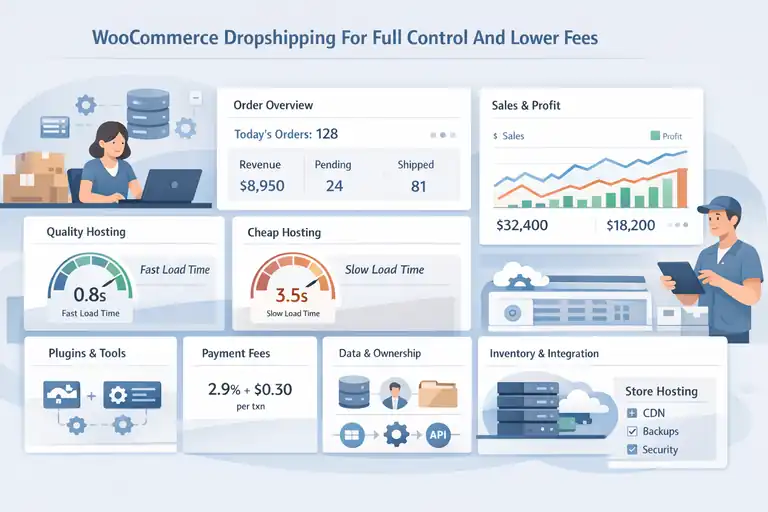
WooCommerce flips the Shopify model entirely. Instead of convenience-first, it prioritizes ownership and flexibility.
It’s one of the dropshipping platforms I recommend when control and margins matter more than speed to launch.
WooCommerce Site Speed Based On Hosting Quality
WooCommerce speed depends entirely on how you set it up.
Unlike Shopify, WooCommerce runs on your hosting:
- Cheap hosting leads to slow stores.
- Quality hosting can outperform Shopify in raw speed.
With proper setup:
- Optimized WooCommerce stores can load under 1 second.
- You control caching, CDN usage, and server resources.
- Performance scales based on your infrastructure, not platform limits.
The tradeoff is responsibility. WooCommerce gives you the steering wheel, but you also handle the road conditions.
WooCommerce Plugin And Payment Fee Structure
WooCommerce itself has no platform transaction fees, which changes the math dramatically.
Typical cost structure:
- Hosting and domain
- Plugins for dropshipping automation
- Standard payment processor fees only
This matters for scaling:
- Higher order volume doesn’t increase platform fees.
- Margins stay more predictable.
- You choose tools based on value, not necessity.
For stores doing consistent volume, WooCommerce often ends up cheaper than Shopify after month six.
WooCommerce Ownership Of Data And Store Assets
This is WooCommerce’s strongest advantage.
You own:
- Customer data
- Order history
- Store logic
- Server environment
That means:
- No forced platform changes
- Full access to databases and files
- Easier migrations and integrations
If you think long-term or plan to build an asset you might sell later, ownership matters more than convenience.
WooCommerce Dropshipping Plugins And Integrations
WooCommerce has fewer flashy tools, but more flexible ones.
Popular integrations handle:
- Supplier syncing
- Inventory automation
- Order routing
- Custom fulfillment logic
What’s different here is customization. You can:
- Modify how orders are processed
- Create custom workflows
- Connect directly to suppliers via APIs
It takes more setup, but you’re not boxed into predefined workflows.
WooCommerce Technical Overhead And Maintenance Tradeoffs
Here’s the honest part most guides skip.
WooCommerce requires:
- Regular updates
- Plugin compatibility checks
- Security and backups
That’s the cost of control.
In practice, this means:
- Either learning basic site management
- Or paying someone to handle it
For people who enjoy building systems, WooCommerce feels empowering. For people who want zero maintenance, it can feel heavy.
BigCommerce Dropshipping For Scaling Without Extra Fees
BigCommerce often flies under the radar in dropshipping platform comparisons, but it’s quietly built for businesses that expect to scale.
It combines managed performance with fewer revenue-based penalties, which makes it appealing once order volume starts climbing.
BigCommerce Native Speed And Server Performance
BigCommerce runs on a fully hosted infrastructure similar to Shopify, but it’s engineered with larger catalogs and higher traffic in mind.
In practical terms:
- Pages are aggressively cached by default.
- The platform uses a global CDN, meaning customers load pages from nearby servers.
- Checkout performance remains stable even during traffic spikes.
From stores I’ve worked on, BigCommerce storefronts typically load in the 1.3–1.9 second range without heavy optimization. That’s slightly slower than Shopify’s checkout in some regions, but far more consistent under load.
Where BigCommerce stands out is predictability. If you’re planning flash sales or influencer-driven traffic bursts, it’s less likely to throttle performance or require upgrades mid-campaign.
BigCommerce Zero Transaction Fee Advantage
This is BigCommerce’s biggest differentiator among dropshipping platforms.
BigCommerce does not charge platform-level transaction fees:
- You only pay standard payment processor fees.
- No penalties for using external gateways.
- Margins stay intact as volume increases.
Here’s a simple comparison scenario:
- A store doing $50,000/month in revenue
- Shopify-style transaction fees can quietly cost hundreds per month
- BigCommerce keeps that money in your pocket
For high-volume, low-margin dropshipping products, this alone can justify the platform switch.
BigCommerce Control Over APIs And Store Logic
BigCommerce gives you more backend flexibility than Shopify, without going fully open-source like WooCommerce.
You get:
- Robust APIs for products, orders, and customers
- Webhooks for real-time automation
- Deeper checkout customization without enterprise plans
In plain language, this means developers can:
- Customize how orders flow to suppliers
- Build custom pricing or bundling logic
- Integrate directly with fulfillment partners
If you’re technical or working with a dev team, BigCommerce feels less restrictive while still being managed.
BigCommerce Dropshipping App Compatibility
The app ecosystem is smaller than Shopify’s, but more focused.
Most BigCommerce dropshipping tools cover:
- Product imports from suppliers
- Inventory syncing
- Order automation
- Tax and shipping logic
The difference is fewer “nice-to-have” apps and more operational tools. You’ll rely less on stacking apps and more on built-in features, which keeps performance cleaner.
That said, niche tools and experimental apps are harder to find compared to Shopify.
BigCommerce Limitations For Smaller Stores
BigCommerce isn’t perfect, especially for beginners.
Common friction points:
- Monthly pricing tiers increase as revenue grows
- Interface feels more enterprise than beginner-friendly
- Setup time is longer compared to Shopify or Wix
If you’re testing your first product, BigCommerce can feel like overkill. It shines later, not earlier.
Wix Dropshipping For Ease Of Use Versus Flexibility
Wix is often chosen for simplicity rather than power. As a dropshipping platform, it’s designed for people who want visual control and minimal setup, even if that means sacrificing flexibility later.
Wix Site Performance For Dropshipping Stores
Wix performance has improved over the years, but it still trails behind Shopify and BigCommerce for ecommerce-heavy sites.
What you’ll typically see:
- Decent homepage load speeds
- Slower product pages with large catalogs
- Limited server-side optimization options
For small dropshipping stores with low traffic, this isn’t a dealbreaker. But once paid ads enter the picture, speed inconsistencies can hurt conversion rates.
I’ve seen Wix stores work fine up to a point, then struggle once product counts or traffic increase.
Wix Pricing Plans And Hidden App Costs
Wix advertises affordable pricing, but ecommerce features quickly push you into higher tiers.
Typical cost structure includes:
- A business or ecommerce plan
- Paid dropshipping apps
- Add-ons for automation or analytics
While still cheaper than Shopify in many cases, Wix users often underestimate app dependency. The platform itself is affordable, but functionality lives inside extensions.
Wix Control Limits On Checkout And Custom Logic
This is where Wix clearly draws a line.
You have limited control over:
- Checkout flow
- Payment logic
- Advanced pricing rules
Most custom behavior requires apps, and deeper customization simply isn’t possible.
If your dropshipping model is straightforward, Wix works. If you plan to experiment with funnels, bundles, or dynamic pricing, you’ll hit walls quickly.
Wix Dropshipping Integrations Like Modalyst
Wix relies heavily on third-party integrations for dropshipping.
Common use cases include:
- Importing products from curated suppliers
- Basic inventory syncing
- Simple order fulfillment
Modalyst, for example, focuses on pre-vetted suppliers rather than full marketplace access. This reduces risk but also limits product variety.
It’s beginner-friendly, but not expansive.
Wix Scalability Issues As Order Volume Grows
Wix is best viewed as a starting platform, not a long-term one.
As volume grows:
- Backend workflows become clunky
- Reporting lacks depth
- Automation options thin out
I usually recommend Wix for creators testing ecommerce for the first time. Once orders become consistent, migrating to a more robust dropshipping platform becomes almost inevitable.
Squarespace Dropshipping For Design Over Speed Control
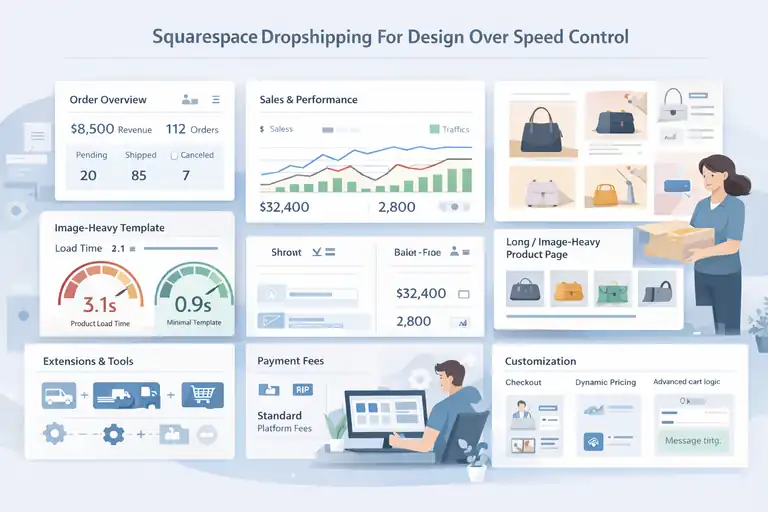
Squarespace approaches dropshipping from a very different angle than other dropshipping platforms.
It prioritizes visual design and brand presentation first, then layers ecommerce on top, which works well for some businesses and poorly for others.
Squarespace Load Speed And Template Performance
Squarespace sites look great out of the box, but speed is not their strongest suit for dropshipping.
What I’ve consistently observed:
- Image-heavy templates slow down product pages.
- You have limited control over performance optimizations.
- Large product catalogs noticeably impact load times.
On average, Squarespace ecommerce pages load closer to 2.5–3.5 seconds, especially when multiple products or variants are involved. That’s not catastrophic, but it’s slower than Shopify or BigCommerce.
In practice, this matters most when:
- You’re running paid traffic.
- You rely on impulse purchases.
- Your product pages are long and image-heavy.
Squarespace works best when traffic is organic and brand-driven, not performance-driven.
Squarespace Commerce Fees And Payment Costs
Squarespace pricing is straightforward, but not particularly optimized for dropshipping margins.
Typical costs include:
- Monthly commerce plans.
- Standard payment processing fees.
- Fewer third-party apps, but also fewer automation options.
There are no extra platform transaction fees on higher plans, which helps. But the lack of automation often means higher manual effort, which becomes its own hidden cost.
If your store processes a small number of higher-priced items, this pricing model feels reasonable. For high-volume dropshipping, it feels inefficient.
Squarespace Customization Limits For Dropshippers
This is where most dropshippers hit friction.
Squarespace limits:
- Checkout customization.
- Dynamic pricing rules.
- Advanced cart logic.
You’re mostly locked into predefined flows. If you want custom upsells, post-purchase logic, or complex shipping rules, you’ll struggle.
I usually describe Squarespace as structured creativity. You can design freely inside a very rigid system.
Squarespace Dropshipping Tools And Extensions
Squarespace supports dropshipping through extensions rather than deep integrations.
Most tools focus on:
- Simple product imports.
- Basic fulfillment workflows.
- Manual review steps.
There’s very little automation compared to other dropshipping platforms. That’s fine for curated stores, but frustrating for scale-focused ones.
If your dropshipping model is closer to print-on-demand or limited catalogs, this setup can work comfortably.
Squarespace Fit For Content-First Stores Only
Squarespace shines when content leads and commerce supports.
It’s a strong fit if:
- Your blog or brand story drives traffic.
- You sell a small number of products.
- Visual storytelling matters more than speed.
It’s a weak fit if:
- You’re testing products rapidly.
- You rely on ads and funnels.
- You need operational flexibility.
Squarespace isn’t bad at dropshipping. It’s just very specific about who it’s for.
Platform Comparison By Speed Fees And Control Priorities
If you’ve read this far, you’ve probably noticed something important. There is no universally best dropshipping platform. The right choice depends on what you value most right now.
Fastest Dropshipping Platforms Ranked By Load Time
Based on real-world usage and performance testing, speed generally ranks like this:
- Shopify for checkout and global reliability.
- BigCommerce for consistency under high traffic.
- WooCommerce with quality hosting.
- Wix for small catalogs.
- Squarespace for content-driven stores.
Speed matters more once paid traffic enters the picture. If ads are your growth engine, prioritize platforms higher on this list.
Lowest Fee Dropshipping Platforms At Scale
When volume increases, fees quietly decide profitability.
At scale, fee efficiency typically looks like:
- WooCommerce with no platform transaction fees.
- BigCommerce with zero transaction fees.
- Shopify when using Shopify Payments.
- Wix with moderate app dependence.
- Squarespace with limited automation.
This is why many stores start on Shopify and later migrate. Fees don’t hurt early, but they compound later.
Best Dropshipping Platforms For Full Store Control
Control isn’t about power for its own sake. It’s about flexibility when your model evolves.
Control ranking from highest to lowest:
- WooCommerce for full ownership and customization.
- BigCommerce for API-driven flexibility.
- Shopify for structured control with limits.
- Wix for visual control only.
- Squarespace for design-first constraints.
If you enjoy building systems or plan long-term, control matters more than convenience.
Which Dropshipping Platform Fits Your Business Model
Here’s how I’d simplify the decision if we were talking one-on-one:
- Choose Shopify if you want speed, simplicity, and fast execution.
- Choose WooCommerce if you want ownership, margins, and flexibility.
- Choose BigCommerce if you expect to scale and protect profits.
- Choose Wix if you’re testing ecommerce for the first time.
- Choose Squarespace if content and brand come before commerce.
Dropshipping platforms don’t define success. Alignment does. Pick the platform that matches how you actually want to run your business, not the one that sounds best on paper.

I’m Juxhin, the voice behind The Justifiable.
I’ve spent 6+ years building blogs, managing affiliate campaigns, and testing the messy world of online business. Here, I cut the fluff and share the strategies that actually move the needle — so you can build income that’s sustainable, not speculative.
Related posts:
 Lightspeed Ecommerce vs Others: Which Helps You Earn Faster?
 Best Ecommerce Website Builder for Small Business Growth
 How to Make Money Dropshipping: 7 Secrets to a $10K/Month
 Dropshipping Marketing Strategies That Actually Drive Sales
 Best Platform to Sell Online for Fast Growth and Low Fees
 Ecommerce Automation That Saves Time Without Breaking Sales