
Table of Contents
Some links on The Justifiable are affiliate links, meaning we may earn a small commission at no extra cost to you. Read full disclaimer.
If you’ve ever dreamed of sharing your ideas online but felt held back by costs, learning how to set up a blog for free might be exactly what you need.
I remember when I started my first blog—I had no budget, no fancy tools, and zero tech knowledge. Yet, that simple free blog became my gateway to earning online income.
In this guide, I’ll walk you through the exact steps to create a blog without spending a dime—and show you how to turn it into a money-making platform that works for you 24/7.
Choose The Right Free Blogging Platform
Before you even write your first post, you need to decide where your blog will live. The right free platform gives you flexibility, ease of use, and a foundation for monetization later.
Let’s go over your best options.
Compare Top Free Platforms For Beginners
When starting out, you’ll likely look at three main choices:
- WordPress.com – Offers excellent flexibility, tons of free themes, and simple setup. Great for beginners who plan to grow.
- Blogger – A Google-owned platform that’s easy to start but limited in customization. Ideal if you just want to write without worrying about design.
- Wix – Known for drag-and-drop simplicity. Great for visual learners who like control over layout but less ideal for deep SEO work.
In my experience, WordPress.com gives you the most scalable start. It’s like renting a small apartment that you can eventually turn into a full house without moving elsewhere.
Blogger is fine for hobbyists, while Wix suits those who want everything to “just look pretty” without touching much tech.
Why WordPress.com Is A Popular Starting Point
WordPress.com is popular for a reason: it’s intuitive, free, and expandable. You can launch your blog in minutes with no coding, using pre-designed templates that already look professional.
Here’s why I personally recommend it:
- Free hosting included – You don’t pay for web space.
- Built-in SEO tools – Even on the free plan, you get basic optimization.
- Easy upgrade path – When you’re ready to monetize seriously, you can switch to WordPress.org or upgrade your plan.
The biggest perk? You own your content. That’s huge when you start earning, because platforms like Medium or Substack can change terms anytime.
When To Consider Platforms Like Blogger Or Wix
If you want something super simple, Blogger or Wix can work. Blogger, for instance, integrates directly with Google AdSense, so it’s easy to place ads and earn without extra steps.
However, here’s the tradeoff:
- Blogger limits your control over design and SEO.
- Wix makes customization easy but can be slower and less flexible for growth.
I’d say choose Blogger if you just want to write without thinking about “tech stuff.” Choose Wix if visuals are your focus—like portfolios or lifestyle blogs. But if you want long-term income potential, go with WordPress.com.
How To Pick A Platform That Supports Monetization
If your end goal is making money, not just writing, pick a platform that allows monetization options such as ads, affiliate links, and sponsored content.
Before deciding, check for:
- Ad integration: Can you add Google AdSense or affiliate banners?
- Content ownership: Do you keep full rights to your posts?
- Upgrade flexibility: Can you switch to paid hosting later if needed?
Pro tip: Go for a platform that grows with you—not one that boxes you in. WordPress.com checks all these boxes.
Pick A Profitable Niche For Your Blog

Your blog’s niche determines everything—who you attract, how much you can earn, and how easily you can stand out.
Picking the right one saves months (even years) of frustration.
How To Identify Topics With Long-Term Earning Potential
Start by asking: What are people always searching for? Some niches never go out of style because they solve timeless problems.
Examples include:
- Personal finance (saving, investing, side hustles)
- Health and fitness (nutrition, workouts, mindset)
- Self-improvement (habits, productivity, mindset)
- Technology (tutorials, app reviews)
I suggest writing down 3–5 things you’re passionate about, then checking if they align with problems people pay to solve. That intersection—between passion and profitability—is gold.
Using Google Trends And Keyword Research To Validate Your Niche
This step turns guessing into data-driven decision-making. Head to Google Trends and type in your topic ideas. You’ll see whether interest is rising or falling.
Then, use free tools like Ubersuggest or AnswerThePublic to find what questions people ask about those topics. If you see steady search volume and low-to-medium competition, that’s a strong signal.
For example, instead of a broad niche like “fitness,” a sub-niche like “home workouts for busy moms” might show steady search demand—and attract a loyal audience.
Balancing Passion With Profit: What I’ve Learned
When I started blogging, I made the mistake of chasing money first. The problem? I lost interest quickly. Blogging takes consistency, and consistency only happens when you care about your topic.
Here’s my formula: Write about something you genuinely enjoy, that others also find useful enough to pay for.
If your passion is baking, for instance, focus on “budget-friendly baking at home.” It’s relatable, searchable, and monetizable.
Mistakes To Avoid When Choosing Your Blogging Niche
Avoid these traps early on:
- Too broad: “Lifestyle” is not a niche—it’s a category. Narrow it down.
- Too obscure: Topics with zero search volume won’t grow.
- Copycat niches: Don’t pick something just because it’s trending. Be original.
- No monetization plan: Some niches (like fan fiction) are hard to monetize.
A smart niche is one that people search for, you love, and offers clear ways to earn (ads, products, or affiliate programs).
Create A Catchy Domain Name And Blog Title
Once you know your niche, it’s time to give your blog an identity. Your domain name is the first impression people get—make it memorable and professional, even if it’s free.
How To Choose A Free Domain That Looks Professional
Platforms like WordPress.com and Blogger give you free domains such as yourblog.wordpress.com or yourblog.blogspot.com. It’s fine at the start, but choose a name that can grow with you.
Here’s what works best:
- Keep it short and easy to spell.
- Avoid numbers or hyphens.
- Choose something that hints at your niche.
For instance, SavvyBudgetLife immediately tells readers it’s about smart money living. When you eventually buy a domain, you can move it to savvybudgetlife.com—same brand, just cleaner.
Why Naming Your Blog Right Affects SEO And Branding
Your blog name isn’t just a title—it’s part of your SEO. When people search for your niche, Google looks at your domain name as one of many relevance signals.
For example, if your niche is eco-friendly living, a name like GreenHabitGuide instantly helps search engines and readers understand your topic.
Plus, your blog name affects trust. A clean, clear name says “I’m serious,” while something random like Jenny’s Stuff doesn’t inspire confidence.
Tools To Generate Creative Blog Name Ideas
If you’re stuck, use free name generators like:
- Namecheap’s Domain Name Generator – Finds available domains fast.
- Wordoid – Creates unique, brandable word combinations.
- Lean Domain Search – Combines your main keyword with creative ideas.
Play with variations until you find something that sounds natural, easy to say aloud, and available as a free subdomain.
Common Pitfalls When Picking A Blog Name
Avoid these early mistakes:
- Copying popular names: It confuses readers and hurts your credibility.
- Overcomplicating it: If people can’t remember or spell it, they won’t return.
- Being too narrow: A name like Keto2025 locks you in forever.
- Ignoring future growth: Choose something that leaves room to expand topics later.
Pro tip: Say your blog name out loud. If it feels awkward or forced, it’s not the one. Your name should feel natural—something you’re proud to say when someone asks, “What’s your blog called?”
Design Your Free Blog For A Professional Look
A blog that looks professional instantly builds trust. Even if you set up your blog for free, you can make it feel polished, organized, and brand-aligned with just a few thoughtful design choices.
Selecting Free Themes That Match Your Brand
Most free blogging platforms like WordPress.com or Blogger offer hundreds of themes. But the trick isn’t just picking something “pretty”—it’s choosing a theme that matches your blog’s purpose and personality.
Here’s what I look for when picking a theme:
- Simplicity first: A clean, clutter-free design makes your content stand out.
- Mobile responsiveness: Choose themes that adjust perfectly on any device.
- Customizable options: Even free themes should let you tweak fonts, colors, and headers.
If your blog focuses on recipes, go for an image-friendly theme with strong visuals. For finance or self-improvement blogs, pick something minimal that’s easy to read.
I once made the mistake of picking a visually heavy template that slowed my site—lesson learned: beauty should never come at the cost of usability.
Customizing Fonts, Colors, And Layout For User Experience
Once your theme is installed, it’s time to personalize. Fonts and colors play a massive role in how readers feel when they land on your site.
Here’s a quick setup formula that works:
- Fonts: Choose one clean sans-serif (like Open Sans or Lato) for body text and one accent font for titles.
- Colors: Stick to 2–3 brand colors—one primary, one secondary, and one accent. Tools like Coolors.co can help you find the right palette.
- Layout: Keep navigation simple. Your readers shouldn’t need to “figure out” where to go.
Imagine you’re designing for someone who’s visiting your site half-asleep on a phone—that’s how intuitive it should be.
How To Create A Branded Logo For Free
Your logo doesn’t need to cost a cent. Free tools like Canva or Looka make it incredibly easy to create one that looks professional.
Here’s how I do it:
- Go to Canva’s logo maker and search “blog logo.”
- Choose a template that fits your niche vibe—playful, minimalist, or elegant.
- Customize the colors and fonts to match your theme.
- Export it in PNG format with a transparent background.
Keep it simple. A clean text logo often looks better than an overcomplicated design. Your logo should be recognizable even when it’s tiny in a browser tab.
Ensuring Your Blog Design Looks Great On Mobile
Over 70% of blog traffic comes from smartphones, so mobile optimization isn’t optional—it’s essential.
Quick mobile-friendly checks:
- Preview every page on mobile before publishing.
- Use short paragraphs and enough white space.
- Avoid large header images that slow loading time.
- Test buttons and menus—make sure they’re easy to tap.
I like using Bing’s Mobile-Friendly Test to see how pages perform. Small tweaks—like resizing images or spacing out text—can make a big difference in keeping readers scrolling.
Write Compelling Blog Posts That Attract Readers
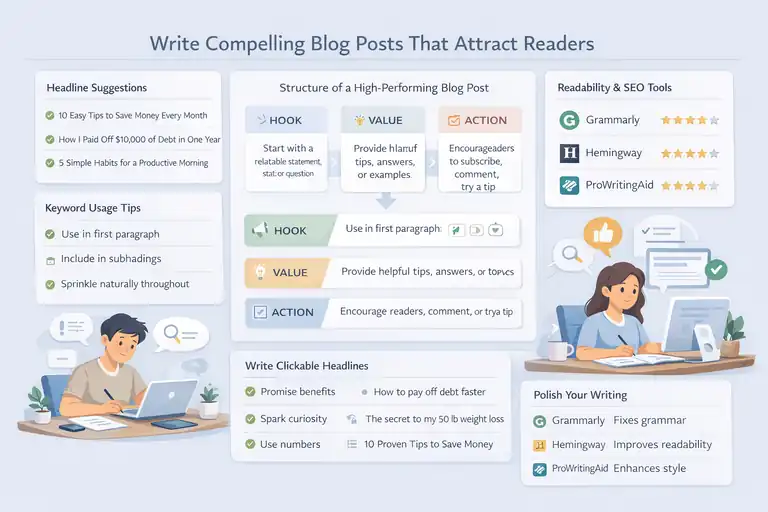
Good design grabs attention—but it’s your words that make readers stay. To attract an audience and keep them coming back, your posts must inform, inspire, or entertain.
The Structure Of A High-Performing Blog Post
Think of your blog post like a mini conversation. It should pull readers in, deliver clear value, and end with something actionable.
Here’s a simple structure I swear by:
- Hook: Start with a relatable statement, stat, or question.
- Value: Deliver what you promised—tips, answers, or a how-to guide.
- Action: End with something readers can do next (subscribe, comment, try a tip).
Break long sections into subheadings, use bullet lists for clarity, and add real examples.
For instance, if you’re writing about saving money, show exactly how you did it—people love seeing what actually works.
How To Find And Use Keywords Naturally In Your Writing
SEO isn’t about stuffing keywords—it’s about helping Google understand your content. To find the right ones, use free tools like Ubersuggest or Google Keyword Planner.
Once you have your list:
- Use your main keyword (like “set up a blog for free”) in the first paragraph.
- Sprinkle related terms naturally throughout your post.
- Include your keyword in at least one subheading.
Write for people first, search engines second. The goal is readability. If your sentence feels forced, remove or rephrase the keyword—it’s that simple.
Tips For Writing Headlines That Get Clicks
Your headline determines whether someone reads your post or scrolls past it.
Effective headlines do one of three things:
- Promise a clear benefit (“How to Set Up a Blog for Free in 15 Minutes”)
- Spark curiosity (“The One Mistake New Bloggers Always Make”)
- Use numbers (“7 Proven Ways to Get More Blog Traffic”)
Keep them under 60 characters so they display properly in Google results. And if you’re ever unsure, test your headline using Coschedule’s Headline Analyzer—it gives instant feedback on structure and emotional appeal.
Using Free Tools To Polish Your Grammar And Readability
No matter how good your ideas are, readers won’t stay if your writing feels clunky.
Free tools can help polish your work fast:
- Grammarly: Checks grammar and tone.
- Hemingway Editor: Highlights long, hard-to-read sentences.
- ProWritingAid: Great for style and flow improvement.
Before hitting publish, read your post aloud. If you stumble over a sentence, your readers will too. Smooth, conversational writing keeps people hooked from start to finish.
Promote Your Blog Without Spending Money
Once your content is live, it’s time to get it seen. The good news?
You don’t need to spend money on ads to attract traffic—just some time, consistency, and smart strategies.
Leveraging Social Media To Drive Organic Traffic
Social platforms can bring massive exposure if you use them intentionally.
Here’s what I’ve found effective:
- Pick 1–2 main platforms—like Pinterest for visuals or LinkedIn for professional content.
- Share teasers, not full posts. Post a hook with a link to your blog.
- Engage consistently. Reply to comments, join niche communities, and repurpose snippets from your articles into short posts or stories.
Pinterest, in particular, is a goldmine for bloggers. Design simple pin graphics using Canva and link them to your blog—organic traffic will snowball over time.
Building An Email List Using Free Tools Like Kit
Email lists are your most loyal traffic source. Aweber offers a free plan where you can collect subscribers and send updates.
Start small:
- Create a simple sign-up form in Aweber .
- Offer a freebie (like a checklist or mini-guide).
- Send helpful emails weekly—not just promotions.
Even with just 100 subscribers, you can build strong engagement. These readers are more likely to buy, click, and share because they trust you.
Guest Posting And Collaboration Strategies
Writing guest posts on other blogs introduces your work to new audiences.
- Find blogs in your niche with active readers.
- Pitch a useful, original topic that fits their style.
- Add a short bio with a link back to your blog.
Another great option is collaborating with bloggers in your niche—exchange shoutouts, interview each other, or create joint guides. Collaboration spreads visibility faster than doing everything solo.
How SEO Helps Grow A Blog Organically Over Time
Search engine optimization is the long game—but it’s worth it. Once your blog ranks, it brings traffic passively, month after month.
Focus on three main things:
- Quality content: Google rewards depth and originality.
- Internal linking: Link your own posts together to help search engines understand your site structure.
- Consistency: Publish regularly. Even one post a week adds up.
In my experience, it takes about 3–6 months to see steady organic traffic. But once it starts, the results compound. Your old posts will keep bringing in visitors while you focus on creating new ones.
Pro tip: Keep improving one small part of your blog each week—whether it’s optimizing an old post, improving your design, or building a new email sequence. Over time, these tiny upgrades turn your free blog into a professional, income-generating platform.
Monetize Your Free Blog Step By Step
Once your blog starts getting visitors, it’s time to turn your effort into income. Even if your blog is built for free, there are plenty of ways to make money without investing upfront.
Let’s walk through the most effective methods I’ve personally used and seen work for other bloggers.
How To Apply For Google AdSense And Get Approved
Google AdSense is one of the simplest ways to earn money by displaying ads on your blog. When visitors click or view those ads, you get paid.
Here’s how to get started:
- Create valuable content first. Google wants to see a blog with original, helpful posts (at least 10–15).
- Make sure your site looks professional. Have an About page, a Contact page, and clear navigation.
- Apply via the AdSense website. Fill in your blog URL and details.
- Wait for review. It usually takes a few days for approval.
Once approved, AdSense will give you a small HTML code to paste into your blog. From there, ads will appear automatically.
A quick note from my experience: free platforms like WordPress.com may limit where ads can appear on the free plan. You might need to upgrade to a basic paid tier later for full control—but starting on free is completely fine to learn the ropes.
Earning Through Affiliate Marketing With Free Sign-Up Programs
Affiliate marketing lets you earn a commission by recommending products or services. When someone clicks your affiliate link and makes a purchase, you get paid.
Here’s how I do it step by step:
- Pick products related to your niche. If you blog about productivity, promote tools like Notion or Trello.
- Join free affiliate programs. Amazon Associates, Awin, and Impact are great places to start.
- Add affiliate links naturally. Don’t just dump links—integrate them into tutorials, reviews, or recommendations.
- Disclose your partnerships. A simple line like “This post contains affiliate links at no extra cost to you” keeps everything transparent.
Affiliate income can take a few months to build, but once your posts rank in Google, those links can bring in money passively.
Selling Digital Products Without A Paid Platform
You don’t need an expensive store to sell your own products. You can sell digital items like eBooks, templates, or checklists using free tools.
Here’s how you can do it:
- Use Gumroad or Payhip. Both let you upload digital files and accept payments directly, even with free plans.
- Link to your product from your blog. Add a “Shop” or “Resources” page with links to your Gumroad listings.
- Promote through email. Remind your readers how your product solves a real problem.
I’ve seen bloggers sell simple PDFs for $5–$10 and earn hundreds per month. The key is to create something genuinely useful—like a “30-Day Blog Planner” or a “Budget Tracker Template.”
Using Sponsored Posts And Brand Collaborations To Earn
Once your blog gains traction, brands might reach out—or you can pitch them yourself. Sponsored posts are when companies pay you to write about their product or include it in your content.
To attract collaborations:
- Keep your blog design clean and professional.
- Publish niche-specific, high-quality posts regularly.
- Create a simple “Work With Me” page with your email and topics you cover.
Start small. Even free product exchanges or $50 collaborations help you learn how brand deals work. Over time, you’ll be able to charge more as your traffic and credibility grow.
Track Your Blog Performance And Optimize
Tracking your performance is like checking your pulse—it tells you what’s working and what’s not.
Without this step, you’ll keep guessing instead of growing intentionally.
Free Tools To Monitor Traffic And Engagement
You don’t need premium analytics software to understand your audience. These free tools are more than enough:
- Google Analytics: Tracks your visitors, traffic sources, and top-performing posts.
- Google Search Console: Shows what keywords bring people to your blog.
- Jetpack (WordPress plugin): Gives you a simple daily traffic overview.
I recommend checking your analytics weekly. Look at which posts people read the most and where they drop off. That’s your goldmine of insights.
How To Understand Analytics And Adjust Content Strategy
Data can be overwhelming at first, but you only need to focus on a few key metrics:
- Page views: Which topics get the most attention.
- Bounce rate: How quickly people leave your site.
- Average session duration: How long visitors stay and read.
If a post has high traffic but short reading time, improve its layout, add visuals, or make it more engaging. If a post gets traffic from certain keywords, create more related content to strengthen your authority in that niche.
Simple Tweaks That Boost Conversion And Reader Retention
Small improvements often bring big results. Try these practical tweaks:
- Add internal links between related posts to keep readers exploring.
- Use clear call-to-actions (CTAs) like “Subscribe for weekly tips.”
- Optimize old posts with updated info or better keywords.
I once updated an old article with a new title and fresh examples, and traffic doubled within a month. Consistent optimization keeps your blog alive and relevant.
When To Consider Upgrading From Free To Paid Hosting
Eventually, you might outgrow your free plan. You’ll know it’s time to upgrade when:
- You want to run full AdSense or affiliate scripts.
- Your blog gets significant traffic and needs faster loading times.
- You want a custom domain (without “.wordpress.com”).
Paid hosting with providers like Bluehost or Hostinger can cost as little as $2–$3 a month. Think of it as a long-term investment once your free setup starts generating income.
Avoid Common Mistakes New Bloggers Make
Every blogger makes mistakes in the beginning—I’ve made plenty myself. Knowing what to avoid early can save you months of frustration.
Ignoring SEO Basics From The Start
Many beginners skip SEO because it sounds technical. But it’s really about making your content easy to find.
Make sure to:
- Use your main keyword naturally in titles and headings.
- Add meta descriptions for each post.
- Write for readers first, search engines second.
If you start applying basic SEO from day one, you’ll get consistent organic traffic without paying for ads later.
Overloading Your Blog With Ads Too Early
I know it’s tempting to fill your site with ads once AdSense is approved—but too many ads hurt user experience and slow your site.
Start small. One or two ads per page are enough in the beginning. Once your traffic grows, you can experiment with placement and frequency.
Not Building An Email List Early On
Your email list is your safety net—it’s the only audience you truly own. Social media algorithms change, but your email subscribers stick around.
Even if you use free tools like Kit, set up a simple sign-up form early. Offer something helpful (like a mini guide) to encourage sign-ups. Those early subscribers often become your biggest supporters later.
Quitting Too Soon Before Results Show
This one breaks my heart because I see it all the time. Blogging success rarely happens overnight. It’s a slow build of trust, content, and consistency.
You might not see traffic for the first few months—and that’s okay. Keep writing, learning, and improving. Momentum takes time, but once it starts, it’s hard to stop.
Pro Tips To Keep Your Free Blog Growing
Growth isn’t just about doing more; it’s about doing better. These practical habits will help you stay consistent and keep improving over time.
How To Stay Consistent And Motivated As A Blogger
Blogging can feel lonely at times, especially when you’re doing it all yourself. The trick is to create a routine that keeps you moving.
Try this:
- Set small weekly goals (like one post or one email).
- Batch your writing so you always have drafts ready.
- Celebrate little wins—like your first comment or 1,000 views.
Motivation fades, but discipline keeps you going. Even writing 15 minutes a day adds up fast.
Using Feedback To Improve Your Content Quality
Your readers are your best teachers. Pay attention to their comments, questions, and emails—they tell you what’s working and what’s missing.
When someone asks a question, turn it into a new post. When you notice readers skipping a section, simplify it or add visuals. Improvement isn’t about perfection—it’s about listening.
Building Authority And Community Around Your Blog
Authority doesn’t come from shouting louder; it comes from showing up consistently and helping people.
You can build authority by:
- Writing deeply useful, experience-backed posts.
- Engaging in niche forums or Facebook groups.
- Featuring other creators or linking to their content.
Community is built one genuine interaction at a time. Respond to comments, start discussions, and treat your readers like friends, not numbers.
When And How To Scale Your Free Blog Into A Full Business
Once you start earning steady income, you can turn your blog into a real business. Here’s how that transition usually looks:
- Upgrade your hosting to get a custom domain and more control.
- Create a content system—schedule, automate, and outsource small tasks.
- Launch your own digital products or courses.
- Diversify income streams (ads, affiliates, consulting, memberships).
Scaling takes time, but the foundation you’ve built with your free blog will make the process much smoother.
Pro tip: The key to long-term blogging success isn’t a secret—it’s consistency, care, and constant learning. Keep refining, keep experimenting, and treat your blog like a living project that evolves with you. Over time, your free blog can become not just a side hustle, but a sustainable business you genuinely love running.
FAQ
How can I set up a blog for free and start earning money?
You can set up a blog for free using platforms like WordPress.com or Blogger, then monetize it through ads, affiliate links, or digital products once you grow your traffic.
What is the best free platform to set up a blog for beginners?
WordPress.com is the best free platform for beginners because it’s easy to use, customizable, and supports monetization options when you’re ready to scale.
How long does it take to make money from a free blog?
It usually takes 3–6 months to start earning, depending on your niche, posting consistency, and traffic growth from SEO and social media promotion.

I’m Juxhin, the voice behind The Justifiable.
I’ve spent 6+ years building blogs, managing affiliate campaigns, and testing the messy world of online business. Here, I cut the fluff and share the strategies that actually move the needle — so you can build income that’s sustainable, not speculative.
Related posts:
 The Best Way to Start a Blog That Actually Makes Money
 How to Create a Blog Site and Start Making Money
 Create a Blog Free and Start Earning With No Risk
 Start a Blog Website and Build a Profitable Side Income
 How to Start a Blog and Make Money
 Make a Blog for Money: Start Earning in 30 Days or Less