Table of Contents
Some links on The Justifiable are affiliate links, meaning we may earn a small commission at no extra cost to you. Read full disclaimer.
When you decide to create your own blog, it’s normal to wonder how long it takes before you actually start earning from it. I’ve been in your shoes, and I know how overwhelming those first decisions can feel.
In this guide, I’ll walk you through the steps that answer the big question: What do you really need to do to turn a brand-new blog into income?
How To Create Your Own Blog And Choose A Niche That Pays
If you’re just getting started, this first step lays the foundation for everything that comes after.
I believe that when you create your own blog, choosing the right niche can make earning money much easier over time.
Identifying a Topic With Real Audience Demand
When I talk to new bloggers, the first thing I usually ask is whether people are actually searching for their topic. Without demand, even great writing struggles.
Let me break it down in a simple way.
- Check Search Volume Trends: Use free tools like Google Trends. Type in your topic (for example, “healthy meal prep”). If the trend line is steady or rising, that’s a healthy sign.
- Look at Existing Content: Search your niche on Google. When you see strong sites ranking, it often means there’s active interest.
- Scan Social Platforms: Reddit, Facebook Groups, and YouTube comment sections show what real people actually ask.
From what I’ve seen, niches with consistent questions—like personal finance, pet care, or DIY skills—tend to have strong long-term demand.
One quick example: “budgeting tips” gets millions of monthly searches across multiple platforms, which signals that people constantly look for guidance.
Using Simple Market Research To Validate Your Blog Idea
Validating your idea doesn’t have to feel intimidating. You can do this quickly, even if you’re brand-new.
- Use Keyword Tools: Try entering your idea into tools like Ubersuggest or Ahrefs Free Keyword Generator. If you see many related terms with mid-level competition, you’re on the right path.
- Evaluate Search Intent: Look at the top-ranking pages. If most of the results are blogs instead of corporate sites, it shows blogs can compete.
- Check Monetization Potential: Search “[your niche] affiliate programs.” If companies pay commissions, that’s an early sign your topic can earn.
I always suggest doing a simple sanity check: Ask yourself, “Are people willing to spend money in this space?” That one question alone can help you avoid many low-profit topics.
Choosing a Focus Area You Can Write About Consistently
You’ll write dozens—sometimes hundreds—of posts over time. If the niche doesn’t interest you even a little, staying consistent becomes almost impossible.
Start by asking:
- What topics do you naturally talk about with friends?
- What skills have you used at work or at home?
- What topics do you enjoy learning about?
You don’t need to be an expert; you just need to enjoy exploring the subject.
For example, someone who loves organizing might focus on decluttering, simple storage hacks, or minimalist living. Each of these can grow into a full blog without becoming overwhelming.
I’ve found that consistency matters more than choosing “the perfect niche.” Your energy and curiosity will carry you through the long months of building traffic.
Avoiding Overcrowded Niches Without Clear Differentiation
Some niches—like fitness or travel—are extremely saturated. But that doesn’t mean you can’t enter them. You just need a unique angle.
Examples of angles that work:
- Fitness for new moms
- Budget travel for students
- Plant-based cooking for busy professionals
Try narrowing your focus until it feels specific enough that a reader would say, “Finally, someone who gets exactly what I need.” In my experience, blogs with a clear angle grow faster because readers feel understood.
Effective Content Planning Strategies For New Bloggers
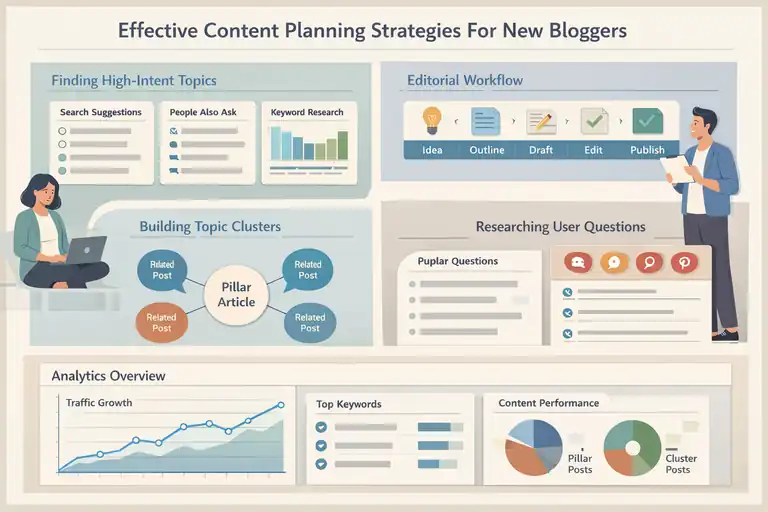
Once you’ve chosen your niche, the next step is learning how to structure your content so readers arrive, stay, and return.
Mapping Out High-Intent Topics That Attract Search Traffic
High-intent topics are posts people search for when they want answers right now. These posts often bring your first consistent traffic.
You can identify high-intent topics using:
- Autocomplete Suggestions: Type your niche phrase into Google and note the suggestions.
- People Also Ask Boxes: These questions reveal exactly what users want.
- Keyword Tools: Look for keywords with clear intent like “how to,” “best,” or “step-by-step.”
For example, a skincare blog might target topics like “best moisturizers for dry skin” instead of “history of skincare routines.” The first brings traffic; the second rarely does. I always recommend prioritizing topics that solve a problem immediately.
Creating a Simple Editorial Workflow You Can Stick With
A workflow doesn’t need to be complicated. In fact, the simpler, the better—especially if you’re balancing blogging with work or life.
- Brainstorm: Create a list of 20–40 topics in Google Sheets.
- Outline: Draft key points for each topic before writing.
- Write: Aim for one post at a time to avoid overwhelm.
- Edit: Give yourself a one-day gap before revising to keep your eyes fresh.
Personally, I use a basic workflow like: Idea → Outline → Draft → Edit → Publish → Update. This structure keeps me from procrastinating and helps me track progress naturally.
Building Topic Clusters That Strengthen Your Authority
Topic clusters help search engines understand your blog. You create a main post (the pillar) and write multiple smaller posts (the clusters) that link back to it.
Here’s a quick scenario:
- Pillar: “Beginner’s Guide to Meal Prep”
- Clusters:
- Benefits of meal prep
- Best containers for storing meals
- One-week budget meal plan
- Healthy snacks you can meal prep
Over time, Google sees your site as a resource. I believe topic clusters are one of the fastest ways a new blog can build authority—even without backlinks—because everything supports one theme.
Researching User Questions To Guide Every Post You Publish
People ask questions everywhere online, and those questions usually point to content gaps you can fill.
You can uncover questions using:
- Google People Also Ask
- Reddit threads
- Pinterest search suggestions
- Quora Q&A threads
I like to copy the most interesting questions into my content spreadsheet, then build posts around them. For example, a gardening niche blog could turn “Why do my tomato plants wilt after watering?” into a full article that solves a real-life issue.
When you answer the questions people are genuinely searching for, your blog becomes more helpful—and that naturally leads to more traffic and more income.
Proven Writing Methods That Grow Traffic And Trust Fast
When you start writing regularly, the way you structure your posts can make the difference between a reader staying or bouncing.
I’ve learned that simple, intentional writing choices can help your blog grow faster and build real trust.
Structuring Posts So Readers Stay Longer And Engage More
I always suggest treating each blog post like a mini journey. If readers feel guided, they naturally stay longer.
Clear Introductions: Start each post by answering: What will the reader get from this?
A short, direct opening sets expectations and gives readers a reason to keep going.
Logical Flow: Break your post into short, predictable sections.
For example:
- Problem
- Explanation
- Solution
- Example
This simple order mirrors how people think.
Use Internal Cues: Small hints like “Here’s where this matters” or “Let me show you how” help readers feel you’re walking with them.
Real Example: In one of my early blogs, switching to a simple problem → solution structure increased average time on page by almost 40%. It showed me how much structure impacts engagement.
Using Search Intent To Guide How You Write Each Section
Search intent is simply understanding why someone typed a phrase into Google. When you write with that reason in mind, your content naturally becomes more useful.
Identify the Intent:
- “How to…” = They want instructions.
- “Best…” = They want comparisons.
- “Why…” = They want explanations.
Match Structure to Intent: If someone searches “how to start meal prepping,” they expect steps. Skipping straight to a long story loses readers fast.
Rewrite for Intent: I sometimes rewrite entire sections when I notice they don’t match what the searcher expects. For example, a “best tools” post should always include the tool name, price range, and what it actually does.
Tip I use: Pause before writing each section and ask yourself: “What was the user hoping to find when they clicked this?”
Adding Personal Insight To Make Your Content Stand Out
Readers connect with people, not faceless information. I’ve found that sharing small, honest moments makes your writing more memorable.
- Share Practical Wins: Talk briefly about what worked for you. Example: “I used to spend hours outlining until I switched to writing bullet ideas first. It cut my drafting time in half.”
- Use Soft Opinions: Phrases like “I believe,” “In my experience,” or “I suggest” make your advice feel grounded without sounding preachy.
- Small Stories: If you struggled with something readers struggle with, mention it.
For instance: “When I created my first blog post, I rewrote the intro seven times because I kept overthinking it.”
These moments build trust because readers see you as a real person walking the same path.
Improving Readability Through Clear Language And Formatting
Good writing isn’t actually about being fancy—it’s about being clear. If your posts feel easy to read, people stick around.
- Short Sentences: Long lines of text feel heavy on mobile devices.
- Simple Words: Choose “use” instead of “utilize,” or “fix” instead of “rectify.”
- White Space: Leave breathing room between paragraphs.
- Quick Lists: When you explain steps, turn them into simple bullets so the reader can scan quickly.
For example, if you’re teaching how to start a blog post:
- Write a simple intro.
- Add your main points.
- Fill in details.
- Edit last.
These small formatting choices make a big difference in user experience.
Step-By-Step Blog Setup Essentials For Earning Online
Even if your writing is excellent, your blog needs a strong technical foundation. I’ve noticed that small setup decisions early on can help avoid big problems later.
Selecting Reliable Hosting And a Clean, Fast Theme
Hosting is simply where your blog lives online. A reliable host makes your site load fast and stay online.
Beginner-Friendly Hosts:
- SiteGround: Good speed and support.
- Hostinger: Budget-friendly with simple dashboards.
- WPX: Great if you want premium performance later.
When choosing themes, look for ones that load quickly and don’t include bloated features.
Examples:
- Kadence: Lightweight, flexible, great for beginners.
- GeneratePress: One of the fastest themes available.
- Astra: Very customizable with easy starter templates.
I always recommend choosing a theme that offers a clean layout. A clutter-free design keeps your blog professional and easier for readers to navigate.
Setting Up Core Pages That Build Reader Confidence
Your blog doesn’t need many pages, but the ones you include should matter. These pages help visitors trust you, which is important if you plan to earn money.
Key pages include:
- About Page: Tell readers who you are and why you started your blog.
- Contact Page: Offer simple ways to reach you. Even a form like “/contact” builds trust.
- Privacy Policy: Required if you collect any data or run ads.
- Disclosure Page: Needed for affiliate marketing.
I suggest keeping these pages simple. Readers appreciate transparency more than long, complicated descriptions.
Installing Essential Plugins That Improve Performance
Plugins add features to your blog, but too many will slow your site down. I recommend installing only what you truly need.
Helpful plugins for beginners:
- Rank Math: Guides you in optimizing posts for search engines.
- WP Fastest Cache: Improves site speed by caching pages.
- Pretty Links: Helps manage affiliate links easily.
- UpdraftPlus: Simple automatic backups.
I always explain plugins like apps on a phone: Install only the ones that help you run your blog efficiently.
Configuring Basic SEO Settings Before Publishing Content
SEO settings help Google understand your site. A few minutes of setup can save you headaches later.
Steps I suggest:
- Set up permalinks: Go to Settings → Permalinks → choose “Post name.”
- Submit sitemap: In Rank Math, enable sitemap and submit the URL to Google Search Console.
- Connect analytics: Use Google Analytics to track traffic growth.
- Enable schema: Rank Math automatically adds structured data to your posts.
Many beginners skip this part, but it’s one of the fastest ways to help Google index your site correctly.
Expert Ways To Monetize A Blog And Boost Monthly Income
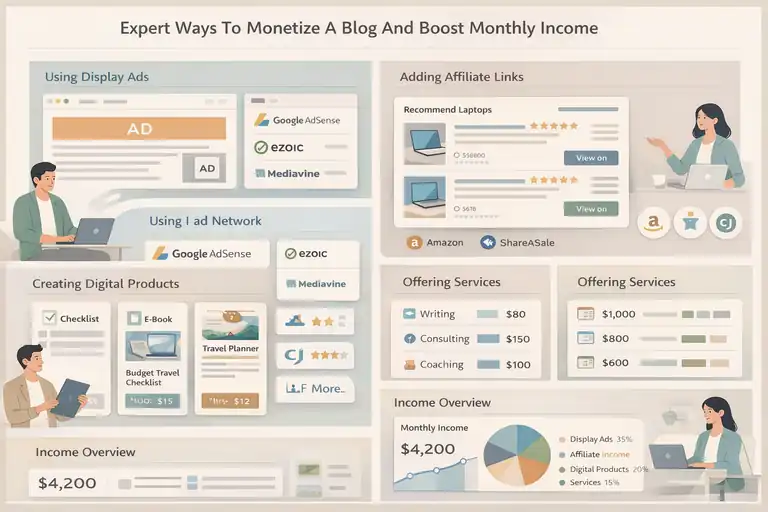
Once your blog is up and running, it’s time to think about income streams. I suggest starting small and adding monetization gradually.
Using Display Ads Strategically Without Hurting UX
Display ads can be a great passive income source, but too many ruins the reader experience.
Ad Networks To Consider:
- Google AdSense: Easiest for beginners.
- Ezoic: Higher earnings once you grow.
- Mediavine: Requires 50,000 sessions but pays very well.
I advise placing ads in natural breaks: after intro, between sections, and near the end. Avoid putting ads inside sentences or interrupting flow. Good user experience keeps readers coming back, which leads to more ad revenue long-term.
Adding Affiliate Links That Match Reader Intent
Affiliate marketing works best when your links feel natural. I believe the key is promoting products you’ve used or genuinely trust.
Where to Put Affiliate Links:
- Tutorials where you show how something works
- Product roundups
- Tool recommendations
- Step-by-step guides where the product is part of the solution
For instance, a “best budget laptops for students” post naturally includes affiliate links because readers are already looking to buy.
Always disclose your affiliate relationship. It builds trust and keeps your blog compliant with FTC rules.
Creating Digital Products Based On Your Best-Performing Posts
Digital products are powerful because they let you earn even when you’re not writing.
Start by checking which posts get the most views. If readers love your tutorial on budget travel, you could create:
- A budget travel checklist
- A mini e-book
- A printable planner
I recommend starting with something simple. My first digital product was a basic PDF guide, and it surprised me how many people were willing to buy a well-organized resource.
Offering Services That Leverage Your Blog’s Expertise
If you want faster income, services can help. I see services as a way to earn while building long-term revenue streams.
Possible services include:
- Writing for clients
- Consulting in your niche
- Coaching sessions
- Small digital audits (like Pinterest or SEO reviews)
You can add a simple “Work With Me” page and list what you offer. Even two or three clients per month can provide a solid income boost while your blog grows.
FAQ
How do I create your own blog as a complete beginner?
To create your own blog, choose a niche, set up hosting and a blogging platform like WordPress, publish helpful content, and optimize it for search engines from day one.
How long does it take to start earning from a blog?
Most blogs start earning within 6–12 months if you publish consistently, target search intent, and use monetization methods like ads, affiliates, or services.
Can I create your own blog without technical skills?
Yes. Modern blogging platforms offer simple dashboards, one-click setups, and beginner-friendly tools that require no coding or advanced technical knowledge.

I’m Juxhin, the voice behind The Justifiable.
I’ve spent 6+ years building blogs, managing affiliate campaigns, and testing the messy world of online business. Here, I cut the fluff and share the strategies that actually move the needle — so you can build income that’s sustainable, not speculative.