
Table of Contents
Some links on The Justifiable are affiliate links, meaning we may earn a small commission at no extra cost to you. Read full disclaimer.
If you’re comparing getresponse vs kit for creator email marketing, you’re probably not just curious about features — you want to know which platform will actually make you money faster.
Whether you’re a blogger building your first list, a YouTuber launching digital products, or a creator trying to monetize a small but loyal audience, the real question is simple: Which tool pays off sooner — and with less stress?
This guide is for content creators, solopreneurs, and digital product sellers who care about speed to revenue, automation power, and long-term scalability.
I’ll break down exactly how GetResponse and Kit compare in pricing, automation, monetization tools, deliverability, and growth potential — so you can decide based on ROI, not marketing hype.
Pricing Breakdown: Which Platform Reaches ROI Faster?
When comparing getresponse vs kit for creator email marketing, pricing isn’t just about the monthly fee. It’s about how fast the tool helps you generate revenue relative to what you’re paying. A cheaper plan that converts slower can cost you more in the long run.
Let’s break this down like you and I are actually planning your next 6 months of growth.
GetResponse Pricing Tiers And Hidden Costs
GetResponse structures its plans around feature access, not just subscriber count. That matters.
As of now, the main tiers are:
- Email Marketing Plan – Core email tools
- Marketing Automation Plan – Full automation builder
- Ecommerce Marketing Plan – Advanced ecommerce + transactional emails
Here’s where creators get tripped up:
If you want access to the visual automation builder (the drag-and-drop workflow system), you need at least the Marketing Automation plan. That’s the real engine for making money faster.
At around 1,000 subscribers:
- Email Marketing plan: Lower monthly fee
- Marketing Automation plan: Higher monthly fee but unlocks behavior-based automation
Now here’s the hidden cost most reviews don’t talk about:
- Webinar hosting is capped by attendee limits.
- SMS marketing costs extra.
- Ecommerce features require higher tiers.
However, GetResponse includes:
- Built-in sales funnels
- Landing pages
- Conversion tracking
- Basic CRM
If you’re selling courses, coaching, or digital products, those built-in tools can replace:
That consolidation can offset the higher plan cost quickly.
In my experience, if you plan to sell something within 30–60 days, GetResponse can reach ROI faster because you don’t need third-party funnel tools.
Kit Pricing Structure For Growing Creators
Kit (formerly ConvertKit) has always positioned itself as the creator-first email tool. And honestly? It shows in how they price things.
Their plans scale primarily based on subscriber count, not aggressive feature gating.
You get:
- Automation rules
- Sequences
- Tag-based segmentation
- Creator commerce features
Even at lower tiers.
That’s refreshing.
At around 1,000 subscribers, Kit’s pricing is often competitive with GetResponse’s automation plan — but Kit doesn’t include:
- Built-in webinar hosting
- Advanced funnel builders
- Full visual conversion funnel mapping
What it does include:
- Clean tagging system
- Creator Network (cross-promotion tool)
- Digital product selling without extra integrations
If you’re a blogger or YouTuber monetizing with:
- Affiliate marketing
- Paid newsletters
- Simple digital downloads
Kit feels lighter. Faster. Less overwhelming.
But here’s the tradeoff:
You may need external landing page tools if you want advanced funnel design. That can slow ROI if you’re building from scratch.
Free Plans Compared For Early-Stage Creators
If you’re testing the waters, this part matters a lot.
GetResponse Free Plan:
- Limited to 500 contacts
- No automation workflows
- Basic email sends only
Kit Free Plan:
- Up to 1,000 subscribers
- Email broadcasts
- Basic automation
- Landing pages
For beginners, Kit clearly wins here.
If you’re validating an idea or building your first lead magnet, Kit’s free plan gives you more room to experiment without pressure.
But remember:
Without advanced automation, you’ll eventually hit a revenue ceiling. Free plans are great for list building — not scaling.
Cost Per Subscriber At 1K, 5K, And 10K Lists
Let’s look at this practically.
Here’s a simplified cost comparison (approximate ranges):
| Subscriber Count | GetResponse (Automation Plan) | Kit (Creator Plan) |
| 1,000 | Mid-tier pricing | Similar range |
| 5,000 | Moderate increase | Slightly higher |
| 10,000 | Scales steadily | Scales aggressively |
Now here’s the ROI lens:
If your average revenue per subscriber is:
- $1–$2/month (common for bloggers)
- $3–$5/month (common for course creators)
Then:
- At 1,000 subscribers = $1,000–$5,000/month potential
- Your software cost becomes minor relative to revenue
The real difference isn’t price.
It’s how fast the platform helps you:
- Launch funnels
- Segment buyers
- Upsell effectively
If you’re planning aggressive monetization early, GetResponse can pay off faster.
If you’re growing slower and focusing on relationship-driven content, Kit often feels more aligned.
Automation Power: Sales Speed And Setup Simplicity
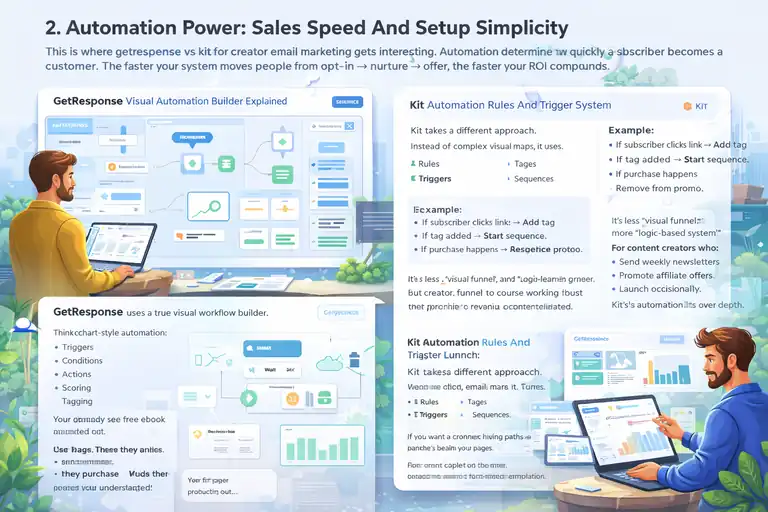
This is where getresponse vs kit for creator email marketing gets interesting. Automation determines how quickly a subscriber becomes a customer.
The faster your system moves people from opt-in → nurture → offer, the faster your ROI compounds.
GetResponse Visual Automation Builder Explained
GetResponse uses a true visual workflow builder.
Think flowchart-style automation:
- Triggers
- Conditions
- Actions
- Scoring
- Tagging
You literally see the entire customer journey mapped out.
For example:
- User downloads your free ebook.
- Wait 1 day.
- If they click link → send sales email.
- If they don’t click → send reminder.
- If they purchase → move to upsell sequence.
This is powerful for:
- Webinar funnels
- Course launches
- Multi-offer product stacks
From what I’ve seen, creators selling high-ticket offers benefit massively from this clarity.
However…
It can feel overwhelming at first. There’s a learning curve.
But once you build one working funnel, duplicating it becomes fast. That’s when speed to revenue accelerates.
Kit Automation Rules And Trigger System
Kit takes a different approach.
Instead of complex visual maps, it uses:
- Rules
- Triggers
- Tags
- Sequences
It’s cleaner. Simpler.
Example:
- If subscriber clicks link → Add tag.
- If tag added → Start sequence.
- If purchase happens → Remove from promo.
It’s less “visual funnel,” more “logic-based system.”
For content creators who:
- Send weekly newsletters
- Promote affiliate offers
- Launch occasionally
Kit’s automation feels intuitive.
You won’t need hours to understand it.
But here’s the limitation:
If you want complex branching paths and behavior scoring, GetResponse is stronger.
Kit prioritizes simplicity over depth.
Pre-Built Funnel Templates For Faster Launch
GetResponse includes:
- Lead magnet funnels
- Sales funnels
- Webinar funnels
- Product launch funnels
These come with:
- Landing pages
- Email sequences
- Thank-you pages
You can literally customize and launch within a day.
Kit offers landing pages and sequences, but you assemble the funnel manually.
There aren’t as many structured “start-to-finish” templates.
If you’re someone who wants plug-and-play speed, GetResponse saves time.
If you prefer building from scratch and keeping it minimalist, Kit feels cleaner.
Time To Launch First Revenue-Generating Funnel
Let’s be realistic.
If you’re starting today:
With GetResponse:
- 1–2 days to set up funnel (including automation)
- Webinar + emails can be live in under a week
With Kit:
- 1 day for opt-in + sequence
- More manual setup if adding upsells or advanced segmentation
From my perspective:
- GetResponse wins on structured monetization speed.
- Kit wins on ease and lower overwhelm.
If your goal is “Make my first $1,000 fast,” GetResponse may edge ahead.
If your goal is “Build trust and monetize gradually,” Kit feels smoother.
Monetization Tools Built For Digital Creators
When evaluating getresponse vs kit for creator email marketing, this is where the money conversation gets real. Features are nice. Automation is powerful. But monetization tools determine how fast subscribers turn into actual revenue.
If you’re selling digital products, courses, coaching, memberships, or even affiliate offers, the built-in revenue stack matters more than fancy dashboards.
Let’s break it down tool by tool.
GetResponse Conversion Funnels And Sales Pages
GetResponse includes something called Conversion Funnels. In simple terms, it’s a guided system that connects:
- Landing page
- Email sequence
- Sales page
- Payment integration
- Upsell flow
All inside one platform.
Instead of duct-taping tools together, you build the entire path in one place.
For example:
You create a lead magnet funnel:
- Opt-in page
- Automated email nurture sequence
- Sales page for your $97 course
- Order confirmation
- Upsell email
GetResponse walks you through it step-by-step.
What I like personally is the built-in conversion tracking.
You can see:
- How many visitors hit your landing page
- How many opted in
- How many purchased
- Revenue generated per funnel
That clarity matters. Especially if you’re optimizing.
Another advantage: You can integrate Stripe and PayPal directly. No third-party cart needed for many setups.
However: The page builder is solid but not as flexible as dedicated funnel tools like ClickFunnels. If you’re obsessed with pixel-perfect design, you may feel slightly limited.
But if speed-to-revenue is your goal? It works. And it works well.
Kit Creator Commerce And Digital Product Sales
Kit approaches monetization differently.
Instead of a “conversion funnel” builder, they offer Creator Commerce — a built-in way to sell digital products and paid newsletters directly to your subscribers.
It’s designed for creators who sell:
- Ebooks
- Notion templates
- Mini-courses
- Paid email subscriptions
You can:
- Create a product
- Set pricing
- Connect Stripe
- Deliver content automatically
What makes Kit strong here is simplicity.
You don’t need complicated funnels to sell a $29 guide. You can embed purchase links directly inside emails.
For example:
- You send a newsletter.
- Inside it, you add a “Buy Now” button.
- Kit automatically tags buyers and delivers the product.
That tagging system is powerful.
You can then:
- Remove buyers from promo emails
- Add them to customer-only sequences
- Offer upsells later
Where Kit feels lighter is in advanced funnel visualization. You don’t see a full pipeline dashboard like in GetResponse.
But if your monetization model is content-driven rather than funnel-heavy, Kit feels natural.
Webinar Hosting Capabilities For Course Sellers
This is a major difference in the getresponse vs kit for creator email marketing debate.
GetResponse includes built-in webinar hosting on higher plans.
That means:
- Live webinar room
- Registration page
- Reminder emails
- Replay hosting
- Attendance tracking
All native.
If you sell courses or coaching, webinars convert extremely well. According to ON24 benchmark data, average webinar conversion rates range between 5%–20% depending on offer and audience.
Let’s say:
- 500 people register
- 200 attend live
- 10% convert
That’s 20 sales in one session.
With GetResponse, the entire flow lives inside the platform. That reduces tech friction.
Kit does not offer native webinar hosting.
You’d need:
And then integrate via Zapier or direct API.
It’s not difficult — but it’s another moving part.
If webinars are central to your business, GetResponse has a structural advantage.
Affiliate Marketing Support And Tracking Features
If you monetize through affiliate marketing, both tools technically support it — but in different ways.
Neither platform restricts affiliate links (unlike some beginner ESPs).
However, here’s what matters:
GetResponse
- Built-in conversion funnels for affiliate offers
- Advanced segmentation based on clicks
- Behavioral scoring
You can create sequences like:
- If subscriber clicks affiliate link → Tag as “Interested”
- Send follow-up bonus email
- Exclude buyers later
Kit
- Extremely strong tagging system
- Link triggers (when someone clicks, a rule fires)
- Easy segment creation
For affiliate-driven bloggers, Kit often feels smoother.
But here’s a strategic tip I’ve used:
In GetResponse, you can build full “bridge funnels” for affiliate launches — meaning opt-in page → value sequence → affiliate pitch — without external tools.
That can increase EPC (earnings per click).
In short:
- Kit excels at content-based affiliate monetization.
- GetResponse excels at structured affiliate funnels.
Monetization Feature Comparison Table
| Feature | GetResponse | Kit |
| Built-In Sales Funnels | Yes | No |
| Native Digital Product Sales | Limited (via integrations) | Yes |
| Webinar Hosting | Yes (On Select Plans) | No |
| Advanced Funnel Tracking | Yes | Basic |
| Creator Commerce | No | Yes |
| Affiliate-Friendly | Yes | Yes |
| Built-In Payment Processing | Stripe/PayPal | Stripe |
If you’re asking which monetizes faster:
- Funnel-based creators → GetResponse
- Newsletter-first creators → Kit
Email Deliverability And Inbox Placement Rates
Let’s talk about something less exciting but absolutely critical: Deliverability.
You can have the best funnel in the world.
If your emails land in spam, none of it matters.
In the getresponse vs kit for creator email marketing comparison, deliverability impacts real income.
Independent Deliverability Benchmarks And Data
Deliverability fluctuates yearly, but independent tests from EmailToolTester have historically shown:
- GetResponse: ~85–90% inbox placement
- Kit: Often slightly higher in the 88–92% range
These numbers vary by sender behavior, list quality, and domain reputation.
In my experience, both platforms perform well when:
- You authenticate your domain
- You warm up properly
- You maintain list hygiene
Kit sometimes edges ahead in creator-heavy niches because its user base tends to be content-driven rather than aggressive marketers.
But realistically, both are strong performers.
Spam Testing, Domain Authentication, And Warmup
Both platforms support:
- SPF
- DKIM
- DMARC
These are authentication protocols that prove to inbox providers (like Gmail) that you’re legitimate.
GetResponse includes built-in spam score testing before sending campaigns.
Kit focuses more on:
- Clean sending infrastructure
- Automatic bounce handling
- Engagement-based filtering
Here’s what I recommend regardless of platform:
- Authenticate your domain immediately.
- Send consistently — not randomly.
- Avoid blasting cold lists.
Warm up new lists slowly.
For example:
- Week 1: Send to most engaged 20%.
- Week 2: Expand gradually.
This protects your sender reputation.
Creator-Focused Segmentation And List Hygiene
Deliverability is deeply tied to segmentation.
Kit shines here because its tagging system makes it easy to:
- Segment by engagement
- Create “cold subscriber” filters
- Automatically remove inactive contacts
GetResponse also supports segmentation but feels slightly more enterprise-style.
Here’s a smart tactic:
Every 60–90 days:
- Send a re-engagement campaign.
- If no open or click → Tag as inactive.
- Remove after final attempt.
This protects inbox placement.
It also lowers your cost per subscriber.
Impact Of Deliverability On Revenue Per Subscriber
Let’s make this practical.
If your list is 10,000 subscribers:
- 90% inbox rate → 9,000 reach inbox.
- 80% inbox rate → 8,000 reach inbox.
That’s 1,000 people difference per send.
If:
- 3% convert
- $100 product
That’s potentially $3,000 revenue swing from deliverability alone.
So when comparing getresponse vs kit for creator email marketing, small percentage differences matter at scale.
In early stages, both platforms perform similarly.
At scale, list hygiene and segmentation matter more than the tool itself.
Deliverability Feature Comparison Table
| Deliverability Factor | GetResponse | Kit |
| Domain Authentication | Yes | Yes |
| Spam Testing Tool | Yes | Limited |
| Engagement Tagging | Yes | Strong |
| Automatic List Cleaning | Yes | Yes |
| Inbox Placement Reputation | Strong | Very Strong |
Audience Growth Tools And Lead Capture Options

If you’re comparing getresponse vs kit for creator email marketing, list growth is where momentum starts.
Monetization only works if you consistently add new subscribers — and how easily you can capture leads directly impacts how fast you scale.
Let’s look at how each platform helps you grow.
GetResponse Landing Page And Form Builder
GetResponse includes a full landing page builder with drag-and-drop editing.
In simple terms: You can build standalone opt-in pages without needing WordPress, Leadpages, or other tools.
You get:
- 100+ templates
- A/B testing
- Countdown timers
- Embedded forms
- Exit-intent popups
The A/B testing is especially useful. You can test two headlines and let the system automatically send more traffic to the higher-converting version.
Example:
You run YouTube traffic to a free checklist.
- Version A converts at 32%.
- Version B converts at 41%.
That 9% lift compounds quickly.
One practical shortcut I like:
Use GetResponse’s built-in “Lead Magnet Funnel” template. It automatically connects:
- Opt-in page
- Thank-you page
- Email sequence
You can realistically launch in a single afternoon.
The downside?
Design flexibility is decent but not ultra-advanced. If you’re obsessed with design precision, you may still prefer Elementor or Webflow.
But for speed and simplicity, it’s strong.
Kit Subscriber Forms And Creator Network
Kit approaches growth with simplicity.
Their subscriber forms are clean, minimal, and fast to embed. They integrate seamlessly into:
- Blog posts
- Link-in-bio pages
- Creator landing pages
You don’t get as many visual templates as GetResponse, but you get clarity.
Where Kit becomes interesting is the Creator Network.
This allows creators to recommend each other during the signup process. So when someone subscribes to your newsletter, they may see suggested creators to follow — and vice versa.
It’s essentially built-in cross-promotion.
If you’re in a niche like productivity, personal finance, or online business, this can add passive subscribers without paid ads.
It’s not explosive growth — but it’s steady.
And for early-stage creators, steady matters.
Integrations With Shopify, WordPress, And Stripe
Let’s talk ecosystem.
Because growth isn’t just about forms — it’s about how your tools connect.
| Integration | GetResponse | Kit |
| WordPress Plugin | Yes | Yes |
| Shopify Integration | Yes | Yes |
| Stripe Integration | Yes | Yes |
| Zapier Support | Yes | Yes |
| Direct Ecommerce Tracking | Strong | Moderate |
If you run Shopify:
GetResponse gives more detailed ecommerce automation. You can trigger emails based on:
- Cart abandonment
- Product views
- Purchase behavior
Kit integrates well but feels more content-centric than ecommerce-heavy.
For WordPress bloggers, both tools embed easily.
Stripe integration is straightforward on both platforms, especially for digital products.
My take:
If you’re running a product-heavy ecommerce store → GetResponse has deeper behavioral tracking.
If you’re running a content-first blog with digital products → Kit feels lighter and less cluttered.
List Growth Speed For Bloggers And YouTubers
Growth speed depends on friction.
For bloggers:
- Kit’s embedded forms are extremely easy to insert in blog posts.
- GetResponse’s popup and form targeting rules are slightly more advanced.
For YouTubers:
- Both work well with link-in-bio pages.
- GetResponse funnels can turn YouTube traffic into structured product journeys faster.
Here’s a real-world scenario:
Let’s say you publish one YouTube video per week.
If each video brings:
- 1,000 views
- 5% opt-in rate
That’s 50 subscribers per video.
Over 12 weeks = 600 subscribers.
Now imagine you increase opt-in rate from 5% to 8% using A/B tested landing pages.
That’s 960 subscribers instead.
Growth tools that improve conversion by just a few percentage points dramatically speed up monetization.
Between the two:
- GetResponse has stronger conversion optimization tools.
- Kit has smoother creator-to-creator discovery via its network.
Ease Of Use For Non-Technical Creators
You don’t want to fight your email platform.
You want to create content, send emails, and make money.
In the getresponse vs kit for creator email marketing comparison, ease of use directly impacts how fast you implement.
Dashboard Experience And Learning Curve
GetResponse dashboard:
- More features
- More menus
- More options
That’s powerful — but initially overwhelming.
You’ll see:
- Funnels
- Webinars
- Automation
- CRM
- Ads
It’s closer to an all-in-one marketing suite.
Kit dashboard:
- Clean
- Minimal
- Creator-focused
You mainly see:
- Subscribers
- Sequences
- Broadcasts
- Automations
If you’re new to email marketing, Kit feels less intimidating.
If you’re building a multi-product ecosystem, GetResponse gives more control.
Email Editor Flexibility And Design Control
GetResponse email editor:
- Drag-and-drop blocks
- Image sections
- Buttons
- Product boxes
It’s more visual and marketing-oriented.
Kit email editor:
- Primarily text-focused
- Clean formatting
- Minimal design blocks
If you believe plain-text emails convert better (many creators do), Kit feels perfect.
If you prefer designed promotional emails, GetResponse gives more flexibility.
Personally?
- For storytelling newsletters → Kit.
- For product-heavy promotions → GetResponse.
Workflow Customization Without Coding
Both platforms are no-code.
But the experience differs.
GetResponse:
- True visual workflow builder
- Drag elements onto canvas
- Create branches and conditions
Kit:
- Rule-based automation
- Trigger → Action logic
- Clean and intuitive
If you’re building advanced branching funnels, GetResponse is easier to visualize.
If you’re building linear sequences, Kit is faster to configure.
Neither requires coding. Both are accessible.
Mobile Optimization And Preview Features
Both platforms:
- Automatically optimize emails for mobile
- Offer preview modes
GetResponse allows device previews inside the builder.
Kit’s minimalist email style often performs well on mobile because it resembles personal email.
Considering over 60% of emails are opened on mobile (Litmus industry reports), simplicity matters.
If your emails look like personal messages rather than marketing blasts, open rates can improve.
That’s one reason many creators love Kit’s simplicity.
Scaling To 10K+ Subscribers Without Pain
Growing to 10,000 subscribers changes the game.
What worked at 500 subs breaks at scale.
This is where getresponse vs kit for creator email marketing becomes a long-term decision.
Advanced Segmentation And Behavioral Targeting
GetResponse excels in behavioral tracking.
You can segment by:
- Click behavior
- Purchase activity
- Page visits
- Webinar attendance
This enables advanced targeting like:
“Send upsell only to subscribers who attended webinar but didn’t buy.”
Kit also offers strong tagging, but behavioral web tracking is lighter.
If your funnel complexity increases over time, GetResponse offers deeper targeting logic.
Multi-Channel Marketing: SMS And Automation
GetResponse supports SMS marketing on higher plans.
That means:
- Send reminder texts
- Trigger SMS during launches
- Combine email + SMS sequences
Kit does not natively support SMS.
If you plan multi-channel campaigns, GetResponse offers broader tools.
However:
Most early-stage creators don’t need SMS immediately.
CRM Features For High-Ticket Funnels
GetResponse includes basic CRM functionality.
You can:
- Track leads in pipelines
- Move contacts through stages
- Assign deal value
If you sell coaching or high-ticket programs, this matters.
Kit focuses more on audience relationships than sales pipelines.
For high-ticket funnels:
GetResponse has stronger built-in infrastructure.
Managing Multiple Products And Funnels
At scale, you’ll likely have:
- Multiple lead magnets
- Several products
- Different customer segments
GetResponse allows you to build separate funnels for each offer inside one system.
Kit manages this through tags and sequences.
Both work — but structurally, GetResponse feels more “campaign-oriented,” while Kit feels more “audience-oriented.”
That’s the core difference.
Scaling Feature Comparison Table
| Scaling Feature | GetResponse | Kit |
| Advanced Behavioral Tracking | Strong | Moderate |
| SMS Marketing | Yes | No |
| Built-In CRM | Yes | No |
| Multi-Funnel Visualization | Yes | Limited |
| Tag-Based Simplicity | Moderate | Strong |
Migration Risk And Switching Costs Compared
If you’re deep in the getresponse vs kit for creator email marketing decision, there’s one fear that quietly sits in the background:
“What if I choose wrong and have to switch later?”
Migration risk is real. It costs time, money, and sometimes deliverability. Let’s unpack it calmly and practically.
Importing Lists And Preserving Automations
Both GetResponse and Kit allow CSV imports.
You can upload:
- Subscribers
- Tags
- Custom fields
That part is easy.
The hard part?
Rebuilding automations.
GetResponse uses visual workflows.
Kit uses rule-based triggers and sequences.
These systems don’t translate 1:1.
If you migrate:
- You’ll likely recreate automation logic manually.
- Complex branching funnels take longer to rebuild.
In my experience:
- Simple welcome sequences = 1–2 hours to rebuild.
- Advanced webinar funnels with tagging logic = Several hours or even days.
Important tip:
Before switching, export:
- Automation maps (screenshots help).
- Tag structures.
- Segment definitions.
Migration is manageable — but not instant.
Downtime Risks During Platform Transition
The biggest mistake creators make during migration?
Sending from two platforms at once.
That confuses domain authentication and hurts deliverability.
Smart migration process:
- Authenticate your new platform first (SPF, DKIM, DMARC).
- Warm up by sending to your most engaged 20%.
- Slowly shift campaigns over 2–3 weeks.
- Pause old platform completely once stable.
If done carefully, downtime is minimal.
If rushed, you risk:
- Spam placement.
- Confused automations.
- Broken funnels.
Neither GetResponse nor Kit locks you into proprietary formats — which is good.
But automation rebuilding is always the hidden cost.
Contract Lock-Ins And Refund Policies
Good news:
Both platforms are subscription-based with no long-term contracts required.
You can pay:
- Monthly
- Annually (with discounts)
Refund policies vary slightly depending on billing cycles, so always check current terms before upgrading.
The real “lock-in” isn’t contractual.
It’s structural.
Once you build:
- Complex tagging systems in Kit
- Deep funnels in GetResponse
Switching becomes emotionally and operationally heavy.
That’s why thinking long-term now matters.
Long-Term Platform Flexibility For Creators
Here’s how I see it.
GetResponse feels like:
A marketing control center.
- More features.
- More expansion potential.
- More advanced scaling.
Kit feels like:
A creator ecosystem.
- Simpler.
- Cleaner.
- More relationship-driven.
If your business evolves toward:
- High-ticket programs
- Webinars
- Multi-step funnels
GetResponse scales aggressively.
If you evolve toward:
- Community
- Paid newsletters
- Digital products
- Creator collaborations
Kit feels aligned.
The best migration strategy?
Choose based on where you want to be in 2–3 years — not just next month.
Performance Metrics That Impact Creator Revenue
Features are exciting.
Pricing matters.
But revenue metrics tell the truth.
In the getresponse vs kit for creator email marketing comparison, these numbers determine who actually pays off faster.
Revenue Per Subscriber Benchmarks
Revenue per subscriber (RPS) is a key metric.
Industry ranges:
- Bloggers: $1–$2 per subscriber per month
- Course creators: $3–$7 per subscriber per month
- High-ticket coaching: Even higher depending on funnel
Example:
5,000 subscribers
$3 average RPS
= $15,000/month potential revenue
Your platform affects this through:
- Automation depth
- Segmentation quality
- Funnel optimization
GetResponse may increase RPS through:
- Upsell flows
- Webinar conversions
- Behavioral targeting
Kit may increase RPS through:
- Strong engagement
- Clean deliverability
- Relationship-based selling
Both can perform well. Strategy matters more than software.
Automation Conversion Rate Comparison
Automation converts better than one-off broadcasts.
According to Campaign Monitor data, automated emails can generate up to 320% more revenue than non-automated campaigns.
GetResponse advantage:
- Complex branching automations.
- Sales funnels tied directly to purchase tracking.
Kit advantage:
- Clean sequence structure.
- Fast setup of evergreen email funnels.
If you build:
Lead magnet → 5-day nurture → Sales pitch
Both platforms perform well.
If you build:
Webinar registration → Live event → Replay → Limited-time upsell → Downsell
GetResponse handles that complexity more naturally.
Average Cart Value Through Built-In Funnels
Cart value increases when you:
- Add upsells
- Add order bumps
- Trigger follow-up offers
GetResponse’s structured funnel builder makes it easier to visualize these stages.
Kit relies on tagging and follow-up emails instead of visual cart logic.
Scenario:
You sell a $97 course.
With upsell:
- 20% take $47 add-on.
- Average cart becomes $106+.
If your funnel structure makes upsells easier to deploy, revenue climbs.
GetResponse supports that flow more directly.
Kit supports it too — but requires more manual setup.
Lifetime Value Tracking And Reporting
Tracking LTV (lifetime value) helps you decide how much you can spend to acquire a subscriber.
GetResponse includes stronger built-in analytics dashboards tied to funnels and ecommerce behavior.
Kit tracks subscriber activity and product purchases but is less funnel-visual.
If you’re data-driven and love dashboards:
GetResponse gives more performance visibility.
If you’re creator-driven and focus on engagement metrics:
Kit keeps reporting clean and simple.
Performance Comparison Snapshot
| Revenue Metric | GetResponse | Kit |
| Funnel Revenue Tracking | Advanced | Moderate |
| Automation Complexity | High | Medium |
| Engagement Simplicity | Moderate | Strong |
| Upsell Flow Visualization | Yes | Limited |
| Data Dashboard Depth | Strong | Clean & Minimal |
Final Verdict: GetResponse Vs Kit For Creator Email Marketing
You’ve seen the pricing.
You’ve seen the automation.
You’ve seen the growth tools and scaling factors.
Now let’s simplify this.
Best Choice For Beginner Bloggers
If you are:
- Just starting out
- Growing your first 1,000 subscribers
- Focused on content + affiliate marketing
Kit is often easier.
- It’s cleaner.
- Less overwhelming.
- Free plan is generous.
You can build trust without drowning in features.
Best Option For Course And Webinar Sellers
If your monetization strategy relies on:
- Webinars
- Structured funnels
- Upsells
- High-ticket offers
GetResponse gives you built-in tools that reduce tech stacking.
Webinar hosting alone can justify the platform.
You’ll likely reach ROI faster if your model is funnel-heavy.
Best Platform For Advanced Automation Users
If you love:
- Mapping customer journeys
- Behavior-based triggers
- Data dashboards
GetResponse is more powerful.
If you love:
- Simplicity
- Clean logic
- Minimal setup
Kit feels more natural.
Which Creator Email Tool Pays Off Faster Overall
Here’s the honest answer.
In the getresponse vs kit for creator email marketing debate:
- GetResponse pays off faster for aggressive monetizers.
- Kit pays off faster for relationship-first creators.
If you want structured funnels that push revenue quickly → GetResponse.
If you want simple systems that nurture loyal audiences → Kit.
Neither is wrong.
The faster payoff depends on how you plan to make money.
And that’s the only metric that truly matters.
FAQ
Which Is Better: GetResponse Vs Kit For Creator Email Marketing?
It depends on your monetization model. GetResponse is better for creators using structured sales funnels, webinars, and upsells. Kit is better for newsletter-first creators focused on content, digital products, and relationship-based selling. If your goal is fast funnel-driven revenue, GetResponse usually pays off quicker. If you prioritize simplicity and engagement, Kit often feels easier to scale.
Does GetResponse Or Kit Have Better Automation For Creators?
GetResponse offers a visual automation builder with advanced branching, behavioral triggers, and built-in funnel tracking. It’s stronger for complex sales paths. Kit uses a clean rule-and-tag system that’s easier to set up and ideal for linear email sequences. For advanced automation depth → GetResponse. For simplicity and speed → Kit.
Which Email Tool Is More Cost-Effective At 1,000 Subscribers?
At 1,000 subscribers, both platforms are competitively priced.
Kit often provides better value for early-stage creators thanks to its generous free plan and simple setup. GetResponse can deliver faster ROI if you actively use its funnel builder, webinars, and ecommerce tracking. Cost-effectiveness depends less on price and more on how quickly you monetize your list.

I’m Juxhin, the voice behind The Justifiable.
I’ve spent 6+ years building blogs, managing affiliate campaigns, and testing the messy world of online business. Here, I cut the fluff and share the strategies that actually move the needle — so you can build income that’s sustainable, not speculative.
Related posts:
 What is Getresponse: A Brief Introduction
 How Do I Create An Email Newsletter And What Should It Include?
 How to Advertise Your Business: Utilizing Email Marketing Strategies
 Top 10 Email Service Providers: Powerful Tools for Businesses
 Email Platform: 12 Proven Strategies for Higher ROI
 What Is Aweber Communications