
Table of Contents
Some links on The Justifiable are affiliate links, meaning we may earn a small commission at no extra cost to you. Read full disclaimer.
How to start dropshipping using AppScenic becomes much easier once you stop thinking about it as “find products and hope they sell” and start treating it like a system.
AppScenic is built around supplier access, product import, automated order routing, price and stock sync, and store integrations, so the real job is setting those pieces up in the right order.
In this guide, I’ll walk you through the full process from choosing a niche and connecting your store to pricing products, avoiding beginner mistakes, and scaling without creating a support nightmare.
What AppScenic Is And Why It Fits Modern Dropshipping
AppScenic makes the most sense when you want a more controlled dropshipping setup, especially around supplier quality, faster regional shipping, and automation.
Before you import a single product, it helps to understand what the platform actually does for you.
What AppScenic Actually Does For A New Store
At its core, AppScenic is a dropshipping platform that connects online stores with suppliers and a large product catalog, then helps automate product import, stock syncing, order routing, tracking updates, and pricing rules.
AppScenic says its catalog includes more than 1 million products across 100+ categories, with suppliers located in regions such as the USA, UK, EU, and Canada.
The platform also highlights 24/7 stock and price sync, automatic ordering, tracking-number import, and white-label orders as key retailer features.
That matters because the old beginner mistake in dropshipping is relying on slow, inconsistent fulfillment with weak inventory visibility. If your supplier goes out of stock and your store keeps selling, you create refunds, chargebacks, and angry support emails almost immediately.
I believe this is where AppScenic is strongest for beginners. It is not magic, and it does not solve bad product choices, but it does remove a lot of the manual work that usually breaks a new dropshipping business in its first few weeks.
A realistic example: Imagine you launch a pet accessories store and one of your winning products suddenly gets traction from a TikTok post. If your stock updates lag behind reality, you can oversell. If tracking data is delayed, customers assume the order is lost. AppScenic’s sync and tracking automation are designed to reduce that risk.
Why Fast Shipping And Supplier Quality Matter More Than Ever
The global dropshipping market is still growing quickly. Grand View Research estimates it was worth $365.67 billion in 2024 and projects a 22.0% CAGR from 2025 to 2030. That sounds exciting, but it also means competition is getting sharper, not easier.
At the same time, customer patience is low. Baymard reports average cart abandonment at roughly 70%, and DHL’s 2025 delivery and returns data says 72% of global shoppers say free delivery would improve their experience, while 73% will not buy from an online retailer if they do not trust the delivery provider.
That is why “fast supplier” is not just a nice feature anymore. It is part of your conversion rate and retention strategy. AppScenic emphasizes 2–5 day fast shipping on parts of its platform and positions domestic or regional supplier access as a major benefit.
In practice, faster shipping gives you three advantages: fewer pre-purchase objections, fewer “where is my order?” tickets, and more room to charge healthy prices without looking sketchy. In my experience, that combination matters more than squeezing out a few extra dollars of margin on a weak supplier.
Choose The Right Business Model Before You Touch The Dashboard
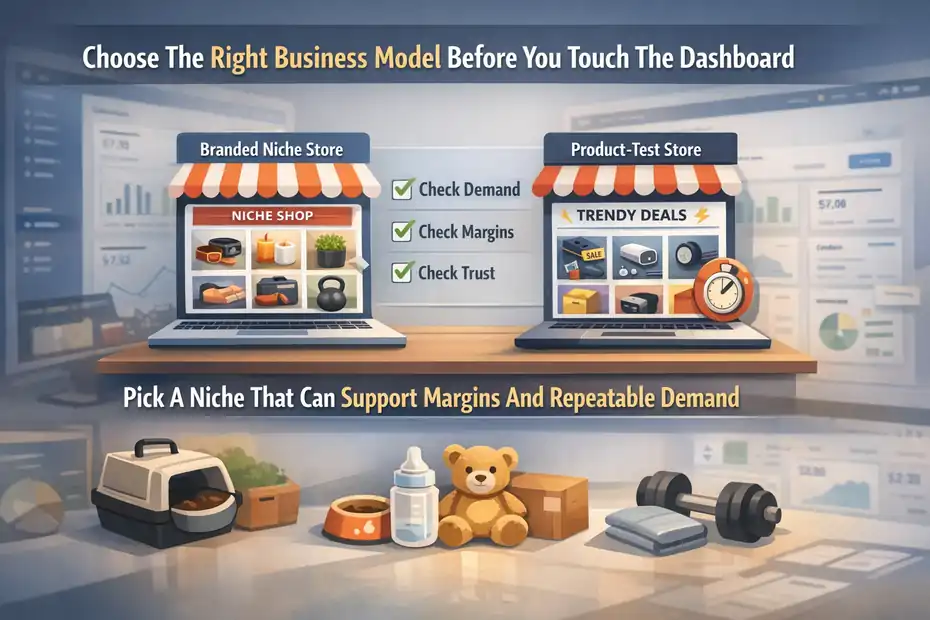
A lot of people skip this step because the software feels exciting. That is backwards. Your store model decides what you should import, how you price, and what kind of customers you attract.
Pick A Niche That Can Support Margins And Repeatable Demand
Before you start dropshipping using AppScenic, choose a niche that has enough demand, enough product depth, and enough room for markup. Good beginner-friendly niches usually have three traits: they solve a clear problem, support bundles or accessories, and do not depend entirely on a one-time impulse buy.
For many of us, the temptation is to launch a “general store” with random gadgets. I understand why. It feels safer because you are not committing to one category.
The problem is that it usually creates weak branding and messy ad testing. A more focused store is easier to price, easier to write product pages for, and easier to make trustworthy.
Here is a simple way to pressure-test a niche before you commit:
- Demand Check: Can you imagine at least 20–30 products that belong naturally in the store?
- Margin Check: Can a product still feel fair after shipping, ad spend, and returns?
- Trust Check: Would a stranger trust a dedicated niche store more than a random general store?
- Content Check: Could you create simple social content, FAQs, or guides around the category?
A smart AppScenic-specific angle is to start with categories where shipping speed matters to the buyer. Pet products, home items, baby items, and practical fitness accessories often benefit from regional warehousing and predictable delivery more than novelty-only products do.
Decide Whether You Want A Branded Store Or A Product-Test Store
There are really two beginner paths here. The first is a branded niche store. The second is a product-testing store that moves faster and cares less about long-term identity. Both can work, but AppScenic tends to fit the first one better.
A branded niche store focuses on trust, cleaner merchandising, stronger collections, and longer customer lifetime value. You might launch with 15 to 40 products, build category pages carefully, and write more convincing descriptions. This is the route I usually recommend because it creates a more stable business.
A product-test store is more aggressive. You import quickly, run tests, cut losers fast, and chase short-term winners. It can work, but it often becomes chaotic. Support gets messy, your offer changes constantly, and you rarely build real customer loyalty.
If you are using AppScenic for the first time, I suggest a branded niche store with a small catalog. That plays better with features like product curation, premium supplier selection, pricing formulas, and automated order flow. It also makes your analytics cleaner because you are not mixing five unrelated customer intents in one storefront.
Set Up Your Store Foundation The Right Way
AppScenic can automate a lot, but it cannot fix a store that looks unfinished or confusing. Your foundation needs to be solid before product import becomes useful.
Connect A Supported Ecommerce Platform
AppScenic currently promotes integrations for Shopify, WooCommerce, Wix, Ecwid, eBay, and Walmart across its official site, while its beginner guide walks retailers through connecting a store as the first major setup step. The platform also highlights automatic import, automatic ordering, stock and price sync, and tracking automation through those integrations.
For most beginners, Shopify is the simplest route because setup is cleaner and the app ecosystem is mature. WooCommerce can be excellent if you want more control and lower platform costs, but it gives you more technical responsibility.
Wix and Ecwid are workable if you already use them. eBay and Walmart are more marketplace-driven models, which is a different playbook from building a standalone brand.
A simple decision rule:
- Choose Shopify: If you want the easiest beginner experience.
- Choose WooCommerce: If you are comfortable managing a WordPress stack.
- Choose Wix Or Ecwid: If you already have a store there and want to expand with dropshipping.
- Choose eBay Or Walmart: If your goal is marketplace sales rather than direct brand building.
The key is not to overthink the platform. Pick one, make sure your domain and basic pages are ready, and move on.
Build The Basic Trust Pages Before Importing Products
This step is boring, and that is exactly why many people skip it. Then they wonder why traffic does not convert.
Before you publish products, make sure your store has a real domain, a usable logo, clean navigation, a contact page, a shipping policy, a return policy, a privacy policy, and an FAQ page. AppScenic’s own beginner content also recommends creating your store’s visual identity and business email before you move deeply into account setup.
This is not just about looking professional. It reduces hesitation. Baymard and Shopify both point to checkout and trust friction as major contributors to abandonment, which means anything that reduces uncertainty helps.
A good beginner scenario: If someone lands on your product page from an ad and likes the item, their next questions are usually “How long will this take?” and “Can I return it?” If those answers are hard to find, you lose sales you already paid to acquire.
I suggest writing policy pages in plain English. Do not sound like a law firm. Sound like a real business that knows how fulfillment works.
Create Your AppScenic Account And Configure The Essentials
Once your store shell is ready, now AppScenic becomes useful. The goal here is to set up the account so your margins and operations are controlled from day one.
Select The Right Plan Without Overspending
AppScenic’s current pricing page shows a free plan at $0/month, a Standard plan at $39/month, Pro at $79/month, and Elite at $99/month, alongside a 7-day free trial offer for paid plans.
The pricing page also lists key limits and features such as connected stores, pushed products, automatic ordering, price and stock sync, auto-import tracking, premium product access on higher tiers, and AI token allocations.
For a new store, Standard is usually enough to validate the business. Pro becomes more logical when you want premium products, more pushed products, and more than one store or broader testing capacity. Elite is really for heavier-volume sellers or multi-store operations.
Here is a quick reference:
| Plan | Best For | Price |
|---|---|---|
| Free | Browsing catalog and learning the platform | $0/mo |
| Standard | First serious test store | $39/mo |
| Pro | Growing store with broader catalog needs | $79/mo |
| Elite | Advanced or multi-store seller | $99/mo |
Prices and plan details can change, so always verify them before publishing your own pricing comparison or internal SOP.
My opinion: Do not start on the highest tier because it feels “more serious.” Start on the cheapest plan that lets you execute properly. Save cash for creatives, store improvement, and customer service.
Set Shipping, Wallet, And Pricing Rules Early
AppScenic’s beginner guide outlines a sequence that includes connecting your store, selecting a plan, setting shipping and store settings, configuring a price formula, and setting up your store wallet and payment details before importing products. That order is smart because it prevents sloppy catalog publishing.
Your price formula matters more than most beginners realize. If you import products first and “fix pricing later,” you usually end up with inconsistent margins. Some products will be underpriced, others overpriced, and your catalog will feel random.
Here is a cleaner approach:
- Step 1: Decide on a minimum profit floor per order.
- Step 2: Create a markup logic based on cost bands.
- Step 3: Add room for shipping, refunds, and payment fees.
- Step 4: Sanity-check the final retail price against real customer expectations.
AppScenic also uses a wallet/payment structure for order payments, including auto-funding and backup payment methods on its pricing page. That is important operationally because failed supplier payment can delay fulfillment even when your store is generating sales.
I recommend setting wallet and payment details before launch, not after your first sale. The best time to prevent order-payment friction is before customers ever see your catalog.
Find Products That Can Actually Sell
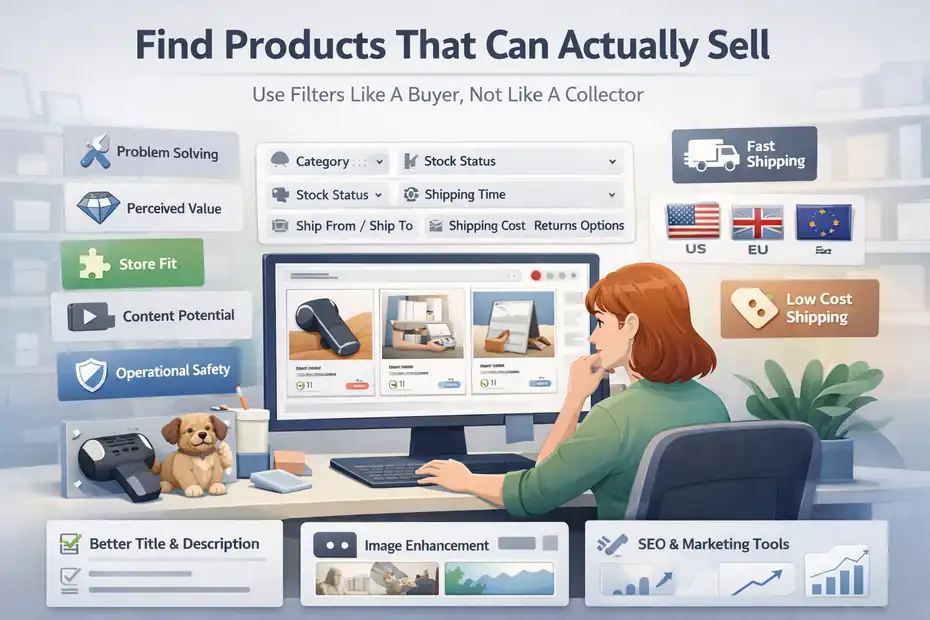
This is the part everyone loves, and it is also the part most people do badly. A product is not “good” just because it looks cool in the dashboard.
Use Filters Like A Buyer, Not Like A Collector
AppScenic’s product catalog can be filtered by category, stock status, premium-only, shipping time, ship-from and ship-to countries, shipping cost, and returns-related options, according to its beginner guide. That filtering system is more useful than beginners often realize because it lets you narrow products based on fulfillment reality, not just appearance.
When you browse, do not ask, “Would someone buy this?” Ask, “Would the right customer buy this from a new store at this price with this shipping promise?” That is a much harder question, and it saves you time.
I usually suggest screening products through five lenses:
- Problem Solving: Does it fix, improve, organize, protect, or simplify something?
- Perceived Value: Does it look worth more than it costs?
- Store Fit: Does it match the niche naturally?
- Content Potential: Can you show the benefit quickly in images or short video?
- Operational Safety: Are returns, variants, or breakage likely to become painful?
A practical example: a compact pet grooming tool might not be the most exciting product in the world, but if it solves shedding frustration, ships quickly, and fits naturally with other pet-care items, it can outperform a flashier novelty item.
Import Selectively And Improve The Product Before Publishing
AppScenic’s flow is simple: choose a product, import it into “My products,” review the details, and then push it live to your store when you are ready. The platform also promotes AI tools for product enhancement, image upscaling, SEO, and marketing support.
This is where I want you to slow down. Do not publish supplier content untouched. Supplier titles are often too generic, descriptions are too broad, and images may not tell the story your customer needs.
Here is the better workflow:
- Step 1: Rewrite the title around the customer benefit.
- Step 2: Reorder images so the most persuasive one appears first.
- Step 3: Rewrite the description in simple, buyer-focused language.
- Step 4: Add shipping and returns notes clearly.
- Step 5: Place the item inside a relevant collection, not just “all products.”
Even if AppScenic gives you AI-assisted tools, your job is still to shape the offer. Software can help draft. It cannot decide your positioning.
Build Product Pages That Convert Instead Of Just Existing
After import, the next job is turning raw listings into product pages that feel trustworthy. This is where stores quietly win or lose.
Write For Objections, Not Just Features
Most bad product pages read like inventory records. They list material, size, and maybe a vague benefit. That is not enough. Good product pages answer the objections a buyer has before they ask.
Because online cart abandonment still sits around 70%, small clarity improvements can matter more than beginners think. Hidden fees, weak trust, and poor checkout flow are all recurring friction points in ecommerce research.
So write your page around questions like these:
- What problem does this solve?
- Who is it best for?
- Why is this version better than a generic alternative?
- How long does shipping take?
- What happens if it arrives damaged or is not a fit?
A clean structure works well: quick promise, key benefits, who it is for, size/spec details, shipping note, returns note, and a final confidence prompt.
I suggest you avoid fake urgency unless it is real. Customers in 2026 are too used to manipulative product pages. Clear value usually beats forced hype.
Use Collections, Bundles, And Average Order Value Logic
One hidden advantage of a niche store is that your products can help each other sell. Instead of relying on one hero item, you build logical collections and low-friction bundles.
Imagine you sell kitchen organization products. A drawer divider may be the traffic product, but a labeling kit and storage container set can lift average order value. The same idea works in pet, baby, fitness, and home niches.
This matters because ad costs are rarely your friend forever. If you can increase average order value through simple related offers, your economics improve without needing more traffic.
Keep it simple:
- Core Product: The item that solves the main problem.
- Accessory Product: A useful add-on.
- Bundle Offer: A “complete setup” option.
- Collection Logic: Group products by outcome, not just category.
That is a cleaner path than dumping 100 imported items into one giant catalog and hoping customers self-sort.
Launch Carefully And Test With Real Signals
The goal of launch is not perfection. The goal is to get a stable, believable store in front of real buyers and learn quickly.
Check Automation Before You Buy Traffic
Before you spend money on traffic, test the operational flow. AppScenic emphasizes automatic ordering, tracking import, and price/stock sync, but you still want to confirm your setup is behaving properly in your own store environment.
Run through a pre-launch checklist:
- Product Check: Titles, images, variants, and descriptions look correct.
- Policy Check: Shipping and returns pages are visible.
- Price Check: Margin logic looks consistent across the catalog.
- Checkout Check: Payment methods and shipping rates behave correctly.
- Order Flow Check: Tracking and order routing settings are configured.
I have seen new stores burn days on ads only to discover variant issues, broken shipping rules, or ugly imported pages after the first sale. That is avoidable.
A small manual test order can save you a much bigger headache. Even one self-funded order teaches you more about the real customer experience than ten hours of guessing.
Start With A Small Product Set And Clear Analytics
When you first launch, keep the catalog tight. Around 10 to 25 carefully selected products is often enough for a niche store. More products can come later once you know what customers respond to.
This is also where discipline matters. Do not measure success only by sales. Track add-to-cart rate, checkout starts, bounce rate on product pages, support questions, and refund patterns. If a product gets clicks but no carts, your offer or trust layer may be weak. If it gets carts but poor checkout completion, your shipping, price clarity, or checkout UX may be the problem.
Because customer expectations around delivery and trust are high, operational data is just as important as ad data. DHL’s findings around delivery trust support that directly.
In my experience, one focused store with clean analytics beats a larger messy store every time.
Avoid The Mistakes That Usually Kill Beginner Stores
Most dropshipping failures are not mysterious. They are repetitive mistakes with predictable consequences.
The Most Common AppScenic Beginner Mistakes
AppScenic gives you a strong setup path, but beginners still sabotage themselves in familiar ways.
Here are the biggest ones I see:
- Mistake 1: Importing too many products before defining the niche.
- Mistake 2: Trusting supplier copy without rewriting for your brand.
- Mistake 3: Ignoring the price formula until after products go live.
- Mistake 4: Launching without a clear shipping and returns explanation.
- Mistake 5: Choosing products because they look viral instead of because they fit the store.
- Mistake 6: Treating automation as a substitute for quality control.
Automation is there to remove repetitive tasks. It is not there to replace merchandising judgment.
The fastest way to look amateur is to have inconsistent pricing, mismatched product images, vague shipping language, and a catalog with no obvious theme. That combination destroys trust before your marketing has a chance.
What To Do When Sales Do Not Come Quickly
This part matters because many beginners quit too early or react in the wrong direction.
If traffic is low, the problem is usually discoverability or ad performance. If traffic is decent but conversion is weak, the issue is often the offer, trust, or page quality. If conversion is okay but profit is poor, the issue is pricing, shipping economics, or average order value.
So do not “fix everything” at once. Diagnose it.
A simple troubleshooting sequence:
- Low Clicks: Improve creative, targeting, or search intent alignment.
- Low Product Engagement: Improve title, hero image, and product promise.
- Low Cart Rate: Improve offer clarity and perceived value.
- Low Checkout Completion: Remove surprise costs and make shipping clearer.
- High Refunds: Tighten product quality control and expectation setting.
This is where humility helps. Sometimes the product is fine and the page is weak. Sometimes the page is good and the product is just not compelling enough. Your job is to separate those two.
Scale Without Turning Your Store Into Chaos
Once you have some traction, the next phase is not “import 500 more items.” It is controlled scaling.
Expand Winning Collections Instead Of Chasing Random Trends
AppScenic’s higher plans allow more pushed products and more stores, which can support growth, but more capacity only helps if the product strategy stays focused.
When you find a winning product, the smartest move is often to expand sideways inside the same customer intent. If one pet grooming product works, add complementary grooming, cleanup, and care products. If one home organization product works, build a collection around the same room or same outcome.
That approach gives you stronger internal merchandising, better bundle potential, and a more believable brand.
I recommend this simple scaling order:
- Optimize the winning product page.
- Add two to five complementary items.
- Build a collection around the customer use case.
- Add bundle and upsell logic.
- Only then consider expanding into adjacent sub-niches.
This feels slower, but it usually creates a healthier business.
Use Automation To Protect Margins As Volume Grows
As order volume increases, tiny operational issues become expensive fast. This is where AppScenic’s automation stack becomes more valuable: stock sync, price sync, automatic ordering, tracking import, wallet logic, and broader catalog management all reduce manual work at scale.
But here is the important part: Scaling is not just about processing more orders. It is about preserving customer experience while doing it.
Watch these metrics closely as you grow:
- Gross Margin After Shipping
- Order Defect Or Refund Rate
- Time To Fulfillment
- Support Tickets Per 100 Orders
- Average Order Value
- Repeat Purchase Rate
If those numbers start moving the wrong way, growth may be exposing a supplier or catalog problem.
That is why I like AppScenic more for structured scaling than for chaotic testing. The platform’s value increases when you use it to build repeatable processes, not just when you use it to import products quickly.
Final Thoughts
If you want the honest version, how to start dropshipping using AppScenic is not really about learning one dashboard. It is about building a store that customers can trust, then using AppScenic to automate the parts that should not eat your time.
The winning order is simple: Choose a niche, build a credible store, connect AppScenic, configure pricing and payments, filter products with discipline, improve every listing before publishing, and launch with a tight catalog. Once sales come in, scale by deepening the niche instead of turning the store into a random warehouse.
That is the path I would take today because it is practical, lean, and much more resilient than the old “throw products at the wall” version of dropshipping.
FAQ
What is AppScenic and how does it help with dropshipping?
AppScenic is a dropshipping platform that connects your store with vetted suppliers and automates product imports, stock updates, and order fulfillment. It helps reduce manual work, improves shipping reliability, and allows you to focus on marketing, pricing, and building a trustworthy online store.
How do you start dropshipping using AppScenic step by step?
To start dropshipping using AppScenic, create an account, connect your store, set pricing rules, and configure shipping settings. Then select products from the catalog, optimize product pages, and publish them. Once your store is ready, you can launch and begin testing traffic and conversions.
Do you need a website before using AppScenic?
Yes, you need an ecommerce store before using AppScenic effectively. Platforms like Shopify or WooCommerce allow you to connect your store, import products, and manage orders. A complete website with policies and branding improves trust and increases your chances of converting visitors into customers.
Is AppScenic good for beginners in dropshipping?
AppScenic is beginner-friendly because it automates key tasks like product syncing and order fulfillment. However, success still depends on choosing the right niche, pricing products properly, and creating strong product pages. The platform simplifies operations, but strategy and execution still matter.
How much does it cost to start dropshipping with AppScenic?
Starting costs depend on your plan and store setup. AppScenic offers free and paid plans, typically starting around $39 per month. You also need to consider ecommerce platform fees, domain costs, and marketing expenses, making a realistic starting budget around $100–$300.

I’m Juxhin, the voice behind The Justifiable.
I’ve spent 6+ years building blogs, managing affiliate campaigns, and testing the messy world of online business. Here, I cut the fluff and share the strategies that actually move the needle — so you can build income that’s sustainable, not speculative.
Related posts:
 How to Start Dropshipping for Free and Still Make a Profit
 Advantages of a Dropshipping Company: Genuine Business Knowledge
 How To Start A Dropshipping Business With No Money
 Dropshipping Guide: Build a Store That Actually Sells
 Start Dropshipping Today: A Simple Guide for Complete Beginners
 How to Make Money Dropshipping Without Huge Upfront Costs