
Table of Contents
Some links on The Justifiable are affiliate links, meaning we may earn a small commission at no extra cost to you. Read full disclaimer.
Surveymonkey review for digital marketers is a search that usually comes up when you are stuck between two needs: you want better audience insight, but you do not want to buy a bloated research platform just to ask smarter questions.
I get it. SurveyMonkey sits in that awkward middle ground between simple survey software and serious research tooling. For many marketing teams, that is exactly why it works.
For others, it is why the cost starts to feel hard to justify. In this guide, I’ll break down where SurveyMonkey helps growth, where it slows you down, and whether the data it gives you is actually useful.
What SurveyMonkey Is Really Built For
SurveyMonkey has expanded well beyond basic feedback forms. Its current positioning is an AI-powered surveys and forms platform with templates, workflow integrations, audience targeting, and analysis tools designed to help teams collect and act on feedback faster.
The platform highlights 500+ expert templates, AI-assisted survey creation, AI analysis features, 200+ native integrations, and access to a global audience panel covering 335M+ people in 130+ countries.
What Digital Marketers Usually Need From A Tool Like This
For marketers, surveys are rarely just “nice to have.” They are often the missing layer between traffic data and buyer intent. Analytics can tell you what people clicked, but they do not tell you why they hesitated, what language they use to describe pain points, or what almost stopped them from buying.
- Use Case 1: Message testing before a landing page rewrite.
- Use Case 2: Post-purchase feedback to uncover objections and buying triggers.
- Use Case 3: Lead qualification and segmentation through forms and quizzes.
- Use Case 4: Brand and market research using SurveyMonkey Audience.
That is where SurveyMonkey becomes more than a form builder. In my view, its strength is not just collecting answers. It is reducing the time between “we have a question” and “we have enough signal to make a decision.”
Where It Fits In The Marketing Stack
SurveyMonkey works best when your team already has traffic, campaigns, or customers, but needs structured feedback to improve performance. If you are doing demand generation, lifecycle email, CRO, content strategy, or product marketing, the tool can plug a real insight gap.
Its built-in integrations with tools like HubSpot, Mailchimp, Microsoft Teams, Google Drive, Zapier, and Power Automate make it easier to push survey data into the rest of your workflow instead of leaving it stranded in one dashboard.
That matters more than many reviews admit, because raw survey data becomes much more valuable when it triggers segmentation, alerts, or reporting automatically.
What It Is Not
SurveyMonkey is not the prettiest survey tool on the market, and it is not the cheapest. It is also not a full enterprise research suite on the level some large organizations expect from highly specialized experience management platforms. It sits in a practical middle zone: more robust than free forms, more approachable than heavyweight research software.
That middle position is why digital marketers keep considering it. You can get serious enough data to improve campaigns, offers, and positioning without needing a dedicated insights team. But you still have to know how to ask useful questions, because no AI survey builder can rescue weak strategy.
How SurveyMonkey Works For Real Marketing Tasks
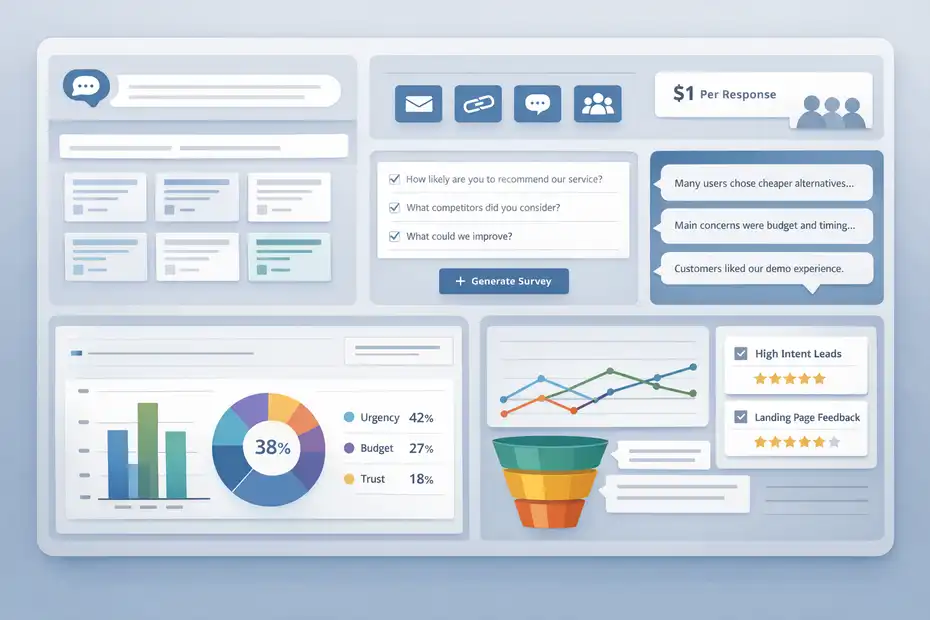
The reason many marketers try SurveyMonkey is speed. The company says you can start with a prompt, use AI to build a survey, choose from hundreds of templates, and then analyze responses with AI-powered summaries, charts, and thematic analysis.
That workflow is designed for teams that do not want to spend days writing and coding every question manually.
Building A Survey Without Starting From Zero
This is one of the platform’s biggest practical wins. If you are running a campaign and need answers this week, not next quarter, prebuilt templates and question banks save real time.
- What Helps: Expert-written question templates reduce sloppy wording.
- What Matters: Faster setup means more testing cycles each quarter.
- What To Watch: Templates are only useful if you still customize them around your funnel stage and audience.
Imagine you run paid ads for a SaaS product and cost per lead looks fine, but demo-to-close rate is weak. A generic feedback survey will not help much. A focused SurveyMonkey survey asking buyers and lost prospects about urgency, alternatives considered, budget friction, and trust signals can give your sales and landing page teams a much clearer direction.
Collecting Responses Across Channels
SurveyMonkey is flexible in how you distribute surveys. You can send by email, use web links, embed or share through connected tools, and for broader research you can buy access to SurveyMonkey Audience, which starts at $1 per response according to the company’s market research page.
That matters for marketers because not all feedback sources are equal.
- Owned Audience Surveys: Best for customer insight, NPS, onboarding, retention, and voice-of-customer research.
- Panel-Based Surveys: Better for market validation, positioning tests, and fast directional research outside your own list.
- Website Or Campaign Surveys: Useful for conversion feedback and lead capture.
In my experience, the real value is not choosing one channel. It is matching the survey source to the decision you need to make. Existing customers help you improve retention and messaging. A third-party panel helps you test whether your assumptions hold outside your house list.
Turning Responses Into Something Actionable
Survey data is only useful if you can actually interpret it. SurveyMonkey’s AI analysis tools include chat-style analysis, thematic summaries for open text, and visual reporting options. Paid plans also include filters and reporting features, while higher tiers support stronger dashboards and multi-survey views.
This is where SurveyMonkey starts to separate itself from basic free alternatives. A marketer does not just need a CSV export. You need to identify patterns like:
- Which audience segment reports the strongest purchase intent.
- Which objection appears most often in open-ended responses.
- Which channel produces the most satisfied customers.
- Which landing page promise sounds credible versus vague.
That shift from “answers” to “patterns” is the difference between data collection and growth work.
Getting Started: The Best Setup For Digital Marketers
If you are evaluating SurveyMonkey seriously, setup matters. Most bad outcomes with survey tools are not because the software is terrible.
They happen because the team launches a broad, unfocused survey and ends up with vague answers like “price is too high” or “I want more features.”
Start With One Marketing Decision, Not A General Survey
Before you build anything, decide what decision the survey needs to support.
- Example: “Why are free trial users not activating in week one?”
- Example: “Which messaging angle wins between speed, savings, and simplicity?”
- Example: “What stopped recent cart abandoners from finishing checkout?”
This sounds obvious, but it changes everything. Once your objective is clear, your question set gets shorter and smarter. You stop writing “interesting” questions and start writing decision-driving ones.
For most marketers, I suggest beginning with one of these survey types:
- Voice-of-customer survey for recent buyers.
- Lead capture form with qualification logic.
- Win/loss survey for sales follow-up.
- Market validation survey through Audience.
Use Logic To Keep Response Quality High
SurveyMonkey supports advanced logic and customization features, which matter a lot more than flashy design if your audience is busy. Logic means people only see questions relevant to them. That reduces fatigue and improves completion quality.
A simple example: If someone says they did not buy because of price, show follow-up questions about budget range and perceived value. If they say trust was the issue, ask what proof they were missing. That one branch can give you copy ideas for pricing pages, testimonials, guarantees, and FAQs.
I believe this is one of the most underused tactics in marketing surveys. Most teams ask the same 12 questions to everyone, then wonder why the answers feel generic. Better logic creates cleaner insight.
Connect Survey Data To Your Existing Workflow
SurveyMonkey’s integrations are not just a convenience feature. They are what turn survey responses into operational signals. Official pages highlight connections with HubSpot, Mailchimp, Microsoft Teams, Google Drive, Zapier, Power Automate, and many more.
SurveyMonkey also says it supports 200+ native integrations, though its app directory page specifically references 100+ apps, which suggests the broader count includes multiple integration paths and connectors across the platform.
A practical setup might look like this:
- Step 1: Collect customer feedback after purchase.
- Step 2: Push responses into your CRM.
- Step 3: Tag promoters, detractors, and feature requests.
- Step 4: Route high-risk answers to customer success.
- Step 5: Feed recurring objections into ad copy and landing page tests.
That is when a survey tool starts helping revenue, not just reporting.
Pricing, Limits, And Whether The Cost Makes Sense
Pricing is where many digital marketers hesitate. SurveyMonkey offers a free plan with limited features, individual paid plans, team plans, and enterprise options.
Current official pricing pages show Standard Monthly at $99 per month with 1,000 responses per month, FLEX at $49 per month, and team pricing such as Team Premier at $92 per user per month billed annually starting at three users.
Feature comparison pages also note response caps by plan and overage charges of up to $0.15 per extra response on paid plans.
What You Are Actually Paying For
When marketers complain SurveyMonkey is expensive, they are usually reacting to one of three things:
- Response Limits: Volume caps can sting when campaigns scale.
- Feature Gating: Better analysis, AI tools, logic, and collaboration often sit on higher plans.
- Seat-Based Team Pricing: Costs rise quickly once multiple stakeholders need access.
That said, price has to be judged against the job. If you only need a simple internal form or one-off poll, SurveyMonkey probably is overkill. If you are using survey data to shape campaigns, segment leads, or improve conversion rates, the cost can be justified surprisingly fast.
A Simple ROI Way To Think About It
Let’s say a marketer spends around $99 monthly on a plan and uses one survey to improve a landing page from a 2.5% conversion rate to 3.0%. On 10,000 visitors, that is 50 extra conversions. For many businesses, that more than covers the software cost.
Of course, results vary. But that is the real lens. Not “is this cheaper than Google Forms?” but “does this help me make a better marketing decision than I could make without structured feedback?”
When The Pricing Feels Hard To Defend
SurveyMonkey becomes harder to justify in a few situations:
- You Need Unlimited Volume Cheaply: Response caps and overage fees can frustrate high-volume teams.
- You Mainly Care About Design: More conversational or visually polished form tools may feel more modern.
- You Only Need Free Basic Collection: Simpler tools can do enough at a much lower price point.
Independent review aggregators reflect this mixed picture. Recent G2 and Capterra listings highlight ease of use and analytics as strengths, while noting that advanced capabilities are often locked behind higher tiers.
Capterra’s 2026 survey software shortlist also places SurveyMonkey among the most reviewed products in the category, which suggests strong market presence even if not every user loves the pricing model.
Where SurveyMonkey Helps Growth The Most
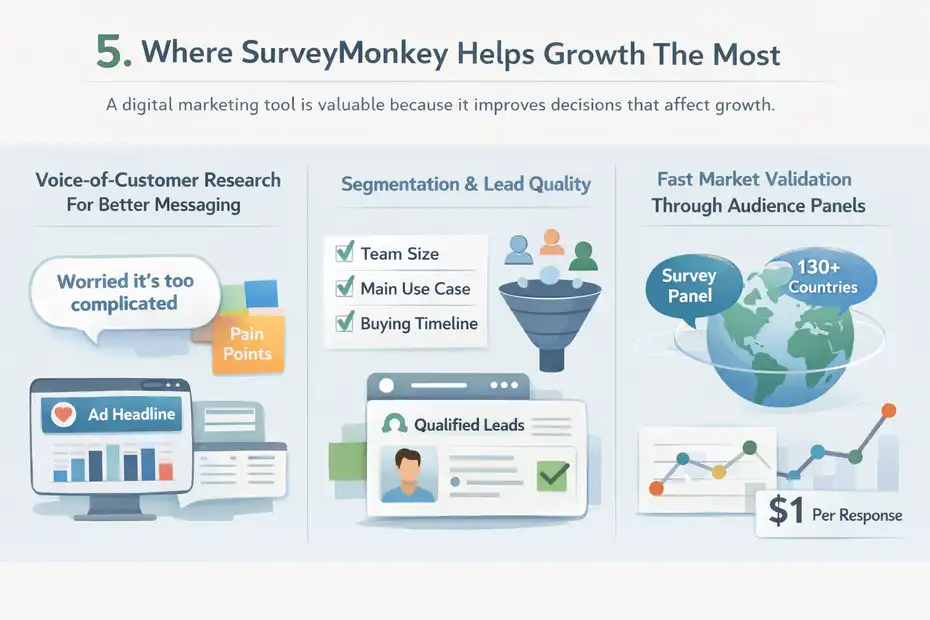
This is the part many “review” articles skip. A digital marketing tool is not valuable because it has features. It is valuable because it improves decisions that affect growth.
Voice-Of-Customer Research For Better Messaging
This is probably the strongest use case. You can survey recent buyers, churned users, demo no-shows, or newsletter subscribers and uncover the phrases they already use to describe pain points and desired outcomes.
Those responses can improve:
- Headlines
- Ad angles
- Email subject lines
- Product page copy
- Webinar hooks
- Sales objection handling
I recommend reading open-text answers the same way you would read copy research. Look for repeated emotional language, not just surface-level requests. When five people say “I was worried it would be too complicated,” that is not just feedback. It is a messaging opportunity.
Segmentation And Lead Quality
SurveyMonkey is also useful when you want to qualify or segment leads before a sales handoff or nurture sequence. Because the platform supports logic, templates, forms, and integrations, you can collect intent signals without forcing every lead through the same path.
For example, a B2B marketer could ask:
- Team size
- Main use case
- Current solution
- Buying timeline
- Biggest operational bottleneck
Then those answers can inform lead routing, personalization, or follow-up content. That is much more useful than sending every lead into the same generic email sequence.
Fast Market Validation Through Audience Panels
SurveyMonkey Audience is one of the clearest reasons marketers choose this platform instead of a simpler form builder. The company says you can reach targeted respondents quickly, sometimes in as little as an hour, and pricing starts at $1 per response. Its panel access spans 335M+ people in 130+ countries.
That creates a real shortcut for:
- Testing positioning with non-customers.
- Validating category assumptions before a launch.
- Checking whether a headline or offer resonates outside your own audience bubble.
I would not treat panel research as perfect truth. But for directional validation, it can save weeks of guesswork.
The Weak Spots Digital Marketers Should Know About
No honest surveymonkey review for digital marketers should pretend the platform is perfect. It has real tradeoffs, and some of them matter more as your team gets more sophisticated.
The Interface Is Practical, Not Especially Inspiring
SurveyMonkey is easy to understand, and independent users frequently praise that. But the user experience is more functional than delightful. On a day-to-day basis, that is not a dealbreaker for most teams.
Still, if your brand experience depends heavily on beautifully designed, highly conversational forms, the platform may feel more utilitarian than premium.
For marketers, that means you need to separate two questions:
- Do I need elegant respondent experience?
- Or do I need fast, reliable insight collection?
SurveyMonkey leans toward the second.
Feature Locking Can Get Annoying
This is the biggest friction point I see. The platform’s strongest capabilities, including richer analysis and higher-end collaboration or enterprise controls, are spread across tiers.
Official pages are quite clear that plan type determines access, and some features such as respondent authentication, SSO, and HIPAA-related capabilities are enterprise only.
That is normal in SaaS, but it can still be frustrating when your workflow grows in stages. A solo marketer may start with a basic plan, then realize the most useful capabilities arrive only after another pricing jump.
Data Is Only As Good As Survey Design
This is not really SurveyMonkey’s fault, but it is still a risk. AI-generated surveys and templates can help you move faster, yet they do not remove the need for good methodology. Leading questions, overloaded scales, vague answer choices, and poor targeting will still produce bad insight.
I say this because marketers sometimes expect survey software to function like an oracle. It does not. It gives you cleaner structure and faster analysis. You still have to ask questions that reflect an actual decision.
Best Practices To Get Better Results From SurveyMonkey
A lot of teams use survey platforms in ways that quietly ruin the quality of the data. The good news is that the fixes are simple once you know what to look for.
Keep Surveys Tied To Funnel Stage
The biggest mistake is mixing audiences with different contexts. A first-time site visitor, a free trial user, and a repeat customer should not get the same survey. Their motivations are different, their knowledge level is different, and the actions you want them to take are different.
A better structure looks like this:
- Top Of Funnel: Ask about awareness, problem definition, and comparison behavior.
- Middle Of Funnel: Ask about objections, trust, urgency, and selection criteria.
- Bottom Of Funnel: Ask what nearly stopped the purchase and what convinced them.
- Post-Purchase: Ask about expectations, ease, satisfaction, and missing features.
This one change usually improves response usefulness more than adding more questions ever will.
Use Open-Ended Questions Sparingly But Intentionally
SurveyMonkey’s AI thematic analysis can help make open-text responses easier to work with, especially on plans that include AI analysis features. That said, too many open fields lower completion rates and make synthesis messy.
I suggest one or two high-value open-ended questions per survey, such as:
- “What almost stopped you from buying?”
- “What problem were you hoping this would solve?”
Those are gold for messaging. Ten open-ended questions is just homework for your audience.
Benchmark And Repeat
SurveyMonkey’s reporting becomes more valuable when you use it repeatedly, not as a one-off campaign tool. Official feature pages mention multi-survey dashboards and reporting capabilities that support trend analysis across projects.
For marketers, that means you can track things like:
- Brand awareness shifts over time.
- Satisfaction by acquisition channel.
- Lead quality by campaign source.
- Changing objections before and after pricing or positioning updates.
One survey is a snapshot. Repeated surveys become a decision system.
SurveyMonkey Vs Simpler And More Specialized Alternatives
You should not buy SurveyMonkey just because it is well known. You should buy it because its balance of speed, structure, integrations, and research capability matches your marketing needs.
When SurveyMonkey Beats Simpler Free Tools
SurveyMonkey usually wins when you need:
- Better survey logic
- Stronger reporting
- More credible research workflows
- Team collaboration
- Audience panel access
- Business integrations
Free tools are fine for quick collection. They are much less compelling when you need a repeatable insight process tied to campaigns and CRM data.
When A More Specialized Tool Might Be Better
Another platform may be a better fit if your highest priority is:
- More polished conversational form design
- Unlimited responses at lower cost
- Deep enterprise research complexity
- A lighter-weight internal workflow
SurveyMonkey’s own comparison content positions it as an affordable alternative to some competitors, but that should be taken as vendor messaging, not neutral truth.
Independent alternative roundups in 2026 commonly position Google Forms as the easiest free option, Typeform as a stronger design-led choice, and enterprise tools like Qualtrics as better suited for highly advanced research environments.
My Honest Positioning Take
If I were advising a digital marketing team, I would frame it this way:
- Choose SurveyMonkey: When you need credible, business-ready survey workflows that go beyond a basic form.
- Skip It: When you mainly care about visual flair or ultra-low-cost volume collection.
- Upgrade Confidently: When your surveys influence major messaging, segmentation, or launch decisions.
That is the real dividing line. Not “best survey tool” in the abstract, but whether the platform improves the quality and speed of your marketing decisions.
Final Verdict: Growth Tool Or Just Data?
SurveyMonkey is a growth tool when you use it to answer decisions that affect revenue. It is just data when you use it to collect opinions with no plan to act on them.
For digital marketers, the platform’s real strengths are pretty clear: fast survey creation, strong template support, useful logic, AI-assisted analysis, broad integrations, and access to an external audience panel for market research. Those are not small advantages. They make SurveyMonkey genuinely useful for voice-of-customer research, campaign optimization, segmentation, and message testing.
The weak spots are also clear: pricing can climb quickly, response limits can become irritating, and some of the most valuable features live behind higher tiers. If you only need lightweight forms, it can feel expensive. If you need actionable insight at marketing speed, it starts to make a lot more sense.
My verdict is simple: SurveyMonkey is worth it for digital marketers who treat research as part of growth, not as a side task. If your team actually uses feedback to improve conversion rates, sharpen positioning, and segment leads more intelligently, the tool earns its place. If not, you may just end up paying for cleaner charts.
That is why the answer to “growth tool or just data?” is not really about SurveyMonkey. It is about your process. SurveyMonkey gives you enough structure and speed to create useful insight. What you do with that insight is where the growth happens.
FAQ
What is SurveyMonkey used for in digital marketing?
SurveyMonkey is used by digital marketers to collect customer feedback, test messaging, segment leads, and validate campaign ideas. It helps turn opinions into actionable insights that improve conversions, refine targeting, and guide marketing decisions across funnels.
Is SurveyMonkey worth it for digital marketers?
SurveyMonkey is worth it if you use surveys to improve campaigns, messaging, or customer experience. The value comes from making better marketing decisions faster. However, if you only need simple forms, the pricing may feel higher than necessary.
How does SurveyMonkey help improve conversion rates?
SurveyMonkey helps improve conversion rates by identifying customer objections, preferences, and motivations. Marketers can use survey data to adjust landing pages, offers, and messaging, leading to more relevant experiences and higher conversion performance.
What are the limitations of SurveyMonkey for marketers?
SurveyMonkey has response limits, feature restrictions across pricing tiers, and a more functional design compared to modern form tools. It also requires good survey strategy, since poor question design can lead to low-quality or misleading data.
Can SurveyMonkey replace analytics tools for marketers?
SurveyMonkey cannot replace analytics tools because it does not track user behavior. Instead, it complements analytics by explaining why users act a certain way, helping marketers understand intent, objections, and decision-making patterns.

I’m Juxhin, the voice behind The Justifiable.
I’ve spent 6+ years building blogs, managing affiliate campaigns, and testing the messy world of online business. Here, I cut the fluff and share the strategies that actually move the needle — so you can build income that’s sustainable, not speculative.
Related posts:
 Marketing Materials: Best Practices for Increasing Conversions
 Top 10 Leadpages Competitors You Need to Know!
 CallRail Call Tracking: How It Works and Why It Matters
 How Automated Marketing Solutions Save Time and Increase Revenue
 10 AI Marketing Solutions Every Marketer Should Try Now
 Top 7 Business Marketing Solutions Every Entrepreneur Needs