
Table of Contents
Some links on The Justifiable are affiliate links, meaning we may earn a small commission at no extra cost to you. Read full disclaimer.
If you’re asking whether is wp rocket worth it for bloggers is a real question or just another shiny-plugin distraction, I think it’s a fair one. Most bloggers do not need more plugins.
They need fewer problems, faster pages, and less time spent fighting settings. WP Rocket earns attention because it promises speed gains without turning performance optimization into a part-time job.
But whether it is actually worth paying for depends on your traffic, hosting, theme, image habits, and how much plugin juggling you’re doing right now.
What Bloggers Are Really Asking When They Ask If WP Rocket Is Worth It
Most bloggers are not really asking whether a caching plugin exists.
They are asking whether paying for one will make enough difference to traffic, user experience, and sanity to justify another yearly subscription.
Why This Question Matters More Than It Seems
When someone searches is wp rocket worth it for bloggers, they are usually stuck between two frustrations. The first is a slow WordPress site. The second is the exhausting pile of “free” fixes that somehow still leave the site feeling clunky.
For many bloggers, speed problems show up quietly. A post loads a little too slowly on mobile. Images pop in late. Ads or scripts make the page jump. Google PageSpeed Insights starts throwing warnings around. Then rankings feel unstable, affiliate clicks soften, and bounce rate starts looking ugly.
This matters because page speed is not just a vanity metric. Google explicitly says Core Web Vitals measure real-world experience and recommends site owners achieve good scores as part of page experience.
PageSpeed Insights also reports both lab and real-world performance data, which is why bloggers keep checking it after every plugin tweak.
I believe this is why WP Rocket keeps coming up. It is not selling “cache” in the abstract. It is selling relief from complexity.
The Blogger-Specific Problem WP Rocket Tries To Solve
A blogger’s site is different from a SaaS homepage or custom web app. Blogs tend to have long posts, lots of images, ad scripts, email popups, related posts, social share widgets, embedded videos, and SEO plugins all competing for resources.
That creates a messy performance profile. You are not just loading text. You are loading theme assets, JavaScript, comment systems, analytics, fonts, image files, and sometimes WooCommerce or membership components on top. On a typical WordPress stack, that gets heavy fast.
WP Rocket positions itself as a plugin that applies “80% of web performance best practices” right after activation, then adds more advanced controls like page caching, cache preloading, lazy loading, delayed JavaScript, database cleanup, CDN integration, and performance guidance through Rocket Insights.
That is why bloggers care. They want fewer moving parts, not more.
What WP Rocket Actually Does On A Blog
Before deciding whether it is worth paying for, you need to know what you are really buying. You are not buying “speed” in a magical sense.
You are buying a set of optimizations bundled into one paid plugin.
The Core Features That Matter Most For Bloggers
At its simplest, WP Rocket creates cached versions of pages so visitors do not have to wait for WordPress to build each page dynamically every time. That alone can reduce server work and make repeat page delivery much faster.
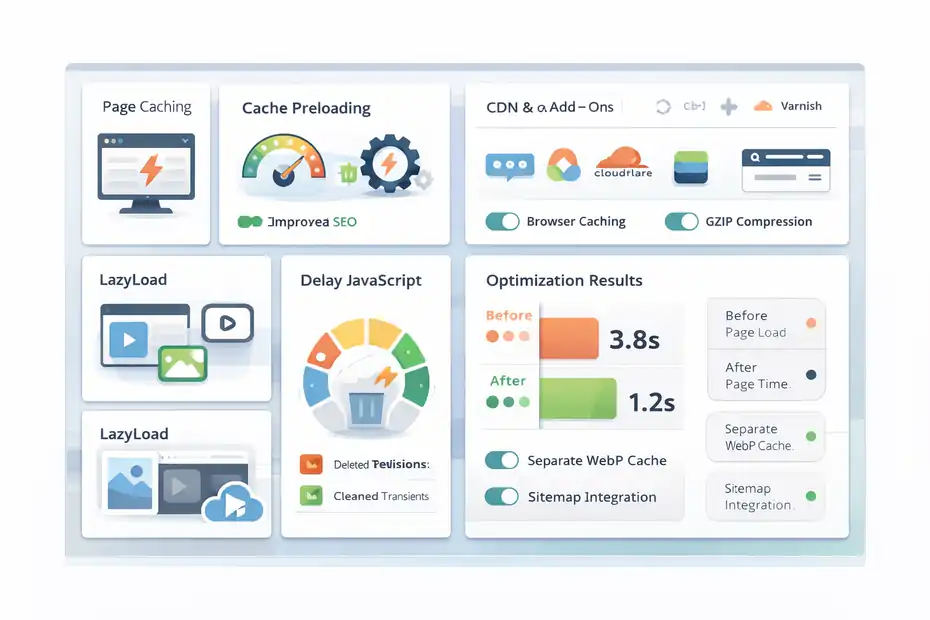
But the value is not only page caching. WP Rocket also includes browser caching, GZIP compression, cache preloading, lazy loading for images and iframes, JavaScript deferral and delay, CSS and JS optimization, database cleanup, CDN integration, and add-ons for services like Cloudflare and Varnish.
It also detects sitemap files from popular SEO plugins for preload workflows and can create separate cache files for WebP images when needed.
For a blogger, the most practical features are usually these:
- Page Caching: Serves a ready-made version of the page instead of rebuilding it each time.
- Cache Preloading: Builds cache before readers arrive, so first visits are faster.
- LazyLoad: Delays off-screen images and embeds until needed.
- Delay JavaScript: Pushes non-essential scripts back until interaction, helping reduce initial load strain.
- Database Cleanup: Removes clutter like old revisions and transients.
That bundle is the real product.
Why The “One Plugin Instead Of Five” Angle Matters
WP Rocket says its feature set can replace what you might otherwise handle with three to five plugins. I think that is one of the strongest arguments in its favor for bloggers.
A lot of blog owners piece together performance with separate free tools: one for caching, one for lazy load, one for database cleanup, one for script control, one for CDN settings. That sounds cheap until you count the hidden cost.
The hidden cost is conflict risk, update management, learning curve, and troubleshooting time. In my experience, performance plugins rarely fail in dramatic ways. They fail in annoying ways. Your mobile menu stops responding. A slider disappears. Ads fire late. Search console starts showing odd behavior after a theme update.
Bundling performance into one maintained system does not eliminate those risks, but it often reduces them. For a blogger who values simplicity, that matters almost as much as raw speed.
How WP Rocket Helps With SEO, UX, And Revenue
A lot of people overpromise on speed and SEO. So let me be careful here: WP Rocket does not magically rank posts. Better caching will not rescue weak content.
But performance absolutely shapes how readers experience your blog.
Speed Helps More Than Rankings Alone
Google says Core Web Vitals align with what its ranking systems seek to reward, but the practical value for bloggers goes beyond rankings. Faster pages feel easier to use. That affects scroll depth, ad viewability, newsletter signups, and affiliate clicks.
WP Rocket’s own messaging focuses on speed, SEO, and conversions, and that is directionally reasonable. Google’s performance guidance and case studies on web.dev show that performance improvements can drive meaningful business outcomes.
In one case study set, Core Web Vitals work contributed to strong mobile conversion improvements and ranking uplift for businesses optimizing speed.
For bloggers, that usually plays out in smaller but still meaningful ways. Imagine you run a recipe blog. Your reader lands from Google on a slow mobile page with 18 photos, an ad stack, and a sticky video.
If the page stabilizes faster and loads the main content earlier, that person is more likely to keep reading, tap a related post, or save the recipe.
That is not theoretical. That is how speed turns into blog outcomes.
Where WP Rocket Can Make The Biggest Real-World Difference
I suggest thinking about WP Rocket in terms of bottlenecks. It is most valuable when your site has one or more of these issues:
- Heavy theme output: Too many CSS and JS files.
- Image-heavy posts: Travel, food, DIY, parenting, and lifestyle blogs especially.
- Script overload: Ads, popups, analytics, embeds, reviews, and social widgets.
- Weak hosting efficiency: Not terrible hosting, but not premium enough to hide inefficiencies.
- No performance system: You are currently relying on random free plugins and hope.
WP Rocket helps because it targets several of those bottlenecks together. It will not fix a terrible host, bloated theme architecture, or oversized image library by itself. But it often improves the “middle layer” where many blogs get stuck: not broken, just slower than they should be.
What WP Rocket Costs And What You’re Paying For
This is where the value question becomes real. Bloggers are not choosing between free and free.
They are choosing between “pay once a year for simpler speed management” and “keep assembling a stack manually.”
Current Pricing And What It Includes
As of March 30, 2026, WP Rocket lists these annual plans: Single for 1 website at $59 per year, Plus for 3 websites at $119 per year, and Multi for 50 websites at $299 per year. The company also includes product updates, support, and Rocket Insights, and offers a 14-day money-back guarantee.
For a solo blogger, the Single plan is the real comparison point. At $59 per year, it is not cheap in the “I’ll install it and forget it” sense, but it is also not wildly expensive if your blog earns anything at all.
What you are paying for is not just the plugin file. You are paying for:
- Support: Helpful when optimization breaks a script or layout.
- Updates: Important because WordPress, PHP, themes, and plugins keep changing.
- Compatibility work: A big deal on plugin-heavy blogs.
- Time saved: Probably the biggest value driver for non-technical bloggers.
I think the support angle gets underestimated. Free plugins are great until you are the one debugging a weird JavaScript issue at 11:40 p.m.
When The Price Feels Expensive And When It Feels Cheap
If your blog makes no money, gets little traffic, and lives on solid managed hosting with a lightweight theme, $59 may feel unnecessary. That is fair.
But if your blog earns affiliate revenue, display ad income, client leads, or email subscribers that eventually convert, then the math changes. One slightly better-performing article that holds more visitors or improves conversions can justify the subscription surprisingly fast.
Here is the simple way I look at it:
- Expensive: Hobby blog, no income, already fast, no performance issues.
- Reasonable: Growing blog with image-heavy content and a few monetization layers.
- Cheap: Revenue-generating blog where one extra signup, sale, or better user session can cover the annual fee.
Value is rarely about the sticker price alone. It is about replacement cost and opportunity cost.
When WP Rocket Is Absolutely Worth It For Bloggers
This is the part people usually want a straight answer on. So here it is: yes, WP Rocket is worth it for many bloggers, but not for all of them.
Best-Fit Blogger Profiles
I recommend WP Rocket most strongly for bloggers in these situations:
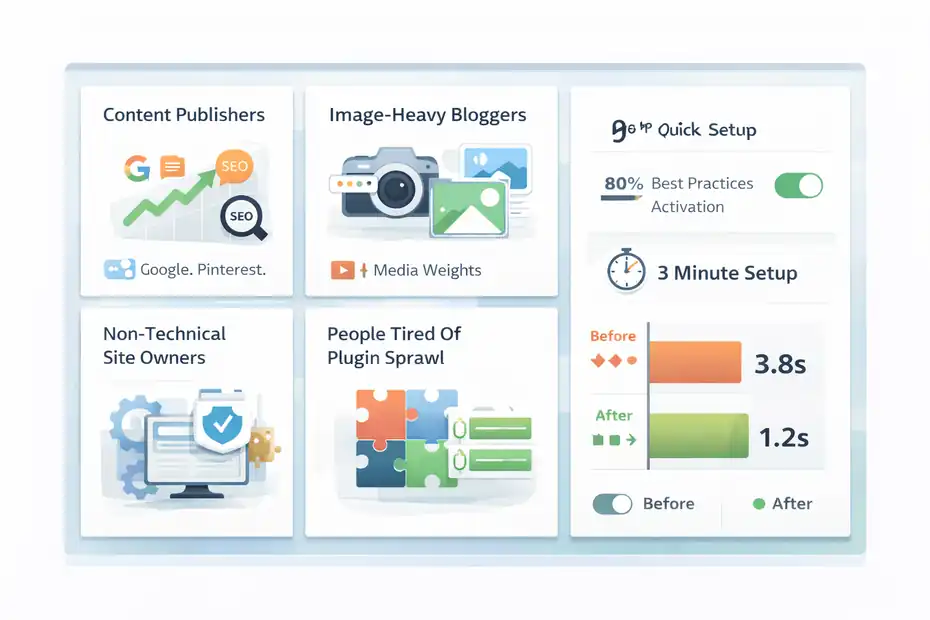
- Content Publishers With Real Traffic: You already have visitors coming in from Google, Pinterest, email, or social, and slow load times are now a growth ceiling.
- Image-Heavy Bloggers: Food, travel, lifestyle, DIY, parenting, photography, and home decor blogs often benefit quickly because media weight is a major issue.
- Monetized Blogs: Especially blogs using display ads, affiliate widgets, comparison boxes, video embeds, and popups.
- Non-Technical Site Owners: You want results without managing five separate optimization plugins.
- People Tired Of Plugin Sprawl: You want one performance center rather than a pile of partial fixes.
This is where WP Rocket’s “out of the box” setup matters. The company says activation applies 80% of performance best practices right away and that setup takes about three minutes. Even if that is marketing-friendly phrasing, the core point is still true: it is designed to be easier than many alternatives.
For busy bloggers, ease is not a bonus feature. It is part of the value.
Realistic Scenarios Where It Pays Off Quickly
Imagine you run a niche finance blog with 120 posts, moderate traffic, and two main income sources: Mediavine-style ads and affiliate links. Your site passes content quality checks, but mobile speed is rough. Readers leave before ads fully render, and some review pages feel sluggish.
In that case, WP Rocket is not just a “plugin expense.” It is a workflow upgrade. You simplify caching, preload pages after updates, delay some heavy scripts, lazy load media, and get a clearer view of what to optimize next.
Or picture a food blogger publishing three recipe posts a week. Every post has step images, recipe cards, structured data, and Pinterest graphics. Even with decent hosting, the front end gets heavy.
WP Rocket often makes sense here because the plugin is working on the exact friction points that pile up on recipe sites.
When WP Rocket Is Not Worth It
I do not think every blogger should buy it. That would be lazy advice.
Situations Where You Can Probably Skip It
WP Rocket is probably not worth it if your blog fits most of these conditions:
- Tiny Site, Minimal Traffic: You are in the early stage and still validating the project.
- Ultra-Lightweight Setup: Fast host, lean theme, optimized images, minimal plugins, no ad stack.
- Technical Confidence: You are comfortable combining free caching, asset control, CDN settings, and manual troubleshooting.
- Host-Level Optimization Already Covers A Lot: Some hosting environments include aggressive caching or performance layers that reduce the benefit of an extra plugin.
This is especially true if your bottleneck is not caching at all. If your images are huge, your hosting is underpowered, or your theme builder is bloated, WP Rocket may help but not enough to feel transformative.
I have seen bloggers buy performance plugins when the real issue was a 4 MB hero image, 60 active plugins, or a cheap host trying to serve an international audience with no CDN. In those cases, the plugin becomes a bandage, not a solution.
The Biggest Mistake Bloggers Make Before Buying
The biggest mistake is assuming speed issues come from one place. They rarely do.
A blog’s performance is usually a chain: hosting → theme → plugins → image handling → scripts → cache behavior → user geography.
WP Rocket mainly improves the optimization and delivery side of that chain. It does not replace fundamental site hygiene. So if your blog is slow because the foundation is poor, the value drops.
That is why I suggest treating WP Rocket as a multiplier. If the basics are decent, it can be very worth it. If the basics are a mess, fix those first.
How To Decide If WP Rocket Is Worth It For Your Specific Blog
This is where I would make the decision as a blogger, step by step.
A Practical 5-Step Decision Framework
Use this quick test before spending anything:
- Step 1: Check your current pain. Are you actually frustrated by speed, low mobile performance, slow admin-to-live updates, or plugin complexity?
- Step 2: Look at monetization. Does faster performance have a real path to more ad revenue, affiliate clicks, leads, or email signups?
- Step 3: Audit your stack. Are you currently patching speed with multiple plugins and still getting mediocre results?
- Step 4: Assess your technical comfort. Do you enjoy troubleshooting optimization conflicts, or do you want a cleaner system?
- Step 5: Compare against the annual fee. Is $59 less painful than the time and friction you are already spending?
If you answer yes to the first four, WP Rocket is probably worth testing. The 14-day refund policy lowers the risk if the results are underwhelming.
I think this is the best way to avoid buying from hype. Make the plugin earn its cost in your own workflow.
Metrics To Watch After Installation
Do not judge the plugin only by a single lab score screenshot. That is where bloggers get misled.
Instead, watch a mix of technical and business indicators:
- PageSpeed Insights trends: Especially mobile, but not as the only metric.
- Core Web Vitals movement: LCP, INP, and CLS matter more than vanity optimism.
- Bounce or engagement shifts: Especially on top landing pages.
- Session depth: Are readers moving to a second post more often?
- Ad and affiliate behavior: Any change in RPM, click-through rate, or time-on-page?
- Your own workflow: Are you spending less time tweaking plugin settings and fixing breakage?
A plugin can be “worth it” even if it improves fewer scores than you hoped, as long as it simplifies performance management and moves your important pages in the right direction.
How To Set Up WP Rocket On A Blog Without Breaking Things
WP Rocket is easier than many performance plugins, but you still want to approach setup carefully.
A Safe Beginner Setup
Start with the defaults. WP Rocket is built to deliver immediate caching benefits on activation, and that is usually the right first move. The official site emphasizes out-of-the-box caching and automatic application of many best practices.
Then move through settings gradually:
- Step 1: Activate basic caching and preload. Let the site stabilize.
- Step 2: Enable LazyLoad for images and embeds. This often helps blogs quickly.
- Step 3: Review media-heavy pages. Recipe posts, tutorials, and long guides are good test pages.
- Step 4: Try JavaScript delay carefully. This can help, but it is also where some front-end issues show up.
- Step 5: Clear and preload cache after each meaningful change.
Do not enable every file optimization switch at once and then panic when something looks odd. In my experience, gradual activation saves hours.
What To Test Right After You Turn Features On
After each feature change, test real blog pages, not just the homepage.
Look at:
- Your mobile menu
- Search bar
- newsletter popup
- ad placements
- embedded video or Pinterest pins
- table of contents
- comment form
- affiliate buttons
- related posts blocks
WP Rocket’s delayed JavaScript feature specifically waits for user interaction before loading certain scripts, which is powerful but also why testing matters. That behavior is documented in its support material.
I suggest choosing three “money pages” and three “messy pages” to test after each change. That gives you a realistic picture of performance without guessing.
Common WP Rocket Mistakes Bloggers Make
This is where good intentions often turn into weird bugs.
Mistake 1: Expecting WP Rocket To Fix Bad Hosting Or Huge Images
Caching is not a substitute for fundamentals. If your host is weak, your images are oversized, or your theme is bloated, WP Rocket will help less than you want.
A lot of bloggers buy a performance plugin before optimizing image dimensions, compression, and server quality. Then they feel disappointed when the site is still only “kind of better.”
That is not always the plugin’s fault. It is often a sequencing problem.
Mistake 2: Turning On Too Many File Optimizations Too Fast
Features like minification, deferred loading, and delayed JavaScript can improve performance, but they can also conflict with fragile front-end elements.
The smart move is incremental testing. I recommend one change at a time, then check core user paths. If your category pages, ad stack, or sticky elements break, reverse the last setting and isolate it.
Mistake 3: Chasing Scores Instead Of Reader Experience
A 99 in a test tool feels great. I get it. But bloggers do not earn from screenshots.
You earn from readers who can actually load, read, click, and trust the page. Sometimes a site that is technically “less perfect” but visually stable and usable is the better outcome.
PageSpeed Insights and Core Web Vitals are useful, but they are tools for diagnosis, not trophies.
That mindset shift matters a lot. Optimize for human outcomes first.
Advanced Optimization Tips For Bloggers Using WP Rocket
Once the basics are working, this is where you make the plugin pay for itself even more.
Prioritize High-Intent Pages First
Do not spread effort evenly across every post. Focus on pages with real leverage:
- top traffic pages
- affiliate roundups
- email opt-in landing pages
- cornerstone content
- posts ranking on page one or two
- high RPM ad pages
WP Rocket includes Rocket Insights as a built-in performance hub to monitor key pages and guide optimization. That matters because most bloggers do not need 500 page reports. They need clarity on the pages that matter most.
If your best review page is slow, fix that first. If your recipe archive page is unstable on mobile, fix that next. High-intent optimization beats broad, shallow tweaking.
Pair WP Rocket With Smarter Blog Operations
I do not mean “install more tools.” I mean operate your blog in a way that lets WP Rocket work better.
For example:
- Resize images before upload.
- Remove unused plugins quarterly.
- Limit heavy embeds where possible.
- Use fewer font families and weights.
- Keep your theme lean.
- Audit script-heavy widgets you barely benefit from.
WP Rocket is strongest when it sits on top of a disciplined site, not a chaotic one. That is the honest truth.
If you do that, the plugin becomes a force multiplier instead of a rescue attempt.
Final Verdict: Is WP Rocket Worth It For Bloggers Or Just Another Plugin?
My honest answer is this: WP Rocket is worth it for bloggers when speed problems are real, monetization matters, and simplicity has value in your workflow. It is not just another plugin in those cases. It is a practical performance layer that can replace a messy pile of partial fixes.
WP Rocket is especially compelling because WordPress still powers a huge portion of the web, and many of those sites face the same performance issues bloggers do.
As of March 2026, W3Techs reports WordPress is used by 42.5% of all websites and has roughly 59.7% share among sites using a known CMS. That scale is part of why mature performance tooling matters so much in the WordPress ecosystem.
Here is my bottom-line opinion:
- If your blog is slow, image-heavy, monetized, or plugin-cluttered, WP Rocket is often worth the money.
- If your blog is tiny, already fast, and technically simple, you may not need it yet.
- If you are hoping it will fix a broken hosting or bloated-site foundation by itself, you will probably be disappointed.
So, is wp rocket worth it for bloggers? For many serious bloggers, yes. Not because it is magical, but because it is one of the rare WordPress purchases that can save time, reduce complexity, and improve the pages that actually matter. That is not hype. That is just a solid value trade when your blog has grown past the point where “free and patchy” still feels efficient.
FAQ
What does WP Rocket do for bloggers?
WP Rocket improves your blog’s speed by adding caching, lazy loading, and file optimization in one plugin. It helps pages load faster without needing multiple tools, which can improve user experience, reduce bounce rates, and support better engagement on content-heavy blogs.
Is WP Rocket better than free caching plugins?
WP Rocket is often easier to use and combines multiple performance features in one place, while free plugins usually require stacking several tools. For bloggers who want simplicity and fewer conflicts, WP Rocket can save time and deliver more consistent results.
Does WP Rocket improve SEO rankings?
WP Rocket does not directly increase rankings, but it improves site speed and user experience, which are important ranking factors. Faster pages can help reduce bounce rates and improve engagement, both of which indirectly support better SEO performance over time.
Is WP Rocket worth it for beginner bloggers?
WP Rocket can be worth it for beginners if they struggle with slow websites or plugin complexity. However, if your blog is small, lightweight, and not monetized yet, you may not need a paid performance plugin until your traffic grows.
How much speed improvement can WP Rocket provide?
The speed improvement depends on your current setup, but many bloggers see noticeable gains in load time and Core Web Vitals. It works best on sites with heavy images, scripts, or multiple plugins, where optimization has the biggest impact.

I’m Juxhin, the voice behind The Justifiable.
I’ve spent 6+ years building blogs, managing affiliate campaigns, and testing the messy world of online business. Here, I cut the fluff and share the strategies that actually move the needle — so you can build income that’s sustainable, not speculative.
Related posts:
 How to Craft a Winning SEO Strategy for Your Website
 How to Use Guest Blogging to Dominate Your Niche
 Engine Optimization Explained: Simple Guide for Beginners.
 Cloudways WordPress Pros & Cons: What You Need to Know
 LiteSpeed Cache Review For WordPress: Is It The Fastest Plugin?
 How To Use WP Rocket For Faster WordPress Site In 15 Minutes Flat