Table of Contents
Some links on The Justifiable are affiliate links, meaning we may earn a small commission at no extra cost to you. Read full disclaimer.
Mailbird email client review searches usually come from one simple pain point: your inbox feels heavier than it should. You want something cleaner than Outlook, more polished than many free alternatives, and easier to manage when you juggle multiple accounts every day.
I spent time looking at Mailbird’s current features, pricing, platform support, and outside user feedback, and the short version is this: Mailbird looks like a real productivity upgrade for the right person, but it is not the perfect fit for everyone.
The speed and simplicity are real, yet a few limitations matter more than Mailbird’s marketing admits.
What Mailbird Is And Who It Is Really For
Mailbird is a desktop email client built for people who want to manage multiple email accounts in one place without living inside a clunky interface.
The company positions it as a Windows and Mac app that works with Gmail, Outlook, Yahoo, iCloud, Exchange, and other IMAP/SMTP accounts, with a unified inbox and app integrations as the core value proposition.
What Mailbird Actually Does Day To Day
When you strip away the landing page language, Mailbird’s core promise is pretty practical: fewer tabs, fewer account switches, and less inbox friction. Instead of logging into separate browser windows for Gmail, Outlook, and a work account, you can bring them together into one desktop workspace. That matters more than it sounds.
For many people, the real win is not “advanced email management.” It is cognitive relief. You stop hunting through browser tabs and start processing messages from one place. In my experience, that is where email tools either earn their keep or become more clutter than help.
Mailbird also leans hard into a cleaner visual layout. That aligns with what users on G2 repeatedly mention: the interface feels clean, simple, and fast, and the multi-account setup is one of the most appreciated parts of the product.
A realistic example: Imagine you manage a freelance business with one Gmail inbox, one branded domain email, and one old Outlook account that still gets invoices. In a browser-only workflow, those accounts constantly compete for attention. In Mailbird, they can be consolidated so triage becomes faster and less mentally fragmented. That is the real use case.
The Best-Fit User Profile
I do not think Mailbird is for everyone. I think it is strongest for a very specific kind of user.
It fits best if you:
- Use Windows or Mac desktop most of the day.
- Manage more than one email account.
- Care about speed, simplicity, and visual cleanliness.
- Want basic productivity extras like tracking, templates, and integrations without moving into a full corporate suite.
It fits less well if you:
- Need a mobile companion app, because Mailbird still does not offer iOS or Android apps.
- Prefer open-source software or deeper customization.
- Need very advanced enterprise collaboration features.
- Want the richest possible rules, filtering, and extensibility stack.
That distinction matters because many reviews oversell Mailbird as a universal Outlook killer. I would not go that far. It is better described as a fast, pleasant desktop inbox for people who value ease of use over deep complexity.
How Fast And Smooth Mailbird Feels In Real Use

If you are here because of the “fastest inbox upgrade” angle, this is the section that matters most.
Mailbird markets itself as lightning-fast and streamlined, and outside review summaries generally support the idea that performance and interface simplicity are two of its strongest selling points.
Why Mailbird Feels Faster Than Heavier Clients
Some email clients feel powerful because they expose everything at once. The problem is that many of us do not need everything at once. We need email triage, search, quick switching, and a compose window that does not slow us down.
Mailbird’s interface seems designed around that exact principle. The company describes the product as a unified workspace for email, chats, calendars, and tools, while user feedback on G2 repeatedly highlights fast performance and a clean layout.
That does not prove benchmark-level speed in a lab sense, but it does support something more useful for daily work: perceived speed.
Perceived speed is what you notice when opening the app, switching accounts, searching threads, and clearing unread messages. In real workflows, that often matters more than raw technical performance claims.
I believe this is one reason Mailbird gets attention from people leaving Outlook. Outlook can be powerful, but it often feels like you are opening an office suite just to answer a message. Mailbird aims for the opposite: open the app, see everything, move quickly.
Where “Fast” Becomes More Than Marketing
The strongest argument in Mailbird’s favor is not just that it opens quickly. It is that its layout reduces friction.
Here is where that shows up:
- Unified inbox reduces account switching.
- Search and conversation grouping help shorten message retrieval time.
- Integrations can reduce app hopping for people who live in email all day.
- A simpler visual hierarchy makes sorting and replying feel less tiring over long sessions.
There is also a psychological speed effect. Clean apps often feel faster because they ask less from your attention. Inboxes are already demanding. A more focused design lowers the cost of every little action.
That said, “fast” should not be confused with “feature-complete.” Mailbird feels fast partly because it is more opinionated and less overloaded than some enterprise tools.
That tradeoff is great for many users, but if you want every advanced setting exposed, the speed advantage may come with compromises you notice later.
Setup Experience And Learning Curve
A good email client should not require an afternoon of setup videos.
Mailbird appears to understand that, and its current support content emphasizes a straightforward install process and easy account connection flow.
Getting Started Without Technical Headaches
Mailbird’s installation flow is simple on paper: download the installer, run it, approve permissions if prompted, and then begin adding your accounts. Its broader positioning also suggests automatic support for major providers like Gmail, Outlook, Yahoo, iCloud, Exchange, and generic IMAP/SMTP accounts.
That is important because setup friction is where many email apps lose casual users. You should not need to know port numbers and server settings unless you are connecting something unusual.
For mainstream providers, the ideal experience is this:
- Add your email address.
- Authenticate securely.
- Let the client pull in folders and sync settings.
- Start organizing immediately.
From what I’ve seen, that is the audience Mailbird is designed for. It is not trying to impress sysadmins first. It is trying to get normal users productive quickly.
A small business owner is a good example here. If you run a Shopify store, you may have support@, orders@, and your personal work inbox all hitting at once. Mailbird’s value is that you can get those connected and visible quickly without having to become an email protocol expert.
The Learning Curve Is Low, And That Is A Feature
One underrated part of email software is how quickly you stop thinking about it. The best client is often the one that disappears into your workflow after day two.
Mailbird seems to do well here because the interface is intentionally simple. G2’s review summary highlights ease of use and interface quality as recurring positives, and that tracks with the product’s overall positioning.
I actually think this is one of Mailbird’s biggest strengths. Many inbox tools lose the plot by adding too many productivity ideas at once. Mailbird appears to keep the front-end experience more approachable, which is exactly what most solo professionals, consultants, creators, and small teams want.
The tradeoff is that power users may eventually hit limits. But if your goal is to get in, connect accounts, customize the layout a bit, and move faster, the learning curve is refreshingly light.
Core Features That Make Mailbird Worth Considering
This is where the review shifts from aesthetics to actual utility.
Mailbird’s strongest current feature set centers on unified inbox management, email tracking, templates, app integrations, and support for multiple account types across Windows and Mac.
Unified Inbox And Multi-Account Management
The unified inbox is the feature most likely to justify switching. Mailbird’s official materials repeatedly emphasize bringing multiple accounts together, and its Mac support docs show users can choose exactly which accounts appear in the unified inbox.
That control matters. A unified inbox is only useful when it is selective. You may want all work accounts together but keep your personal inbox separate. Mailbird appears to support that more flexible approach rather than forcing every account into one giant stream.
For many readers, this is the single biggest productivity benefit. Managing three inboxes separately can turn email into context-switching punishment. Pulling the right accounts into one view helps you process faster and reply with better continuity.
A simple scenario: One consultant I’d imagine using this setup might keep sales@ and client@ inside the unified view, while excluding a low-priority personal account. That reduces noise without losing visibility where it matters.
Tracking, Templates, And Integrations
Mailbird’s paid tiers include features that go beyond basic email reading. The official pricing page lists unlimited email tracking, templates, custom apps, ChatGPT integration, unsubscribe and block sender tools, and premium integrations in its Premium tier. Support documentation also says third-party integrations are not included in the Free plan.
This is where Mailbird starts to feel less like “just another email app” and more like a light productivity hub.
Useful examples include:
- Email tracking for sales outreach or client follow-up.
- Templates for repetitive replies like onboarding, support, or invoice reminders.
- Calendar and app integrations to reduce tab-switching.
- Unsubscribe and sender blocking tools for inbox cleanup.
I would not call these features unique in the email market. What makes them appealing is their packaging. Mailbird seems built for users who want these capabilities without moving into a much heavier platform.
Pricing, Plans, And Value For Money
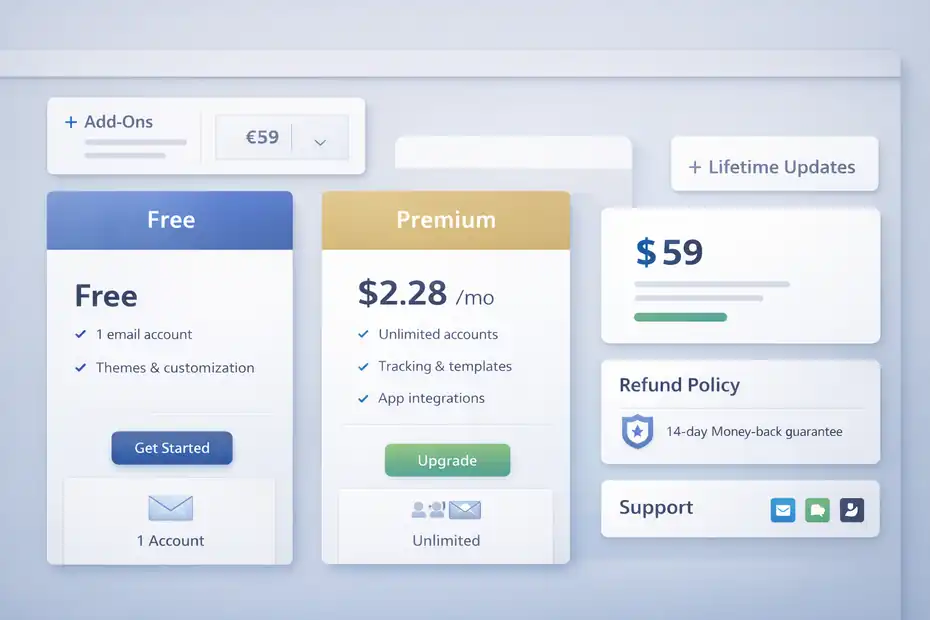
Pricing is where Mailbird gets a little more nuanced than the homepage headline suggests. The official pricing page currently shows a free option, a Premium tier, a one-time “Lifetime Updates” add-on priced at €59 on the localized page I checked, and a 14-day money-back guarantee.
Third-party listings also show plan structures including free and paid options, with some variation in displayed prices and older Standard/Premium breakdowns.
What You Get On Free Vs Paid
Based on Mailbird’s current support and pricing pages, the Free plan supports one email account and includes a customizable interface, but it leaves out most advanced features. Premium unlocks the fuller experience, including unlimited accounts, tracking, integrations, templates, and more.
Here is the clearest way to think about it:
| Plan Area | What You Can Expect |
|---|---|
| Free | One account, basic desktop inbox experience, themes/customization |
| Premium | Unlimited accounts, tracking, templates, integrations, advanced features |
| Pay Once Add-On | Lifetime Updates is sold separately for eligible pay-once licenses |
| Refund Policy | 14-day money-back guarantee |
The part I would watch closely is the pricing structure itself. Mailbird’s official site currently emphasizes Premium and add-ons, while support docs note that the Standard plan is not currently for sale, even though older or third-party listings still mention it.
That means you should verify the exact plan and billing model at checkout rather than relying on old blog posts or comparison articles.
Is Mailbird Actually Good Value?
For the right user, yes. But the value depends on your pain point.
Mailbird is strong value if your current workflow costs you time every day. If you switch between multiple accounts constantly, lose messages across providers, or hate living in several browser tabs, a paid desktop client can pay for itself quickly in saved focus.
It is weaker value if:
- You only use one email account.
- You are happy with Gmail in the browser.
- You need mobile access inside the same ecosystem.
- You want lots of advanced power-user controls without extra caveats.
I also think the “lifetime” angle deserves careful reading. Mailbird’s support docs explain that “Lifetime Updates” applies to certain pay-once licenses and is recommended to keep receiving future improvements.
That is not necessarily bad, but it does mean you should read the license details instead of assuming every one-time purchase automatically includes every future feature forever.
Platform Support, Compatibility, And Daily Flexibility
Before you buy any email client, you need to know whether it fits your actual devices. Mailbird now supports both Windows and Mac, with Windows 10 and 11 supported, and the Mac version requiring Ventura or higher.
Each license can be used on both Windows and Mac, but there is still no mobile version for iOS or Android.
Windows And Mac Support Is A Big Step Forward
This is one of the biggest changes in Mailbird’s story. For a long time, people thought of it mainly as a Windows app. That is no longer the full picture.
Mailbird’s official site says the product is available for both Windows and Mac, and that licenses are valid across both platforms. The support article on mobile availability also confirms Mac support and specifies that Mailbird for Mac requires macOS Ventura or later.
That cross-platform licensing is a real plus if you split your time between a desktop PC and a MacBook. It removes one of the classic annoyances of paid desktop software: buying twice for the same workflow.
For hybrid professionals, this matters a lot. A marketing manager might do most inbox work on a Windows office machine, then catch up on a Mac laptop while traveling. Being able to keep the same client ecosystem across both machines is a meaningful convenience.
The Missing Mobile App Is A Serious Limitation
This is the biggest weakness in Mailbird’s current setup. The company explicitly says it does not currently offer a mobile app for iOS or Android, though it remains on the long-term roadmap.
I would not downplay that. In 2026, many people expect their inbox system to follow them across desktop and mobile. If your workflow depends on a unified app experience everywhere, Mailbird falls short.
This does not kill the product. Plenty of people still do their serious email work at a desk. But it changes who should buy it.
I would recommend Mailbird more confidently to:
- Office-based users.
- Freelancers working primarily from a laptop or desktop.
- People who treat mobile email as “light triage only.”
I would recommend it less confidently to:
- Founders always on the move.
- Field sales teams.
- Anyone who wants a seamless desktop-to-phone workflow.
Pros, Cons, And Real-World Tradeoffs
No honest mailbird email client review should pretend the product is perfect.
The strongest outside signals point to the same story: users like the clean interface, fast performance, and multi-account organization, but recurring complaints include missing features, some bug issues, and specific gaps like print preview.
The Best Reasons To Choose Mailbird
There is a lot to like here.
The biggest pros are:
- Clean, modern interface that feels less overwhelming than heavier alternatives.
- Strong multi-account handling and unified inbox value.
- Premium features that actually help daily workflow, such as tracking, templates, and integrations.
- Cross-platform desktop support across Windows and Mac.
- Free version available for light users.
- 14-day refund window for paid purchases.
I also think Mailbird benefits from having a clear product philosophy. It seems designed to make email feel lighter, not more corporate. That may sound vague, but users who are tired of bloated software will understand exactly what I mean.
The Biggest Downsides Before You Buy
The cons are just as important:
- No mobile app.
- Free version is limited to one email account.
- Some advanced features sit behind paid tiers.
- Older and third-party pricing references can create confusion.
- User feedback on G2 includes mentions of missing features, bugs, poor customer support in some cases, and lack of print preview.
This is why I would not call Mailbird the best email client for every use case. It is best for users who care more about a smooth everyday inbox than about having the deepest feature stack.
That tradeoff is not a flaw by itself. But you should buy with that tradeoff in mind.
How Mailbird Compares To Common Alternatives
A review is only useful if it helps you decide against the other options in your head. Most people comparing Mailbird are also considering Outlook, Apple Mail, Thunderbird, or simply staying inside Gmail. Mailbird’s advantage is ease and elegance.
Its weakness is that it is less universal and less deeply extensible than some rivals.
Mailbird Vs Outlook, Apple Mail, And Gmail In A Browser
Here is the simplest comparison:
| Option | Best For | Main Weakness |
|---|---|---|
| Mailbird | Multi-account desktop users who want a cleaner experience | No mobile app, some advanced gaps |
| Outlook | Enterprise workflows and Microsoft-heavy organizations | Can feel bloated or complex |
| Apple Mail | Mac users who want a built-in free default | Less appealing for some multi-account power workflows |
| Gmail In Browser | People happy with web-based email and Google ecosystem | Browser-tab sprawl, less desktop focus |
I think Mailbird wins when your current setup feels scattered rather than underpowered. If your problem is too many tabs, too many inboxes, and too much visual clutter, it is a compelling upgrade.
It loses when your needs are extremely enterprise-specific or deeply mobile-first.
Mailbird Vs Thunderbird
This comparison comes up often because both target people who want something outside the default big-tech inbox experience.
Thunderbird is typically the better choice for users who want:
- Open-source software.
- Deeper customization.
- More extensibility.
- A tool they can shape heavily over time.
Mailbird is usually the better choice for users who want:
- Faster onboarding.
- Better visual polish.
- Easier everyday multi-account management.
- A more guided, consumer-friendly experience.
My honest take is this: Thunderbird may be the “smarter” choice for technical users, but Mailbird is often the easier choice for busy users. Those are not the same buyer.
My Verdict: Is Mailbird The Fastest Inbox Upgrade?
After looking at the latest official positioning, support details, pricing signals, and third-party review summaries, I think Mailbird earns a qualified yes.
It can absolutely feel like one of the fastest inbox upgrades if your biggest frustrations are account switching, visual clutter, and browser-tab chaos.
The clean interface, unified inbox, Windows-and-Mac support, and practical premium features make it a credible productivity tool, not just a pretty email skin.
Who Should Buy It And Who Should Skip It
You should seriously consider Mailbird if:
- You manage multiple inboxes every day.
- You work mostly on desktop.
- You want a simpler, faster-feeling email environment.
- You are willing to pay for productivity features that save attention and time.
You should probably skip it if:
- You need a mobile app right now.
- You only use one personal email account.
- You want open-source control or highly advanced configuration.
- You expect enterprise-grade collaboration depth from your email client.
If I were recommending it to a friend, I would say this: Mailbird is not the most complete email ecosystem, but it is one of the most appealing desktop-focused inbox upgrades for people who want email to feel lighter and faster. That is a narrower claim than “best email client,” but it is a more honest one.
Final Recommendation
My final verdict for this mailbird email client review is simple: Mailbird is worth trying, especially if your current inbox setup feels messy, slow, or mentally expensive.
The Free version gives light users a low-risk entry point, and the 14-day refund window lowers the risk for paid plans. Just go in with open eyes about the missing mobile app and make sure the current plan structure matches what you actually need.
For many desktop-heavy users, that tradeoff will be completely worth it.
FAQ
What is Mailbird and how does it work?
Mailbird is a desktop email client that combines multiple email accounts into one unified inbox. It works by connecting to providers like Gmail or Outlook using secure protocols, allowing you to manage, read, and send emails from a single interface without switching between different apps or browser tabs.
Is Mailbird faster than other email clients?
Mailbird often feels faster than traditional email clients because of its lightweight design and simplified interface. Instead of loading multiple heavy features at once, it focuses on speed, smooth navigation, and quick account switching, which improves daily productivity for users handling multiple inboxes.
Does Mailbird support multiple email accounts?
Yes, Mailbird supports multiple email accounts, including Gmail, Outlook, Yahoo, and custom domains. Its unified inbox feature allows you to manage all accounts in one place or separate them based on your preference, making it easier to stay organized and respond quickly.
Is Mailbird free or paid?
Mailbird offers a free version with limited features, including support for one email account. The paid version unlocks advanced tools like unlimited accounts, email tracking, templates, and integrations, making it more suitable for professionals and business users.
Does Mailbird have a mobile app?
No, Mailbird currently does not offer a mobile app for iOS or Android. It is designed as a desktop email client for Windows and Mac users, so mobile access requires using your email provider’s app or web version separately.

I’m Juxhin, the voice behind The Justifiable.
I’ve spent 6+ years building blogs, managing affiliate campaigns, and testing the messy world of online business. Here, I cut the fluff and share the strategies that actually move the needle — so you can build income that’s sustainable, not speculative.