
Table of Contents
Some links on The Justifiable are affiliate links, meaning we may earn a small commission at no extra cost to you. Read full disclaimer.
An elementor review for seo focused websites really comes down to one practical question: can you build a site that looks great without quietly hurting speed, crawlability, and rankings? I’ve worked on enough WordPress projects to tell you this is not a yes-or-no tool.
Elementor powers a huge share of the web, with 10+ million active WordPress installs and claims of 22M+ websites worldwide, so it clearly works at scale. But SEO results depend far less on the builder itself and far more on how you use it.
What Elementor Actually Is And Why SEO Users Care
Elementor is a visual WordPress builder.
Instead of editing templates and blocks in the default WordPress editor, you design pages with drag-and-drop sections, widgets, spacing controls, templates, and theme-building tools.
Is Elementor Good For SEO In Real Life?
My honest take is this: Elementor is not automatically bad for SEO, and it is not automatically good either. It is a flexibility tool. That matters because SEO-focused websites usually need three things at the same time: clean content structure, fast loading pages, and the ability to ship landing pages or content layouts quickly.
That is exactly where Elementor becomes attractive. You can build custom landing pages, sales pages, comparison pages, service pages, and blog templates without depending on a developer for every layout change.
For many site owners, that speed of execution is a real SEO advantage. Publishing faster, testing faster, and improving conversion pages faster can absolutely help growth.
The downside is just as real. Page builders can add extra markup, styling layers, and JavaScript. Elementor has spent the last few years trying to reduce that through performance features like Optimized DOM Output and reductions in unused CSS, but the builder still gives you enough rope to slow your own site down if you overbuild layouts.
So the right frame is not “Does Elementor hurt SEO?” It is “Can you use Elementor in a disciplined way?” In my experience, yes. Many people just do not.
Who Elementor Fits Best
Elementor works best when your website needs custom presentation without a fully custom theme build. Think service businesses, affiliate sites with comparison pages, SaaS marketing sites, local business sites, coaches, agencies, and lean e-commerce content funnels.
It is especially useful when your team needs visual control. A writer, marketer, or business owner can adjust layouts, update CTAs, create lead magnets, or launch seasonal pages without opening code. That shortens the time between idea and published page.
Where it fits less well is on websites that win mainly through extreme efficiency.
For example, a content-heavy publisher chasing the lightest possible HTML output might prefer native Gutenberg or a custom theme setup. The same goes for developers who want total control and minimal abstraction.
I suggest thinking of Elementor as a middle ground. It gives you much more design freedom than the default editor, but it usually asks for more performance discipline in return.
How Elementor Affects SEO Under The Hood

SEO is bigger than page speed, but speed, structure, and usability all feed into how a site performs in search.
Page Speed, Core Web Vitals, And Why This Matters
Google’s Search documentation says Core Web Vitals measure loading performance, interactivity, and visual stability, and Google recommends site owners achieve good Core Web Vitals because they align with the kind of experience search systems seek to reward. Today those metrics are LCP, INP, and CLS.
This matters for Elementor because builders affect all three:
- LCP can suffer when pages include oversized hero images, background videos, web fonts, and too many layout containers.
- INP can suffer when scripts, sliders, popups, and interactive widgets pile up.
- CLS can suffer when images, embeds, popups, and dynamic elements load without reserved space.
Elementor itself has added performance improvements, including optimized markup and reductions in unused CSS across some widgets and features.
That is the good news. The less comfortable truth is that a sloppy Elementor page can still be much heavier than a carefully built native block page.
When people say “Elementor is slow,” what they often mean is “I built a visually busy page with too many sections, animations, widgets, and giant images.” That is not the same thing.
HTML Structure, Headings, And Crawlability
Search engines do not rank pages because the HTML looks beautiful. They rank pages that are understandable, useful, and technically accessible. Elementor lets you control headings, spacing, content blocks, templates, and dynamic sections, which can be excellent for organizing content if you use it carefully.
The risk is layout-first thinking. I see this a lot: someone designs a page visually, then sprinkles in heading tags later. Suddenly the page has multiple H1s, skipped heading levels, text embedded in image banners, and decorative sections that look nice but communicate almost nothing to search engines.
That is not an Elementor flaw as much as a workflow flaw. If you treat the builder like a design tool first and a content structure tool second, SEO gets messy. If you start with page intent, content hierarchy, and semantic structure, Elementor can work perfectly well.
I believe the best Elementor SEO workflow is simple: write the content outline first, then build the layout around that outline. Not the other way around.
Mobile Experience And User Signals
Most SEO-focused websites live or die on mobile. Elementor gives you responsive controls for tablet and mobile layouts, which is helpful. You can adjust spacing, typography, hidden elements, and stacking order by device.
That said, responsive controls can become a trap. A page that looks polished on desktop can turn into a long, bloated, scroll-heavy mobile experience. I have seen pages with endless spacer sections, oversized testimonials, giant accordions, and decorative effects that add almost no value on a phone.
From a ranking and conversion perspective, this matters more than many people admit. A visually impressive page that feels slow, awkward, or cluttered on mobile can hurt engagement, lead quality, and revenue even if it technically indexes fine.
Elementor’s Biggest SEO Strengths
This is where I think Elementor gets underestimated. People talk about code bloat, but they often ignore the operational advantages that help SEO campaigns move faster.
Faster Landing Page Creation And SEO Testing
One of Elementor’s biggest strengths is speed of deployment. You can build dedicated pages for local SEO, lead generation, service variations, seasonal campaigns, and topic clusters without waiting on custom development every time.
Imagine you run a dental clinic with separate pages for Invisalign, veneers, teeth whitening, and emergency appointments. With Elementor, you can duplicate a proven layout, swap the service content, adjust local trust signals, and publish a new page quickly. That is not just convenient. It supports SEO scale.
The same goes for affiliate and content websites. Comparison pages, roundup pages, product alternatives pages, author pages, and category templates are often easier to implement visually than through theme edits. When testing different page structures, CTA placements, or FAQ layouts, Elementor gives you real agility.
In my experience, this is the strongest argument in Elementor’s favor. SEO is not only about raw performance metrics. It is also about publishing quality pages consistently and improving them fast.
Better Visual Control For Conversion-Focused SEO Pages
A lot of SEO traffic lands on pages that need to do more than inform. They need to convert. That means forms, buttons, testimonials, feature sections, before-and-after proof, pricing layouts, FAQ blocks, and strong page flow.
Elementor shines here. You can control section order, visual hierarchy, spacing, and calls to action in a way that is harder for non-technical users inside a plain editor.
This matters because rankings alone do not pay the bills. A slightly heavier page that converts much better can outperform a lighter page in business terms. That does not mean you should ignore speed. It means you should measure both traffic and outcomes.
I recommend Elementor most strongly when search traffic is supposed to become leads, bookings, or inquiries. Its design flexibility can make a real difference at that point in the funnel.
Template Control Across Important SEO Pages
Elementor Pro plans include tools like Theme Builder, Dynamic Content, Forms, Popup Builder, and custom code/CSS support, which means you can control templates beyond individual pages. As of the current plan page, the entry Pro tier is listed at $84 billed annually for one site.
From an SEO workflow perspective, template control is valuable. You can create reusable layouts for blog posts, service pages, author pages, archives, or custom post types. That helps maintain design consistency while reducing manual page building.
Used well, this saves time and reduces mistakes. Used badly, it creates one heavy template that slows down every page on the site. That is why template discipline matters as much as template power.
Elementor’s Biggest SEO Weaknesses
This is the part many reviews either overdramatize or avoid. So let me be direct.
Extra Markup Is Still A Real Thing
Elementor has improved its output, and that deserves credit. The official documentation specifically says Optimized DOM Output reduces wrapper elements in the HTML generated by Elementor, and developer updates note continued reductions in DOM output and unused CSS.
Still, compared with a lean native setup, Elementor can produce more markup and styling complexity. That means more opportunities for heavier pages, more CSS to manage, and more rendering work for the browser.
For SEO, the effect is indirect but important. Extra markup by itself does not doom rankings. But when it combines with image bloat, third-party widgets, motion effects, custom fonts, and popup logic, performance can slide fast.
I would not call this a dealbreaker. I would call it a tax. Elementor gives you speed of design, and you pay for that with a little more technical overhead. The question is whether the trade-off is worth it for your site.
It Encourages Overdesign
This is the real killer, in my opinion.
Elementor makes it very easy to keep adding. Another section. Another icon list. Another animation. Another carousel. Another testimonial slider. Another sticky CTA. Another popup.
The problem is not just page speed. It is distraction. SEO pages often perform better when they are clear, scannable, and tightly focused on one search intent. Builders tempt people to turn every page into a homepage.
I suggest watching for “design inflation.” That is when each revision adds visual weight without increasing clarity. If your service page keeps getting prettier while the message gets harder to understand, SEO and conversions usually both suffer.
Plugin Stack Problems Get Blamed On Elementor
A lot of slow Elementor sites are really slow WordPress stacks. Cheap hosting, six add-on packs, heavy form plugins, uncompressed images, a bloated theme, and three tracking scripts get lumped together and blamed on the builder.
That does not fully let Elementor off the hook, because its ecosystem makes it easy to pile on extras. But it is important to be honest about where the slowdown often comes from.
The more Elementor add-ons you install, the more unpredictable the site becomes. This includes performance, CSS conflicts, JavaScript conflicts, update issues, and maintenance risk.
WordPress support threads show that update-related conflicts still happen in the wild, which is normal for a plugin ecosystem this large but still worth factoring into your decision.
Step-By-Step: How To Use Elementor Without Hurting SEO
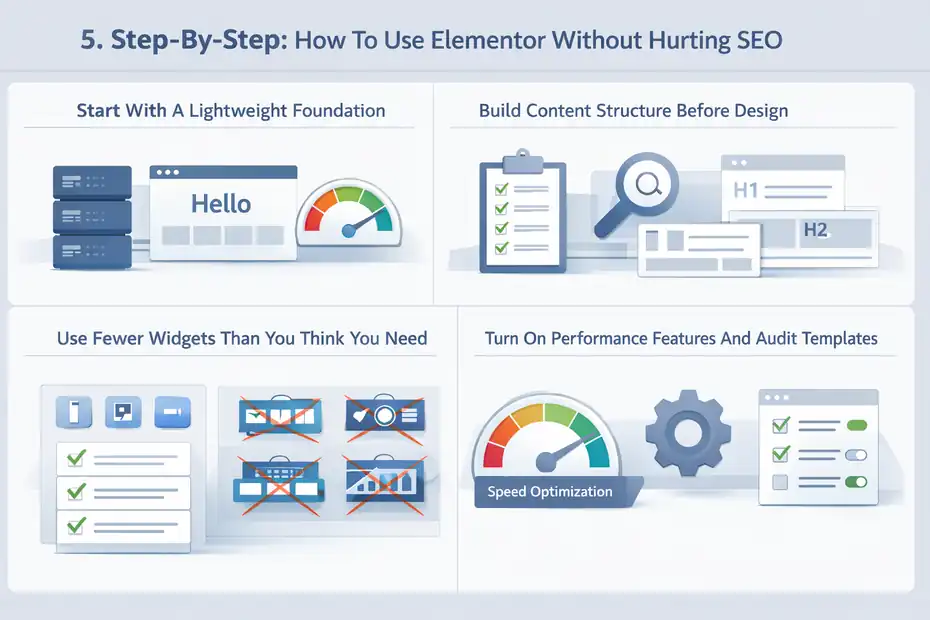
If you already use Elementor, this is the section that matters most.
Step 1: Start With A Lightweight Foundation
Your theme and hosting matter before Elementor even enters the conversation. Elementor’s own Hello theme is positioned as lightweight and performance-focused.
Elementor says Hello is built with minimal CSS and JavaScript, and one official help page describes it as using only 6KB of resources, while the marketing page says it is under 30KB. Even allowing for differences in how those numbers are presented, the broader point is clear: Hello is intentionally minimal.
That kind of setup is what you want with a builder. A heavy multipurpose theme on top of Elementor usually makes no sense for SEO-focused sites.
I also recommend being realistic about hosting. Slow hosting can make every builder look worse. Elementor’s hosting materials emphasize CDN, caching, and Google Cloud infrastructure, but you do not need Elementor Hosting specifically.
You do need a setup with good caching, fast PHP performance, and enough resources for your traffic.
The cleaner the foundation, the more room you have to use Elementor without performance slipping.
Step 2: Build Content Structure Before Design
Before you drag anything into the page, decide:
- The primary search intent
- The H1
- The H2 structure
- What the visitor needs first
- What proof or conversion element should appear near the end
This sounds basic, but it prevents most Elementor SEO mistakes. When you know the page logic first, you use the builder to support the content. When you do not, the page becomes a patchwork of sections.
A simple rule I follow is this: Every section must earn its place. If a section does not help the reader understand, trust, or act, I remove it.
For blog posts and informational pages, I keep designs especially restrained. Content pages usually need great typography, clear headings, tables where useful, images that add meaning, and maybe an FAQ section. They do not need a mini sales funnel every 400 words.
Step 3: Use Fewer Widgets Than You Think You Need
A disciplined Elementor page is almost always built from a small set of repeated patterns. Containers, headings, text editor blocks, images, buttons, lists, accordions, and maybe a testimonial or form section.
That is enough for most SEO pages.
Where sites get into trouble is using lots of decorative or script-heavy widgets. Sliders, carousels, tabs everywhere, counters, animated headlines, icon boxes in every section, layered motion effects, and popup logic across multiple triggers all increase complexity.
My advice is blunt: If a widget exists mainly to impress another marketer, skip it. If it helps a real visitor make a decision faster, keep it.
This one change alone can make a huge difference to load time, editing speed, and maintainability.
Step 4: Turn On Performance Features And Audit Every Template
Elementor has a Performance area and feature settings aimed at reducing code and improving speed. Its official help documentation says these include code reduction and DOM optimization features.
That means you should not just install Elementor and leave defaults untouched. Go through performance-related settings and review what is active. Then test templates, not only single pages. A lightweight homepage means very little if your post template, archive template, and header/footer system are bloated sitewide.
I also recommend auditing template parts separately:
- Header: Keep menus simple and avoid oversized sticky headers.
- Footer: Do not turn the footer into a second homepage.
- Post template: Prioritize readability over decorative blocks.
- Archive template: Keep cards light and image sizes controlled.
This is where many SEO-focused websites quietly lose performance without noticing.
The SEO Features Elementor Helps With Indirectly
Elementor is not your SEO plugin. It is your presentation layer. Still, it can help with SEO outcomes in indirect but important ways.
Better Internal Linking Layouts And Topical Hubs
A lot of websites know they need internal links but present them poorly. Elementor can help you create clean topic hubs, related content sections, service comparison boxes, and navigation elements that make internal links more visible and useful.
For example, if you run a home services site, you can build a service hub that visually guides readers from “roof repair” to “roof replacement,” “storm damage repair,” and “insurance claim help.” That is useful for users and supportive of stronger internal linking paths.
This works especially well when layouts remain simple. You are not trying to turn internal links into fancy design pieces. You are using design to make content relationships clearer.
More Persuasive On-Page UX
SEO-focused websites often undervalue page flow. A page can rank and still underperform because it does not guide the visitor well. Elementor lets you control section sequencing, CTA timing, trust signal placement, and scannability with more precision than a rigid template usually allows.
That matters on pages where searchers are comparing options, evaluating services, or deciding whether to contact you.
I have seen this play out on local lead-gen pages. The ranking page stays the same topic-wise, but the layout improves: clearer first-screen message, better proof near the middle, tighter CTA near the bottom, mobile-friendly form. Traffic stays flat, but leads improve.
That is not “SEO” in the narrow sense. It is SEO page performance in the business sense, which is what most people actually care about.
Easier Updates On Important Money Pages
Search visibility often improves when pages are refreshed, expanded, and sharpened over time. Elementor makes this easier for non-developers, especially on pages with custom layouts.
That is a quiet strength. When the barrier to updating pages is low, teams tend to improve pages more often. They add new FAQs, better trust proof, stronger service details, updated pricing context, clearer comparisons, or more relevant calls to action.
In practice, that editorial agility can matter more than shaving a tiny amount of code from the page.
Common Elementor SEO Mistakes I See Over And Over
This is the part where most of the damage happens.
Mistake 1: Treating Every Page Like A Design Showcase
SEO pages are not portfolio pieces. They do not need to demonstrate every visual trick available inside the builder.
A common failure pattern looks like this: big hero, animated icons, multi-column sections on mobile, testimonial slider, FAQ accordion, video embed, countdown timer, popup, sticky CTA, and giant footer. The page feels “premium,” but the reader has to work too hard to get the answer.
The fix is simpler than people expect. Strip the page back to intent. Ask what this searcher needs at this stage. Then build only around that.
Mistake 2: Using Too Many Add-Ons
One Elementor add-on becomes three very quickly. Then each adds widgets, scripts, controls, and settings panels you do not fully use.
This creates a messy site and a messy editing environment. It also increases update risk. I usually advise people to keep the add-on stack as close to zero as possible. If Elementor’s native widget can do the job, use it. If custom CSS can solve a small styling issue, that is often better than installing a new add-on pack.
Minimalism is boring, but boring usually wins on performance.
Mistake 3: Ignoring Image Weight
Elementor pages often lean heavily on large visuals. That makes image optimization non-negotiable. Elementor now offers image optimization tooling and highlights WebP and AVIF conversion in its current pricing pages and product materials.
Even so, the principle is bigger than one tool. Resize images correctly, compress them, serve modern formats where possible, and avoid using oversized decorative images that add no information.
I have seen pages lose far more speed to image bloat than to the builder itself.
Mistake 4: Building Long Mobile Pages With Spacer Addiction
Spacing controls are useful until they become a habit. Huge top and bottom padding values, mobile-specific spacer sections, and duplicated layouts can make pages feel endless on phones.
This hurts readability and can weaken engagement. Use whitespace intentionally, not theatrically.
Elementor Vs Simpler Alternatives For SEO-Focused Websites
This is where the answer becomes nuanced.
When Elementor Is The Better Choice
I recommend Elementor when you need custom marketing pages, stronger visual control, faster non-technical page production, or reusable templates for lead-focused websites. It is a good fit when design flexibility and publishing speed create real business value.
A few strong-fit scenarios:
| Website Type | Elementor Fit | Why |
|---|---|---|
| Local service business | Strong | Fast page creation for service areas, offers, and lead pages |
| Agency site | Strong | Custom layouts, landing pages, case study design, fast iteration |
| SaaS marketing site | Strong | Flexible conversion pages and campaign testing |
| Affiliate site | Moderate | Good for comparison pages, but must stay disciplined on speed |
| Content-heavy publisher | Weaker | Leaner native/editor-first setups often scale cleaner |
The more conversion-focused your SEO is, the stronger Elementor usually looks.
When A Simpler Stack Is Smarter
If your site is mostly articles, category pages, and basic templates, I often think a lighter stack is smarter. Native WordPress blocks or a lean custom theme can give you cleaner output and fewer moving parts.
This matters for publishers with hundreds or thousands of pages. At that scale, template efficiency, editorial simplicity, and consistent performance become more important than custom page design.
I would also avoid Elementor for teams that cannot control themselves around design. That sounds funny, but I mean it seriously. Some sites simply perform better when the layout options are more limited.
The Trade-Off In One Sentence
Elementor usually trades some technical purity for workflow speed and design control.
Whether that is a good trade depends on your site model.
Pricing, Value, And Whether It Pays For Itself
Pricing matters because “SEO value” is not just rankings. It is return.
What You Are Paying For
Elementor has a free version, and its Pro plans add deeper builder functionality like Theme Builder, forms, popups, dynamic content, and custom code/CSS.
The current Pro plan page lists the entry level at $84 annually for one site, while current pricing materials also mention bundled value around extras such as image optimization and accessibility tooling on some plans.
If you only need a basic blog with simple layouts, paying for Pro may not make sense. But if Elementor replaces developer time for landing pages, service templates, or frequent marketing updates, the value equation changes quickly.
I suggest calculating value this way: how many layout or deployment tasks will this save you each month? If the answer is “a lot,” the pricing is usually easy to justify.
The Hidden Cost People Forget
The real cost of Elementor is not always the subscription. It is the possibility of heavier pages, more plugin complexity, and more time spent managing design decisions.
That hidden cost is manageable, but it is real.
This is why I do not recommend Elementor based on features alone. I recommend it when the team behind the site can use it with restraint. The software can pay for itself fast. Undisciplined usage can also create technical debt fast.
Final Verdict: Fast Or Slowing You Down?
Here is my honest conclusion.
My Real-World Answer
Elementor is fast enough for SEO-focused websites when the site is built with restraint, a lightweight theme, good hosting, optimized images, and a clean template system. It becomes slow when it is treated like a playground for every visual effect and add-on imaginable.
So, is Elementor fast or slowing you down?
It is neither by default. It amplifies your build habits.
That might sound less dramatic than a hard yes or no, but it is the most useful answer I can give you. I have seen Elementor sites perform very well in search, generate leads, and pass real-world usability tests. I have also seen Elementor sites collapse under the weight of unnecessary sections, scripts, and add-ons.
Who Should Use It
I would use Elementor for SEO-focused websites when:
- You need landing pages or service pages that must convert.
- You want non-developers to publish and improve pages quickly.
- You are willing to keep design systems simple.
- You will actively manage performance instead of assuming the builder handles it for you.
I would lean away from Elementor when:
- Your site is mostly a high-volume publishing machine.
- You want the lightest possible front end.
- Your team tends to overdesign pages.
- You already have a lean custom setup that works.
The Bottom Line
My verdict on this elementor review for seo focused websites is simple: Elementor is a strong option for SEO-driven businesses, especially where search traffic must convert, but it is not a free pass to ignore performance.
If you care about rankings and revenue, the right question is not “Can Elementor rank?” It is “Can I build lean, clear, useful pages inside Elementor?”
Do that well, and it can absolutely support SEO.
Do it poorly, and yes, it will slow you down.
FAQ
What is Elementor and is it good for SEO focused websites?
Elementor is a visual page builder for WordPress that allows you to design pages without coding. It can be good for SEO focused websites if used correctly, but poor design choices, heavy layouts, and too many widgets can negatively affect page speed and performance.
Does Elementor slow down your website speed?
Elementor can slow down your website if you use too many widgets, animations, or large images. However, with proper optimization, lightweight themes, and clean layouts, you can build fast-loading pages that meet Core Web Vitals and perform well in search rankings.
Can Elementor rank well on Google?
Yes, Elementor websites can rank well on Google when built with SEO best practices. This includes proper heading structure, fast loading speed, mobile optimization, and high-quality content. The builder itself does not prevent rankings, but how you use it makes a big difference.
Is Elementor better than Gutenberg for SEO?
Elementor offers more design flexibility, while Gutenberg is generally lighter and faster. For SEO, Gutenberg may have a slight performance advantage, but Elementor can outperform it when used strategically, especially for conversion-focused pages and custom layouts.
How do you optimize Elementor for better SEO performance?
To optimize Elementor for SEO, focus on using fewer widgets, compress images, enable performance settings, and maintain clean page structure. Also ensure fast hosting, mobile responsiveness, and proper internal linking to improve both speed and search visibility.

I’m Juxhin, the voice behind The Justifiable.
I’ve spent 6+ years building blogs, managing affiliate campaigns, and testing the messy world of online business. Here, I cut the fluff and share the strategies that actually move the needle — so you can build income that’s sustainable, not speculative.
Related posts:
 Astra Schema Pro Warning: What You Must Know Before Buying
 Customer Experience Management: Boost Your Business with Happy Customers
 Free Invoice Software: Top 10 Solutions for Small Businesses and Freelancers
 Niche Market Analysis: How to Identify Profitable Niches
 Brand Protection: Top Strategies for Safeguarding Your Business
 Top 7 Skills Every Marketing Manager Needs