
Table of Contents
Some links on The Justifiable are affiliate links, meaning we may earn a small commission at no extra cost to you. Read full disclaimer.
Bluehost hosting review for beginners is really about one question: can you launch a site without making your first month of hosting feel like a full-time job? I think that is where Bluehost still matters.
It is built to make setup easier for new site owners, especially if you want WordPress, a free first-year domain, built-in SSL, and a dashboard that does not feel hostile on day one.
At the same time, pricing, renewal costs, and performance tradeoffs matter more than the homepage promises, so this guide walks you through the real setup, speed, and value story before you buy.
What Bluehost Is And Who It Is Best For
Bluehost is a mainstream hosting provider that aims to simplify website setup for beginners.
The real appeal is not that it is the absolute fastest host on the market, but that it bundles the basics most new site owners need in one place.
What You Actually Get As A Beginner
When you strip away the sales language, Bluehost gives beginners a simple stack: hosting space, a domain name free for the first year on eligible terms, SSL for secure browsing, WordPress-friendly setup, and support access from one dashboard.
Its current hosting pages also highlight NVMe storage, caching, free site migration, CDN access, and uptime claims up to 99.99% depending on the product line.
That matters because most beginners are not comparing server architecture. You are usually trying to do one of three things: start a blog, launch a portfolio, or get a small business website online without hiring a developer. In that scenario, bundled convenience has real value.
I believe Bluehost is strongest for people who want a guided path into WordPress. If you know you want deep control, ultra-low-cost experimentation, or premium performance from day one, there may be better fits.
But for a beginner who wants the “buy domain, install WordPress, publish homepage” workflow in one account, Bluehost is still very usable.
A realistic example: Imagine you are starting a local landscaping site. You need a domain, a WordPress install, a contact page, a few service pages, and basic SEO. Bluehost covers the starter infrastructure well enough that you can focus on content and calls instead of infrastructure headaches.
Who Should Use Bluehost And Who Should Skip It
Bluehost makes the most sense for beginners who value ease over perfect optimization. That includes bloggers, freelancers, creators, churches, local businesses, and first-time affiliate site builders. Its support and guided setup reduce friction, which is often the biggest problem during a first launch.
I would recommend Bluehost if your priorities look like this:
- Good Fit: You want WordPress quickly, one bill, one dashboard, and beginner-friendly setup.
- Good Fit: You care about a free first-year domain and built-in SSL more than shaving every possible millisecond from page speed.
- Good Fit: You expect modest traffic at the beginning and plan to grow later.
I would be more cautious if your priorities look like this:
- Maybe Skip: You hate renewal-price jumps and want the lowest long-term cost.
- Maybe Skip: You run a performance-heavy WooCommerce site with custom code from day one.
- Maybe Skip: You compare hosts mainly on benchmark results and global response times.
That distinction matters. Bluehost is not “bad” because it is not the fastest host. It is useful because it removes setup friction. For many beginners, that is the more expensive problem to solve.
Setup Experience: From Signup To First Website
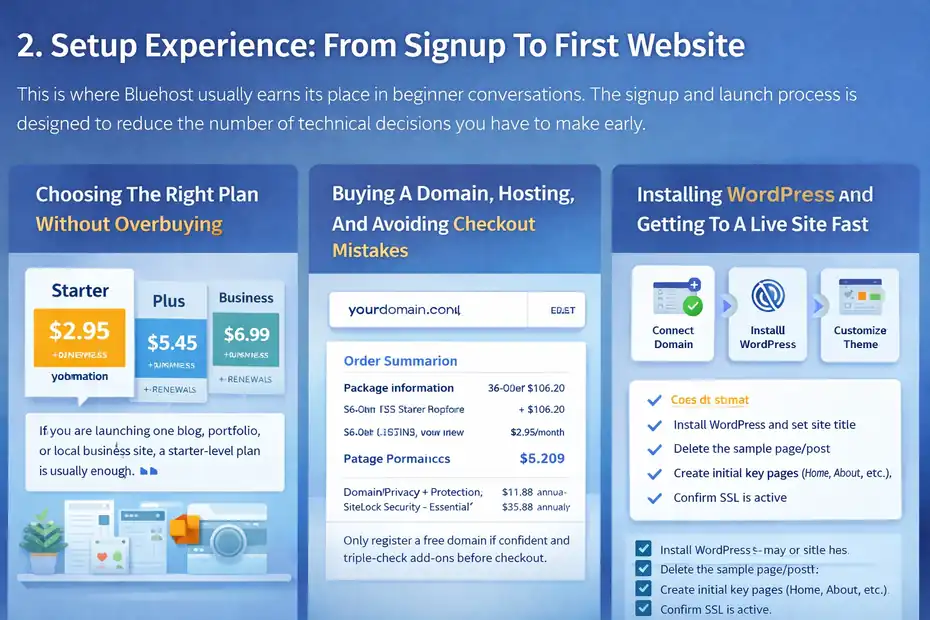
This is where Bluehost usually earns its place in beginner conversations. The signup and launch process is designed to reduce the number of technical decisions you have to make early.
Choosing The Right Plan Without Overbuying
One of the easiest mistakes beginners make is buying based on fear. Hosting companies know that words like “Pro,” “Premium,” or “Business” can make the cheapest plan feel risky. In reality, many new sites can begin on an entry-level plan and upgrade later.
Bluehost’s current entry pricing starts low, with official pages showing starter-level shared or WordPress-style offers beginning around $2.95 per month in promotions, while other comparison pages show higher-tier plans like Business starting at $6.99 per month
The important part is not the intro price alone; it is the renewal price and what features you truly need.
Here is how I would simplify the decision:
- Step 1: Pick the lowest plan that supports your current project, not your imaginary future empire.
- Step 2: Check whether your term length includes the free domain offer.
- Step 3: Read the renewal pricing before checkout so the second billing cycle does not surprise you.
If you are launching one blog, one portfolio, or one local business site, a starter-level plan is usually enough. When I see beginners overpay, it is often because they buy “just in case” resources they never use.
Buying A Domain, Hosting, And Avoiding Checkout Mistakes
Bluehost includes a free domain for the first year on qualifying hosting terms, which is a genuine beginner benefit because it removes one extra setup step.
But there is a catch many people miss: the domain registration fee is typically not refundable even if the hosting is refunded during the guarantee period.
That means you should slow down during checkout and pay attention to add-ons. In my experience, checkout pages are where beginners accidentally spend more than they planned.
A clean checkout approach looks like this:
- Step 1: Register the domain only if you are reasonably confident in the brand name.
- Step 2: Review every optional extra before paying.
- Step 3: Screenshot the intro price, billing term, and renewal terms for your records.
- Step 4: Save the invoice email immediately.
This is boring advice, but it saves real money. If you later decide Bluehost is not for you, the 30-day money-back guarantee can still help on eligible hosting fees, but domains and certain extras are treated differently.
Installing WordPress And Getting To A Live Site Fast
For beginners, Bluehost’s biggest strength is that WordPress setup is not hidden behind technical menus. The platform is designed around guided installation, and its hosting pages lean hard into AI site creation, managed updates on relevant plans, and WordPress-specific support.
Your first launch usually looks like this: sign in, connect domain, install WordPress, choose a starter theme, add a title, create a homepage, then publish. That sounds simple because it is supposed to be simple.
I suggest a very practical first-day checklist:
- Step 1: Install WordPress and set your site title.
- Step 2: Delete the default sample page and post.
- Step 3: Create Home, About, Contact, and one main service or blog page.
- Step 4: Confirm SSL is active so your URL loads with HTTPS.
- Step 5: Set your permalink structure before publishing many pages.
Imagine a first-time food blogger launching “Easy Weeknight Bowls.” Bluehost helps them reach a publishable site quickly, even if they have never touched hosting before. That is not glamorous, but it is valuable.
Speed And Performance: Good Enough Or Frustrating?
Most beginners ask whether Bluehost is “fast.” I think the better question is whether it is fast enough for the type of site you plan to run.
The answer is often yes for small sites, but not always impressive when compared with more performance-focused hosts.
What Bluehost Promises On Performance
Bluehost’s official pages mention NVMe storage, caching, CDN support, and uptime claims of 99.99% on some hosting offers. These are meaningful terms, but let me translate them into plain English.
NVMe means faster storage access than older drive types. Caching means serving stored versions of pages so they load faster. A CDN distributes content across locations so users far from the server can still get faster delivery.
On paper, that is enough to support a solid beginner site. For a brochure site, personal blog, or early affiliate project, these built-in features can make the difference between a sluggish site and a reasonably smooth one.
Still, performance marketing pages are not the same thing as real-world testing. Hosting companies showcase ideal conditions. Your actual speed will depend on theme weight, plugins, images, traffic spikes, and whether you let your homepage turn into a digital garage sale.
I recommend seeing Bluehost’s speed claims as “capability” rather than guaranteed outcome. The tools are there. Whether your site feels fast depends on how cleanly you build it.
What Independent Reviews Suggest
Independent testers do not paint Bluehost as the fastest host available. Website Planet reports typical page loading times of around 2 seconds or more in its testing and described performance as inconsistent.
Themeisle’s March 2025 review presented Bluehost more favorably, showing faster US and EU load times than its tracked market average and 100% uptime in its observed period. Tooltester’s long-running review describes uptime as acceptable but not standout.
That mixed picture is exactly why beginners get confused. One reviewer says it is slow. Another says it performs well enough.
My read is this: Bluehost is not a premium speed host, but it is also not automatically a disaster. It sits in the “good enough for many starter sites” category.
A simple way to think about it:
- Best Case: Lightweight WordPress site, optimized images, few plugins, CDN on, simple theme.
- Worst Case: Heavy multipurpose theme, 25 plugins, giant image files, sliders, popups, and no caching discipline.
In other words, Bluehost performance is very sensitive to beginner behavior. That is actually normal in shared hosting, but it matters more than people think.
How To Make Bluehost Feel Faster Without Changing Hosts
If you end up choosing Bluehost, the smartest move is to optimize before you blame the host. I have seen beginners switch hosting when the real problem was a bloated page builder and 8MB hero images.
Start with the basics:
- Step 1: Use a lightweight WordPress theme.
- Step 2: Compress images before upload.
- Step 3: Keep plugins lean and purposeful.
- Step 4: Turn on caching and CDN where available.
- Step 5: Test homepage speed after every major design change.
A useful rule: Every extra design flourish should “pay rent.” If a plugin adds visual flair but slows down your site and does not improve conversions, remove it.
Imagine a small real estate site on Bluehost. Version A uses autoplay video, giant uncompressed photos, and six homepage widgets. Version B uses compressed photos, one clear call-to-action, and a simple layout. Same host, very different speed experience.
That is why I do not think a Bluehost review for beginners should reduce performance to one number. Speed is partly host quality, but it is also site discipline.
Value For Money: Intro Pricing Vs Real Cost
This is where I advise beginners to stay skeptical.
Bluehost can offer strong entry value, but the real financial story only makes sense when you look at renewal rates, billing terms, and optional extras together.
The Good Side Of Bluehost Pricing
Bluehost’s promotional entry pricing is attractive for beginners because it lowers the barrier to launching a real site. Starting around $2.95 per month on entry offers is cheap enough that many people can experiment without a huge upfront investment. The bundled free first-year domain and SSL improve that value further.
For a beginner, that combination matters more than people admit. Buying hosting, a domain, SSL, and setup help separately can feel fragmented and intimidating. Bluehost turns it into one purchase.
I think the value is strongest when you need convenience more than absolute optimization. For example, if a student launches a portfolio and gets online for a relatively low first-year cost, that is real value even if a power user could squeeze out a better long-term hosting deal elsewhere.
There is also psychological value in reducing moving parts. Beginners often stall because every separate decision feels technical. A bundled platform can help you cross the finish line faster.
The Part That Catches Beginners Off Guard
Renewal pricing is the part many new customers notice only later.
Bluehost’s renewal FAQ lists shared hosting renewals substantially higher than many intro offers, with examples such as Starter renewing at $15.99 monthly on a month-to-month term, $11.99 monthly on a 12-month renewal, or $9.99 monthly on a 36-month renewal. Higher plans renew above that.
That does not make Bluehost deceptive on its own, because the company does publish renewal information. But it does mean the cheapest advertised entry price is not the full story.
I suggest viewing Bluehost like this:
- Year 1 Value: Usually strong for beginners who want convenience.
- Year 2 And Beyond: More debatable unless you still value the platform enough to justify the higher rate.
This is why I always tell beginners to calculate 24-month cost, not just checkout cost. A host that looks slightly pricier upfront can sometimes be cheaper by year two. Bluehost is easiest to justify when simplicity saves you time and launch friction.
Is Bluehost Worth It For Different Types Of Beginners?
Here is my honest breakdown.
For a hobby blogger, Bluehost can be worth it because low intro pricing and easy WordPress setup reduce startup stress. For a local service business, it can be worth even more because getting a site live quickly matters more than benchmark bragging rights.
For a serious affiliate publisher planning lots of content, constant optimization, and aggressive SEO growth, the value depends on how long you stay before upgrading.
A practical scenario helps here. Imagine three people:
- Case 1: A photographer needs a portfolio live this week. Bluehost is a very reasonable pick.
- Case 2: A dentist needs a simple local site with contact forms and service pages. Bluehost is still a strong fit.
- Case 3: A niche publisher plans 300 articles, multiple authors, and advanced optimization. Bluehost may work as a starting point, but not necessarily as the forever home.
So yes, I think Bluehost offers good beginner value, but only if you go in with open eyes about renewals and realistic expectations on performance.
Support, Dashboard, And Day-To-Day Usability
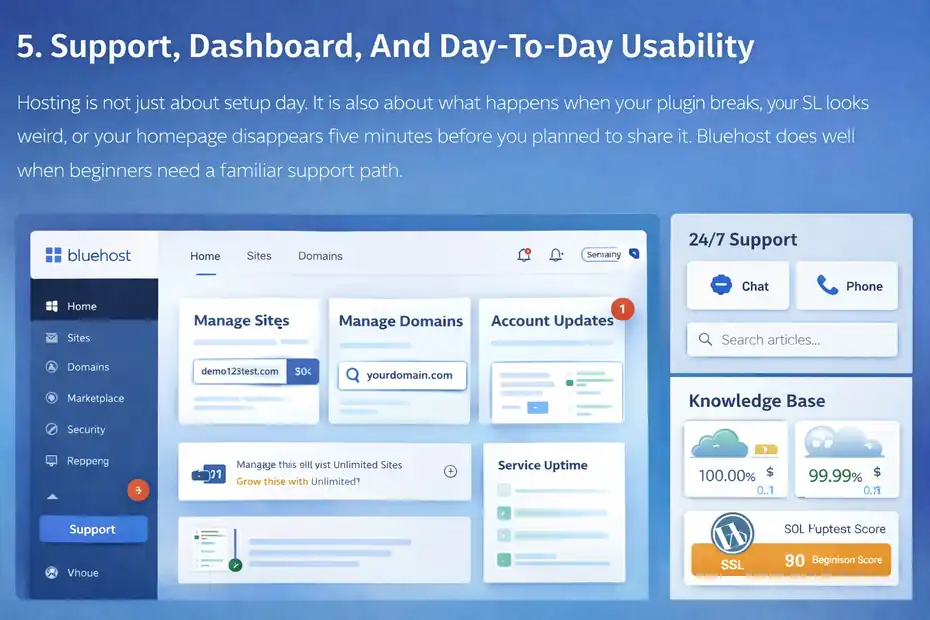
Hosting is not just about setup day.
It is also about what happens when your plugin breaks, your SSL looks weird, or your homepage disappears five minutes before you planned to share it. Bluehost does well when beginners need a familiar support path.
How Beginner-Friendly The Dashboard Feels
I would not call any hosting dashboard beautiful, but Bluehost generally keeps the beginner path visible. Its product pages emphasize account management visibility for billing, renewals, and service upgrades, and that matters because hidden account details create confusion fast.
You can usually manage hosting, domain, WordPress access, and support from one account area. That centralization is underrated. Many beginners struggle less with “technical hosting” than with “too many disconnected interfaces.”
The dashboard experience is not perfect. At times, hosting interfaces can still feel sales-heavy, and beginners may need to slow down before clicking extras or upsells. But overall, Bluehost is easier to navigate than many bare-bones infrastructure-style hosts.
I believe that usability is part of the product’s value. A cleaner, more guided dashboard saves decision energy, and that matters when you are already learning domains, DNS, WordPress, themes, and SEO at once.
What Support Looks Like In Practice
Bluehost’s official contact and support documentation points to 24/7 support availability, with chat and phone options listed for many users and WordPress-trained support emphasized in recent comparison and hosting pages.
That is important because beginners do not just want a knowledge base. They want a human when something feels broken.
I would still set the right expectation: support can help with hosting-level issues, account questions, and some WordPress basics, but support is not your private web strategist. They can often help you get unstuck, but they are not going to redesign your homepage or write your service pages.
Use support wisely:
- Best Use: SSL confusion, login issues, domain connection, migration questions, billing clarifications.
- Not Ideal: Full SEO coaching, custom code debugging, or conversion strategy.
From what I have seen, beginners are happiest when they treat support as a troubleshooting safety net, not a replacement for learning.
Where Bluehost Can Feel Annoying
I do not want to pretend every part is smooth. The most common friction points for beginners are usually upsell pressure, confusion around renewal pricing, and uncertainty about which included features apply to which plan.
That does not mean Bluehost is uniquely guilty. Most mass-market hosting brands do similar things. But it does mean you should buy carefully and document what you selected.
My personal rule is simple: If a feature matters to your decision, confirm it on the specific plan page before checkout. Do not assume every sales page benefit applies to every package in the same way. Bluehost’s plan ecosystem now spans shared, WordPress, store, VPS, and other tiers, so clarity matters.
Common Beginner Mistakes With Bluehost
Most bad Bluehost experiences I see are not caused by the host alone. They come from avoidable beginner mistakes layered on top of normal hosting limitations.
That is actually good news, because it means you can prevent many of them.
Buying The Wrong Plan For The Wrong Project
The first mistake is mismatch. People buy the cheapest plan for a store with lots of products, or they buy a premium plan for a one-page portfolio. Both create frustration.
A basic guideline works well here. If your site is mostly informational and traffic will be light at first, start simple. If you are launching a store, heavy membership site, or resource-intensive project, think harder before choosing the lowest entry option.
I suggest writing down your site type before you buy:
- Blog Or Portfolio: Entry-level hosting is often enough.
- Local Business Site: Starter plans usually work well.
- Online Store Or Heavier Build: Be more careful about resources and growth path.
That one note can prevent overbuying and underbuying at the same time.
Ignoring Renewals And Refund Terms
This one hurts because it is preventable. Bluehost offers a 30-day money-back guarantee on eligible hosting fees, but not everything is refundable, and domains are treated separately. Renewal pricing is also public, but many buyers never read it until later.
I recommend a tiny admin habit that saves a lot of regret: keep a simple note with your purchase date, renewal date, plan name, intro price, and renewal price. It takes two minutes and prevents those “wait, why was I charged that?” moments.
Many of us treat hosting like a set-it-and-forget-it expense, then get surprised a year later. A little attention upfront goes a long way.
Blaming The Host For A Bloated Website
This is the classic beginner trap. A heavy theme, unnecessary plugin stack, oversized images, and poor page design can make almost any budget host feel worse than it is.
I have seen people install page builders, animation packs, social feeds, popup suites, review widgets, and tracking scripts before writing a decent homepage. Then they call the hosting slow.
A smarter sequence is this:
- Step 1: Launch the simplest usable version of the site.
- Step 2: Test speed.
- Step 3: Add one new feature at a time.
- Step 4: Re-test after every addition.
That discipline makes Bluehost feel much more stable for beginners, and frankly it is a good habit on any host.
Advanced Tips If You Start On Bluehost
Bluehost can absolutely be a starting point rather than an endpoint. If you begin there, the goal is to build cleanly enough that scaling later is an upgrade decision, not a rescue mission.
Optimize Early So Migration Stays Optional
The best time to make a site scalable is before traffic arrives. Clean URL structures, compressed media, organized plugins, and a lightweight design stack all make future growth easier whether you stay on Bluehost or move later.
I suggest building with “migration readiness” in mind:
- Tip 1: Keep plugins documented so you know what is essential.
- Tip 2: Avoid theme lock-in when possible.
- Tip 3: Organize content cleanly with categories and templates.
- Tip 4: Back up regularly.
Bluehost now promotes free site migration tools in parts of its product lineup, which is useful both for moving in and for understanding that the company knows migration matters in hosting decisions.
If you ever outgrow shared hosting, a tidy site gives you options.
Use Bluehost As A Launchpad, Not An Excuse To Delay SEO
One thing I really want beginners to hear: hosting is not your ranking strategy. Good hosting supports SEO, but it does not replace content quality, internal linking, topical coverage, technical cleanliness, and user intent alignment.
A beginner often spends five hours comparing hosts and twenty minutes writing the homepage. That is backwards.
Here is the better order:
- Step 1: Get stable hosting.
- Step 2: Publish strong core pages.
- Step 3: Improve on-page SEO and internal links.
- Step 4: Monitor speed and conversions.
- Step 5: Upgrade hosting only when data says you need to.
That is why I still think Bluehost works for many first projects. It gets you into the game quickly. After that, your results are shaped more by execution than by obsessing over hosting forums.
Know When To Stay And When To Upgrade
The smartest Bluehost decision may not be whether to buy it. It may be when to leave it.
Stay if your site is stable, traffic is modest, pages load well enough, and you are still getting value from the convenience. Upgrade if you start seeing resource limits, performance bottlenecks on a well-optimized site, or business costs from slow loading and downtime.
I would look for these upgrade signs:
- Stay: Informational site, light traffic, simple plugin stack, acceptable speed.
- Upgrade: Growing revenue site, heavier WooCommerce use, more complex functionality, or consistently slow performance despite optimization.
- Upgrade: You need more control, stronger performance isolation, or premium support expectations.
That is a healthy way to think about beginner hosting. Not forever. Just right for the current stage.
Final Verdict: Is Bluehost Good For Beginners?
Bluehost is good for beginners when your main goal is getting online quickly with less friction. Its strengths are clear: easy WordPress setup, bundled beginner essentials, a free first-year domain on qualifying terms, SSL, support access, and a dashboard that generally feels manageable for first-time users.
Its weaknesses are also clear: renewal pricing can feel steep after the intro period, performance is decent rather than elite, and you still need to watch checkout extras and keep your site optimized.
My honest opinion is this: Bluehost is not the best host for every situation, but it is still one of the more practical starting points for beginners who want WordPress and do not want a technical mess on day one. I would not choose it because it is the absolute fastest. I would choose it because it makes the first launch easier.
So if your search intent behind “bluehost hosting review for beginners” is really “Will this help me start without making me regret it?” my answer is yes, with conditions. Buy carefully, expect renewals, keep your site lean, and use it as a launchpad. For many first websites, that is a solid deal.
FAQ
What is Bluehost hosting and is it good for beginners?
Bluehost hosting is a web hosting service designed to help users launch websites easily, especially with WordPress. It is considered beginner-friendly because it includes guided setup, a free domain for the first year, built-in security, and a simple dashboard that reduces technical complexity for first-time users.
How easy is it to set up a website with Bluehost?
Setting up a website with Bluehost is straightforward. After purchasing a plan, you can install WordPress in a few clicks, choose a theme, and publish pages quickly. Most beginners can have a basic site live within an hour without needing coding or advanced technical knowledge.
Is Bluehost fast enough for a new website?
Bluehost offers decent performance for beginner websites, especially small blogs or business pages. While it may not be the fastest hosting available, features like caching, CDN integration, and optimized storage help ensure acceptable loading speeds when your site is properly optimized.
Does Bluehost offer good value for money?
Bluehost provides strong value initially with low introductory pricing, a free domain for the first year, and included SSL. However, renewal prices are higher, so it is important to consider long-term costs. For beginners, the convenience and bundled features often justify the initial investment.
What are the main drawbacks of Bluehost for beginners?
The main drawbacks include higher renewal pricing, upsells during checkout, and performance that may not match premium hosts. Beginners should also be aware that some features vary by plan and that optimizing their website is necessary to get the best performance.

I’m Juxhin, the voice behind The Justifiable.
I’ve spent 6+ years building blogs, managing affiliate campaigns, and testing the messy world of online business. Here, I cut the fluff and share the strategies that actually move the needle — so you can build income that’s sustainable, not speculative.
Related posts:
 Bluehost Hosting: Features, Pricing, & Perks
 Bluehost WordPress: 7 Reasons It’s Perfect for Beginners
 How Do I Install WordPress on Bluehost? A Step-by-Step Beginner’s Guide
 Bluehost Cost Explained: What You’ll Really Pay 2025
 Namecheap WordPress Hosting vs Bluehost: Who Wins?
 WP Engine Managed WordPress Hosting Review: Worth Cost?