Table of Contents
Some links on The Justifiable are affiliate links, meaning we may earn a small commission at no extra cost to you. Read full disclaimer.
Bubble app builder review articles often swing too far in one direction. They either treat Bubble like magic or dismiss it because it is not traditional code.
My view sits in the middle. Bubble is one of the few no-code platforms that can genuinely build real, production-grade apps, but it asks a lot from you in return. You will trade coding complexity for product, logic, data, and performance complexity.
That trade can be absolutely worth it. It can also become expensive and frustrating if you pick Bubble for the wrong kind of app or go in expecting a beginner toy.
What Bubble Actually Is And Who It Is For
Bubble is a visual app builder that lets you create full-stack web and mobile apps with a drag-and-drop editor, workflows for logic, a built-in database, hosting, API connections, and now support for web, iOS, and Android app building inside the same platform.
Bubble says it has 5 million builders, 6 million apps, and more than 8,000 plugins in its ecosystem, which helps explain why it remains one of the most established no-code products in the market.
What Bubble Means By “No-Code”
Bubble is not “simple website builder” no-code. That distinction matters. It is closer to a visual programming environment than a template tool.
When you use Bubble, you are still building a real application architecture. You define data types, user flows, permissions, conditions, backend workflows, and integrations. The difference is that you do it visually instead of writing JavaScript, Python, or Swift line by line.
That is why I believe many first-time users misunderstand Bubble. They hear “no-code” and assume “easy.” In practice, Bubble removes syntax, not complexity. You still need to think like a product builder. You need to know what happens when a user signs up, when a payment fails, when records grow, and when search results become slow.
For many of us, that is actually the appeal. Bubble gives you more control than lightweight no-code tools that only work well for forms, dashboards, or directory sites.
If you want to build a SaaS product, internal tool, marketplace, membership platform, client portal, or AI-powered workflow app, Bubble sits in a much stronger position than most beginner-friendly builders.
The Best Fit Use Cases
Bubble works best when your app needs custom logic, user accounts, workflows, and a database that can support more than a simple content site.
Here is where Bubble usually shines:
- SaaS products with subscriptions and role-based dashboards
- Client portals with messaging, file uploads, and approval steps
- Marketplaces with listings, profiles, search, and transactions
- Internal business tools that replace spreadsheets and manual ops
- AI wrappers and workflow tools that connect to APIs
Imagine you are running a small recruiting company. You need employers, candidates, admin users, status pipelines, automated emails, interview scheduling, document uploads, and searchable records. Bubble is a very reasonable choice for that.
Now imagine you want to build a twitchy, animation-heavy multiplayer game or a mobile app that depends deeply on bleeding-edge native device features. That is where I would slow down and question the fit.
Who Should Probably Not Use Bubble
Bubble is a poor match when speed-to-prototype matters more than flexibility, or when your team already has strong developers who can ship quickly in code.
I also would not recommend Bubble to someone who hates systems thinking. If databases, conditions, or debugging logic already make your eyes glaze over, Bubble may feel heavier than expected.
Independent review summaries back up this pattern. Capterra lists Bubble at 4.6 out of 5 from hundreds of reviews, with common praise around flexibility and launch speed, but recurring complaints about the learning curve and some performance limits.
G2 review summaries show a similar split: users like the platform’s power and customization, but repeatedly mention that advanced use gets harder fast.
How Bubble Works Under The Hood
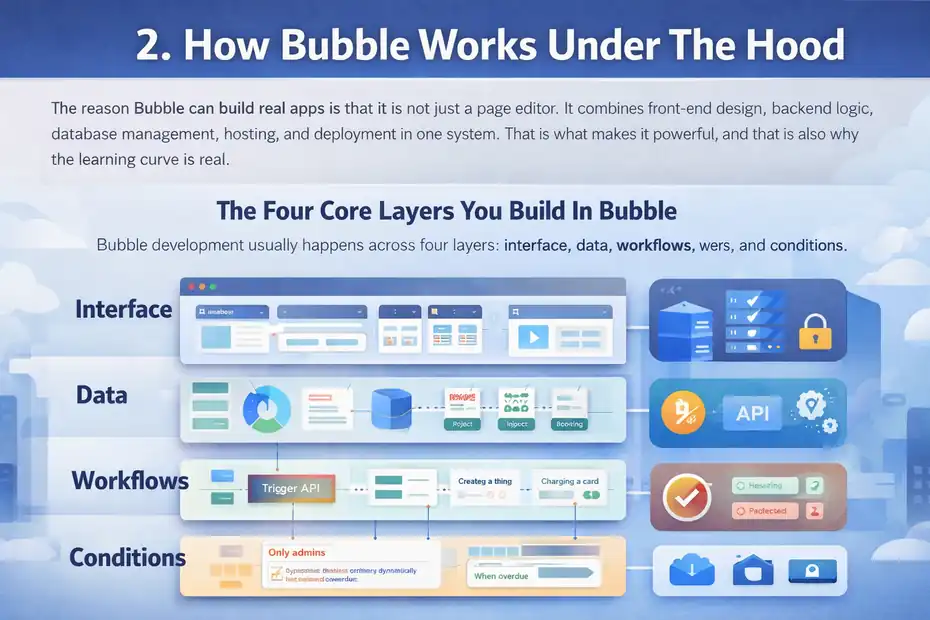
The reason Bubble can build real apps is that it is not just a page editor. It combines front-end design, backend logic, database management, hosting, and deployment in one system.
That is what makes it powerful, and that is also why the learning curve is real.
The Four Core Layers You Build In Bubble
Bubble development usually happens across four layers: interface, data, workflows, and conditions.
The interface layer is your visual UI. You place containers, inputs, repeating groups, tabs, and other elements. This is what users see.
The data layer is your database structure. You create data types like User, Project, Invoice, or Booking, then add fields and relationships between them.
The workflow layer is your logic engine. A button click can create a thing, update a thing, charge a card, send an email, trigger an API, or schedule backend work.
The condition layer controls dynamic behavior. Show this button only for admins. Change the badge color when status is overdue. Hide pricing until a plan is selected.
When Bubble clicks for someone, it is usually because they suddenly realize these layers can replace much of what a traditional dev stack would require.
Why Bubble Feels Powerful Faster Than Code
Bubble’s homepage positions the platform as a way to switch between AI prompting and visual editing while building full-stack web and mobile applications, with built-in hosting and security included. That bundled approach is one of Bubble’s biggest strengths. You are not stitching together five services just to get an MVP online.
In real life, that means you can move from idea to functioning app surprisingly fast. A founder can build sign-up, login, dashboard, CRUD actions, admin views, and API-driven features without waiting on a full engineering team.
I have seen this be especially valuable in messy businesses where the workflow is changing every week. When the process is still being discovered, a visual builder can be faster than repeatedly rewriting code.
The key point, though, is this: Bubble is fastest when you know what you are trying to build. If your product thinking is fuzzy, Bubble will not rescue you. It will simply let you build confusion faster.
The Hidden Cost Of Visual Development
The visual interface makes building feel easier at first, but it can also hide complexity until later.
For example, it is very easy to create a page that “works” for 50 records and becomes painful at 50,000 records. It is easy to add conditions everywhere until the page becomes hard to debug. It is easy to make workflows that technically function but consume more server resources than necessary.
Bubble’s own documentation is honest here. It notes that app performance is heavily impacted by how the app is built, and that pages fetching less data and using simpler structures generally perform better.
That is why I tell people this: Bubble rewards clean architecture almost as much as code does. The platform is forgiving early, but not forever.
Setting Up Your First Real App In Bubble
Getting started with Bubble is straightforward. Building something worth launching is where the real work begins.
This section is where a proper bubble app builder review needs to go beyond marketing and talk about the actual setup path.
Start With Data Before You Design
Most beginners open Bubble and start dragging UI blocks around. I think that is backwards.
Start with the database. List the core objects your app needs. For a project management app, that might be User, Workspace, Project, Task, Comment, and Subscription. For a marketplace, it might be User, Listing, Category, Message, Booking, and Review.
Then define relationships. Can a user belong to many workspaces? Can a task have many comments? Does a booking belong to one listing and one customer?
This is boring compared to picking colors, but it is what separates real apps from pretty mockups.
A useful shortcut is to write user stories first:
- A customer can create an account
- A customer can save multiple addresses
- An admin can approve or reject orders
- A provider can update availability
- A user can only see their own private records
Those stories naturally reveal your data structure and privacy needs.
Build One Core Workflow First
Before you create ten pages, build one important workflow from start to finish.
For example, if you are making a client portal, your first complete workflow could be:
- User signs up
- User creates a project request
- Admin receives the request
- Admin updates the request status
- User sees the updated status in their dashboard
That single path tells you whether your database, pages, permissions, and logic make sense together.
Bubble’s docs include a getting started section for new builders, but I think the real lesson is more strategic than technical: do not build wide too early. Build deep first.
A narrow but complete workflow exposes problems quickly. A half-built app with twelve unfinished sections gives you fake progress.
Use Templates Carefully, Not Lazily
Bubble has a large marketplace with templates, plugins, expert partners, and coaching resources. That ecosystem is a genuine advantage because it shortens the path to learning and shipping.
That said, I suggest treating templates like scaffolding, not finished product.
Templates are helpful when:
- You want to understand a common app pattern
- You need a layout starting point
- You want to inspect a working workflow
Templates become dangerous when:
- You inherit messy architecture you do not understand
- You force your business into someone else’s data model
- You spend more time unpicking template logic than building your own
In my experience, Bubble users often overbuy templates and plugins early, then later realize they built on top of decisions they never would have made themselves.
Bubble’s Biggest Strengths In Real-World Use
Bubble earns its reputation because it can do more than most no-code tools once you move beyond simple apps. This is the part where the platform justifies the attention.
You Can Build More Custom Logic Than Most No-Code Tools Allow
This is the number one reason serious builders choose Bubble.
You are not limited to fixed app patterns. You can build custom states, backend workflows, API-driven automations, approval systems, user role logic, conditional experiences, and fairly complex relational data behavior.
That flexibility matters when your product is not just “a form connected to a spreadsheet.” It matters when your idea includes exception handling, subscriptions, permissions, onboarding paths, or multi-step processes.
A practical example: An agency could use Bubble to create a white-labeled client portal where clients upload briefs, request revisions, track deliverables, pay invoices, and receive milestone updates. That is not a toy use case. That is operational software.
This is why Bubble has stayed relevant while many no-code tools remain stuck in “nice for prototypes” territory.
Bubble’s Built-In Stack Speeds Up MVP Launches
Bubble’s official positioning is that you can build, host, secure, and deploy from one platform. For founders, that simplicity is a huge deal. Bubble also now includes native mobile app tooling alongside web app building, which expands what one platform can cover.
Instead of managing separate backend, hosting, database, and deployment layers, you can work inside one editor.
That reduces technical overhead in the early stage. It also changes the economics of idea testing. Bubble says you can start free, then move to paid plans when you are ready to launch, and its own 2026 content contrasts that with traditional development costs that can run from thousands to hundreds of thousands of dollars depending on complexity.
Do I think Bubble replaces engineers forever? No. But I absolutely think it can save a founder from spending $20,000 proving nobody wants the product.
The Ecosystem Is Mature Enough To Matter
A mature ecosystem is easy to underrate until you use a platform that does not have one.
Bubble’s marketplace includes plugins, templates, agencies, freelancers, and coaching resources. Bubble’s site also highlights thousands of templates and more than 8,000 plugins. That means you are rarely solving every problem from zero.
This helps in three ways. First, you can move faster. Second, you can learn by seeing how other builders solved similar problems. Third, you can hire help without leaving the ecosystem.
I would still be careful with plugins because too many can create maintenance headaches. But compared with smaller no-code tools, Bubble gives you a wider support network once your app becomes serious.
Where Bubble Gets Hard And Frustrating
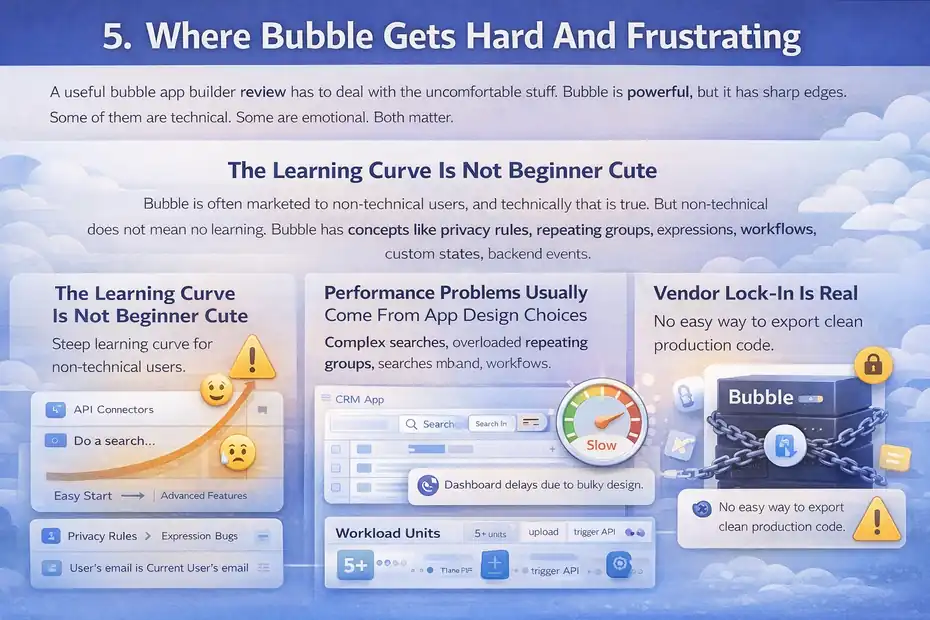
A useful bubble app builder review has to deal with the uncomfortable stuff. Bubble is powerful, but it has sharp edges. Some of them are technical. Some are emotional. Both matter.
The Learning Curve Is Not Beginner Cute
This is the biggest gap between expectation and reality.
Bubble is often marketed to non-technical users, and technically that is true. But non-technical does not mean no learning. Bubble has concepts like privacy rules, repeating groups, expressions, workflows, custom states, backend events, API connectors, branching, and workload. That is a lot.
User review summaries consistently mention this. Capterra reviews describe Bubble as powerful but with a steep learning curve. G2 review summaries and public pros-and-cons pages echo that advanced features are where many users struggle.
My honest take is that Bubble feels easier than code for the first 20 percent, then harder than expected for the next 50 percent. Once you internalize how Bubble thinks, it becomes much more intuitive. But that middle stretch can be rough.
Performance Problems Usually Come From App Design Choices
Bubble can scale, but not all Bubble apps scale well.
Its documentation says performance depends heavily on how the app is built, and it specifically warns that fetching less data and keeping pages simpler improves speed.
Bubble also explains that scaling is tied to workload units, which track the server effort behind things like queries, workflows, uploads, and API calls.
This means sloppy architecture has consequences. A repeating group with poor search constraints, too many conditional expressions, or an overloaded dashboard page can become expensive and slow.
A simple scenario: You launch a CRM app and every manager dashboard loads thousands of records, each with multiple searches and calculations on page load. The page may “work,” but it may feel heavy and eat workload fast. The issue is not that Bubble is fake. The issue is that you built a real app with real inefficiencies.
Vendor Lock-In Is Real
Bubble lets you move fast because it abstracts a lot. The downside is that much of your app logic lives in Bubble’s system.
That is convenient while building. It is less convenient if you later want to migrate to a coded stack. There is no magical one-click export that turns your Bubble app into clean production code.
For some businesses, that is acceptable. For others, especially VC-backed startups expecting a later engineering handoff, this can be a strategic concern.
I do not think vendor lock-in is an automatic deal-breaker. I think it is a deal-breaker only when you ignore it at the beginning and treat it like a surprise later.
Pricing, Workload, And What Bubble Really Costs
Pricing is where many reviews become vague. I would rather be direct. Bubble can be affordable for MVPs and still become meaningfully expensive as your app grows or your team needs advanced features.
Current Bubble Pricing At A Glance
As of March 2026, Bubble’s web and mobile plans start with a Free plan, then Starter at $59 per month billed annually, Growth at $209 per month billed annually, and Team at $549 per month billed annually.
The Free plan includes 50K workload units per month, Starter includes 175K, Growth includes 250K, and Team includes 500K. The paid plans also layer in things like version control, more editors, branch limits, server logs, and mobile build submissions.
That pricing structure tells you something important. Bubble is not trying to compete as the cheapest simple app tool. It is pricing itself more like a serious application platform.
For a founder validating an idea, $59 per month is very reasonable. For a bootstrapped team with multiple builders, branches, and rising workload needs, the bill can climb.
Why Workload Confuses New Users
Bubble measures server consumption in workload units, or WU. Its docs say workload tracks the resources needed to host, run, and scale your app, including activities like database queries, workflows, uploads, and API communication. Bubble also allows pre-purchased workload tiers and flexible overages if usage exceeds your monthly allotment.
This model is logical from an infrastructure perspective, but it is not always intuitive for beginners.
The challenge is that your costs are influenced by how elegantly you build. Two apps with the same user count may consume very different workload depending on page design, search efficiency, and backend workflow patterns.
I recommend treating workload like performance budget, not just hosting budget. Track it early. Do not wait until launch week.
What Bubble Costs In Practice
Here is my practical way to think about it.
Bubble is cheap when:
- You are replacing custom development for an MVP
- Your workflows are focused and efficient
- One or two builders can manage the product
Bubble gets expensive when:
- You pile on plugins and external services
- Your app is inefficiently structured
- You need more collaboration, branches, submissions, or workload
That does not mean Bubble is overpriced. It means Bubble punishes messy scaling more visibly than flat-rate tools do.
Can Bubble Build Real Apps Or Just MVPs?
This is the question behind almost every bubble app builder review.
My answer is yes, Bubble can build real apps. But “real” needs to be defined honestly.
Yes, Bubble Can Launch Production Products
Bubble’s own site showcases apps across marketplaces, internal tools, AI SaaS, travel, subscriptions, and more. It also highlights customer stories about getting functional products live in weeks rather than months.
That alone does not prove quality, of course. But the platform’s capabilities do support real product launches: custom domains, live deployment, database-backed logic, recurring workflows, APIs, user accounts, native mobile tooling, and version control across paid plans.
In other words, Bubble is not merely for clickable prototypes.
A well-built Bubble app can absolutely power a real business with real users, payments, and operations. Plenty already do.
The Better Question Is What Kind Of “Real App” You Need
Not all real apps are the same.
A founder-run SaaS with a few thousand users, admin tooling, subscriptions, and API-connected features is one kind of real app. Bubble can be great there.
A consumer app needing ultra-smooth custom interactions, complex offline behavior, bleeding-edge native features, or extreme engineering control is also a real app. Bubble may be less ideal there.
I suggest evaluating Bubble across three dimensions:
- Product complexity: Can the logic be expressed visually without becoming chaos?
- Performance sensitivity: Will your app suffer if data and workflows are not tightly optimized?
- Strategic flexibility: Are you comfortable building deeply inside Bubble’s ecosystem?
Answer those honestly, and the decision becomes much clearer.
My Verdict On The “Real Apps” Question
Yes, but with a condition: the app must fit Bubble’s strengths, and the builder must respect architecture.
That is why some Bubble apps impress people and others feel clunky. The difference is rarely whether Bubble is “real.” The difference is usually whether the product was designed carefully.
Common Mistakes New Bubble Builders Make
Most Bubble pain is self-inflicted. That is not an insult. It is actually encouraging, because it means many problems are preventable.
Designing Pages Before Defining Logic
This is the classic mistake. A new user creates pretty screens, only to discover the workflows and data model do not support the experience.
The fix is simple: Define user actions first. What should happen when someone upgrades, cancels, submits, filters, edits, or invites? Then build the UI around those actions.
A decent-looking app with strong logic beats a beautiful app with broken flows every time.
Ignoring Privacy Rules Until Late
Bubble lets you control data access through privacy rules. That is powerful, but it is also easy to postpone.
Please do not postpone it.
If you are building anything with user-specific records, internal notes, customer data, or role-based access, privacy should be planned from the start. Otherwise, you may end up rebuilding major pieces of the app after launch prep.
For many founders, this is the moment Bubble stops feeling like a toy and starts feeling like actual software building. That is a good thing.
Overusing Plugins And Page-Level Searches
Plugins are tempting because they promise quick wins. Sometimes they deliver. Sometimes they create dependency debt.
Likewise, too many page searches, nested groups, and repeated calculations can quietly make your app slower and more costly.
Bubble’s own performance guidance strongly favors lighter data fetching and simpler page structures. That advice may sound obvious, but it is where many apps win or lose.
My rule is simple: Use plugins when they save meaningful implementation time or enable something genuinely hard. Do not use them as a substitute for understanding your app.
Advanced Tips To Make Bubble Work Better At Scale
Once the basics are stable, Bubble becomes much more enjoyable. This is where you move from “I made it work” to “I built it well.”
Separate Heavy Logic From The Page Experience
Try to keep user-facing pages light. Move heavy or repetitive work into backend workflows when possible.
For example, instead of recalculating dashboard metrics live every time a page loads, precompute summaries on a schedule or when triggering events happen. Instead of searching giant datasets loosely, constrain searches based on user role, date range, or workspace.
This reduces perceived lag and often lowers workload waste.
I have found that Bubble apps feel dramatically more professional when the visible interface does less thinking in real time.
Use Branching And Versioning Like A Real Product Team
Bubble’s paid plans include version control, with higher tiers unlocking more advanced collaboration and branch allowances. That matters more than many solo founders realize.
If your app is live, do not edit recklessly in production. Use branches for experiments, major features, and risky workflow changes. Treat releases with discipline.
A lot of Bubble horror stories are not platform failures. They are release management failures.
Monitor Workload Early, Not Just After Growth
Bubble’s docs explain that workload reporting can help you understand how your app consumes resources over time. This is one of the most practical parts of the platform, and I think more users should pay attention to it sooner.
Even if you are small, look at which pages, workflows, and operations are doing the most work. That gives you early warning before scale amplifies the problem.
Think of it like analytics for app health. Traffic tells you whether people are showing up. Workload tells you whether your app can handle them economically.
Final Verdict: Is Bubble Worth It In 2026?
Bubble remains one of the strongest no-code platforms for building genuinely functional apps in 2026, especially if you need custom workflows, a built-in backend, and the ability to launch both web and mobile products from one ecosystem.
It is not the easiest builder, but it is one of the most capable.
Who I Recommend Bubble To
I recommend Bubble to founders, operators, consultants, agencies, and product-minded teams who want meaningful control without hiring a full engineering team on day one.
It is a strong choice when:
- You need custom logic, not just simple forms
- You want to validate a serious product quickly
- You are willing to learn app architecture, not just drag blocks
- You can accept platform lock-in in exchange for speed
If that sounds like you, Bubble can be a very smart leverage play.
Who Should Choose Something Else
I would look elsewhere if your main priority is absolute simplicity, low learning commitment, or maximum code portability later.
I would also hesitate if your app depends on cutting-edge native behavior, very custom front-end interactions, or engineering patterns that need fine-grained control outside Bubble’s model.
Those are not flaws so much as boundaries. Every platform has them.
My Honest Review Score
If I were rating Bubble for real-world builders, I would give it this:
- Capability: 9/10
- Ease Of Use For Beginners: 5/10
- MVP Speed: 8.5/10
- Long-Term Flexibility Inside Bubble: 8/10
- Long-Term Flexibility Outside Bubble: 4/10
- Value For The Right Use Case: 8/10
Overall, I would rate Bubble 8/10 for the right person and 4/10 for the wrong one.
That is probably the fairest conclusion I can give. Bubble is not hype-only, and it is not a gimmick. Yes, you can build real apps with it. But you need to treat it like a real app platform, not a shortcut that removes the need for product thinking. If you do that, Bubble can take you a lot farther than most people expect.
FAQ
What is Bubble app builder used for?
Bubble is a no-code platform used to build web and mobile applications without traditional coding. It allows users to create full-stack apps with databases, workflows, and user interfaces. Many founders use it to launch SaaS tools, marketplaces, and internal business systems quickly and cost-effectively.
Can you build real apps with Bubble?
Yes, Bubble can build real, production-ready applications with user authentication, payments, APIs, and complex workflows. It is commonly used for SaaS products and business tools. However, performance and scalability depend heavily on how well the app is structured and optimized.
Is Bubble good for beginners?
Bubble is beginner-friendly in terms of not requiring coding, but it has a steep learning curve. Users must understand logic, workflows, and databases. Many beginners can build basic apps quickly, but mastering Bubble for complex projects takes time and consistent practice.
How much does Bubble cost?
Bubble offers a free plan and paid plans starting around $59 per month. Pricing increases based on features and workload usage, which measures app activity like database queries and workflows. Costs can grow as your app scales or requires more advanced functionality.
What are the limitations of Bubble?
Bubble’s main limitations include performance challenges for poorly optimized apps, vendor lock-in, and a learning curve for advanced features. It may not be ideal for highly complex, performance-heavy, or deeply native mobile applications requiring full engineering control.

I’m Juxhin, the voice behind The Justifiable.
I’ve spent 6+ years building blogs, managing affiliate campaigns, and testing the messy world of online business. Here, I cut the fluff and share the strategies that actually move the needle — so you can build income that’s sustainable, not speculative.