
Table of Contents
Some links on The Justifiable are affiliate links, meaning we may earn a small commission at no extra cost to you. Read full disclaimer.
Thinkific review for course creators searches usually come from one honest question: Is this platform actually going to help me build, sell, and grow a course business without making everything harder? I get why you’d ask.
Course platforms can look almost identical from the outside, but once you start uploading lessons, setting prices, managing students, and trying to improve sales, the differences become very real.
In this review, I’ll walk you through Thinkific from a practical creator’s point of view, including features, pricing, setup, limitations, best use cases, and whether it is worth your time.
What Thinkific Is And Who It Is Really For
Thinkific is an online course platform built to help creators, educators, coaches, and businesses create, host, sell, and manage learning products.
It supports courses, communities, digital downloads, memberships, coaching, webinars, landing pages, checkout, analytics, and learner management in one place.
What Thinkific Does In Simple Terms
Thinkific gives you the main pieces you need to run an online learning business without building everything from scratch. You can create a course, upload videos and resources, organize lessons into chapters, build a sales page, take payments, enroll students, and track progress from the same dashboard.
The big benefit is that Thinkific removes a lot of technical friction. Instead of stitching together a video host, website builder, checkout tool, student login system, certificate tool, and community app, you can keep most of the learning experience under one roof.
That does not mean Thinkific replaces your entire business stack. You may still use an email marketing platform, a CRM, a webinar tool, or analytics software depending on your growth stage. But for the core job of delivering paid education online, Thinkific gives you a strong base.
In my experience, Thinkific feels most useful when you care about structured learning. If your product is just a simple PDF or a one-hour workshop replay, it may feel heavier than you need. But if you want organized modules, student progress, quizzes, certificates, discussions, bundles, and memberships, it starts to make more sense.
A simple scenario: Imagine you teach beginner photography. With Thinkific, you could create a free starter course, a paid flagship course, a private student community, and a bundle that includes downloadable editing presets. That is where the platform starts to feel like a real course business system rather than just a content library.
Who Should Consider Thinkific
Thinkific is best for course creators who want control over their learning experience but do not want to code or manage custom software. It works well for solo creators, consultants, coaches, professional trainers, and small education businesses that need a clean way to package expertise.
I believe Thinkific is especially strong for creators who already have knowledge, an audience, or a repeatable teaching process. You do not need to be famous, but you should have a clear learning outcome. A course called “How To Use Canva” is too broad. A course called “Create 30 Days Of Instagram Content In Canva In One Weekend” is much easier to sell and deliver.
It also fits businesses that use education as part of customer success. For example, a software company might use Thinkific to train customers, reduce support questions, and help users adopt the product faster. Thinkific’s higher-tier and Plus features make more sense for this kind of use case because teams often need more reporting, admins, integrations, and structured learning paths.
For beginners, Thinkific can be a good starting point if you are serious about selling courses and want room to grow. Still, I would not suggest paying for advanced features before validating your idea. Start with one focused course, prove people want it, then upgrade when the missing features are clearly costing you time or revenue.
Who Thinkific May Not Be Right For
Thinkific is not perfect for every creator. If you mainly want a lightweight checkout for digital files, a simple landing page builder may be enough. If you want a full marketing automation machine with complex funnels, advanced email behavior, and deep CRM workflows built in, Thinkific may need help from other tools.
The platform also may feel limited if you want full design freedom. You can build branded course sites and landing pages, and higher plans include deeper design control such as HTML and CSS customization, but it is not the same as building a completely custom website.
Another case where Thinkific may not be ideal is if your business depends heavily on live cohort learning with complex scheduling, breakout groups, and real-time facilitation workflows. Thinkific can support live learning through coaching, webinars, communities, and integrations, but the core platform still shines more as a structured course and learning product system.
Here’s the honest filter I recommend: If your main product is education, Thinkific deserves a serious look. If your main product is content access, downloads, or a newsletter-style membership, you may want to compare simpler options before committing.
How Thinkific Works From Course Idea To Student Delivery
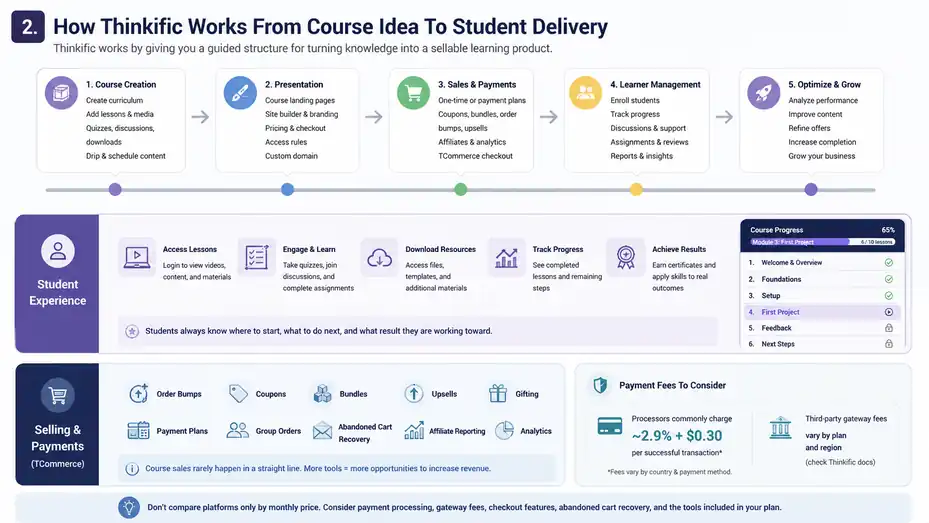
Thinkific works by giving you a guided structure for turning knowledge into a sellable learning product.
You build the course, design the student experience, publish sales assets, accept payments, and manage learners from the admin area.
The Basic Workflow Inside Thinkific
The usual workflow starts with your course curriculum. You create chapters, add lessons, upload media, and decide how students move through the material. Thinkific supports common course content such as video lessons, quizzes, student discussions, downloads, and scheduled content release.
Once the course structure is ready, you move into presentation. This includes your course landing page, pricing, checkout settings, branding, and access rules. Thinkific’s site builder lets you create branded websites and landing pages, which is helpful if you do not already have a separate website.
After that, you connect your sales flow. You can offer one-time payments, limited-duration access, coupons, bundles, order bumps, and payment plans depending on your plan and payment setup. These features matter because the way you package a course often affects revenue as much as the course content itself.
Then comes learner management. You can enroll students, track progress, support discussions, review assignments on eligible plans, and use reporting to understand how people move through the course.
The course creator’s job does not end at launch. Your best insights usually come from seeing where students stop, what questions they ask, and which lessons create the most momentum.
What The Student Experience Looks Like
From the student’s side, Thinkific gives learners a login-based course experience. They can access lessons, watch videos, download resources, complete quizzes, join discussions, and move through the curriculum based on the access rules you set.
A good student experience is not just about a pretty course player. It is about clarity. Students should always know where to start, what to do next, how long each step will take, and what result they are working toward. Thinkific gives you the container, but you still need to design the journey.
For example, instead of uploading 45 random video lessons, you might create five modules: Foundations, Setup, First Project, Feedback, and Next Steps. Each module should feel like a small win. When students feel progress early, completion rates usually improve.
Thinkific’s completion certificates, assignments, compliance tools, and live lessons are available on higher plans, which can be useful for courses where accountability matters. Certificates can motivate learners, assignments can help you review real work, and compliance tools can prevent students from skipping required material.
My advice is simple: Do not build the course around what the platform can do. Build it around what the student needs to accomplish. Then use Thinkific features only when they make that outcome easier.
How Thinkific Handles Selling And Payments
Thinkific includes commerce tools so you can sell learning products without manually invoicing every student. Its TCommerce system is Thinkific’s native checkout and payment infrastructure, and Thinkific says it includes features such as order bumps, gifting, group orders, abandoned cart recovery, flexible payment options, PayPal support, coupons, bundles, upsells, affiliate reporting, and analytics depending on the plan.
This is important because course sales rarely happen in a perfectly straight line. Someone might visit your landing page, leave, come back through an email, use a coupon, choose a payment plan, and then buy an extra resource at checkout. The more your platform supports those moments, the easier it is to improve revenue without rebuilding your setup.
That said, payment fees deserve attention. Thinkific’s support documentation says payment processors commonly charge around 2.9% + $0.30 per successful transaction, though exact fees vary by country and payment method. Thinkific also lists third-party payment gateway fees for creators using third-party processors in certain regions, with rates shown by plan.
For a beginner, the practical takeaway is this: Do not compare course platforms only by monthly subscription price. Look at payment processing, gateway fees, transaction rules, checkout features, abandoned cart recovery, and whether the plan includes the sales tools you actually need.
Thinkific Pricing: What You Actually Pay For
Thinkific pricing matters because the “right” plan depends less on your ego and more on your business model.
A new creator selling one self-paced course has very different needs from a company training thousands of customers.
Thinkific Plan Comparison
Thinkific currently lists Basic at $49/month or $36/month billed annually, Start at $99/month or $74/month billed annually, Grow at $199/month or $149/month billed annually, and Plus as a custom plan for high-growth businesses and teams. Thinkific says prices are in USD and charged per site, with applicable taxes added at checkout.
| Plan | Monthly Price | Annual Price | Best Fit | Key Notes |
|---|---|---|---|---|
| Basic | $49/month | $36/month | New course businesses | Unlimited courses, 1 community, 5 digital downloads, basic sales tools |
| Start | $99/month | $74/month | Growing creators | Adds certificates, assignments, compliance tools, memberships, subscriptions, payment plans |
| Grow | $199/month | $149/month | Scaling businesses | Adds more communities, enhanced analytics, group orders, invoicing, API/webhooks |
| Plus | Custom | Custom | Larger teams and academies | Adds enterprise-style features such as unlimited users/products, SCORM, learning paths, SSO, advanced analytics |
The Basic plan is attractive because it gives you unlimited published courses and a custom domain. That is enough for many creators to launch professionally without overbuying. But Basic does not include some important learning and monetization tools, such as certificates, assignments, compliance tools, paid memberships, product bundles, and certain advanced sales options.
Start is where Thinkific becomes more serious for course creators who want recurring revenue, structured student accountability, and better monetization. I would look closely at Start if your course needs certificates, assignments, memberships, subscriptions, payment plans, or Zoom-based live learning.
Grow is better when operations start getting heavier. If you need group orders, invoicing, more communities, API/webhooks, stronger analytics, more admin roles, or better support, Grow starts to justify itself. But I would not jump there too early unless those features clearly support revenue or reduce admin work.
Hidden Or Easy-To-Miss Costs
The first easy-to-miss cost is payment processing. Every platform that accepts card payments has some form of payment processing cost, and Thinkific’s help center notes that processors often charge around 2.9% + $0.30 per successful transaction, though exact costs depend on location and payment method.
The second cost is third-party payment gateway fees. Thinkific’s support page states that third-party payment gateway fees apply to transactions processed through third-party providers for creators in certain regions, with listed rates by plan: Basic 5.0%, Start 2.0%, Grow 1.0%, Expand 0.5%, and Plus no fee at the time shown.
The third cost is your surrounding marketing stack. Thinkific can help with landing pages, checkout, email automation, analytics, and sales tools, but many creators still add tools for email newsletters, funnels, design, webinars, customer support, or advanced analytics. Those costs can quietly become bigger than the course platform itself.
The fourth cost is your time. I know that sounds boring, but it is real. If you choose a cheaper setup that takes 12 extra hours per month to manage, it may not actually be cheaper. A platform that saves admin time can pay for itself once your course has consistent sales.
Which Plan I Would Choose
For most new creators, I would start with Basic only if the course is simple and self-paced. You can publish unlimited courses, use a custom domain, create a community, offer digital downloads, use basic sales tools, and access reporting. That is enough to validate your offer without taking on a large monthly cost.
I would choose Start if the course depends on accountability or recurring revenue. Certificates, assignments, compliance tools, memberships, subscriptions, payment plans, and live learning options are not “nice extras” if they directly support your offer. For example, a certification-style course without certificates feels incomplete.
I would choose Grow when the course business is already working and the bottleneck has shifted from “Can I sell this?” to “Can I manage this efficiently?” Group orders, invoicing, API/webhooks, enhanced analytics, more communities, and priority support become more valuable when you have more buyers, partners, teams, or reporting needs.
My personal rule: Pick the cheapest plan that does not weaken your promise to the student. If a feature affects learning outcomes, sales conversion, or your ability to deliver professionally, it may be worth paying for. If it only sounds impressive, wait.
Course Creation Features: Where Thinkific Feels Strong
Thinkific’s course creation features are one of its strongest areas, especially for creators who want a structured, professional course without building a custom learning management system.
The platform gives you enough control to create a real learning journey, not just a folder of videos.
Drag-And-Drop Course Builder
The drag-and-drop course builder lets you organize course content visually using chapters, lessons, and media types. Thinkific describes it as a way to build courses using lessons, chapters, and media, with support for free, paid, private, hidden, on-demand, and scheduled courses.
This matters because curriculum structure is one of the biggest differences between a course that gets finished and a course that gets abandoned. A messy course makes students feel lost. A clear course helps them feel guided.
When building in Thinkific, I suggest starting with the result, not the content. Ask: What should the student be able to do by the end? Then reverse-engineer the modules. Each module should answer one question, solve one problem, or create one milestone.
Example: Instead of “Module 1: Introduction,” try “Module 1: Choose Your Course Topic And Validate Demand.” That tells the student exactly what outcome they are moving toward.
A practical build sequence could look like this:
- Step 1: Outline The Outcome: Define the transformation students should achieve.
- Step 2: Break It Into Milestones: Turn the transformation into 4–8 modules.
- Step 3: Add Lessons: Keep each lesson focused on one action or concept.
- Step 4: Add Resources: Include worksheets, templates, checklists, or examples only where they help.
- Step 5: Review The Flow: Remove anything that does not move students forward.
Thinkific makes course assembly easier, but the real quality still comes from your instructional design. The tool can host your course. It cannot decide what your students need most.
Video, Quizzes, Discussions, And Downloads
Thinkific supports common course content such as video lessons, quizzes, student discussions, and digital downloads. The Basic plan includes unlimited courses with video lessons, quizzes, and student discussions, plus five digital downloads. Higher plans increase access to additional learning and sales features.
Video is usually the heart of many online courses, but I recommend not relying on video alone. Students learn better when they can apply the lesson immediately. That is where quizzes, downloads, assignments, discussions, and examples help.
For instance, if you teach copywriting, a video explaining headlines is useful. But a headline swipe file, a quiz on weak vs. strong headlines, and a discussion prompt where students post three headline drafts will create a much stronger learning experience.
Thinkific’s discussions can help reduce the lonely feeling that many self-paced courses create. Even a simple prompt like “Share your first draft and one thing you are unsure about” can increase engagement. You do not need to turn every course into a social network. You just need students to feel seen enough to keep going.
Digital downloads are useful when they save effort. Good examples include templates, calculators, checklists, scripts, worksheets, and implementation plans. Bad examples include bloated PDFs that repeat the video. Every resource should help the student take action faster.
Certificates, Assignments, And Compliance Tools
Thinkific includes completion certificates, assignments, and course compliance tools on the Start plan and above. Certificates automatically recognize completion, assignments let learners submit work for review, and compliance tools can require students to complete certain lessons or videos before moving forward.
These features are most valuable when your course promises a skill, certification, professional improvement, or measurable outcome. A certificate may not matter much for a hobby course, but it can matter a lot for workplace training, coaching programs, professional development, or customer education.
Assignments are especially useful when the student’s success depends on implementation. If you teach business strategy, marketing, design, writing, fitness programming, or software setup, student submissions help you catch misunderstandings before they become frustration.
Compliance tools are worth using carefully. Requiring every second of every video can annoy motivated students, especially if they are reviewing material. But for required training, onboarding, or certification programs, compliance can protect the integrity of the learning path.
My advice: Use accountability features where they improve outcomes, not where they simply make the course feel more formal. A course can be rigorous without being annoying. The goal is progress, not control.
Website, Landing Pages, And Branding
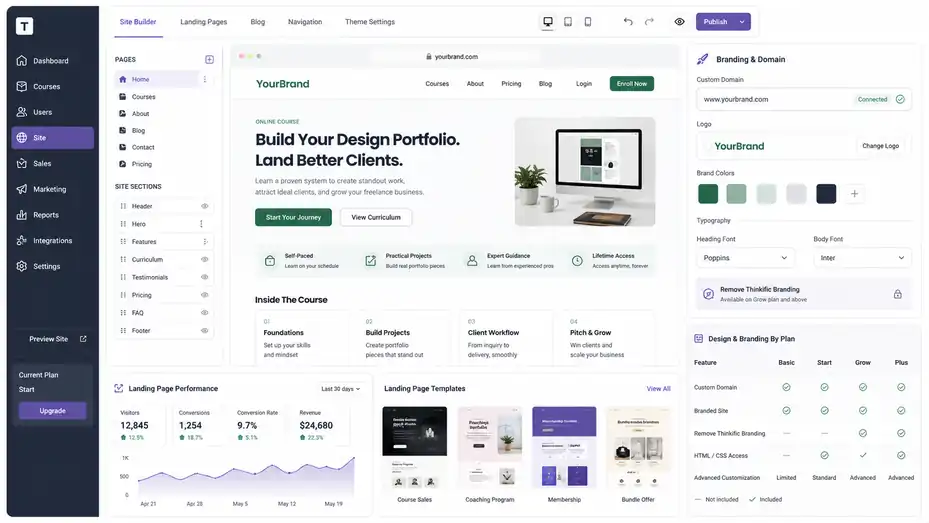
Thinkific gives you website and landing page tools so you can promote and sell your learning products without needing a separate site on day one.
This is useful, but you should understand where it helps and where it may feel limited.
Site Builder And Custom Domain
Thinkific’s site builder lets you create branded websites and landing pages, and the Basic plan includes a custom domain for your brand. A custom domain means your school can live on your own web address instead of looking like a temporary platform subdomain.
For a new course creator, that is a big credibility boost. Students may not consciously judge every technical detail, but they do notice when a checkout or learning site feels unfinished. A clean domain, consistent colors, clear course page, and simple navigation can make your offer feel safer.
That said, you do not need to obsess over design. I have seen creators spend weeks adjusting fonts while avoiding the harder work of clarifying the offer. Your course page needs to answer a few core questions: Who is this for? What will I learn? Why should I trust you? What is included? How does it work? What happens after I buy?
A simple course site can convert well if the message is sharp. A beautiful course site can fail if the offer is vague.
For many beginners, I recommend using Thinkific’s site builder to launch quickly, then improving the page after you see real visitor behavior. Your first version should be clear, not perfect.
Landing Pages That Actually Convert
Thinkific’s landing page features are useful because each course, bundle, or membership needs a focused sales page. The pricing page describes landing pages as conversion-focused pages for courses, bundles, and memberships.
A course landing page should not read like a resume. It should guide a potential student from problem to promise to proof to purchase. The best pages feel like a helpful conversation, not a brochure.
Here’s a practical landing page structure I recommend:
- Hero Section: Say who the course is for and what outcome it helps them achieve.
- Pain Point Section: Name the problem the reader already feels.
- Course Promise: Explain the transformation in plain language.
- Curriculum Preview: Show modules as milestones, not generic topics.
- Proof Section: Add testimonials, examples, credentials, or realistic previews.
- Offer Section: Explain what is included, price, access, bonuses, and guarantee.
- FAQ Section: Remove doubts about time, skill level, access, and support.
Imagine you sell a course for freelance designers. “Learn freelancing” is too vague. “Build a client-ready design portfolio and pitch your first five prospects in 14 days” is much clearer. Thinkific can host the page, but your positioning does the selling.
Branding Limitations To Know Before You Commit
Thinkific lets you create a branded experience, but full white-labeling depends on your plan. For example, removing Thinkific branding is listed under the Grow plan and above in the pricing comparison.
This may or may not matter to you. If you are launching your first course, Thinkific branding is probably not the reason someone buys or does not buy. Your offer, credibility, and sales page matter more.
But if you run an established brand, agency, academy, or corporate training program, platform branding may feel less professional. In those cases, Grow or Plus may be easier to justify because the experience needs to look fully owned by your business.
Design flexibility is another thing to watch. Start includes customizable site design with HTML and CSS, while Basic is more limited. If you want deeper visual customization, factor that into your plan choice.
My honest opinion: Most creators overestimate how much branding matters at the beginning and underestimate how much clarity matters. Make the promise obvious first. Polish the brand second.
Marketing And Sales Tools
Thinkific includes several marketing and sales features that help you turn courses into revenue.
These tools matter because course success is rarely just about content quality; it is also about offer design, checkout flow, follow-up, and buyer confidence.
Coupons, Bundles, Order Bumps, And Upsells
Thinkific’s sales tools include coupons, product bundles, order bumps, gifting, flexible payment options, payment plans, additional pricing, free trials, after-purchase flows, and affiliate reporting depending on your plan.
These features let you shape how people buy. A course priced at $399 may feel expensive as a single payment, but a payment plan can reduce friction. A bundle can increase perceived value. An order bump can add a workbook, template pack, or mini-training at checkout.
Here’s a simple example. Suppose you sell a $299 beginner course on podcast editing. Your order bump could be a $29 preset pack. Your upsell could be a $99 advanced editing workflow. Your bundle could combine the beginner course, advanced workflow, and templates for $449.
The key is relevance. An order bump should feel like a natural helper, not a random add-on. If the buyer thinks, “I’ll probably need that too,” it works. If they think, “Why are they trying to sell me more already?” it hurts trust.
I suggest starting with one core offer, then adding sales features once you understand your buyers. Too many pricing options too early can make your offer harder to understand.
Email Automation And Abandoned Cart Recovery
Thinkific lists email automation and abandoned cart recovery among its marketing and sales capabilities. Email automation helps manage ready-made templates and pre-built sequences, while abandoned cart recovery helps follow up with people who start checkout but do not finish.
Abandoned cart recovery can matter because not every unfinished purchase means “no.” Sometimes the buyer got distracted, needed to check their card, wanted to ask a question, or planned to come back later. A gentle reminder can recover sales without feeling pushy.
A useful abandoned cart email is short and helpful. It can remind the person what they were looking at, restate the outcome, answer one common objection, and provide a clear return path. Avoid sounding desperate. People can feel that.
For broader email automation, I recommend keeping sequences simple at first. A welcome email, a lesson reminder, a progress encouragement email, and a completion email can do more than a complicated 27-email funnel nobody wants to read.
Here’s the mindset: Email should reduce confusion and increase momentum. It should not just shout “buy now” louder.
Affiliate Reporting And Sales Tracking
Thinkific includes affiliate reporting, which helps track affiliate sales and commissions. This is useful if you want partners, students, influencers, or industry peers to promote your course and earn a commission for successful referrals.
Affiliate marketing can work well for courses because trust transfers. If a respected person recommends your program to an audience that already trusts them, conversion can be much stronger than cold traffic.
But do not open an affiliate program too early. First, make sure your course converts, students get results, refund rates are low, and the sales page answers common objections. Affiliates do not fix a weak offer. They amplify what already exists.
Track more than sales volume. Watch refund rate by affiliate, customer quality, student engagement, and support load. A partner who sends fewer but better-fit buyers may be more valuable than someone who sends lots of low-intent traffic.
In my experience, the best affiliate programs give partners clear assets: swipe emails, honest talking points, audience-fit guidance, product screenshots, bonus ideas, and rules for ethical promotion.
Communities, Memberships, And Student Engagement
Thinkific has expanded beyond traditional courses into communities and memberships.
This matters because many creators now want recurring revenue and deeper student relationships, not just one-time course sales.
Thinkific Communities
Thinkific’s pricing page lists communities across plans, with Basic and Start including one community, Grow including three, and Plus including unlimited communities. Spaces are topic-based areas inside a community, with Basic listing five spaces, Start ten, Grow twenty, and Plus unlimited.
A community can make your course feel more alive. Students can ask questions, share progress, post wins, and learn from each other. For topics where feedback and motivation matter, that can be a major advantage.
But a community is not automatically valuable. An empty community can make your course feel worse, not better. Before adding one, ask what purpose it serves. Is it for accountability? Peer feedback? Office hours? Job opportunities? Templates? Weekly challenges?
A strong community needs rhythm. For example, you might use:
- Monday Prompt: Students share their goal for the week.
- Wednesday Help Thread: Students ask questions in one organized place.
- Friday Win Post: Students share progress, examples, or lessons learned.
- Monthly Live Session: You answer common questions and review work.
Thinkific gives you spaces and discussion tools, but you need to create reasons for people to participate. Community is a behavior, not a feature.
Paid Memberships And Subscriptions
Paid memberships are available beyond Basic, and Thinkific describes them as a way to gate courses and content behind recurring subscription plans. Start adds membership and subscription programs, which makes it a stronger option for creators building recurring revenue.
A membership works best when students have an ongoing problem, not a one-time problem. For example, “Learn how to set up your camera” is probably a course. “Get monthly photo critiques and editing challenges” could be a membership.
Recurring revenue sounds attractive, but it comes with a promise. People will keep paying only if they continue seeing value. That value can come from ongoing content, live sessions, coaching, community access, templates, accountability, or fresh examples.
A practical membership structure might include one monthly workshop, one implementation challenge, one Q&A thread, and a resource library. That is enough to feel alive without overwhelming you.
I would not suggest launching a membership just because subscriptions sound profitable. Start with a course. Notice what students need after finishing. Then build the membership around that next problem.
How To Improve Student Engagement
Student engagement improves when the course feels doable, relevant, and rewarding. Thinkific gives you tools like discussions, quizzes, communities, scheduled content, certificates, assignments, and live learning options, but the strategy matters more than the feature list.
The first engagement lever is lesson length. Long lessons are not always bad, but every lesson should have one clear purpose. If a 28-minute video contains five different ideas, split it into smaller lessons.
The second lever is visible progress. Students should know what they have completed, what comes next, and why it matters. Completion certificates can help, but small wins throughout the course matter even more.
The third lever is interaction. Ask students to apply what they learn, post a result, answer a reflection question, or complete a small task. Passive watching creates fragile learning. Active participation creates ownership.
Here’s a mini scenario: A creator teaching resume writing could ask students to upload their old resume in Module 1, rewrite the summary in Module 2, improve bullet points in Module 3, and submit the final version in Module 4. That course will likely feel more valuable than ten videos about resume theory.
Analytics, Reporting, And Optimization
Thinkific gives creators reporting and analytics tools to understand learner behavior, revenue, and engagement.
This is where a course starts becoming a business asset instead of a one-time launch project.
What You Should Track First
Thinkific describes reporting and analytics as tools for tracking learner progress, engagement, and revenue. It also lists basic reporting and higher-level reporting options depending on plan.
For beginners, I would not track everything. Too many numbers create noise. Start with the metrics that show whether students are buying, starting, progressing, and completing.
The core metrics I recommend are:
- Sales Conversion Rate: How many landing page visitors buy?
- Checkout Completion Rate: How many people who start checkout finish?
- Lesson Start Rate: How many buyers begin the course?
- Module Completion Rate: Where do students slow down or stop?
- Refund Rate: Are expectations matching the product?
- Support Questions: What keeps confusing students?
These numbers tell a story. If sales are low but completion is high, your product may be good but your offer or traffic may need work. If sales are strong but completion is poor, your course experience may need simplification.
Analytics should lead to decisions. Do not look at dashboards just to feel productive. Use them to improve one thing at a time.
How To Use Student Progress Data
Student progress data helps you spot friction inside the course. If many students stop at the same lesson, that lesson may be too long, too hard, unclear, or poorly placed.
For example, imagine 80% of students complete Module 1, but only 35% complete Module 2. That drop is not random. Maybe Module 2 asks them to do too much too soon. Maybe the instructions are unclear. Maybe they need an example before the assignment.
The fix might be simple. You could add a quick-start checklist, split one lesson into three smaller lessons, add a sample project, or include a “common mistakes” video before the assignment.
Progress data is also useful for improving your marketing. If students consistently love a specific module, mention that outcome on the sales page. If they struggle with a specific concept, turn that into a bonus, workshop, or onboarding email.
I recommend reviewing student progress after every 25–50 enrollments. That is usually enough to notice patterns without overreacting to one person’s behavior.
Revenue Optimization Without Being Pushy
Thinkific includes commerce features like order bumps, bundles, payment plans, upsells, abandoned cart recovery, affiliate reporting, and analytics depending on your plan. These can increase revenue, but they work best when they improve the buyer’s experience.
Revenue optimization does not mean squeezing people. It means making the right offer easier to understand and easier to buy.
A good payment plan helps people who want the course but need flexibility. A good bundle helps people who want a complete solution. A good upsell helps buyers take the next step. A good abandoned cart email answers hesitation.
Here’s a practical test: Would you recommend the add-on to a friend who just bought the course? If yes, it probably belongs. If no, skip it.
One creator might sell a $499 course with a $99 template pack order bump. Another might offer the same course for $199/month over three months. Another might bundle the course with group coaching. The best option depends on buyer motivation, trust level, and the value of the outcome.
Thinkific Pros And Cons For Course Creators
This Thinkific review for course creators would not be useful without a balanced look at where the platform wins and where it may frustrate you.
No course platform is perfect, and the right choice depends on your stage, offer, and workflow.
Biggest Thinkific Pros
Thinkific’s biggest strength is that it gives course creators a serious learning product system without requiring technical skills. You can create courses, sell them, manage students, build landing pages, use communities, offer downloads, and track performance from one platform.
Another major advantage is the range of learning formats. Thinkific supports courses, communities, memberships, coaching, webinars, and digital downloads. That gives you room to build more than one product type as your business grows.
The course builder is also beginner-friendly while still offering useful learning features. Scheduled content, quizzes, discussions, certificates, assignments, compliance tools, and live learning options can help you create more structured student experiences.
I also like that Thinkific includes real sales infrastructure. Coupons, bundles, order bumps, payment plans, abandoned cart recovery, affiliate reporting, and analytics can make a meaningful difference once you have traffic and a validated offer.
In plain language, Thinkific feels like a good platform for creators who want to build a real education business, not just upload videos and hope people finish them.
Biggest Thinkific Cons
The first downside is that some important features sit behind higher plans. Certificates, assignments, compliance tools, memberships, subscriptions, advanced sales tools, and deeper customization are not all available on Basic.
The second downside is cost complexity. Monthly plan price is only one part of the picture. Payment processing fees, third-party gateway fees, taxes, add-ons, and external marketing tools can all affect your real cost.
The third downside is that Thinkific’s built-in marketing tools may not replace a dedicated email marketing or funnel platform for advanced creators. It can support marketing, but if you need complex segmentation, behavior-based campaigns, or advanced CRM workflows, you may still need integrations.
The fourth downside is design flexibility. Thinkific’s site builder is useful, but creators who want pixel-perfect website control may feel limited compared with a custom website setup.
Finally, a feature-rich platform can tempt you to overbuild. New creators sometimes spend months creating communities, bundles, certificates, and automations before proving that people want the course. Thinkific gives you tools, but discipline is still your job.
My Honest Verdict On The Trade-Off
I believe Thinkific’s trade-off is reasonable for serious course creators. You give up some full-custom flexibility in exchange for speed, structure, hosting, checkout, student management, and scalable learning features.
That trade-off is worth it if you want to spend more time improving your course and selling your offer, and less time managing plugins, tech bugs, and disconnected tools.
It is less worth it if you only need a basic digital product checkout or if your business model depends on advanced marketing automation more than structured learning.
My practical verdict: Thinkific is worth your time if your course is central to your business and you want a platform that can grow with you. It may be too much if you are still unsure whether anyone wants your topic.
Step-By-Step: How To Launch A Course On Thinkific
Launching on Thinkific is easier when you follow a clear sequence. The mistake many creators make is building everything first and validating later.
I suggest doing the opposite: Validate the promise, build the minimum strong version, then improve based on real student behavior.
Step 1: Validate Your Course Offer
Before you build inside Thinkific, clarify the course promise. This is the outcome someone is paying for. A strong promise is specific, believable, and connected to a real pain point.
- Weak promise: “Learn social media marketing.”
- Stronger promise: “Create a 30-day content plan for your local business without spending every day online.”
The second version tells the buyer what they will walk away with. It also hints at the pain point: They need content, but they do not want social media to take over their life.
Validation does not need to be complicated. You can talk to potential students, run a small survey, sell a beta version, host a free workshop, or publish content around the topic and watch what gets engagement.
A simple validation checklist:
- Audience: You know exactly who the course is for.
- Pain Point: They already feel the problem.
- Outcome: The result is specific enough to explain in one sentence.
- Willingness To Pay: People have paid for similar solutions or expressed serious interest.
- Proof: You can show experience, examples, process, or results.
Do this before uploading 40 videos. It can save you months.
Step 2: Build Your Curriculum
Once your offer is clear, build the curriculum around milestones. Thinkific lets you organize lessons into chapters, but you should decide the learning path before clicking around the builder.
Start with the final result and work backward. What does the student need to understand, decide, create, practice, or submit? Each module should move them one step closer.
For a course on launching a handmade product shop, the modules might be:
- Choose A Profitable Product Idea
- Price Your Product Correctly
- Create Your First Listings
- Photograph Your Products At Home
- Launch With A Simple Promotion Plan
- Improve Based On First Sales
That structure feels practical because each module produces progress. Compare that with vague modules like “Introduction,” “Marketing,” and “Sales.” Specific beats broad almost every time.
Inside Thinkific, use videos for explanation, downloads for implementation, quizzes for reinforcement, and discussions or assignments for feedback when needed. Do not add features just because they exist. Add them because they help students move.
Step 3: Create Your Sales Page And Checkout
Your Thinkific sales page should make the buying decision easier. It should clearly explain the problem, the promise, the curriculum, the format, the price, and the reason to trust you.
Start with the headline. I recommend writing 10–20 headline options before choosing one. A good headline usually includes the audience, result, or pain point. For example: “Build Your First Client-Winning Portfolio In 21 Days” is clearer than “Portfolio Masterclass.”
Then build the page around buyer objections. People usually wonder: Is this for me? Do I have enough time? Will it work for my level? What exactly is included? Why should I trust you? What happens if I get stuck?
Use Thinkific’s checkout and pricing tools to match your offer. If the course is expensive, consider payment plans if your plan supports them. If you have a helpful add-on, test an order bump. If you teach multiple related skills, consider a bundle when the timing makes sense.
Before launch, buy your own course with a test purchase if possible. Check the checkout flow, confirmation email, login experience, course access, first lesson, and mobile experience. Small friction points can quietly hurt sales.
Step 4: Launch, Learn, And Improve
Your first launch is not the final judgment on your course. It is feedback. Some parts will work. Some will not. That is normal.
After launch, review sales page conversion, checkout completion, student start rate, student progress, common questions, refund reasons, and testimonials. Thinkific’s reporting and analytics can help you track revenue and learner behavior, with more advanced reporting available on higher plans.
Then improve in cycles. Do not change everything at once. If students are not buying, improve the offer and sales page. If students buy but do not start, improve onboarding. If students start but do not finish, simplify the course path. If students finish but do not get results, add examples, assignments, feedback, or clearer action steps.
A helpful 30-day post-launch plan:
- Week 1: Fix urgent tech and access issues.
- Week 2: Review student questions and add clarifying lessons.
- Week 3: Improve the sales page based on buyer objections.
- Week 4: Collect testimonials, case studies, and completion feedback.
This is where course businesses grow. Not from one perfect launch, but from steady improvement.
Common Mistakes To Avoid With Thinkific
Thinkific can make course creation easier, but it cannot protect you from every strategic mistake.
The biggest problems usually come from unclear offers, overbuilt courses, weak onboarding, and ignoring student data.
Mistake 1: Building Too Much Before Selling
Many creators build a giant course before proving demand. I understand the instinct. It feels responsible. You want the product to be complete before asking anyone to pay.
But a huge course can become a hiding place. You spend months recording lessons, designing slides, and tweaking pages, only to discover your audience wanted something simpler or more specific.
A better approach is to build the smallest course that can deliver the promised result. That might be five modules, not fifteen. It might be three templates, not twenty. It might be a beta cohort before a polished evergreen launch.
Thinkific supports unlimited courses on paid plans, but unlimited does not mean you should create a huge course catalog immediately. One strong course that solves a painful problem is more valuable than six unfinished ideas.
Ask yourself: What is the fastest path to a meaningful student win? Build that first.
Mistake 2: Treating The Course Like A Content Dump
A course is not just information. It is a guided path from confusion to capability. If you upload every video, note, and idea you have, students may feel overwhelmed instead of helped.
The best courses create momentum. They tell students what to do first, what to ignore for now, how to practice, and how to know they are improving.
Thinkific’s structure helps, but you still need to design the learning experience. Use short lessons, clear module outcomes, practical exercises, and examples that match the student’s real situation.
A simple improvement is adding “Do This Now” instructions at the end of each lesson. For example: “Open the pricing worksheet and calculate your minimum profitable price before moving on.” That turns passive learning into action.
Remember, students do not pay for more content. They pay for a clearer path.
Mistake 3: Ignoring Checkout And Pricing Psychology
Creators often spend 90% of their energy on course content and 10% on the buying experience. That is backwards during launch. If people do not understand the offer or feel confident buying, they will never experience your great lessons.
Thinkific gives you pricing and sales options such as coupons, order bumps, bundles, payment plans, free trials, abandoned cart recovery, and after-purchase flows depending on plan. These tools can help, but only when tied to a clear offer.
For example, a coupon can create urgency, but it cannot fix a weak promise. A payment plan can reduce friction, but it cannot make an unclear course valuable. An order bump can raise average order value, but only if it is closely related to the main course.
Before using advanced sales tactics, answer the basics: Is the outcome clear? Is the price justified? Is the checkout simple? Are objections answered? Is there proof?
Pricing is not just math. It is trust.
Mistake 4: Not Creating A Student Success System
A student success system is the set of reminders, resources, checkpoints, and support moments that help students finish and benefit from the course. Without it, even good content can underperform.
Thinkific offers features that can support student success, including discussions, communities, quizzes, assignments, certificates, compliance tools, live events, and analytics depending on plan.
But you need to decide how success will be supported. Will students get a welcome email? A quick-start lesson? A checklist? Weekly reminders? A discussion prompt? Office hours? Feedback on assignments?
For a beginner course, a quick-start path can be powerful. Tell students: “Complete these three lessons first. Ignore the rest until you finish the worksheet.” That reduces overwhelm.
In my experience, the more specific your next step, the more likely students are to take it. Do not just say, “Enjoy the course.” Tell them exactly where to begin and what result they should aim for this week.
Advanced Thinkific Strategies For Scaling
Once your first course is working, Thinkific can support more advanced growth strategies.
This is where you move from selling a single product to building a learning business with offers, segments, systems, and partnerships.
Build A Product Ladder
A product ladder means creating offers at different levels of depth, price, and commitment. Instead of relying on one course, you guide students from a smaller first step to a more valuable next step.
For example:
- Free Resource: A checklist or mini-course that solves one tiny problem.
- Starter Course: A low-cost course that creates a quick win.
- Flagship Course: A deeper program with the main transformation.
- Membership: Ongoing support, updates, coaching, or community.
- Premium Offer: Group coaching, certification, consulting, or team training.
Thinkific can support multiple learning product types, including courses, communities, memberships, digital downloads, coaching, and webinars. That makes it easier to create a ladder without starting over on a different platform.
The key is logical progression. Do not create random products. Ask: What does the student need before the main course? What do they need after finishing? What would make the result faster, deeper, or easier?
A strong product ladder increases customer lifetime value while helping students continue their journey. That is the kind of scaling that feels natural instead of forced.
Use Communities For Segmentation
As your audience grows, not every student needs the same support. Thinkific’s community limits vary by plan, with more communities and spaces available on higher tiers. This can help you segment students by topic, level, product, or goal.
For example, a business coach might have one community for beginners, one for advanced students, and one for alumni. A fitness educator might organize spaces by nutrition, workouts, accountability, and wins.
Segmentation matters because relevance drives engagement. A beginner can feel intimidated in an advanced group. An advanced student can feel bored in a beginner group. Separate spaces let you create more useful conversations.
But keep it simple. Too many spaces can fragment the community. Start with the fewest categories that make participation easier.
A good test: Can a new student immediately understand where to post? If not, simplify.
Sell To Teams And Organizations
Thinkific’s Grow plan includes features like group orders, invoicing, API/webhooks, and enhanced analytics, while Plus adds more enterprise-style features such as unlimited users and products, SCORM-compliant courses, learning paths, SSO, advanced analytics, and dedicated onboarding.
These features matter if you sell training to companies, schools, nonprofits, or teams. Business buyers often need invoices, bulk seats, reporting, admin access, security, and structured learning paths.
Selling to teams can be powerful because one sale may include many learners. Instead of selling 100 individual seats, you might sell one team package to a company training 100 employees.
The offer needs to change, though. A consumer course page focuses on personal transformation. A B2B training offer should focus on business outcomes: less support time, faster onboarding, consistent processes, compliance, employee performance, or customer success.
If you want to scale this way, prepare a team-facing version of your offer. Include seat pricing, implementation timeline, reporting details, support options, and measurable outcomes.
Thinkific Alternatives And When To Compare Them
Thinkific is strong, but comparison is healthy. The best platform is the one that matches your business model, not the one with the longest feature list.
When To Compare Other Platforms
You should compare alternatives if your needs lean heavily outside Thinkific’s strengths. For example, if you need advanced email marketing built directly into the platform, you may want to compare all-in-one marketing platforms. If you want extreme website design freedom, a custom website plus LMS setup may be better.
If your business is mostly digital downloads, templates, or simple paid content, Thinkific may be more platform than you need. A lighter commerce tool could be easier and cheaper.
If your education model is live cohort-first, compare platforms based on scheduling, live session management, community behavior, assignments, and facilitator workflows. Thinkific can support live learning, but your exact delivery style matters.
Here’s the simple comparison question I use: Where does your business create the most value? If it creates value through structured learning, Thinkific is a strong contender. If it creates value through marketing automation, community culture, live coaching, or content subscriptions, compare carefully.
Thinkific Vs A Custom Website Setup
A custom website setup gives you more control but more responsibility. You might use a CMS, video hosting, checkout software, membership plugins, email tools, analytics, and integrations. That can be powerful, but it can also become a maintenance project.
Thinkific gives you less total control but more simplicity. Hosting, student access, course structure, checkout, and learning features are already connected.
A custom setup may make sense if you have a technical team, unique design requirements, complex funnels, or very specific integrations. Thinkific may make more sense if you want to launch faster and avoid managing a stack of plugins.
In my opinion, most solo course creators should not start with a custom build unless they have a clear reason. The goal is not to win a software architecture contest. The goal is to sell a course and help students succeed.
Thinkific Vs Marketplace Platforms
Course marketplaces can give you built-in discovery, but they usually limit your control over branding, pricing, customer relationships, and long-term business assets. Thinkific is different because you are building your own course site and selling under your own brand.
The trade-off is traffic. A marketplace may bring some visitors. With Thinkific, you are responsible for audience building, content marketing, partnerships, ads, email, or community growth.
If you want control and long-term brand equity, Thinkific is more attractive. If you want to test a topic with less marketing setup, a marketplace may be useful, but you should understand the limits.
I generally prefer owned platforms for serious creators because the customer relationship matters. Your email list, brand trust, student results, and product ladder become assets you can keep improving.
Final Verdict: Is Thinkific Worth Your Time?
Thinkific is worth your time if you want a serious, scalable platform for building and selling structured learning products. It is not the cheapest possible way to sell knowledge online, but it offers a strong balance of course creation, student experience, commerce, community, and growth features.
Best Use Cases For Thinkific
Thinkific is a strong fit for creators selling self-paced courses, professional training, coaching programs, certification-style education, customer education, paid communities, and learning-based memberships.
It is especially useful when your course needs structure. If students must move through lessons, complete quizzes, submit assignments, earn certificates, join discussions, or follow a learning path, Thinkific gives you tools that simpler content platforms may not.
I also like it for creators who want to grow beyond one product. Because Thinkific supports multiple learning product types, you can start with a course and later add downloads, webinars, memberships, communities, bundles, or team training.
The best-fit creator is someone who says, “I want to build a real education business, and I need a platform that will not fall apart when I add more students, products, and sales systems.”
When I Would Skip Thinkific
I would skip Thinkific if you only need to sell a basic PDF, a tiny video library, or a simple paid newsletter. In that case, the platform may be more than you need.
I would also pause if you have not validated your course idea yet. You can still test with Thinkific, but do not use platform setup as a way to avoid market research. Talk to your audience first. Sell the outcome before building the mansion.
Finally, I would compare carefully if your business depends on advanced marketing automation, highly customized website design, or complex live cohort delivery. Thinkific may still work, but you need to confirm the workflow before committing.
My Bottom-Line Recommendation
For this Thinkific review for course creators, my bottom line is straightforward: Thinkific is a strong choice for creators who want to build, sell, and improve online courses with a professional learning experience. It is especially worth considering if your course is more than a content dump and you care about student progress, engagement, and long-term growth.
Start lean. Choose the plan that matches your current promise. Build one focused course. Launch it. Watch how students behave. Improve the experience. Then add memberships, communities, bundles, automation, and advanced sales tools when they support a real business need.
Thinkific will not make your course valuable by itself. But if you bring a clear offer, useful expertise, and a willingness to improve, it gives you a solid system to turn that knowledge into a course business worth building.
FAQ
Is Thinkific Good For Course Creators?
Yes, Thinkific is good for course creators who want to build, sell, and manage online courses without coding. It offers course hosting, landing pages, checkout tools, student progress tracking, communities, and sales features. It works best for creators who want a structured learning platform with room to grow.
Is Thinkific Worth It For Beginners?
Thinkific can be worth it for beginners if they already have a clear course idea and want a professional setup. The platform makes course creation easier with templates, payments, and student management. However, beginners should validate their course topic before paying for advanced features.
What Are The Main Benefits Of Thinkific?
The main benefits of Thinkific include easy course creation, built-in sales pages, secure payments, student tracking, quizzes, certificates, communities, and flexible pricing options. It helps course creators keep learning content, checkout, and student access in one place instead of managing several separate tools.
What Are The Downsides Of Thinkific?
The main downsides of Thinkific are that some useful features are locked behind higher plans, advanced marketing automation may require extra tools, and design flexibility can feel limited compared with a custom website. It is powerful, but not always the cheapest option for very simple digital products.
Who Should Use Thinkific?
Thinkific is best for coaches, educators, consultants, trainers, and creators who want to sell structured online courses, memberships, or learning communities. It is a strong fit if your goal is to create a professional student experience, track progress, and build a long-term course business.

I’m Juxhin, the voice behind The Justifiable.
I’ve spent 6+ years building blogs, managing affiliate campaigns, and testing the messy world of online business. Here, I cut the fluff and share the strategies that actually move the needle — so you can build income that’s sustainable, not speculative.
Related posts:
 How to Get LearnWorlds Free Trial and Start Fast
 BuddyBoss Theme: The Hidden Features You’re Missing
 Try BuddyBoss LearnDash Demo for Free & Build Courses Fast
 LearnWorlds Features Overview: Tools That Power Online Courses
 LearnWorlds Review For Course Creators: Powerful Or Overrated?
 Is Freelancer Worth It: Make Good Money