Table of Contents
Some links on The Justifiable are affiliate links, meaning we may earn a small commission at no extra cost to you. Read full disclaimer.
When you decide to build a blog website, it’s usually because you want something that can grow with you—and eventually earn steady, long-term income. I’ve been there too, figuring out what actually works and what just wastes time.
Before you invest months into creating content, have you ever wondered what specific steps truly matter if you want your blog to last, rank, and generate revenue?
This guide breaks everything down so you can start strong and avoid the traps most beginners fall into.
Choosing A Profitable Niche With Long-Term Earning Potential
Picking the right niche is one of the most important decisions you’ll make when you build a blog website, because it determines your audience, income potential, and how fast you can grow.
Validating Niche Demand With Real Search Data
Before committing to a niche, I always recommend confirming that people are actively searching for the topics you want to write about. One simple way is to check actual search volumes using tools like Google Keyword Planner or Ahrefs.
When you type in a core topic—like “meal prep recipes” or “budget travel”—you’ll see how many people search for it each month and whether that demand is seasonal or consistent.
Why this matters: Steady year-round demand tells you the topic has long-term potential. A niche with 20,000+ monthly searches for its main keywords often offers plenty of room to grow without running out of content ideas.
Mini example: When I typed “home gardening tips” into Ahrefs recently, it showed over 60,000 monthly searches spread across dozens of related subtopics—exactly the kind of structure that supports long-term content plans.
Quick way to check trends:
- Search “your niche + trend” in Google Trends
- Look for stable or rising interest over at least 3 years
- Avoid niches with sharp declines or short-lived spikes
Seeing actual data early helps prevent getting stuck in a niche that burns out or can’t bring in traffic reliably.
Assessing Long-Term Monetization Opportunities In The Niche
Once you’ve validated search demand, the next thing I suggest checking is how easily the niche can be monetized. Different niches have different income ceilings.
Some convert extremely well with affiliate links, while others perform better with display ads or digital products.
Look at websites already ranking in your niche.
Check if they use:
- Display ads (you’ll often see Mediavine, Raptive, or AdSense)
- Affiliate programs (Awin, Flexoffers, Impact, niche retailer programs)
- Courses or digital products (PDFs, templates, ebooks)
If most top-ranking blogs are monetizing successfully, that’s usually a good sign the niche is viable.
Simple test: Search “best [your niche product]” on Google. If the SERP is filled with list posts, product reviews, and affiliate-style articles, the niche is likely monetizable.
I believe the best niches combine high search demand with clear commercial intent—meaning readers are actually willing to buy something.
Narrowing Topic Focus To Build Topical Authority Faster
When you’re starting out, going broad can slow you down. Google rewards websites that demonstrate deep expertise within a narrow topic cluster.
That’s why I often advise new bloggers to choose a niche and then narrow it one layer deeper.
For example:
- Instead of “fitness,” choose “strength training for beginners.”
- Instead of “parenting,” choose “activities for toddlers at home.”
- Instead of “travel,” choose “budget travel in Southeast Asia.”
This narrower focus helps you rank faster because you become the go-to resource on a specific need rather than a general category. When Google sees multiple related articles on a topic, it recognizes your authority and starts ranking your content more easily.
The beauty of this approach is that you can always expand later—once you’ve built some traction and authority.
Selecting The Best Platform To Build A Blog Website Easily
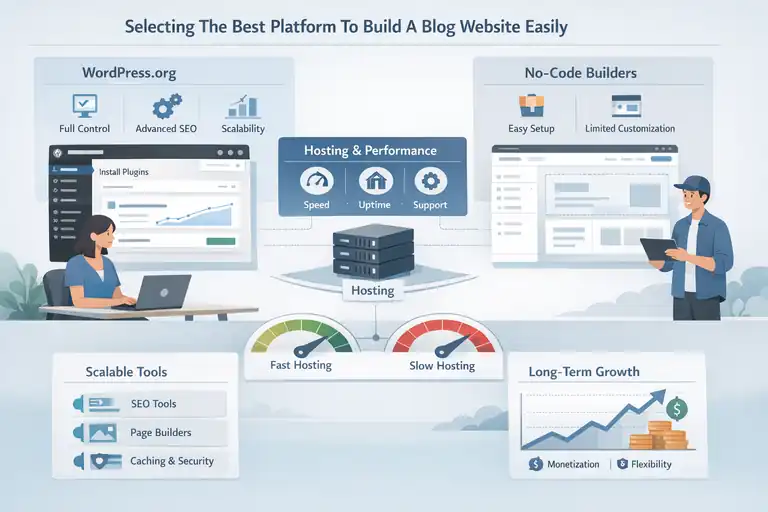
Your blogging platform affects how flexible, scalable, and profitable your site can become.
I’ve tested almost every major platform, and some make long-term growth far easier than others.
Comparing WordPress.org And No-Code Website Builders
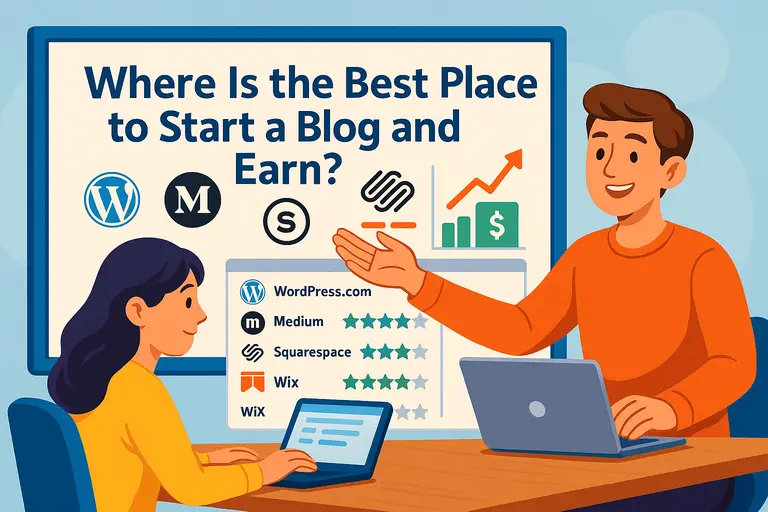
WordPress.org is still the strongest choice for long-term blogging because it gives you full control, unlimited customization, and the ability to scale without hitting platform limits.
No-code builders like Wix or Squarespace are easier for beginners, but they usually come with limited SEO features, fewer plugins, and less freedom for monetization.
Example: On WordPress, you can install SEO tools like Rank Math or Squirrly, run site speed optimizers, and fully control your theme. On Wix, your customization is limited to what the platform allows.
Here’s how I break it down:
- If you want complete control and plan to monetize heavily, choose WordPress.org.
- If you want to quickly build a small personal blog with minimal tech, a no-code builder may be enough.
For building a blog website that earns long-term income, WordPress almost always wins.
Understanding Hosting Requirements For Speed And Stability
Hosting determines how fast your site loads and how reliable it is—two factors that impact SEO rankings and user experience. When choosing a host, prioritize speed, uptime, and customer support.
Reliable hosts like SiteGround, Bluehost, or WPX often make setup simple with one-click WordPress installs.
If you’re not familiar with hosting dashboards, here’s the basic path most providers use:
Dashboard → Websites → Add New Site → Install WordPress
Faster hosting means better Core Web Vitals, and Google does consider loading speed in search rankings. A slow site can lose up to 40% of visitors before it even loads, according to Google’s own page speed research.
I always suggest starting with at least a mid-tier hosting plan so your blog doesn’t slow down as it grows.
Choosing Scalable Tools That Reduce Tech Problems Later
One thing I learned early is that the tools you pick now can save you huge headaches later. Scalable tools help you add new features, speed up your site, and improve SEO without needing a developer.
Some helpful examples include:
- Rank Math for SEO optimization
- Cloudflare CDN for security and faster loading
- Elementor or Gutenberg blocks for page building
- LiteSpeed for performance
The key is choosing tools that simplify your workflow rather than complicate it. When you pick well-supported plugins and themes, updates go smoother, bugs are rarer, and your blog grows without technical problems slowing you down.
Setting Up Your WordPress Blog For Sustainable Growth
Once your site is installed, the next steps shape how easy it will be to grow, rank, and keep your blog organized long term.
Installing Essential Plugins For SEO, Security, And Performance
Plugins give your WordPress site extra functionality, but choosing the right ones matters. I always recommend starting with a small, clean set to avoid slowing down your site.
A good starter stack includes:
- Rank Math for SEO
- Wordfence for security
- LiteSpeed Cache for site speed
- Akismet for spam filtering
- UpdraftPlus for automatic backups
When installing plugins, stick to the official WordPress plugin directory. The basic path is:
WordPress Dashboard → Plugins → Add New → Search → Install → Activate
This gives you everything you need to optimize your blog for search, keep it safe, and ensure it loads fast.
Structuring Blog Categories And Tags For Clear Navigation
Good site structure helps readers find what they want and helps Google understand your site’s content. I personally like using 3–6 broad categories that match the main topics of the blog, and then using tags more sparingly for specific themes.
For example, if your niche is personal finance:
- Categories: Budgeting, Saving Money, Side Hustles, Investing
- Tags: emergency funds, college budgeting, dividend income
Keeping categories limited prevents confusion and helps you build topical authority. Tags should not be used as “extra categories.” Instead, think of them as supporting labels.
When categories and tags are structured well, visitors stay longer, your bounce rate decreases, and search engines can index your content more easily.
Creating Core Pages That Build Trust And Authority
Core pages make your site look legitimate and trustworthy. I suggest creating these early:
- About page (your story, mission, and why you started the blog)
- Contact page (with a simple form or business email)
- Privacy policy and disclaimers (especially if you use affiliate links)
- Homepage that introduces your topics clearly
An effective About page helps build a personal connection. I often tell readers a bit about my background, how I started, and what I want the blog to help them achieve. It doesn’t need to be long—just honest and relatable.
These foundational pages help you comply with ad networks and affiliate programs, build credibility with readers, and signal professionalism to Google.
Designing A User-Friendly Blog Layout That Drives Engagement
A clean, user-friendly layout makes it easier for readers to stay on your site longer, click through more pages, and actually enjoy navigating your content.
When you build a blog website, your layout plays a surprisingly big role in how people (and Google) perceive your brand.
Using Clean Themes Optimized For Speed And Usability
I always recommend starting with a minimalist, lightweight theme. Clean themes load faster, reduce distractions, and make your writing feel more trustworthy.
When a page loads in under 2 seconds, people are far more likely to stay—Google’s 2023 performance report showed that bounce rates jump by almost 32% once load time hits 3 seconds.
Why clean themes work:
- They reduce heavy scripts and unnecessary animations
- They maintain consistent spacing and readable typography
- They keep your design flexible for future updates
If you’re on WordPress, I personally like using themes such as Astra, Kadence, or GeneratePress because they’re easy to customize and don’t slow down your site.
If you’re adjusting settings, the general navigation path looks like this: WordPress Dashboard → Appearance → Customize → Site Identity / Colors / Layout
An example scenario: A reader lands on your post about “meal-prep ideas for beginners.” If your theme loads quickly and displays simple headings and clean formatting, they can immediately start reading without feeling overwhelmed.
Simplifying Site Structure To Improve Reader Journey
The structure of your site affects how easily readers can move from one article to the next. I believe that if your website feels intuitive, visitors stay longer and explore more pages—which is great for SEO and ad revenue.
A simple structure usually includes:
- A clear menu with 3–5 categories
- Internal links guiding readers to related content
- A sidebar or footer with popular posts or resources
Here’s one quick method I often advise: Start by mapping out your top-level categories, then place related posts under each one. This makes your content feel organized even as your site grows.
Example: If your niche is “budget travel,” your top menu might include: Planning, Destinations, Packing, and Travel Hacks. Each article should clearly belong to one of these.
In practice, this avoids the all-too-common confusion where readers click around and feel lost. A clean structure builds trust and reduces friction.
Enhancing Mobile Experience For Higher Retention Rates
More than half of blog traffic now comes from mobile devices. If your blog layout doesn’t adapt well to smaller screens, you risk losing those visitors instantly. I always test a new blog layout on my phone before making it live.
A strong mobile experience includes:
- Buttons large enough to tap without zooming
- Text sized correctly (16px or more)
- Short paragraphs with clear spacing
- A header that doesn’t take up half the screen
You can check this quickly in WordPress by going to: Appearance → Customize → Mobile View
A powerful example: One blogger I follow increased her mobile retention by nearly 18% just by reducing her homepage hero image height. Small tweaks like this can make a big impact.
Creating A Strategic Content Plan That Fuels Long-Term Income
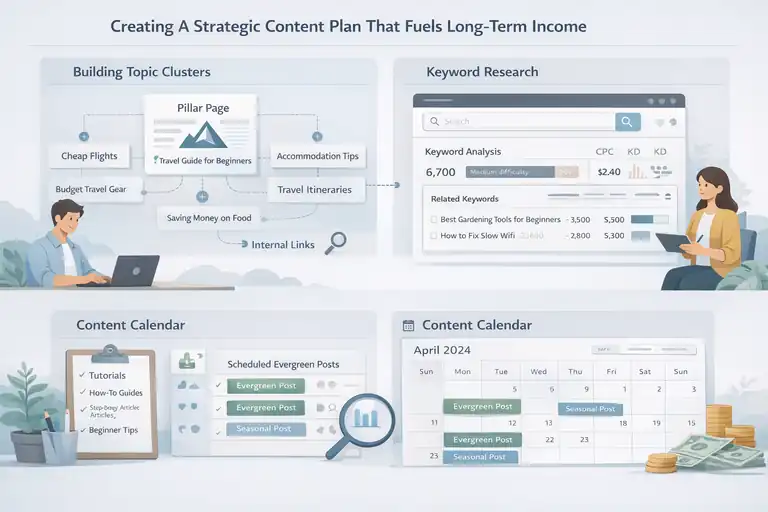
A strong content plan gives your blog direction, consistency, and the potential to earn long-term income.
Without a plan, most blogs end up posting random topics that never build momentum.
Building Topic Clusters To Strengthen SEO Visibility
Topic clusters help Google understand how your content fits together. Instead of writing isolated posts, you write around a central theme, connecting related articles internally. It signals expertise and improves ranking potential.
A basic topic cluster looks like this:
- One main pillar page (e.g., “Guide to Budget Travel for Beginners”)
- Multiple supporting posts (e.g., “How to Find Cheap Flights,” “Low-Cost Accommodation Tips”)
- Internal links tying everything together
I believe topic clusters are one of the fastest ways to grow SEO traffic because they make your content look more organized, helpful, and credible.
An example scenario: If your niche is “home workouts,” you might build clusters around strength training, cardio routines, and stretching. Each cluster supports the others, creating a full ecosystem of reliable information.
Researching Keyword Opportunities With High Monetization Value
Not all keywords are equal. Some keywords bring traffic but little income, while others attract buyers ready to act.
I recommend focusing on keywords with strong monetization signals—things like “best,” “review,” “how to start,” or “tools.”
When I research keywords, here’s the simple process I follow:
- Type a seed keyword into a tool like Ahrefs, Ubersuggest, or Google Keyword Planner.
- Look for keywords with medium difficulty and solid search volume.
- Check SERPs for affiliate-style articles or posts using product comparisons.
These keywords often work best for long-term earnings. For example, “best gardening tools for beginners” has clear monetization intent and attracts readers likely to make purchases.
Keywords tied to problems also perform well—for instance, “how to fix slow WiFi” or “meal prep for busy people.”
Planning Evergreen Articles That Generate Passive Traffic
Evergreen content brings consistent traffic year after year. Instead of relying on trends, these posts solve long-standing problems. That’s why I always weave evergreen articles into any content plan.
Evergreen topics often include:
- Tutorials
- How-to guides
- Step-by-step solutions
- Beginner-friendly explanations
A quick example: A post titled “How to Start a Vegetable Garden in Small Spaces” stays relevant for years, whereas something like “2024 Garden Design Trends” expires quickly.
To plan evergreen content, I suggest creating a simple spreadsheet with columns for keyword, search intent, publishing date, and internal link targets. It keeps you organized and ensures you publish consistently.
Writing High-Quality Blog Posts That Build Authority
When you build a blog website for income, the quality of your writing matters more than anything.
High-quality posts help you rank, earn trust, and convert readers into loyal fans.
Crafting Helpful Content That Meets Search Intent
Search intent means understanding what the reader is truly looking for. Before writing a post, I like to ask myself: What problem is the reader trying to solve, and how can I make the solution easy to follow?
Matching intent involves:
- Studying the top-ranking posts for the keyword
- Evaluating whether they are informational, transactional, or tutorial-style
- Delivering a better or more complete answer
If someone searches “how to meal prep chicken,” they don’t want a long history of meal prepping—they want steps, safety tips, and maybe seasoning ideas.
I believe the easiest way to meet intent is to make solutions simple and actionable. Include examples. Show steps. Remove fluff. This is what keeps readers engaged.
Using Natural Keyword Placement For Better Rankings
Keyword placement used to be about stuffing phrases everywhere, but now it’s more about clarity and natural language. I suggest placing your main keyword in:
- The title
- The introduction
- One H2
- A few natural places in the body
After that, let synonyms and related phrases flow organically. It makes your writing sound more human and helps Google understand your topic better.
For instance, instead of repeating “build a blog website,” you could use variations like “start your blog,” “create your site,” or “set up your blog on WordPress.”
I’ve seen posts rank faster simply because the keywords were used naturally instead of forcefully.
Adding Visuals And Examples To Increase Reader Engagement
Visuals help readers digest complex information quickly. Even simple screenshots, charts, or infographics can improve engagement.
Research shows that readers spend up to 30% more time on articles with helpful visuals.
Here are simple visual ideas you can use:
- Process diagrams for tutorials
- Before/after screenshots when editing a website
- Comparison tables for tools or hosting options
- Simple charts to illustrate trends
If you’re walking someone through a WordPress task, for example, showing the navigation path like: Dashboard → Appearance → Menus makes the process more approachable.
I also like including scenarios to help readers connect with the content.
For example, imagine a reader trying to choose between two hosting providers. A small comparison chart showing uptime, price, and support can instantly clarify the decision.
Optimizing Every Blog Post With Effective On-Page SEO
Good on-page SEO helps your blog posts get discovered more easily.
I like to think of it as giving search engines a clear roadmap so they understand what your content is about and who it helps.
Structuring Posts With Headers, Internal Links, And Schema
A well-structured post makes your content readable for people and understandable for search engines. When I write, I treat headers as signposts that guide the reader.
Using clear headers: Each H2 should introduce one main idea, and your H3s should break that idea into smaller parts. This helps readers skim and also helps Google understand the hierarchy of your content.
Adding internal links: I recommend adding 3–6 internal links per post. Internal links help readers go deeper into your content and keep them longer on your site. They also help build topical authority because Google sees how related your posts are. Make sure internal links feel natural. Link to relevant tutorials, supporting guides, or resource pages you’ve already written.
Using schema markup: Schema helps search engines display rich snippets. If you use WordPress, plugins like Rank Math include a built-in schema generator. You can choose types like Article, How-To, or FAQ schema. The usual path looks like this:
WordPress Dashboard → Post → Rank Math → Schema
A quick scenario: If you’re writing a recipe post, adding Recipe Schema can help your post appear in Google’s recipe cards, increasing clicks and visibility.
Overall, proper structure makes your content feel polished, helpful, and trustworthy.
Improving Readability With Clear Formatting And Flow
Readability affects user experience more than people realize. When I edit posts, I always read them out loud to check flow and clarity.
Breaking text into short paragraphs: Large blocks of text can overwhelm readers. I aim for 1–3 sentences per paragraph. Shorter sections create a natural rhythm and make the content easier to digest.
Using simple language: I try to write like I’m explaining a concept to a friend. If something feels too technical, I break it down or show a simple path like:
Dashboard → Settings → Permalinks
Using numbered or bulleted steps where helpful:
- They make instructions extremely easy to follow
- They help readers scan solutions quickly
- They increase the chances of Google pulling your content as a featured snippet
Including connection phrases: Phrases like “here’s why this matters,” “let me explain,” or “in simple terms” make the content feel human. Readers appreciate feeling guided rather than lectured.
I believe good readability also keeps people on the page longer, which sends positive engagement signals to search engines.
Enhancing Crawlability Through Technical SEO Tweaks
Technical SEO might sound intimidating, but a few simple tweaks can make sure search engines index your blog correctly.
- Checking indexing settings: Go to: Settings → Reading → Search Engine Visibility and make sure the box preventing indexing is unchecked. Many beginners accidentally leave this enabled.
- Improving site speed: Fast-loading posts get crawled more frequently and tend to rank better. Tools like WP Rocket can help reduce unnecessary file sizes and optimize CSS.
- Submitting your sitemap: Rank Math or Yoast automatically generates a sitemap. Submit it to Google Search Console using: GSC → Sitemaps → Add New Sitemap → /sitemap_index.xml
- Fixing broken links: Broken links create crawl errors. Plugins like Broken Link Checker (cloud version) can scan your site and help you fix issues quickly.
These small improvements make your site easier to crawl, which strengthens your overall SEO foundation.
Building Strong Backlinks For Long-Term Domain Authority
Backlinks are one of the strongest ranking signals.
I like to think of them as online referrals—when another website links to you, it tells Google your content is trustworthy.
Using Outreach Strategies That Attract High-Quality Links
Outreach works best when it feels honest and personal. Instead of sending cold, robotic emails, I suggest taking a friendlier approach.
A simple outreach method I use:
- Find websites with content related to your niche.
- Identify a post where your resource can genuinely add value.
- Send a short email mentioning what you liked and why your resource fits.
The key is focusing on value, not asking for favors. If you create something genuinely helpful—like a detailed guide or comparison—many sites will link to it naturally.
A small tip I’ve learned: Keep your emails short and conversational. Long emails often get ignored.
Outreach is slow but powerful. A few high-quality backlinks can outperform dozens of low-quality ones.
Leveraging Guest Posts And Expert Contributions
Guest posting is one of the most reliable ways to earn backlinks while building relationships in your niche. When you write for someone else’s audience, you get exposure and a high-quality backlink at the same time.
Guest posting works well when:
- You target relevant sites
- You offer unique insights
- You write content that actually helps readers
If you’re unsure where to start, search:
- “your niche + write for us”
- “your niche + contribute”
- “your niche + guest post guidelines”
Another overlooked strategy is inviting experts to contribute a paragraph or quote to your posts. They often share or link back to the article because they were featured. It’s a simple way to build authority and network at the same time.
Earning Natural Backlinks Through Linkable Assets
Some content naturally attracts backlinks without outreach. I love creating posts that people reference because they provide data, tools, or clarity.
Examples of linkable assets include:
- Original charts
- Comparison tables
- Ultimate guides
- Free templates
- Research-based articles
For instance, if you publish a chart comparing hosting provider speeds, other bloggers may link to it as evidence in their posts. Data is highly link-worthy because it saves people time they would spend researching.
I also recommend updating your linkable assets regularly. Fresh data gets shared more often, which strengthens your backlink profile over time.
Establishing A Consistent Publishing Workflow That Scales
A consistent workflow helps you publish more efficiently, stay organized, and maintain high quality even as your blog grows. I’ve learned that systems matter just as much as creativity.
Creating A Repeatable Writing And Editing Process
A solid writing process helps you avoid writer’s block and finish drafts faster. I like breaking my workflow into simple stages.
My basic writing workflow looks like this:
- Research keywords and search intent
- Outline the post using headers
- Write a first draft without worrying about perfection
- Edit for clarity, flow, and readability
- Add visuals, screenshots, or examples
- Optimize for SEO and publish
Having a checklist reduces stress because you always know what step comes next. It also helps maintain consistent quality across your posts.
To make editing easier, I suggest leaving a post overnight and revisiting it with fresh eyes. I catch most of my mistakes this way.
Using Content Calendars To Maintain Publishing Consistency
A content calendar keeps your publishing schedule organized. I believe consistency is more important than speed—publishing weekly is better than posting randomly.
You can use simple tools like:
A basic calendar includes:
- Post title
- Keyword
- Target publish date
- Writer/editor (if applicable)
- Internal link targets
Scenario: If you plan 12 posts for the next three months, you reduce decision fatigue and stay focused. Instead of wondering “what should I write next?” you simply follow the calendar.
Consistency signals credibility to readers and helps search engines understand your posting pattern.
Outsourcing Tasks Strategically To Increase Output
At some point, you might want to scale beyond what you can do alone. Outsourcing can help you maintain quality while increasing output.
Tasks you can outsource include:
- Editing
- Graphic design
- Formatting posts
- Keyword research
- Creating social media snippets
I recommend starting small. Maybe outsource one task that drains your energy the most—like creating Pinterest graphics or formatting long posts.
If you use WordPress, you can create temporary accounts for freelancers using: Dashboard → Users → Add New
Outsourcing doesn’t mean losing control. It means giving yourself more space to focus on strategy, high-quality writing, and the parts of blogging you genuinely enjoy.
Implementing Smart Monetization Methods For Your Blog
When you build a blog website for long-term income, monetization becomes a natural next step. The key is choosing income streams that match your niche and feel authentic to your audience.
Using Display Ads And Revenue Optimization Tools
Display ads are one of the easiest ways to start earning once your traffic grows. I usually recommend ads as a foundational income stream because they earn passively on almost every page view.
Starting with beginner-friendly ad networks: Most new bloggers begin with Google AdSense because it has no strict traffic requirements. As your blog grows, you can upgrade to higher-paying networks. Mediavine typically requires 50,000 sessions per month, and Raptive requires 100,000 pageviews per month. These networks often pay significantly more due to better optimization and premium advertisers.
Why speed matters for ad revenue: Ads slow sites down if not optimized. I suggest pairing ads with a caching plugin like LiteSpeed Cache or WP Rocket. Faster load times increase ad viewability, which can improve your RPM (revenue per thousand views).
Simple optimization tips that improve earnings:
- Place ads above the fold to increase impressions
- Use lazy loading so ads load smoothly
- Keep your blog layout clean so ads don’t feel overwhelming
A small scenario: A blogger I worked with increased her RPM by almost 22% just by removing a cluttered sidebar and allowing Mediavine to place ad units more intelligently. Ads don’t have to ruin your design—they just need breathing space.
Creating Affiliate Content That Converts Authentically
Affiliate marketing works beautifully when you recommend products your readers genuinely need. I like to think of affiliate content as “guided suggestions,” not sales pitches.
Types of affiliate posts that convert well:
- Best-of lists (e.g., best meal-prep containers)
- How-to guides with product recommendations
- Tool comparison posts
- Real-use tutorials
Why authenticity matters: People can sense forced recommendations. I personally only suggest products I’ve tested or thoroughly researched. Adding small real-life examples helps a lot.
Example: Instead of saying “This budgeting app is great,” you might say, “I used this app during my first year of saving, and it helped me automatically track spending categories without overwhelm.”
Quick UI tip: When inserting affiliate links in WordPress, I often use Pretty Links to create short, clean URLs: Dashboard → Pretty Links → Add New
Short links improve click-through rates because they look cleaner and more trustworthy.
Developing Digital Products For Passive Income Streams
Digital products let you earn income without relying on traffic alone. Once created, they can be sold again and again.
Common digital products that work well:
- Ebooks
- Templates
- Notion dashboards
- Mini-courses
- Printables
- Toolkits or resource bundles
If you’re unsure what to create, look at the questions readers ask most. Those pain points often lead to great product ideas.
Simple product example: If your blog is about home organization, you could create a printable weekly cleaning checklist. If you’re in the finance niche, a monthly budgeting spreadsheet works really well.
Selling made simple: Platforms like Gumroad, SendOwl, or ThriveCart make delivery automatic. You can embed buy buttons directly into blog posts or your About page.
I believe digital products are one of the best long-term monetization strategies because they give you ownership and independence from algorithm changes.
Growing Your Blog With Email Marketing And Lead Magnets
Email marketing is a powerful way to build a relationship with your audience that doesn’t depend on social media algorithms or search rankings.
I like to view it as your most reliable communication channel.
Creating Lead Magnets That Attract Long-Term Subscribers
A lead magnet is something valuable you give away in exchange for someone’s email address. The best lead magnets make life easier for your reader.
Lead magnet ideas that convert well:
- Checklists
- Step-by-step guides
- Email mini-courses
- Resource libraries
- Templates
If your niche is fitness, you could offer a “7-Day At-Home Workout Plan.” If your niche is productivity, offer a Notion template for weekly planning.
Where to place lead magnets:
- Within blog posts
- As exit-intent popups
- On your homepage
- In your sidebar
Simple UI example: In Kit (ConvertKit), you can create a form by navigating to: Grow → Landing Pages & Forms → Create New
Lead magnets work best when they solve a clear problem your audience feels right now.
Setting Up Automated Email Sequences That Nurture Readers
Once people join your list, they expect guidance. Automated sequences help you build trust while also promoting your best content.
A simple 3–5 email sequence might include:
- Welcome email
- A helpful tutorial related to the lead magnet
- A story or personal insight that builds connection
- A curated list of your best posts
- A soft introduction to a paid product or affiliate recommendation
I advise keeping these emails conversational, not salesy. Readers appreciate honesty, transparency, and practical value.
If you use Kit, automations are built through: Automate → Visual Automations → New Automation
These sequences work while you sleep, bringing readers back to your blog again and again.
Turning Subscribers Into Repeat Visitors And Buyers
Subscribers are more likely to return to your site than first-time visitors because they already know and trust you.
Ways to bring subscribers back regularly:
- Send weekly or biweekly newsletters
- Share quick tips or personal stories
- Link to new blog posts
- Offer exclusive discounts on digital products
- Include polls or questions to increase engagement
One small tip I’ve learned: Add a personal note at the top of each email. Even one or two sentences make readers feel valued. It could be something like, “I’ve been experimenting with a new productivity routine this week, and I wanted to share what’s working.”
This human touch often leads to higher open rates and more clicks.
Using Social Media To Drive Consistent Blog Traffic
Social media helps you amplify your content beyond search engines. You don’t need to be everywhere—just choose platforms that align with your niche and personality.
Choosing Platforms That Match Your Niche And Audience
Different platforms attract different types of readers. Choosing the right one helps you grow faster without burnout.
Here’s a quick way I evaluate platforms:
- Pinterest works well for niches like food, DIY, travel, and home organization.
- Instagram suits lifestyle, fashion, wellness, and visual niches.
- YouTube works for how-to content, tutorials, and storytelling.
- TikTok is great for personality-driven content and quick tips.
- LinkedIn works well for business, marketing, and professional advice.
If you’re not sure where to start, look at where your competitors get the most engagement. That usually reveals your best platform.
Repurposing Content To Expand Reach Effortlessly
Repurposing saves time because one blog post can turn into multiple social media posts. I often reuse content in smaller formats.
Simple repurposing ideas:
- Turn a blog list into a carousel post
- Turn a step-by-step guide into a short video
- Share a quote or insight from your article
- Convert research data into charts or infographics
- Use your blog introduction as the basis for a social caption
This approach helps you stay active on social media without spending hours creating original content every day.
I believe repurposing works because each platform has different strengths, and the same idea can shine in new formats.
Leveraging Community Engagement To Boost Blog Visits
Communities—online groups, forums, and niche-based platforms—are powerful for building trust and driving consistent traffic.
Examples include:
- Facebook Groups
- Reddit communities
- Discord servers
- Niche forums (e.g., gardening boards, fitness forums)
The trick is to engage genuinely. I suggest sharing helpful answers, contributing to discussions, and linking to your blog only when it truly adds value.
People appreciate authenticity, and they usually explore your website naturally when they see you’re genuinely trying to help.
A small example: I once answered a question in a Facebook Group about “how to pick a blog niche,” and that single comment brought more than 300 visitors to a related guide within two days. That’s the power of helpful engagement.
Tracking Key Metrics To Improve Growth And Revenue
Once you build a blog website and start publishing consistently, tracking your results becomes a game changer.
I like to think of analytics as quiet feedback that shows what your audience actually cares about.
Monitoring Traffic Behavior With Analytics Tools
Understanding how readers move through your site helps you make smarter decisions. Google Analytics and Google Search Console are the two tools I suggest setting up early.
Key things to monitor:
- Pageviews: Which posts get the most attention
- Average session duration: How long readers stay
- Bounce rate: How quickly visitors leave
- Traffic sources: Where users come from
When you log into Google Analytics, the typical path is: Reports → Engagement → Pages and screens
This shows your most-viewed posts and how people behave on each one.
Search Console is great for understanding how your site performs in search. You can see which queries bring traffic by going to: Performance → Search results → Queries
A small insight I’ve learned: If a post has high impressions but low clicks, improving the title and meta description can make a noticeable difference in traffic.
Analyzing Conversion Data To Increase Earnings
Conversions are actions that lead to income—newsletter sign-ups, product purchases, affiliate clicks, or downloads. Even small improvements can significantly increase revenue.
What to track:
- Clicks on affiliate links
- Lead magnet sign-up rates
- Product sales
- Button click-through rates
If you’re using Google Analytics, you can set up conversions by navigating to:
Admin → Events → Create Event → Mark as Conversion
I recommend running simple A/B tests to compare variations. For example, changing a call-to-action from “Download now” to “Get your free guide” can increase sign-ups by 10–20%.
A real scenario: I once moved an affiliate link higher in a post because heatmaps showed readers weren’t scrolling far enough. That single change doubled the click-through rate.
Identifying High-Value Posts To Optimize Further
Some posts quietly drive most of your income. These are your “high-value posts,” and they deserve extra attention.
You can identify them by checking:
- Posts with consistent traffic
- Posts that rank in positions 1–10
- Posts that earn the most affiliate clicks or ad revenue
- Posts readers stay on the longest
Once you find these posts, I suggest refreshing them regularly with:
- Updated data or stats
- More visuals
- Additional internal links
- Better examples
- New tips or insights
A quick method: In Google Analytics, filter by “Page value” to see which pages contribute most to revenue. Those are the posts worth refining every few months.
Maintaining Your Blog To Ensure Long-Term Stability
A healthy blog grows faster, ranks better, and avoids unexpected problems. Maintenance isn’t glamorous, but I’ve learned it’s essential if you want long-term stability.
Updating Old Content To Keep Rankings Strong
Old posts can lose rankings if they’re outdated. I like to review important posts every 3–6 months.
What to update:
- Stats or quotations
- Outdated screenshots
- Broken links
- Missing internal links
- Formatting and readability
A simple approach:
- Identify posts losing traffic
- Add new examples and updated insights
- Improve the intro and conclusion
- Add new images or tables
- Submit the page for reindexing using Search Console
This process often brings posts back to life. In one case, updating a two-year-old guide increased its traffic by 40% within a month.
Checking Technical Health For Speed And User Experience
Technical health influences how fast your website loads and how smooth the user experience feels. Even small issues can hurt rankings.
Technical checks I regularly perform:
- Page speed tests (PageSpeed Insights or GTmetrix)
- Mobile responsiveness (Search Console → Mobile Usability)
- Plugin updates and theme updates
- Broken link scans
Look for simple wins like compressing images, enabling caching, and reducing unnecessary scripts. Tools like LiteSpeed Cache can automatically optimize images and CSS.
If you’re unsure where to look, start at: WordPress Dashboard → Tools → Site Health
This panel highlights common issues and suggestions.
Securing Your Website Against Hacks And Data Loss
Security protects your work and your readers. I always advise installing at least one security plugin and enabling regular backups.
Ways to secure your blog:
- Use Wordfence or Sucuri for firewall protection
- Enable two-factor authentication
- Run daily or weekly backups
- Use strong passwords
- Keep plugins and themes updated
Backups are often overlooked, but they’re a lifesaver. With UpdraftPlus, you can back up your site through: Settings → UpdraftPlus Backups → Backup Now
One blogger I worked with avoided losing her entire site because she had a scheduled backup running daily. It’s one of those things you don’t appreciate until something goes wrong.
Scaling Your Blog Into A Long-Term Income Asset
Scaling is about turning your blog from a simple website into a growing, predictable income source.
I believe this shift happens when you start using systems instead of relying purely on creativity.
Diversifying Income Streams For Stability
Relying on one income source can be risky. Diversifying helps you stay stable even when algorithms or traffic change.
Common income streams bloggers use:
- Display ads
- Affiliate marketing
- Sponsored posts
- Digital products
- Courses or membership sites
- Coaching or consulting
I suggest starting with two to three income streams and expanding slowly. For example, once your affiliate revenue feels stable, introduce a digital product or a low-cost course.
Diversification allows your blog to weather seasonal dips or market changes more comfortably.
Expanding Into New Topics Without Losing Authority
As your blog grows, you might feel tempted to cover new topics. Expansion is fine as long as it’s strategic.
Here’s what I suggest:
- Identify a related sub-niche your audience already cares about
- Create a small topic cluster (3–5 posts) to test interest
- Track traffic and engagement before expanding further
Example: If you run a personal finance blog, you might expand into productivity tips or side hustle ideas because readers often overlap.
The key is staying close enough to your main niche so your content still feels cohesive.
Systematizing Workflows To Turn Your Blog Into A Business
Systems help you work smarter and scale efficiently. When I started documenting my processes, everything—from writing to editing to publishing—became easier.
Helpful systems to create:
- A standard writing process
- A checklist for editing and formatting
- A publishing workflow
- Templates for social media posts
- A content calendar process
- A monthly analytics review routine
You can document your systems in tools like Notion or Google Docs. The goal is to make your blog repeatable and manageable, even if you start working with a team.
One scenario: When you hire a freelance writer, having a clear writing template makes onboarding far smoother. They know what tone to use, how to structure an article, and how to add internal links.
Systems turn your blog from a passion project into a business that can grow sustainably.
FAQ
How long does it take to build a blog website that earns income?
Most people can build a blog website in a few days, but earning consistent income usually takes 6–12 months of focused content creation, SEO, and monetization setup.
What platform is best to build a blog website for long-term income?
WordPress.org is the most popular choice because it offers full control, strong SEO capabilities, and flexible monetization options that scale over time.
Can beginners build a blog website without technical skills?
Yes. With beginner-friendly hosting, one-click WordPress installs, and simple themes, you can build a blog website without coding or advanced technical knowledge.

I’m Juxhin, the voice behind The Justifiable.
I’ve spent 6+ years building blogs, managing affiliate campaigns, and testing the messy world of online business. Here, I cut the fluff and share the strategies that actually move the needle — so you can build income that’s sustainable, not speculative.