Table of Contents
Some links on The Justifiable are affiliate links, meaning we may earn a small commission at no extra cost to you. Read full disclaimer.
If you’ve ever wondered how to create a free blog and earn money without spending a dime upfront, you’re not alone.
Many people start with zero investment and end up turning their blogs into full-time income sources. The real question is: how can you do it quickly and effectively?
In this guide, I’ll walk you through a clear, step-by-step plan to help you launch your blog for free and set up proven ways to start earning income faster than most beginners think possible.
Choosing the Right Free Blogging Platform
Before you can create a free blog and earn money, you need a platform that won’t limit your growth.
Let me walk you through the differences so you can pick the one that sets you up for success.
Comparing the Best Free Platforms for Beginners
When you’re just starting out, the three platforms most people consider are WordPress.com, Blogger, and Wix. I’ve used all three at different points, and each comes with its own quirks.
WordPress.com gives you a clean dashboard, access to essential plugins on paid upgrades, and long-term scalability. Blogger is simple and owned by Google, but it hasn’t seen real feature updates in years. Wix gives you design freedom, though its drag-and-drop builder can feel heavy and slow.
If I break it down simply:
- WordPress.com: Best all-around for blogging, clean editing experience.
- Blogger: Basic but stable. Strong Google integration.
- Wix: Beautiful layouts, weaker long-term SEO performance.
I often suggest WordPress.com because it offers a beginner-friendly setup and a pathway to grow into a more flexible, self-hosted version in the future.
Why WordPress.com Often Outperforms Blogger and Wix
From what I’ve seen, WordPress.com consistently performs better because it’s built specifically for blogging. Its editor is smoother, SEO structure is cleaner, and the customization options expand easily as you grow.
For example, the block editor lets you structure posts with headers, images, tables, and embeds without touching code. Even the free plan allows basic analytics so you can understand what readers are doing on your pages.
Meanwhile, Wix sometimes struggles with page speed due to its visual builder, and Blogger’s aging interface limits you if you want to add more advanced design or monetization tools.
In short, if your goal is long-term earnings, WordPress.com gives you more flexibility without overwhelming you.
Key Features to Look for in a Monetizable Blog Platform
When selecting a platform, I usually recommend checking for a few essentials. These directly affect whether you can earn money quickly.
- Built-in SEO tools: So your posts can rank without extra apps.
- Ad support: You’ll need this for Google AdSense or display ads.
- Custom domain option: Even if it’s paid later, growth depends on this.
- Analytics dashboard: A simple way to track views and engagement.
If a platform forces you to upgrade too early or blocks you from adding monetization, it’ll slow your progress.
Common Mistakes When Selecting a Free Blog Platform
One mistake I often see is choosing a platform purely because it looks modern. Visual appeal matters, but not if you sacrifice performance or monetization options.
Another common issue is ignoring long-term growth. Some platforms make it hard to move your content later, and migrating isn’t always simple.
It also helps to avoid platforms that hide essential blog features behind add-ons or paid tiers you aren’t ready for. Starting free should still give you enough tools to publish, share, and grow.
Picking a Profitable Niche That Attracts Readers
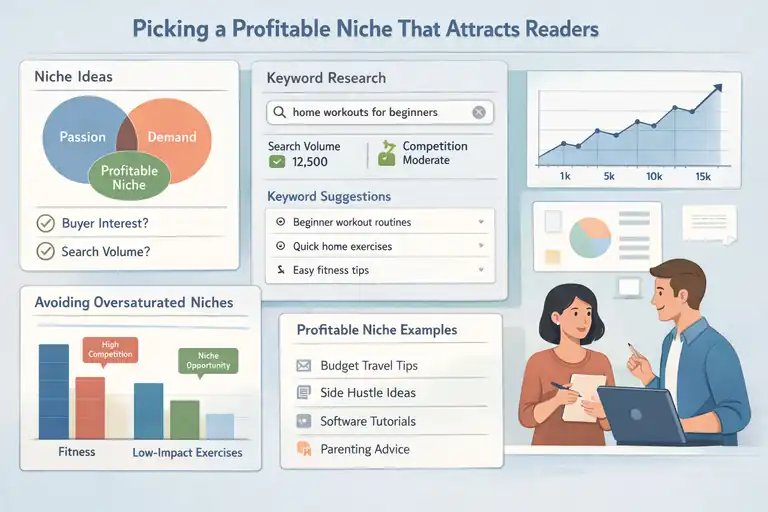
Once your platform is ready, choosing the right niche determines whether your blog grows fast or barely gains traction.
How to Find a Niche You’re Passionate About and Can Monetize
I usually tell people to pick a niche where passion and demand overlap. If you only chase trends, you’ll burn out. And if you only follow passion, you might end up writing about something no one searches for.
Try writing down topics you enjoy, then ask yourself two questions:
- Would someone spend money in this niche?
- Are people actively searching for advice on this topic?
Combining both gives you a niche you can stick with—and profit from.
Using Keyword Research Tools to Validate Your Niche
Tools like Google Keyword Planner, Ubersuggest, and Ahrefs help you see whether people are actively searching for content in your niche. You don’t need premium tools to get started; even typing ideas into Google Autocomplete gives you direction.
A simple UI path in Google Keyword Planner is: Tools & Settings → Planning → Keyword Planner → Discover New Keywords
Once inside, type your topics and look for search volumes above 1,000 and moderate competition. Those typically offer solid growth potential.
Avoiding Oversaturated or Low-Profit Blog Topics
If you pick something like fitness or recipes, you’re entering an extremely competitive space. It doesn’t mean you can’t win—you just need a more specific angle.
Instead of “fitness,” try niches like:
- Home workouts for beginners
- Fitness for office workers
- Low-impact exercises for seniors
Low-profit niches also exist. These are topics with passionate audiences but low commercial intent—for example, poetry or general journaling advice. They attract readers but don’t convert well for monetization.
Real Examples of Niches That Earn Money Quickly
From what I’ve seen, some niches consistently generate fast income because they mix high search volume with strong buying intent.
Examples include:
- Budget travel guides for specific cities
- Side hustle or online earning strategies
- Software tutorials (like Canva or Notion guides)
- Parenting tips and early childhood activities
- Personal finance and frugal living
Even new blogs in these niches can start earning within a few months with steady publishing and basic SEO.
Setting Up and Customizing Your Free Blog
Once your niche is confirmed, it’s time to actually build your site. Setting everything up properly early on saves you a lot of future rework.
Step-by-Step Setup on WordPress.com or Blogger
Let me break down the quickest way to get started on WordPress.com.
- Go to WordPress.com → Start Your Website.
- Select the free plan and choose a temporary domain.
- Pick a theme (you can change it later).
- Access your dashboard through My Home → Site → Dashboard.
- Create your first post using Site → Posts → Add New.
If you choose Blogger, the path is even simpler:
- Visit Blogger.com and sign in with your Google account.
- Click Create New Blog.
- Pick a title, URL, and starter theme.
- Start writing through Posts → New Post.
Both platforms take less than 10 minutes to set up.
Choosing a Clean, Fast, and Mobile-Friendly Theme
Your theme affects loading speed, readability, and overall user experience. I usually advise avoiding heavy themes with too many animations or large image headers.
Look for themes with:
- Lightweight structure
- Clear typography
- Mobile responsiveness
- Easy customization options
On WordPress.com, themes like Twenty Twenty-Three or Ixion are simple, fast, and beginner friendly. Blogger themes like Soho or Contempo also work well.
The theme you choose should support your niche’s tone. For example, travel blogs benefit from clean photo-friendly layouts, while financial blogs should emphasize clarity and trust.
Adding Essential Pages: About, Contact, and Privacy Policy
Even when your blog is brand new, these pages help create trust and allow monetization tools to accept your site.
- About Page: Share who you are and why you started your blog. A short personal story helps readers connect with you.
- Contact Page: Add a simple form or email so brands and readers can reach you.
- Privacy Policy: Required if you plan to use Google AdSense or collect emails. You can use a free generator and paste it into a new page.
On WordPress.com, you can create pages with: Site → Pages → Add New
These are simple steps, but they make your blog look polished from the beginning.
Optimizing Your Blog Layout for Engagement and Clicks
Small layout choices can dramatically impact how long visitors stay on your site.
Here’s how I usually optimize a free blog layout:
- Keep the sidebar minimal with just categories, search, and recent posts.
- Avoid cluttering the homepage with too many sections.
- Add internal links in every article to guide visitors deeper.
- Place CTAs like “Read Next” at the bottom of posts.
If you want to earn money faster, making your content easy to navigate increases pageviews—Google rewards that with higher rankings.
Writing SEO-Friendly Content That Ranks and Converts
Once your blog is set up, the next step is writing content that actually gets found.
I always tell people that learning basic SEO isn’t optional if you want to create a free blog and earn money consistently.
How to Choose Blog Post Topics with High Search Demand
When I’m choosing topics, I look for something very specific: what people are already searching for but aren’t getting great answers to. This is where you can step in and fill the gap.
One way to start is by typing your niche keyword into Google and paying attention to the People Also Ask questions. These usually show you real problems people want solved. You can also use Google Trends to see whether interest is increasing or dropping.
Another simple method I personally use is checking low-competition phrases on Ubersuggest. Even the free version works fine. Just go to: Ubersuggest → Keyword Research → Keyword Ideas → Enter your topic.
Aim for topics with:
- Search volume: At least 100–1,000 per month.
- Difficulty: Lower is better when you’re starting out.
- Intent: Make sure it’s something people want detailed help with.
This approach boosts your early rankings before you tackle bigger keywords.
Writing Titles and Introductions That Hook Readers
A good headline is often the difference between someone clicking your article or scrolling past it. I believe a strong title solves one problem clearly and promises a specific outcome.
Try formats like:
- How to… (works for tutorials)
- X Ways to… (perfect for list posts)
- Mistakes to Avoid… (people want shortcuts)
For introductions, I like to keep it personal. A quick story, a relatable question, or a clear benefit helps readers feel like you actually understand their problem. Think of it as a conversation, not a lecture.
A simple structure I use:
- Call out their problem.
- Show you understand what they’re struggling with.
- Promise what your post will help them do.
Readers stay longer when they feel seen, and that boosts your SEO naturally.
On-Page SEO Basics: Keywords, Meta Descriptions, and Links
On-page SEO is just you helping Google understand what your content is about. I know it sounds technical, but it’s really just a checklist.
The basics I follow:
- Put your main keyword in the title, first paragraph, and one H2.
- Include related terms naturally so Google sees your depth.
- Write a clear meta description using everyday language.
- Add internal links to other posts to improve site structure.
- Add external links to credible sources like .gov or .edu sites.
One thing I always advise beginners to avoid is stuffing keywords. Google is smarter than that, and it makes your writing feel robotic.
A personal tip: After writing a post, I skim it and ask myself, Would I actually read this? If not, I rewrite until it feels natural.
Creating Evergreen Content That Continues to Earn Over Time
Evergreen content is powerful because it earns long after you publish it. These are the posts that consistently solve a problem that doesn’t go away. Once a post like this ranks, you can generate income without constantly posting.
Evergreen ideas include:
- How-to guides
- Beginner tutorials
- Product comparisons
- Niche-specific tips
I usually revisit my evergreen posts every 6–12 months and refresh small parts:
- Update any outdated info
- Add images or screenshots
- Improve paragraphs for clarity
- Insert new internal links
A small update like this can boost rankings again, which means more views and ultimately more income.
Driving Traffic to Your Blog Fast Without Spending Money
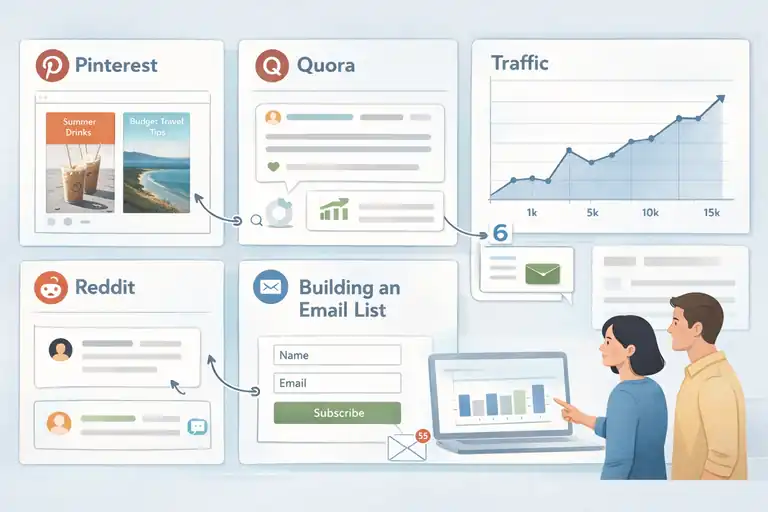
Traffic is the lifeblood of earning. Even with the best content, you won’t make money unless people actually find your blog.
The good news is there are free traffic sources that work surprisingly well if you use them consistently.
Leveraging Pinterest, Reddit, and Quora for Free Traffic
These three platforms send extremely fast traffic if used right. Let me break down how I use each one.
On Pinterest, I create simple vertical pins using Canva templates and link them directly to blog posts. Pinterest works like a search engine, so your pins can bring traffic months after posting.
On Reddit, I participate in niche subreddits—not to spam links, but to answer questions. After building trust, you can share your posts when they genuinely help.
Quora works similarly. I look for questions with over 1,000 followers and write short, helpful answers. At the end, I include a link to a relevant blog post.
Traffic from these platforms often spikes quickly, giving your blog the early boost it needs.
Building an Email List from Day One (Even for Free Blogs)
I know it seems early, but building an email list is something I always recommend right from the start. Even with a free blog, you can use MailerLite or Aweber free plan.
Just create a simple form and add it using: Dashboard → Plugins or Integrations → Email Provider → Add Form
Why start early?
Because email subscribers return to your blog again and again, and returning visitors send positive signals to Google.
A simple freebie like a checklist or short PDF guide is enough to encourage sign-ups. It doesn’t have to be fancy; it just needs to solve one small problem.
Engaging in Online Communities to Promote Your Content
Communities can drive traffic quickly if you approach them with care. I’ve found that being genuinely helpful is what actually gets people to check out your blog.
Places to consider:
- Facebook groups in your niche
- Forums like StackExchange
- Niche Discord communities
Don’t jump in with links. Instead:
- Answer questions
- Share personal experiences
- Provide value without expecting anything
Once people notice your insights, they naturally explore your content. Over time, a community can become one of your most loyal traffic sources.
How to Use SEO and Social Sharing Together for Growth
I personally like using SEO for long-term traffic and social platforms for quick bursts. When you combine the two, growth happens much faster.
Here’s a simple workflow I use:
- Write the blog post targeting a keyword.
- Share a summary version on Pinterest and Reddit.
- Link the post internally from older articles.
- Update the post after 30 days with new insights.
This combo works because SEO builds authority, while social platforms bring fresh visitors who help Google index your new content faster.
Proven Ways to Monetize a Free Blog
Once traffic starts coming in, your blog becomes ready to earn. Even on a free platform, there are several ways to monetize effectively.
How to Earn with Google AdSense and Display Ads
AdSense is usually the first method beginners use because it’s easy to set up. Just apply through: Google AdSense → Get Started → Connect Your Site.
Once approved, you’ll add a snippet of code to your blog. WordPress.com free plans don’t support AdSense, but Blogger does, which is one reason some people start there.
Ads work best when you have consistent traffic—usually 3,000 to 10,000 monthly visits. I suggest not relying on ads alone because earnings start off slow, especially with low RPMs (rate per thousand views).
Still, they’re a simple way to start making small passive income every month.
Promoting Affiliate Products That Match Your Niche
Affiliate marketing is one of the fastest ways to earn with a free blog. You recommend products you already use, and when someone buys through your link, you get paid.
Some beginner-friendly affiliate programs include:
The key is matching the product to the reader’s problem. For example, if your niche is budgeting, recommending a budgeting app or a simple spreadsheet template works perfectly.
I personally like adding small how-to tutorials that show the product in action. People trust recommendations more when they see real usage.
Using Sponsored Posts and Brand Collaborations
Even small blogs can get sponsored posts if they position themselves well. Brands often look for blogs with engaged audiences—not just big numbers.
I’ve seen bloggers with fewer than 1,000 monthly views land collaborations by reaching out directly. A simple pitch email works:
“Hi, I’ve created content on [topic] that aligns with your brand. I’d love to collaborate on a review or tutorial that highlights your product in an authentic way.”
Just make sure the sponsored content still helps your readers. Forced promotions hurt your credibility long-term.
Offering Digital Products or Simple Services for Extra Income
Digital products are powerful because they take time once but earn continuously.
You can create:
- Checklists
- Templates
- Mini guides
- Printable planners
Even with a free blog, you can sell them using Gumroad or Payhip. Just upload your digital file and add the buy link to your posts.
If you prefer services, simple options include:
- Proofreading
- Freelance writing
- Pinterest pin creation
I often suggest new bloggers start with one digital product and one small service. This combination diversifies income early while keeping things manageable.
Tracking Results and Scaling Your Blog Earnings
Once you start getting traffic and a few early earnings, the next step is understanding what’s working.
I always tell new bloggers that scaling doesn’t come from doing more things — it comes from doing more of the right things.
Using Free Analytics Tools to Measure Performance
I suggest starting with Google Analytics and WordPress.com Stats (if you’re using WordPress.com). Both are free and give you more insight than most beginners expect.
Google Analytics setup: Admin → Data Streams → Add Stream → Website URL → Install Tag.
If you’re on Blogger, you can paste the tracking ID into: Settings → Analytics Property ID.
Once it’s running, focus on a few key metrics:
- Pageviews: Which posts attract the most readers.
- Average engagement time: Shows how long people actually stay.
- Traffic sources: Helps you see where to promote more.
Something I learned early on is that numbers don’t lie. If one post keeps bringing traffic, that’s a sign to create similar topics or supporting articles to cluster around it.
Understanding Which Content Generates the Most Income
To scale your earnings, you need to know which content makes money, not just which content brings views. Sometimes a post with fewer visits earns more because it matches stronger buying intent.
I usually track income by adding a simple sheet in Google Sheets:
- Post title
- Pageviews
- Affiliate clicks
- Ad revenue
- Total earnings
Seeing everything together helps you notice patterns. For example, tutorials and comparison posts often convert better than general opinion pieces.
One blogger I helped discovered that one review post earned 70% of her affiliate commissions. She doubled down on similar product reviews and saw earnings triple within two months.
Reinventing Your Strategy Based on Data Insights
This is the step most beginners skip. I believe your blog should constantly evolve based on what the data tells you. If long guides keep ranking, create more long guides. If Pinterest is sending traffic but Instagram is not, shift your time to Pinterest.
I usually run through this simple cycle every month:
- Review analytics.
- Identify what performed best.
- Check why it worked.
- Produce more of that type of content.
This cycle prevents burnout because you’re focusing on what already works. And yes, you’ll make mistakes — I’ve reinvented my content strategy more times than I can count. But each adjustment gets you closer to consistent income.
When to Move from a Free Blog to a Self-Hosted Platform
You don’t need to rush into hosting, but there comes a point when upgrading gives you more control and more earning options.
I generally recommend moving when:
- You want to install plugins (SEO, page builders).
- You want to apply to AdSense but your platform doesn’t allow it.
- You want a custom domain for authority and branding.
- You’re getting 1,000+ monthly visits.
If you move to self-hosted WordPress, the common path is: Buy hosting → Install WordPress → Import your old posts.
It takes about 20 minutes, and you’ll gain full freedom to scale income.
Common Pitfalls That Stop New Bloggers from Earning
I’ve seen many beginners give up not because blogging “doesn’t work,” but because a few preventable mistakes slow their progress.
Relying Only on Ads Instead of Diversifying Income
Ads are usually the slowest way to earn, especially on new blogs. I suggest combining ads with affiliate links, digital products, or simple services. Ads alone can limit your potential, especially when RPMs are low.
I’ve watched bloggers replace ads with affiliate links and instantly double their earnings. It’s not magic — it’s just aligning content with the right monetization method.
Ignoring SEO and Consistent Content Publishing
A free blog can absolutely rank in Google, but consistency matters. Google needs signals that your blog is alive and reliable. I’ve noticed that publishing even one post a week creates significantly better momentum than posting randomly.
Ignoring SEO slows everything down. Even basic SEO — like adding internal links and using clear headings — can make your posts easier to find.
Copying Other Blogs Instead of Building a Unique Brand
Readers can tell when content feels generic. I always suggest adding personal stories, examples, and opinions. Even if your topic has been covered a thousand times, your voice hasn’t.
One trick I use is asking myself, “Would I say this out loud to a friend?” If the answer is no, I rewrite it.
Giving Up Too Early Before the Blog Gains Momentum
Most blogs take 3–6 months to see steady organic traffic. That’s normal. You’re competing with millions of sites, so Google needs time to trust you.
Many beginners quit right before their first breakthrough. If you keep writing, optimizing, and learning, momentum arrives — usually when you least expect it.
I believe blogging rewards the ones who stay consistent, not the ones who start perfectly.
Expert Tips to Grow and Earn Money Faster
These are strategies I personally use when I want to grow a blog quickly. They’re not complicated, but they require consistency.
How to Network with Other Bloggers for Traffic and Mentorship
Networking accelerates everything. A single established blogger mentioning your post can send more traffic than a month of posting on social media.
Ways to network naturally:
- Comment thoughtfully on other blogs in your niche.
- Join blogging Facebook groups and participate.
- Share someone’s content and tag them.
- Send a genuine message appreciating their work.
I suggest approaching networking the same way you build friendships — slowly, honestly, and without expecting anything in return. The benefits come naturally.
Repurposing Blog Posts into Videos, Reels, and Newsletters
One piece of content can become many pieces of content with little effort.
I often repurpose posts like this:
- Turn key points into short Instagram Reels.
- Turn the outline into a YouTube tutorial.
- Turn examples into newsletter content.
This saves time and exposes your blog to wider audiences. Think of it as recycling your knowledge into new formats.
Automating Social Media Promotion for Consistency
Posting manually every day is exhausting. Automation tools like Buffer, Later, or even Canva’s scheduler help you stay consistent without spending hours online.
A simple setup looks like this:
- Plan 7 posts on Sunday.
- Schedule them for the week.
- Check analytics the following weekend.
I advise automating only distribution, not writing. Your content should still feel human.
The Mindset Shift That Turns a Blog into a Business
I believe your mindset becomes your strategy. Bloggers who treat their blog like a hobby publish when they “feel inspired.” Bloggers who treat it like a business follow a plan.
This shift doesn’t mean working nonstop. It means showing up consistently, learning from mistakes, and building long-term assets instead of chasing quick wins.
If you can make this shift, your earnings rise naturally over time.
Final Step: Turning Your Free Blog into a Long-Term Asset
At this point, your blog is more than a collection of posts — it’s something that can earn for years. This is when you start treating it like a true digital asset.
How to Reinvest Your First Earnings for Growth
The first money you make from blogging might be small, but how you use it matters.
I usually reinvest in things like:
- A custom domain
- Faster hosting
- Better design templates
- A keyword research tool
Even $20–$50 can significantly improve your site. I’ve seen people invest their first $30 in a domain and unlock brand deals they couldn’t get before.
Why Building an Email List Is Your Most Valuable Asset
Social media changes constantly, but email subscribers stay with you. Your list becomes a direct line to people who truly care about your content.
I suggest sending simple weekly or biweekly emails, even if your list is small. It builds trust and helps you promote posts, products, and affiliate links directly.
Even a list of 300–500 people can generate consistent monthly income.
Setting Goals and Systems for Passive Income
Passive income isn’t magic — it’s systems. When I want to scale passively, I focus on:
- Evergreen posts
- Automated emails
- Affiliate reviews
- Digital products
Systems keep earning even when you’re busy. For example, a simple SEO-optimized tutorial can rank for years with minor updates.
Setting monthly goals — like publishing four posts or adding five new internal links — keeps you moving forward.
Pro Tip: How to Keep Growing Without Burnout
Burnout is real in blogging. What keeps me going is focusing on small, consistent steps instead of overwhelming goals. Write shorter posts when needed. Take breaks. Repurpose content. Celebrate the wins, even the tiny ones.
I remind myself often: If you stay consistent and keep improving, the results compound. Your blog becomes not just a project, but a long-term asset that supports your life and goals.
FAQ
Can you really create a free blog and earn money fast?
Yes. You can create a free blog and earn money by choosing the right niche, publishing SEO-focused content, and using monetization methods like affiliate links or services early on. Results depend on consistency and traffic sources.
What is the best free platform to start a money-making blog?
WordPress.com and Blogger are the most beginner-friendly options. Blogger allows ads earlier, while WordPress.com is better for long-term growth and future upgrades.
How long does it take to make money from a free blog?
Some bloggers earn within weeks using affiliate offers or services, but most see consistent income after 2–3 months of regular publishing and promotion.

I’m Juxhin, the voice behind The Justifiable.
I’ve spent 6+ years building blogs, managing affiliate campaigns, and testing the messy world of online business. Here, I cut the fluff and share the strategies that actually move the needle — so you can build income that’s sustainable, not speculative.