
Table of Contents
Some links on The Justifiable are affiliate links, meaning we may earn a small commission at no extra cost to you. Read full disclaimer.
Ecommerce analytics is one of those things most store owners think they’re using well—until they realize their decisions are still based on gut feeling.
I’ve seen brands track dozens of metrics but still struggle to answer simple questions like why sales dipped, which products actually drive profit, or what to optimize next.
This article is for ecommerce store owners, marketers, and growth-focused teams who want to stop collecting data for the sake of it and start using analytics to make clearer, faster, and more confident decisions.
The core question this answers is simple: which ecommerce analytics metrics actually influence real business decisions—and which ones just create noise?
Revenue Metrics That Reveal True Business Performance
These ecommerce analytics metrics help you understand whether your store is actually healthy, not just busy.
Revenue looks simple on the surface, but the wrong interpretation can push you into bad decisions fast.
Gross Revenue vs Net Revenue for Decision Accuracy
Gross revenue is what most dashboards show first, but it’s also the fastest way to fool yourself. Net revenue is where real decisions come from.
Gross revenue tells you how much money came in before expenses. Net revenue shows what you actually keep after refunds, discounts, shipping, payment fees, and taxes.
Here’s how I use this in practice:
- When evaluating ad performance, I ignore gross revenue entirely.
- I compare net revenue against ad spend to see if growth is real or cosmetic.
- For subscription or repeat-heavy stores, net revenue exposes silent margin leaks early.
In Shopify analytics, this usually means exporting revenue data and subtracting refunds and discounts manually. GA4 won’t show this cleanly unless you customize reports. It’s annoying, but it changes everything.
Revenue by Channel to Identify Scalable Traffic Sources
Not all revenue sources deserve more budget. Some just look good on the surface.
Revenue by channel answers one critical question: Where should I confidently put more money or effort next?
What I look for:
- Organic search revenue growing steadily without proportional cost.
- Email revenue punching above its traffic weight.
- Paid social revenue compared against repeat purchase behavior.
A real scenario I see often: Facebook ads drive 40% of revenue but only 15% of repeat customers. Email drives 20% of revenue but 45% of repeat purchases. The scaling decision becomes obvious once you see it this way.
Revenue Concentration by Product or Category
If one product disappeared tomorrow, would your business survive?
Revenue concentration shows whether your store is diversified or fragile. I like to calculate what percentage of total revenue comes from:
- The top product.
- The top three products.
- A single category.
If one SKU drives more than 40–50% of revenue, I treat that as both a strength and a risk. This metric often triggers decisions around bundling, upsells, or launching complementary products to reduce dependency.
Average Revenue Per User for Growth Forecasting
Average revenue per user (ARPU) is one of the most underused ecommerce analytics metrics, especially for forecasting.
ARPU helps answer:
- How much is each visitor worth on average?
- How traffic growth translates into revenue growth.
- Whether conversion or monetization should be the next focus.
I use ARPU when planning campaigns. If ARPU is $3 and traffic increases by 10,000 sessions, the revenue expectation is grounded in reality, not hope. It also exposes when conversion rate improvements matter more than traffic.
Revenue Trends vs Seasonal Spikes Analysis
Spikes feel good. Trends build businesses.
This metric separates real growth from temporary noise. I always overlay revenue with:
- Year-over-year comparisons.
- 30-day rolling averages.
- Promotion calendars.
A common trap: assuming a holiday spike means something “worked.” When you smooth the data, you often see revenue reverting right back. Real improvement shows up as a higher baseline after the spike fades.
Conversion Metrics That Expose Funnel Weak Points

Conversion-focused ecommerce analytics tell you where money is leaking. Instead of guessing what to fix, these metrics point directly to friction.
Overall Conversion Rate vs Page-Level Conversion Rates
Overall conversion rate is useful for tracking progress, but it’s terrible for diagnosis.
Page-level conversion rates show:
- Which product pages persuade.
- Which landing pages attract the wrong traffic.
- Where intent drops off suddenly.
In GA4, I create page-specific conversion reports for product views, add-to-cart events, and purchases. One weak page can drag down the entire store’s performance without being obvious.
Add-to-Cart Rate as Product Intent Signal
Add-to-cart rate tells you whether people want the product before checkout even begins.
Low add-to-cart usually means:
- Weak product positioning.
- Poor pricing perception.
- Mismatched traffic intent.
I treat add-to-cart as a product validation metric. If traffic is high but add-to-cart is low, I don’t touch checkout. I rewrite copy, adjust pricing displays, or improve imagery first.
Checkout Conversion Rate to Detect Friction
Checkout conversion rate isolates pure friction.
When add-to-cart is strong but purchases lag, checkout is the problem.
Common causes I see:
- Unexpected shipping costs.
- Forced account creation.
- Limited payment options on mobile.
Shopify’s checkout analytics are especially useful here. Even small improvements, like enabling Shop Pay or simplifying address fields, can move this metric dramatically.
Device-Based Conversion Rate Differences
Mobile traffic usually dominates. Mobile conversion often disappoints.
This gap tells you whether the issue is:
- Page speed.
- Layout and tap targets.
- Checkout usability.
I’ve seen stores with desktop conversion rates triple mobile rates. Fixing mobile-specific issues often produces faster gains than launching new campaigns.
New vs Returning Visitor Conversion Behavior
New visitors and returning visitors behave very differently. Treating them the same is a mistake.
This comparison reveals:
- Whether your value proposition works cold.
- How effective remarketing and email really are.
- If trust-building is missing on first visits.
If returning visitors convert 3–4x higher, that’s normal. If the gap is extreme, your store may rely too heavily on familiarity rather than clarity.
Customer Value Metrics That Guide Long-Term Growth
These ecommerce analytics metrics shift your thinking from transactions to relationships. This is where smarter budgeting and calmer decision-making start.
Customer Lifetime Value for Budget Allocation
Customer lifetime value (CLV) tells you how aggressive you can be with acquisition.
I use CLV to:
- Set realistic customer acquisition cost limits.
- Decide which channels deserve patience.
- Justify upfront losses for long-term gains.
If CLV is $240 and first-order profit is $20, suddenly spending $40 to acquire a customer doesn’t feel scary. Without this metric, most stores underinvest in growth.
Repeat Purchase Rate for Retention Health
Repeat purchase rate answers one uncomfortable question: Do customers actually like what they bought?
A healthy rate varies by niche, but trends matter more than benchmarks.
I watch:
- Changes after product launches.
- Impact of email campaigns.
- Effects of shipping or support issues.
Even a 5% improvement here often outperforms traffic growth efforts.
Time Between Purchases to Predict Churn
Time between purchases helps you predict when customers are about to disappear.
This metric supports:
- Smarter email timing.
- Better replenishment reminders.
- More relevant promotions.
If the average gap is 45 days, waiting 90 days to re-engage is too late. This one metric often improves retention without increasing discounts.
Average Order Value and Upsell Effectiveness
Average order value (AOV) shows whether your upsells and bundles actually work.
I compare:
- AOV before and after introducing bundles.
- AOV by traffic source.
- AOV for new vs returning customers.
If AOV rises but conversion drops, the upsell strategy may be too aggressive. Balance matters more than raw increases.
Revenue Per Customer by Acquisition Source
Not all customers are equal, even if they cost the same to acquire.
Revenue per customer by source reveals:
- Which channels bring long-term buyers.
- Which channels produce one-time deal hunters.
- Where retention efforts should focus.
I’ve seen email-acquired customers generate double the lifetime revenue of paid social customers. That insight changes how you value a subscriber overnight.
Traffic Quality Metrics That Separate Buyers From Browsers
Traffic volume feels good, but traffic quality is what actually pays the bills.
These ecommerce analytics metrics help you tell the difference between people who are curious and people who are ready to buy.
Sessions vs Users to Understand Real Demand
Sessions and users sound similar, but they answer very different questions.
- Users show how many individual people are reaching your store.
- Sessions show how often those people come back and interact.
When sessions grow faster than users, it usually means interest is deepening. I see this often with strong brands or products that need consideration time. If users rise but sessions stay flat, traffic may be shallow or mismatched.
In GA4, I like to look at sessions per user by channel. Organic and email traffic usually outperform paid traffic here, which helps guide where to invest long-term effort.
Traffic Source Quality Based on Conversion Impact
Not all traffic sources deserve equal attention, even if they send the same volume.
I evaluate traffic quality by comparing:
- Conversion rate by source.
- Average order value by source.
- Repeat purchase behavior by source.
A personal rule I follow: if a channel converts below half of site average and shows weak repeat behavior, it doesn’t get scaled. This saves a lot of wasted ad spend and content effort.
Bounce Rate Interpreted Through Page Intent
Bounce rate gets misunderstood constantly. High bounce is not always bad.
What matters is page intent:
- Blog post traffic often has higher bounce and that’s fine.
- Product and collection pages should have lower bounce.
- Landing pages tied to ads need especially tight alignment.
In GA4, bounce rate is replaced by engagement rate, but the logic is the same. I always judge this metric alongside time on page and scroll depth to avoid false conclusions.
Engagement Metrics That Indicate Purchase Readiness
Engagement metrics tell you who’s warming up, even if they’re not buying yet.
Signals I trust:
- Product page views per session.
- Time spent on comparison or FAQ pages.
- Scroll depth on long product descriptions.
These metrics help you identify traffic that’s one nudge away from converting. That’s usually where email capture, retargeting, or on-page messaging works best.
Landing Page Performance by Traffic Segment
One landing page rarely works for everyone.
I segment landing page performance by:
- New vs returning visitors.
- Mobile vs desktop.
- Paid vs organic traffic.
A common example: a page converts well for returning users but poorly for new ones. That’s a sign your trust signals or clarity are missing, not that the offer is bad.
Product Performance Metrics That Drive Merchandising Decisions
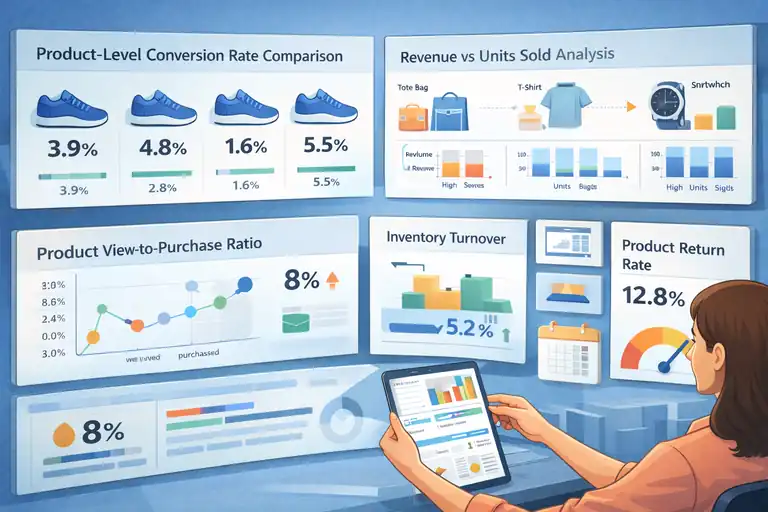
Product-level ecommerce analytics help you decide what to promote, what to fix, and what to quietly retire. This is where data directly shapes your catalog.
Product-Level Conversion Rate Comparison
Product-level conversion rate shows which products sell themselves and which need help.
I compare:
- Conversion rate across similar-priced products.
- Variations within the same product line.
- Conversion before and after copy or image updates.
Low conversion doesn’t always mean bad product. Sometimes it just means weak positioning. This metric tells you where effort will pay off fastest.
Revenue per Product vs Units Sold Analysis
Units sold can lie. Revenue per product tells the truth.
I place products into simple buckets:
- High volume, low revenue.
- Low volume, high revenue.
- High volume, high revenue.
This helps decide which products deserve ad spend, homepage placement, or bundling. Some low-volume products quietly carry profit margins that justify more visibility.
Product View-to-Purchase Ratio
This metric shows how often interest turns into action.
A weak view-to-purchase ratio often points to:
- Pricing friction.
- Unclear benefits.
- Missing social proof.
In Shopify analytics, I check this after traffic spikes. If views jump but purchases don’t, something on the page is breaking trust.
Inventory Turnover Informed by Analytics
Inventory turnover connects analytics with cash flow.
I use sales velocity data to:
- Forecast restock timing.
- Avoid over-ordering slow movers.
- Spot products worth expanding into variations.
Fast turnover with healthy margins is usually a green light for scaling ads or expanding the product line.
Product Return Rate as Quality Signal
Return rate is uncomfortable, but it’s honest.
High return rates often reveal:
- Product description mismatch.
- Quality control issues.
- Customer expectation gaps.
I treat this as a feedback loop, not just a loss metric. Fixing the root cause often improves conversion and retention at the same time.
Marketing Efficiency Metrics That Protect Profit Margins
Growth without efficiency is just expensive stress. These ecommerce analytics metrics help you scale without quietly losing money.
Customer Acquisition Cost by Channel
Customer acquisition cost (CAC) tells you how much it really costs to get a customer.
I calculate CAC by:
- Channel-specific spend.
- New customer count from that channel.
- Comparing CAC against first-order profit and lifetime value.
If CAC rises but retention stays flat, that channel becomes risky fast. This metric keeps emotions out of budget decisions.
Return on Ad Spend vs True Profitability
Return on ad spend (ROAS) looks clean, but it hides reality.
ROAS ignores:
- Refunds.
- Shipping costs.
- Payment fees.
- Repeat purchase behavior.
I prefer looking at contribution margin instead. A 2x ROAS with healthy margins often beats a 4x ROAS that barely breaks even.
Attribution Models That Change Budget Decisions
Attribution determines who gets credit, and credit determines budget.
In GA4, switching from last-click to data-driven attribution often:
- Reduces over-credit to branded search.
- Reveals email and organic assist value.
- Changes how upper-funnel ads are judged.
I always review attribution before cutting a channel. Many “underperformers” are actually silent contributors.
Email Revenue Contribution per Subscriber
Email revenue per subscriber shows how valuable your list really is.
I track:
- Revenue per active subscriber.
- Revenue per campaign.
- Revenue per automation.
This metric helps justify investment in list growth, copy testing, and deliverability tools. Email often looks small until you measure it properly.
Discount Impact on Net Revenue
Discounts feel like an easy win, but they can quietly erode profit.
I compare:
- Net revenue with and without discounts.
- Conversion lift vs margin loss.
- Repeat purchase behavior after discounted orders.
If discounts boost short-term revenue but reduce lifetime value, they’re a net negative. This metric helps you use discounts intentionally, not reactively.
Retention and Loyalty Metrics That Predict Stability
Retention-focused ecommerce analytics tell you whether your growth has a foundation or if it’s being propped up by constant acquisition.
These metrics are quieter than revenue spikes, but they’re far more honest.
Customer Retention Rate Over Time
Customer retention rate shows how many buyers come back, and more importantly, whether that number is improving or slipping.
How I look at this metric:
- Short-term retention: Did they come back within 30–60 days?
- Mid-term retention: Did they make a second or third purchase?
- Trend direction: Is retention improving month over month?
A flat retention rate while traffic grows is a warning sign. It usually means product experience, fulfillment, or post-purchase communication isn’t keeping pace with acquisition.
Cohort Analysis for Behavioral Patterns
Cohort analysis sounds intimidating, but it’s just grouping customers by when they first purchased and tracking how they behave over time.
What this reveals clearly:
- Which acquisition periods produced better customers
- How promotions affect long-term value
- Whether changes improved or hurt retention
In Shopify or GA4, I compare cohorts before and after major changes, like free shipping thresholds or subscription launches. It’s one of the fastest ways to see if a “win” actually stuck.
Revenue From Returning Customers
Revenue from returning customers tells you how much of your business depends on trust you’ve already earned.
I watch:
- Percentage of total revenue from returning buyers
- Average order value of returning vs new
- Frequency of repeat purchases
If returning customers generate a disproportionate share of revenue, that’s a green light to invest more in email, SMS, or loyalty incentives instead of chasing cold traffic harder.
Churn Indicators in Ecommerce Analytics
Ecommerce churn isn’t always obvious, but the signals show up early if you look.
Key indicators I track:
- Increasing time between purchases
- Drop in email engagement among past buyers
- Lower repeat purchase rate in recent cohorts
When these move in the wrong direction together, it’s usually a product expectation or experience issue, not a marketing one.
Loyalty Program Performance Metrics
Loyalty programs only work if they change behavior, not just signups.
I evaluate loyalty programs by:
- Purchase frequency of members vs non-members
- Average order value lift after joining
- Redemption rate of rewards
If members aren’t buying more often or spending more, the program is decoration, not a growth lever.
Operational Metrics That Prevent Silent Revenue Leaks
Operational ecommerce analytics don’t feel exciting, but they quietly protect profit. Most “mystery” revenue losses show up here first.
Cart Abandonment Rate Root Cause Analysis
Cart abandonment rate tells you where intent breaks.
Instead of just tracking the number, I break it down by:
- Shipping cost visibility
- Discount code behavior
- Device type
A sudden spike often traces back to a small change, like a shipping rate update or promo expiration. This metric is your early warning system.
Checkout Error and Drop-Off Monitoring
Checkout errors don’t always show up as alerts, but they hurt immediately.
I monitor:
- Drop-offs between checkout steps
- Payment method failures
- Error logs tied to spikes in abandonment
Even a short outage or payment glitch can cost days of revenue if you’re not watching closely.
Page Load Speed Impact on Revenue
Page speed isn’t just technical; it’s financial.
What I’ve seen repeatedly:
- Slower product pages reduce add-to-cart rate
- Slow checkout increases abandonment
- Mobile speed matters more than desktop
Google research suggests even a one-second delay can reduce conversions by around 7%. That’s not theoretical. It shows up clearly in revenue trends.
Stockout Rate and Lost Sales Measurement
Running out of stock doesn’t just pause sales; it often sends customers elsewhere permanently.
I track:
- Out-of-stock views
- Missed revenue estimates
- Back-in-stock conversion rate
If restocked products don’t rebound quickly, it’s a sign customers already moved on.
Refund and Chargeback Rate Tracking
Refunds and chargebacks are painful, but they’re also informative.
Patterns usually point to:
- Product quality issues
- Shipping delays
- Misleading descriptions
Ignoring this metric means repeating the same mistakes while margins quietly shrink.
Analytics Platform Metrics Worth Tracking Consistently
Not all metrics deserve daily attention. These ecommerce analytics signals are the ones I check consistently because they inform real decisions.
Google Analytics 4 Ecommerce Metrics That Matter
GA4 can feel overwhelming, so I focus on a tight set:
- Engaged sessions
- Add-to-cart events
- Purchase conversion rate
- Revenue by channel
GA4’s data-driven attribution is especially useful once traffic volume grows, even though setup takes patience.
Shopify Analytics Metrics for Daily Decisions
Shopify analytics shines at operational clarity.
Metrics I check daily:
- Net sales
- Conversion rate
- Average order value
- Returning customer rate
It’s not perfect, but for quick health checks, it’s hard to beat.
Heatmap and Session Recording Insights
Heatmaps and session recordings, from tools like Hotjar or Microsoft Clarity, show what numbers can’t.
They help uncover:
- Where users hesitate
- Which elements get ignored
- Where confusion happens
I use these when metrics stall and the reason isn’t obvious. They save guesswork.
CRM-Linked Ecommerce Analytics Signals
When ecommerce data connects to a CRM, patterns sharpen fast.
Useful signals include:
- Revenue by customer segment
- Purchase history tied to support tickets
- Lifetime value by source
This is where retention and service improvements often reveal themselves.
Dashboard Metrics for Executive-Level Clarity
Dashboards should reduce noise, not add to it.
My rule:
- One dashboard for daily health
- One for weekly growth
- One for long-term strategy
If a metric doesn’t change a decision, it doesn’t belong there.
Metrics to Ignore That Distract From Real Decisions
Some ecommerce analytics metrics look impressive but quietly waste attention. Learning what to ignore is just as important as knowing what to track.
Vanity Metrics That Don’t Influence Revenue
Vanity metrics feel good but rarely guide action.
Common examples:
- Raw traffic numbers
- Social followers
- Email list size without engagement
If a metric can’t influence a decision, it’s just noise.
Isolated Engagement Metrics Without Context
Engagement metrics are only useful in combination.
On their own, metrics like:
- Time on site
- Pages per session
- Scroll depth
Don’t tell you much. Without conversion or revenue context, they’re easy to misread.
Over-Aggregated Data That Hides Problems
Averages hide extremes.
I avoid relying on:
- Site-wide conversion rates
- Blended channel performance
- Total revenue without segmentation
Granular data is where problems and opportunities actually show up.
Metrics That Look Good but Don’t Convert
Some metrics improve while revenue stalls.
Examples:
- Higher click-through rates with flat sales
- Rising engagement with lower conversion
- Growing traffic with declining retention
These usually signal misalignment, not success.
When Too Much Ecommerce Analytics Slows Growth
At some point, more data stops helping.
I’ve learned that:
- Clarity beats completeness
- A few trusted metrics beat dozens of dashboards
- Decisions matter more than reports
When ecommerce analytics starts creating hesitation instead of confidence, it’s time to simplify.
FAQ
What ecommerce analytics metrics actually drive decisions?
Ecommerce analytics metrics that drive decisions are the ones directly tied to revenue, conversion, retention, and profit. This includes conversion rate, customer lifetime value, revenue by channel, customer acquisition cost, and repeat purchase rate. If a metric doesn’t change what you do next, it’s not decision-driving.
Which ecommerce analytics metrics should I track daily?
For daily monitoring, focus on net revenue, conversion rate, average order value, traffic by channel, and returning customer rate. These ecommerce analytics metrics quickly show whether performance is improving or slipping without overwhelming you with noise.
What ecommerce analytics metrics should I ignore?
You should ignore vanity metrics like total traffic, social followers, and isolated engagement numbers without revenue context. In ecommerce analytics, metrics that look good but don’t influence pricing, marketing spend, or optimization decisions usually slow growth instead of helping it.

I’m Juxhin, the voice behind The Justifiable.
I’ve spent 6+ years building blogs, managing affiliate campaigns, and testing the messy world of online business. Here, I cut the fluff and share the strategies that actually move the needle — so you can build income that’s sustainable, not speculative.
Related posts:
 Dropshipping Business Model Success: Tips for Long-Term Growth
 Ecommerce Marketing Guide: Turn Traffic Into Sales
 Ecommerce SEO Strategy That Drives Buyers, Not Just Rankings
 Why the Salehoo Wholesale Directory Helps You Scale
 Salehoo Products List That Helps You Find Winning Items Fast
 How to Use SaleHoo for Dropshipping and Pick Fast-Selling Items